
模型与 MCP
待识别

rea
morluto
Reverse engineer anything with agents, from app behavior down to native binaries.
PROJECT TOPICS
INSTALL REFERENCE
dsh plugin --profile web add github:KyoMio/dsh-zen-remote
该命令指向仓库当前默认分支;尚无绑定当前 commit 的完整验证结果。
PROJECT README

One DeepSeek Harness plugin, three roles — built for cross-machine peer mesh.
Link computers into an end-to-end encrypted virtual mesh with zero public IPs, keep phone PWA & lock-screen push active, or pair specific hosts and desktop clients.







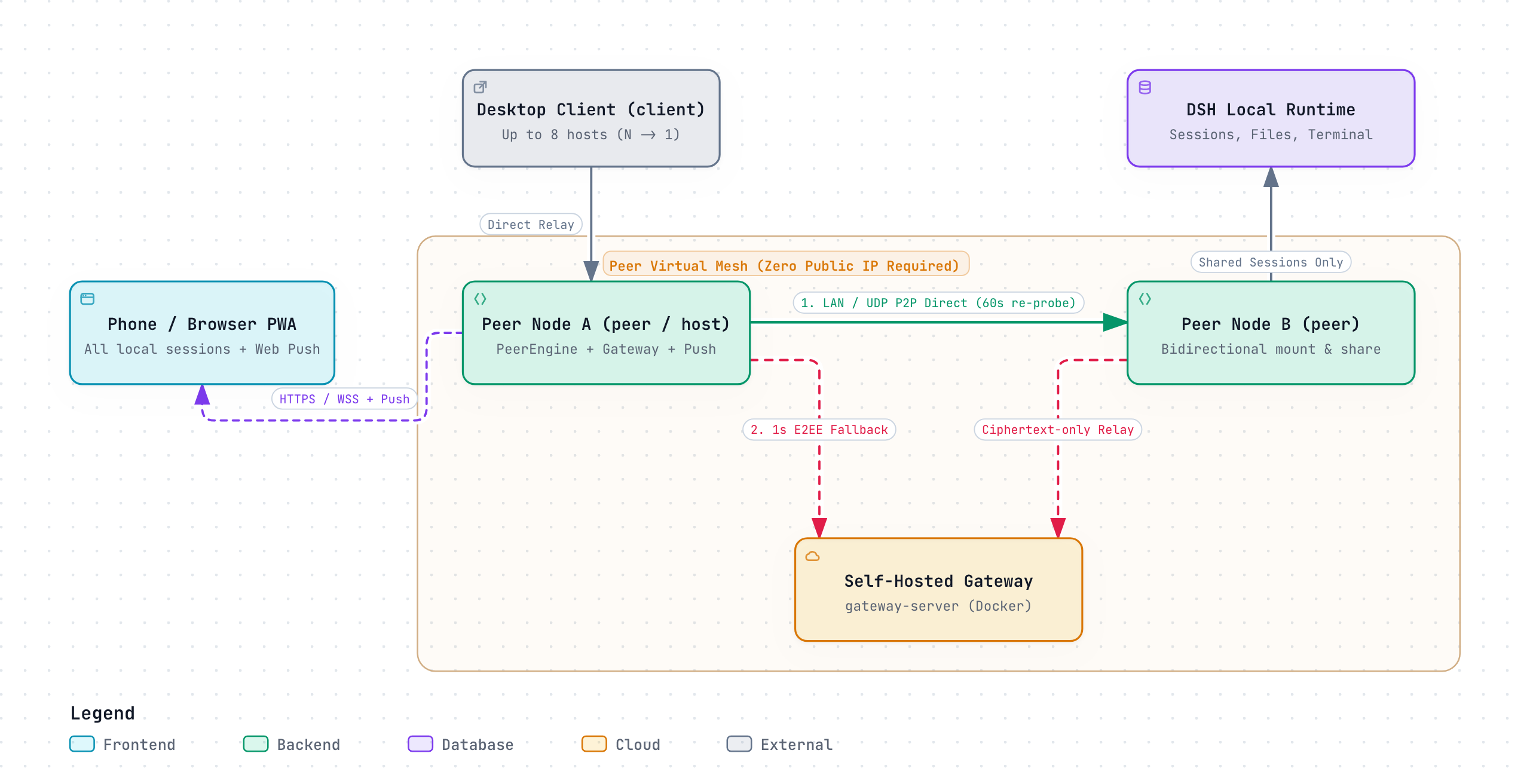
| Role | Best for | Session sharing | Phone PWA & Push | Needs public IP? |
|---|---|---|---|---|
Peer Node (peer) |
Multiple computers forming a two-way mesh across LANs / NATs | Bidirectional — mounts peers' shared sessions & shares yours | Yes — full PWA & push stay active | No (LAN / UDP hole-punch + E2EE relay) |
Host (host, default) |
Always-on workstation / server accessed from phone & paired desktops | Shares chosen sessions outbound (1 → N) |
Yes (gateway + Web Push) | Optional (Caddy / Tunnel / Proxy / LAN) |
Desktop Client (client) |
Secondary computer mounting sessions from specific hosts | Connects inbound to up to 8 hosts (N → 1) |
No (doesn't bind port 3088) |
No |
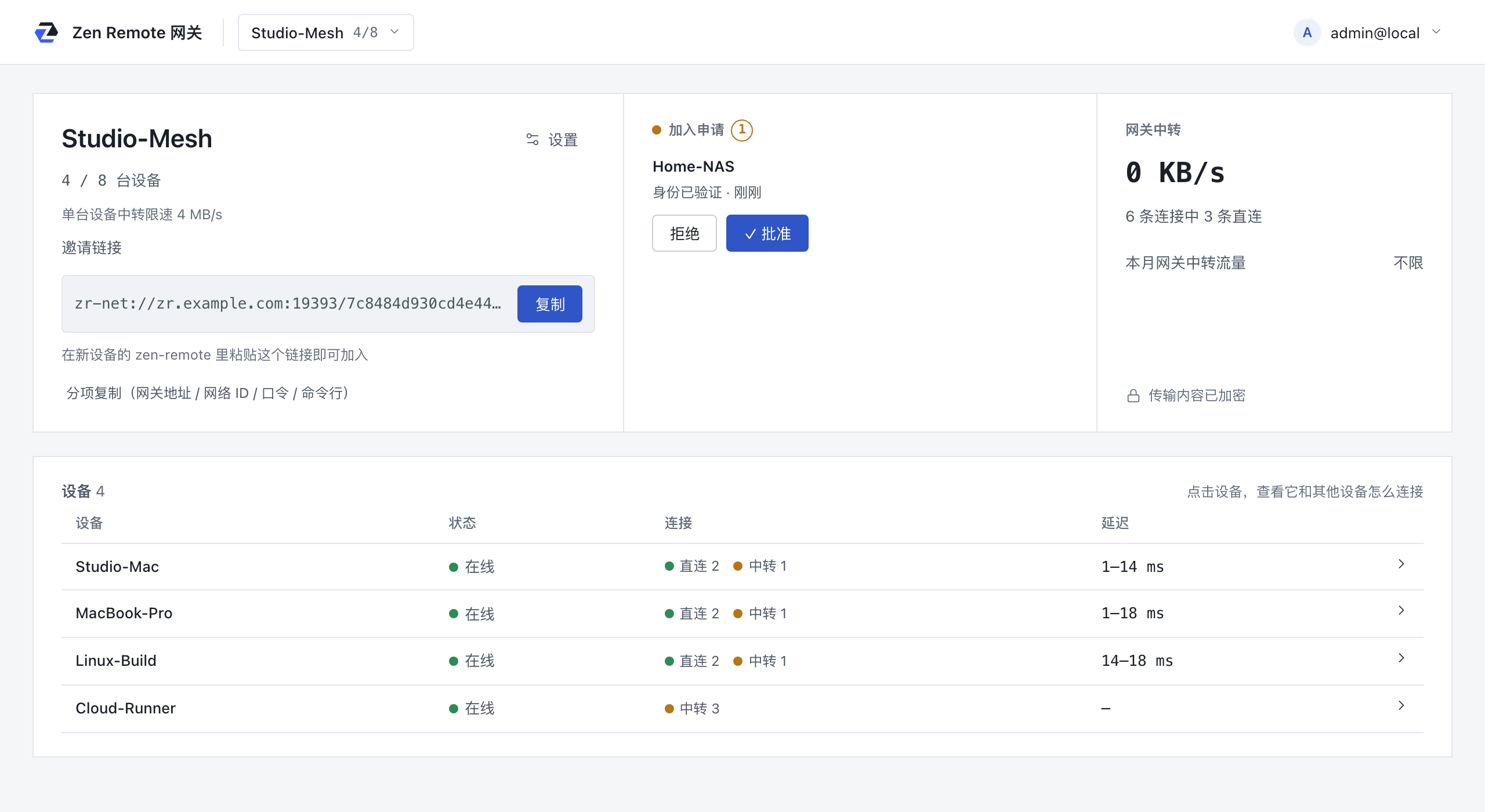
Gateway Web Console (Studio-Mesh) |
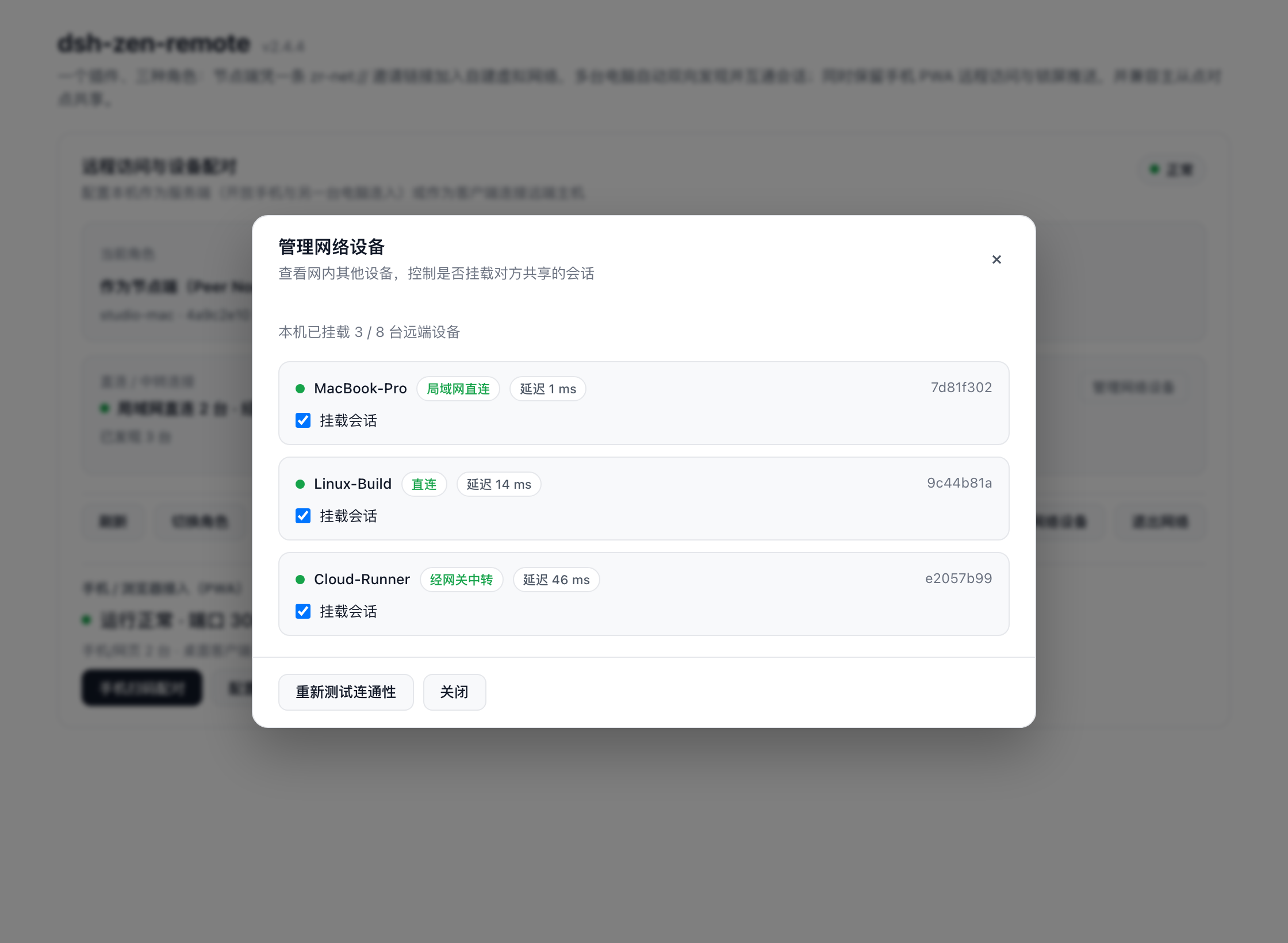
Peer Network Device Manager |
|---|---|
 |
 |
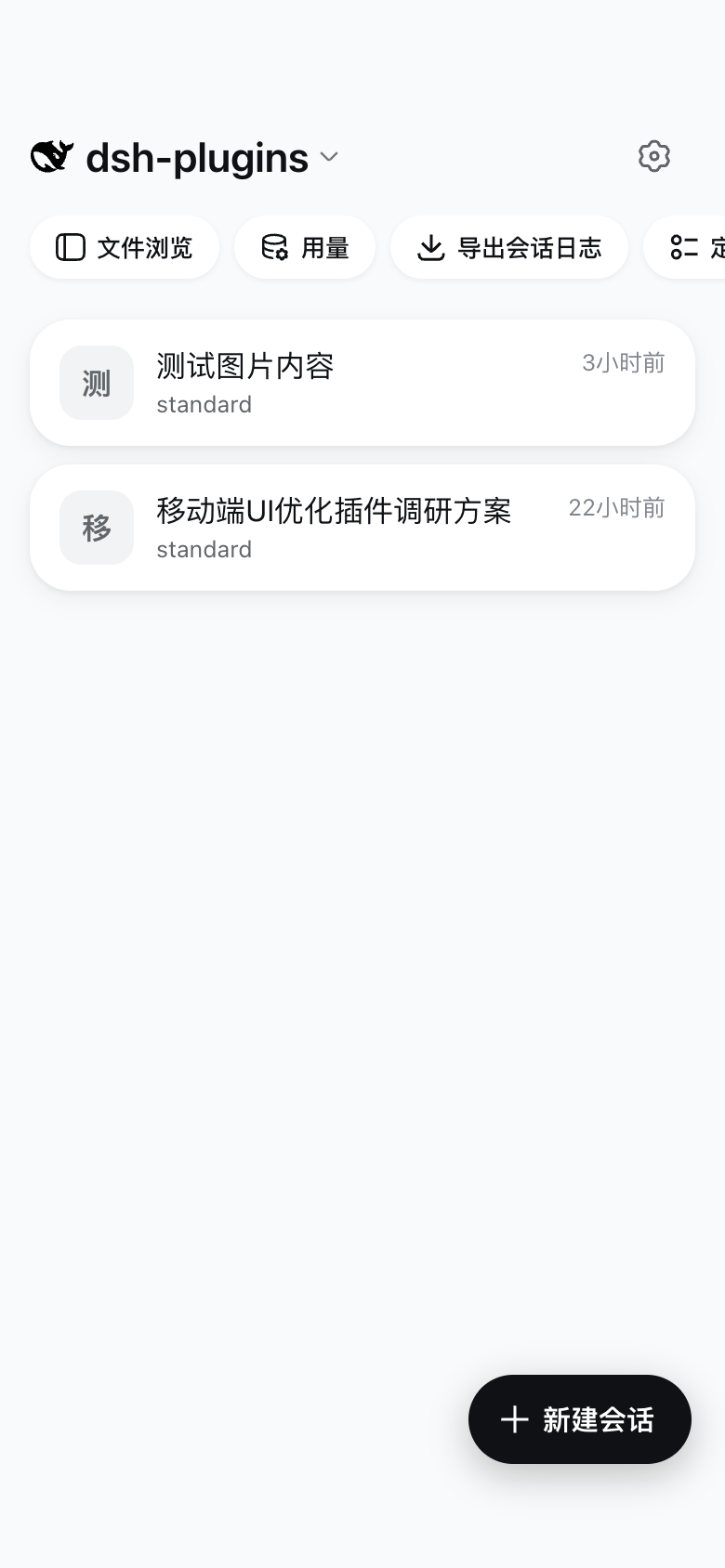
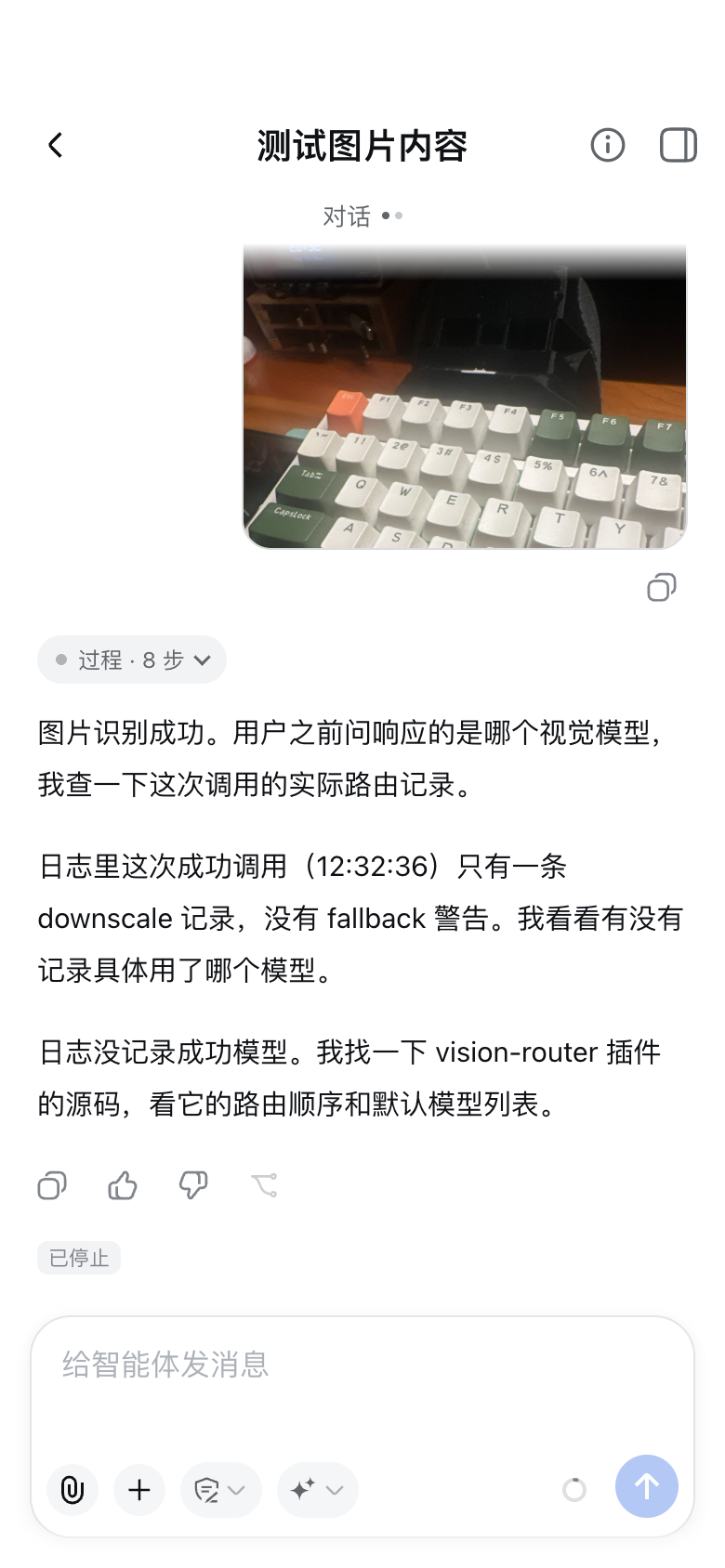
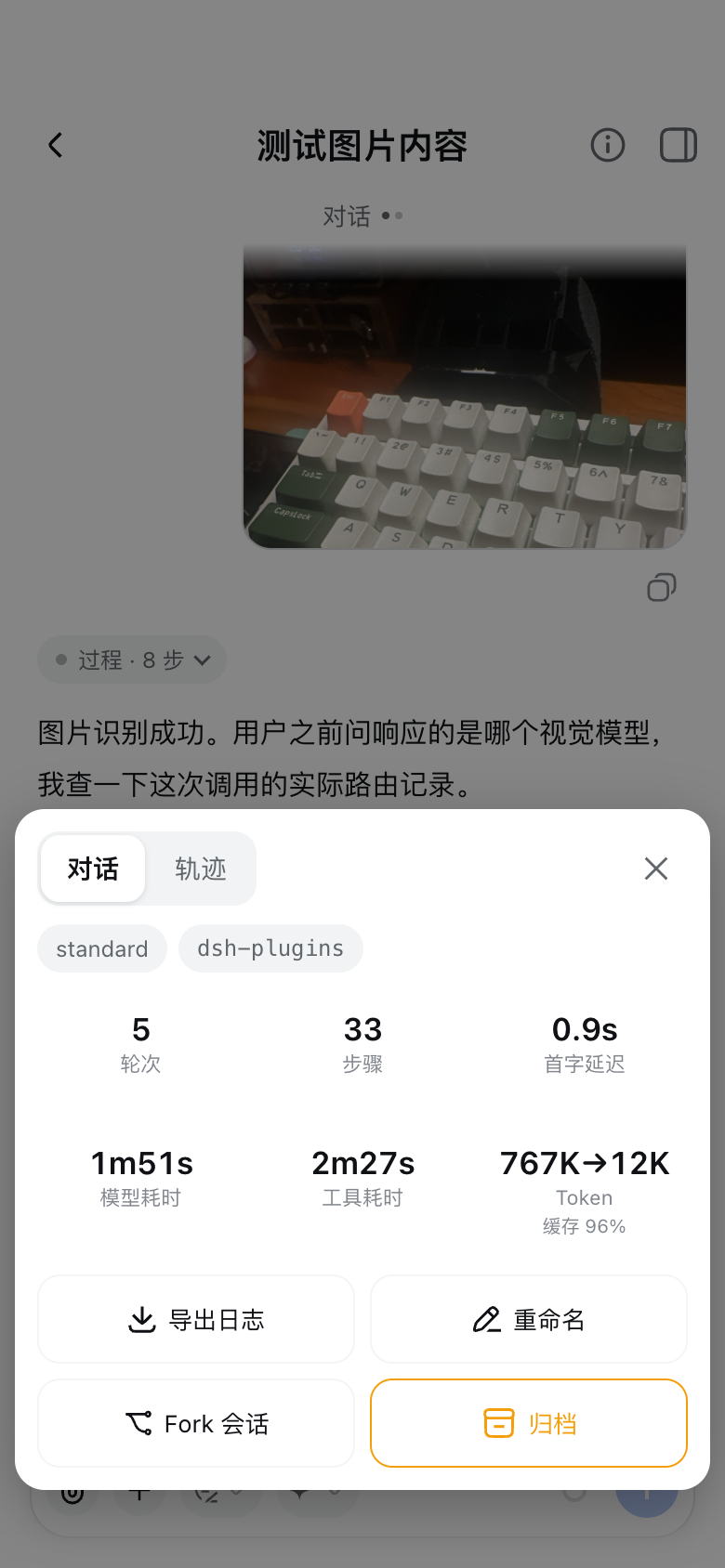
| Mobile session list | Mobile session view | Session info card | Pairing page |
|---|---|---|---|
 |
 |
 |
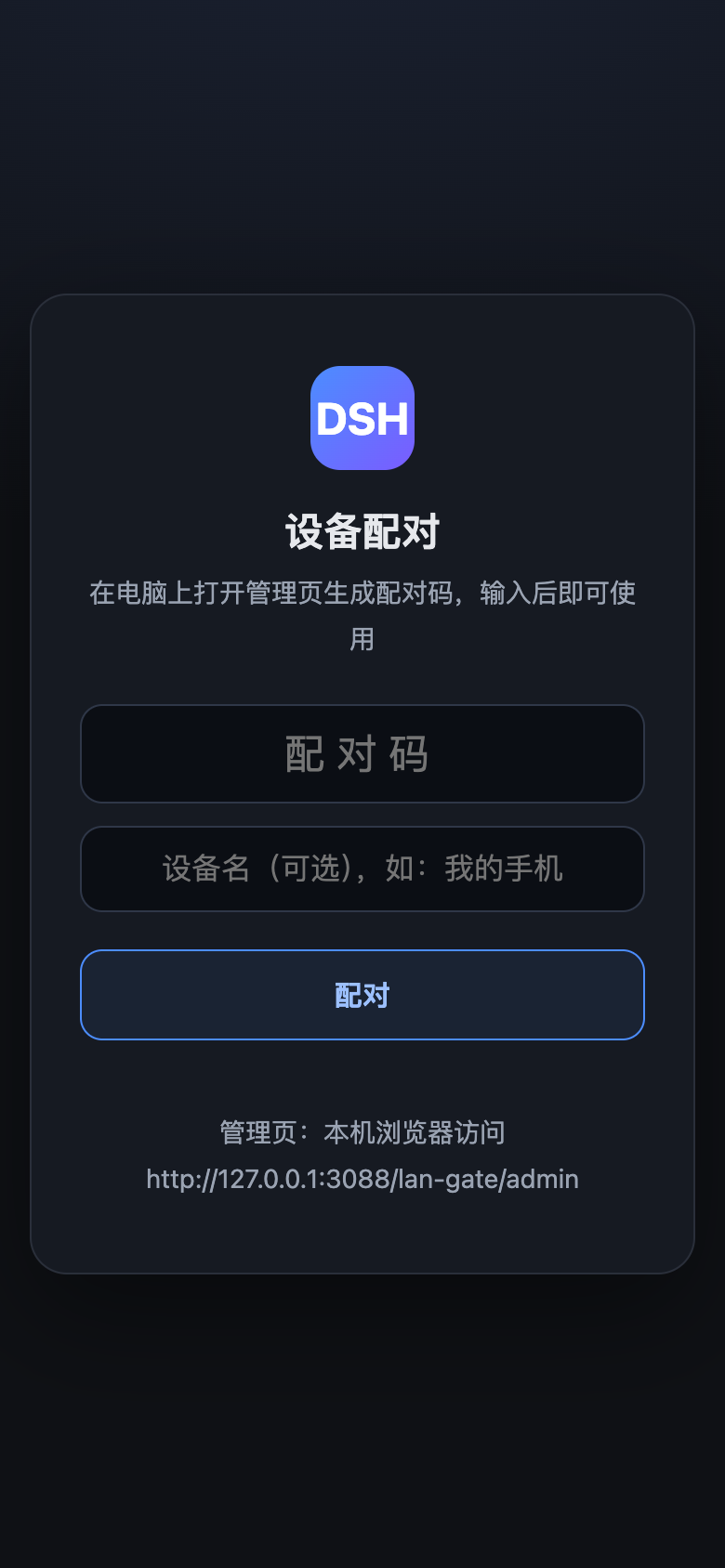 |
Mobile screenshots show a 390×844 viewport in the light theme; both light and dark themes are supported across the gateway console, mobile UI, and pairing page.
Open Plugins in the DSH sidebar → click Add plugin → enter dsh-zen-remote → click Enable now after installation completes, then restart the DSH desktop app (or dsh web).
dsh web server)dsh plugin --profile web add dsh-zen-remote
# or run the interactive CLI wizard directly (installs, starts DSH, and configures in one go):
npx dsh-zen-remote setup
dsh-zen-remote status
dsh pluginrequires--profileto name the target profile. The desktop app'sdesktopprofile is managed exclusively by the app (--profile desktopis refused on the CLI), so use the UI install above on the desktop app.
peer / host / client), manual link: profile setup, upgrading & uninstalldsh-zen-remote)The CLI communicates with the running plugin over a 0600 local IPC socket (~/.dsh/zen-remote-cli.sock); Caddy and cloudflared remain managed by the plugin process. Pass --lang zh|en to switch output language, or --yes with flags for unattended scripts.
# Peer commands (when role is peer, join a self-hosted virtual network)
npx dsh-zen-remote setup --role peer --invite "zr-net://gw.example.com/0123456789abcdef#join-key" [--yes]
dsh-zen-remote peer join "zr-net://gw.example.com/0123456789abcdef#join-key" [--name My-Mac] [--yes]
dsh-zen-remote peer status                                     # nodeId, admission state, peers, paths & RTT (--json)
dsh-zen-remote peer trust <nodeId>                             # explicitly trust a peer's new identity after a mismatch
dsh-zen-remote peer leave [--yes]                              # leave the network (phone/browser QR access stays intact)

# Host commands (when role is host)
dsh-zen-remote host device pair --device-role web              # mint a phone/browser pairing code + terminal QR (or desktop-client)
dsh-zen-remote host device list                                # list paired devices (--json supported)
dsh-zen-remote host device revoke <id|--all> [--yes]           # revoke one or all paired devices
dsh-zen-remote host ingress start --mode lan                   # configure & start ingress (caddy | cloudflared | external | lan)
dsh-zen-remote host ingress stop [--yes]                       # stop managed Caddy / Cloudflare Tunnel processes
dsh-zen-remote host ingress verify [--no-wait]                 # three-light check + mint web QR & desktop pairing codes
dsh-zen-remote host ingress snippet [--proxy nginx|caddy|lucky] # print reverse-proxy config snippets

# Client commands (when role is client, up to 8 paired hosts)
dsh-zen-remote client pair http://192.168.1.2:3088 --code 12345678 [--name My-Mac]
dsh-zen-remote client list                                     # list paired hosts (up to 8) and connection states
dsh-zen-remote client unpair <hostUrl|entryId|--all> [--yes]   # remove one or all paired hosts

# Diagnostics
dsh-zen-remote status --debug # export redacted diagnostics reportlink:)Add the dependency to the profile's package.json (~/.dsh/profiles/desktop for the desktop app, ~/.dsh/profiles/web for the web service) and append "dsh-zen-remote" to the dsh.profile.bundles array:
// ~/.dsh/profiles/desktop/package.json
{
  "dependencies": {
    "dsh-zen-remote": "^2.5.1"        // for local development: "link:/path/to/dsh-zen-remote"
  },
  "dsh": {
    "profile": {
      "bundles": ["dsh-zen-remote"]
    }
  }
}
cd ~/.dsh/profiles/desktop && pnpm install
# For a link: checkout, also run `npm install --omit=dev` inside the repository so the gateway subprocess resolves `web-push`.dsh-zen-remote first, then install the new version (dsh plugin --profile <name> remove dsh-zen-remote → add dsh-zen-remote, or Uninstall → Add in the Plugins page).dsh --profile <name> --from-default-profile <template> replaces an existing custom profile with a fresh copy; back up ~/.dsh/profiles/<name> first.dsh-zen-remote). Remove legacy dsh-zen-remote-gateway, dsh-zen-remote-push, or manual dsh-push.mjs lines from cordis.patch.yml. Existing ~/.dsh/lan-gate.config.json and paired devices carry over automatically.dsh-zen-remote plugin page and restart. To wipe pairing and share state too, delete ~/.dsh/lan-gate-state.json, ~/.dsh/lan-gate.config.json, and ~/.dsh/zen-remote-state.json.Open Plugins → dsh-zen-remote in DSH. The Remote Access & Device Pairing overview card sits at the top of the page (or run npx dsh-zen-remote setup on a headless server).
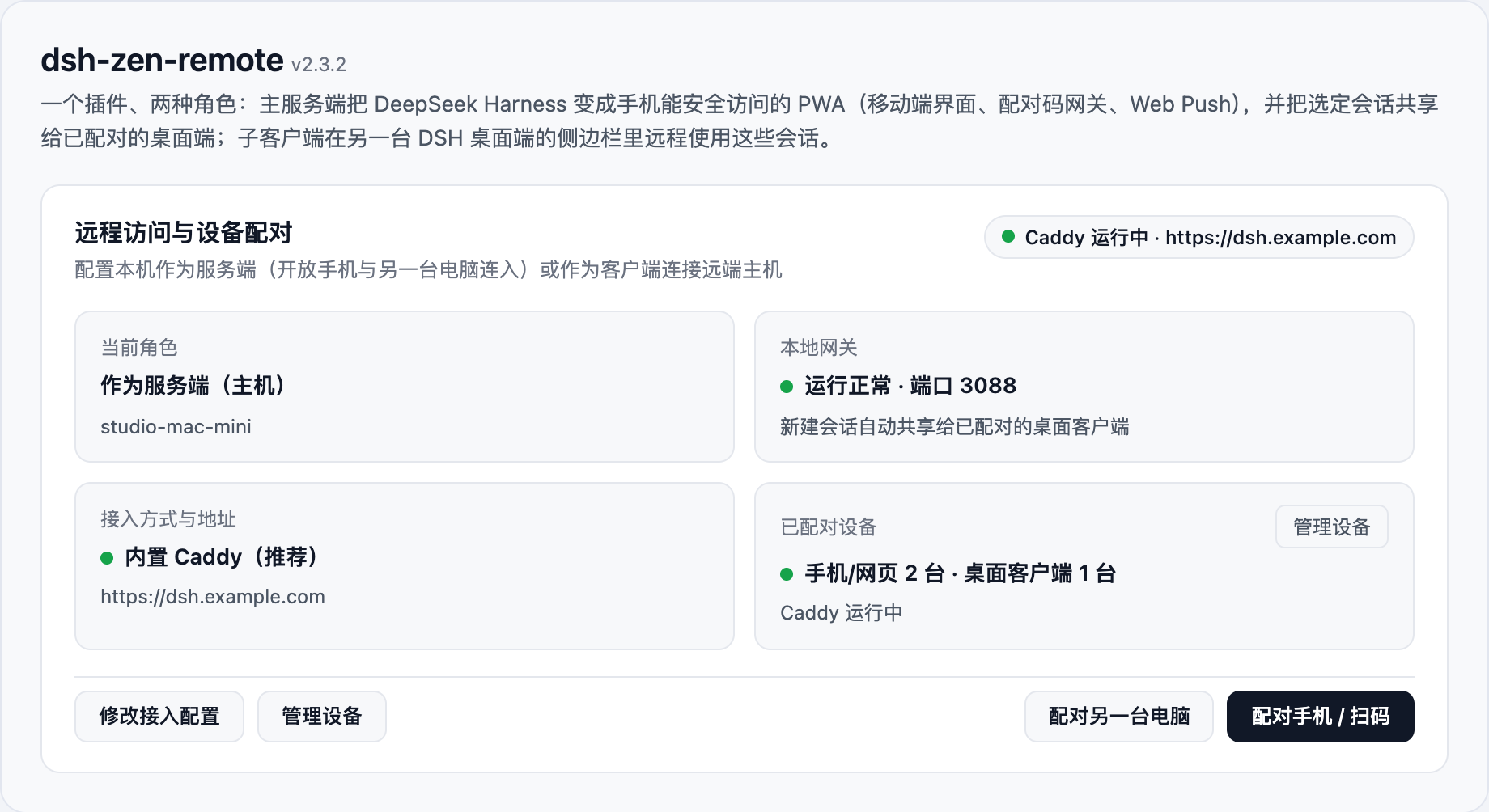
peer, Recommended)Link multiple computers across LANs, home routers, and NATs into one bidirectional mesh — zero public IPs on member computers and no per-machine pairing codes, while keeping each computer's own Phone / Browser PWA and Web Push fully active.
gateway-server/, Once per Team or Self)[!IMPORTANT]
gateway-server/lives in this repository for source co-maintenance and is excluded from thedsh-zen-remotenpm package. Deploying it is only needed forpeervirtual networks (hostandclientmodes work standalone without it).
docker build -t zr-gateway ./gateway-server

docker run -d --name zr-gateway \
  --restart unless-stopped \
  -p 19393:19393/tcp \
  -p 19393:19393/udp \
  -p 19394:19394/udp \
  -e ZR_GATEWAY_PUBLIC_URL=https://zr.example.com \
  -v zr-gateway-data:/data \
  -v $(pwd)/certs:/certs \
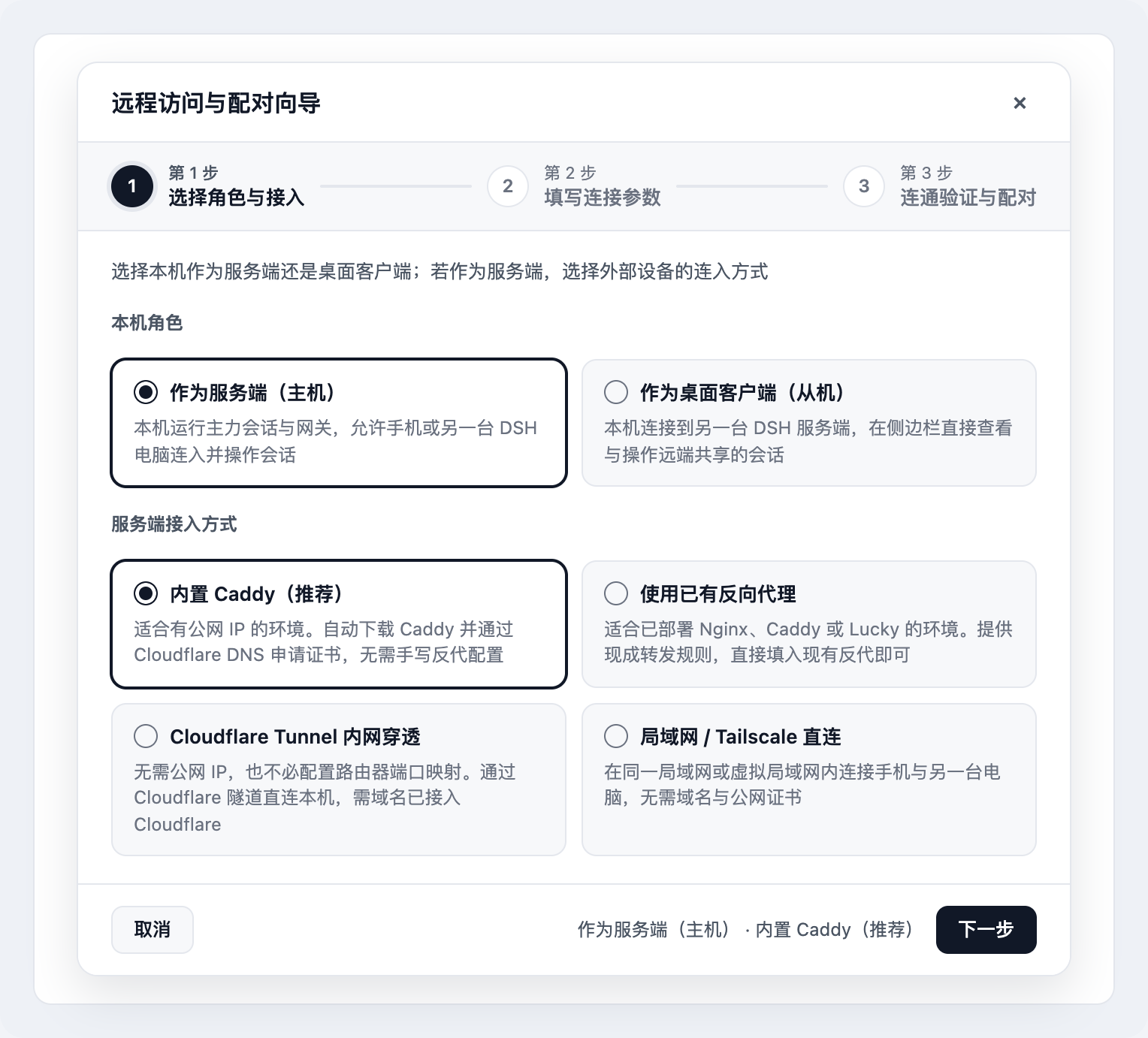
zr-gatewaydocker logs zr-gateway for the one-time initial password of admin@local, sign in at http://<host>:19393/, create a virtual network, and copy the zr-net://… invite link.19393/tcp, five-state member admission (pending / authorized / paused / mismatch / revoked), dual-UDP STUN coordination (19393/udp + 19394/udp), and gateway-pushed direct RTT caps (peerDirectMaxRttMs). See gateway-server/README.md.In Plugins → dsh-zen-remote → Start Setup Wizard → Step 1, select Peer Node (peer):
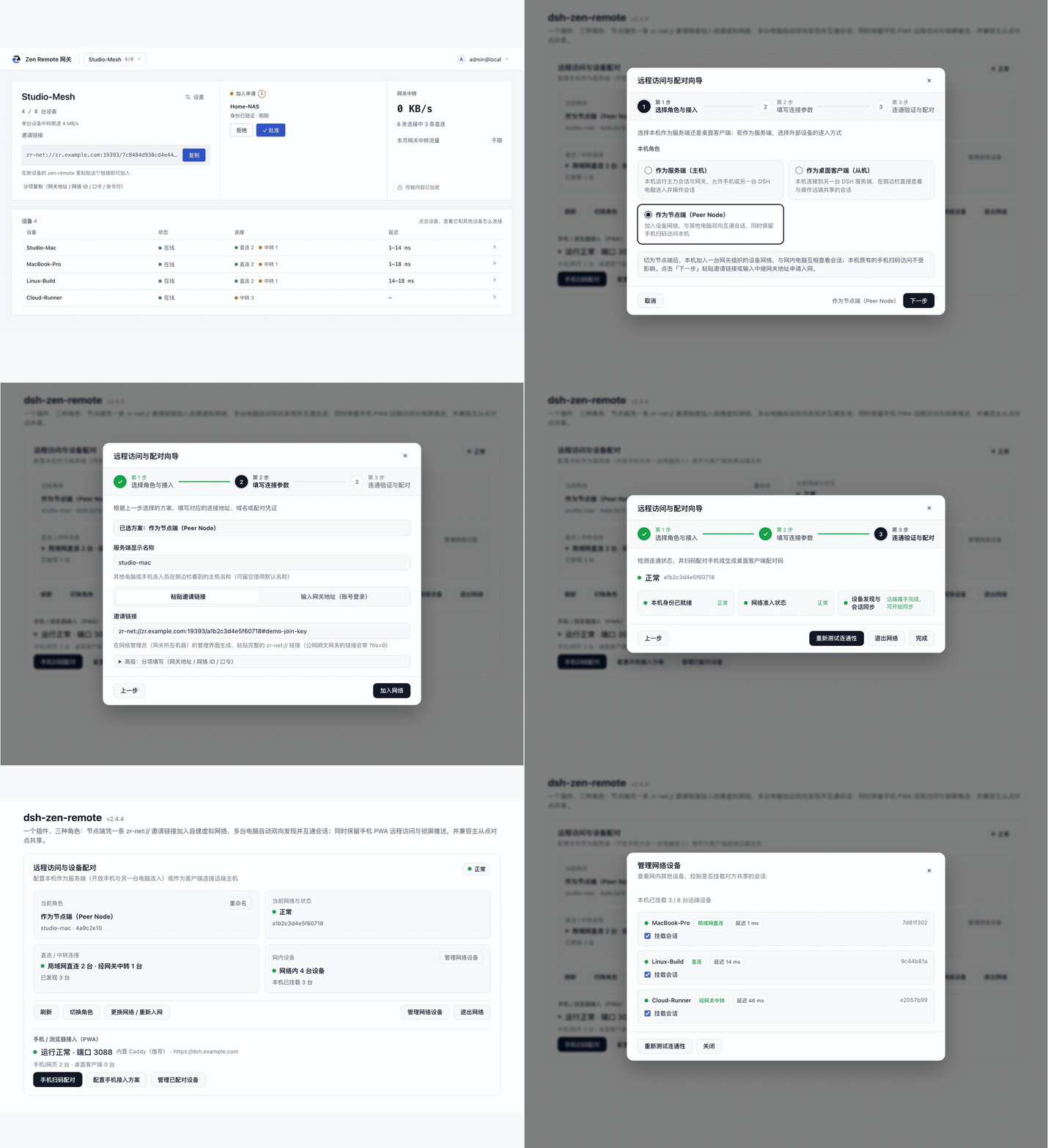
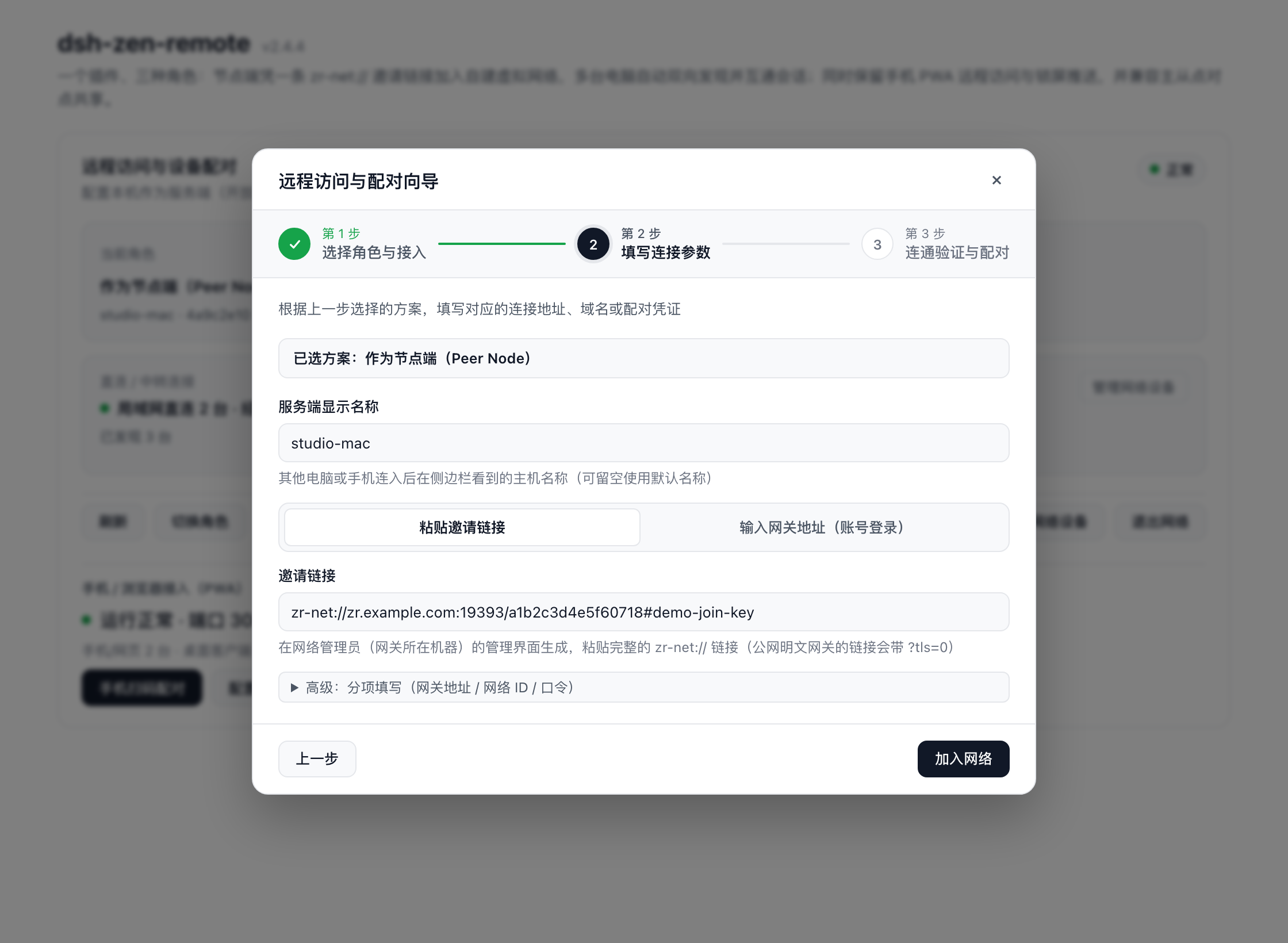
zr-net://…): paste the link from the gateway console (?tls=0 for plaintext gateways; #join-key is optional when manual approval is enabled; legacy zr-nets:// and zr-net+insecure:// links still parse). Expand Advanced split-fill to enter Gateway URL, 16-hex Network ID, and optional join passphrase separately."Device Name · Workspace Name" — and sessions you share appear in theirs.Mounted X / M remote devices, live LAN Direct vs Gateway Relay counts) alongside your Phone / Browser Access (PWA) section and Plugin Bridge toggles.ms), toggle Mount Sessions / Ignore per peer, trigger a Re-probe, or explicitly Trust New Identity after a local TOFU mismatch block.| Step 1: Choose Peer Node | Step 2: Paste zr-net:// Invite |
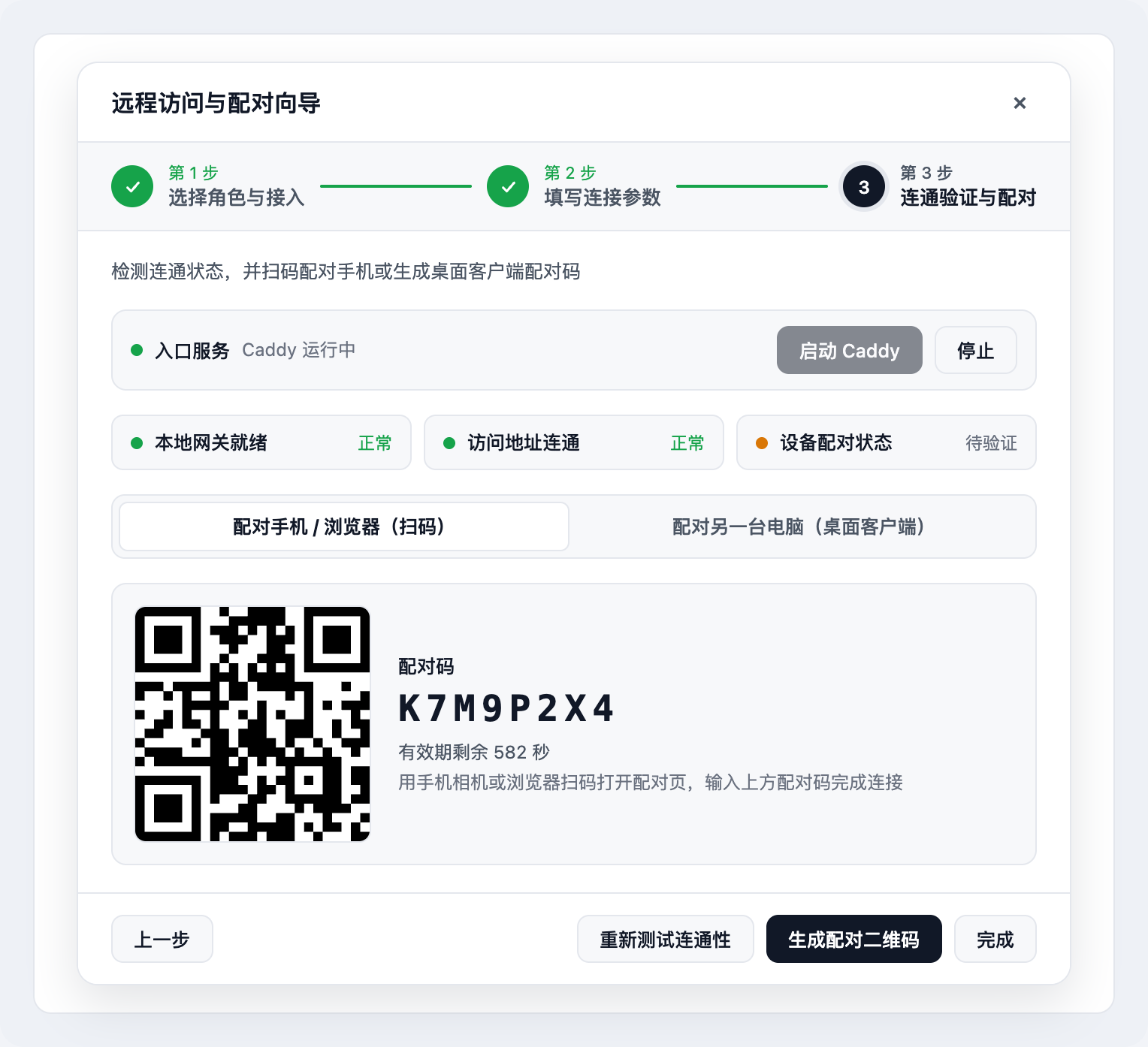
Step 3: Peer Readiness Lights |
|---|---|---|
 |
 |
 |
# Headless server one-liner
npx dsh-zen-remote setup --role peer --invite "zr-net://gw.example.com/0123456789abcdef#join-key"
dsh-zen-remote peer status # nodeId, admission state, peer paths & RTT (--json)| Priority | Path | How it works |
|---|---|---|
| 1st | LAN Direct (lan) |
Direct socket on shared local subnets (excludes CGNAT 100.64.0.0/10 tunnel ranges from misdetection as LAN) |
| 2nd | UDP Hole-Punch P2P (p2p) |
Coordinated via the gateway's dual UDP STUN ports (19393/udp + 19394/udp) with adaptive sliding-window ARQ |
| 3rd | E2EE Gateway Relay (relay) |
1-second seamless fallback if direct setup doesn't land (or if measured direct RTT stays above the gateway's peerDirectMaxRttMs cap); background 5s → 15s → 60s re-probe upgrades back automatically |
host, Phone PWA & Point-to-Point)Choose Act as Server (host) in Step 1 if you only need phone/browser access or direct 1 → N pairing without running a virtual-network gateway:
| Access method | Best for | What the wizard automates |
|---|---|---|
| Managed Caddy (Recommended) | Public IP / port forwarding + domain on Cloudflare | Downloads prebuilt Caddy + caddy-dns/cloudflare, issues/renews TLS certs via DNS-01 (127.0.0.1:3088) |
| Existing Reverse Proxy | Already running Nginx, Caddy, or Lucky | Generates proxy snippets + one-click trustedProxies registration (manual guide) |
| Cloudflare Tunnel | No public IP / no port forwarding + domain on Cloudflare | Downloads cloudflared, creates/reuses tunnel, configures CNAME, and starts tunnel (127.0.0.1:3088) |
| LAN / Tailscale Direct | Same Wi-Fi / LAN or shared Tailscale network | Auto-detects LAN / Tailscale IPv4 and binds 0.0.0.0:3088 behind the built-in private-IP wall (403 public-direct-forbidden) |
In Step 3, verify connectivity and open Pair Phone / Browser (QR) to scan & install the PWA, or switch to Pair Desktop Client to mint an 8-character pairing code.
client, Connect up to 8 Hosts)Choose Desktop Client (client) on a secondary DSH computer (or run dsh-zen-remote client pair <hostUrl> --code <8-char-code>) to mount remote-enabled sessions from specific hosts without exposing a local gateway:
maxServers 1..64 or LAN_GATE_MAX_SERVERS).Name-1, Name-2).serverId.| Web App Device (Phone / Tablet / Browser) | Peer Node / Desktop Client (Another DSH Computer) | |
|---|---|---|
| Visible sessions | All sessions on the host | Only sessions with remote access enabled on the serving machine (enforced server-side) |
| Credential | Long-lived HttpOnly cookie | Peer: Ed25519 TOFU identity + ephemeral X25519 session key Client: Bearer device token in ~/.dsh/zen-remote-state.json |
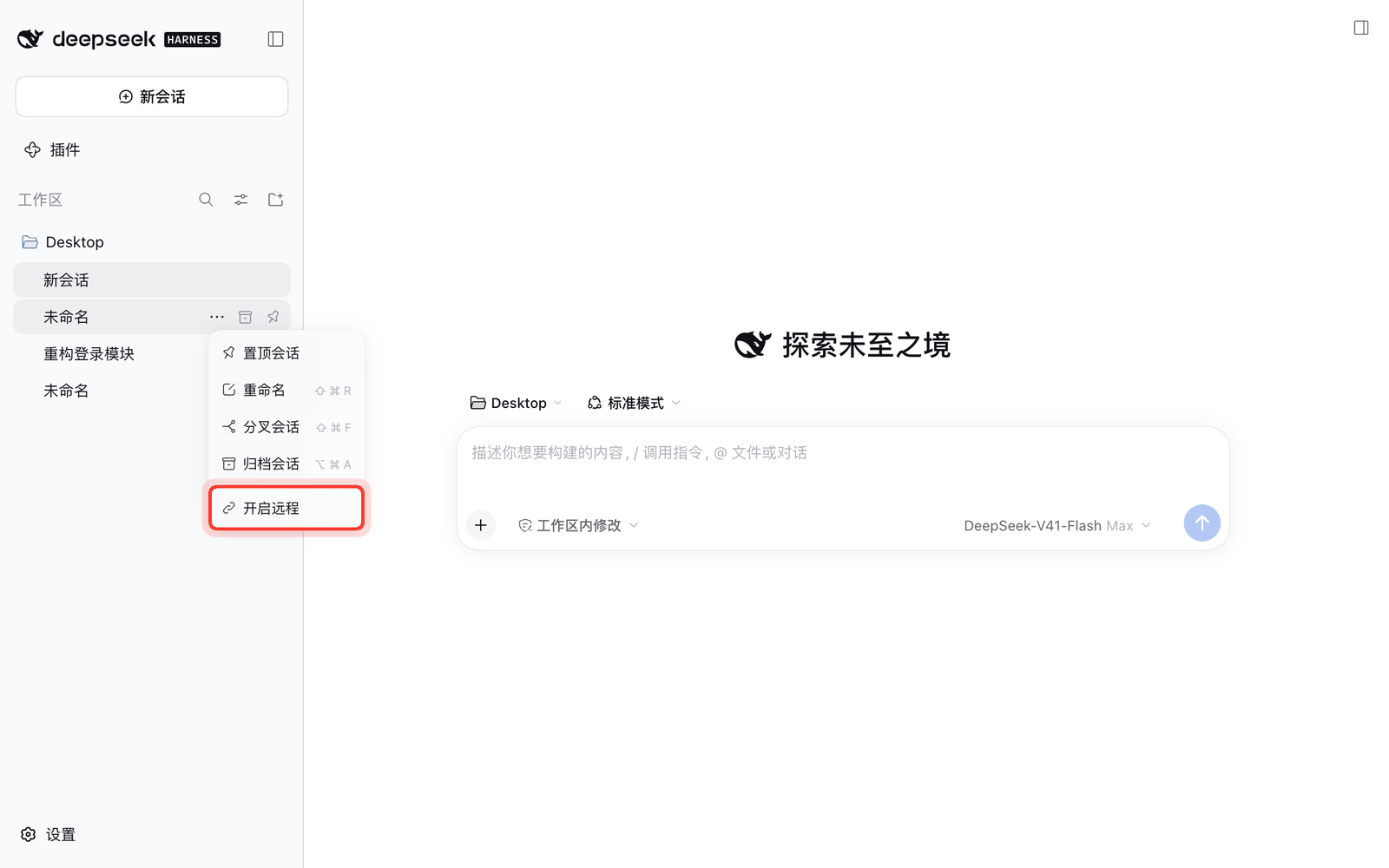
Remote access is toggled per session (or automatically for new sessions when autoShareNewSessions is enabled) from four places:
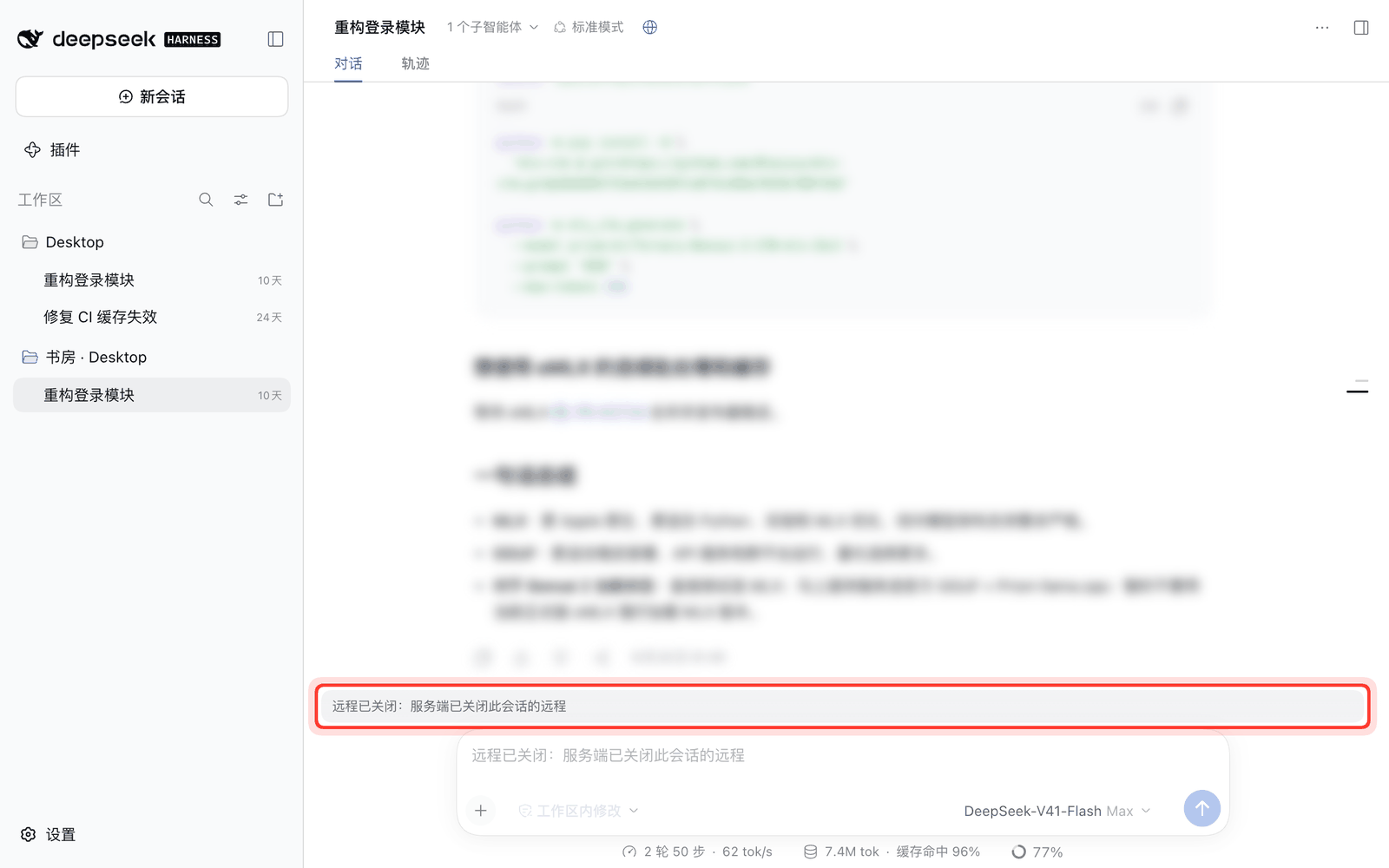
"…" menu → Enable / Disable remoteⓘ) → Remote access toggleShared sessions auto-close remote access after 48 hours (idleHours) of inactivity (running or waiting sessions never sleep). Unshared or revoked sessions disappear from remote sidebars automatically, and any currently open tab displays a "remote closed" banner until re-enabled.
| Enable from sidebar menu | Remote-closed banner |
|---|---|
 |
 |
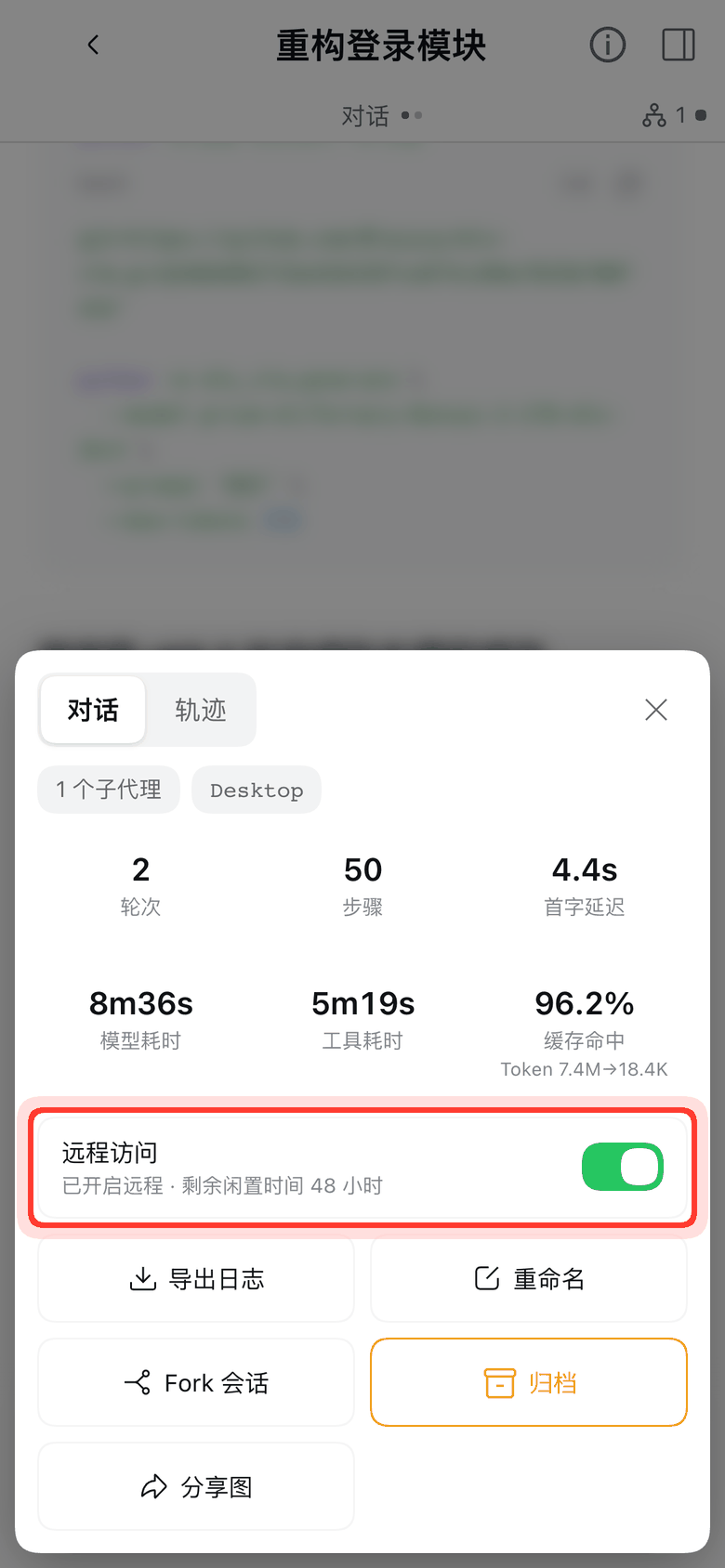
Remote access toggle inside the phone session info card (ⓘ)
Every remote RPC/stream/HTTP route is guarded by a strict per-method allowlist (src/relay-access.ts + src/fetch-route-intercept.ts) rather than generic parameter scanning:
| Surface | Supported Official DSH Interfaces | Isolation & Notes |
|---|---|---|
| Sessions, Queue & Subagents | session/follow, page, projections, list, control, search, create, fork, rename, selectModel, modelCatalog, prompt, cancel, updateQueue, attachment, sessionFeedback/record; subagents/prompt, interruptByUser / interruptByParent; $zr/events (approval & question forwarding); workspace/follow, pinSession, unpinSession, archiveSession, unarchiveSession, insertSessionBefore |
Global streams/lists (list, search, follow, control, @ candidates) are row-filtered by the share table; dsh-session: references in prompts, queue edits, and slash commands are validated server-side; modelCatalog isolates per-server groups and clears host failures |
| Workspace Files, Diffs & Previews | workspaceFiles/list, changes, read, readBytes, stat, search; officeKit/render & officeToPdf/render (server-side LibreOffice PDF preview); HTTP /api/changes.summary, /api/changes.diff, /api/session/uploadFileBinary, /api/file (inline Markdown images/media) |
Host-local OS actions (/api/session.export, /api/changes.open, /api/present.open, /api/present.host) are intentionally disabled/hidden in remote sessions |
| Server Terminal | terminal/attach (0.2.2+ full-duplex PTY), watch, environment, shells, create, write, resize, rename, close, follow, list, retain |
Runs on the serving machine as its OS user; closing remote access on a session terminates its remote terminal streams immediately |
| Forge Panel (Git / PR / Worktree) (DSH 0.2.2+) | All 31 session-scoped forgePanel/* endpoints (follow, branches, diffBases, localCommits, localDiff, localText, changeRequest*, *Worktree, review*, merge, …) + global forgePanel/changeRequestStates stream |
PR badge stream is filtered per workspace/session; older DSH hosts degrade gracefully without breaking core chat |
| Goals, Commands, Presets & Interactive Tools | goals/get\|create\|edit\|complete\|pause\|resume\|clear; commands/list\|execute; agentPresets/list\|read\|select; sessionReferenceResolver/candidates; userQuestions/answer\|attachWait; actionCards/act; toolResults/watch; agentTeams/setEnabled; pluginRecommendations/describe; job/list\|follow\|kill; skills/list; messageFeedback/*; schedule/list |
When at least one session is shared, agentPresets exposes the serving machine's preset roster/YAML; when zero sessions are shared, agentPresets/list returns empty and read refuses |
dsh-better-sidebar Compatibilitydsh-zen-remote ships a dedicated built-in adapter (src/adapters/dsh-better-sidebar/) for dsh-better-sidebar with wire-surface digest matching, so compatible releases bridge automatically without requiring dsh-zen-remote updates on every minor patch:
/sidebar/api/* (file browser, editor, Git graph/history, tasks, sidechat), /sidebar/file, /sidebar/sidechat-image, /sidebar/archive, /sidebar/upload, /sidebar/write, /sidebar/html preview, plus all three WebSocket feeds (/sidebar/ws/agent-opens, /sidebar/ws/fs-watch, and frame-rewritten /sidebar/ws/sidechat).cwd server-side so paths always resolve from the verified session; blocks open.external in remote sessions; keeps /sidebar/bundle local.dsh-better-sidebar is on an unsupported version or consent is disabled, its host-file panels return fail-closed 503 rather than silently reading your local machine's disk.Third-party DSH plugins whose session panels query their own backend routes on DSH's webServer can work seamlessly across remote sessions via the Plugin Bridge Protocol — without taking any runtime dependency on dsh-zen-remote.
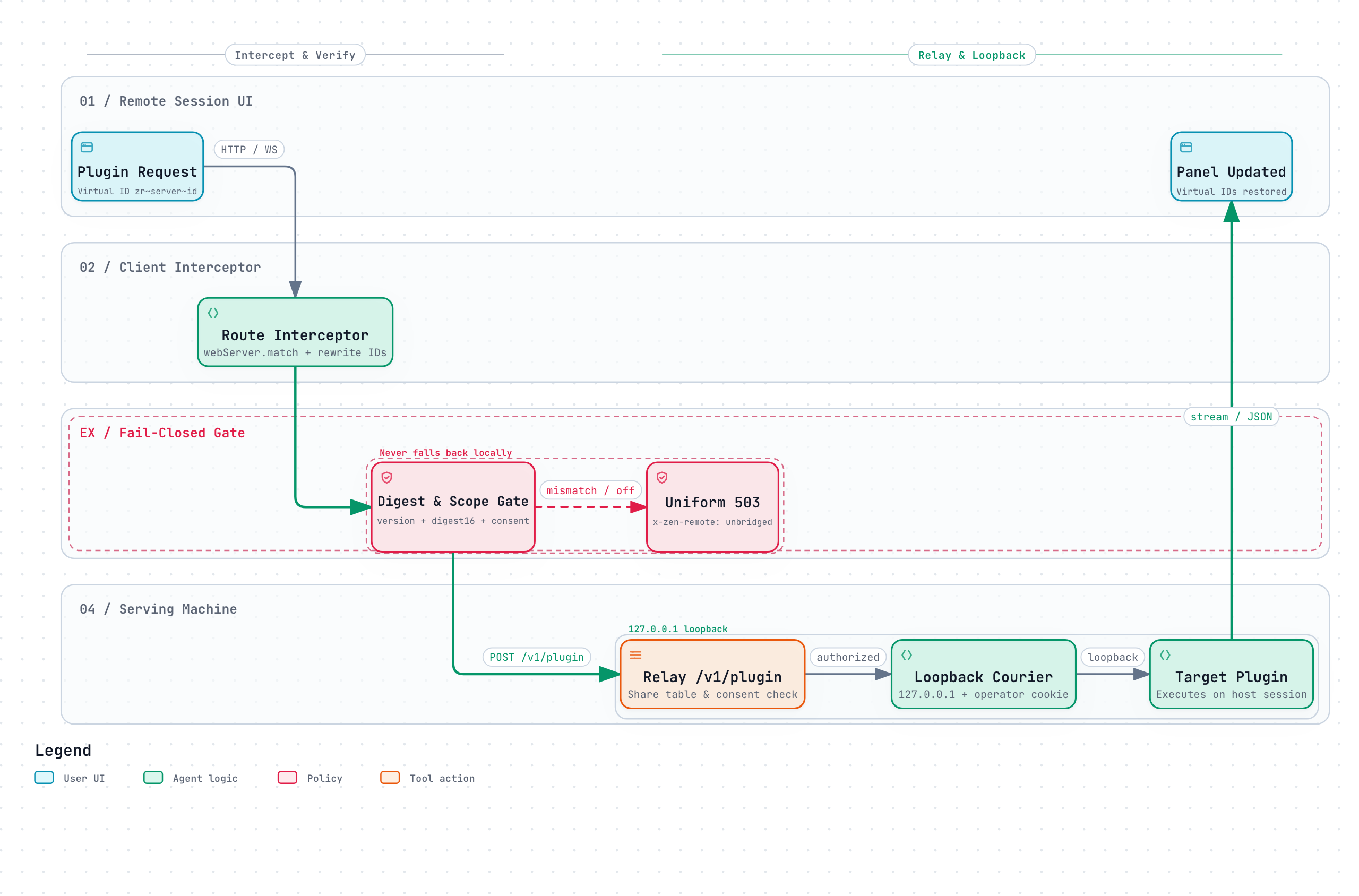
zenRemote service (ctx.inject(['zenRemote'], ...)) and call bridge.bridge({ plugin, version, routes }) with types imported from dsh-zen-remote. Supports GET/HEAD/POST/PUT/PATCH/DELETE, stream, upgrade: true (WebSocket byte or JSON-frame tunneling), prefix: true, locator (query / path-segment / json-body), deny: true (block local-only routes remotely), and rewriteIds (true or { fields }). When dsh-zen-remote is not installed, inject simply never fires.src/adapters/): maintained inside dsh-zen-remote for existing uncooperative plugins (such as dsh-better-sidebar); cooperative declarations always take precedence over adapters.{ plugin, version, digest16 } (a 16-hex SHA-256 of the normalized declaration). Both ends must match on plugin name, exact version, and declaration digest.scope: 'session' — authorized automatically per request against the share table.scope: 'server' — requires explicit host-owner consent in Settings → Plugin Bridge (default OFF).not-on-server, version-mismatch, declaration-mismatch, consent-off, route-denied, bad-query, offline, etc.) returns a uniform 503 (x-zen-remote: unbridged) — remote panels never fall back to local machine data.See the full specification in Plugin Bridge Guide.
Both peer and host roles run the built-in mobile web experience and Web Push engine:
tok/s output speed, log export, rename, fork, archive, one-tap full-conversation PNG share image, and remote access switch).aes128gcm; toggle pushEnabled globally or enable pushSessionName to prepend Session: <name>):pushEnabled is on, never suppressed by debounce):DSH_PUSH_APPROVAL_GRACE_MS (default 5s so fast auto-approvers handle it without buzzing your phone).ask_user_question waiting for input: pushes "DSH is waiting for your answer".push_notify tool): called by the agent when you asked to be notified on completion or when it hits a blocker requiring your decision (ordinary turn ends stay silent unless pushTurnEnd is turned on; pushSummary appends up to 120 chars of the final reply).Day-to-day setup and device management are handled in the Remote Access & Device Pairing Wizard (or npx dsh-zen-remote setup). To fine-tune individual low-level fields, click dsh-zen-remote a second time under Included components on the plugin detail page.
Each field resolves in order: environment variable > plugin row settings > ~/.dsh/lan-gate.config.json > default. Saving a field that requires a gateway/push restart reloads the plugin row automatically without restarting DSH.
| Field | Default | What it does |
|---|---|---|
role |
host |
peer joins a self-hosted virtual network while keeping serving halves (gateway, push, sharing) mounted; host runs gateway + push + sharing; client connects to paired hosts only |
serverName |
computer name | Device name (≤ 40 chars): sidebar group title on a serving machine, registered name on a client (renaming on a client broadcasts one-way to paired servers) |
port |
3088 |
Gateway port; retries upward (up to +20) if occupied |
host |
127.0.0.1 |
Gateway bind address (127.0.0.1 for local proxy/tunnel, 0.0.0.0 for LAN/Tailscale direct) |
targetPort |
(auto) | Local DSH Web UI port; leave empty to auto-discover |
rateLimit |
120 |
Per-minute cap on unpaired requests per client IP |
trustedProxies |
empty | Comma-separated trusted proxy IPs when the reverse proxy runs on another machine |
vapidSubject |
mailto:admin@localhost |
Web Push contact (must be a real mailto: or https:// URL for iOS delivery) |
lang |
auto |
Gateway & notification language: auto (browser Accept-Language), zh, or en |
pushEnabled |
on | Master switch for session notifications; off stops automatic pushes and unregisters push_notify |
pushSessionName |
off | Prepend Session: <name> to notification bodies |
pushTurnEnd |
off | Also push when ordinary turns finish (approvals/questions always push) |
pushEvents |
agent/turn-stopping |
Comma-separated events treated as turn end when pushTurnEnd is on |
pushDebounceMs |
15000 |
Minimum interval (ms) between automatic pushes |
pushSummary |
off | Include up to 120 chars of the final reply in notification bodies |
pushTool |
on | Register the model-callable push_notify tool |
idleHours |
48 |
Idle-sleep window in hours for shared sessions; range (0, 8760] |
maxServers |
8 |
Paired host limit (1..64, live read; env LAN_GATE_MAX_SERVERS outranks). In peer mode, remote mounts are bounded by min(maxPeers - 1, maxServers) |
logLevel |
info |
Logging threshold (info / debug / warn, live read; env LAN_GATE_LOG_LEVEL outranks) |
autoShareNewSessions |
off | Automatically enable remote access on newly created sessions |
pluginBridgeConsent |
{} |
Whole-machine data consent map (pluginName -> boolean) for the Plugin Bridge |
serverUrl / deviceToken |
empty | Legacy single-server client fields, auto-migrated into ~/.dsh/zen-remote-state.json on first start |
turnFoldDesktop |
off | Enable turn-process folding on desktop widths as well as mobile |
keyboardLiftRatio / keyboardLiftMaxPx / keyboardSafetyPadPx |
0.42 / 400 / 15 |
Soft-keyboard lift calibration fallback |
maxUploadBytes |
20 MB |
Mobile attachment upload cap |
Legacy environment variables (outrank row settings): LAN_GATE_PORT, LAN_GATE_HOST, LAN_GATE_TARGET_PORT, LAN_GATE_RATE_LIMIT, LAN_GATE_TRUSTED_PROXIES, LAN_GATE_VAPID_SUBJECT, LAN_GATE_LANG, LAN_GATE_LOG_LEVEL, LAN_GATE_MAX_SERVERS, DSH_PUSH_ENABLED, DSH_PUSH_SESSION_NAME, DSH_PUSH_TURN_END, DSH_PUSH_EVENTS, DSH_PUSH_DEBOUNCE_MS, DSH_PUSH_SUMMARY, DSH_PUSH_TOOL, DSH_PUSH_LANG, DSH_PUSH_APPROVAL_GRACE_MS.
nodeId from its public key and pins peers locally (pinnedPeers): even a gateway-side credential reset stays blocked (mismatch) until explicitly trusted on each peer machine.0.0.0.0), the gateway's private-IP wall rejects unproxied public internet IPs (403 public-direct-forbidden), and admin/wizard mutations stay loopback-only.dsh-zen-remote version; DSH host versions may differ (interface fingerprints are compared at handshake and degrade only mismatched panels).In depth: Public Access & Relay Protocol · Interface Design · Plugin Bridge Guide · Self-Hosted Gateway
Data & state files
~/.dsh/lan-gate-state.json; the unified state file ~/.dsh/zen-remote-state.json (0600) stores local serverId, sessions share table, servers list, and peer state (peerIdentity, peerNetwork, pinnedPeers); managed Cloudflare tokens live in 0600 files under ~/.dsh/zen-remote-ingress/.Known limitations
iOS standalone PWA notes
WKScrollPocket blur across the top ~95px; entering any session and navigating back to the list clears it.Third-party plugins with mobile & bridge adaptations
| Plugin | Adaptation summary | Version tested |
|---|---|---|
| dsh-better-sidebar | Full-screen mobile right-sidebar drawer with notch safe-area padding and swipe-back; Plugin Bridge built-in adapter with wire-surface matching | Built-in adapter |
| @nanmicoder/dsh-agent-teams | Repositions AgentTeams floating pill below session header and preserves parent session back-link | 0.1.9 |
| @ychris12138/dsh-usage-stats | Moves usage & balance entry into the mobile home chips bar | 0.2.9 |
| @opendsh/dsh-plugin-scheduled-tasks | Moves scheduled tasks entry into the mobile home chips bar | 0.2.3 |
| dsh-at-file | Deduplicates .dsh-uploads/ attachment rows on mobile |
0.6.7 |
| @ace-zone/dsh-market | Compacts marketplace modal header on mobile so the close button stays reachable | 0.1.66 |
| dsh-vision-toolkit | Works with mobile attachment uploads for image Q&A/OCR | — |
| dsh-web-ui bundle | Mobile width-constrained centered overlays for file tree / preview | — |


| Document | Scope |
|---|---|
| Public Access & Relay Protocol | Reverse proxy snippets, device roles & pairing, relay methods, peer virtual networking, security boundaries |
| Interface Design | Responsive breakpoints, settings & wizard components, mobile safe-area system, compatible plugins |
| Plugin Bridge Guide | Bridge declaration API, WebSocket byte/JSON-frame tunneling, fail-closed 503 contract |
| Self-Hosted Relay Gateway | Docker / Node.js deployment, native TLS, environment variables, web console & zr-net:// links |
This plugin's interface layer derives from mexiaosqwq/dsh-web-mobile, and its channel layer from zylzyqzz/dsh-mobile-pwa (itself derived from Bernardxu123/dsh-mobile-gate), both MIT. The original copyright lines are preserved in LICENSE.
CLASSIFICATION EVIDENCE
系统优先读取 GitHub Topics,再与站内分类词典和词根规则比对。当前命中: deepseek、deepseek-harness。
morluto
Reverse engineer anything with agents, from app behavior down to native binaries.

deepseek-ai
DeepSeek Harness: Everything is a Plugin.

nexu-io
The 1st Collaborative AI Design Agent Workspace. Local-first and open source. Create motion, prototypes, websites, apps, dashboards, presentations, images, and videos with your team and AI agents. Share work, exchange feedback, and iterate together in one workspace.