🤖 dsh-telegram
Telegram remote control for DeepSeek Harness — your agent in your pocket.
Drive your dsh sessions from Telegram: list, bind, prompt, watch live streaming replies,
answer agent questions with one tap, and stop or re-point sessions — all through the exact
same channel the Web UI uses, from any chat you whitelist.


✨ Features
- Full session console —
/attach bind a session, /status inspect it, plain text becomes a prompt, live replies edit in place on one message.
- Real-time streaming replies — assistant output is streamed into a single message and edited in place across the whole turn (
💭 Think / 🔧 tool action lines per step), then finalized as Telegram HTML with a token-usage footer.
- Interactive questions as buttons — when the agent calls
ask_user_question, the chat gets an answerable inline keyboard instead of a wall of text: tap to answer, tap to cancel; the outcome races the Web UI first-claimant-wins.
- One-tap keyboards — reply keyboards carry
/create /archive /attach and /stop /close action rows; session lists and workspace pickers render as inline buttons. Almost everything is a tap, everything still works typed.
- Safe by default — only
allowChatIds can talk to the bot; everyone else gets ⛔ 无权访问。 and zero session facts. The plugin opens no inbound port: all traffic is outbound Telegram long polling (optionally through a CONNECT proxy).
- Secrets never land on disk —
botToken is referenced as !!js process.env.TELEGRAM_BOT_TOKEN; the token lives in the environment (or $DSH_HOME/.env, 0600).
- Cold-session resume — binding and prompting go through the host
apiProxy, the exact path the Web UI uses, including cold-session resume and queued-message semantics.
📸 Demo
A real session, driven from Telegram:
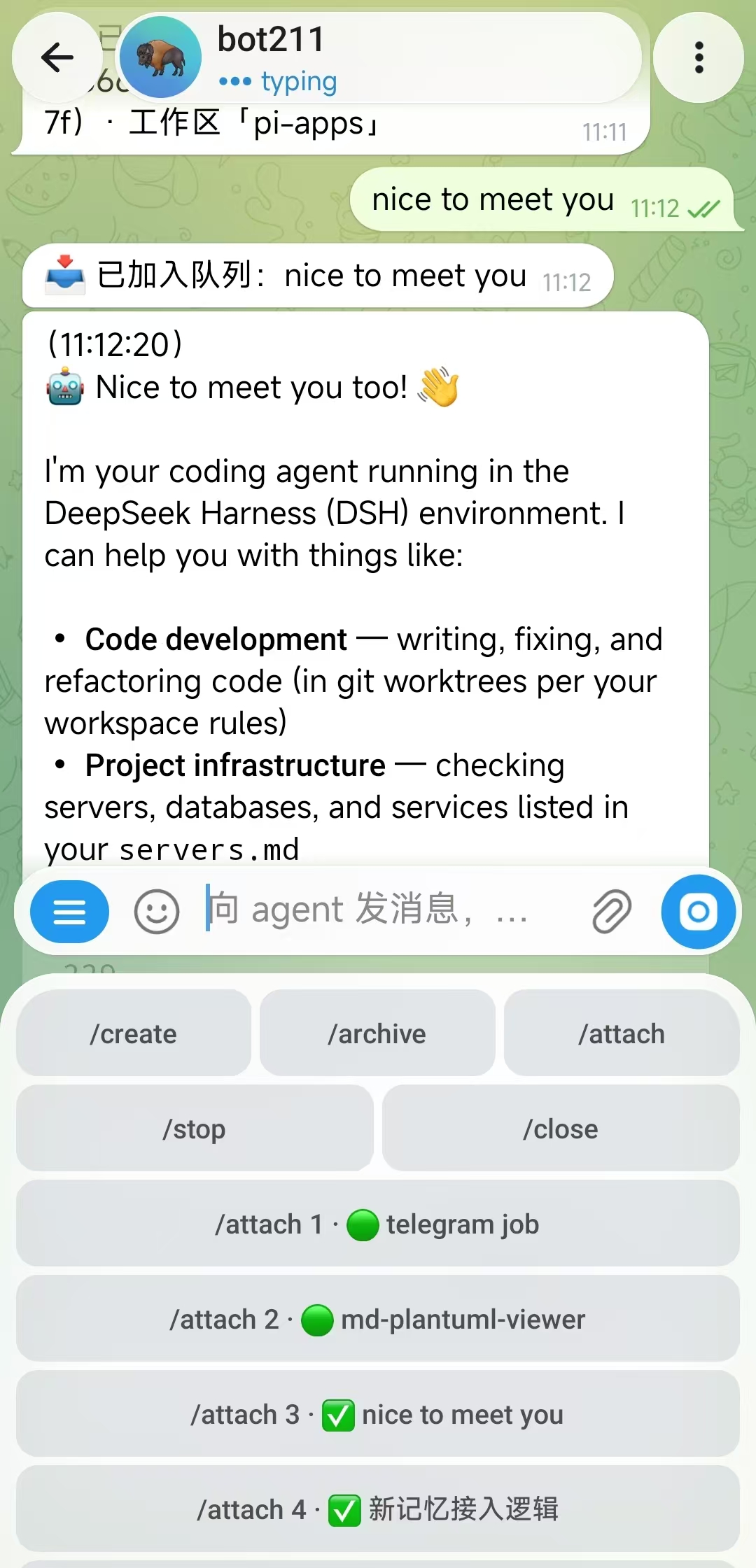
| Attach & live streaming reply |
One-tap keyboards |
Answer a question by tapping |
 |
 |
 |
🚀 Quick Start
Prerequisites
- A dsh source checkout (the plugin is installed into it) — or an already-running dsh deployment for the package route.
- Node.js ≥ 22.19, pnpm, git.
- A bot token from @BotFather, and outbound access to
api.telegram.org (or a CONNECT proxy).
Option 1 (recommended): install into your dsh source tree
git clone https://github.com/Kevin66Z0/dsh-telegram.git dsh-telegram
cd dsh-host-telegram
./install.sh /path/to/deepseek-harness     # your existing dsh checkout
install.sh syncs the plugin under src/packages/host/telegram, registers it in the
workspace, and (when DSH_HOME is set) writes the mount row into
$DSH_HOME/profiles/web/cordis.patch.yml. It is idempotent — re-run after git pull to update.
Then three steps, once:
# 1) Inject the token (no plaintext anywhere)
echo 'TELEGRAM_BOT_TOKEN=<token-from-@BotFather>' >> "$DSH_HOME/.env"; chmod 600 "$DSH_HOME/.env"

# 2) Whitelist your chat(s) — hot-reloaded, per-field override of the plugin row
#    in $DSH_HOME/settings.yaml:
#    telegram:
#      allowChatIds: [123456789]            # find yours below
#      # proxy: 'http://127.0.0.1:7890'     # only if api.telegram.org is blocked

# 3) Restart your dsh service (your usual start command / deployment script)
Find your chat id: with an empty allowlist, the first run logs every rejected chat id —
copy it into allowChatIds and it activates without a restart.
Verify: the log shows telegram: bot @<username> listening; message the bot /start.
Option 2: already-running dsh deployment
If your dsh is not run from a source checkout, install the plugin package into your profile:
dsh plugin --profile web add git+https://github.com/Kevin66Z0/dsh-telegram.git
…then the same token / allowlist / restart steps. This route installs the plugin as a
separate package (all @deepseek-ai/* imports resolve from the running host). Don't combine
both routes: one plugin row id: telegram per deployment.
Update / remove
cd dsh-host-telegram && git pull && ./install.sh /path/to/deepseek-harness   # update
# or, package route:  dsh plugin --profile web update/remove @deepseek-ai/dsh-host-telegram
⚙️ Configuration
| Field |
Type |
Default |
Meaning |
botToken |
string |
required |
Bot token; referenced as !!js process.env.TELEGRAM_BOT_TOKEN, injected via env or $DSH_HOME/.env |
allowChatIds |
number[] |
required |
Chats allowed to use the console; empty denies everything (first run logs rejected ids) |
proxy |
string |
ALL_PROXY, then HTTPS_PROXY |
HTTP CONNECT proxy for Telegram API traffic |
The plugin registers the telegram settings namespace: fields in $DSH_HOME/settings.yaml
(or the Web settings page, Plugins → Telegram) override the composition row and rebuild the
bot session without a restart.
🕹️ Commands
| Command |
What it does |
/attach [scope\|n\|id\|none\|arc] |
Bind this chat to a session (scope picker → session list as inline buttons) and show the recent dialogue + running-turn actions; plain text then goes to the bound session |
/create |
Creation sub-menu: /new (fresh session) or /fork (fork the bound session) |
/operate |
Operation sub-menu: /archive, /stop, /curTasks |
/new [path\|n\|none] |
Create a session (workspace picker; none = ungrouped) |
/fork [n\|id] |
Fork from the last completed turn of a session and bind to it |
/archive [n\|id] |
Archive a session (two-step confirm; ungroups it and unbinds) |
/delete [n\|id] |
Archive from the picker |
/stop |
Cancel the running turn of the bound session (inline list when unbound) |
/keyboard |
Re-wake the reply-keyboard area after /close or an overlay |
/status [n\|id] |
Session details: last assistant output, state, usage footer |
/model [name] |
Set the global default model (tap the model list, or type a name) |
/rename [title] |
Rename the bound session (interactive without argument) |
/curTasks |
Print the bound session's todo list (same source as the Web sidebar) |
/preset [name\|n] |
Pick an agent preset (PTC / standard / minimal…) |
/start |
Full help; /close dismisses the keyboards |
🔐 Security & Privacy
- Whitelist-gated: chats outside
allowChatIds are rejected with a fixed generic reply and learn nothing about your sessions.
- No inbound listener: the plugin only long-polls Telegram outbound; no port to open, no public IP needed, works behind NAT.
- Secrets not in config: the token is an env reference; docs and templates carry placeholders only.
- Rotation is cheap: if a token ever leaks,
/revoke it in @BotFather — the allowlist, not the token, is the real access control.
🧠 How it works
  Telegram app          dsh process (one node process)
 ┌───────────┐   HTTPS   ┌──────────────────────────────────────────┐
 │ your phone│ ◄───────► │ grammY Bot (long polling, this plugin)    │
 └───────────┘  outbound │      │ apiProxy (the Web UI channel)      │
                         │      ▼                                    │
                         │  sessions / agent loop / LLM / tools     │
                         └──────────────────────────────────────────┘
The plugin is a Cordis function plugin (name: telegram, inject: [apiProxy]) — the same
plugin architecture every dsh component uses, so it composes into any profile that stacks
dsh-web-app (headless-only hosts lack apiProxy and cannot mount it). No durable stream of
its own: it reads the session/question event feed, exactly like the web UI.
❓ FAQ
Why does it need the web profile? It drives sessions through apiProxy, the same RPC
channel the Web UI uses — a headless-only dsh has no apiProxy.
How do I find my chat id? Leave allowChatIds empty, message the bot once, and copy the
id from the log line about the rejected chat.
api.telegram.org is blocked in my region? Configure proxy in the telegram: settings
section (defaults to ALL_PROXY/HTTPS_PROXY).
My dsh upstream already ships a telegram package? install.sh overwrites the plugin
source with this repo's version; or use only the package route — never both for the same row.
Plugin fails at startup? Usually the token didn't reach the process: write
$DSH_HOME/.env and restart. Config errors fail loudly at load.
🛠️ Development
Source mirrors packages/host/telegram from the dsh monorepo. Contributors keep working in
the monorepo (its AGENTS.md applies) and sync back here:
bash scripts/sync-from-monorepo.sh [monorepo-path] # defaults to ../dsh/src
The READMEs (this file and the Chinese mirror) are maintained in this repo and are not
overwritten by the script. Built lib/ is committed so package consumers never build.
📄 License
MIT. docs/official/ mirrors Telegram's public Bot API documentation for offline reference.
Built on DeepSeek Harness.


