
其他
插件

dsh-bili-scroll
c1overzz
DSH 插件:每天替你刷一轮 B站,读字幕挑出值得的、写一份日报,值得的 @ 你
PROJECT TOPICS
INSTALL REFERENCE
dsh plugin --profile web add github:Kevin-McIsaac/dsh-workspace-git-badge
该命令指向仓库当前默认分支;尚无绑定当前 commit 的完整验证结果。
PROJECT README
Git status badges for DeepSeek Harness

Most agent workflow failures happen quietly: branches drift, uncommitted files are left behind, and approved PRs or failed builds sit unnoticed. This plugin brings repository awareness directly into your workflow:
git worktree, the badge follows that tree rather than the main checkout.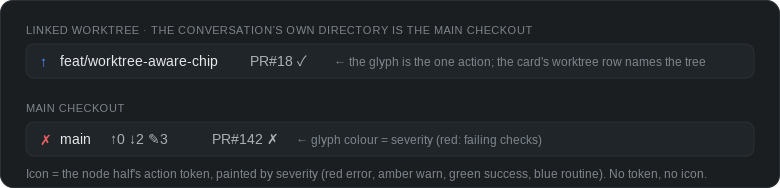
↑ push — no upstream configured). The chip leads with the same icon, and a checkout with nothing to do shows an in sync disc — green when nothing is outstanding, amber when commits are not yet merged — so a session is never iconless.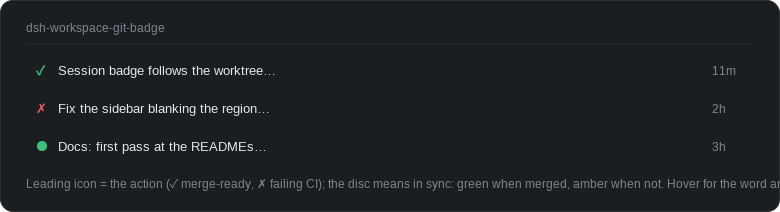
Both are updated within seconds of any commit, checkout, stage or file edit — including inside a linked worktree for safe isolation of parallel dhs working session.
Use the plugin market place or install manually:
dsh plugin --profile web add dsh-git-badge # marketplace Install does this stepThen restart the web process and refresh the browser. That is the whole install: every surface rides an upstream slot, so there is nothing to patch and no second step.
The status icon renders using the upstream
sidebar.session.row.leading seat — a 16px cell in the row's leading cluster,
rendered only while the session is idle. The hover-card provenance line rides
upstream's own sidebar.session.row.hover seat as well.
See TESTING.md — clean-profile boot (customer simulation) and the
gotchas list. cd dsh-git-badge && npm test
runs the whole suite (parser, real temp repositories, resolution, SSE, the
watcher, every gh degradation path and the rendered surfaces) with no DSH, no
network and no restart.
A worktree isolates each session to ensure it does not step on another sessions work, e.g., change or delete the branch, modify the same file.
A session can enter a worktree that is not its original workspace. Without the session's current directory, the badge would keep reporting the main checkout: the wrong branch, the wrong counts, the wrong pull request.
DSH records the session's working directory. The working_directory tool and
the create_worktree tool commit the change, and the badge reads that
projection on every request. When the projection changes, the plugin pushes a
refresh over SSE, so the badge follows within about one second. Enter the
worktree with the tool (or cd) and the badge follows it. A compact full-colour
tree between the branch name and the sync suffix marks a linked worktree. No
plugin registration and no file on disk are involved. A workspace-targeted row still reports the checkout the
registry owns.
git on PATHweb profilegh on PATH, authenticated, for the PR/CI token and the row's merge/review
actions — otherwise those are silently absent and everything else still worksCLASSIFICATION EVIDENCE
系统优先读取 GitHub Topics,再与站内分类词典和词根规则比对。当前命中: 无有效分类标签。
c1overzz
DSH 插件:每天替你刷一轮 B站,读字幕挑出值得的、写一份日报,值得的 @ 你

hellowind777
一个自主的高级智能伙伴,不仅分析问题,更持续工作直到完成实现和验证。

xing-shuyin
Just open your browser — get all your work done.