
模型与 MCP
待识别

rea
morluto
Reverse engineer anything with agents, from app behavior down to native binaries.
PROJECT TOPICS
INSTALL REFERENCE
dsh plugin --profile web add github:Keridium/dsh-gopeed-downloader
该命令指向仓库当前默认分支;尚无绑定当前 commit 的完整验证结果。
PROJECT README

English | Chinese
7 tools | HTTP, magnet and .torrent URLs | process control Windows-only | needs Gopeed 1.9.3+
[!IMPORTANT] Reading this as an agent? Stop and open docs/AGENTS.md instead.
That file is the contract: the seven tools with the result fields DSH validates, the do-not-poll rule for
gopeed_add, the save-location order, an error playbook keyed onverdict, and an explicit do-not list. This README is the human landing page and deliberately does not repeat it.If you maintain an agent that uses this plugin, point it at that URL -- not at this file.
Turn a local Gopeed download manager into agent tools inside DeepSeek Harness (DSH): start downloads, follow them, steer them, diagnose or launch the Gopeed process, and receive download-complete events -- including a background job that wakes an idle agent.
Any link Gopeed itself accepts works: HTTP/HTTPS direct links, magnet links and remote .torrent
URLs. A local .torrent file is not accepted -- there is no upload path, so hand over the URL it came
from instead. BitTorrent detail (peers, DHT, trackers, seeding) stays with Gopeed; the plugin creates the task
and reads its progress, nothing more.
The agent hands a URL to Gopeed over its loopback HTTP endpoint; Gopeed owns the outbound traffic and the
files on disk, so nothing passes through the model or a shell. Gopeed's desktop build listens on a random port
per launch by default, so the plugin reads the live port from the running process (port: 0) unless you pin
one. See Configuration.
| Goal | Tool |
|---|---|
| Start a download and be told when it ends | gopeed_add -- takes a direct link, a magnet link or a remote .torrent URL, and returns a background job; the completion notice is DSH's own, so a busy agent reads it next step and an idle agent is woken. |
| Watch progress | gopeed_list, gopeed_status -- one flat task shape (percent, sizeKnown, speed, real save directory). |
| Steer a download | gopeed_control -- pause / resume / remove through an action enum. remove deletes the files too unless force: false. |
| Fix the setup | gopeed_process -- one of six verdicts plus pid, memory, version, executable path and webhook status. |
| Start a stopped Gopeed | gopeed_launch -- the agent-side equivalent of double-clicking the icon. |
| Hear downloads finish | gopeed_events -- reads the DOWNLOAD_DONE / DOWNLOAD_ERROR pushes Gopeed sent; action: "apply" saves the webhook address into Gopeed's config in auto mode. |
gopeed_launch only starts an
absent process and has no parameters.gopeed_process, gopeed_launch, the restart button and executable
auto-discovery all call Windows tools. The download tools work wherever Gopeed runs.127.0.0.1 only. A Gopeed in Docker or on another machine cannot push to it
without extra networking; poll gopeed_list / gopeed_status instead.plugin_manager tool, or the Web
Plugins page).host:port. Verified against 1.9.3.tasklist, taskkill,
powershell.exe, netstat and netsh.dsh-gopeed-downloader is on npm. In any DSH session, tell the agent:
Install the
dsh-gopeed-downloaderbundle from npm.
That is plugin_manager with action: "install_bundle" and target: "dsh-gopeed-downloader". DSH installs it
with its own package manager and enables the bundle; restart DSH when it asks.
Nothing needs to be installed on your machine first -- no Node.js, no npm, no pnpm. The profile carries its
own package manager; this plugin only needs DSH and Gopeed. If you would rather use a shell,
dsh plugin --profile web add dsh-gopeed-downloader is the equivalent.
From Git instead -- for a development build, or to pin a commit:
Install the
dsh-gopeed-downloaderbundle fromgithub:Keridium/dsh-gopeed-downloader.
Both forms accept a version pin: dsh-gopeed-downloader@0.3.2, or
github:Keridium/dsh-gopeed-downloader#v0.3.2.
Uninstall with action: "remove_bundle", target: "dsh-gopeed-downloader". The Web UI equivalent is
Plugins -> Installed.
Then open Plugins -> Installed -> Gopeed Downloader -> row gopeed -> Configure and, if Gopeed uses a
token or a fixed port, enter them there. A first run looks like this:
gopeed_add  { "url": "https://example.com/file.iso" }
# -> taskId, path, jobId; stop here -- the completion notice arrives on its owntarget forms (read from the DSH plugin manager)target |
Accepted | Notes |
|---|---|---|
dsh-gopeed-downloader |
yes | An npm package name, resolved from the registry. |
dsh-gopeed-downloader@0.3.2 |
yes | The same, pinned to a version. |
github:owner/repo |
yes | pnpm's Git host shorthand. |
git+https://github.com/owner/repo.git |
yes | Standard Git URL; git+ is stripped before the reachability check. |
https://github.com/owner/repo |
yes | A hosted-repository URL is treated as a Git spec, not a plain web page. |
github:owner/repo#v0.1.1 |
yes | Pin a tag or commit after #. |
https://.../repo/archive/refs/tags/v0.1.1.tar.gz |
yes | A .tgz / .tar.gz URL is a tarball spec and skips Git entirely. |
D:\path\to\dsh-gopeed-downloader |
yes | An absolute local directory (development installs). |
| a relative path | no | Refused: "a local path must be absolute". |
For GitHub Git specs the manager runs git ls-remote (5 s default) first, so git must be installed for a
Git-URL install; otherwise install from a release tarball URL. A directory install records a link:
dependency, and source edits then need the extra step described in the development notes below.
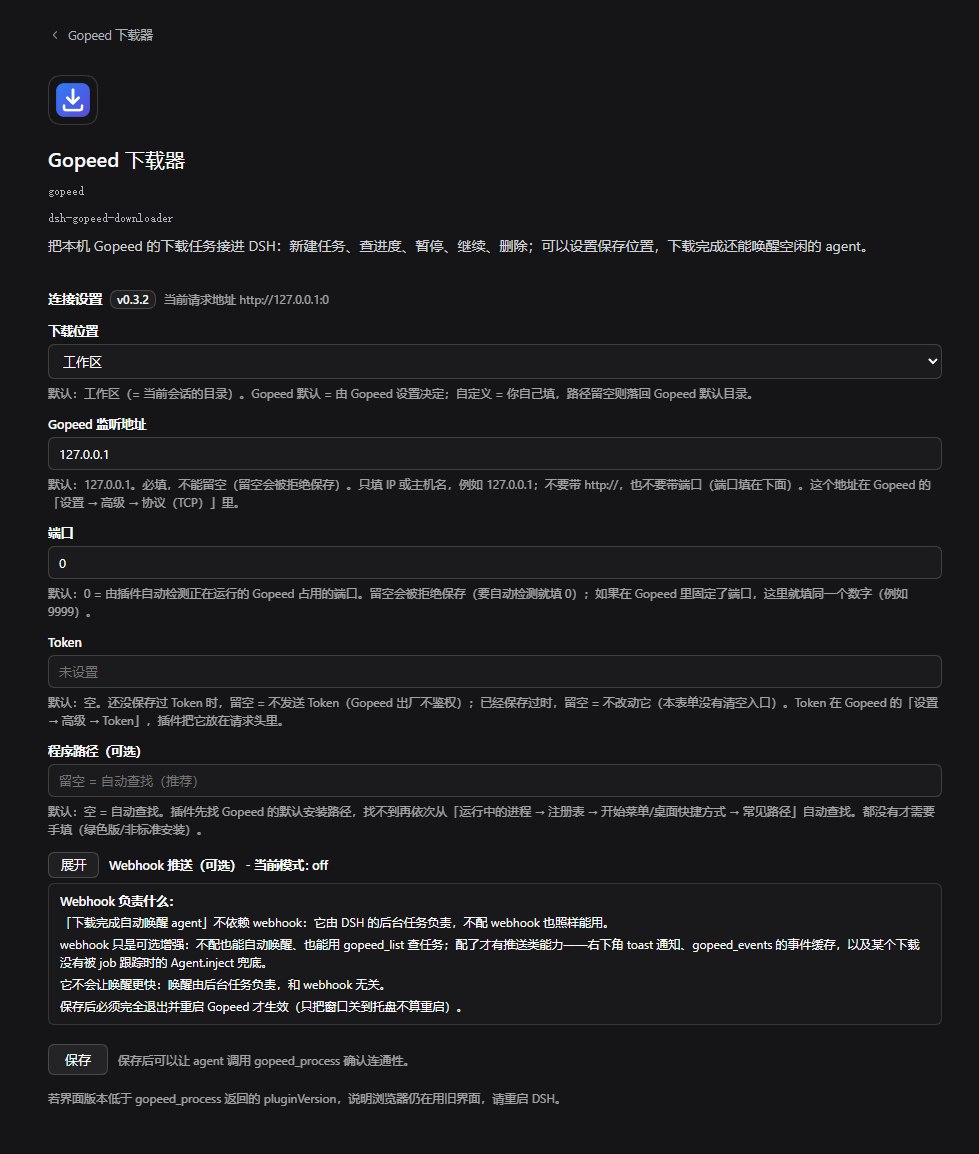
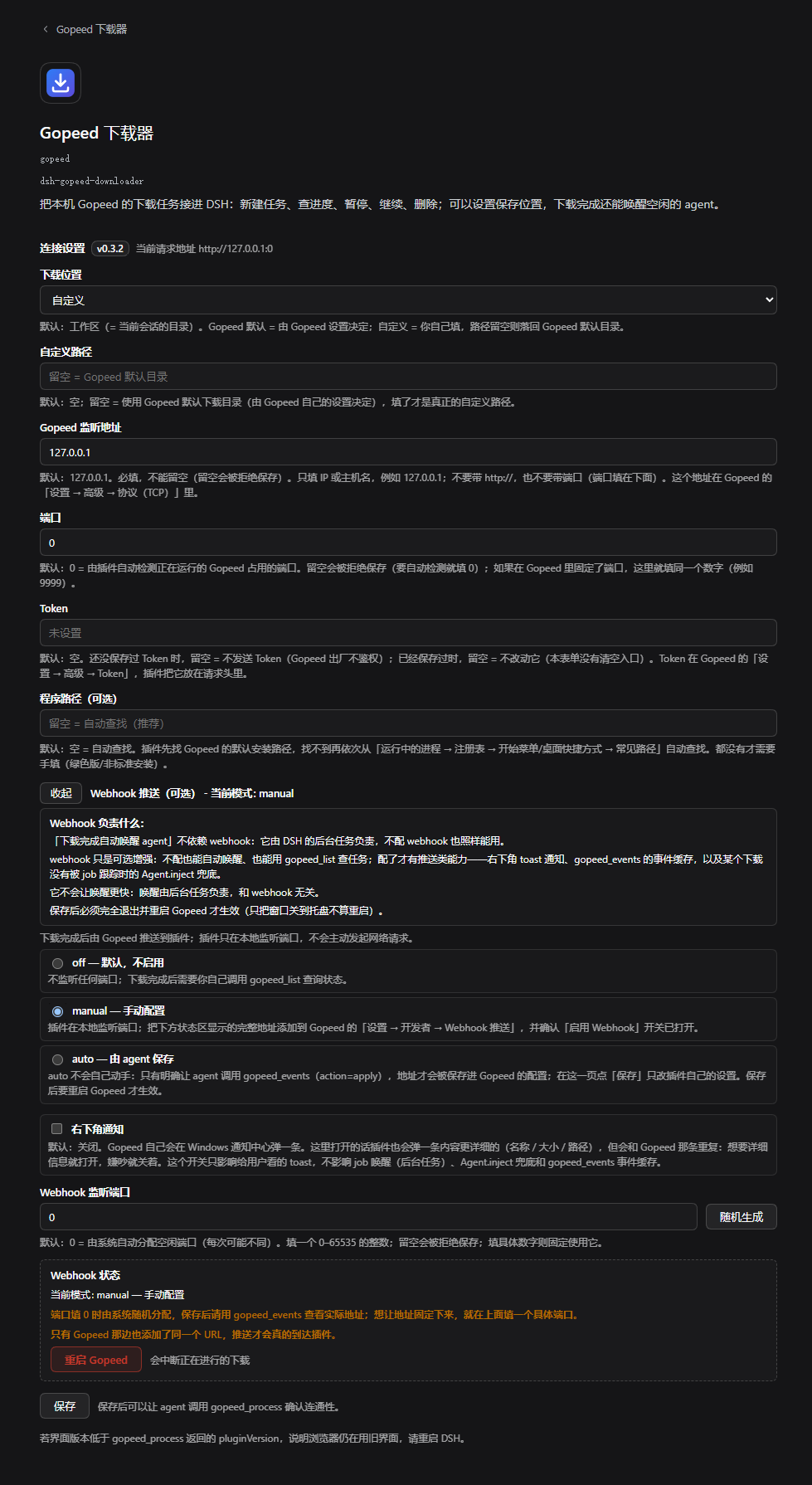
The form on Plugins -> Installed -> Gopeed Downloader -> Configure is volatile: saving applies
immediately, with no plugin remount and no DSH restart. Every field's hint reads Default: X; empty = Y.
downloadTarget -- workspace (default) / gopeed / custom. workspace saves into the session's
current working directory, which follows a cd. An explicit path argument to gopeed_add always wins.customDownloadPath -- used when the target is custom. Empty = Gopeed's own download directory,
and the fallback is reported in jobNote, never silent.host -- default 127.0.0.1, required. IP or hostname only; http://... or host:port is
rejected, and a bare IPv6 literal must be bracketed ([::1]).port -- default 0 = auto-detect the live port of the running process. An empty box is rejected on
save, so auto-detect means typing 0, not clearing the field.token -- empty (the default) means no token is sent, which is what Gopeed ships with. An empty field
keeps the stored token instead of clearing it; the browser only ever sees "set" / "not set". A wrong
token is reported as unauthorized -- Gopeed answers HTTP 401, so it never looks like a connection failure,
and auto-detection keeps the port it found. Only the token needs fixing.exePath -- empty (the default) = auto-detect. Only portable or non-standard installs need it.webhookMode -- off (default) / manual / auto; webhookPort -- 0 = system-assigned (the URL
then changes across restarts), a concrete number keeps it stable; webhookToast -- off by default,
because Gopeed already posts its own notification.timeoutMs (20000), portScan (false) and webhookNotify (true). Set them
in the active profile's cordis.patch.yml under id: gopeed.The port. Gopeed's desktop build starts on 127.0.0.1:0 -- port 0, a random port per launch -- with an
empty token. Leave the plugin's port at 0 and it asks Windows which port the live Gopeed.exe holds. To pin
one instead, open Gopeed -> Settings -> Advanced -> Protocol, choose TCP, set e.g. 127.0.0.1:9999, and
enter the same number in the plugin form. Any concrete number in this README (such as 9999) is only an
example. Saving writes the values into cordis.patch.yml under id: gopeed and takes effect immediately.
Gopeed's own source hardcodes network="tcp", address="127.0.0.1:0", apiToken=""
(app_controller.dart), and binds it with net.Listen (pkg/rest/server.go). The 9999 in Gopeed's OpenAPI
document and JS SDK is a client-side convention (the CLI and gopeed-web build default -P to 9999); the
desktop app never listens there unless you set it.
With port at 0 the plugin asks Windows for the ports Gopeed.exe holds (netstat -ano, then
Get-NetTCPConnection). When neither discloses them it says so and points at the fixed port instead of guessing.
portScan exists for that case and is off by default, because sweeping the dynamic port range touches
software unrelated to Gopeed. There is no silent 9999 fallback: it would make an honest "port unknown"
diagnosis unreachable.
form.state / mutate,
field projection, token redaction) is tested; the styling is inline CSS nobody has looked at in a browser.meta.res
degrades to sizeKnown: false rather than an invented percentage.remove is idempotent. Gopeed 1.9.3 answers a DELETE for an unknown id with success, so deleting
twice still reports "removed".gopeed_status. There is no persistence and no re-attach. A plugin reload at least reports the
loss: each live tracker settles as killed with a detail saying the download state is unknown.gopeed_list, gopeed_status and
gopeed_control (25 s) and gopeed_process (30 s) still probe for the listen port without an internal
bound, so a cold Gopeed can trip the DSH tool timeout and end the call with no message.
gopeed_add is the exception: its tool timeout is 25 s and its internal budget is 22.5 s (port
probing is hard-capped at 12 s), so 22.5 s < 25 s and the call returns before DSH's own kill at 25 s.
A killed write would risk an unaccounted download; a failed read is cheap to retry, so the same
treatment is deferred for the rest.One tool per endpoint, deliberately. The seven tools map one-to-one onto Gopeed's HTTP endpoints
instead of sharing a single action dispatcher. That diverges from the heavier style used elsewhere
in the DSH ecosystem, where one tool (such as skill or bash) covers a whole feature area. The
measured cost is 1,452 characters across all seven definitions -- about 207 per tool, the
lowest per-tool footprint of any plugin measured on this machine -- so the shape buys clarity without
charging the model for it. This plugin is a thin adapter around one downloader, not a framework: it
does one thing and keeps the context cost near the floor.
Where it stops paying. The per-endpoint shape is cheap only while the endpoint count is small. A ninth or tenth tool would make a dispatcher the better trade; the 1,100-character target above is the line to watch.
Save location is decided in this order, first match wins:
path argument to gopeed_add;downloadTarget is workspace (the default);customDownloadPath, when downloadTarget is custom and the field is not empty;"Workspace" means the live directory, not the one the session started in. It is the directory the
working_directory tool reports, so it follows a cd; the creation-time directory is only the fallback for a
host that exposes no such projection. That keeps a download next to the files the agent is actually working on.
The fallbacks are reported, never silent: an unresolvable workspace or a custom target with an empty path
still downloads into Gopeed's directory, and jobNote says which fallback happened. gopeed_add also reads
the created task back once, because Gopeed fills meta.opts.path with the real directory even when no path was
sent -- so the returned path is where the file actually lands rather than an echo of the argument. That
read-back is best-effort: a failed GET does not fail an add Gopeed already accepted.
A normalized task looks like this:
{ "id": "0n37...", "name": "a.iso", "status": "running", "protocol": "http",
  "sizeBytes": 11857955, "downloadedBytes": 4200000, "percent": 35.4,
  "sizeKnown": true, "speedBytesPerSec": 1048576,
"path": "D:\\Downloads", "createdAt": "..." }Gopeed can POST an event to a URL when a task finishes or fails. This is push, not polling: Gopeed sends
DOWNLOAD_DONE / DOWNLOAD_ERROR, and the plugin never guesses that a download ended.
| Mode | Listener | Who registers the URL in Gopeed |
|---|---|---|
off (default) |
none -- no port is opened | nobody; poll with gopeed_list / gopeed_status |
manual |
yes, on 127.0.0.1:<webhookPort> |
you, by hand, in Gopeed |
auto |
yes, on the same listener | gopeed_events action=apply, on your explicit request |
The listener URL always has the form http://127.0.0.1:<port>/webhook.
manual mode: two steps in Gopeed, not one. The settings page shows the URL and a copy button when
webhookPort is above 0 (with 0 the port is system-assigned, so read the real URL from gopeed_events
after saving). In Gopeed open Settings -> Developer -> Webhook push and do both:
An address alone sends nothing. Adding the URL without enabling the switch is the trap hit in practice: the list looks configured and the plugin still receives zero events.
auto mode: the plugin saves the URL. gopeed_events with action: "apply" is the only code path that
saves Gopeed config, and it is refused unless webhookMode is auto. It reads the current config, changes
only the webhook fields (webhook.enable = true, and the listener URL merged into webhook.urls,
keeping every URL you already had), saves the whole config back, then reads it back and reports applied: true
only if the URL is really there. A failed read leaves Gopeed untouched. action accepts apply and nothing
else -- no "apply and restart", because no agent tool may restart or kill Gopeed.
A full restart is required afterwards. Gopeed applies webhook settings only after a complete restart; closing the window is not a restart (it minimizes to the tray and keeps running with the old settings). The GUI may keep showing the old values in the meantime, so "the settings screen looks unchanged" does not mean the save failed. The only restart entry point is the Restart Gopeed button.
Reading events. Events live in a 50-entry in-memory ring buffer; the oldest are dropped and the buffer
is empty after a plugin or DSH restart. gopeed_events filters by since (a timestamp) and unreadOnly.
Returning events marks them read, so a second unreadOnly: true call returns nothing until new events
arrive. gopeed_process also reports the webhook status, so the wiring can be checked without the buffer.
Three channels, none in the conversation.
gopeed_add registers a DSH
job that polls Gopeed and settles when the download ends; DSH's own dsh-tool-jobs turns that into an
in-session completion notice (busy agent: next step; idle agent: woken with a follow-up turn).webhookToast, off by default because Gopeed already
posts its own Windows notification). The page polls an authenticated
GET /api/dsh-gopeed-downloader/notifications route and each toast vanishes after 6 seconds; it never marks the buffer
as read.Agent.inject -- the fallback, for a completion no job covers (a download started in the Gopeed UI, or a
host whose composition has no ctx.jobs). The same summary is queued as model-facing context for the
agent's next pre-step; it does not wake the agent. A task a job owns is deliberately not injected, since
both channels carried the same completion and a real session showed the model reading it twice.webhookNotify (default on) gates channels 2 and 3. Channel 1 follows gopeed_add and needs no webhook at
all, so an agent-started download is still reported with webhookMode: "off".
Restarting Gopeed. Press the red Restart Gopeed button on the settings page; it asks for confirmation first. It force-kills
the running process (taskkill /F), waits until the pid is really gone from the process table, starts Gopeed
again, then waits up to 15 seconds for its endpoint to answer, re-detecting the port as it goes. It does not
save webhook config -- registering the listener URL is the separate apply step (or your own entries in
manual mode). A plain taskkill (without /F) only posts a close message, which Gopeed answers by
minimizing to the tray, so stopping is always forced here.
Run gopeed_process first; it classifies the situation into one of six verdicts.
| Verdict | Meaning | What to do |
|---|---|---|
running |
The endpoint answers normally. | Nothing -- it works. |
unresponsive |
The port accepts connections but nothing replies; the process is alive but stuck. | Press Restart Gopeed -- the only restart path (it interrupts running downloads). |
misconfigured |
The process runs, but nothing answers on the port in use: Gopeed is fine, the port is not. | Read the fixed port under Gopeed -> Settings -> Advanced -> Protocol and enter it, or leave port at 0. |
stopped |
Connection refused and no live process was found. | gopeed_launch -- the equivalent of double-clicking the icon. |
unauthorized |
The process is fine, the token is wrong. | Fix the token on the plugin settings page. |
unknown |
Wrong port or address, or the process table could not be read. | Check host, port and Gopeed's protocol setting. |
misconfigured keeps a wrong port from being reported as stopped: telling someone to launch a program
that is already running sends them to the wrong fix. It only appears when the process probe can actually see the
process. Read processProbe before you believe processFound -- when it is unavailable the environment
would not hand over the process list, so processFound: false does not mean Gopeed is down. The probe
checks whether it can see its own process first, and reports unavailable rather than an empty list that looks
like "not running".
Launching. gopeed_launch needs no configured path; it looks for Gopeed.exe and stops at the first hit:
| Step | Source | Notes |
|---|---|---|
| 1 | the exePath setting |
Only when filled in; overrides everything. |
| 2 | Gopeed's default install locations (%LOCALAPPDATA%\Programs\Gopeed\Gopeed.exe, %LOCALAPPDATA%\Gopeed\Gopeed.exe) |
A pure filesystem check that starts no subprocess. |
| 3 | the running process's image path | Covers portable and custom installs. |
| 4 | registry uninstall entries | DisplayIcon / InstallLocation. |
| 5 | Start Menu or Desktop Gopeed.lnk |
Resolves the shortcut's TargetPath. |
| 6 | other common directories | Program Files, Program Files (x86), D:\Program Files, and similar. |
Steps 3-5 share one PowerShell call and only run when step 2 missed; the result is cached and recomputed if
the cached path disappears. Nothing found? The tools do not guess: gopeed_process.advice and
gopeed_launch.message list every location tried and ask you to install Gopeed or set the path for a portable
build. Launching uses a detached spawn with no console, effectively a double-click, then polls for up to 15
seconds. It re-detects the port while it waits (a fresh Gopeed comes up on a new random port that only appears
once the process listens) and probes the resolved port, not the raw 0, so an already-running Gopeed is left
alone instead of being launched twice. If the process list cannot be read there is no pid, so the restart path
says so and gives manual steps instead of reporting success.
Guiding the user. When any tool hits a connection failure or a timeout, it appends a short English
step-by-step notice to that tool's own result (an error message, or gopeed_process.advice): install
Gopeed, open its protocol settings and pin the port, match the token. It is appended at most once per plugin
lifetime, and a failure to build it never masks the tool's own error. Task-level errors -- an unknown id, for
example -- deliberately do not trigger it. A wrong token takes a shorter route: the failure ends with
-- the token is wrong; set it in the plugin settings (gopeed_process explains it). That sentence already
means the port is right (the 401 answer proves it), so the repair is the token and nothing else.
Sandbox vs. plugin runtime. Read-only diagnosis (tasklist, Get-Process, netstat,
Get-NetTCPConnection, netsh, file reads, the loopback probe) runs unconfined, because a confined shell
often cannot see other processes at all, which would make the diagnosis worthless. gopeed_launch runs through
ctx.sandbox.confine under the calling session's file policy, and, when that policy refuses it, nothing is
started: the plugin never silently falls back to an unconfined run. The config-page restart button runs
unconfined because it is a user gesture, not an agent action. Every result says which one happened:
diagnosticsSandboxed plus diagnosticsSandboxNote, and launchSandboxed / sandboxMode / sandboxDetail on
gopeed_launch.
Version badge. The settings page shows the loaded browser bundle next to the backend version reported by
gopeed_process. If the page shows a lower version, the browser is still running the previous bundle:
restart DSH, then refresh the page.
Polling gopeed_status is the wrong way to wait for a download: it burns a step per check, and the agent has
nothing to react to when the file lands. So gopeed_add also registers the download as a DSH background
job (kind: 'gopeed', id gopeed-<16 hex>), and DSH reports it when it ends.
gopeed_add returns jobId; its own output names the matching job_output call and says explicitly not to
poll for progress. Only when no job could be started does the output suggest polling gopeed_status.pause or wait.completed with the file size; on a Gopeed error status as failed; when the
task disappears from Gopeed as killed (removed outside the plugin).dsh-tool-jobs then delivers its own completion notice. This is the official DSH mechanism (ctx.jobs
plus dsh-tool-jobs notices), not a user message the plugin forged, and nothing is added to the
transcript by the plugin.gopeed_control with action: "remove" cancels the tracking job, so a removed download never leaves an
orphan poller behind.job_output <jobId> (optionally with wait: true) reads the job and blocks up to the configured timeout. Use
it to collect a job before the final answer instead of busy-polling.Degradation is reported, never silent. Without a ctx.jobs service, gopeed_add still works: jobId is
"" and jobNote says why, so no completion notice will arrive -- follow the download with gopeed_status or
the webhook channel then.
A stalled task is not a failed task. A task that stays pause / wait for 24 hours stops being tracked and
is reported as killed with "task still pause, download NOT cancelled"; a still-moving download also stops
being tracked after 24 hours, and its detail says the download itself was not touched. failed is reserved for
an unreachable endpoint or a Gopeed error status.
Reloads and restarts. A plugin reload (or a profile remount) stops every tracker; each settles as killed
with a detail saying the download state is now unknown and the Gopeed task may still be running -- DSH's outcome
vocabulary has no "unknown", so the detail is the only honest place to say it. A DSH restart loses tracking
entirely, because the jobs live inside the DSH process; the downloads keep running in Gopeed.
DSH projects every tool's {name, description, parameters} into the system prompt on every turn
(output.schema and render do not), so that text is a permanent cost. The seven tools measure:
| Tool | Characters |
|---|---|
gopeed_add |
359 |
gopeed_list |
191 |
gopeed_status |
155 |
gopeed_control |
268 |
gopeed_process |
110 |
gopeed_launch |
134 |
gopeed_events |
235 |
| 7 tools total | 1452 |
The total is 1452 characters, 352 over the 1100 target. Each description is one fragment that
never repeats the gopeed_ prefix, and parameter descriptions are dropped except path (a wrong
"file instead of directory" silently downloads to the wrong place). additionalProperties: false
is left out to match the shape defineTool produces (validation happens in execute). The one
meaning that cannot live in a name -- force deletes files -- is carried by gopeed_control's
description.
The schema skeleton (names, required arrays, enum values) is deliberately kept: that is what DSH
validates, so shrinking it further would drop parameters, not characters. name and the value
enums stay for the same reason: hiding a real parameter or a legal value costs more in wrong calls
than the characters save. Every download capability is still exposed. The download wake-up
costs zero prompt characters, because jobId / jobNote live in output.schema only.
A local checkout installs as a directory spec (an absolute path). DSH records it as a link: dependency,
and edits are picked up by a DSH restart -- or, for changes inside apply(), by calling plugin_manager's
set_plugin on include:gopeed with enabled: false then enabled: true, which re-runs apply() so tool
descriptions and render strings update immediately. Module-level state is not guaranteed to reset, so
changes to lib/ or top-level constants still call for a full restart. Front-end changes in client.js need a
browser page refresh.
One manual step for link installs. Node resolves the bare imports @deepseek-ai/schemastery and
@deepseek-ai/cosmokit relative to the plugin's real path. When that path sits outside the profile, the
profile's node_modules is not on the resolution chain, so a local checkout needs those two packages next to
index.js. They are optional peer dependencies and are not vendored here: copy them from your DSH
installation (matching versions) into a local node_modules/, which .gitignore keeps out of the repository.
Installing from npm, a Git URL or a tarball does not need this.
Layout. package.json (bundle manifest), cordis.patch.yml (inserts one row, id: gopeed), index.js
(host half: Config and the seven tools), client.js (web half: the form, the toast overlay and the restart
button), lib/api.js (REST client, task normalization, process probing and launching), lib/webhook.js
(loopback webhook receiver and the 50-entry ring buffer), locale/ and icon.svg. Neither lib/ module
imports anything from DSH, so both can be exercised with plain Node.
Language policy. The plugin carries no Chinese: every string in index.js and lib/ is English (tool names,
descriptions, render() output, messages, error text, comments), because tool descriptions sit in the system
prompt on every turn. Chinese lives only in the docs -- docs/README.zh.md
and docs/GETTING-STARTED.md are
reading material for Chinese-speaking humans, not agent input. One deliberate exception: client.js ships a
zh / en dictionary for the settings form and the toasts, because that interface is read by the person
configuring the plugin. When editing a string, ask who reads it: model context -> English; a human in the Web UI
or on GitHub -> follow that split.
verdict, and an explicit do-not list.
docs/is excluded fromfiles, so an installed plugin directory carries no user-facing documentation beyond this README, the changelog and the licence. There is no build step: the shipped files are the source.
This plugin is an independent, unofficial integration. It talks to a locally running Gopeed (a fast, modern download manager for HTTP, BitTorrent, Magnet and ed2k) through its loopback HTTP endpoint. It does not bundle, link against, modify, or redistribute any Gopeed code: the two programs are separate processes and the only contract between them is the loopback HTTP endpoint.
CLASSIFICATION EVIDENCE
系统优先读取 GitHub Topics,再与站内分类词典和词根规则比对。当前命中: deepseek-harness。
morluto
Reverse engineer anything with agents, from app behavior down to native binaries.

deepseek-ai
DeepSeek Harness: Everything is a Plugin.

nexu-io
The 1st Collaborative AI Design Agent Workspace. Local-first and open source. Create motion, prototypes, websites, apps, dashboards, presentations, images, and videos with your team and AI agents. Share work, exchange feedback, and iterate together in one workspace.