
Agent 与会话
插件

nuwa-skill
alchaincyf
你想蒸馏的下一个员工,何必是同事。蒸馏任何人的思维方式——心智模型、决策启发式、表达DNA。Distill how anyone thinks.
PROJECT TOPICS
INSTALL REFERENCE
dsh plugin --profile web add github:Kattentions/dsh-katt-browser
该命令指向仓库当前默认分支;尚无绑定当前 commit 的完整验证结果。
PROJECT README
English | 中文
A DeepSeek Harness (DSH) plugin that turns the desktop app's built-in sidebar browser into an agent-controllable browser.
Structure first, screenshots last. Page state is read from the accessibility tree, DOM, worker messages and the network layer; screenshots exist only as a fallback.
--remote-debugging-port=9222. The plugin can also fall back to a DOM bridge when CDP is unavailable, but CDP is the primary and recommended path.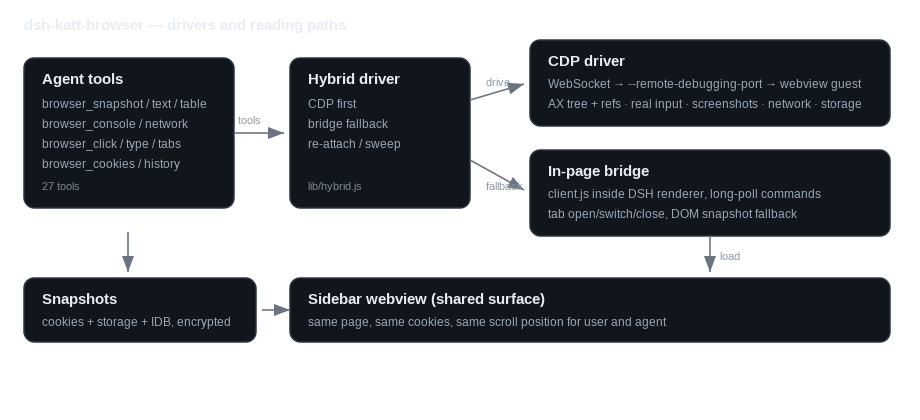
Tools talk to a hybrid driver: it attaches to the sidebar webview guest over the DevTools
protocol (WebSocket to --remote-debugging-port) and falls back to an in-page bridge when CDP
is unavailable. Account snapshots live beside the driver and are encrypted at rest.
Works right after installation: no launch flags, no configuration.
In DSH open Plugins → Discover → Index sources and add:
https://cdn.jsdelivr.net/gh/Kattentions/dsh-katt-browser@main/index.jsonThe source lists two plugins (sidebar browser + mobile bridge); press Install.
Restart DSH.
Ask the agent to open a page. If the right sidebar was never opened, the first action expands it automatically.
Command line equivalent (no git):
dsh plugin --profile desktop add https://cdn.jsdelivr.net/gh/Kattentions/dsh-katt-browser@main/dist/dsh-katt-browser-latest.tgzPick whichever fits your machine. The first two need no git.
1. npm (after npm publish)
dsh plugin --profile desktop add dsh-katt-browser2. Release tarball — no git required
# direct from GitHub Releases
dsh plugin --profile desktop add https://github.com/Kattentions/dsh-katt-browser/releases/download/v0.9.9/dsh-katt-browser-0.9.9.tgz

# jsDelivr mirror (usually faster in mainland China)
dsh plugin --profile desktop add https://cdn.jsdelivr.net/gh/Kattentions/dsh-katt-browser@main/dist/dsh-katt-browser-0.9.9.tgz
3. Download, then install from disk
Unpack the tarball (tar -xzf dsh-katt-browser-0.9.9.tgz), then:
dsh plugin --profile desktop add file:C:\path\to\package4. Discover / plugin market
Add this index under Plugins → Discover → Index sources:
https://cdn.jsdelivr.net/gh/Kattentions/dsh-katt-browser@main/index.json5. GitHub repository (needs git)
dsh plugin --profile desktop add github:Kattentions/dsh-katt-browserhttp://127.0.0.1:<port>/... and opens it in the sidebar browser (the shipped preview is a sandboxed frame without CDP, so the agent cannot drive it).browser_open_file with a path; it starts the server and opens the page in one step.- id: katt-browser
config:
driver: webview # webview (default) | headless (legacy)
cdpPort: 9222 # DevTools port used by the desktop app
idbLimit: 50 # rows per page when snapshotting IndexedDB (500 per DB max)
downloadDir: '' # default folder for browser_download
allowedHosts: [] # non-empty = allow these domains (and subdomains) only
revealPanel: false # true = tool calls may open the sidebar (off by default)
cdpIdleDetachMs: 45000 # detach CDP after this many idle ms (0 = stay attached)
instrument: true # false = skip page instrumentation on heavy sites
homeUrl: https://www.bing.com # first-run page when a session has no history yet
dataDir: "" # root for headless profiles and page memory, defaults to ~/.dsh/katt-browser
restoreLastPage: true # remember each session's page; restore it on new tab / Ctrl+T / restart
suspendOnLeave: true # close an idle session browser on switch-away; restore tabs and scroll on return
backgroundFallback: true # a background session that needs the browser gets its own headless one
showSettings: false # the Browser settings section is hidden; set true to manage cross-session tabs manually
profileRetentionDays: 14 # prune headless session profiles older than this many days
maxHeadlessBrowsers: 3 # concurrent headless instances, LRU-evicted beyond this
## What it gives the agent
**Reading (no screenshots)**
- `browser_snapshot` — accessibility tree with `eN` refs; `detail=compact` for interactive elements only
- `browser_text` — readable page text (title, body, links)
- `browser_table` — tables as headers + rows
- `browser_evaluate` — run JS in the page
- `browser_console` — console logs, uncaught exceptions
- `browser_network` — request history (method/URL/status/MIME/duration), filterable
- `browser_instrument` — worker messages, fetch/XHR/WebSocket traffic, storage writes (canvas games expose state here)
**Interaction**
- `browser_open` / `back` / `forward` / `reload` with `waitFor` / `waitMs` for SPA hydration
- `browser_click` (ref or coordinates), `browser_type`, `browser_press_key`, `browser_scroll`, `browser_hover`, `browser_upload`
- `browser_zoom` — `in` / `out` / `reset` / `set` with a 0.25–5 factor (page zoom, layout reflows)
- `browser_tabs` — list (with session ownership and queue) / switch / new / close / cancel-queued / `open-here` (open another tab's URL in the session you are viewing)
**Accounts and state**
- `browser_cookies` — `list / save / load / clear / clear-site / clear-cache / profiles`
- Snapshots cover cookies + localStorage/sessionStorage + IndexedDB + Cache Storage, and are encrypted at rest (AES-256-GCM, key under `~/.dsh/katt-browser/profile.key`)
- Default is shared login state inside one workspace partition; switch accounts by loading another snapshot
- `browser_serve` — local HTTP server for local pages (`file://` is blocked by the sidebar webview)
- `browser_download` — native downloads are disabled by the shell, so files are fetched in-page and written to disk
- `browser_history`, `browser_probe`, `browser_page_diag` — diagnostics
## Screenshots
| The page the user sees | What the agent reads instead |
|---|---|
|  | `browser_snapshot` returns roles, names and `eN` refs; `browser_text` returns readable text |
A canvas game whose state never touches the DOM: `browser_instrument` reads the worker messages
(score, board, move count) instead of taking a screenshot.

- `browser_zoom` uses the webview's page zoom (the same control as Ctrl+=, layout reflows) and falls back to CDP page scale / CSS zoom when the panel helper is unavailable.
### Performance
- **Idle detach**: 45 s without a browser call detaches CDP (`cdpIdleDetachMs`), reconnecting on
the next one. Chromium stops throttling a page that has a debugger attached, so a long-lived
attachment kept the browser panel rendering at the display refresh rate.
- **Focus emulation is temporary**: enabled for ~4 s around click/type only, instead of always on.
- **Heartbeat**: 8 s instead of 2.5 s, and skipped entirely when the data is unchanged or the
window is hidden.
- **Instrumentation**: previews only JSON bodies up to 256 KiB; `instrument: false` turns the
page hooks off on heavy sites.
### Multi-session and multi-workspace
**A GUI opened from a phone or another browser is a "panel-less client"**: it has no Electron `<webview>`, so it never polls browser commands and never overwrites the desktop browser state. Session selection and composer drafts are per client and stay independent (verified by switching sessions and typing a draft on a simulated phone client while the desktop kept its session and empty draft). The sidebar browser panel is desktop-only by design; use `driver: headless` if you need browsing from a phone.
The right column belongs to **each session separately**: tools only drive the tabs of the
session that invoked them, and never navigate a page another session is showing.
- **Background opens queue up.** When the calling session's sidebar is not visible, the page is queued for that session (valid for 2 hours) and opens when you switch back; `browser_tabs` exposes the queue in its `queued` field.
- **Settings → Browser** lists every session's tabs (title, URL, current session) and queued pages, with close/cancel buttons, plus driver and instance status. A tab with a known URL also gets an "Open here" button that brings that page into the panel of the session you are viewing.
- **Per-session page memory**: closing the tab, pressing Ctrl+T or restarting the app returns that session to its last page instead of the home page. Turn off with `restoreLastPage: false`.
- **headless driver**: one browser and profile per session (`dataDir/sessions/<sessionId>`); cookies, history and page state are never shared, and `maxHeadlessBrowsers` caps concurrency.
- **Panel visibility**: tool calls never open or switch the sidebar on their own. Reading (snapshot, text, console, network, cookies) and navigation work with the panel collapsed; real mouse/keyboard input needs it open and returns a `panelHidden` hint instead of failing silently. Set `revealPanel: true` if you *want* tools to reveal it.
## Known limits
- **headless driver** supports core browsing (open, snapshot, text, tables, evaluate, click/type, wait, zoom) with one isolated instance per session; console logs, network history, cookie snapshots, in-page downloads, uploads and multi-tab management need the webview driver and return an explicit "not supported" result instead of throwing.
- `file://` cannot be opened; use `browser_serve`.
- Native downloads are blocked by the shell; use `browser_download`.
- Service Worker registration itself is not restorable from a snapshot (Cache Storage content is).
- Sites that require a human (login walls, CAPTCHA, rate limits) surface a `barriers` hint; the user completes that step in the sidebar.
## Development check
`npm run check` compares every `browser.xxx()` call the tools make against the methods each driver implements (webview and headless) and fails on any gap.
The same command runs a session-boundary check: client code that iterates all tabs or webviews and then closes, activates or navigates must show session scoping (`ownerSession` / `callerSession` / `visibleSession`); otherwise it fails. Hidden sessions mount no webview by design, so without this rule their tabs look dead and get swept. The headless driver stayed broken for weeks precisely because nobody had this: it implemented 25 methods while the tools called 39.
## License
MIT
## Usage walkthrough
```text
# 1. read the page as structure, interact by ref
browser_open url=https://quotes.toscrape.com/
browser_snapshot detail=compact
[e1] link "Quotes to Scrape" [e2] link "Login" [e3] link "(about)" ...
# 2. click a ref (real mouse event), then re-read
browser_click ref=43 -> https://quotes.toscrape.com/page/2/
browser_text maxChars=400 -> title, body, links
# 3. debug a page that fails to render
browser_console level=error -> uncaught exceptions, console.error
browser_network filter=api -> GET /api/... 200 application/json 120ms
# 4. keep and switch accounts
browser_cookies save name=work -> 17 cookies, 10 local keys, 1 IndexedDB, encrypted
browser_cookies load name=work -> storageRestored: true
## Discover / plugin market
DSH has no central marketplace; a market is a JSON index you add under
**Plugins → Discover → Index sources**. This repo publishes one (format 1):
- `https://cdn.jsdelivr.net/gh/Kattentions/dsh-katt-browser@main/index.json` (CDN, no redirects)
- `https://raw.githubusercontent.com/Kattentions/dsh-katt-browser/main/index.json` (fallback)
See [MARKET.md](MARKET.md). Direct install works without any index:
```sh
dsh plugin --profile desktop add github:Kattentions/dsh-katt-browserCLASSIFICATION EVIDENCE
系统优先读取 GitHub Topics,再与站内分类词典和词根规则比对。当前命中: ai-agent。
alchaincyf
你想蒸馏的下一个员工,何必是同事。蒸馏任何人的思维方式——心智模型、决策启发式、表达DNA。Distill how anyone thinks.

freestylefly
Prompt as Code | GPT Image 2 / 2.5 提示词与案例库,530+ 个案例、20+ 套工业级模板与可复用 Skills,新增 2.5 同提示词对比专区,附完整提示词与生成记录,持续更新。

titanwings
Distilly — Distill how they think into reusable Skills for any Agent or Bot. Formerly Colleague Skill(原同事 Skill).