

模型与 MCP
待识别

rea
morluto
Reverse engineer anything with agents, from app behavior down to native binaries.
PROJECT TOPICS
INSTALL REFERENCE
dsh plugin --profile web add github:KamChiHei/dsh-deepseek-usage-monitor
该命令指向仓库当前默认分支;尚无绑定当前 commit 的完整验证结果。
PROJECT README
English | 简体中文



A DeepSeek Harness (dsh) plugin: records token usage for every model call on the Host side, polls your DeepSeek account balance on a timer, and shows a draggable, resizable live status card in the bottom-right corner of DSH Web.
The plugin has two halves reading the same data:
index.js): listens to harness events for accounting, queries the balance on a timer, and serves the state endpoint;client.js, loaded via the dsh.client declaration in package.json): polls the state endpoint and renders the bottom-right "Usage" card. The API key never leaves the Host process and is never sent to the browser.The "Usage" card in the bottom-right corner of DSH Web after installation (shown expanded, with total tokens, cache hit rate, balance, and model / provider groups):
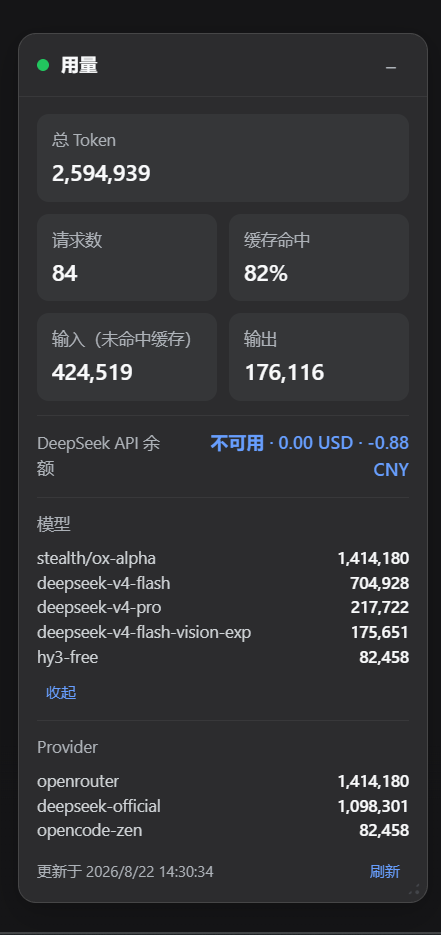
session/event: assistant/message TokenUsage is the source of truth; usage recorded by assistant/chunk (chunk.type === "usage") is the fallback for failed requests, deduplicated by the session:turn:step key so a step is never counted twice; step/end and session/disposed flush chunk usage that never received a message confirmation.inputTokens / outputTokens / cacheReadTokens / cacheWriteTokens, and raw DeepSeek response fields prompt_tokens / prompt_cache_hit_tokens / prompt_cache_miss_tokens / completion_tokens ... (converted automatically; miss = prompt − hit when omitted).totalTokens = input + output + cache read + cache write; reasoning tokens are already included in output — tracked separately but never double-counted.sessionLimit entries (sessionCount is the number of retained sessions). Routing info comes from request/header / request/context events; missing names fall into the unknown group.~/.deepseek-harness/deepseek-usage.json) and keep accumulating across restarts. Only numbers, group names, and timestamps are stored — never API keys, prompts, or model replies. Delete the file and restart DSH to reset the stats.GET /user/balance endpoint on a timer (default 60s), recording is_available and balance_infos amounts; timeouts (default 10s) and failures are recorded with the reason.GET /plugins/deepseek-usage-monitor/state: the endpoint used by the web card; add ?refresh=1 to force a balance refresh; HEAD is supported. See "State endpoint response" below for the shape.
After installation a "Usage" card appears in the bottom-right corner of DSH Web and polls state every 5 seconds (polling pauses while the tab is hidden and refreshes once immediately when it becomes visible again):
?refresh=1).·) / No balance / Unavailable / Not queried / Query failed (hover for the reason).dsh-deepseek-usage-monitor:placement) across page reloads.--dsw-* for backgrounds, borders, text levels, and state colors; --ds-* for motion) with fallbacks, adapting to dark/light themes automatically; responsive width on small screens (≤560px).zh-* locales, English otherwise.Node.js ≥ 22.19
pnpm (dsh plugin essentially forwards pnpm inside the profile directory)
No global dsh install needed: every dsh command can run via pnpm dlx. This document uses:
pnpm dlx @deepseek-ai/dsh@0.1.1-rc.2 <command>Replace 0.1.1-rc.2 with the dsh version you actually use (the package.json scripts are written the same way).
Harness configuration and profiles live under ~/.dsh (C:\Users\<you>\.dsh on Windows); the web profile is ~/.dsh/profiles/web. dsh plugin forwards pnpm in that directory and automatically adds dependencies that declare dsh.bundle to the profile's bundle layer — no YAML editing needed.
No cloning and no manual dependency installs — run from any directory:
pnpm dlx @deepseek-ai/dsh@0.1.1-rc.2 plugin --profile web add dsh-deepseek-usage-monitor@deepseek-ai/schemastery etc.) are installed into the profile's own node_modules, and the plugin joins dsh.profile.bundles automatically;plugin --profile web add dsh-deepseek-usage-monitor@0.1.0.The install source points straight at the GitHub repository, so you always get the latest main-branch code:
pnpm dlx @deepseek-ai/dsh@0.1.1-rc.2 plugin --profile web add github:KamChiHei/dsh-usage-monitor~/.dsh/profiles/web/package.json gains "dsh-deepseek-usage-monitor": "git+https://github.com/KamChiHei/dsh-usage-monitor.git" and the plugin joins dsh.profile.bundles;github:KamChiHei/dsh-usage-monitor#v0.1.0.Run two steps inside the plugin directory:
cd C:\path\to\dsh-usage-monitor

# 1. Install the plugin's own dependencies (required first, see below)
pnpm install

# 2. Register the plugin into the web profile
pnpm dlx @deepseek-ai/dsh@0.1.1-rc.2 plugin --profile web add .
Or use the bundled one-liner (run inside the plugin directory, same effect as step 2 above):
pnpm run install:webWhy pnpm install first: pnpm registers the local directory as a link: dependency (a symlink) and does not install @deepseek-ai/schemastery and other dependencies for the plugin directory; Node resolves modules from the plugin's real path without going through the profile's node_modules, so the plugin directory needs its own node_modules.
Once installed:
~/.dsh/profiles/web/package.json gains "dsh-deepseek-usage-monitor": "link:C:/path/to/dsh-usage-monitor" and the plugin joins dsh.profile.bundles;link: is a live link, source changes take effect after restarting DSH — no reinstall needed.Launch (as usual):
pnpm dlx @deepseek-ai/dsh@0.1.1-rc.2 webThe Host startup log should show [deepseek-usage-monitor] loaded; web: /plugins/deepseek-usage-monitor/state, and the "Usage" card appears in the bottom-right corner.
Check that the plugin layer entered the composed config tree:
pnpm dlx @deepseek-ai/dsh@0.1.1-rc.2 --profile web --dump-configThe output should contain a # == dsh-deepseek-usage-monitor layer.
For other profiles, replace web with the profile name.
pnpm creates absolute-path symlinks under node_modules/@deepseek-ai/. Move or rename the plugin directory and they all dangle — dsh fails at startup with Cannot find package '@deepseek-ai/schemastery', and a plain pnpm install (Already up to date) won't fix it. In that case, inside the plugin directory run:
Remove-Item -Recurse -Force node_modules
pnpm installpnpm run uninstall:web
# or
pnpm dlx @deepseek-ai/dsh@0.1.1-rc.2 plugin --profile web remove dsh-deepseek-usage-monitorThe official tutorial's --patch flow requires an absolute path to the plugin entry. This repository ships the template cordis.local.patch.yml with a hardcoded absolute path to index.js — after cloning or moving the repo, change it to your local path first.
Run from any directory (usually the plugin directory itself):
pnpm dlx @deepseek-ai/dsh@0.1.1-rc.2 web --patch "C:\path\to\dsh-usage-monitor\cordis.local.patch.yml"Or use the one-liner inside the plugin directory (relative paths resolve against the current directory):
pnpm run dev:web--patch loads the source entry and likewise requires a prior pnpm install in the plugin directory.
Balance queries need a DeepSeek API key, but usually no extra configuration is required: the plugin reuses the key already configured in dsh — the credential store written by the web Models page (~/.dsh/.credentials.yaml). If you can chat with DeepSeek models in dsh, balance queries just work.
The key resolves in this order, stopping at the first hit:
apiKey (see the table below);DEEPSEEK_API_KEY environment variable in the launching terminal ($env:DEEPSEEK_API_KEY = "sk-..." before starting dsh web; both of these are fixed at startup);ctx.get("credentials"), re-resolved on every refresh), layering: process environment → Models-page credential store → project .env → ~/.dsh/.env.A key added on the Models page after startup takes effect on the next balance refresh (interval balanceRefreshMs) without a restart; changing the first two (config and launch-time env) requires a restart.
Overrides go in the profile's cordis.patch.yml (~/.dsh/profiles/web/cordis.patch.yml). DSH patches replace whole lines, so keep name when overriding:
- replace:
    - id: deepseek-usage-monitor
      name: dsh-deepseek-usage-monitor
      config:
        balanceRefreshMs: 60000
        requestTimeoutMs: 10000
        recentLimit: 200
Options:
| Option | Default | Description |
|---|---|---|
apiKey |
"" (empty) |
Explicit DeepSeek API key; takes precedence over the environment variable and the dsh credential store; leave empty to reuse the key configured in dsh |
baseUrl |
https://api.deepseek.com |
DeepSeek API base URL (trailing slashes stripped) |
storePath |
~/.deepseek-harness/deepseek-usage.json |
Stats file path (~ expansion supported) |
balanceRefreshMs |
60000 |
Balance refresh interval in ms (clamped to ≥ 5000) |
requestTimeoutMs |
10000 |
Balance request timeout in ms (clamped to ≥ 1000) |
recentLimit |
100 |
Recent calls retained and returned by the state endpoint (≥ 1) |
sessionLimit |
50 |
Recent sessions retained by last-request time (≥ 1) |
After installing and restarting DSH Web, the "Usage" card in the bottom-right corner works automatically — no conversation needed; see "DSH Web status card" above for the interactions. Click "Refresh" to force a balance refresh immediately (equivalent to ?refresh=1).
The plugin listens to session/event in the background: assistant/chunk usage is the fallback source for failed requests; successful requests are merged with assistant/message.usage into a single record, avoiding double counting. Reasoning tokens are already included in output tokens and never added twice.
GET /plugins/deepseek-usage-monitor/state returns:
{
  "generatedAt": "2026-08-22T00:00:00.000Z",
  "totals": {
    "requests": 15,
    "inputTokens": 21000,
    "outputTokens": 8000,
    "cacheReadTokens": 15000,
    "cacheWriteTokens": 1200,
    "reasoningTokens": 4000,
    "totalTokens": 45200,
    "lastRequestAt": "2026-08-22T00:00:00.000Z"
  },
  "sessionCount": 2,
  "models": [
    { "key": "deepseek-chat", "totals": { "requests": 12, "totalTokens": 45678 } },
    { "key": "deepseek-reasoner", "totals": { "requests": 3, "totalTokens": 12345 } }
  ],
  "providers": [
    { "key": "deepseek", "totals": { "requests": 15, "totalTokens": 58023 } }
  ],
  "balance": {
    "checkedAt": "2026-08-22T00:00:00.000Z",
    "isAvailable": true,
    "balanceInfos": [{ "currency": "CNY", "total_balance": "110.00" }]
  },
  "recent": [{ "timestamp": "…", "sessionId": "…", "turn": 1, "step": 1, "provider": "deepseek", "model": "deepseek-chat", "usage": { "…": "…" } }]
}
Notes:
models / providers are sorted by total tokens descending (name order breaks ties); recent is newest-first with at most recentLimit entries; sessionCount is the number of retained recent sessions (capped at sessionLimit);error field inside balance (with the reason) and sets isAvailable to false;unknown; store files from older versions without group data start from empty groups — no migration needed.No real API key needed. Pure-function tests cover usage normalization, reasoning deduplication, group keys, group accumulation, sorting, session pruning, and store-path expansion; integration tests cover UsageLedger accounting dedup, failed-request fallback, persistence round-trip, legacy store migration, write-failure recovery, and balance refresh (keys are stubbed):
pnpm testSyntax check:
node --check index.jsThe balance shape follows DeepSeek's official is_available / balance_infos response; token shapes follow the harness TokenUsage spec and DeepSeek's prompt-cache fields.
| File | Purpose |
|---|---|
index.js |
Host entry: event accounting, balance refresh, and the state endpoint |
client.js |
Web entry: bottom-right status card UI and polling |
usage-utils.mjs |
Pure functions: usage normalization, accumulation, grouping, sorting, session pruning, and store-path expansion (independently testable) |
cordis.patch.yml |
Insertion entry declared via dsh.bundle when installing into a profile |
cordis.local.patch.yml |
--patch source-debugging template (contains a hardcoded absolute path — edit after cloning) |
tests/usage-utils.test.mjs |
Pure-function tests (node --test) |
tests/usage-ledger.test.mjs |
UsageLedger integration tests: accounting dedup, persistence, balance refresh (node --test, no real key needed) |
CLASSIFICATION EVIDENCE
系统优先读取 GitHub Topics,再与站内分类词典和词根规则比对。当前命中: llm、deepseek、deepseek-api、deepseek-harness。
morluto
Reverse engineer anything with agents, from app behavior down to native binaries.

deepseek-ai
DeepSeek Harness: Everything is a Plugin.

nexu-io
The 1st Collaborative AI Design Agent Workspace. Local-first and open source. Create motion, prototypes, websites, apps, dashboards, presentations, images, and videos with your team and AI agents. Share work, exchange feedback, and iterate together in one workspace.