部署运维
插件

TokenLedger
zh667
Relay-site attributed token usage for DeepSeek Harness — zero config, no credentials

KIDLi1412/dsh-token-heatmap
DSH web plugin: GitHub-style daily token-usage heatmap on the new-session screen with a selectable calendar-year view, green/blue color schemes and a display switch, plus today / this-month / all-time totals.
PROJECT TOPICS
INSTALL REFERENCE
dsh plugin --profile web add github:KIDLi1412/dsh-token-heatmap
该命令指向仓库当前默认分支;尚无绑定当前 commit 的完整验证结果。
PROJECT README
DSH Web GUI 插件:在新会话(hero)屏幕的输入框下方显示一个 GitHub 风格的 token 用量热力图 —— 当前自然年(1月–12月)每天的 token 用量,颜色深浅表示用量多少;同一行展示今日 / 本月 / 累计 token 用量。
A DeepSeek Harness web plugin: a GitHub-style daily token-usage heatmap of the current calendar year (Jan–Dec) rendered below the composer input card on the new-session screen only, with today / this-month / all-time totals on the same line.
新会话屏幕输入框正下方出现一张统计卡(只在新会话显示;已对话的会话不显示):
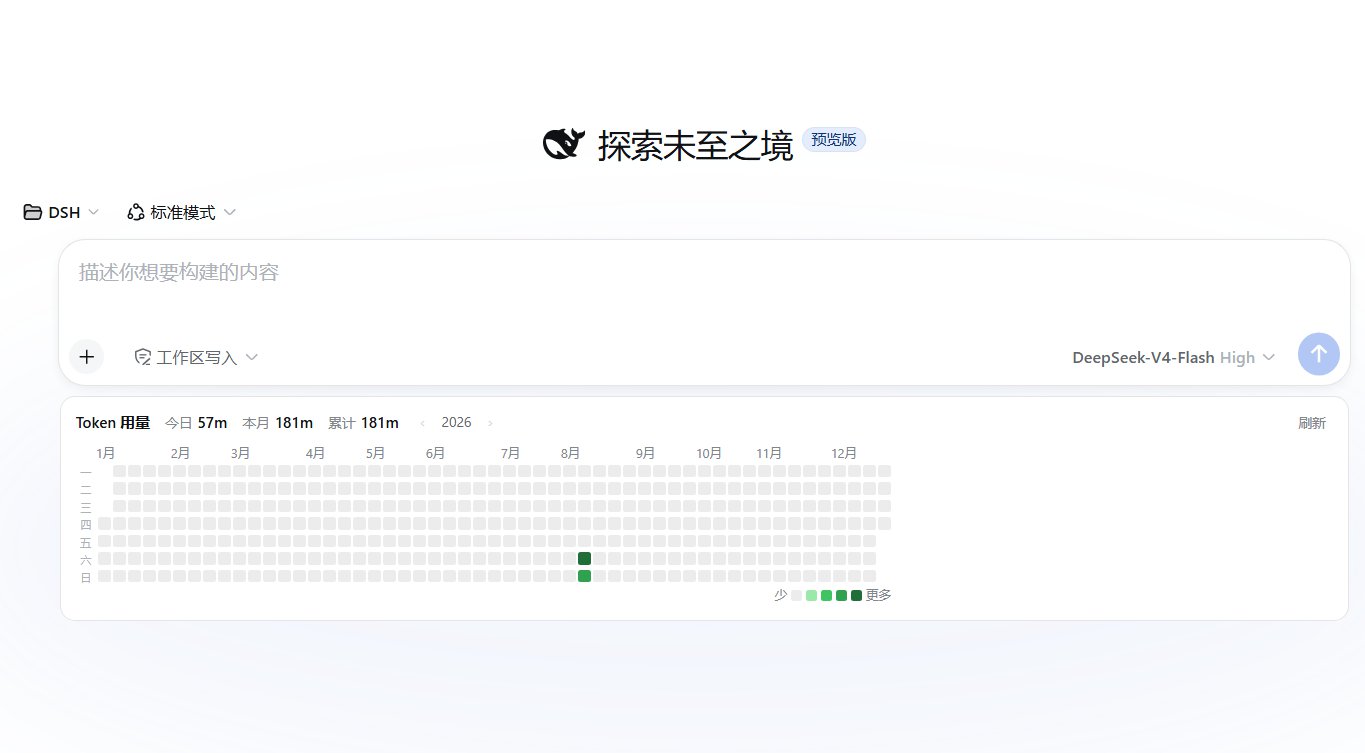
‹ 年份 › 选择器在统计行右侧,最多到当前年),列为周(周一起),行为星期(左侧标注一~日全部 7 天);顶部月份标签按列跨度标注(左侧与格线对齐),今日之后的日期显示为空格。<DSH_HOME>/storages/token-heatmap-config.json。需要 web profile(@deepseek-ai/dsh >= 0.1.0-rc.6)与 pnpm。
从 npm 安装:
dsh plugin --profile web add @kidli1412/dsh-token-heatmap从 GitHub 安装:
dsh plugin --profile web add github:KIDLi1412/dsh-token-heatmap本地开发(手动,本地链接):
dsh plugin --profile web add "link:path/to/dsh-token-heatmap"安装完成后重启正在运行的 dsh web,并在浏览器中硬刷新(Ctrl+Shift+R)。侧边栏无新增入口——统计卡直接出现在新会话输入框下方。卸载:
dsh plugin --profile web remove @kidli1412/dsh-token-heatmaplib/index.js + lib/usage.js + lib/config.js):作为 profile bundle 挂载,增量折叠全部会话事件日志中的 token 用量样本(assistant/chunk 的 usage 与 assistant/message 的 usage;同 (turn, step) 的重复样本按"替换"语义处理,归属后一天),按天、按模型聚合,缓存到 <DSH_HOME>/storages/token-heatmap-cache.json,并通过回环受限端点 GET /api/token-heatmap/usage 提供;显示配置(开关 + 配色)经 GET/POST /api/token-heatmap/config 读写,持久化到 <DSH_HOME>/storages/token-heatmap-config.json。lib/client.js):手写 __ModuleLoader__ bundle,注册进会话 conversation.input.dock 列表插槽,仅当 session.composerPhase === "blank"(新会话 hero 屏)且配置开关开启时渲染。框架真正的"卡片下方"插槽 conversation.composer.dock 在 hero 屏被 !hero 门控禁用,因此本插件利用 input.dock 容器(flex 列)的 CSS order 把自己排到输入卡片之后。配置卡注册进官方 settings.plugin.item 插槽(设置 → 插件 → 插件配置页签);官方 Host 只向 Web 客户端暴露白名单内的设置命名空间,因此本插件不依赖 settingsScope,而是直接读写自己的回环配置端点。dsh-token-meter 的 tokenUsage 投影一致(参考插件 dsh-usage-stats,MIT)。input.dock 需要会话上下文)统计卡不渲染。dsh web 启动加载,因此新增/更新插件后需要重启。MIT。聚合与回环端点实现参考了 dsh-usage-stats(MIT © Ychris12138)。
CLASSIFICATION EVIDENCE
系统优先读取 GitHub Topics,再与站内分类词典和词根规则比对。当前命中: token-usage。
zh667
Relay-site attributed token usage for DeepSeek Harness — zero config, no credentials

Han-1413141
DeepSeek Harness Session Cost Statistics & OpenCode Go Quota Display, DS Official Balance & Custom Provider Balance Lookup, Codex-like Token Heatmap Plugin: Session/Daily Cost, Budget, History, Peak/off-peak pricing, Price Sync, Multi-vendor pricing (90+ catalog), Coding Plan quota queries (6 vendors), Balance progress bar

wink-run
Token Bank — the local LLM gateway that sits between your AI agents and every provider. Know where tokens go · Spend less with smart routing to Ollama, Groq, GitHub Models · Earn by sharing idle quota on a community P2P network. One-click onboarding for Cursor, Claude Code, Codex CLI, Gemini CLI — no agent changes. Full trace, seamless model swap