
Agent 与会话
插件

nuwa-skill
alchaincyf
你想蒸馏的下一个员工,何必是同事。蒸馏任何人的思维方式——心智模型、决策启发式、表达DNA。Distill how anyone thinks.
PROJECT TOPICS
INSTALL REFERENCE
dsh plugin --profile web add github:JupiterWalker/dsh-section
该命令指向仓库当前默认分支;尚无绑定当前 commit 的完整验证结果。
PROJECT README
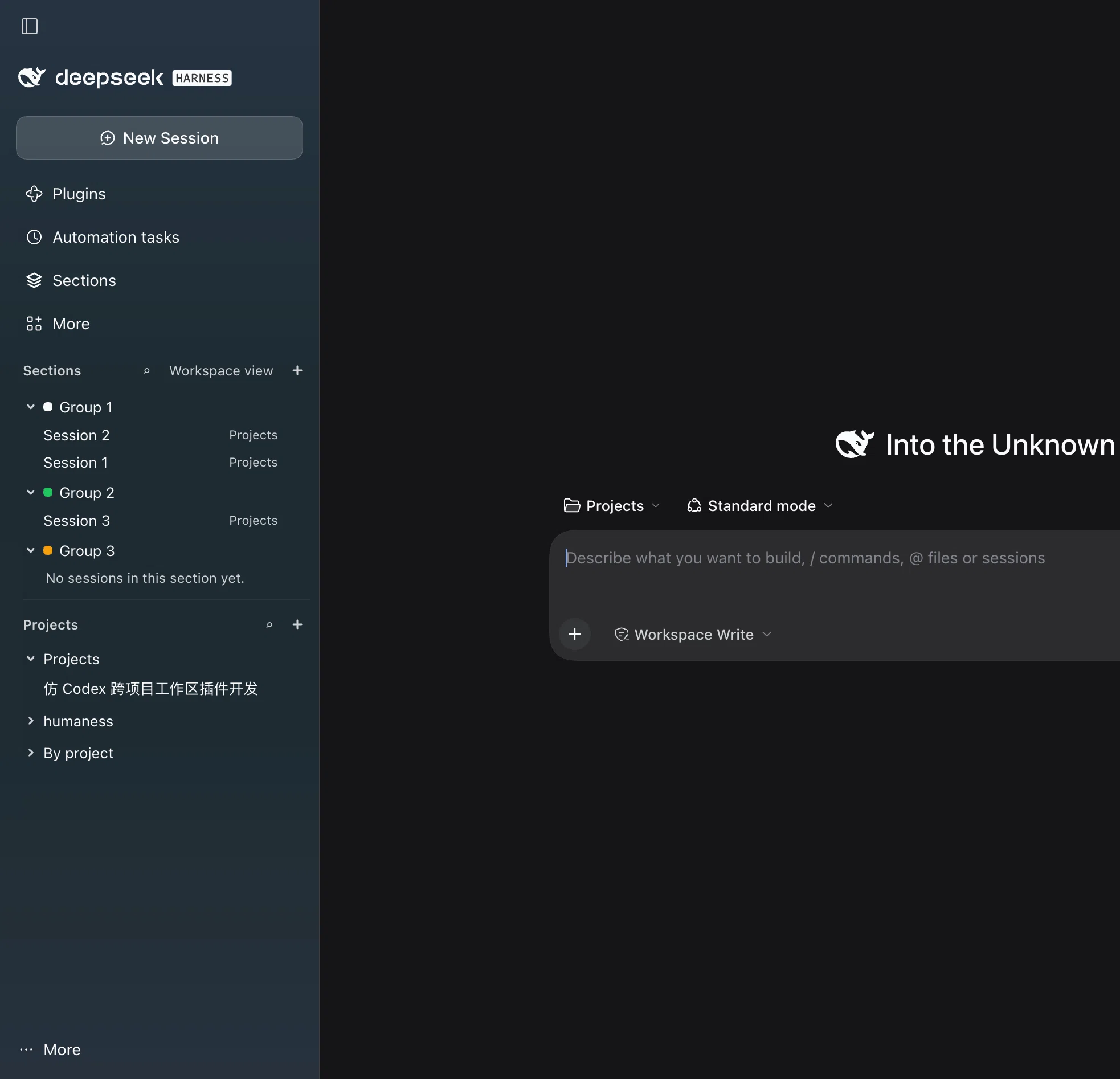
给 DeepSeek Harness(DSH)的 Web UI 加一层「分组」:把散落在不同项目(workspace)里的会话收进同一个分组,集中管理一条跨项目的工作线(类似 Codex 的 section)。
DSH 默认按项目组织会话,但一段工作常常横跨多个仓库:需求在 A、后端在 B、数据在 C。dsh-section 让你按「事情」而不是按「目录」来看会话,并且直接在左侧边栏里操作。
⌕ 与新增 +。同一棵树上还能看到按项目分好的未分组会话。⋯ → 添加会话 / 重命名 / 删除(删除需二次确认)。⋯ → 加入分组(已在分组里则是移出分组)/ 重命名 / 归档。⋯ → 添加会话 / 整个项目加入分组 / 归档项目(= 从侧栏移除该项目,不会删除磁盘文件,需二次确认)。⌕ 按项目名或会话标题筛选,+ 选择目录新增项目。⋯。打开会话即记为已读,首次加载会把当时所有会话当作已读基线。用 DSH 自带的插件管理安装本目录(绝对路径),随后刷新 Web 页面:
# 在 DSH 会话里执行
plugin_manager action=install_bundle target=/绝对路径/dsh-section
也可以手动把包加入 profile 的 bundles。因为是以 link 方式安装,改完 client.js 刷新页面即可生效,无需重新安装。
dsh-section.state.v1 下(纯前端 UI 数据,不写入门户会话事件、不上传);其中也存了每个会话的「已读到哪个时间」的标记,用于行尾状态点。「显示更多」的展开进度只存在内存里,刷新即回到第一页。sidebar.workspaces 席位实现(priority: -1),因此宿主侧栏升级后可能需要跟随适配。node --check client.js # 语法检查
node tools/smoke.mjs # 冒烟测试:假 DOM + 假 React,渲染每个注册项并断言交互
node tools/audit.mjs # 审计样式键与词典键:悬空/未用/en-zh 是否对齐npm pack # 产出 local-dsh-section-<版本>.tgz
cp dist/local-dsh-section-<版本>.tgz dist/dsh-section.tgz
gh release create v<版本> dist/local-dsh-section-<版本>.tgz dist/dsh-section.tgzdist/dsh-section.tgz 这个名字是刻意的:插件市场条目指向 releases/latest/download/dsh-section.tgz,所以每次发版都要附上这个同名资产,市场会自动跟到最新版,不必再提市场 PR。
目录结构:
client.js          浏览器侧插件(全部 UI 与交互)
index.js           宿主侧入口(本插件无宿主逻辑)
cordis.patch.yml   插件组成(insert @local/dsh-section)
icon.svg           插件图标
locale/en.json     设置页展示用的英文标题与说明
locale/zh.json     设置页展示用的中文标题与说明
screenshots.json   插件市场展示的截图清单
assets/            README 与插件市场用的截图、图标
tools/smoke.mjs    冒烟测试(不随包发布)
tools/audit.mjs 静态审计(不随包发布)未声明许可证;如需复用请先联系作者。
A grouping layer for the DeepSeek Harness (DSH) Web UI: collect sessions that live in different projects (workspaces) into one named section, so a single cross-project workstream can be managed in one place (similar to Codex sections).
DSH organizes sessions by project, but real work usually spans several repositories — spec in A, backend in B, data in C. dsh-section lets you browse by workstream instead of by directory, and operate on it directly from the left sidebar.
⋯ in a section header → add session / rename / delete (delete asks for confirmation first).⋯ at the end of a session row → group (or ungroup) / rename / archive.⋯ in a project header → new session / move the whole project into a section / archive the project (removes it from the sidebar, does not touch files on disk, asks for confirmation).⌕ filters by project name or session title; + picks a directory and registers a new project.⋯ while you hover the row. Opening a session marks it read; the first load baselines every session as read.Install this directory (absolute path) with DSH's plugin manager, then reload the Web UI:
# inside a DSH session
plugin_manager action=install_bundle target=/absolute/path/dsh-section
You can also add the package to the profile bundles manually. It is installed as a link, so editing client.js and reloading the page is enough — no reinstall needed.
dsh-section.state.v1 (pure front-end UI data — no session events are appended, nothing is uploaded). How far a group has been unfolded by Show more is in-memory only, so a reload starts at the first page.sidebar.workspaces seat (priority: -1), so a future host sidebar change may need a follow-up adaptation.node --check client.js # syntax check
node tools/smoke.mjs # smoke tests: fake DOM + fake React, renders every entry and asserts interactions
node tools/audit.mjs # audits style and dictionary keys for missing, unused and en/zh driftnpm pack # writes local-dsh-section-<version>.tgz
cp dist/local-dsh-section-<version>.tgz dist/dsh-section.tgz
gh release create v<version> dist/local-dsh-section-<version>.tgz dist/dsh-section.tgzThe dist/dsh-section.tgz name is deliberate: the storefront entry points at releases/latest/download/dsh-section.tgz, so every release must attach that same-named asset — the marketplace then follows the newest release and no marketplace PR is needed.
Layout:
client.js          browser-side plugin (all UI and behaviour)
index.js           host-side entry (no host logic in this plugin)
cordis.patch.yml   composition patch (insert @local/dsh-section)
icon.svg           plugin icon
locale/en.json     English title/description shown on the Plugins page
locale/zh.json     Chinese title/description shown on the Plugins page
screenshots.json   screenshot list for the plugin storefront
assets/            screenshots and storefront icon used by the README
tools/smoke.mjs    smoke tests (not published)
tools/audit.mjs static audit (not published)No license declared; please contact the author before reuse.
CLASSIFICATION EVIDENCE
系统优先读取 GitHub Topics,再与站内分类词典和词根规则比对。当前命中: session、会话。
alchaincyf
你想蒸馏的下一个员工,何必是同事。蒸馏任何人的思维方式——心智模型、决策启发式、表达DNA。Distill how anyone thinks.

freestylefly
Prompt as Code | GPT Image 2 / 2.5 提示词与案例库,530+ 个案例、20+ 套工业级模板与可复用 Skills,新增 2.5 同提示词对比专区,附完整提示词与生成记录,持续更新。

titanwings
Distilly — Distill how they think into reusable Skills for any Agent or Bot. Formerly Colleague Skill(原同事 Skill).