<img src="./assets/img/Hero.png" width="100%"
alt="DeepSeek Harness hero 横幅:对话自动分层蒸馏成记忆,模型每步前自动召回注入——右侧对话气泡逐层溶解为三层渐亮光带,流入带发光圆球与渐变轨道的玻璃胶囊(下有 日常·工作·智能·关闭 四档刻度),光丝回流示意召回注入">
dsh-layered-memory
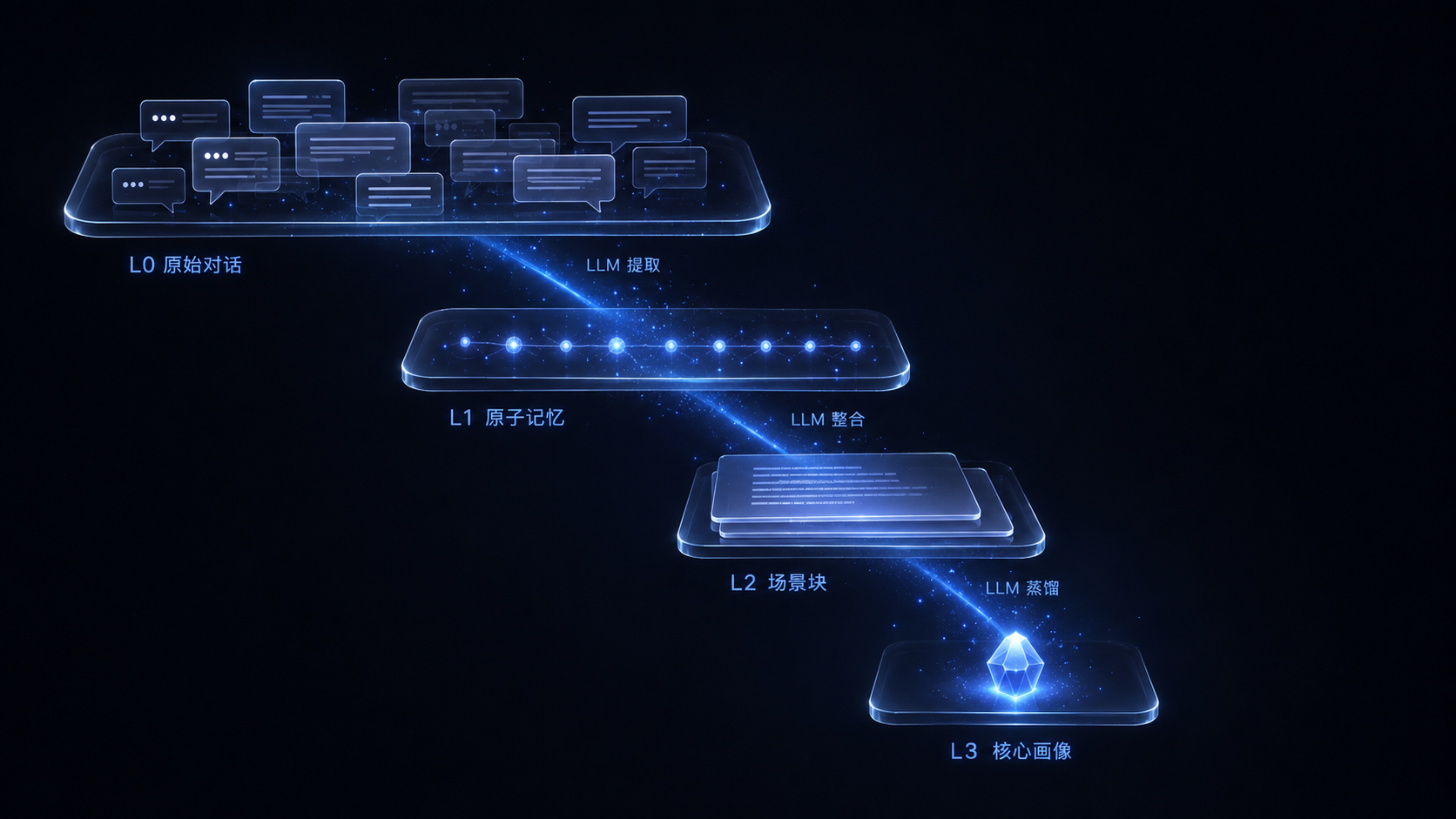
DeepSeek Harness 的分层蒸馏记忆插件:对话在后台自动完成 L0 捕获 → L1 原子记忆 → L2 场景整合 → L3 画像蒸馏,模型每一步前自动把相关记忆注入上下文。
English · 最新发行版 · 反馈问题


快速开始
需要 Node ≥ 22.16 与 DeepSeek Harness 0.1.2-alpha.1 ~ 0.1.2-rc.1(0.10.0 起
支持到 0.1.2-rc.1,npm latest 已指向该版本;旧版插件请看
历史版本)。
两种调用方式任选(npx 前缀可替换下面任何 dsh 命令):
# 方式一:npx 直接跑官方 CLI(无需预装 dsh)
npx -y @deepseek-ai/dsh plugin --profile web add dsh-layered-memory

# 方式二:已装 dsh CLI(升级:npm i -g @deepseek-ai/dsh 并重启;
# dsh 是 pnpm 转发器,未装 pnpm 时先 npm i -g pnpm)
dsh plugin --profile web add dsh-layered-memory

# 包源备选:GitHub 仓库 / 本地路径(开发调试,link: 指向仓库,pnpm run build + 重启 dsh 即生效)
dsh plugin --profile web add https://github.com/JunNanLYS/dsh-layered-memory
dsh plugin --profile web add /path/to/dsh-layered-memory
让 Agent 安装(推荐)
如果当前 Agent 可以执行终端命令,把下面这段话完整发送给它:
请为 DeepSeek Harness 的 web Profile 安装 dsh-layered-memory 插件。

只执行下面两条命令,不要修改其他 Profile:
dsh plugin --profile web add dsh-layered-memory
dsh --profile web --dump-config

确认输出中出现 dsh-layered-memory 后告诉我安装结果。
不要替我关闭或重启正在运行的 DSH;安装完成后提醒我手动重启 DSH Web Host。
Agent 应当返回安装结果,并明确告诉你配置中是否已经出现 dsh-layered-memory。
本包声明了 dsh.bundle 组合包层(cordis.patch.yml),安装后会自动挂载插件行——
不需要再手改 $DSH_HOME/profiles/web/cordis.patch.yml。然后重启 DeepSeek Harness,
验证:~/.dsh/memory/ 下出现 conversations/ records/ scenes/ 目录和 memory.db
即插件 apply 成功;设置页出现"记忆"页面(记忆工作台五区)、输入栏出现记忆芯片
(记忆 · 智能)即 client 半边就绪。
卸载:dsh plugin --profile web remove dsh-layered-memory + 重启。数据保留在
~/.dsh/memory/,不需要时手动删除整个目录即可。
终端形态(TUI / headless)
除 web 外,同一插件可直接装进终端形态宿主:
# dsh-tui(Claude Code 风格 TUI 前门,详见 github.com/ccch1mneyyy/dsh-TUI · 官网 https://dshtui.com)
dsh plugin --profile dsh-tui add @deepseek-harness-tui/dsh-tui   # 首次:建 profile 并装 TUI 宿主
dsh plugin --profile dsh-tui add dsh-layered-memory
dsh --profile dsh-tui
/memory <auto|chat|work|off> 切换当前会话档位,无参数时弹出档位选择面板;- 状态行:提示框上方常驻
记忆:智能 等当前档位读数;
/settings 设置区块:总开关、捕获、蒸馏、召回、蒸馏模型路由与输入预算可直接编辑
(与 web 设置面板同一存储;复杂路由链仍走 web / YAML);- headless(
dsh --profile headless "一次性任务"):捕获与蒸馏照常工作,无界面元素。
web 与终端形态共享 ~/.dsh/memory/ 同一份记忆。
从源码开发
git clone https://github.com/JunNanLYS/dsh-layered-memory
cd dsh-layered-memory
pnpm install && pnpm run build
dsh plugin --profile web add .        # link: 安装,改代码后 pnpm run build + 重启 dsh 即生效
pnpm run smoke                        # 冒烟测试(先重编:见下方命令)
npx tsc src/smoke.ts --outDir dist-smoke --module nodenext --moduleResolution nodenext --target es2022 --strict --skipLibCheck --esModuleInterop
依赖管理用 pnpm(与 dsh 官方安装通道一致,版本由 packageManager 字段钉死)。
运行时数据流
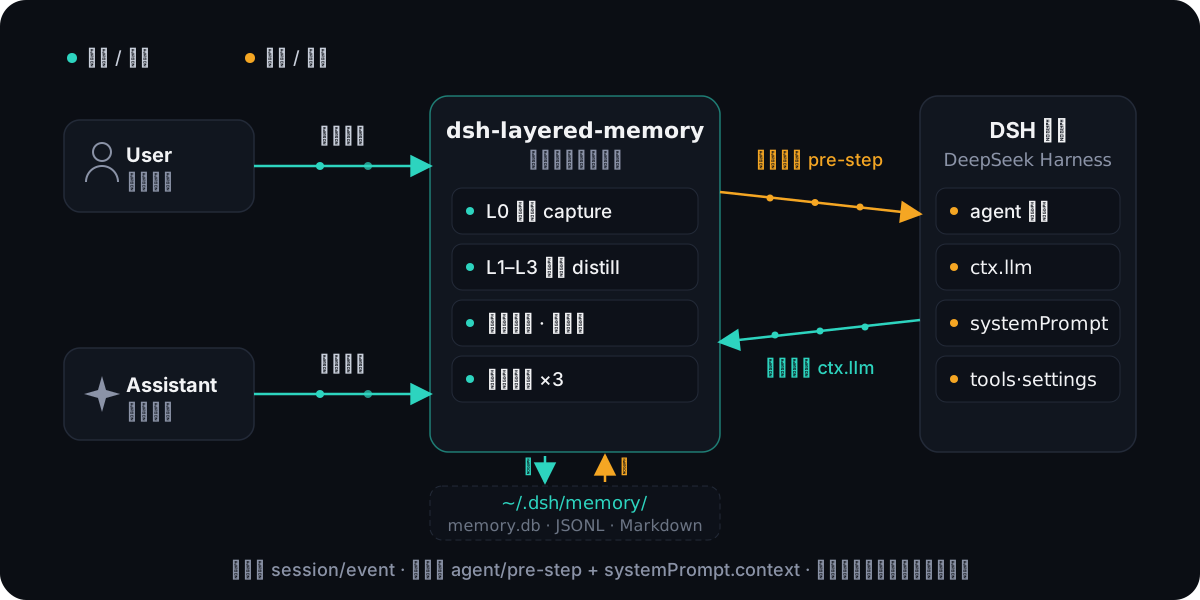
插件挂在 dsh 原生事件上(session/event 捕获、agent/pre-step 注入),蒸馏调用复用宿主 ctx.llm。召回以消息侧注入呈现:相关记忆作为一条合成消息排在用户新消息之前,会话流里显示为"上下文注入 · memory"行(点开看命中内容)——用户能直接看到"记忆生效了";注入内容有长度预算与时间预算,超限截断/超时跳过,绝不拖慢对话。同会话去重:已注入过的记忆不再重复注入(模型上下文里已经有了,追问同类问题时省 token);上下文被 /compact 压缩或清空时自动重置,记忆可重新注入;被更新的记忆(内容变化换新 id)不受旧压制。时效加权:召回排序按 相关度 × max(0.5, 0.5^(距上次更新天数/30)) 软加权——相关度相近的候选之间新鲜记忆优先(名额自然轮转),相关度足够高的老记忆照常召回(地板保证最多损失一半排序分,长期事实不沉底);recall.decayHalfLifeDays 可调,0=关闭。
成本看板:每次蒸馏 LLM 调用(抽取/去重/L2/L3)的 token 成本按 provider/model 写入
SQLite 明细表(保留期可配置,默认 365 天,写入时滚动清理;记账失败只告警、绝不阻塞蒸馏),
设置页 → 记忆 → 洞察 → 成本 子页可视化:按模型分色的趋势折线(日/周/月粒度 + 近 N 天窗口 +
L1/L2/L3 层级过滤)、层级 × 时间窗口表格(调用数 / 输出与思考 token / 均值 / 中位数)、
按模型累计——蒸馏开销一目了然。输入按字符计(dsh 流式 usage 不含输入 token),
输出与思考按 token 计。
记忆工具(3):
- memory_search
- conversation_search
- memory_read_scene
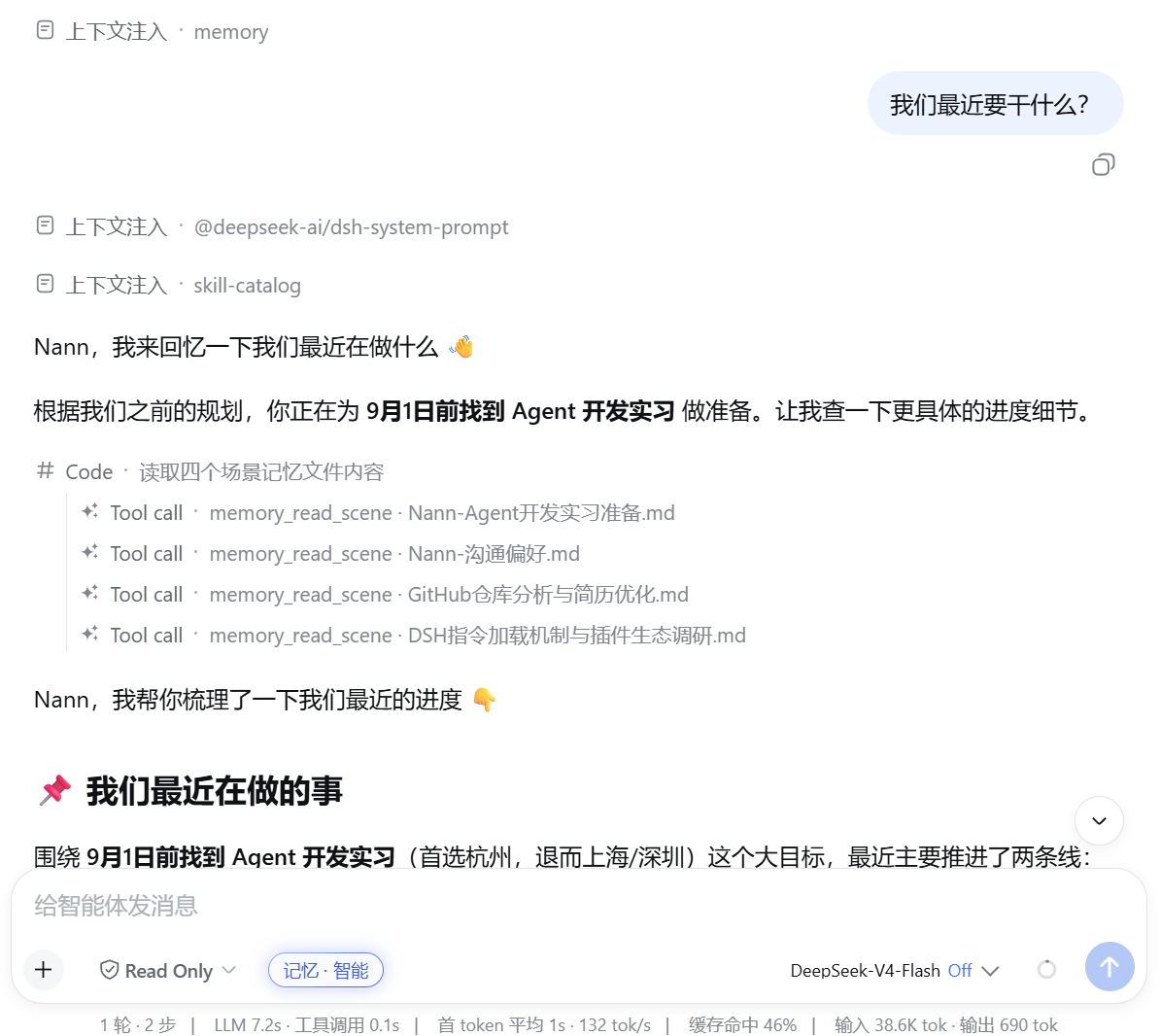
真机实录:召回注入与工具调用在对话里的样子——"上下文注入 · memory"行先带出相关记忆,模型再按需调 memory_read_scene 读取场景块,凭记忆直接作答:
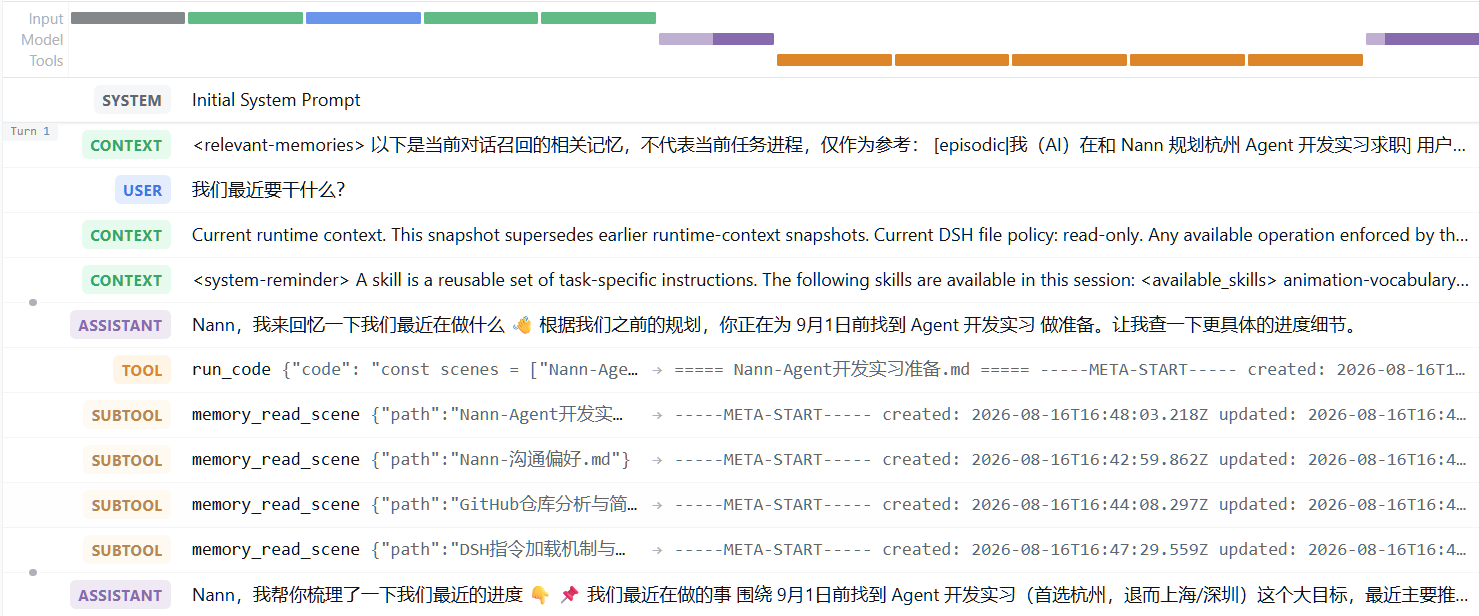
在只开放代码执行入口的受限会话中,模型经由 run_code 间接调用记忆工具(轨迹视图中的 SUBTOOL 嵌套):
分层记忆(L0–L3)
会话级记忆档位
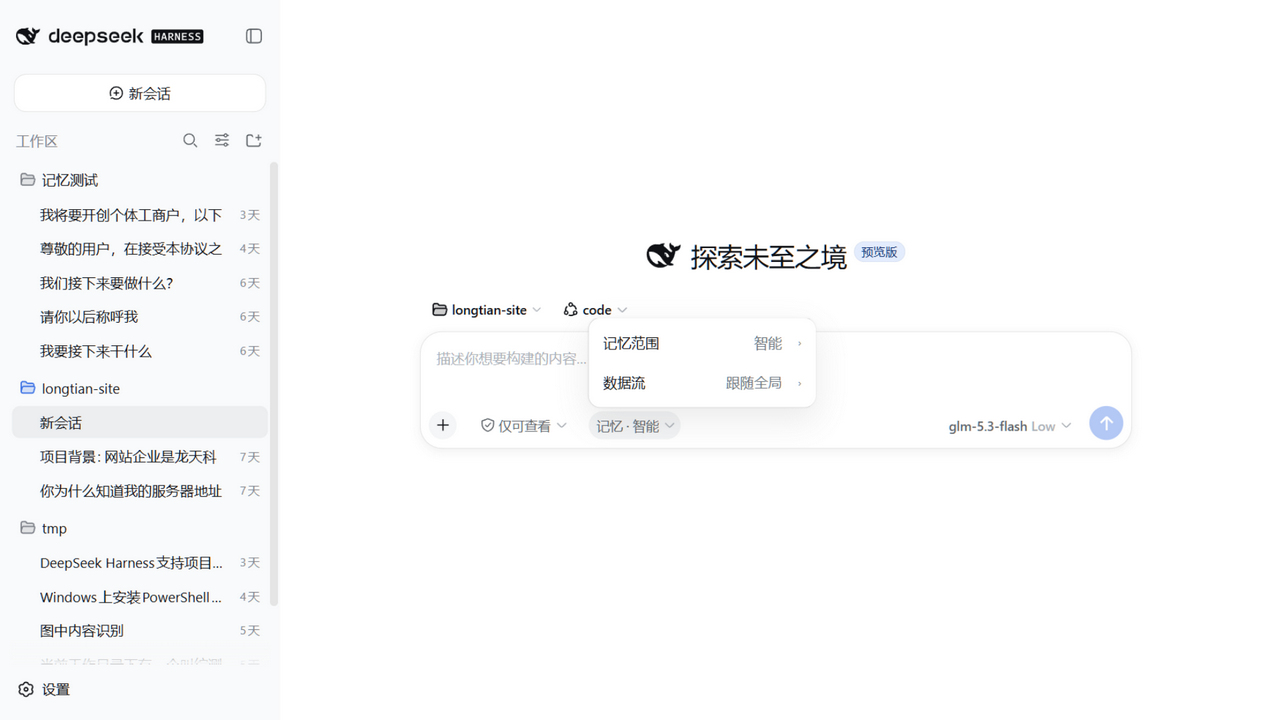
会话侧是分散式记忆面——信息按类型住进宿主原生座位,插件不再有自有条带:
- 记忆芯片(输入栏左簇、Read Only 芯片右侧):
记忆 · {智能|日常|工作} 无边框
芯片(官方 composer chip 语法),文案是解析真值——记忆 · 只写(注入关)、
记忆 · 暂停(灰点)、记忆 · 降级(琥珀点);zh/en 双语随宿主语言切换。
- 级联菜单(点击芯片向上展开):两行
记忆范围 {值} › / 数据流 {值} ›;数据流
选项在 hover 二级子面板(跟随全局/读写/只写/暂停),点击不固定、桥接热区保证
慢速移动不断链;键盘通路齐备(方向键巡游 + focus 揭示)。
- 内联滑条(点「记忆范围」原地展开):三停点 日常/工作/智能,拖拽跨档时芯片文字
实时联动;键盘方向键/Home/End +
aria-valuetext。
- 暂停恢复快照:数据流切「暂停」进 off 档时记录暂停前范围与注入覆盖,恢复即原样
还原;每会话选择持久化到
session-modes.json(与全局开关叠加,全局是总闸);
L2/L3 完全分类,分类内容不渗透。
- 记忆占用只住官方上下文环面板:点开官方环即可见「记忆」分项小节(召回片段 /
记忆稳定区);输入区没有任何占用 UI,只在官方统计行追加
待蒸馏 N 遥测段。
- 只写不读(#38):数据流选「只写」即只写会话——捕获与蒸馏照常(对话照常沉淀
为 L0→L1→L2/L3),但不向本会话注入任何记忆(召回注入、画像/导航稳定区、工具指南
一并停止;
memory_search 等读工具返回只写提示)。覆盖按会话持久化,切回
「跟随全局」即清除、跟随自动化区的召回开关;适合调试/评测/敏感会话「只吸收不干扰」。
与暂停正交:暂停是完全隐身(连捕获都关),只写保留「进」关「出」。
- 终端形态(TUI):同一档位体系在 dsh-tui 宿主下以
/memory 命令、状态行与
/settings 区块呈现(安装见快速开始)。
界面预览
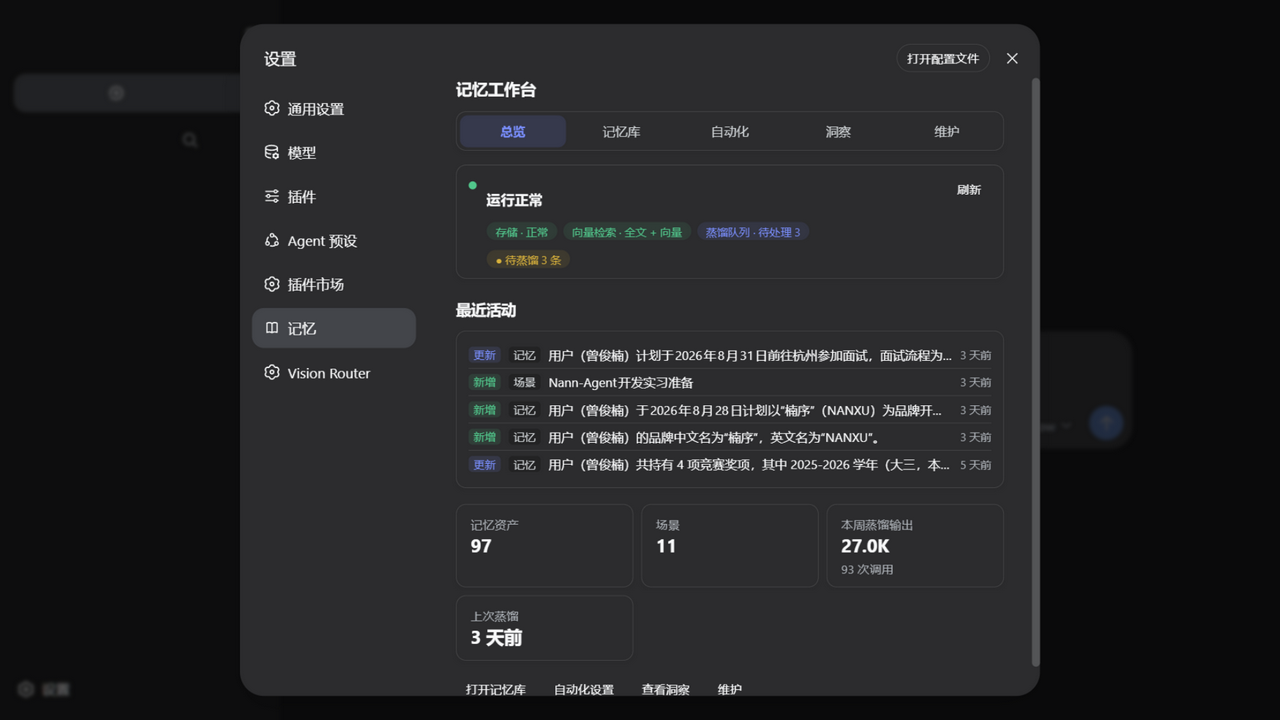
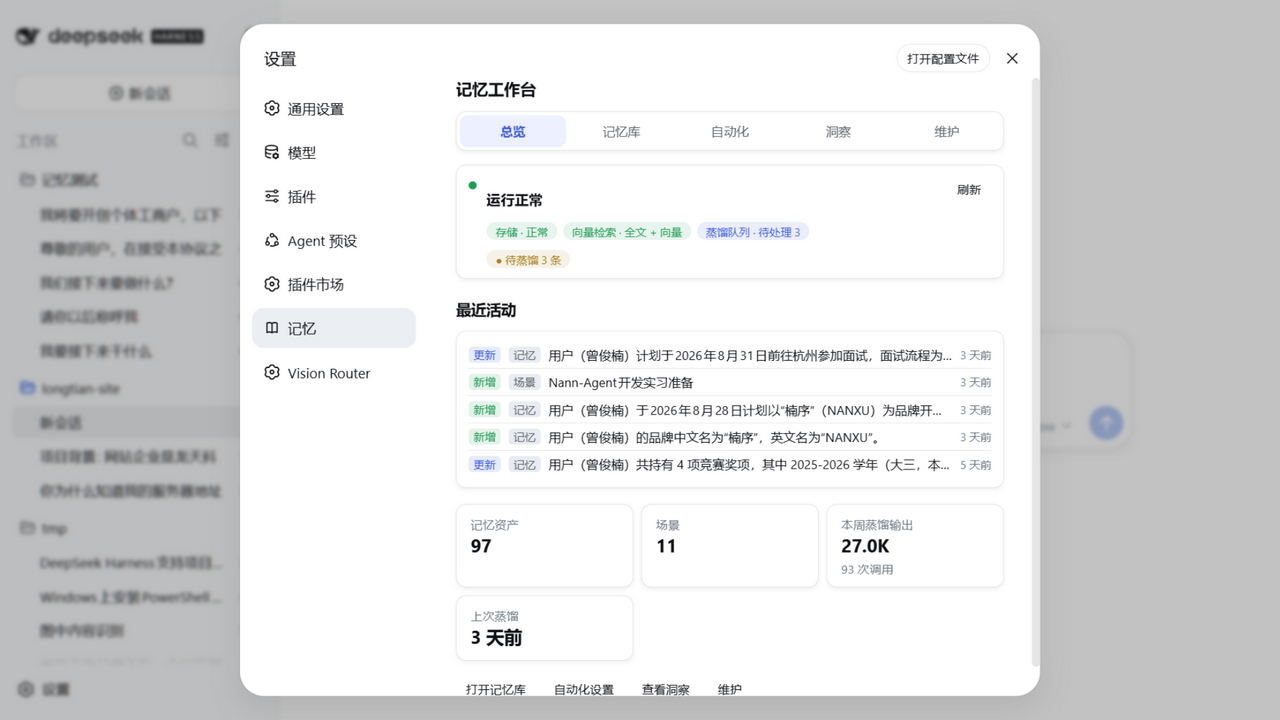
设置 → 记忆 是记忆工作台(五区任务导航,sticky 标签 + 箭头键巡游):
- 总览:健康摘要 + 最近活动 + 关键数字 + 引导式空状态;
- 记忆库:L1 记忆 / L2 场景 / L3 画像按更新时间混排的只读资产活动流
(搜索 + 类型/范围/时间筛选 + 原位展开 + 复制);
- 自动化:基础开关 + 高级披露(蒸馏路由链与预算)+ 嵌入模型披露;
- 洞察:成本 / 活动(近 7 天资产活动 + 蒸馏调用失败)/ 召回(累计与停用分布);
- 维护:运行健康 + 诊断日志 + 危险区全量重建(二次确认 + 进度 + 可取消)。
实测对比(DSH-MemBench:自动化基准)
图文回答"长什么样",这一节用自动化基准的实测数字回答"开了到底有什么用"(bench/,一条命令可复现)。方法:同场景库、逐字相同输入,A 组(记忆开)跑 3 次取合并值,B 组(记忆关)跑 1 次(无记忆的长任务每场景要吞数倍 token,成本护栏);对话赛道只跑 A 组(B 组会话独立无记忆必然失败,对照无信息量,已下线)。对话赛道环境:DeepSeek 官方 deepseek-v4-flash、插件 0.8.5(判卷与被测同源,答案原文全部留痕可人工复核)、Windows;题型设计借鉴 LongMemEval / LoCoMo / AMB,扩展题型与生命周期赛道参照 MemoryAgentBench / GoodAI LTM / BEAM。
对话赛道为 0.8.5 新基线(修复版插件 + 修正后的判卷口径);工作流赛道数字仍为 0.8.3 存档(0.8.5 起场景库扩至 8 个,新增前瞻记忆场景,重跑待做)。
对话赛道(20 场景 × 10 题型 × 3 次 = 420 题):答得准吗
0.8.5 基线(A 组数据;对话赛道 B 组已下线,只跑 A 组)。
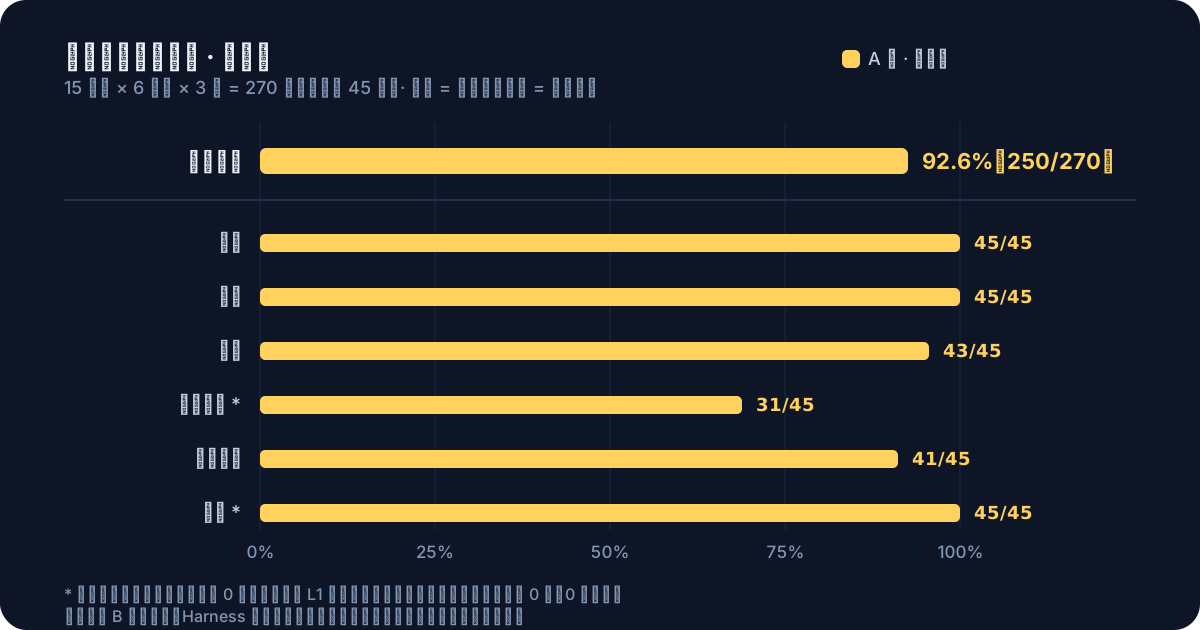
召回双通道(A 组):被动注入召回率 78.1%(该题要点出现在召回注入中,281/360),其余多数由模型主动调用记忆工具查回——106 题主动查询、75 题靠工具兜底答对;端到端 95.2% 是两通道 + 模型利用的合成结果。记忆库跨场景全程累积下,探针召回注入混入其他场景记忆 295 次(已如实计数),总准确率反而前段 92.8% → 后段 97.7%——抗干扰能力经受住了膨胀记忆库的考验(离线灌水再灌 600 条合成噪声,检索层 recall@5 也只降 2.8pp)。
分层看短板:检索层离线指标(recall@5 受控复现)总 73.3%,其中事件排序 0%、场景回忆 50%——端到端仍 93%+ 靠的是注入邻近记忆后模型的鲁棒性;效率三角(记忆的开销):注入非但不加延迟(注入轮响应比无注入轮平均快 210ms)、注入占每轮输入约 10.3%,蒸馏全链路摊到每条捕获消息 ≈2727 输入 / 240 输出 token(1172 次调用 0 失败)。
工作流赛道(0.8.3 存档 · 7 场景版 · A 组 3 次 / B 组 1 次,真实工具沙箱):做得对、做得省吗
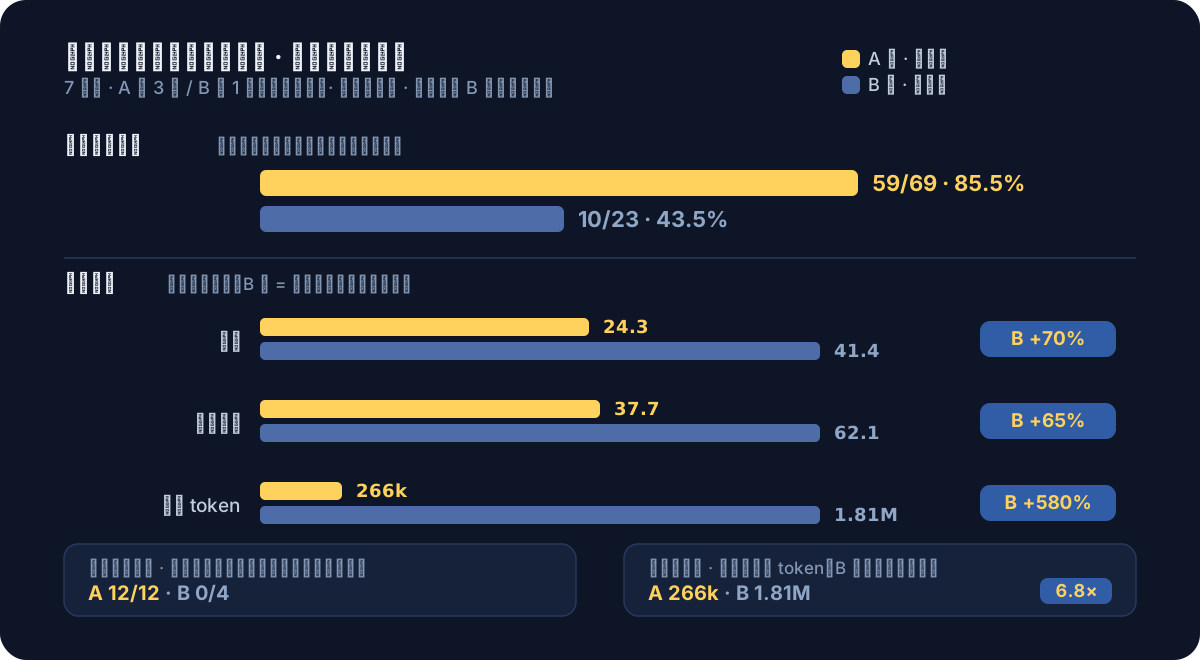
探针段完成度 85.5% vs 43.5%(+42pp):教学/变更段两组都有现场上下文,探针段(新会话延续任务)才是纯记忆窗口——A 组三个新考法场景(流程知识更新 / 双胞胎消歧 / 风格规范延续)全部 12/12 满分且三轮一致;B 组在风格规范场景探针 0/4(命名/结构/千分位/页脚约定只存记忆,沙箱探不出来),在流程更新场景则能靠读脚本逆向(判别力受沙箱可供性限制,已如实标注)。
长任务成本:B 组每场景输入 token 是 A 组的 6.8 倍(1.81M vs 266k)——无记忆时 agent 靠重新探索前进,high 思考档下甚至会自建工程去探测本可用一条脚本约定完成的流程;输出 token 3 倍(46.2k vs 15.4k)、步骤 +70%。这正是记忆的核心价值:省掉的不是任务难度,是无谓的往返与重复探索。
方法论与复现
node bench/harness/run.mjs --arm A --repeats 3 --provider deepseek-official --model deepseek-v4-flash   # 对话赛道(只跑 A 组)
node bench/harness/run.mjs --track workflow --arm AB --repeats 3 ...                                  # 工作流赛道(A/B 双组并行)
node bench/harness/run.mjs --track lifecycle --arm A ...                                              # 生命周期赛道(门控/off/rebuild/遗忘)
node bench/harness/report.mjs --latest [dialog|workflow]                                               # 汇总报告
node bench/harness/retrieval-metrics.mjs <runDir> --flood 200,600                                     # 检索层指标 + 灌水曲线
- 判分:
contains-all 程序判 + 判卷模型按要点判(答案原文与判分理由全部留痕 result.json 可人工复核);带 stale 的题(更新/连锁/遗忘)"旧值当作现状陈述"才判负、拒答题允许引用真实背景解释"不知道被问点";工作流完成度为产物文件 + 关键内容程序化校验(四型判据:正检查/禁词/产物缺席/存在性);
- 指标面:准确率总表(6 核心 + 4 扩展题型)之外,自动产出检索层离线指标(recall@5 / 注入精度 / 作废泄漏)、效率三角(注入开销差分 / 注入占比 / 蒸馏记账摊到每消息)、规模位置分析(库容膨胀下的准确率/污染)与生命周期赛道专属节(分族门控矩阵 / off 双断言 / rebuild 保真 / 遗忘);
- 实时进度:跑基准时自动拉起本地进度面板并打开浏览器(
--no-panel 关闭)——A/B 双臂场景/阶段/消息粒度进度、心跳与活动新鲜度(直判"卡住 vs 进程挂了")、累计成本随跑随涨;
- 指标全部来自供应商上报 usage(输入含缓存命中拆分)与会话事件折叠;稳态缓存率剔除每会话首请求(0.8.5 基线:89.1%——记忆注入不伤缓存);
- 回归用途:改插件前后各跑一遍,
compare.mjs 出对比表(环境头校验含 gitSha + B 组对照组漂移告警 + 检索层指标对比);
- 局限(诚实声明):单机;A 组 ×3 合并、B 组 ×1(成本护栏,噪声更大);判卷与被测模型:对话 0.8.5 基线同源、工作流存档跑为异构(glm-5.3 判 v4-flash);作者自建场景库(倾向记忆优势场景,欢迎自行复现);沙箱文件的可供性会部分泄露流程(B 组可读脚本逆向,判别力受限处已如实标注);工具审计双档(严格违规判负/宽松提示),实测双方 0 违规。
完整报告与逐题数据:bench/baseline/。
存储布局
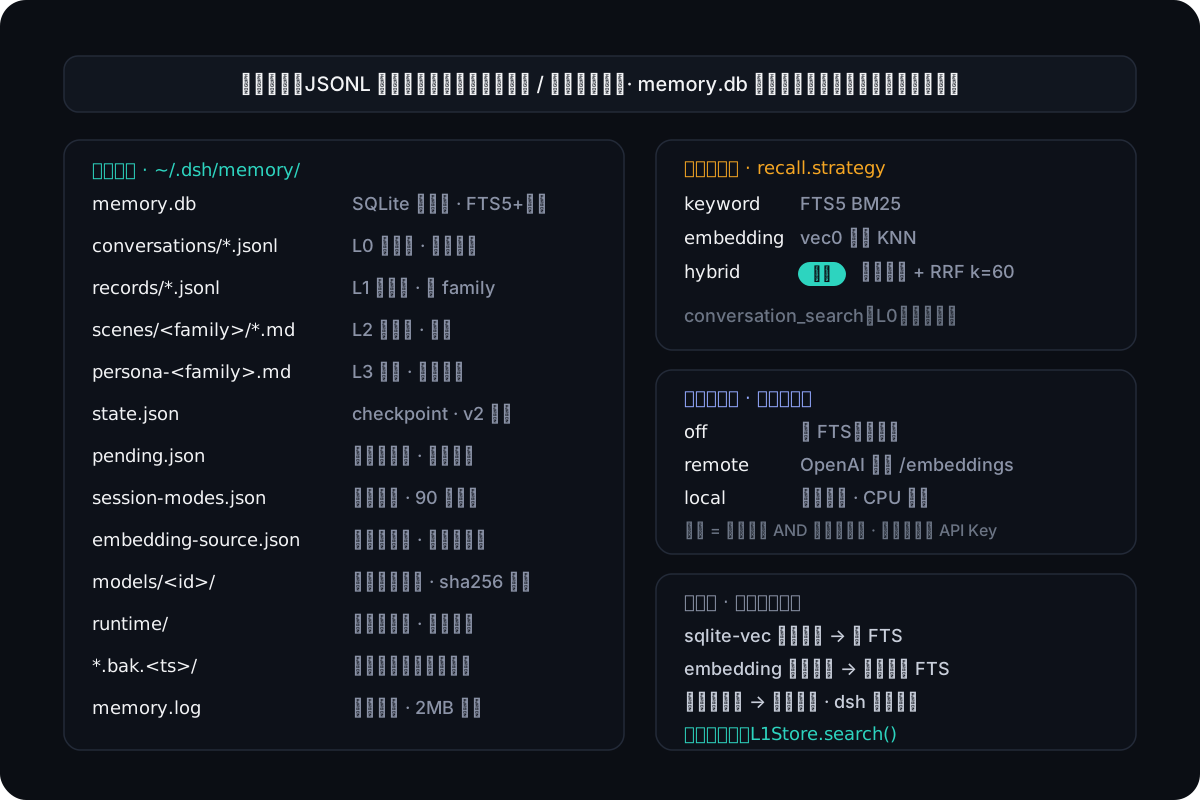
向量能力默认关闭(纯 FTS)。DSH 的 ctx.llm 无 embeddings 端点,语义检索由
三态嵌入源提供(关闭 / 远程 / 本地),设置页可运行时切换——见下节。
语义检索(嵌入源)
设置页(记忆 → 自动化 → 嵌入模型)选择嵌入源,即时生效、无需改配置重启:
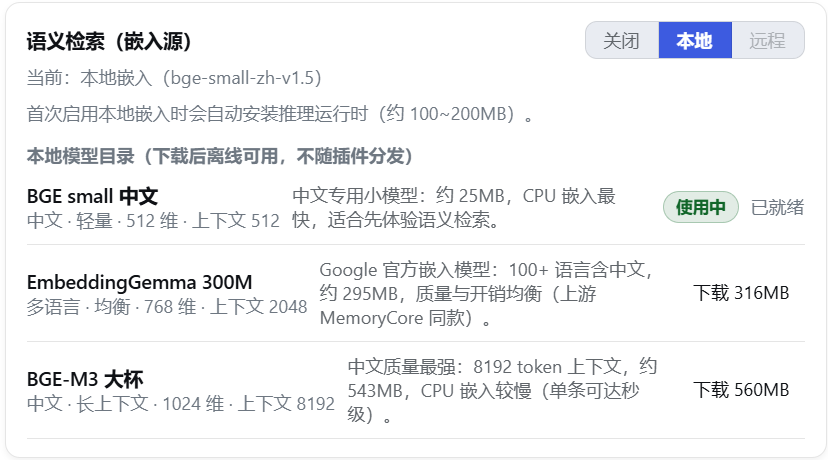
三种嵌入源:关闭(默认,纯 BM25 关键词检索)、远程(自备任意 OpenAI 兼容
/embeddings 服务,embedding.* 四件套配齐才可选)、本地(内置模型目录选一款,
ONNX 量化 CPU 推理——无需 API Key,数据不出本机)。本地模型目录是插件内置
白名单(每款锁定 revision + 每文件 sha256,不可下载任意仓库)。
- 下载:模型卡一键下载(默认镜像
hf-mirror.com,断点续传 + sha256 完整性
校验;直连不可达时可走代理——默认自动探测 HTTPS_PROXY/ALL_PROXY 等环境
变量,见 embedding.proxy)。单文件失败自动重试且换缓存键(?dshmem-retry=N,
绕开镜像 CDN 偶发的坏缓存对象),校验失配从零重下、网络错误保留断点续传;
落盘数据目录 models/<id>/,不用了随时在设置页删除;
- 按需运行时:首次切换本地档才安装推理运行时(transformers.js,约 100~200MB,
装进数据目录
runtime/——不进插件依赖树,不碰插件安装目录);模型加载与推理在
独立 worker 线程执行,不冻结宿主事件循环(嵌入计算期间对话与页面交互照常);
- 活切换:一键换源——自动后台全量重嵌(进度可见、可取消,期间检索自动降级
关键词,不影响对话;维度变化时向量表按新维度重建);切换失败保持旧源,重启仍按原源运行;
- 生效规则 = 部署上限 AND 运行时选择:
embedding.allowLocalModels=false 可整体
禁用本地档、未配 embedding.* 四件套则远程档不可选(企业部署可收口),状态持久
化在 embedding-source.json。
配置
覆盖配置写在 profile 自己的 cordis.patch.yml,用顶层裸 patch 条目(直接 id:,
不要包在 insert: 里——insert 与 bundle 层同 id 追加会导致 duplicate loader entry id
启动失败):
- id: dsh-memory
  name: dsh-layered-memory
  config:                    # 键按行整体替换(不深合并),按需写全要保留的键
    family: auto             # 新会话默认档:auto | chat | work
    llm:                     # 蒸馏模型静态路由(双字段齐 = 部署 pin,优先于设置页路由链;
      provider: ''           # 留空则跟随设置页路由链主路由或当前默认模型)
      model: ''
| 字段 |
默认 |
说明 |
family |
auto |
新会话默认记忆档位:auto(双族自动)| chat(个人)| work(工作);会话内可用输入栏控件临时切换 |
dataDir |
$DSH_HOME/memory |
数据目录 |
capture.enabled |
true |
L0 捕获 |
capture.stripCodeBlocks |
true |
助手消息剥离代码块 |
capture.maxMessageChars |
4000 |
单条消息最大字符数 |
extract.enabled |
true |
L1 抽取 |
extract.minMessages |
6 |
稳态触发阈值:单会话攒够 N 条新消息跑一次 L1 抽取。起步阶段生效阈值从 1 翻倍爬坡到此值(首轮即出记忆,随后自动攒批省调用) |
extract.idleSeconds |
300 |
闲置兜底:会话静默 N 秒后把未蒸馏切片落袋(接住"没攒够阈值用户就离开");0 关闭 |
extract.backgroundMessages |
10 |
抽取时附带的背景消息条数(按会话从 L0 现查,会话间互不污染) |
extract.candidatePool |
5 |
去重候选池大小 |
l2.enabled |
true |
L2 场景整合 |
l2.minNewMemories |
5 |
距上次 L2 整合的新记忆阈值 |
l2.maxScenes |
12 |
场景块数量上限 |
l2.sceneContextLimit |
3 |
L2 prompt 附带的相似场景全文上限 |
l3.enabled |
true |
L3 画像蒸馏 |
l3.interval |
20 |
L3 蒸馏间隔(新记忆条数) |
recall.enabled |
true |
自动召回 |
recall.maxResults |
5 |
每条新用户消息前注入的 L1 条数上限 |
recall.maxCharsPerMemory |
500 |
单条注入记忆的字符上限(超限截断并提示用记忆工具查全文);0 不限 |
recall.maxTotalRecallChars |
2000 |
整轮注入总字符上限(超限按相关性丢尾部);0 不限 |
recall.timeoutMs |
5000 |
召回总预算(ms):超时跳过本轮注入、不阻塞对话;0 不限时 |
recall.includePersona |
true |
系统提示注入画像上下文(<user-persona>,稳定区) |
recall.includeSceneNav |
true |
系统提示注入场景导航(<scene-navigation>,稳定区) |
recall.strategy |
hybrid |
检索策略:keyword / embedding / hybrid |
recall.scoreThreshold |
0.3 |
召回分数阈值(低于不注入;仅 keyword/embedding 策略生效,hybrid 融合前不过滤;工具路径不过滤) |
recall.decayHalfLifeDays |
30 |
召回时效衰减半衰期(天,0=关):排序按 相关度 × max(0.5, 0.5^(距更新天数/半衰期)) 软加权——相关度相近的候选间新鲜记忆优先(名额轮转),老记忆最多损失一半排序分(地板兜底,长期事实不沉底) |
embedding.enabled |
false |
向量检索开关;关闭即纯 FTS 运行 |
embedding.baseUrl |
空 |
OpenAI 兼容 /embeddings 地址(如 https://api.siliconflow.cn/v1) |
embedding.apiKey |
空 |
API Key |
embedding.model |
空 |
embedding 模型名 |
embedding.dimensions |
0 |
向量维度(启用时必填,须与模型输出一致) |
embedding.maxInputChars |
5000 |
单条文本最大字符数(超长截断) |
embedding.timeoutMs |
10000 |
单次 embedding 调用超时(ms) |
embedding.allowLocalModels |
true |
允许本地嵌入档(部署上限:关闭后设置页不能下载模型、不能切本地档) |
embedding.mirror |
https://hf-mirror.com |
本地模型下载镜像根地址(可改回官方 https://huggingface.co) |
embedding.proxy |
'' |
模型下载代理三态:''(默认)= 自动探测代理环境变量(HTTPS_PROXY/ALL_PROXY 等,尊重 NO_PROXY);none = 禁用强制直连;其他值 = 代理 URL(如 http://127.0.0.1:7890)。镜像直连在国内网络间歇不可达(直连超时与污染字节交替出现过),开代理的机器建议保持默认自动探测 |
llm.provider/model |
空 |
蒸馏模型静态路由(部署 pin):provider 与 model 双字段齐时锁定蒸馏路由,优先于设置页的运行时路由链与默认模型(部署可强制蒸馏走指定路由);留空则跟随"设置页路由链主路由 → 默认模型"。运行时可在设置页 → 记忆 → 自动化 → 高级路由与预算的蒸馏路由链编辑器里配置主路由与回退链(从已配置的供应商(含 dsh 设置 → 模型里添加的自定义供应商)中选择,主路由行可留空跟随默认模型),非空即整体接管本静态配置,即时生效无需重启 |
llm.fallbacks |
[] |
蒸馏回退链:主路由失败(报错/被掐断/网络异常/空输出)后按条目顺序逐个降级尝试的备用路由列表,条目 = {provider, model, reasoningEffort?}(档位非空覆盖全局 llm.reasoningEffort,仍按模型能力钳制);与主路由完全相同的条目自动跳过;每条路由各享全额 timeoutMs;全部失败交既有按会话退避重试。空数组(缺省)= 单路由行为不变(详见下方蒸馏回退链与慢 TTFT 模型);设置页运行时路由链(distillChain)非空时整体接管主路由与回退链(单行链 = 显式无回退),空 = 跟随本配置 |
llm.layerRoutes |
{} |
蒸馏按层路由:层键 l1/l2/l3 各配一条完整链(条目同 llm.fallbacks,头行必须 provider+model 双显式),非空即完整替换该层解析(该层主路由与回退都归层链管,全局链对该层不参与),空/缺省 = 该层跟随全局;l1 同管抽取+去重两个调用点。运行时可在设置页「蒸馏参数」分段面板里按层编辑(优先于本静态配置);部署 pin 不废静态层链(同为部署配置,同回退链先例)。与回退链正交可组合——每层各自一条链(ADR-0005) |
llm.maxTokens |
65536 |
未分层调用的兜底输出总闸。各蒸馏层有独立预算(抽取 16k / 去重 8k / L2 32k / L3 16k;思考档 high/xhigh/max 时自动 ×4,防 reasoning 吃光预算),分层预算可在设置页 → 记忆 → 自动化 → 高级路由与预算运行时调整(留空/0 = 跟随内置默认) |
llm.reasoningEffort |
空 |
蒸馏思考档位:空串 = 自动(按模型能力解析:模型默认档 → high);显式值(off/none/minimal/low/medium/high/xhigh/max)仅在该模型声明支持时发送——跨供应商 effort 词汇表不同(deepseek 认 off,OpenAI 系是 none,未声明档位的模型不传),不支持的档位自动降级为不传并告警一次;思考档 high/xhigh/max 时输出预算自动 ×4。运行时可在设置页路由链编辑器里逐路由覆盖档位(行内下拉,词表按各模型声明的能力实时显示,缺省跟随本值) |
llm.temperature |
0.3 |
蒸馏温度 |
llm.maxInputChars |
700000 |
单次蒸馏输入字符预算(超限的 L1 输入自动分块抽取);运行时可在设置页 → 蒸馏参数 → 输入预算调整(留空/0 = 跟随本值) |
llm.timeoutMs |
120000 |
单次蒸馏调用超时(ms) |
tokenCost.retentionDays |
365 |
蒸馏成本明细(token_cost 表)保留天数,写入时滚动清理更早行;0 = 永久保留。成本看板「近 N 天」窗口上限同此值 |
tools |
true |
是否注册模型可调用的记忆工具 |
benchControl |
false |
注册 bench 控制服务(进程内 rebuild 触发/会话档位设置/蒸馏用量快照,供基准 lifecycle 赛道)。默认关——生产部署零表面积,勿随意开启 |
蒸馏回退链与慢 TTFT 模型
部分推理供应商的免费/慢速档位首 token 延迟(TTFT)可达 20 秒以上,而部分上游网关会在连接静默约 20 秒时掐断——蒸馏调用以固定 ~20s 失败(llm aborted),插件侧 120s 超时根本轮不到生效(#31 的实测场景)。三层缓解按需取用:
-
换路由(最直接):设置页 → 记忆 → 自动化 → 高级路由与预算的路由链编辑器即时改主路由(或把快路由排到链首),或静态 pin llm.provider/llm.model。
-
回退链(自动降级):主路由失败时按序自动换备用路由,无需人工干预:
llm:
  provider: opencode-go          # 主路由(也可不 pin,跟随设置页路由链主路由/默认模型)
  model: ox-alpha-free
  fallbacks:                     # 条目顺序 = 降级优先级;不配置 = 单路由行为不变
    - provider: opencode-go
      model: deepseek-v4-flash
      reasoningEffort: low       # 可选:该路由的档位覆盖(缺省跟随全局)
    - provider: deepseek-official
      model: deepseek-v4-flash
-
按层路由(各走各的通道):不同蒸馏层对模型诉求不同(L1 高频要便宜快稳、
L3 低频可容忍慢首包但要强能力),可给差异层单独配链——每层一条完整回退链,
未配置的层照走全局链:
llm:
  layerRoutes:                  # 按层独立路由(#34);头行必须显式 provider+model
    l1:                         # l1 同管抽取 + 去重两个调用点:配条便宜快稳的链
      - provider: opencode-go
        model: deepseek-v4-flash
        reasoningEffort: low
      - provider: deepseek-official   # 层内回退:L1 故障只降级到这里,不落全局链
        model: deepseek-v4-flash
    l3:                         # L3 画像蒸馏:低频大输入,配强能力链
      - provider: deepseek-official
        model: deepseek-v4-flash
        reasoningEffort: high
也可在设置页 → 记忆 → 自动化 → 高级路由与预算的分段面板(全局默认 / L1 / L2 / L3)
里按层运行时编辑,层内优先级:运行时层链 > 本 YAML 静态层链 > 全局默认链,
逐级兜底。
失败 = 报错 / 被掐断 / 网络异常 / 空输出(流正常结束但 0 字符——对蒸馏而言必然在解析阶段报废,改判为该路由失败而非返回空串);调用方主动取消不降级;每条路由各享全额 llm.timeoutMs(共享预算会让慢 TTFT 的回退路由拿到的窗口小于它真实需要的首包时间,回退链形同虚设);token 成本逐次尝试记账(失败尝试也计一行,含流中断前已到的 token),成功调用归因到实际服务的路由。路由链也可在设置页 → 记忆 → 自动化 → 高级路由与预算的「蒸馏路由链」编辑器里运行时调整(无需改配置重启);本 YAML 适合部署者固化静态链。
-
调高超时:llm.timeoutMs 只在路由确实慢但网关不掐时有用;网关 20s 掐断的场景调插件超时无效,请用前两层。
日志与故障排查
dsh 宿主把插件日志打到控制台;插件另把 info 级以上镜像到数据目录的 memory.log。
一轮对话的典型日志路径:L0 捕获 → L0 落盘 → 蒸馏管线开始 → LLM 调用(输入/输出 字符数、耗时) → L1 阶段完成 → 管线结束;下一轮开头是 召回注入 N 条 L1。LLM 空输出
带完整诊断(finish reason / token 计数 / reasoning 摘录);JSON 解析失败记录模型原始输出
前 400 字符;所有失败告警带堆栈首帧。JSONL 事实源按轮次追加、依赖操作系统写回(不做逐条
fsync),断电等极端崩溃最多丢最后一小段尾部,检索库可用「重建记忆」从事实源全量重导。
与 MemoryCore 的差异
- 内嵌完整管线(不依赖外部 Gateway),蒸馏复用 DSH 自己的 LLM;
- L2/L3 由"LLM 操作文件工具"改为"LLM 输出操作 JSON / 完整文档,工程侧执行";
- 召回注入点在
agent/pre-step(消息侧合成消息,官方 pre-step 替换语义)+ agent 作用域 systemPrompt.context(画像/导航稳定区,DSH 原生事件/服务);
- 存储/检索即官方 sqlite 后端的单机裁剪版(裁掉多租户隔离列、TCVDB 云后端、审计表;
分词与官方一致用 jieba——@node-rs/jieba 预编译二进制 + CJK 二元组并集,
词元供 BM25 精确整词命中、二元组保子词召回;加载失败自动回退纯二元组,
FTS 索引按分词器版本戳自动重建)。
路线图
以下为规划中的功能,欢迎在 Issues 反馈需求与优先级:
- [ ] Git 分支感知:记忆与当前 git 分支关联,召回可按分支过滤/加权(与现有记忆档位正交)
- [ ] Claude Code / Codex 记忆导入:一键迁移既有记忆资产(
CLAUDE.md、Claude Code 记忆文件、Codex AGENTS.md 等),导入后进入分层蒸馏管线
致谢
记忆核心能力(分层蒸馏管线、Prompt 设计、双写存储架构)参考自
TencentCloud/TencentDB-Agent-Memory
项目中的 MemoryCore,感谢原项目开放的设计与实现。
License
MIT


