dsh-autonomy


English | 简体中文
Switch between Chat and Agent in the same DeepSeek Harness session.
dsh-autonomy is a DeepSeek Harness plugin that adds a Chat | Agent switch above the Web input. Discuss an approach in Chat, switch to Agent when you're ready to execute, and keep the conversation going.
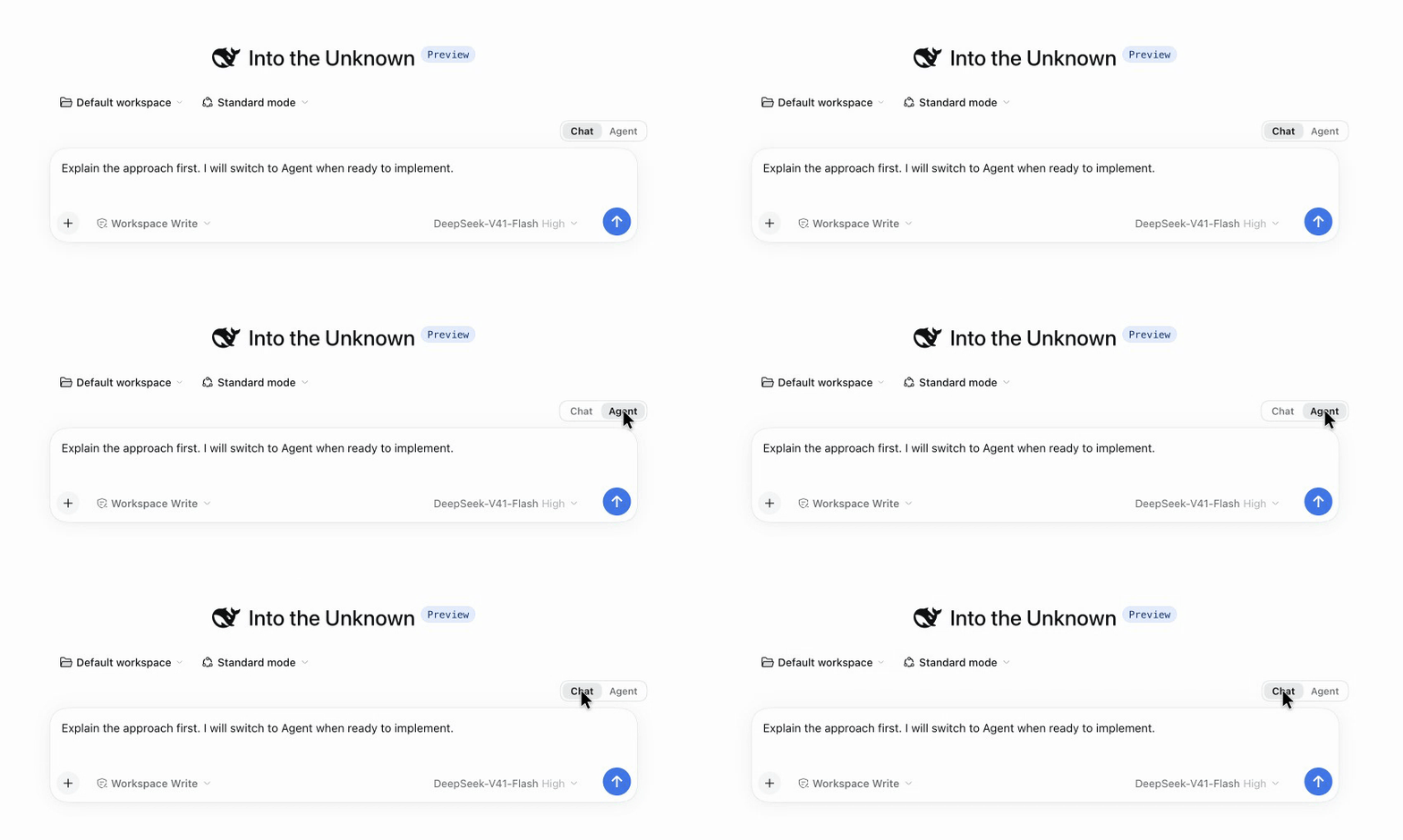
Chat → Agent → Chat, in the same session. Your unsent draft stays in place.
| Mode |
Use it for |
Behavior |
| Chat |
Questions, explanations, planning |
Answers in text. Tools are hidden from the model and tool execution is blocked. |
| Agent |
Investigation, file edits, commands |
Uses DSH's normal tools and agent loop, subject to its existing permissions. |
Quick start · Configuration · Compatibility · Troubleshooting
Quick start
You need a working DeepSeek Harness setup and Node.js ^22.19.0 || >=24.0.0. Install the plugin into the Web profile, then start DSH Web:
npx @deepseek-ai/dsh plugin --profile web add dsh-autonomy
npx @deepseek-ai/dsh web
These commands use the official CLI through npx; a global dsh installation is optional. The install command adds both the host plugin and its Web control to the profile.
If DSH Web is already running, stop it with Ctrl+C and start it again so it can load the plugin.
Open a session and click Chat or Agent above the input. You can also use slash commands:
/autonomy chat
/autonomy agent
The default mode is Agent. Each session remembers its own selection across page refreshes, DSH restarts, and session resumes. A fork inherits the mode recorded in its session history. Switching keeps your model, preset, conversation history, and unsent draft.
You can switch during an active turn. The change applies immediately to tool calls that have not passed the execution check.
Already-running operations: selecting Chat lets a tool that has already started finish; it cannot undo earlier changes. Use DSH's Stop control if you want to cancel the active turn.
Install from a local checkout
Requires pnpm 11.7.0. Replace /absolute/path/to/dsh-autonomy with the path to your cloned directory.
git clone https://github.com/JinkaiLiu/dsh-autonomy.git
cd dsh-autonomy
pnpm install
pnpm run build
npx @deepseek-ai/dsh plugin --profile web add /absolute/path/to/dsh-autonomy
npx @deepseek-ai/dsh web
How it works
Chat mode restricts the session's tools, removes all tool definitions from the final model request—including DSH's reserved Code Mode tool—and rejects tool calls at execution time. A short system instruction asks the model to answer directly and suggest switching to Agent when a task requires action.
Agent mode restores DSH's usual tool access and agent loop. DSH's sandbox and permission policies continue to apply in both modes.
Every successful switch is saved through DSH's built-in session command log. The Web control and host behavior use that same record to recover the selected mode.
Chat can reduce token use by omitting tool definitions and avoiding autonomous tool loops. It does not impose a token budget or usage cap: conversation history, prompt size, model output, and provider pricing still affect the cost.
Configuration
No configuration is needed. To start sessions in Chat mode when they have no saved selection, update the installed autonomy entry in your Web profile's cordis.patch.yml:
- id: autonomy
  config:
    defaultMode: chat
| Option |
Default |
Purpose |
defaultMode |
agent |
Mode used when the session has no saved selection. Accepts chat or agent. |
chatGuidance |
Built-in Chat instruction |
System instruction added in Chat mode. |
denyMessage |
Built-in tool denial message |
Error returned when a tool call is blocked in Chat mode. |
Changing defaultMode keeps existing sessions' saved selections. Customizing the messages does not change the tool restrictions.
Compatibility
For dsh-autonomy 0.1.4, the development baseline is DSH 0.2.0-rc.2; DSH 0.2.1-alpha.1 is also supported. See the changelog for release verification.
Earlier DSH releases covered by CI
0.1.0-rc.6 and 0.1.0-rc.70.1.1-rc.20.1.2-rc.10.1.7-alpha.2 and 0.1.7-rc.2
Scheduled CI also checks the exact versions published under DSH's latest, next, and alpha tags. This plugin is an MVP for DSH's developer preview; upstream changes may require plugin updates.
Troubleshooting
| Symptom |
What to check |
| The switch is missing |
Confirm you installed into the web profile, restart DSH Web, then refresh the browser. |
unknown command: /autonomy |
The browser control loaded but the host plugin did not. Stop old DSH processes and restart the same profile. |
| The default port is occupied |
Stop the older process or use npx @deepseek-ai/dsh web --port 3081. |
| A GitHub-source install asks for build approval |
Allow the package's prepare script in that profile, or install the prebuilt npm release. |
If the issue persists, open an issue with the DSH and plugin versions, install command, active profile, operating system, and first relevant host error. For security reports, follow SECURITY.md.
Uninstall
Remove the plugin from the profile where you installed it, then restart DSH Web:
npx @deepseek-ai/dsh plugin --profile web remove dsh-autonomy
npx @deepseek-ai/dsh web
Historical /autonomy commands remain in the session log and have no effect after removal.
Permissions and data
The plugin records mode changes in DSH's existing session log and creates no separate database or configuration directory. The host plugin does not make network requests, collect telemetry, access provider credentials, or read or write workspace files. The browser control sends mode commands to the local DSH command service; each command affects only its selected session.
Like other Cordis plugins, it runs with the privileges of the DSH host process. Review the source before installing it in an environment with sensitive data.
Contributing
From a local checkout, run:
pnpm install
pnpm run check
pnpm run pack:check
check runs type checking, host and client tests, and a production build. CI also validates package contents and exercises installation, Web loading, and removal in an isolated profile. See CONTRIBUTING.md for setup and compatibility checks.
This plugin grew out of the workflow proposed in DeepSeek Harness Discussion #1644.
License
MIT.


