
其他
完整应用

deepseek-harness
deepseek-ai
DeepSeek Harness: Everything is a Plugin.
PROJECT TOPICS
PROJECT README
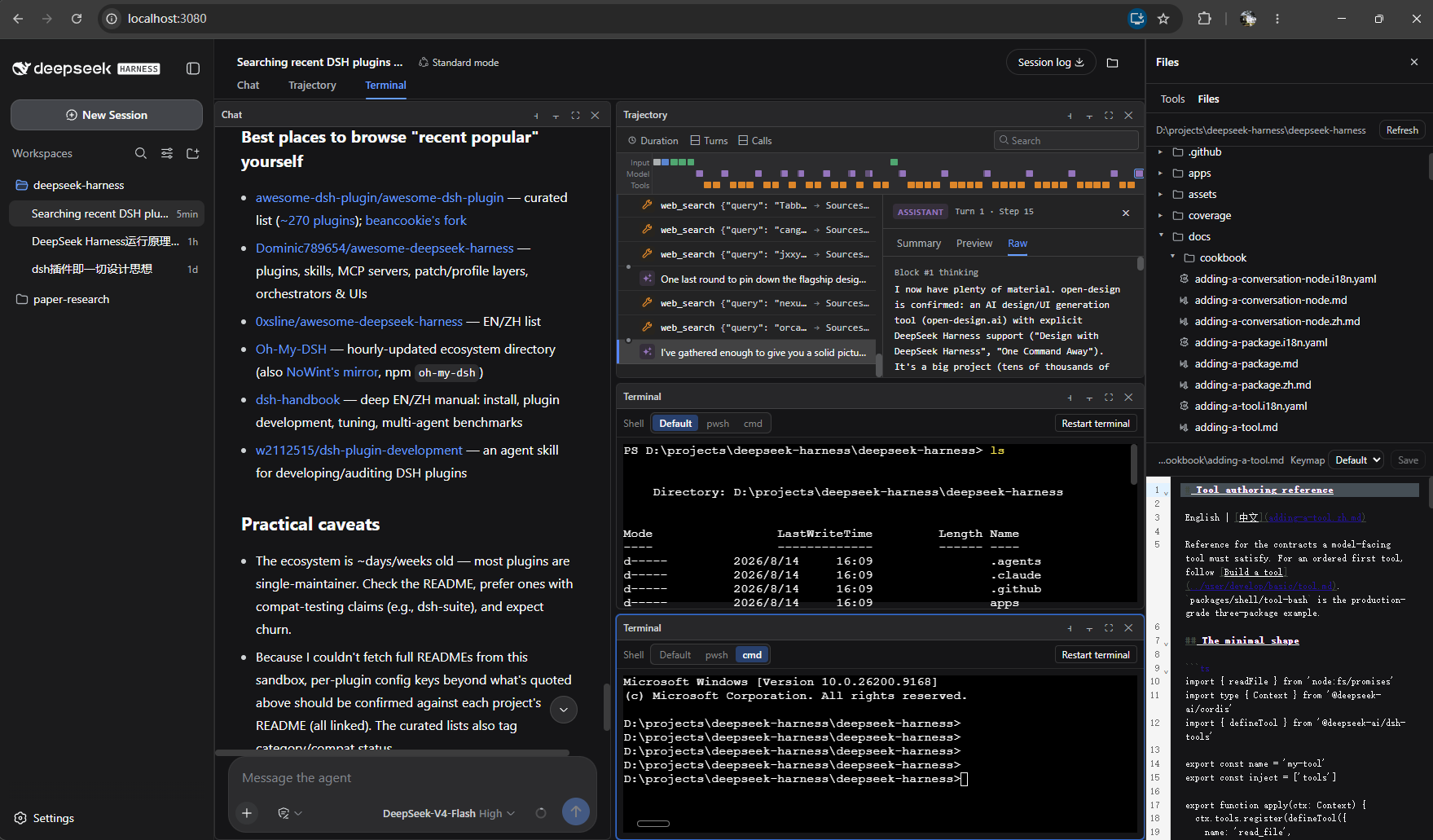
Interactive terminal, workspace file browser, and tmux-style split panes for the DeepSeek Harness web GUI (dsh web).
This plugin extends the DeepSeek Harness browser surface with three features:
| Feature | What you get |
|---|---|
| Terminal | A real interactive terminal tab beside Chat/Trajectory. Per-pane PTYs with a shell picker (Windows: pwsh / cmd; Linux/macOS: bash / zsh / sh). |
| File browser | A workspace file tree with per-type icons and syntax-highlighted editing (save with conflict detection, Vim/Emacs keymaps, drag-resizable tree/editor split). |
| Split panes | tmux-style panes: recursive split right/down, per-pane fullscreen, draggable dividers, sizes that follow the window. Splitting a Chat pane starts a new session side by side, and each chat pane gets its own input box sized with the pane. |
The plugin is a set of packages inside the deepseek-harness monorepo. It modifies core packages, so it is installed by applying the cumulative patch to a clean checkout and building with the app — three ways, from easiest to most manual:
1. npm (recommended) — no need to clone this repo (package: @jiayuw/dsh-files-panel):
npx @jiayuw/dsh-files-panel <deepseek-harness checkout>The npm package ships the patch and an installer bin: it validates the checkout, applies patch/dsh-files-panel.patch (skipped when already applied), then runs pnpm install and pnpm run build. (--apply-only skips the build for a dry check.)
2. Installer scripts from this checkout:
# Windows PowerShell:  .\install.ps1 <deepseek-harness checkout>
# Linux/macOS/Git Bash: ./install.sh  <deepseek-harness checkout>
3. Manually — in a deepseek-harness checkout at base commit 47f943859b:
git apply path/to/dsh-files-panel.patch
pnpm install
pnpm run build
pnpm dsh --profile web   # do NOT use npx @deepseek-ai/dsh web
Open the printed URL (default http://127.0.0.1:3080) and hard-refresh (Ctrl+F5).
Full usage: docs/USAGE.md · docs/USAGE.zh.md(中文)
patch/dsh-files-panel.patch   the single cumulative patch (everything above)
package.json, bin/            npm package (@jiayuw/dsh-files-panel) — the npx installer
install.ps1 / install.sh      one-command installer (apply + pnpm install + build)
src/packages/                 the plugin source, mirroring the monorepo packages/ layout
assets/layout.png             the layout screenshot shown above
src/packages/ mirrors the harness monorepo paths, so each file's location tells you where it belongs:
host/web-terminal, host/web-terminal-local — terminal capability seam + local providerhost/workspace-files, host/workspace-files-fs — workspace file seam + providerhost/apiproxy/src/api/{terminal,files}.* + fetch/* — the terminal.* / files.* wire domainsclient/ui-terminal, client/ui-files — the browser Terminal and file-panel viewsclient/ui-conversation — the split-pane grid, pane store, and cross-session panesclient/ui-slots, client/web-react, client/runtime — framework additions (SessionBoundary, provideInfoOf)client/tsdown.client.ts, bundle/web-app — build + registrationTERM=dumb (no color / full-screen programs yet).MIT
CLASSIFICATION EVIDENCE
系统优先读取 GitHub Topics,再与站内分类词典和词根规则比对。当前命中: 无有效分类标签。
deepseek-ai
DeepSeek Harness: Everything is a Plugin.

anywhere-labs
为 DeepSeek Harness (DSH) 插件生态打造的现代化桌面端解决方案。万物皆「插件」,桌面本身也是「插件」。

walkinglabs
Harness engineering beginner tutorial, from 0 to 1