
模型与 MCP
待识别

rea
morluto
Reverse engineer anything with agents, from app behavior down to native binaries.
PROJECT TOPICS
INSTALL REFERENCE
dsh plugin --profile web add github:Jfreey/dsh-searxng-search
该命令指向仓库当前默认分支;尚无绑定当前 commit 的完整验证结果。
PROJECT README
English | 中文
One-click local search engine for DeepSeek Harness. It installs
SearXNG on your machine, keeps it running, and points
web_search at it.
The base layer pins ctx.web to searchProvider: deepseek-official, which needs
DEEPSEEK_API_KEY. Without that credential searchReady() answers false and the
web_search tool is withheld from every model step — the agent is left with
web_fetch only. This plugin registers a credential-free provider backed by a
SearXNG instance you run yourself.
| Piece | What it does |
|---|---|
| Provider | Registers search provider searxng on ctx.web. The shipped web_search tool keeps its schema, formatting, and result card. |
| Supervision | Probes /healthz before every search; when the server is down it restarts it through launchd, systemd, a Windows task, or a child process it owns. |
| Installer | scripts/bootstrap-searxng.sh (macOS, Linux) and scripts/bootstrap-searxng.ps1 (WSL) install or repair an instance idempotently. Never overwrites an existing settings file. |
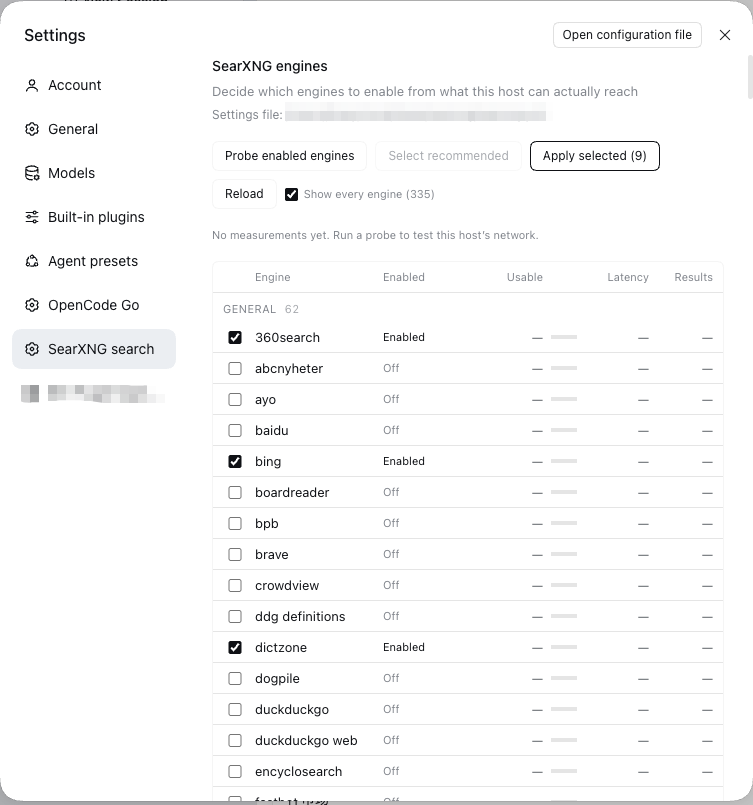
| Settings page | Engine table grouped by category, one-click probe of the engines this host can reach, a recommended roster, and the outbound proxy. |
| Proxy | Reads and writes SearXNG's outgoing.proxies.all://, so engine requests can go through a local proxy. |
dsh.bundle support).git, Python 3.11+, and
macOS, Linux, or WSL.search.formats has to include json.# 1. Get a SearXNG to point at (skip if you already run one).
./scripts/bootstrap-searxng.sh # macOS / Linux
./scripts/bootstrap-searxng.sh --print # show the plan first
# 2. Install the plugin into a DSH profile.
# In DSH: Plugins → install from a directory, or
# dsh plugin install /path/to/dsh-searxng-searchPoint the plugin at an existing instance by editing config.baseUrl; point it at
another machine and disable the supervisor with ensure.enabled: false.
The installer refuses to run when the target port is taken by something that is not SearXNG, and names the process holding it:
Port 8888 is taken by another process:
  python3.1 (pid 835)
Nothing was installed. Use another port, and set the plugin's baseUrl to match:
  SEARXNG_PORT=8899 ./scripts/bootstrap-searxng.sh
  config.baseUrl: 'http://127.0.0.1:8899'
A healthy instance on that port, or a SearXNG process stuck in a restart loop,
counts as “ours” and is repaired in place. There is no automatic port
fallback: the installer and the plugin have to agree on the port, so the port
stays one explicit value on both sides. If the plugin is pointed at a dead port,
its error scans 8888–8896 for an instance that answers /healthz and returns an
engine list from /config, and names the address to use.
- id: searxng-search
  name: 'dsh-searxng-search'
  config:
    baseUrl: 'http://127.0.0.1:8888'
    settingsPath: '~/.local/share/searxng/searxng.yml'   # optional; this is the default
    id: searxng              # provider id the web service pins
    maxResults: 20           # provider-side floor; the tool caps again
    timeoutMs: 20000
    safesearch: 0
    probeTimeoutMs: 12000    # one engine probe
    # Optional SearXNG query parameters, omitted when empty:
    # language: zh-CN
    # categories: general
    # engines: google,bing
    ensure:
      enabled: true
      healthPath: /healthz
      probeTimeoutMs: 1500
      startupTimeoutMs: 20000
      probeIntervalMs: 400
      retryCooldownMs: 15000
      launchAgent: com.searxng.server   # macOS
      systemdUnit: ''                   # Linux, e.g. searxng.service
      windowsTask: ''                   # Windows (WSL only)
      windowsService: ''
      command: ''                       # universal fallback, plugin-owned
      args: []
      cwd: ''
env: {}| Platform | Supervisor | Installer | Status |
|---|---|---|---|
| macOS | LaunchAgent → launchctl kickstart -k gui/<uid>/<label> |
bootstrap-searxng.sh |
installed, self-heal and clean uninstall verified on a real machine |
| Linux | systemd user unit → systemctl --user restart, falling back to systemctl restart |
bootstrap-searxng.sh |
installer, settings, JSON API and the plugin round-trip verified in an Ubuntu 24.04 container; the unit itself only with a stubbed systemctl |
| Windows | — | bootstrap-searxng.ps1 refuses outside WSL |
not supported natively: SearXNG's searx/valkeydb.py imports the POSIX-only pwd module, so the server dies at import. Use WSL, Docker, or point this plugin at a Linux/macOS instance with config.baseUrl |
The plugin half is plain Node and runs anywhere; only the server is POSIX-bound.
Every web_search probes GET /healthz first (1.5 s budget). If the server is
down, the plugin starts it and polls until healthy (20 s budget), then runs the
search:
ensure.command, which the plugin spawns through ctx.subprocess,
owns, and terminates when the plugin unloads.A failed start is remembered for retryCooldownMs, and concurrent searches share
one recovery attempt. The provider implements no ready(), so web_search stays
admitted to every step: a down server surfaces as an actionable tool error instead
of a silently missing tool.
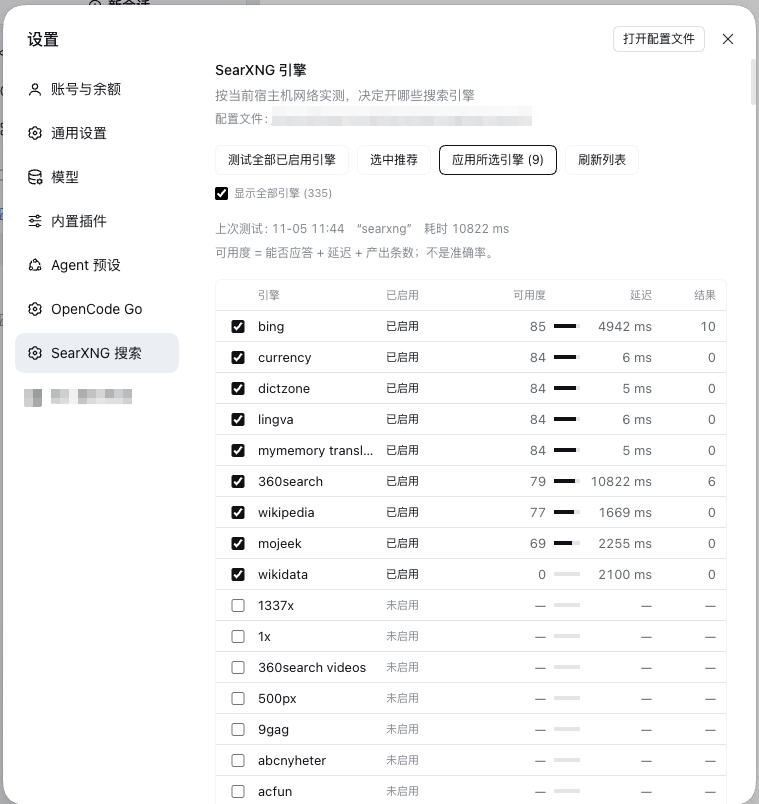
The page probes the engines you already have checked as soon as it opens, so the table is never empty, and re-probes on demand. Each result is scored 0–100:
| Component | Points | Rule |
|---|---|---|
| Answers | 55 | valid JSON and no unresponsive_engines entry for it |
| Latency | 25 / 18 / 10 / 4 / 0 | ≤0.8 s / ≤2 s / ≤5 s / ≤15 s / slower |
| Yield | 20 / 12 / 4 | ≥5 results / 1–4 / none |
That is a usability score, not accuracy: nothing compares an engine's answers with ground truth. Accuracy would need a labelled corpus or cross-engine agreement sampling; the page does not pretend to have it.
Above the score, two things are called out as advice — an engine that did not answer (CAPTCHA, blocked, suspended) and one that answered slower than 5 s. Both come with a one-click “select the working set” that only unchecks those. Zero results is not advice: the probe asks one short query, so a currency or translation engine legitimately returns nothing in 5 ms while working fine — those are listed as a note instead.
Apply writes one explicit switch per engine (- name: "<engine>" +
disabled: true|false) and drops use_default_settings.engines.keep_only. The
whitelist is a one-way door — after it is written /config only returns the kept
engines, so every other engine disappears from the page and cannot be turned back
on. The first apply migrates the file away from it; the page also lists engines
parsed from SearXNG's own searx/settings.yml, so the catalog is complete even
before that migration.
Every write keeps a timestamped backup next to the settings file, restarts the instance, waits for health, and restores the backup if the instance does not come back.
ready().127.0.0.1. SEARXNG_BIND=0.0.0.0
exists for containers and puts the exposure decision on you.launchctl,
systemctl, schtasks, or the explicit ensure.command; nothing is discovered
or killed by pattern.web_search
result formatting and the harness's untrusted-content notice unchanged.| Symptom | Cause |
|---|---|
web_search is missing from the tool list |
Another provider is pinned and unavailable. Check web.provider/searchProvider and GET /dsh-searxng/engines. |
| Search returns 0 results | Engine roster is empty or every engine was CAPTCHA-blocked. Probe from the settings page. |
did not answer within N ms |
The instance is down and could not be restarted; the error names the strategy that failed. |
HTTP 500 on a search |
SearXNG refused the JSON format. Add json to search.formats. |
| Engines vanish after applying | You are on an old build: apply used to write keep_only. Update to 0.4.3+, then apply once to migrate. |
| File | Role |
|---|---|
index.js |
Host plugin: provider, supervision, platform restarts |
engines.js |
Pure helpers: scoring, roster/proxy text surgery, catalog parsing |
engine-api.js |
Host routes: GET /dsh-searxng/engines, POST /probe, /apply, /proxy |
client.js |
Settings page: table, probe/apply buttons, proxy field, zh/en dictionaries |
scripts/bootstrap-searxng.sh |
Idempotent installer for macOS and Linux |
scripts/bootstrap-searxng.ps1 |
Same, for WSL; refuses natively |
Routes are host-only JSON. The client renders them and never touches the settings file.
bing, sogou, 360search are the tamest engines on a CN route; several
upstream defaults (google, brave, duckduckgo, startpage, qwant,
baidu) are CAPTCHA- or rate-limited, and wikipedia can cost 15 s before its
own timeout — it is out of the default roster for that reason.query; recency and domain filters are not exposed
by the harness seam.MIT
CLASSIFICATION EVIDENCE
系统优先读取 GitHub Topics,再与站内分类词典和词根规则比对。当前命中: deepseek-harness。
morluto
Reverse engineer anything with agents, from app behavior down to native binaries.

deepseek-ai
DeepSeek Harness: Everything is a Plugin.

nexu-io
The 1st Collaborative AI Design Agent Workspace. Local-first and open source. Create motion, prototypes, websites, apps, dashboards, presentations, images, and videos with your team and AI agents. Share work, exchange feedback, and iterate together in one workspace.