
其他
完整应用

deepseek-harness
deepseek-ai
DeepSeek Harness: Everything is a Plugin.
PROJECT TOPICS
PROJECT README
A Cordis plugin for the DSH (DeepSeek Harness) web interface that floats a translucent, glass-styled bubble in the top-right corner showing your DeepSeek account balance, refreshed automatically.
The bubble is freely draggable, always stays inside the window (and repositions proportionally when you resize it), can be hidden behind a sidebar toggle, turns red and re-appears when your balance runs low, and adapts to dark mode.
https://api.deepseek.com/user/balance endpoint and exposes it as GET /dsh-balance; the bubble refreshes every 20 seconds. Hover for a breakdown of topped-up / granted balance and the last update time.余额 toggle in the sidebar footer (above the Cordis plugin entry) brings it back. Both stay in sync.theme/change event; in dark themes the bubble brightens and the text turns white.When the bubble is hidden, bring it back with the 余额 button at the bottom of the sidebar, directly above the Cordis plugin entry. In the wide sidebar it shows a ¥ icon next to the 余额 label; in the collapsed rail it shrinks to the icon alone. The button mirrors the bubble's state — it turns gray while the bubble is hidden — and the two always stay in sync.
| Light mode | Dark mode |
|---|---|
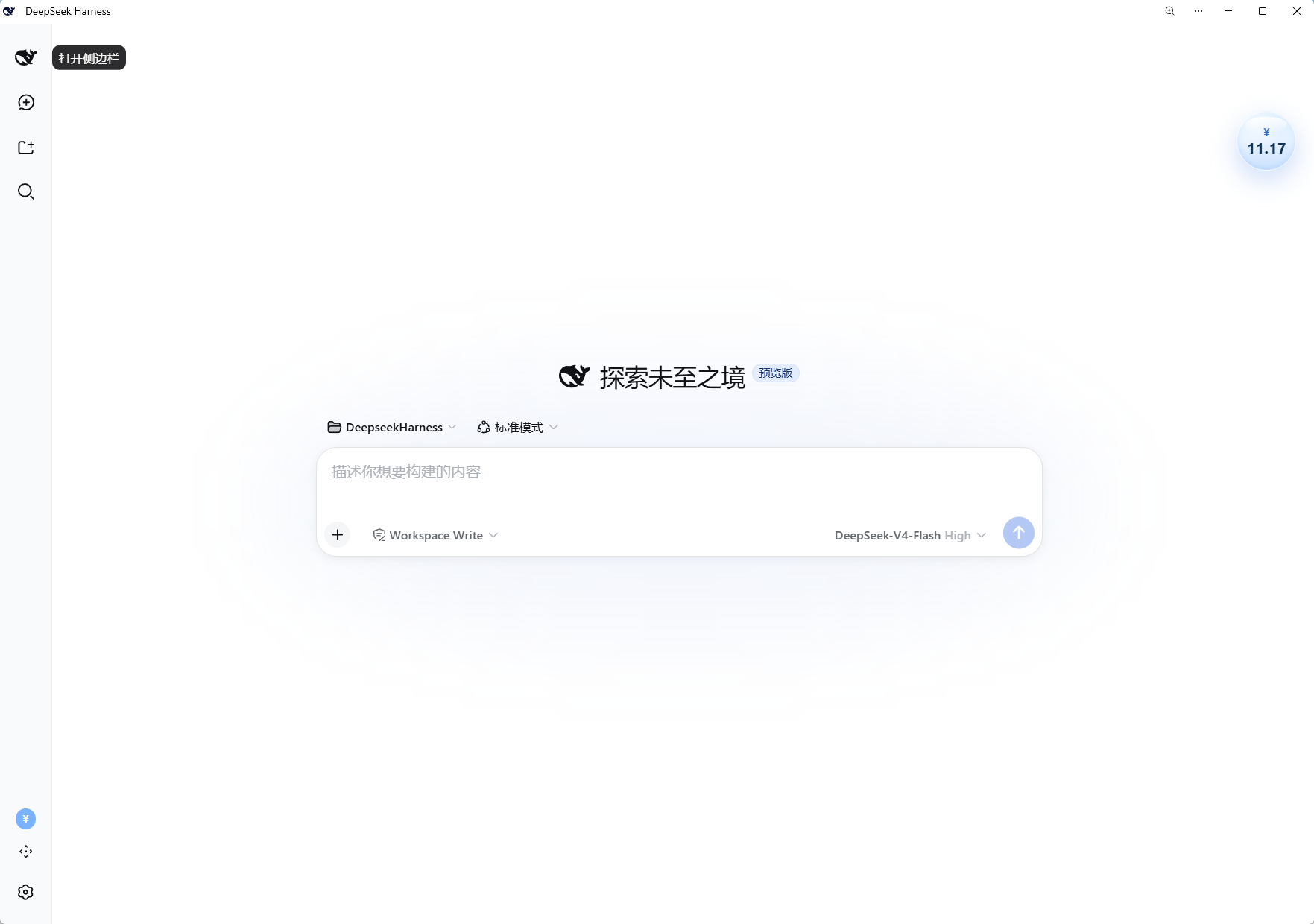 |
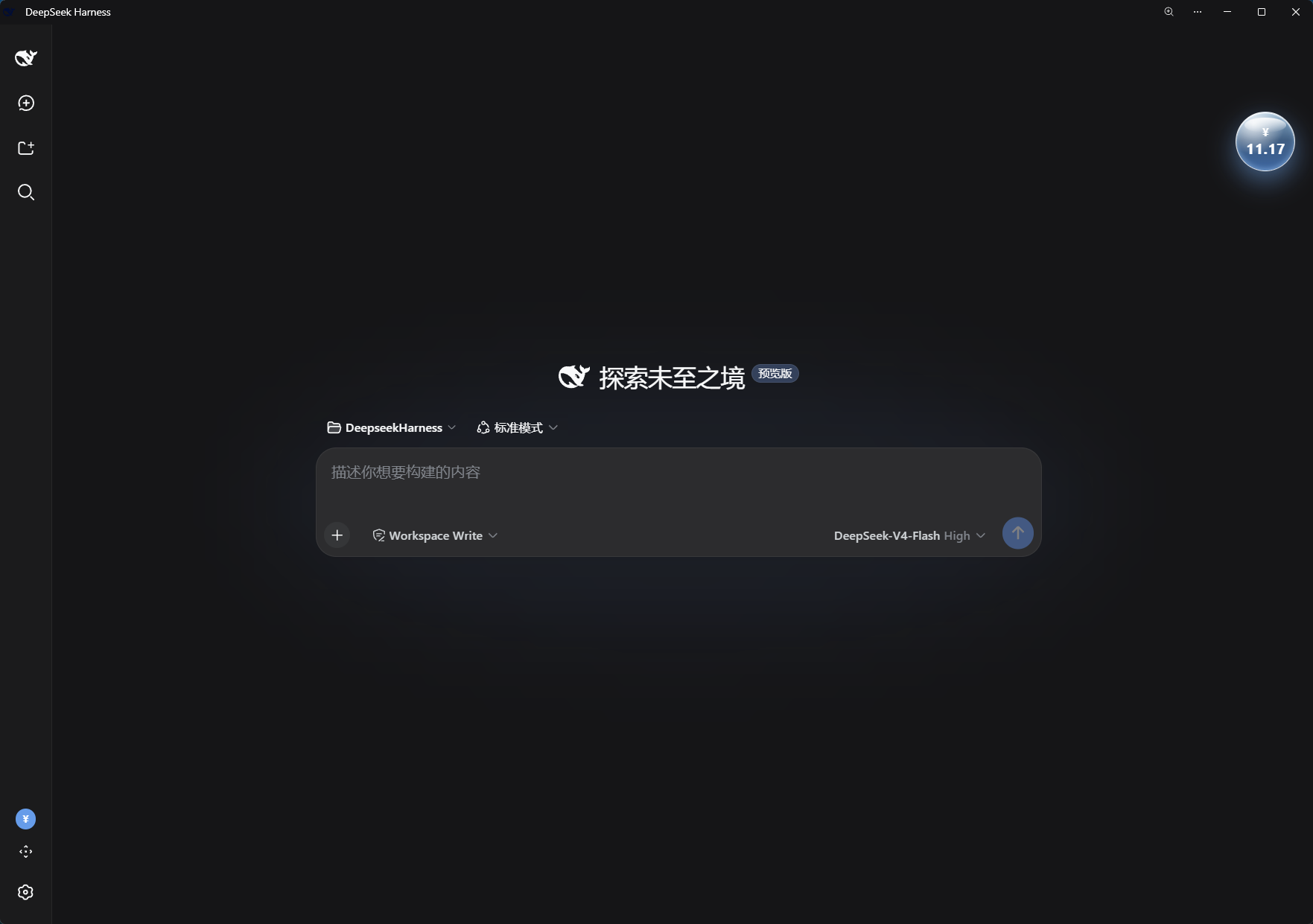 |
 |
 |
Requires the DSH web profile (dsh web) and a configured DeepSeek API key (DEEPSEEK_API_KEY, set in Settings → Models).
Install the package into the web profile:
dsh plugin --profile web add dsh-balance-bubble
# or manually:
cd ~/.dsh/profiles/web && pnpm add dsh-balance-bubble
Mount it. The package carries its own patch (dsh.bundle.patch → cordis.patch.yml), so adding dsh-balance-bubble to the profile's dsh.profile.bundles is enough — or insert the row manually:
- insert:
    - id: dsh-balance-bubble
      name: 'dsh-balance-bubble'
Restart DSH. The bubble and the sidebar toggle load automatically on every start.
No user-facing settings are exposed yet. The low-balance threshold is hard-coded at 5 CNY in lib/client.js — edit totalBalance < 5 to change it.
The API key is read from the DSH credentials service (DEEPSEEK_API_KEY, the same one the Models page writes); the plugin never stores the key itself.
lib/index.js) — resolves the key via ctx.credentials, calls the official balance endpoint with native fetch (30-second cache), and registers the GET /dsh-balance route on ctx.webServer. The path deliberately avoids the /api prefix used by the built-in transport.lib/client.js) — registers the bubble into shell.overlay and the toggle into sidebar.footer.action (order -1, above the Cordis plugin entry), polls the route every 20 seconds, and renders with React.一个面向 DSH(DeepSeek Harness) Web 界面的 Cordis 插件:在界面右上角悬浮一个半透明玻璃质感的气泡,实时显示你的 DeepSeek 账户余额,并自动刷新。
气泡可自由拖动、始终保持在窗口范围内(窗口缩放时按比例跟随),可通过侧边栏开关隐藏/显示,余额不足时变红并自动重新出现,且适配暗色主题。
https://api.deepseek.com/user/balance,以 GET /dsh-balance 暴露给浏览器半边;气泡每 20 秒刷新。悬停可查看充值余额 / 赠送余额明细与更新时间。theme/change 事件;暗色主题下气泡更亮、文字变白。气泡隐藏后,可通过侧边栏底部的 「余额」按钮重新显示——它位于 cordis 插件条目正上方。宽侧边栏下显示 ¥ 图标加「余额」文字;收起为窄栏时仅剩图标。按钮与气泡状态实时同步:气泡隐藏时按钮变灰。
| 浅色模式 | 深色模式 |
|---|---|
|
|
|
|
需要 DSH web profile(dsh web)且已配置 DeepSeek API Key(DEEPSEEK_API_KEY,在「设置 → 模型」中填写)。
安装到 web profile:
dsh plugin --profile web add dsh-balance-bubble
# 或手动:
cd ~/.dsh/profiles/web && pnpm add dsh-balance-bubble挂载插件:本包自带补丁(dsh.bundle.patch → cordis.patch.yml),把 dsh-balance-bubble 加入 profile 的 dsh.profile.bundles 即可自动生效;也可以手动插入:
- insert:
    - id: dsh-balance-bubble
      name: 'dsh-balance-bubble'
重启 DSH,气泡与侧边栏开关每次启动自动加载。
目前暂未开放用户可配置项。低余额阈值固定为 5 CNY,如需修改请编辑 lib/client.js 中的 totalBalance < 5。
API Key 通过 DSH 的 credentials 服务读取(DEEPSEEK_API_KEY,与「设置 → 模型」页面写入的同一个引用),插件本身不存储密钥。
lib/index.js)— 通过 ctx.credentials 解析密钥,用 Node 原生 fetch 请求官方余额接口(30 秒缓存),并在 ctx.webServer 注册 GET /dsh-balance 路由(路径刻意避开系统传输层占用的 /api 前缀)。lib/client.js)— 向 shell.overlay 注册气泡、向 sidebar.footer.action 注册开关(order: -1,位于 cordis 插件条目上方),每 20 秒轮询路由,用 React 渲染。CLASSIFICATION EVIDENCE
系统优先读取 GitHub Topics,再与站内分类词典和词根规则比对。当前命中: 无有效分类标签。
deepseek-ai
DeepSeek Harness: Everything is a Plugin.

walkinglabs
Harness engineering beginner tutorial, from 0 to 1

anywhere-labs
为 DeepSeek Harness (DSH) 插件生态打造的现代化桌面端解决方案。万物皆「插件」,桌面本身也是「插件」。