dsh-bot-toggle


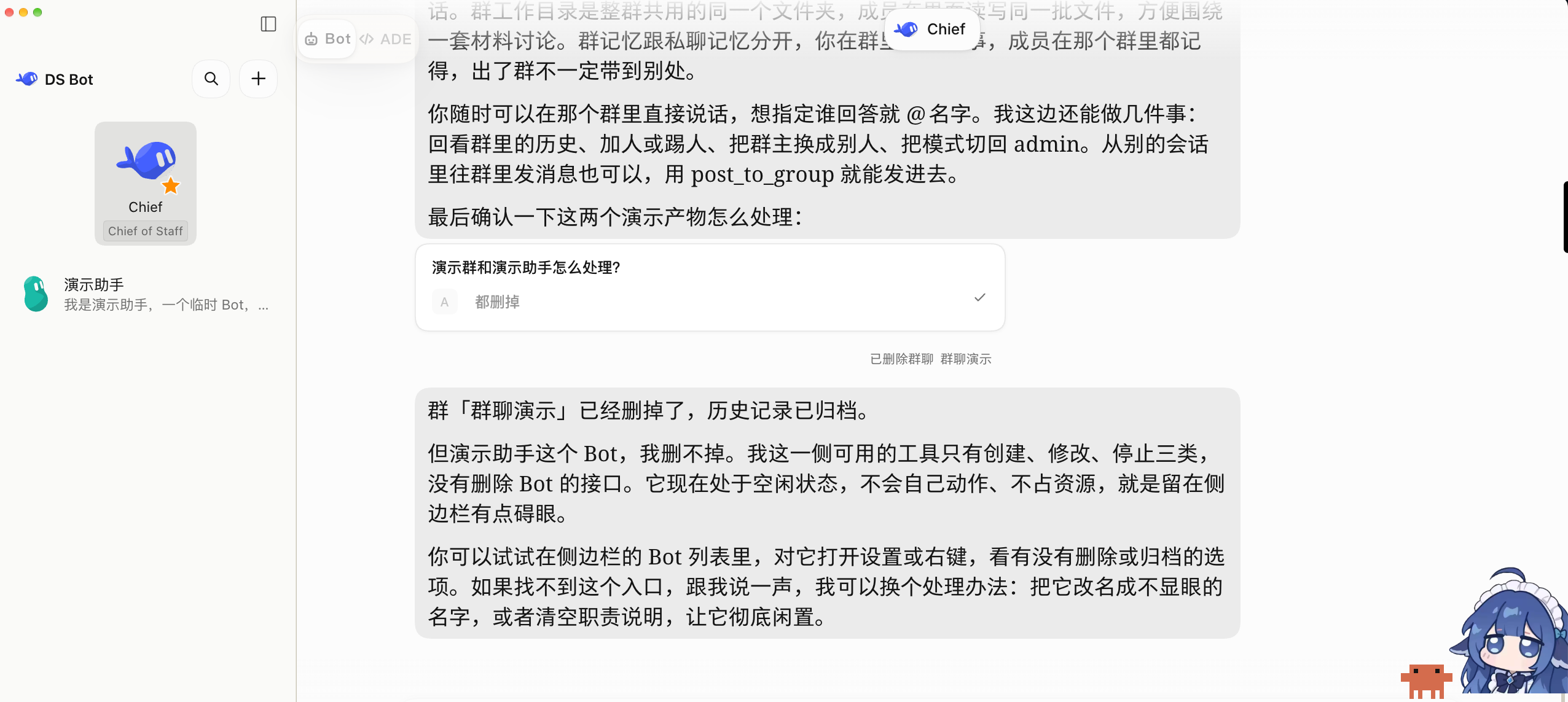
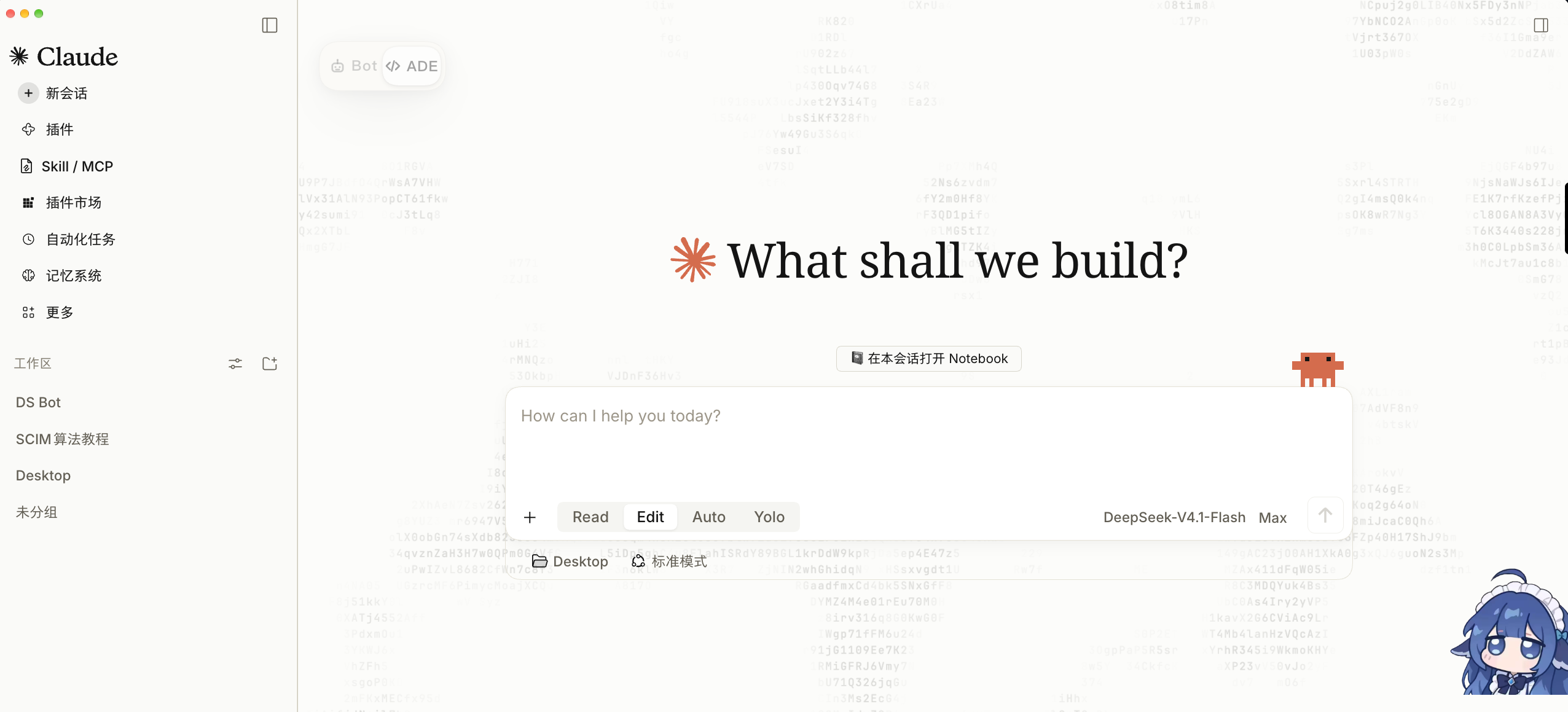
A floating Bot / ADE switch for the DSH web UI. It flips between the two interfaces that
ds-bot brings — its Bot surface and the classic ADE
interface — with a single click, while ds-bot stays loaded.
中文说明
Why
ds-bot ships both interfaces but has no persistent switch: from the Bot surface you can only get
back through its account menu, and from the classic interface you need its DS Bot return button.
This plugin puts a small two-segment capsule on the right edge that is visible in both surfaces.
It is a UI layer on top of ds-bot, not a replacement for it: ds-bot keeps running the whole time.
Features
- One-click switch between Bot and ADE; the active side is highlighted
- Available in both surfaces as a fixed overlay, kept clear of the content area
- Drag it anywhere, snap to an edge; right-click resets to the default position (remembered)
- Keyboard shortcut
Alt+Shift+B on Windows / Linux, ⌥⇧B or ⌘⇧B on macOS
- Fades after 4 s of no interaction, restores on hover; respects
prefers-reduced-motion
- Bilingual UI (Chinese / English) following the page or browser language
- ds-bot compatibility probe: reports whether ds-bot is loaded and, when obtainable, its version;
if ds-bot's controls are missing, the capsule turns amber with an explanation instead of
silently disappearing
- Stays out of the way during boot animations: while dsh-boot-suite's full-screen splash overlay
(
#dsh-startup-root) is on screen, the capsule and the top-bar entry stay hidden and the
shortcut is ignored; they come back within half a second after the splash ends
Screenshots
| Bot surface |
Classic (ADE) surface |
 |
 |
Requirements
- DSH Desktop
0.2.1-rc.2 / 0.2.1-rc.3 / 0.2.1-rc.4 / 0.2.2-rc.1
- ds-bot installed and enabled (
0.2.2 / 0.2.3 / 0.3.1 tested; 0.3.2 checked against its source)
Install
From DSH: Settings → Plugins → add plugin, then either
- the GitHub source
github:JackWoods-code/dsh-bot-toggle, or
- the packaged
dsh-bot-toggle-<version>.tgz from Releases (or npm pack it yourself)
CLI equivalent: dsh plugin --profile desktop add github:JackWoods-code/dsh-bot-toggle.
If the plugin page says the change takes effect at the next start, restart DSH.
Usage
- Click Bot to enter the ds-bot Bot surface, ADE to return to the classic DSH interface.
- Drag the capsule to move it; right-click it to reset the position to the right edge, centered.
- Press
Alt+Shift+B (on macOS ⌥⇧B or ⌘⇧B) to toggle from anywhere.
Debugging
Open DevTools (Settings → Account → developer tools) and check the console:
__botToggle.status()
// { version, mode, painted, lang, busy, mounted, lastError,
//   dsBot: { loaded, version, compatible } }
__botToggle.probe()          // ds-bot detection result only
__botToggle.switchTo("bot")  // "classic" for the other direction
__botToggle.toggle()
__botToggle.reset()          // position reset
The log prefix is [bot-toggle].
Compatibility probe
ds-bot exposes no public version API — window.dshBot is only its theme registry hub
(registerShape / registerTheme / themes / shapes). The probe therefore reads, in order:
window.__DSH_BOOT__.entries for an entry whose id / name / package is ds-bot
(and any version, pkg.version, manifest.version it may carry),window.dshBot.version (in case ds-bot adds one),document.body.dataset.dsBotVersion (in case it adds one).
If ds-bot appears to be loaded but neither surface's controls exist, the capsule turns amber, the
tooltip explains that the plugin may need an update, and status().dsBot.compatible is false.
Known limitations
- Surface switch only. ds-bot stays loaded, so ordinary sessions still see ds-bot's tools
(
list_bots, message_bot, …). To unload ds-bot, disable it on the Plugins page instead.
- Switching relies on ds-bot's own DOM:
.bt-return, .bt-account, .bt-account-menu, the
localized settings item (Bot settings, or Settings since 0.3.2) and the settings page's
Classic Agent mode row. A ds-bot upgrade may move these; the compatibility probe exists to
make that visible rather than silent.
- If neither interface can be detected, the capsule hides after about 1.6 s.
Development
npm test        # DOM-stub smoke tests (node --test, no dependencies)
npm run check   # syntax check for the client bundle, host entry and tests
Layout: lib/client.js builds the web bundle, lib/index.js is the host entry (intentionally a
no-op), cordis.patch.yml inserts the bot-toggle plugin row.
License
MIT © 2026 JackWoods-code. Not affiliated with DeepSeek or ds-bot.


