
模型与 MCP
待识别

rea
morluto
Reverse engineer anything with agents, from app behavior down to native binaries.
PROJECT TOPICS
INSTALL REFERENCE
dsh plugin --profile web add github:JaMoLpE88/dsh-opencodego-usage
该命令指向仓库当前默认分支;尚无绑定当前 commit 的完整验证结果。
PROJECT README







OpenCode Go subscription usage in the DeepSeek Harness composer. The 5-hour, weekly and monthly windows live in a compact pill in the composer tool row, inside the shared centered pill group; click it for a DSH-style details dialog with reset countdowns, colors and a manual refresh.
Zero configuration. The plugin uses the OpenCode Go provider key DSH already stores — no cookie, no workspace ID, no settings page.
Español → README.es.md
Project page → jmolo.es/proyectos/dsh-opencodego-usage
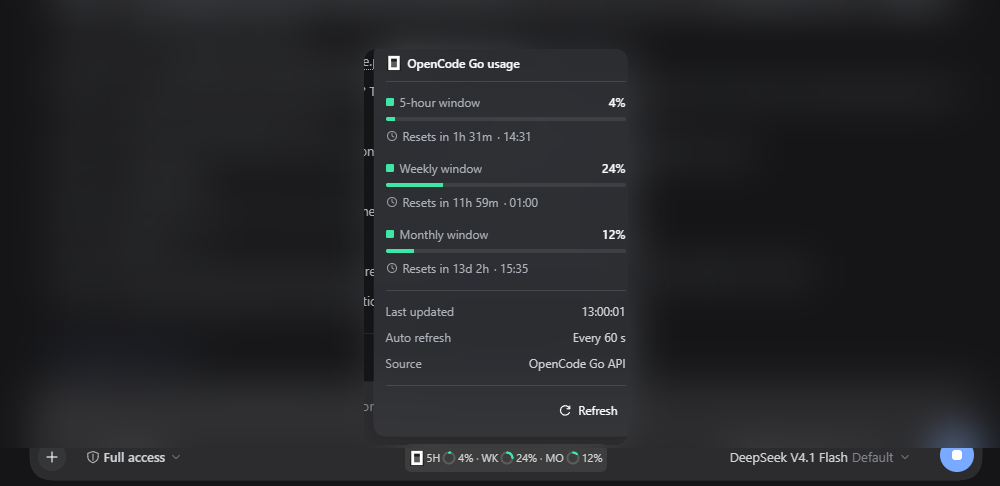
The details window: one percentage, one thin progress bar and one local reset countdown per window, followed by last update, auto-refresh cadence, source and a manual refresh. The chat background is blurred for privacy.

The compact pill: the OpenCode mark and three context-style rings separated by ·. It joins the shared centered pill group used by the other JaMoLpE88 plugins and is visible only with an OpenCode Go model; with several pills visible they sit side by side, centered, with a small gap.
· separators between windows.opencode-go provider. Other providers show nothing.If an OpenCode Go model is selected, the provider is configured and its key is already available to DSH. The plugin resolves that key on the Host side and reads the official usage API. If no OpenCode Go model is selected, the plugin has nothing useful to show and renders nothing.
There is no plugin config file, no key input, no threshold editor and no refresh preference. It is what it is: the subscription data the provider already knows about.
>= 0.2.1-rc.3, profile desktop (tested on 0.2.1-rc.3, Windows 11).If the provider is not configured you cannot select one of its models, so the plugin never appears. That is intentional.
From npm:
dsh plugin --profile desktop add @jamolpe88/dsh-opencodego-usageFrom the repository:
dsh plugin --profile desktop add github:JaMoLpE88/dsh-opencodego-usageFrom a local checkout, while developing:
dsh plugin --profile desktop add C:\path\to\dsh-opencodego-usageRefresh the DSH window after installing. The pill appears in the composer of any session whose active model uses the opencode-go provider.
Click outside the dialog, press Escape, or click the pill again to close it. Reset times are shown in the browser's local time zone, and the countdowns update every second without any action.
The Host half calls the official OpenCode Go endpoint with the provider key:
GET https://opencode.ai/zen/go/v1/usage
Authorization: Bearer <OPENCODE_GO_API_KEY>
It returns the three windows:
{
  "usage": {
    "rolling": { "status": "ok", "percent": 4,  "resetsAt": "2026-10-25T13:31:58.000Z" },
    "weekly":  { "status": "ok", "percent": 24, "resetsAt": "2026-10-26T00:00:00.000Z" },
    "monthly": { "status": "ok", "percent": 12, "resetsAt": "2026-11-07T14:35:16.000Z" }
  }
}OPENCODE_GO_API_KEY) on each read; OPENCODE_GO_API_KEY in the process environment is the fallback./api/opencodego-usage and /api/opencodego-usage/refresh. The key never reaches the browser.modelSelection projection. Switching to another provider hides the pill immediately; switching back shows it again.With DSH running, on the same URL as the interface (the port changes on each start):
curl http://127.0.0.1:59863/api/opencodego-usageIt returns percentages, reset timestamps, an error code and a freshness flag — never the key:
{
  "updatedAt": 1793016001120,
  "windows": {
    "rolling": { "percent": 4, "resetsAt": 1793025060000, "status": "ok" },
    "weekly": { "percent": 24, "resetsAt": 1793059200000, "status": "ok" },
    "monthly": { "percent": 12, "resetsAt": 1794062116000, "status": "ok" }
  },
  "error": null,
  "stale": false
}
Use /api/opencodego-usage/refresh to skip the 55-second cache and force a read. When error is not null, stale tells you whether the percentages are the last good values or there are no values at all.
| DSH | >= 0.2.1-rc.3 (the only version tested by the author) |
| Node | >= 22 |
| OS | Windows 11 (tested); macOS and Linux untested |
| Profile | desktop |
| Provider | OpenCode Go configured in Settings → Models |
| Pill group | Shared with the other JaMoLpE88 composer pills (centered, side by side) |
| Catalog | listed on dsh-plugin.org |
| Project page | jmolo.es/proyectos/dsh-opencodego-usage |
Validation status: tested on Windows 11 with DSH Desktop 0.2.1-rc.3 (2026-10-25). The pill appears only with an OpenCode Go model, the details dialog opens, local reset times and countdowns update, the severity colors follow the thresholds, and manual refresh works. The automatic refresh at a reset is implemented with a one-shot guard; it is covered by the countdown path but was not observed during a live reset in this validation.
Not validated: macOS, Linux, other DSH versions, and the web profile.
parse error.See SECURITY.md for the short policy.
The pill does not appear. Check that the active model belongs to the OpenCode Go provider. The plugin intentionally renders nothing for other providers.
The pill shows a red dot and an error. Open the dialog for the code and hint:
| Code | Meaning |
|---|---|
missing-key |
DSH has no OPENCODE_GO_API_KEY for this profile. Configure the OpenCode Go provider in Settings → Models. |
invalid-key |
The provider key was rejected (401). Re-check or replace it in Settings → Models. |
no-subscription |
The key has no active OpenCode Go subscription (403). |
rate-limited |
The usage API itself is rate limiting; try again shortly. |
timeout / network |
The Host could not reach opencode.ai; retry with Refresh. |
parse |
The response did not contain recognizable windows. |
The plugin has no settings of its own: provider problems are fixed in DSH's model settings.
npm test        # node --test
npm run check   # syntax check for the Host and Client files
The tests cover the API parser, HTTP error mapping, the cache, the missing-key path and the stale-data fallback. The Client half is a plain client.js bundle (no build step) and is verified in the running Harness.
Local install:
dsh plugin --profile desktop add C:\path\to\dsh-opencodego-usageOpenCode and the OpenCode logo are trademarks of their respective owner. The logo is used only to identify the OpenCode Go service; it is not covered by the MIT license that applies to the source code. See NOTICE.
MIT © 2026 JaMoLpE88
CLASSIFICATION EVIDENCE
系统优先读取 GitHub Topics,再与站内分类词典和词根规则比对。当前命中: deepseek-harness。
morluto
Reverse engineer anything with agents, from app behavior down to native binaries.

deepseek-ai
DeepSeek Harness: Everything is a Plugin.

nexu-io
The 1st Collaborative AI Design Agent Workspace. Local-first and open source. Create motion, prototypes, websites, apps, dashboards, presentations, images, and videos with your team and AI agents. Share work, exchange feedback, and iterate together in one workspace.