
模型与 MCP
待识别

rea
morluto
Reverse engineer anything with agents, from app behavior down to native binaries.
PROJECT TOPICS
INSTALL REFERENCE
dsh plugin --profile web add github:JaMoLpE88/dsh-deepseek-peakoffpeak
该命令指向仓库当前默认分支;尚无绑定当前 commit 的完整验证结果。
PROJECT README







DeepSeek peak/off-peak rate clock in the DeepSeek Harness composer. A live 24-hour tariff bar lives in a compact pill between the permission and model controls; click it for a DSH-style window with the current band, the countdown to the next change, the day's windows and the official prices per million tokens.
Zero configuration. The plugin is computed in the browser from the user's clock and the official price table — no API, no key, no settings page.
Español → README.es.md
Project page → jmolo.es/proyectos/dsh-deepseek-peakoffpeak
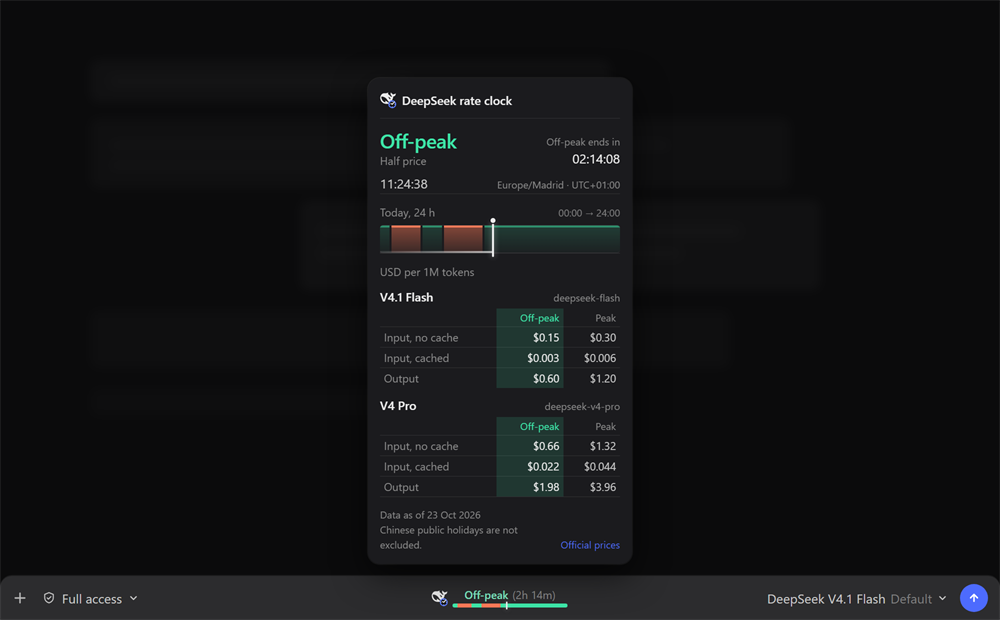
The details window: the active band with its half-price / full-price note, the countdown to the next change, the current local time and zone, today's 24-hour bar, and the official prices for V4.1 Flash and V4 Pro with the active column tinted.
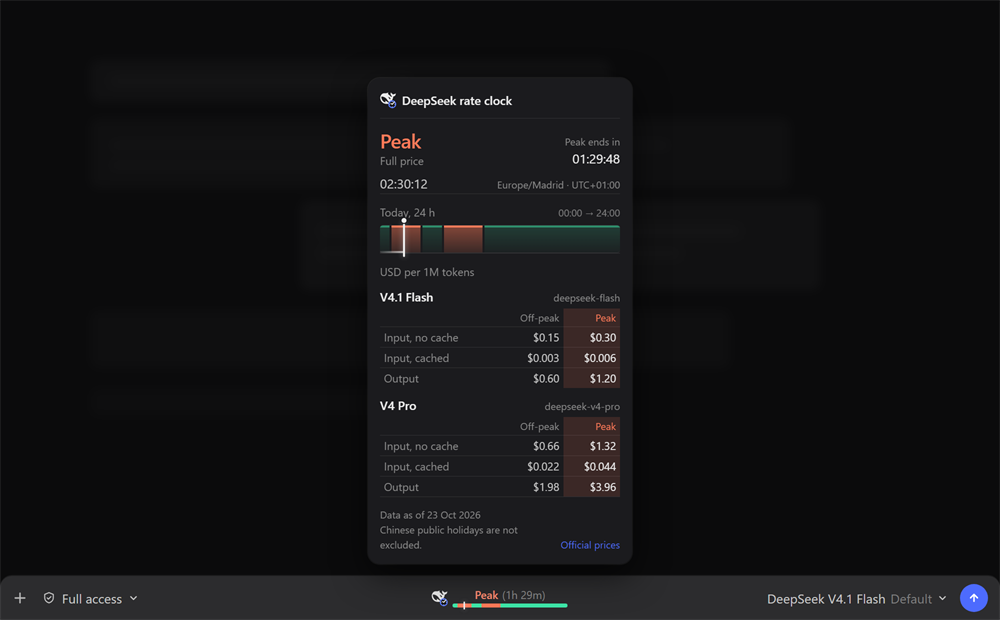
During peak the same window turns warm: the band, the 24-hour bar and the active price column follow the peak color.

The compact pill: the DeepSeek mark with a small clock, the current band, the time left and a 24-hour bar with the peak / off-peak blocks and the current-time marker. It is visible only with a DeepSeek model.
Peak / Off-peak) and the time remaining to the next change, updated every second.Full price / Half price;hh:mm:ss countdown to the next change;deepseek-official, deepseek-account, opencode-go with a DeepSeek model, or an aggregator whose provider, model id or catalog name contains deepseek.Everything the plugin needs is already on the machine: the user's clock and the official price table. There is no key to enter, no endpoint to configure, no refresh interval to choose and no threshold to edit. The only visible state is the band, the countdown and the prices; when the model is not DeepSeek there is nothing useful to show and the plugin renders nothing.
>= 0.2.1-rc.3, profile desktop (tested on 0.2.1-rc.3, Windows 11).deepseek-official, deepseek-account, opencode-go with a DeepSeek model, or an aggregator that serves one.If no DeepSeek model is available, the plugin never appears. That is intentional.
From npm:
dsh plugin --profile desktop add @jamolpe88/dsh-deepseek-peakoffpeakFrom the repository:
dsh plugin --profile desktop add github:JaMoLpE88/dsh-deepseek-peakoffpeakFrom a local checkout, while developing:
dsh plugin --profile desktop add C:\path\to\dsh-deepseek-peakoffpeakRefresh the DSH window after installing. The pill appears in the composer of any session whose active model is a DeepSeek one.
The 24-hour bar follows the local day, including days with a daylight-saving change. Times are shown in the browser's local time zone; the peak windows themselves are defined in UTC.
01:00–04:00 and 06:00–10:00 UTC, Monday through Friday. Every other hour is off-peak, including weekends in full.00:00 → 24:00) is split at every UTC window boundary, so each block has its real duration and the bar stays correct across DST changes.Peak / Off-peak is evaluated from the same UTC rules.modelSelection projection with the composer's displayed model, so a blank Session follows the catalog default instead of waiting for the first request.| Model | Concept | Off-peak | Peak |
|---|---|---|---|
V4.1 Flash (deepseek-flash) |
Input, no cache | $0.15 | $0.30 |
| Input, cached | $0.003 | $0.006 | |
| Output | $0.60 | $1.20 | |
V4 Pro (deepseek-v4-pro) |
Input, no cache | $0.66 | $1.32 |
| Input, cached | $0.022 | $0.044 | |
| Output | $1.98 | $3.96 |
Source: api-docs.deepseek.com/quick_start/pricing (data as of 23 Oct 2026). Off-peak rates are half of the peak rates; Chinese public holidays are not excluded by this plugin.
| DSH | >= 0.2.1-rc.3 (the only version tested by the author) |
| Node | >= 22 |
| OS | Windows 11 (tested); macOS and Linux untested |
| Profile | desktop |
| Models | Any DeepSeek model, from any provider |
| Catalog | listed on dsh-plugin.org |
| Project page | jmolo.es/proyectos/dsh-deepseek-peakoffpeak |
Validation status: tested on Windows 11 with DSH Desktop 0.2.1-rc.3 (2026-10-27). The pill appears with a DeepSeek model, paints the peak/off-peak blocks with the current-time marker, shows the countdown and opens the details window with the tinted price column. Not validated: macOS, Linux, other DSH versions and the web profile.
deepseek in the provider, model id or catalog name will not show the pill.See SECURITY.md for the short policy.
The pill does not appear.
Check that the active model is a DeepSeek model from any provider. A provider alias without deepseek in the provider, model id or catalog name is not detected.
The prices are out of date. The table ships with the plugin. Install the latest version; the window shows the data date next to the source link.
The counts look wrong. The windows are defined in UTC. Check the system clock and the browser's time zone; the window shows both the local time and the UTC offset it is using.
Several pills disappear at once. They share one centered group and hide together when the composer is too narrow. Widen the window to bring them back.
npm test        # node --test
npm run check   # syntax check for the Host and Client files
The tests cover the UTC peak edges, the next-change search, the day segmentation (including a DST day), the DeepSeek match and the price table. The Client half is a plain client.js bundle (no build step) and is verified in the running Harness.
Local install:
dsh plugin --profile desktop add C:\path\to\dsh-deepseek-peakoffpeakDeepSeek and the DeepSeek logo are trademarks of DeepSeek, Inc. The mark is used only to identify the DeepSeek service and its tariffs; it is not covered by the MIT license that applies to the source code. This plugin is independent and unofficial. See NOTICE.
MIT © 2026 JaMoLpE88
CLASSIFICATION EVIDENCE
系统优先读取 GitHub Topics,再与站内分类词典和词根规则比对。当前命中: deepseek、deepseek-harness。
morluto
Reverse engineer anything with agents, from app behavior down to native binaries.

deepseek-ai
DeepSeek Harness: Everything is a Plugin.

nexu-io
The 1st Collaborative AI Design Agent Workspace. Local-first and open source. Create motion, prototypes, websites, apps, dashboards, presentations, images, and videos with your team and AI agents. Share work, exchange feedback, and iterate together in one workspace.