dsh-full-remote








Listed in awesome-dsh-plugin · DeepSeek Harness plugin
Current release: v0.3.12 · Distributed through GitHub Releases
English | 中文
dsh-full-remote is a plugin for
DeepSeek Harness. It
places an authenticated reverse proxy in front of the Harness Web server,
so the Web UI can be used through a public tunnel or from a device on the
local network while privileged APIs such as settings, credentials, and
directory browsing remain available.
60-second quick start
curl -fLO https://github.com/JUANWANG-BUAA/dsh-full-remote/releases/download/v0.3.12/dsh-full-remote-0.3.12.tgz
dsh plugin --profile web add ./dsh-full-remote-0.3.12.tgz
dsh --profile web
In Settings → Reverse proxy, press Start proxy, then Start
Cloudflare quick tunnel and scan the generated QR code. The invite is
one-time and never contains the standing access token. For a controlled
network, point an existing SSH, frp, ngrok, Tailscale, or cloudflared tunnel
at the proxy target shown in the panel instead.
The quick tunnel is optional and temporary, not a managed production
deployment. Read Security model before exposing a listener
to the Internet. For composition details, see
Compatibility and composition.
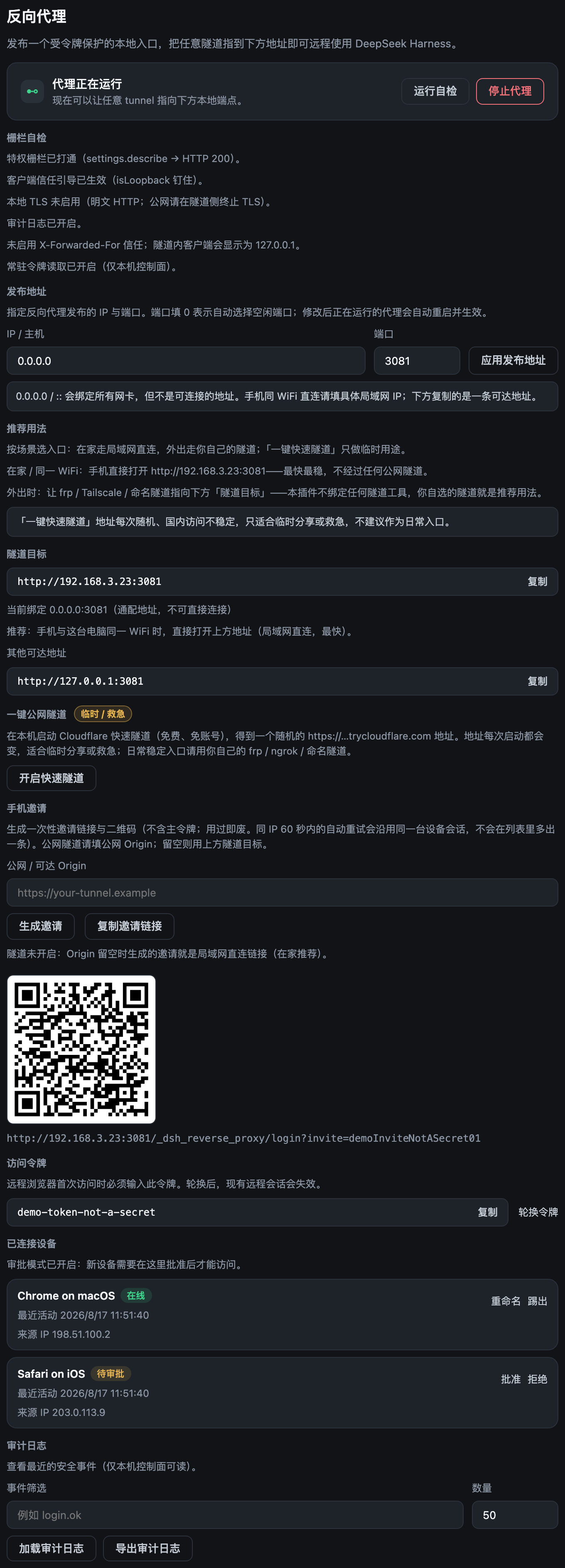
| Desktop control panel |
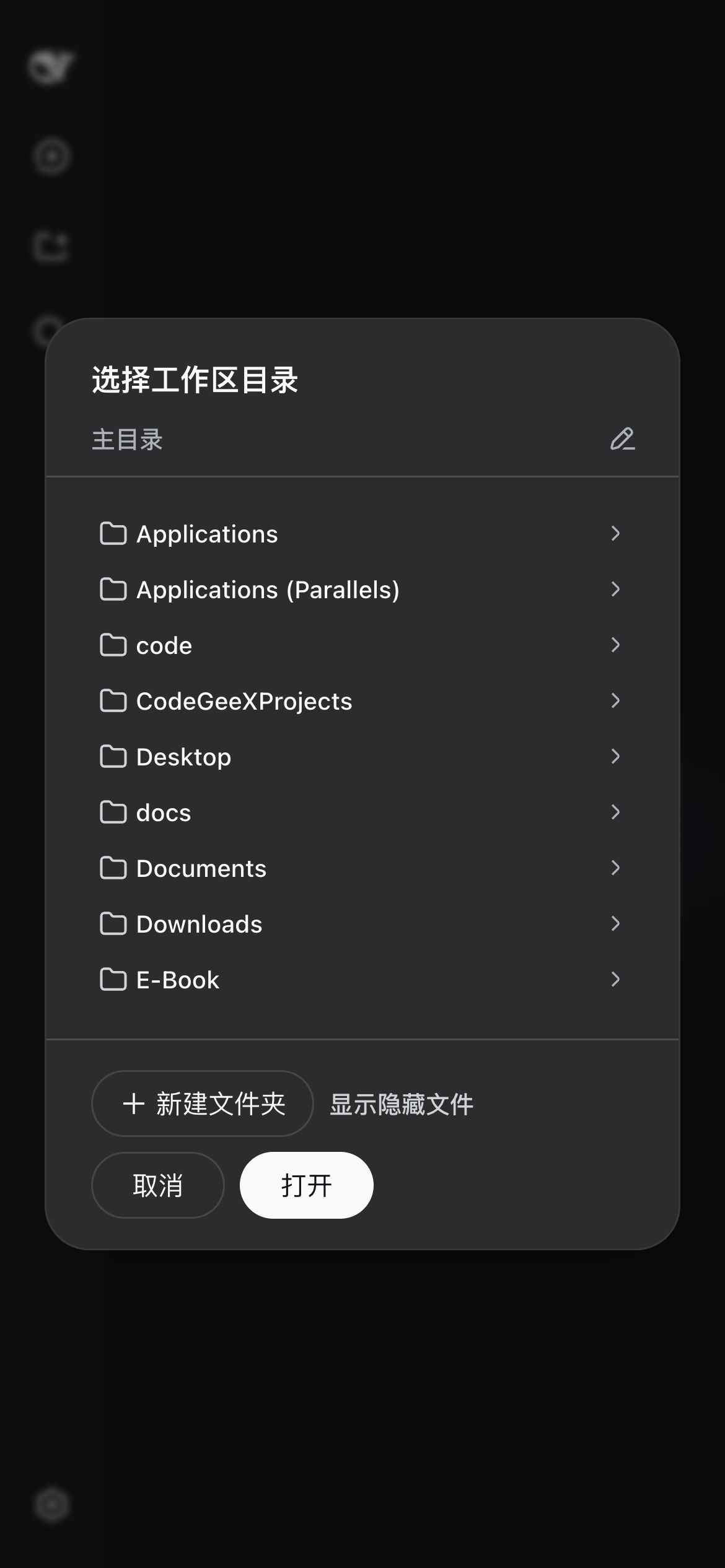
Mobile workspace |
 |
 |
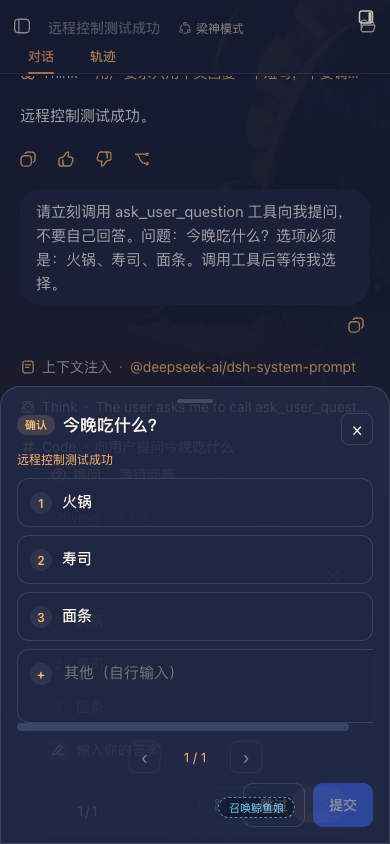
| Phone confirmation sheet |
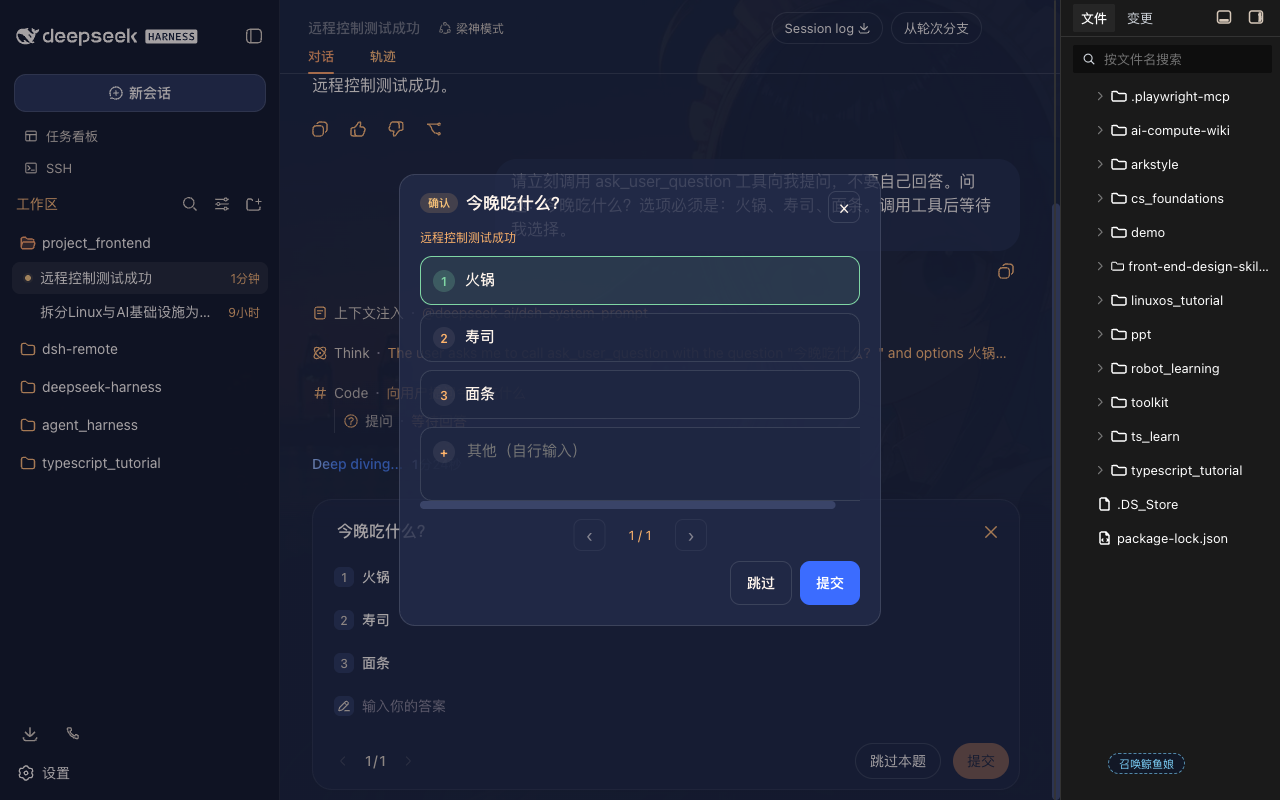
Remote desktop confirmation |
 |
 |
Problem
DeepSeek Harness binds its Web server to a loopback address and only
accepts privileged requests when the Host and Origin headers refer to
a loopback address. When the UI is reached through a generic tunnel, these
headers carry the public hostname and the trust check fails. The page
loads, but the following methods return 403:
settings.*credentials.*host.listDirectory
| Approach |
Result |
Generic tunnel (SSH port forward, Caddy, binding 0.0.0.0) |
Page loads; settings.* / credentials.* / host.listDirectory return 403 |
| LAN-only plugin without authentication |
Usable on the local network; not suitable for public exposure |
| Password prompt without header rewriting |
Requests are authenticated, but the privileged APIs remain blocked |
Solution
The plugin inserts a reverse proxy between the tunnel and the Harness Web
server. The proxy:
- rewrites
Host and Origin to 127.0.0.1 before forwarding, so the
privileged APIs pass Harness's trust check;
- requires an access token or a valid device session before any request is
forwarded;
- forwards HTTP, SSE, and WebSocket traffic; compressible HTTP responses
may be gzipped (not SSE or WebSocket);
- provides a settings page (Settings → Reverse proxy) for starting and
stopping the proxy, changing the listen address, rotating the token, and
managing device sessions.
Because the rewrite disables Harness's original trust check for remote
clients, the plugin provides its own access-control layer in its place.
This layer is described under Security model.
The plugin can optionally start a temporary Cloudflare quick tunnel. Any
managed tunnel (cloudflared, ngrok, frp, SSH, Tailscale) can also point at the
local endpoint it publishes.
How it works
flowchart LR
    A[Phone or remote browser] --> B[Public tunnel<br>cloudflared / ngrok / frp / SSH]
    B --> C[dsh-full-remote<br>127.0.0.1:3081<br>authentication + header rewrite]
    C --> D[DeepSeek Harness Web<br>127.0.0.1:3080]
- The remote browser connects to the public tunnel, which forwards to the
plugin's listener (
127.0.0.1:3081 by default).
- A request is accepted only with an access token, a valid one-time
invite, or an existing device session. Requests that fail
authentication do not reach the backend.
- The proxy rewrites
Host/Origin to loopback, removes untrusted
headers, and forwards the request to the Harness Web server at
127.0.0.1:3080. Compressible HTTP responses (HTML/JS/CSS/JSON/SVG,
≥1 KB) may be gzipped; SSE and WebSocket are not. Hashed /assets/*
files may receive a long-cache header. See
HTTP gzip.
Features
Privileged APIs
settings.describe / update / replace / mutatecredentials.describe / set / unsethost.listDirectory / pickDirectory / openPathagentPreset.*, llm.discoverModels
Access control
- 192-bit access token, stored in a state file with mode
0600; reveal and
rotation are performed from the local panel
- Per-device sessions: each login creates an independent device
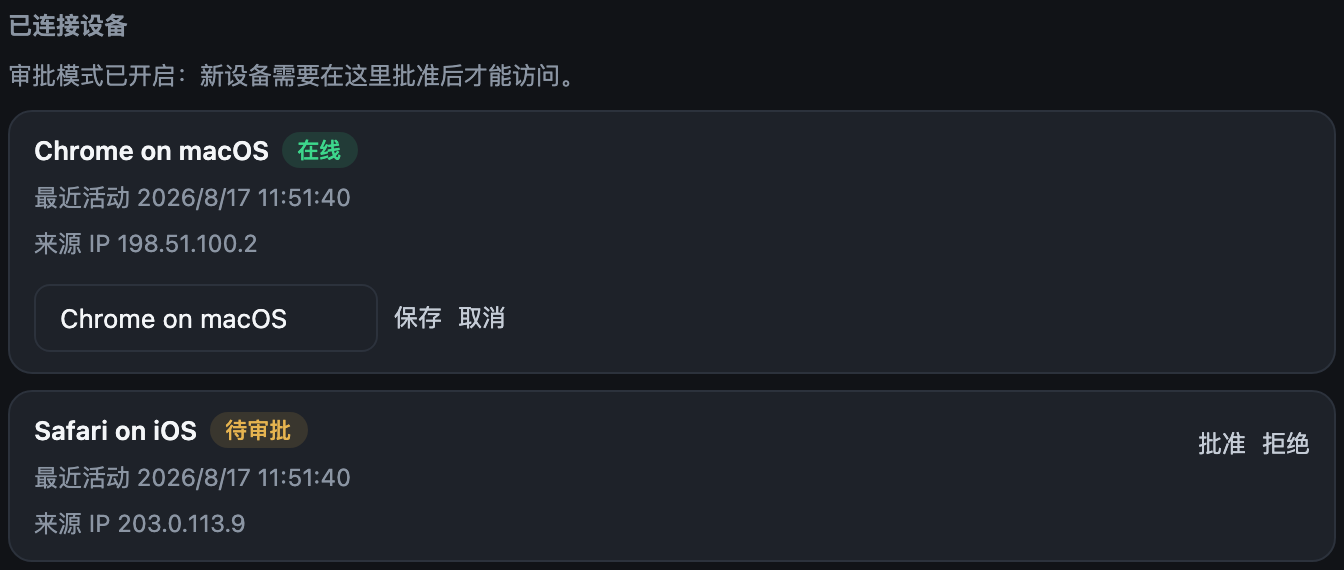
credential, and only a hash is persisted. Devices can be renamed or
revoked from the panel, which also shows each device's source IP
(at login and most recently seen).
- Optional first-visit approval: a new device waits on a page until it is
approved from the local panel
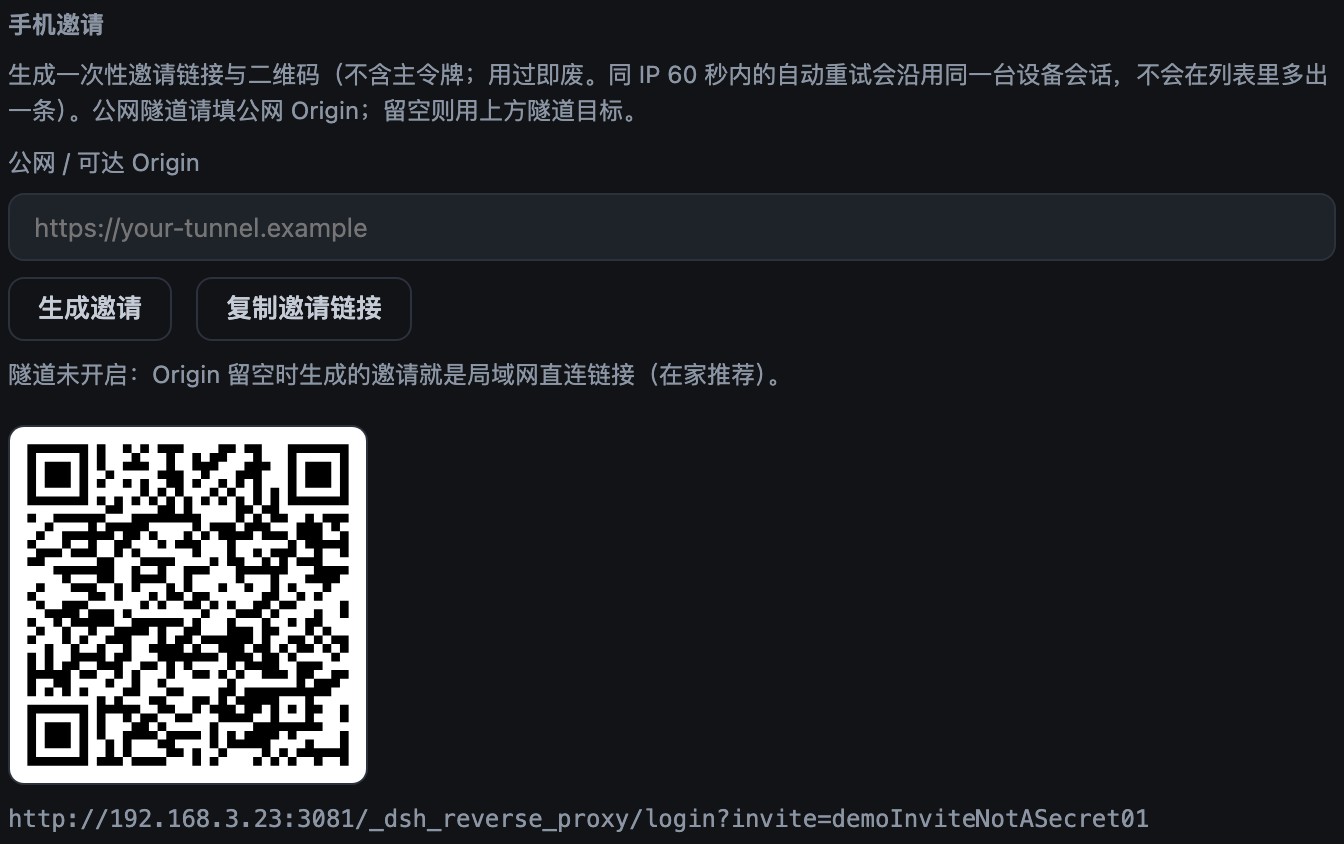
- Phone invite: a QR code or a one-time link (single use, 15-minute
expiry). Same-IP browser retries within 60 s reuse the original device
session so a flaky tunnel dropping the redirect cannot deadlock the
phone into the token form or spawn a duplicate device. The link does
not contain the standing token.
- Fixed delay and per-IP lockout on failed logins
- Optional CIDR allowlist for remote IPs
- Optional
trustForwardedFor to use real client IPs from a trusted local
tunnel in CIDR / rate-limit / audit via its rightmost X-Forwarded-For
value; CF-Connecting-IP is a separate Cloudflare-only opt-in, and
loopback or malformed forwarded values are never trusted
Operation
- Fence self-check: probes
settings.describe with the same Host/Origin
rewrite the proxy uses
- Structured JSONL audit log (login, approval, revocation, token rotation,
start, stop, WebSocket open/deny/reject) with an in-panel viewer for
recent events and JSON export; rotates past 8 MB, keeping one previous
generation
- Runtime listen-address changes with automatic rollback when a bind fails
- Optional local TLS (
tlsCertFile / tlsKeyFile)
- Health endpoint at
/_dsh_reverse_proxy/healthz
- WebSocket upgrade rate limiting: repeated failed upgrades are locked out
per remote IP
- Stream-level request body limit; hop-by-hop and spoofable headers are
stripped; upstream
set-cookie is removed
- Gzip for compressible HTTP responses (JS/CSS/HTML/JSON/SVG) when the
client advertises gzip; SSE, WebSocket, fonts, gate pages, and bodies
under 1 KB are skipped. Measured first-load of the Harness shell:
−72.7% (1.29 MB → 351 KB).
vendor-*.js −75.7%. Tiny JSON grows,
so it is not compressed. Issue #11's "95%+" is not a general result.
Off: compressResponses: false. Details: HTTP gzip
- Long-cache
Cache-Control on hashed /assets/* (not index.html or
/api). Off: cacheHashedAssets: false
One-click public tunnel (Cloudflare quick tunnel)
- Start a cloudflared quick tunnel from the panel (free, no account) and
get a
https://…trycloudflare.com address — no public IP or port
forwarding required
- Binary resolution:
cloudflaredPath → PATH → a pinned
(2026.8.2), SHA256-verified download cache; failed checksums are
discarded
- While the tunnel is up, forwarding-header trust applies dynamically
(rate limiting / CIDR / audit see real client IPs) and reverts when the
tunnel stops; the tunnel forwards to the proxy listener, so the token
gate, approval and audit all keep applying
- Invites automatically use the tunnel URL: start the tunnel, generate
the QR, scan from the phone (the panel shows it and the Origin can
still override it)
- Mutually exclusive with local TLS (the Cloudflare edge already
provides HTTPS); the quick-tunnel address is random per start and is
meant for temporary sharing / emergencies
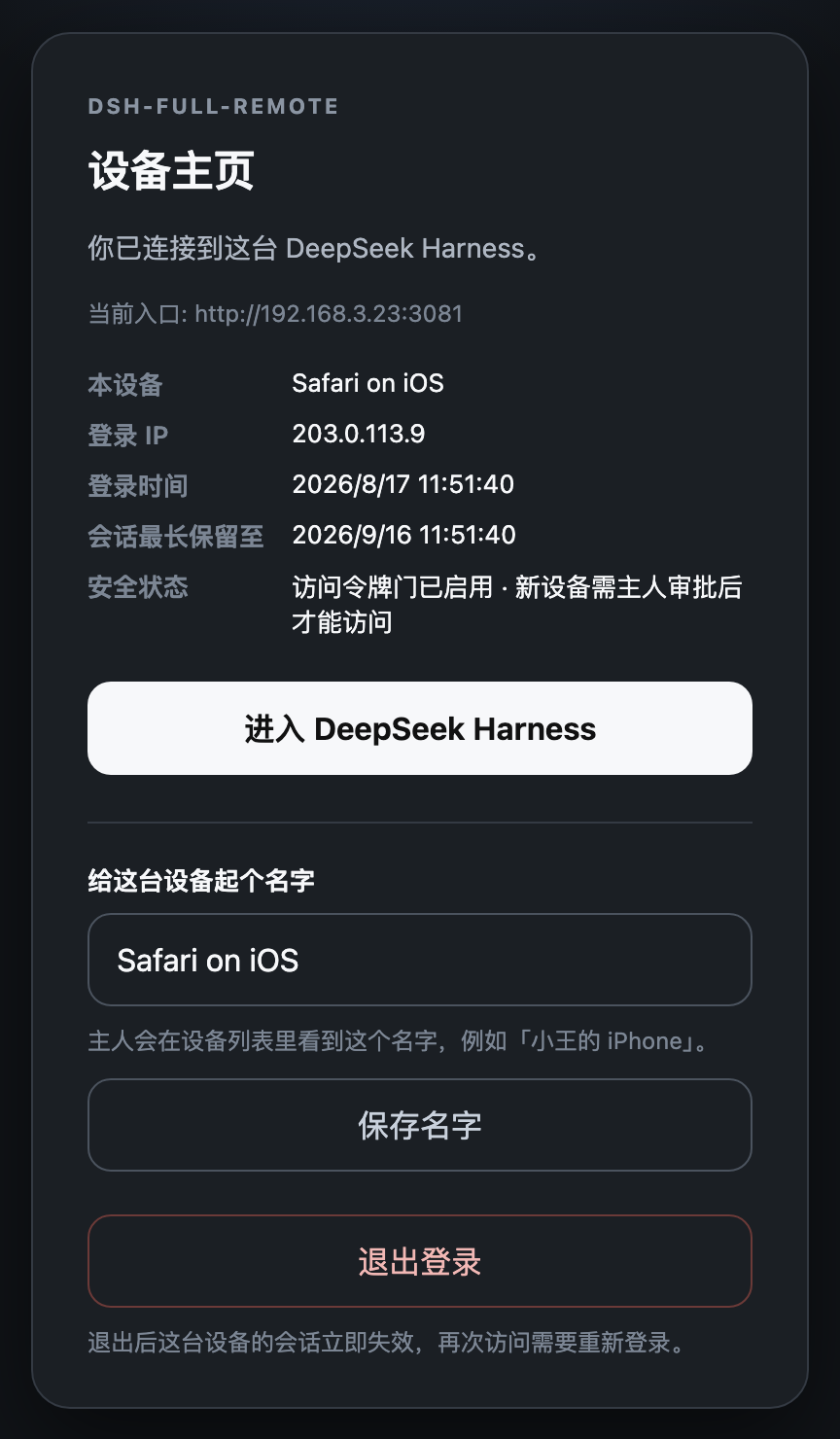
Device home (opt-in)
- A second button on the login form opens
/_dsh_reverse_proxy/home:
device facts (label, login IP/time, expiry estimate, security
posture), self-rename, and self-logout (revokes only this device)
- The default login landing stays
/; the original flow is unchanged
Mobile use
- Settings edits persist when the page is opened through a tunnel hostname
- Add workspace uses the in-app directory browser; no native dialog
appears on the host display
- Tool approvals,
ask_user_question option lists, and plan reviews
appear as a confirmation sheet on the remote page: a bottom drawer
on a phone, a centered card on a wider remote window. You can choose
and submit there; you do not have to go back to the host. Custom
answers wrap; Shift+Enter inserts a newline. The official composer
still only sits on the current session
- Image paste/drop for
deepseek-v4-flash-vision-exp (and other
image-capable routes) goes through the same authenticated /api
path. The default body cap is 160 MiB, matching Harness. Raster
image responses are not gzipped
- For a phone-friendly layout (full-width session area, directory drawer,
adapted dialogs), pair it with a mobile-layout plugin such as
dsh-web-mobile
Requirements
- Node.js
^22.19.0 || >=24
- A DeepSeek Harness web profile. The plugin depends on
webServer and
Host connection services and is not intended for headless profiles.
Verified against 0.1.2-rc.1 (npm next dist-tag), with a compatibility
path for 0.1.1-rc.1/rc.2.
Installation
curl -fLO https://github.com/JUANWANG-BUAA/dsh-full-remote/releases/download/v0.3.12/dsh-full-remote-0.3.12.tgz
curl -fLO https://github.com/JUANWANG-BUAA/dsh-full-remote/releases/download/v0.3.12/SHA256SUMS
shasum -a 256 -c SHA256SUMS
dsh plugin --profile web add ./dsh-full-remote-0.3.12.tgz
dsh --profile web
The current release is v0.3.12. npm publication is separate and currently
lags behind the GitHub release, so use the attached tarball above when
installing or upgrading this version.
- Open
http://127.0.0.1:3080.
- Open Settings → Reverse proxy (last entry in the left navigation).
- Press Start proxy and copy the local target.
- Point the tunnel at the target:
# Examples only. The plugin does not execute these commands.
cloudflared tunnel --url http://127.0.0.1:3081
ngrok http 3081
For devices on the same network, set the listen address to a LAN IP
instead of using a tunnel.
The package was previously published as dsh-reverse-proxy; that legacy name
is deprecated. Install dsh-full-remote for new deployments.
Usage
Starting and stopping
On the settings page, press Start proxy to start the listener and
Stop proxy to stop it.
Listen address
| Bind |
Purpose |
127.0.0.1 (default) |
The tunnel runs on the same machine |
192.168.x.x |
A device on the same network, without a tunnel |
0.0.0.0 / :: |
Bind every interface. This is not an address to open; the panel reports a separate reachable address. |
The listen address can be changed at runtime and persists across restarts.
If a new address fails to bind, the proxy rolls back to the previous
working address.
The copyable tunnel target (and any extra reachable URL the panel
lists) is what a remote client should open. Binding 0.0.0.0 only
listens; it is not a URL.
backendHost is the address the proxy connects to, not the address it
listens on. Keep it at 127.0.0.1.
Phone invite
The QR encodes a one-time login URL. Public / reachable Origin is the
host the scanning device will request: the tunnel's https://…, or the
LAN URL from the panel. Leave it empty only when the tunnel target above
is already that address.
Do not put 127.0.0.1 in Origin. That address is the Harness machine; a
phone would open its own loopback and never reach the proxy.
Then press Generate invite. After a scan (or opening the link) the
login page submits once. The invite expires in 15 minutes, works once
(same-IP retries within 60 s reuse the original session), and does not
contain the standing token. Invites can only be generated while the proxy
is running.
Upgrade
Download the current GitHub release and add its tarball to the existing web
profile:
curl -fLO https://github.com/JUANWANG-BUAA/dsh-full-remote/releases/download/v0.3.12/dsh-full-remote-0.3.12.tgz
dsh plugin --profile web add ./dsh-full-remote-0.3.12.tgz
Then restart dsh web. This replaces an older registry-installed or tarball
version with v0.3.12.
Language
The plugin panel has a Language / 语言 selector: Auto, English, or 中文. Auto follows the Harness locale when available, otherwise your browser language (English for non-Chinese browsers). An explicit choice is saved per browser and origin and also applies to remote confirmation overlays. Login, approval-wait, and device-home pages continue to follow the browser’s HTTP language header.
Screenshots
The gallery is hosted in the repository; the release package keeps only runtime
files and links back here so installation stays small.
Desktop
The full settings page: running status and fence self-check, listen
address, recommended setup, tunnel target, one-click quick tunnel,
one-time invite QR, access token, connected devices with source IPs
(inline rename), and the audit viewer.
| One-time phone invite (QR) |
Connected devices with inline rename |
 |
 |
Mobile
| Login page |
Control panel |
Add workspace |
 |
 |
|
Remote confirmation
When the model asks a question, requests a tool approval, or presents a
plan review, the remote browser shows its own sheet. You do not have to
look at the host display.
| Phone bottom sheet |
Remote desktop card |
|
|
Gate pages
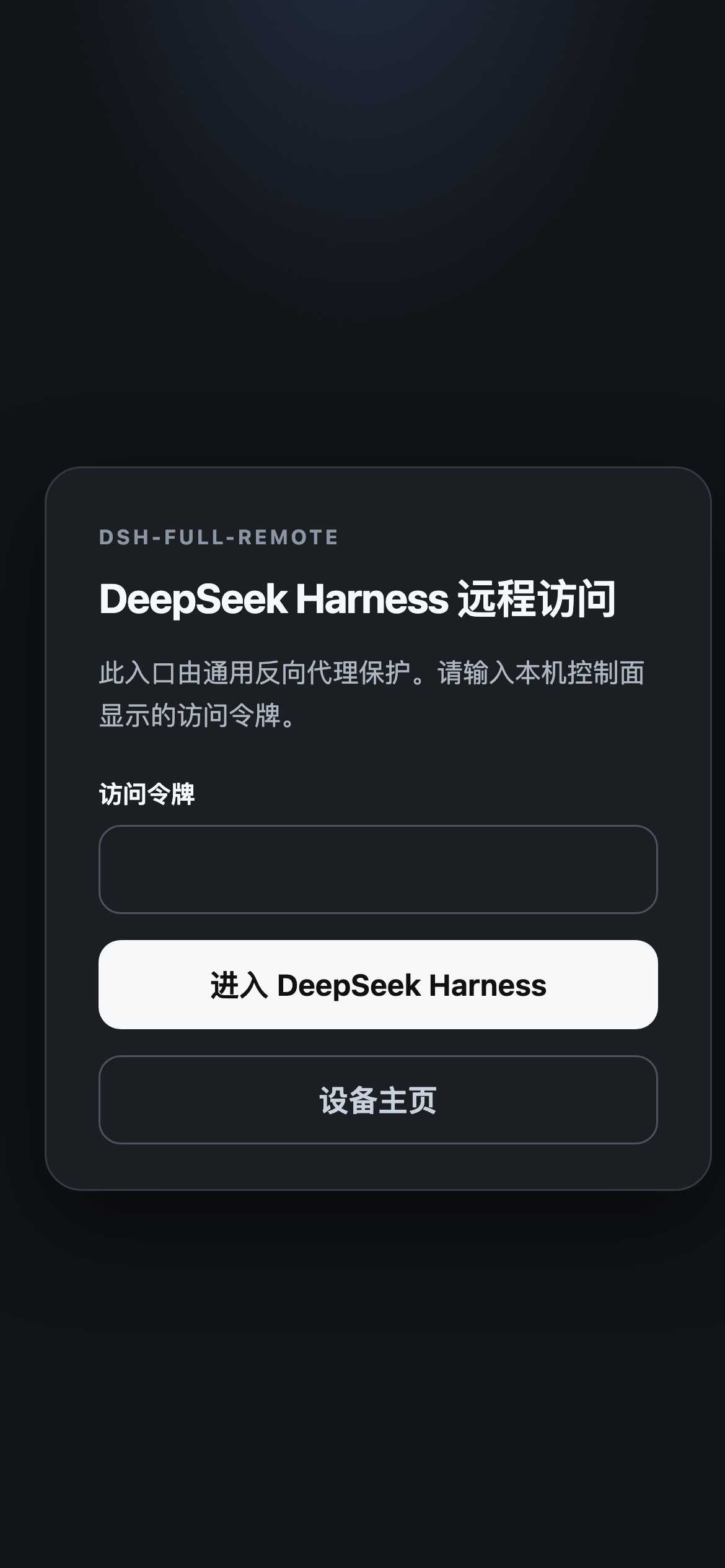
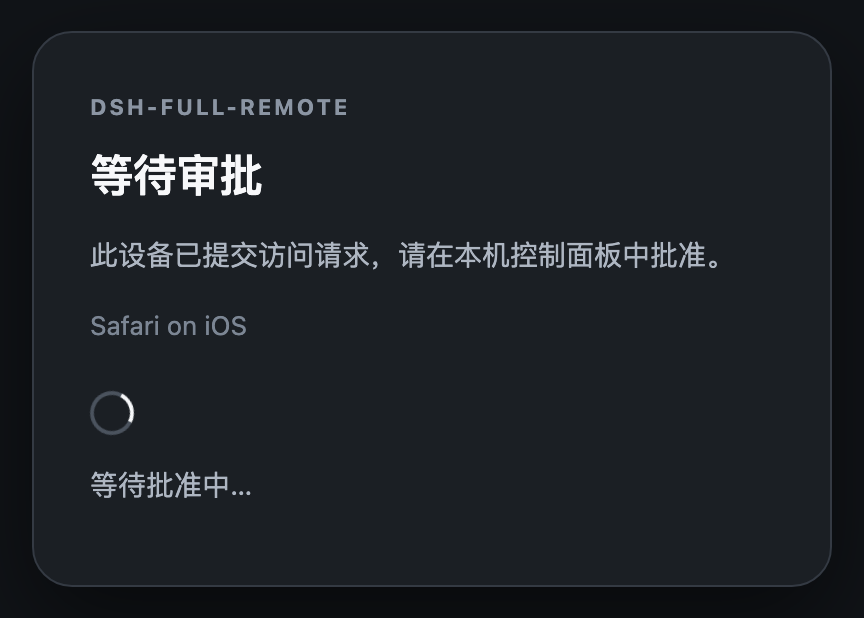
The token login (with an opt-in Device home button), the device home
itself, and the first-visit approval wait page.
| Device home |
Waiting for approval |
 |
 |
Configuration
Common options:
- id: reverse-proxy
  name: dsh-full-remote
  config:
    listenHost: 127.0.0.1
    listenPort: 3081
    approvalMode: false          # true: approve each new device locally
    allowedCidrs: []             # e.g. ["192.168.1.0/24"]; empty: any IP after login
    trustForwardedFor: false     # true: trust rightmost X-Forwarded-For from a trusted local tunnel
    trustCloudflareConnectingIp: false # true only with trustForwardedFor for a local Cloudflare connector
    upgradeMaxAttempts: 10       # failed WebSocket upgrades before lockout
    upgradeLockoutSeconds: 300   # lockout for repeated failed WebSocket upgrades
    headersTimeoutMs: 15000      # timeout for request headers
    requestTimeoutMs: 300000     # timeout for the complete request (headers + body); covers remote vision uploads
    upstreamTimeoutMs: 15000     # TCP connect + first POST byte after the body; not applied to SSE GET
    commandTimeoutMs: 300000     # first POST byte for host commands (/compact): /api/commands/execute, or a session.prompt whose single text part starts with "/"
    maxRequestBytes: 167772160   # 160 MiB; matches the Harness /api image envelope
    sessionIdleSeconds: 0        # 0: off; otherwise idle timeout in seconds
    auditLog: true
    allowTokenRead: false        # safer default; enable only for local token re-read
    cloudflaredPath: ""          # optional path to cloudflared for the one-click tunnel
    tlsCertFile: ""              # optional local HTTPS
    tlsKeyFile: ""
    compressResponses: true      # gzip JS/CSS/JSON/HTML ≥1KB; skip SSE/WebSocket/fonts/gate pages
    cacheHashedAssets: true      # immutable Cache-Control on hashed /assets/* only
The complete option list, with defaults and validation, is defined in the
package Config schema (src/config.ts) and
src/config-validation.ts (source is not included in the published package).
Two points to note:
- Installing the plugin pins the in-app directory picker so that a phone
can add workspaces. By default the stock adaptive picker is disabled and
the browse pair is created at runtime unless another plugin already
inserted it. Set
DSH_FULL_REMOTE_USE_NATIVE_PICKER=1 before boot only
when you deliberately want the host's native chooser and do not need
remote directory browsing.
backendHost must remain a loopback address. A wildcard or non-loopback
value is rejected at load time.
Security model
The Host/Origin rewrite restores the privileged APIs and, at the same
time, disables Harness's original protection for remote clients. The
access-control layer provided by this plugin consists of:
- a 192-bit access token, stored locally with file mode
0600;
- an
HttpOnly, SameSite=Strict session cookie per device, carrying a
per-device secret of which only a hash is stored;
- a fixed delay plus a per-IP
429 lockout on failed logins;
- loopback-only control routes (
/dsh-reverse-proxy/*), which require a
control header and are never forwarded through the public proxy;
- removal of spoofable forwarding and hop-by-hop headers, so the proxy's
own cookie never reaches the backend;
- optional
trustForwardedFor: when enabled, only a loopback peer's
rightmost X-Forwarded-For value is trusted for CIDR / rate-limit / audit.
CF-Connecting-IP needs the separate, Cloudflare-only
trustCloudflareConnectingIp opt-in; loopback or malformed values are
never trusted. Keep both disabled for direct LAN access.
The access token must be treated as a secret. Terminate TLS on the public
side of the tunnel. For LAN use without a tunnel, set
tlsCertFile / tlsKeyFile (for example with
mkcert).
Public exposure checklist. Whoever holds the token controls the whole
Harness — credentials and settings included — so for anything reachable
from the internet:
- enable
approvalMode: true, so a new device stays pending until you
approve it in the local panel (the panel shows a warning whenever the
quick tunnel is online with approval off);
- consider
allowedCidrs to pin the entry to known networks;
- keep
auditLog: true (the default) and rotate the token after invites
outlive their need.
Limitations
- Control actions (start, stop, reveal token, change listen address) can
only be performed from the local Harness window, not from the tunnel
URL.
- Settings persistence on a remote page relies on a temporary trust pin
until Harness provides a proper deployment trust field. On Harness
0.1.0-rc.8 and later, that pin must survive the official ModuleLoader
create() replacing load; otherwise Settings → Models shows
settings are unavailable in this browser. "Open on host" from a phone
acts on the machine running Harness.
allowTokenRead defaults to false. When explicitly enabled, GET /token
is served over loopback HTTP, so any local process that sends the control
header can read the token; rotation always returns the replacement token.- By default, a tunnel running on the same machine makes every remote
client appear as
127.0.0.1 to the proxy. allowedCidrs and per-IP
login lockout therefore apply to the tunnel as a whole unless
trustForwardedFor: true is set behind a trusted local edge.
- The plugin replaces Harness's remote trust check with its own
access-control layer. A defect in this layer has serious consequences.
If Harness provides official remote access in the future, the role of
this plugin should be reassessed.
- The one-click quick tunnel: the URL is random per start (old invites
and logins stop working), Cloudflare positions quick tunnels as
temporary/testing with terms limiting heavy non-HTML content, and the
first use downloads cloudflared on demand (18–52 MB depending on the
platform; Windows ARM64 has no official build — install it yourself
and set
cloudflaredPath). For a stable daily entry, bring your own
frp / ngrok / named tunnel.
- Gzip at the proxy helps LAN and SSH/frp. A Cloudflare quick tunnel
already compresses HTML/JS/CSS/JSON at the edge, so that path sees
little extra saving. Live model output uses WebSocket and is not gzipped.
Plugin login/wait/home pages are not gzipped (about 1 KB of potential
saving). Full contract: HTTP gzip.
Development
Build from source
pnpm pack
dsh plugin --profile web add ./dsh-full-remote-0.3.12.tgz
Git installs run the prepare build. On pnpm ≥ 10 allow it:
allowBuilds:
  dsh-full-remote: true
Checks and CI
pnpm install
pnpm run check:ci
check:ci runs lint, typecheck, unit and client tests, and a build. CI
adds a real dsh plugin add smoke test against a live Harness
composition. .github/workflows/canary.yml runs a weekly smoke test
against the harness default-branch tip.
The loopback control API lives at /dsh-reverse-proxy/* and is never
forwarded through the public proxy. The settings page is the intended
interface; the raw routes are rarely needed. For example, recent audit
events can be read with GET /dsh-reverse-proxy/audit?limit=50&event=login.ok
from the local control surface.
Contributing · Security · License


