


模型与 MCP
待识别

rea
morluto
Reverse engineer anything with agents, from app behavior down to native binaries.
PROJECT TOPICS
INSTALL REFERENCE
dsh plugin --profile web add github:JKZeng-cell/moki-library-for-dsh
该命令指向仓库当前默认分支;尚无绑定当前 commit 的完整验证结果。
PROJECT README
English · 简体中文
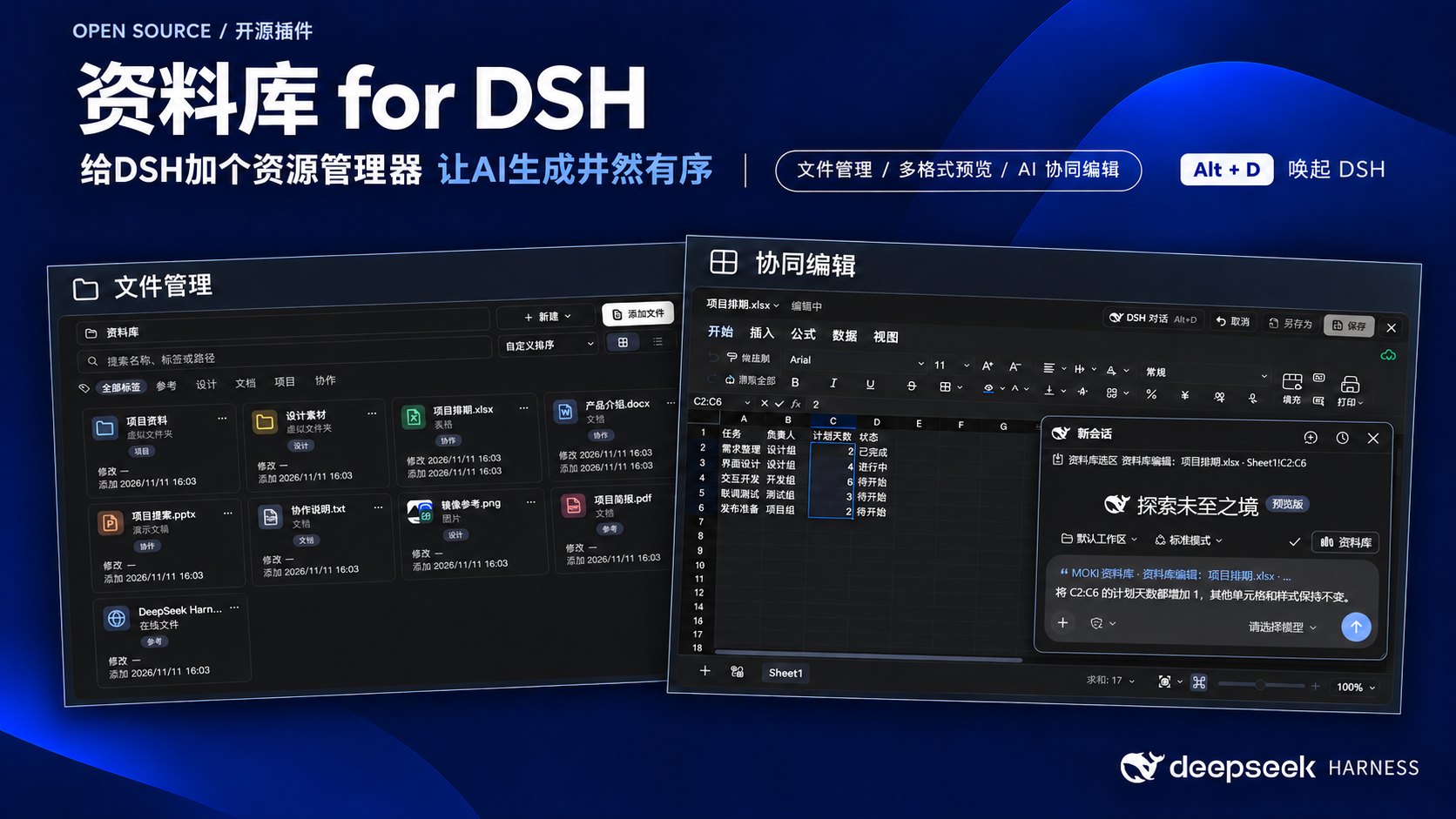
Give DSH a file explorer. Keep AI-generated work organized.
MOKI Library is a community plugin for DeepSeek Harness (DSH). It brings a local file library, multi-format previews and Office editing into the same workspace as your DSH conversations.
Move from finding a file to reading, selecting, editing and saving it in one workflow. Organize a project, then keep its documents and spreadsheets beside the conversation.
Five usage demos · Create PPTs in the side workspace · Preview and editing format support · Media kit
Copy a prompt to install with DSH · Download · Usage guide (中文) · Features · Report an issue
Open Library settings → Interface language to choose Follow DSH (default), 简体中文 or English. The choice is saved across restarts and updates open library views immediately, independently of DSH’s own interface language. File names, paths, tags and document contents are preserved. An already-open Office editor keeps its current language until reopened, so unsaved edits are not interrupted.
Start a selection drag in the blank space on either side of the library, or between cards and rows. Name, modified-time and added-time sorting compare all items together, without grouping folders or file formats first. Missing dates appear last.
context → edit_selection; complex edits can use the Office tools.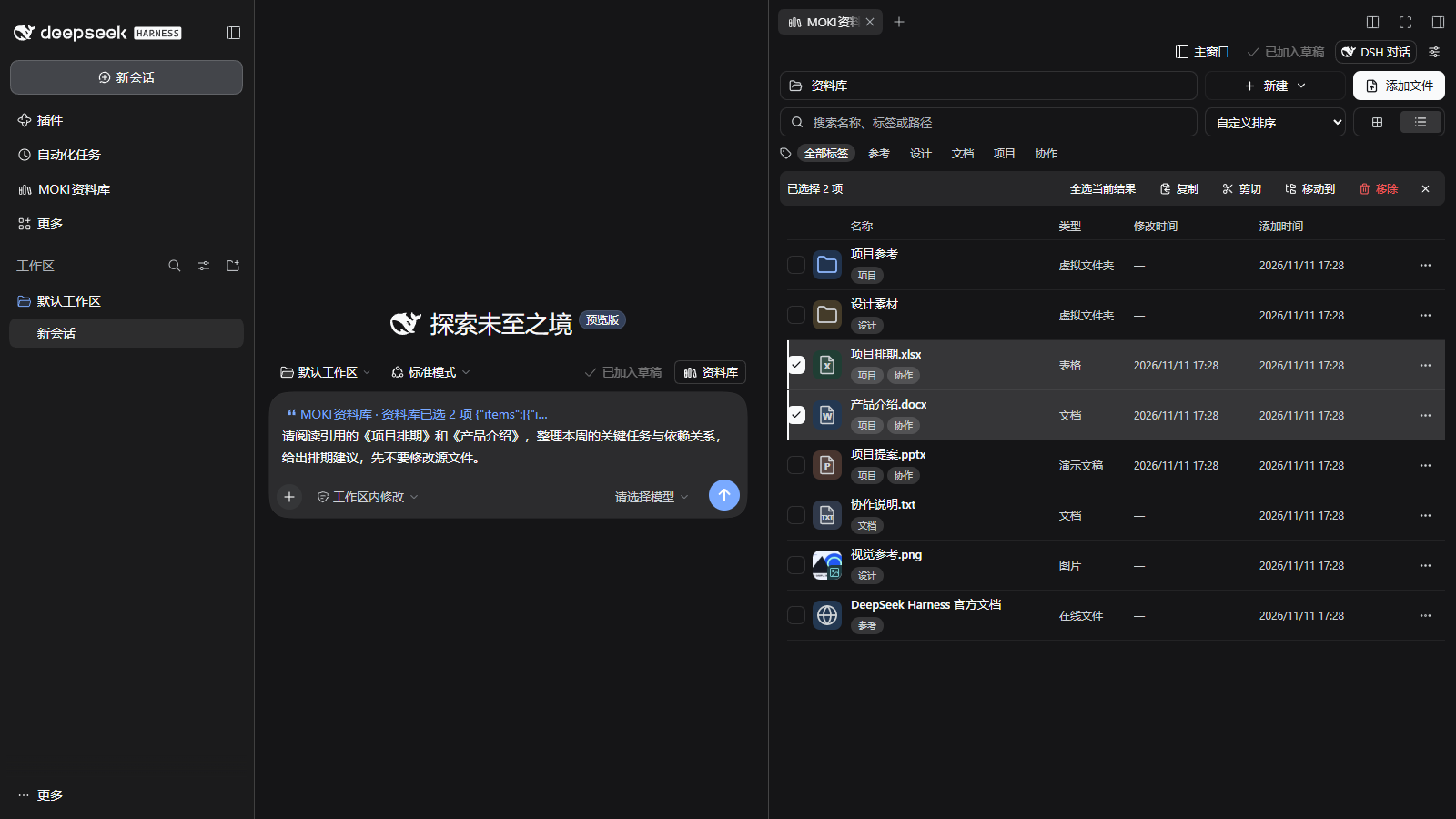
Library and conversation in one window. In this actual local DSH Web capture, “项目排期.xlsx” and “产品介绍.docx” are selected in the side workspace. Add selection to conversation places a native reference in the composer, followed by the user's request. The files are demonstration data and the input is an unsent draft. Card-view alternative.
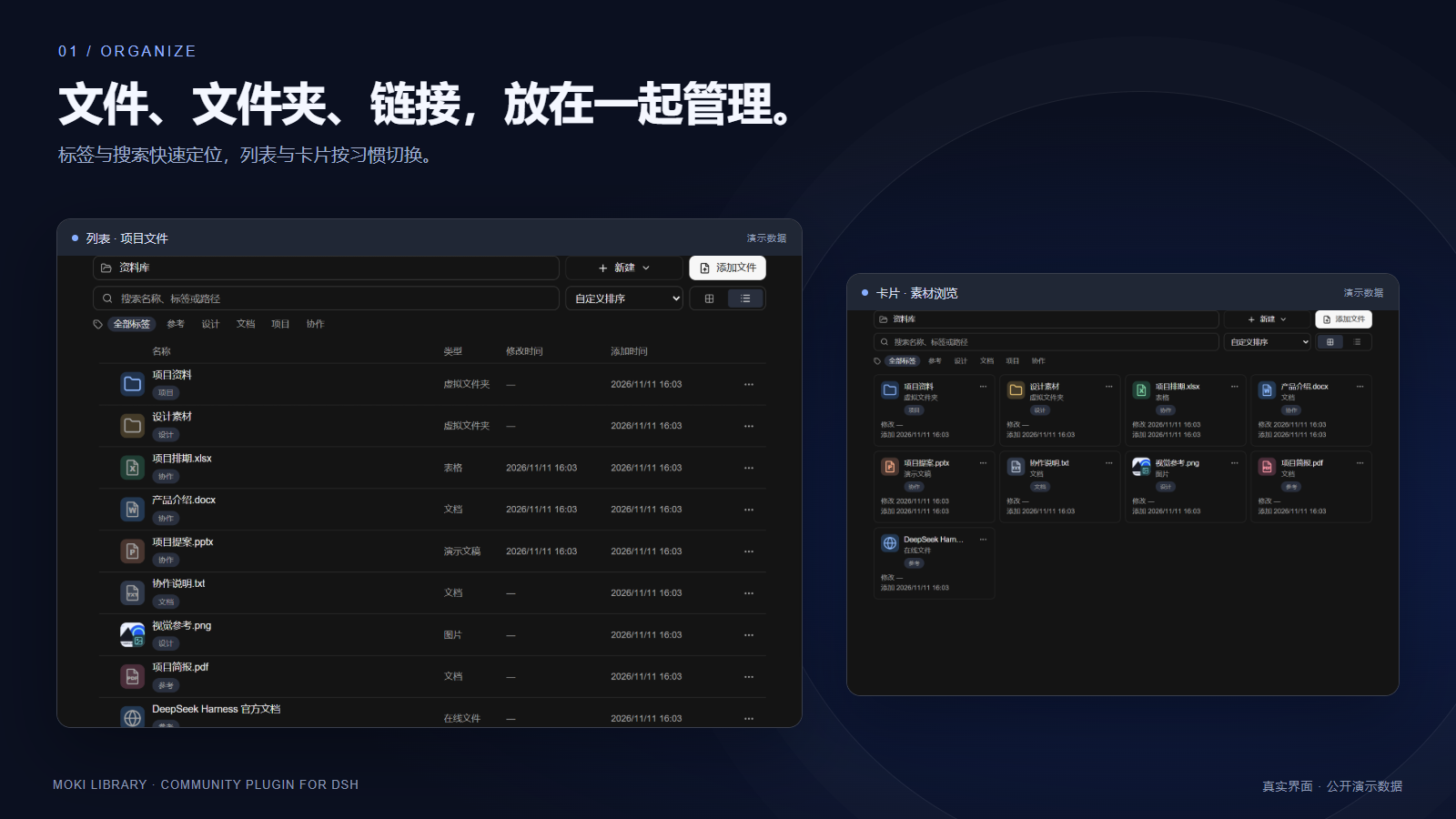
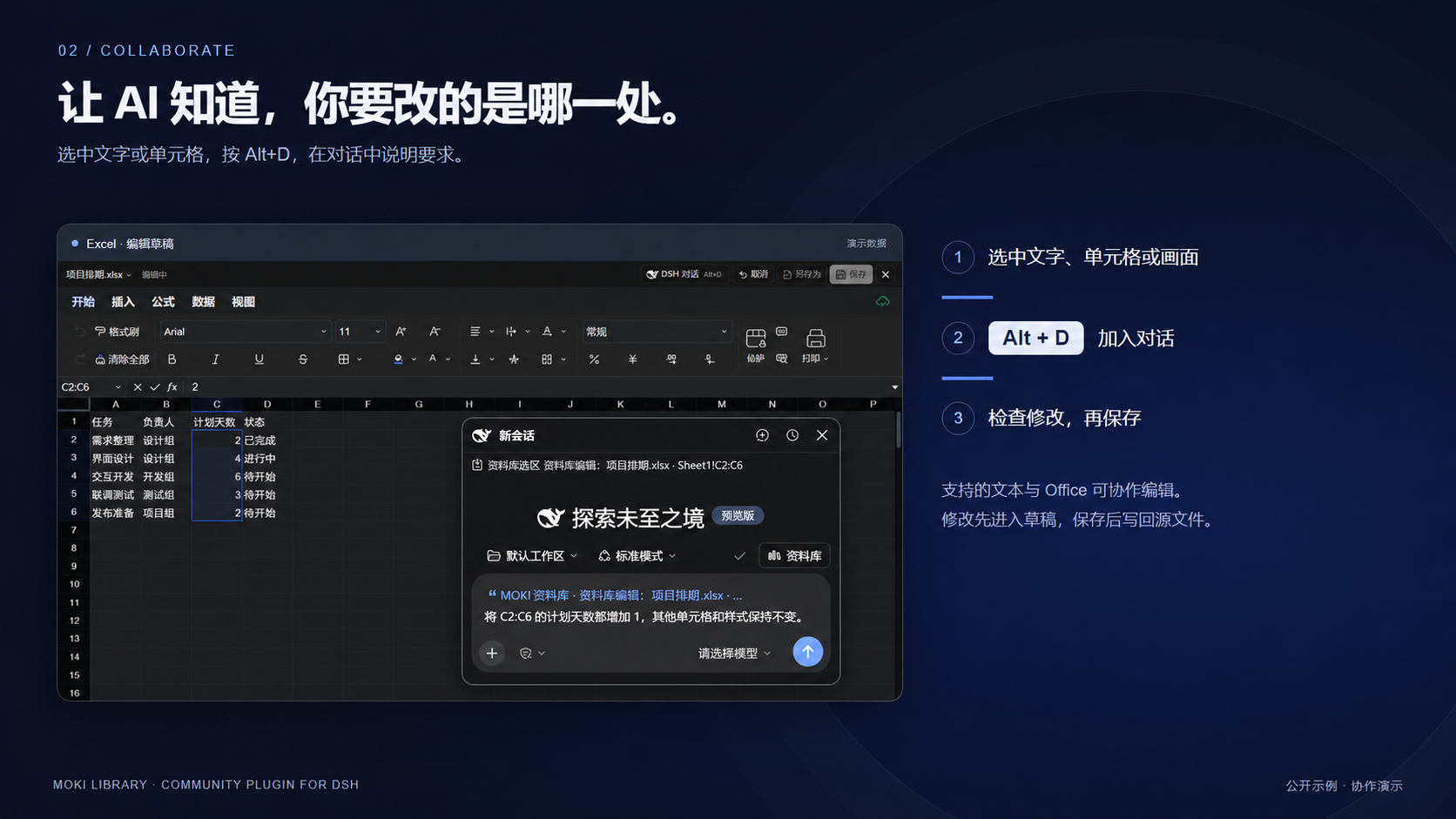
The collaboration illustration includes the DSH floating composer with a Sheet1!C2:C6 reference and an unsent request. Original floating-chat capture.
Tested on Windows with DSH Desktop 0.2.2-rc.1. Declared compatibility: >=0.2.2-rc.1 <0.3.0; other desktop versions and operating systems need further verification. The plugin requires Node.js 22.19+. Native preview windows use a locally installed Edge or Chrome. FFmpeg is optional for additional audio/video decoding.
Please install the MOKI Library plugin in my current DSH Desktop, including the download, installation and version verification.

Repository: https://github.com/JKZeng-cell/moki-library-for-dsh
Version: 0.1.74
Package: https://github.com/JKZeng-cell/moki-library-for-dsh/releases/download/v0.1.74/dsh-moki-library-0.1.74.tgz
SHA256 checksum manifest: https://github.com/JKZeng-cell/moki-library-for-dsh/releases/download/v0.1.74/SHA256SUMS.txt

Follow these steps:
1. Check the operating system, DSH version and the Node.js runtime it uses. The plugin requires DSH >=0.2.2-rc.1 <0.3.0 and Node.js >=22.19. Windows Desktop is the primary verified environment.
2. Locate the CLI belonging to this desktop installation. On Windows, prefer resources/runtime/cli/bin/dsh.cmd inside its installation directory. Use the desktop's existing DSH_HOME if one is set. Target the desktop profile.
3. Check the installed dsh-moki-library version in desktop. Verify an existing identical version; retain and report a newer version. If installation is needed, download the .tgz above locally and verify its SHA256.
4. Use the actual CLI and the downloaded archive's absolute path with this command pattern. Replace <absolute-archive-path> with that path, using forward slashes on Windows:
   dsh plugin --profile desktop add "dsh-moki-library@file:<absolute-archive-path>" --allow-build=sharp
5. Check the installed version:
   dsh plugin --profile desktop list dsh-moki-library --depth 0
   Confirm that desktop lists version 0.1.74 (or the newer version retained above). Preserve existing plugins, configuration and library data.
6. Report the archive location, actual CLI, profile and version-check result. Then ask me to save my work, fully quit DSH and reopen it manually. Keep the current DSH conversation running while the installation task is in progress.

If this conversation cannot download files or execute a terminal, the environment is incompatible, or installation fails, explain the specific cause and next step. Report installation status from the actual command results.dsh-moki-library-0.1.74.tgz from the release.DSH_HOME, use the same value in this terminal.$mokiDshCli = 'C:\Path\To\DeepSeek Harness\resources\runtime\cli\bin\dsh.cmd'
$mokiArchive = 'C:\Downloads\dsh-moki-library-0.1.74.tgz'
$mokiArchive = (Resolve-Path -LiteralPath $mokiArchive).Path.Replace('\', '/')
& $mokiDshCli plugin --profile desktop add "dsh-moki-library@file:$mokiArchive" --allow-build=sharp& $mokiDshCli plugin --profile desktop list dsh-moki-library --depth 0If dsh is on PATH and belongs to the current desktop installation, use it in place of & $mokiDshCli. --profile desktop targets the desktop profile; --allow-build=sharp allows the installation build step for the sharp image dependency. Initial installation requires network access for runtime dependencies. See the official DSH CLI reference for profile command syntax.
The GitHub source archive is for development; the .tgz release asset is the built plugin. This release does not require an npm publication.
If DSH reports tool "moki_library_context" parameters must be lossless JSON before schema projection, update to 0.1.74 or later, then fully quit and reopen DSH. Earlier plugin versions passed Zod's hidden metadata along with the tool parameter schema, which strict DSH JSON validation rejects. Version 0.1.74 registers plain JSON schemas for every library tool while preserving parameter constraints and runtime validation. This error occurs during model request preparation, before the selection is read.
Text previews, PDF text, the text editor and Office editors support quick selection chat, including file and precise location references. Mouse and keyboard selection work in side workspace tabs and separate preview windows. Opening the quick input never sends a message. Its Send button submits only the captured selection, your instruction and its attachments; existing DSH draft text and attachments stay intact. Failed sends retain the quick input for retry. Files use DSH’s native attachment pipeline (32 MB per file). Use visual region selection for scanned PDFs; selections in the default external application remain managed by that application.
Use Refresh preview in the file toolbar to reload the original file. If a draft is unsaved, choose to keep editing, save and refresh, or discard the draft and refresh. Pending AI edits still require review before saving. DSH source-file updates are distinct from draft changes: identical content already saved elsewhere is acknowledged without rewriting it. Text/HTML saves can reconcile strictly separated edits against a verified baseline; overlapping edits remain protected. Office saves compare document contents rather than modification time alone and recheck the source after export.
Text/HTML acceptance remains compatible when an updated preview connects to an older DSH plugin host. If DSH has already saved the exact draft, acceptance verifies the current contents and clears the review without rewriting the file. Different contents retain the draft and conflict notice.
AI edits to text, Word, Excel and PowerPoint are highlighted. Expand the review bar to see locations and before/after content. Highlights are temporary decorations, never saved document formatting. Accept saves the current result to the original file without reloading or leaving the editor. The current slide, sheet, selection and view stay in place. If saving fails, the pending edits remain available for retry.
The Office editor stays loaded while AI work is in progress. Progress updates and read-only tool calls preserve the current selection instead of reopening the editor. Incoming changes appear in the existing view; actual pending edits still require review.
You can ask DSH to continue editing before accepting an earlier edit. Each new edit builds on the visible draft and adds a review record. Choose Accept all, Undo latest edit to step back one edit, or Discard all to restore the draft before the first pending AI edit while preserving earlier manual changes. Discarding does not overwrite the original file. Selection, copying and AI collaboration remain available; manual input and saving wait until review is resolved. Pending records recover with the draft. If another window changes that draft, cancellation reports the conflict and preserves the current content.
| Task | Select first | Example prompt and check |
|---|---|---|
| Excel schedule | C2:C6 on the intended sheet |
“Increase each selected planned-day value by 1; preserve other cells and styles.” Inspect, save and reopen |
| Word / text revision | A passage | “Make this more concise, preserving facts and proper names. Change only the selected range.” Check context and styles |
| PowerPoint heading | Highlighted text inside the intended text box | “Replace with ‘Review before saving’; preserve the box position and font size.” Check wrapping and layout |
| PDF reading | Text on the relevant page | “Explain this passage, identify its page and list conditions I should verify.” Read-only analysis |
| Image / scanned page | A selected region | “Describe this region and explicitly mark unreadable text.” Requires a vision-capable model |
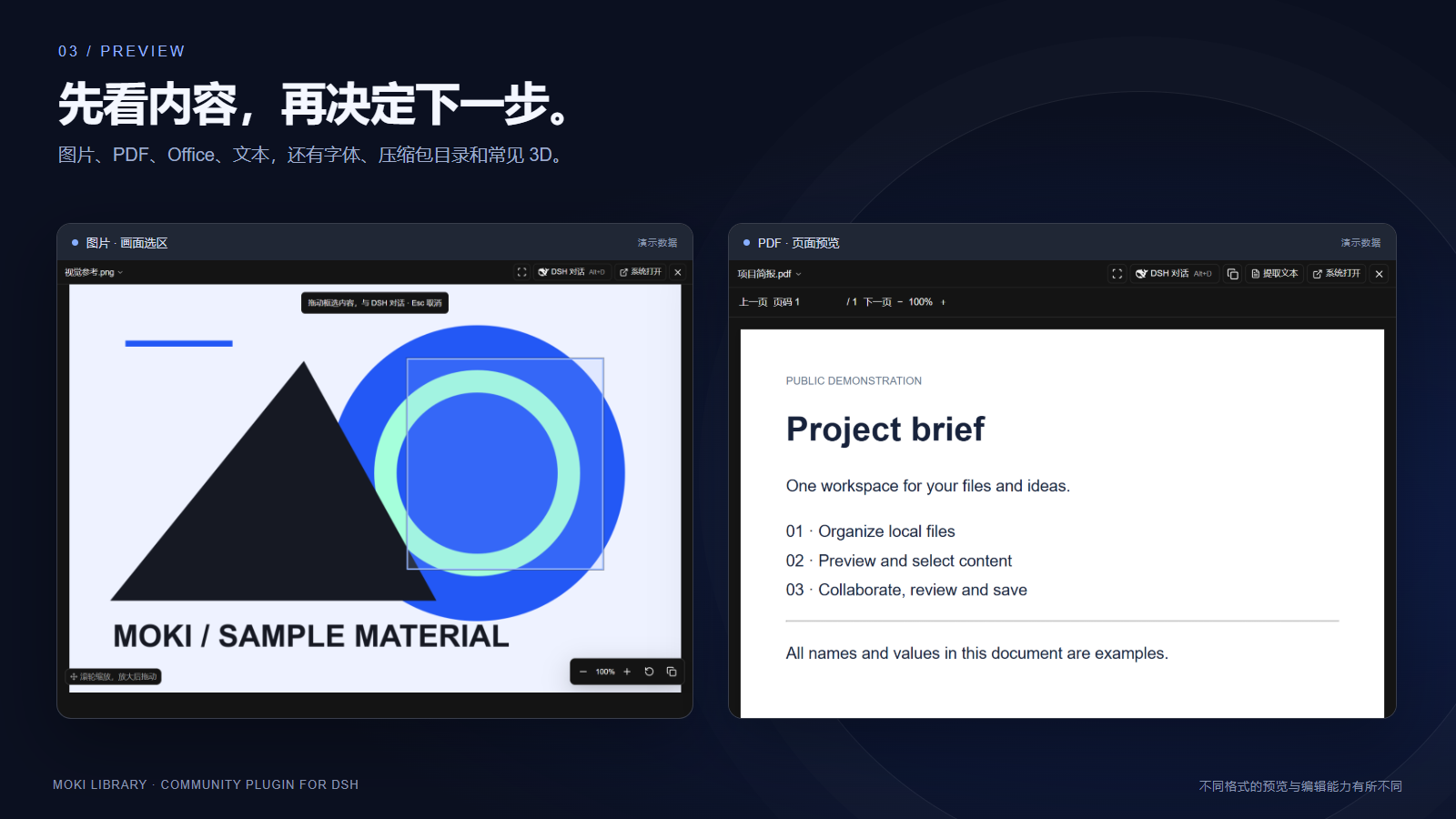
The illustrated usage demos include exact steps, sample prompts, expected checks and window/workspace choices. Sample prompts are instructions, not fabricated AI transcripts.
Add selection to conversation carries selected content and its location. Library → Add attachments supplies selected files, after enabling the library composer button in settings. Separately, automatic task-file mapping collects newly created/delivered DSH files in “DSH task files” after it is enabled, deduplicating identical paths.
The whale opens the same compact selection input as MOKI Canvas. After sending in the side workspace, the current main conversation receives focus so the file stays beside the chat. The DSH conversation button and Alt+D still open the conversation directly. Main-window and standalone previews use a floating conversation with DSH's native input, moving/resizing and session creation/switching. A standalone preview keeps its conversation inside that window. Moving back to the side workspace routes quotes to the current main session instead of a previously selected floating history session.
Default context text is bounded to 4,000 characters; composer quotes to 1,000. Truncation is marked. Tools can request more content when needed. Selection references are scoped to the conversation/editor, expire after ten minutes, and reject stale or reused edits.
Select text in a rendered HTML preview and click the whale to enter instructions with optional attachments. The selection is mapped to exact source text nodes, so repeated text elsewhere is preserved. Inline markup stays intact; replacements are escaped as text. HTML scripts remain disabled. AI edits are highlighted for review; accepting saves without reloading the preview or resetting its scroll position. Switch to source view for structural or style edits.
Enable Select modules in an HTML preview to identify page modules under the pointer. Hover shows a boundary; clicking keeps the module highlighted and reveals the whale for quick instructions. The reference includes the module's text, element location and a bounded HTML excerpt. Alt+↑ expands to the parent module and Esc clears the selection. Scrolling keeps highlights aligned. Links are selected without navigating in this mode; turning it off restores normal text selection.
New folders offer six colors (violet, blue, green, amber, rose and slate) with matching light and dark palettes. The choice persists and can also be changed from the folder context menu.
DSH generated-file cards and change review pages offer a Library button; file context menus include Open in MOKI Library. The original file is mapped under DSH task files once, independently of the automatic-mapping setting. Existing mappings are reused. Preview preferences determine the destination; automatic mode opens a new side tab when the library is already docked. Explicitly choosing the library overrides a system-app default and opens the library's main window.
To choose where to file an output, right-click it and select Add to MOKI Library. Browse or search library folders, or create a named folder with a color, then choose Add to this folder. Root and mapped folders are supported. This adds a reference to the original file, without moving or copying it. Repeated additions to the same folder reuse its reference; references in other folders remain intact. This action works even when automatic mapping and the composer picker are disabled.
| Category | Main formats | Preview | In-plugin editing |
|---|---|---|---|
| Word / Excel / PowerPoint | DOCX, XLSX, PPTX | Supported | Supported; review the draft before saving |
| Delimited data / workspace | CSV, TSV, UNIVER | Supported | Supported; CSV/TSV do not retain workbook styling |
| Text and code | TXT, MD, JSON, HTML, XML, YAML, JS/TS, Python and more | Supported | Listed editable extensions up to 5 MB |
| Legacy / Apple Office | DOC, PPT, PAGES, NUMBERS, KEY | Limited content extraction | No; convert to an editable format first |
| Images / design files | PNG, JPEG, GIF, WebP, SVG, BMP, AVIF, ICO, PSD/PSB, TGA, TIFF | Image or composite preview | No image/layer editor |
| PDF / OFD / AI | PDF, OFD, PDF-compatible AI | Page, text or region | Reading/analysis, not source-format editing |
| Audio / video | MP4, MOV, MKV, AVI, WebM; MP3, WAV, FLAC, AAC, OGG and more | Codec-dependent, optional FFmpeg | No media editing workflow |
| 3D / fonts | GLB, glTF, OBJ, STL, PLY, FBX; TTF, OTF, WOFF, WOFF2 | Model controls / font samples | No model/font source editing |
| Archives | ZIP/ZIP64, RAR5, 7z, TAR, GZ, BZ2, XZ, CAB and more | Read-only directory/search/paging | No archive-content editing |
HEIC/HEIF depend on decoder availability. Legacy XLS, macro-enabled and password-protected documents are not listed as supported embedded editing formats. See the full matrix for extensions, sidecar resources, read-only formats and size limits. Preview support does not imply editing support or complete fidelity for every file variant.
The catalog, generated files and editing drafts are stored locally under DSH_HOME/moki-library or the user's .dsh/moki-library directory. Mapping an existing file keeps its original path. Content selected for AI collaboration or attached to a conversation is provided to DSH and its configured model/tools. Local storage is not a promise of offline AI processing.
There is no single size cap for mapped files or streamed original-file previews. Decoder support, available memory and disk space still apply. Conversation attachments have a separate 32 MB limit. Text over 5 MB uses read-only paging. Whole-file decoding for selected preview types uses a 512 MiB guard; Office structured-data previews use a 256 MiB expanded-data budget. See the format and size details.
npm ci
npm run build
npm test
node scripts/collect-licenses.mjs
npm pack
The browser/Office tests use an installed Chrome or Edge. Tests create synthetic temporary files, never the user's library. Tests run serially to avoid competing Office runtimes. src/ contains the DSH integration, web/ the embedded UI, and vendor/moki/ the required MOKI library modules.
dsh-plugin topic and DeepSeek Harness Discussions.Developed by JKZeng / MOKI. Contact: GitHub Issues. This is an independent community plugin, not an official DeepSeek product. The DeepSeek Harness logo identifies the host application and belongs to its respective owner.
CLASSIFICATION EVIDENCE
系统优先读取 GitHub Topics,再与站内分类词典和词根规则比对。当前命中: deepseek、deepseek-harness。
morluto
Reverse engineer anything with agents, from app behavior down to native binaries.

deepseek-ai
DeepSeek Harness: Everything is a Plugin.

nexu-io
The 1st Collaborative AI Design Agent Workspace. Local-first and open source. Create motion, prototypes, websites, apps, dashboards, presentations, images, and videos with your team and AI agents. Share work, exchange feedback, and iterate together in one workspace.