
模型与 MCP
待识别

rea
morluto
Reverse engineer anything with agents, from app behavior down to native binaries.
PROJECT TOPICS
PROJECT README
English | 中文


One-click MCP deployment for the DeepSeek Harness (DSH) — built for Windows developers.
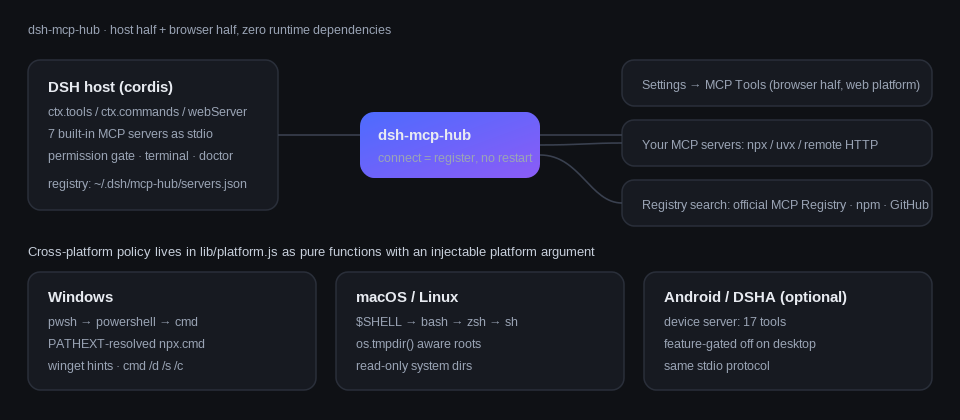
Open Settings → MCP Tools, search an MCP server, click install. It is connected in the
running harness immediately — no restart, no config file, no npx.cmd pain.
# Windows (PowerShell) — from a clone or an extracted release tarball
.\install.ps1 -Verify

# macOS / Linux
./install.sh
Then restart DSH once and open Settings → MCP Tools → Doctor.
Prefer DSH's own plugin channel? It is the same thing:
dsh plugin --profile web add dsh-mcp-hubRequires Node.js >= 20. Execution-policy and pnpm fallbacks are covered below.
MCP is great. Getting an MCP server running on a Windows dev box is not. Three things are genuinely harder there, and this plugin targets exactly those:
npx is npx.cmd, which Node's spawn will not find
without PATHEXT handling. This plugin resolves executables the way cmd.exe does, so
npx / uvx / git presets just work.winget install OpenJS.NodeJS.LTS,
winget install astral-sh.uv, ...) instead of dumping a stack trace.| dsh-mcp-hub | static mcp.json / @deepseek-ai/mcp-client |
|
|---|---|---|
| Time to add a server | one click in Settings | edit config, restart |
| Restart required | no (connect = register) | yes |
| Discovery | official MCP Registry + npm + GitHub, on demand | you find it yourself |
| De-duplication vs DSH native tools | yes, with reasons | none |
| Per-server permission tiers | permanent / session / ask / disabled | none |
| Built-in offline toolkit | 7 servers, 61 tools, zero deps | none |
| Environment diagnosis | /mcp doctor + Settings panel |
none |
| Terminal | built-in (pwsh → powershell → cmd on Windows) | none |
Settings page "MCP Tools": status bar, environment doctor, one-click presets, on-demand search (official MCP Registry / npm / GitHub), installed-server list with a per-server permission dropdown, the DSH native-tool list for the current platform, a custom MCP form, a built-in terminal and the live host log.
Slash commands and model-facing tools exposing the same capabilities:
/mcp doctor                 # diagnose the environment
/mcp list                   # installed servers + running state
/mcp search sqlite          # search registries (no full pre-fetch)
/mcp add mcp-sqlite         # install
/mcp permission kb ask      # always / session / ask / disabled
/mcp reload                 # full re-sync
7 built-in zero-dependency MCP servers (61 tools) that also work as plain stdio servers in
any MCP host: files, exec, net, kb (long-term memory),
util, hub (control plane) and device (Android/DSHA only).
Four permission tiers per server: always / this session (asked once) / ask every time / disabled. The "ask" path uses DSH's approval channel; with no approval UI available it fails closed instead of silently allowing.
All platform-specific behaviour lives in lib/platform.js as pure functions with an
injectable platform argument — which is why the Windows branch is unit-tested on Linux CI and
really executed on the Windows runner.
| Concern | Windows behaviour |
|---|---|
| DSH native command tool | pwsh (not bash) — used consistently in de-dup, UI text, search hints |
| Default file roots | home + %TEMP% (never a whole drive) |
| Path policy | hard-blocks Windows device namespaces; %SystemRoot%, Program Files (x86), |
ProgramData and $Recycle.Bin are read-only, resolved through env vars |
|
| Path comparison | case-insensitive, forward/back slashes both accepted, correct prefix boundaries |
(C:\WindowsApps is not inside C:\Windows) |
|
| One-shot commands | cmd.exe /d /s /c (safest for dir, &&, %VAR%) |
| Interactive terminal | pwsh.exe → powershell.exe → cmd.exe /Q /K, auto-fallback on ENOENT |
| Executable resolution | PATHEXT-aware, so npx.cmd / node.exe resolve (the classic spawn npx ENOENT) |
| Runner detection | node / npx / uvx / git, each with the matching winget command |
| Danger list | format, diskpart, bcdedit, cipher /w, reg delete HKLM, |
recursive delete of a drive root, ... while dir / git / npm / node stay allowed |
|
| Installer | install.ps1 is UTF-8 with BOM (required for CJK text under Windows |
PowerShell 5.1), uses Join-Path throughout, normalises file: specs to forward slashes |
This plugin is real and tested, but it is not magic. Specifically:
device (17 tools) only does anything on Android/DSHA; on a desktop it is not offered.uvx; the plugin tells you the winget command but will not
install it for you.dsh plugin add dsh-mcp-hub needs no cloneZero runtime dependencies (only Node built-ins; the MCP SDK is provided by DSH). One devDependency, for tests:
npm install
npm test            # 10 suites: hygiene, platform, capabilities, installer, client-smoke,
                    # handshake, hub-query, host-query, plugin-integration, dsh-wiring
npm run pack:check  # validate the published tarball contents
Tests that need the MCP SDK or a local DSH install skip explicitly (exit 0) instead of
pretending to pass; CI sets MCP_HUB_REQUIRE_SDK=1 so skipping becomes a hard failure.
See CONTRIBUTING.md for the test map and the one architectural rule: platform-specific code must stay injectable so it can be tested on any OS.
Bug reports are welcome and genuinely useful — the structured template asks for exactly what is
needed: version, OS, Node version, the doctor report and the relevant hub.log lines.
| Role | Who | What |
|---|---|---|
| Maintainer | JD579g | requirements, review, releases, final say |
| Co-creator (coding agent) | DSH agent (deepseek-flash) | drafted the implementation, tests, CI and docs in pairing with the maintainer |
This project was built inside DeepSeek Harness (DSH) as a maintainer + coding-agent pairing:
the agent drafts and implements, the maintainer decides, verifies and ships. Commits carrying a
Co-authored-by: trailer record where the agent took part.
AI is not a disclaimer — whoever opens a pull request is still responsible for correctness, licensing and security. See CONTRIBUTORS.md.
MIT · Changelog · Contributing · Code of Conduct · Contributors
CLASSIFICATION EVIDENCE
系统优先读取 GitHub Topics,再与站内分类词典和词根规则比对。当前命中: mcp、model-context-protocol、deepseek、mcp-server、deepseek-harness。
morluto
Reverse engineer anything with agents, from app behavior down to native binaries.

deepseek-ai
DeepSeek Harness: Everything is a Plugin.

nexu-io
The 1st Collaborative AI Design Agent Workspace. Local-first and open source. Create motion, prototypes, websites, apps, dashboards, presentations, images, and videos with your team and AI agents. Share work, exchange feedback, and iterate together in one workspace.