
模型与 MCP
待识别

rea
morluto
Reverse engineer anything with agents, from app behavior down to native binaries.
PROJECT TOPICS
INSTALL REFERENCE
dsh plugin --profile web add github:InnovationLou/dsh-link-actions
该命令指向仓库当前默认分支;尚无绑定当前 commit 的完整验证结果。
PROJECT README


English | 中文
Right-click menus for links in DeepSeek Harness chat. File and folder links gain open, open with, show in file manager, copy path, and save as; HTTP(S) links gain open in browser and copy link.
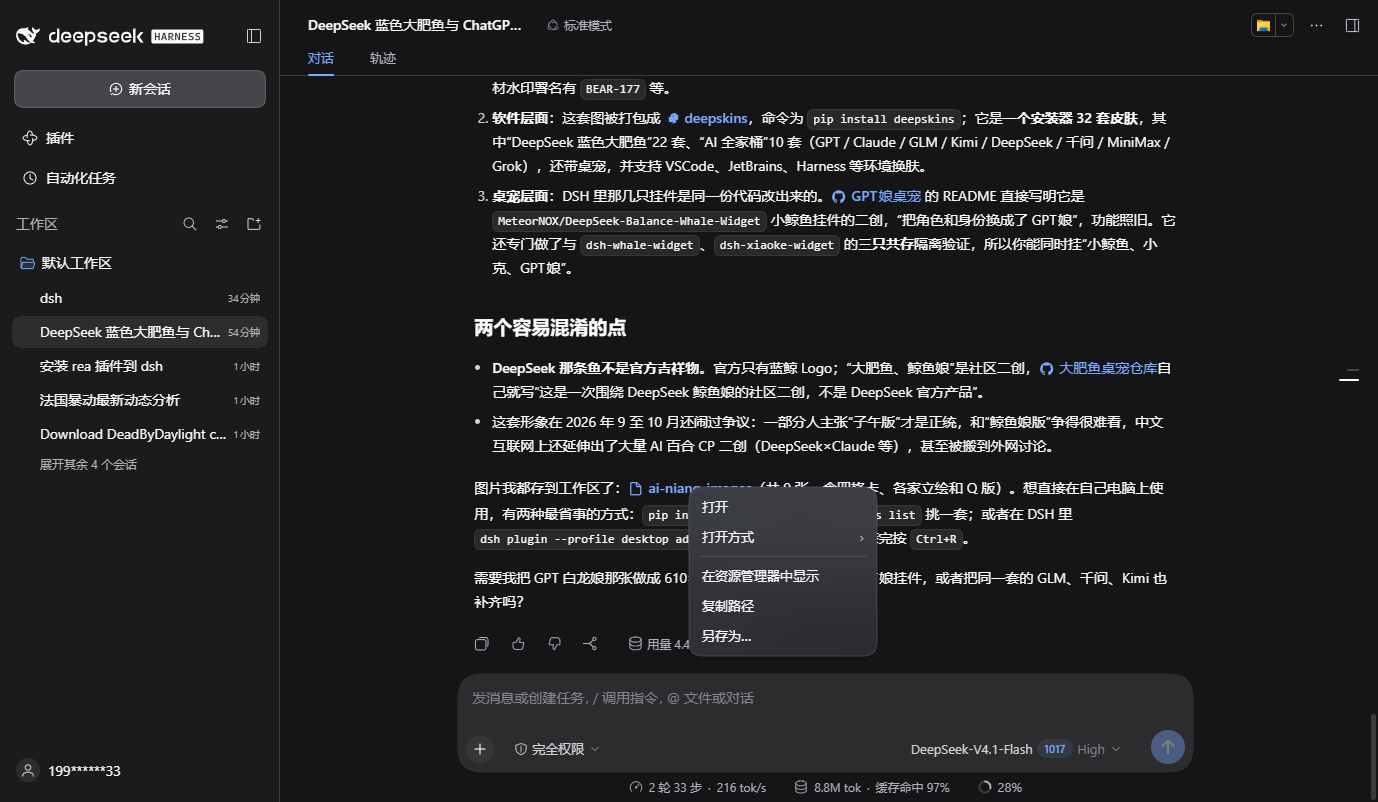
The DSH repository does not accept external pull requests today, and the plugin ecosystem is the path it recommends instead. The client also has no per-link slot: a Markdown link is a plain anchor or button, so this plugin listens for contextmenu on the document, recognises the two link shapes the Markdown renderer emits, and draws its own menu.
Tested against the shipped 0.2.1-rc.2 runtime. It needs a DSH client build that serves client plugins; the desktop app and dsh web both do.
From npm:
dsh plugin --profile desktop add dsh-link-actionsStraight from this repository (lib/ is committed, so no build step either):
dsh plugin --profile desktop add github:InnovationLou/dsh-link-actionsFrom a local checkout, which is what you want while editing:
dsh plugin --profile desktop add link:E:\MyProject\dsh-link-actionsThen append this to ~\.dsh\profiles\desktop\cordis.patch.yml:
- insert:
    - id: link-actions
      name: dsh-link-actions
Restart the client. A page reload (Ctrl+R) is not enough: the plugin entry is composed when the Host boots.
For another profile — the one dsh web uses, for instance — replace desktop in both places.
Uninstall:
dsh plugin --profile desktop remove dsh-link-actionsThen delete those three lines from cordis.patch.yml.
File and folder links — the filename buttons and fileMention chips in a message:
| Item | Behavior |
|---|---|
| Open | Hand the path to the Host desktop's default application; a folder opens in the file manager |
| Open with › | List the registered handlers for the file and open it with one |
| Show in file manager | Reveal the file with it selected |
| Copy path | Copy the resolved absolute path |
| Save as… | Read the file's bytes and write them to a location you pick |
HTTP(S) links — ordinary <a> elements in the message:
| Item | Behavior |
|---|---|
| Open in browser | Open the URL in a new window |
| Copy link | Copy the href |
title (the resolver supplies it for fileMention, the authored destination for MarkdownFileLink); when there is no title, the button text is the path.cwd. The Host resolves relative paths against its own process cwd, which would be wrong.session.canOpenWorkspacePath, session.workspacePathApplications, session.openWorkspacePath, and workspaceFiles.readBytes; the plugin ships no transport of its own.--dsw-menu-surface-fill, --dsw-elevation-prominent, --dsw-alias-*, so the card follows the active theme.window.__ModuleLoader__.load({ id, factory })). No bundler.Against the shipped 0.2.1-rc.2 runtime, with the same client bundle that npm serves:
| Scenario | Result |
|---|---|
| Install from npm | dsh plugin add dsh-link-actions (0.1.0, 8 files / 71.5 kB), fresh profile, client boot, menu opens |
| Install from GitHub | dsh plugin add github:InnovationLou/dsh-link-actions, fresh profile, client boot, menu opens |
| Right-click a folder link | Five items: open, open with, show in file manager, copy path, save as |
| "Open with" on an image | Real handlers listed: Paint, Photos, VS Code, Typora, Notepad++, … |
| "Save as" on a png | "Saved" notice, file landed in the download directory under its own name |
| Right-click an HTTP(S) link | Two items: open in browser, copy link |
| Relative path | ai-niang-images\fish-01-classic.png resolved through the Session cwd |
Open and Show in file manager go through the same session.openWorkspacePath call (the reveal branch was checked in code) but were not exercised by automation against real windows.
[data-chat-flow] — the sidebar, the document preview — keep their native behavior.[label](relative/path) links. The button carries only the label the author wrote; when no real path can be recovered, only Copy path is offered.workspaceFiles read limit (maxFileBytes); a directory cannot be saved this way.open-in-app/icon/<id> route; a missing icon removes its slot so the labels stay aligned.dsh.client declaration, the Remote names, data-chat-flow, and the fileMention/fileLink CSS-module classes are product internals; re-check after a DSH upgrade.node scripts/build.mjs # src/ -> lib/, including the loader handshake
node --check lib/client.js # syntax checktools/ holds the local verification helpers (Node 24 ships WebSocket, so they talk to CDP directly): cdp-contextmenu.mjs for the link menu, cdp-file-menu.mjs for the file menu, cdp-open-with.mjs for the submenu, cdp-save-as.mjs for an end-to-end save, cdp-screenshot.mjs for a capture, and asar-head.mjs to read the installed app.asar.
test/overlay.yml mounts the plugin into a throwaway CLI profile:
dsh --profile <name> --patch test/overlay.yml --no-open --port 7401so verification never touches the profile you use daily.
Publishing runs on npm Trusted Publishing: the release workflow asks GitHub
for an OIDC token, npm exchanges it for a short-lived publish grant, and no npm
token is stored in the repository or in any secret. That keeps the account's
"require 2FA and disallow bypass tokens" setting intact — there is no token that
could bypass it.
One-time setup, on npmjs.com → the package → Settings → Trusted Publisher (GitHub Actions):
| Field | Value |
|---|---|
| Publisher | GitHub Actions |
| Organization or user | InnovationLou |
| Repository | dsh-link-actions |
| Workflow filename | release.yml |
| Environment | leave empty |
Then a release is three commands:
npm version patch --no-git-tag-version
git commit -am "release: v0.1.2" && git tag v0.1.2
git push origin main --follow-tags
The tag starts release, which rebuilds lib/, fails if the rebuild differs
from the commit, and publishes with a provenance attestation. Running the same
workflow by hand (workflow_dispatch) publishes whatever version the commit
already carries.
0.1.1 was the first release published this way: npm recorded a SLSA v1
provenance statement for it (attestations),
and no npm token exists anywhere in the pipeline.
MIT
CLASSIFICATION EVIDENCE
系统优先读取 GitHub Topics,再与站内分类词典和词根规则比对。当前命中: deepseek-harness。
morluto
Reverse engineer anything with agents, from app behavior down to native binaries.

deepseek-ai
DeepSeek Harness: Everything is a Plugin.

nexu-io
The 1st Collaborative AI Design Agent Workspace. Local-first and open source. Create motion, prototypes, websites, apps, dashboards, presentations, images, and videos with your team and AI agents. Share work, exchange feedback, and iterate together in one workspace.