DSH Git Plugin
See your Git history and changes. Run everyday Git operations with a few clicks.
A visual Git workbench inside DeepSeek Harness Web.






English · 简体中文
Preview
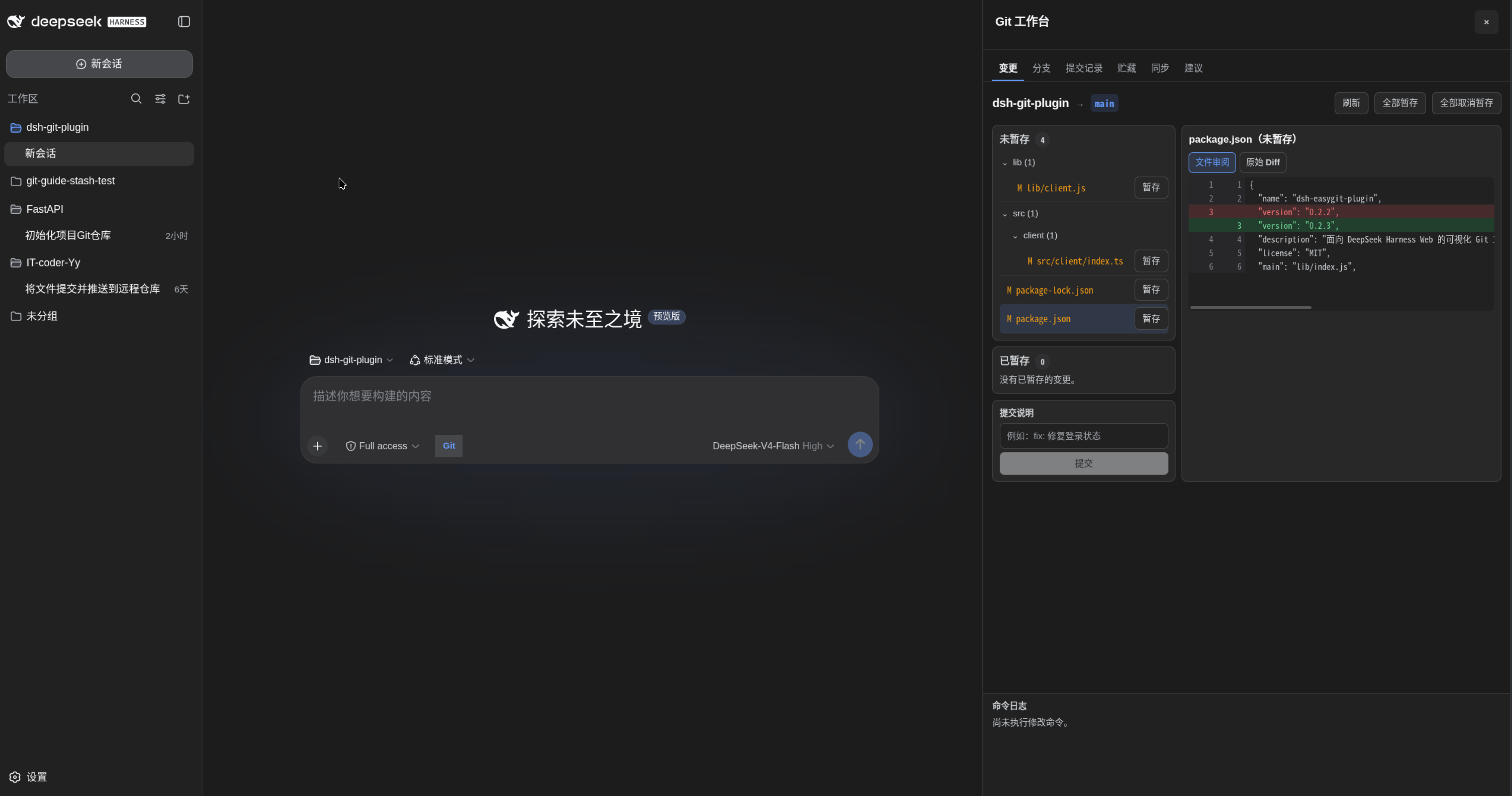
Git you can see and use
Understand your repository at a glance. Browse the commit graph, inspect commit details and file diffs, compare staged and unstaged changes, and see branches, tags, stashes, and remote sync status in one workbench.
Click through everyday Git work. Stage files, commit, switch branches, merge, stash, fetch, pull, and push from the interface. Preview changes before merging and resolve conflicts in the built-in three-pane editor.
| Area |
What you can do |
| Changes |
Review formatted or raw diffs; stage or unstage files; use AI 生成 to draft a Conventional Commit with the current session model using staged changes and project context, then edit and commit. |
| Commit history |
Browse the graph, inspect messages, parents, changed files and diffs; amend, undo, or revert commits. |
| Branches |
Search, create, switch, and delete local branches; inspect remote branches and tags. |
| Merge branches |
Preview incoming commits and changes; choose normal, fast-forward-only, or squash merge. |
| Conflict resolution |
Compare current, incoming, and result panes; accept either side, keep both, or edit manually; save, resolve, and continue. |
| Stashes |
Stash all or selected files, optionally including untracked files; review, apply, pop, drop, or create a branch from a stash. |
| Sync |
Inspect upstream and ahead/behind counts; fetch, fast-forward pull, push, set upstream, and manage Rebase. |
For more involved workflows, chat with the independent Git assistant in 建议. It inherits and receives updates from the main conversation while keeping its model settings independent. Review generated commands before execution; results return to the assistant, and stale proposals are rejected when the repository changes. Failed operations retain command output and repository diagnostics for follow-up analysis.
Quick start
Requires Git, Node.js ^22.19.0 || >=24.0.0, and DeepSeek Harness Web. Plugin 0.4.0 is verified with DSH 0.2.0-rc.1; see compatibility.
npm install -g @deepseek-ai/dsh@0.2.0-rc.1
dsh plugin --profile web add dsh-easygit-plugin@0.4.0
dsh web
Open a session for your Git repository, then click the Git button beside the composer. The workbench opens in a native right-sidebar tab.
A typical workflow: Changes → review the diff → stage files → enter a message → commit → Sync → push. New branches can set their upstream when pushing.
If pnpm blocks installation because the package was recently published, add the package to the existing configuration in ~/.dsh/profiles/web/pnpm-workspace.yaml:
minimumReleaseAgeExclude:
  - dsh-easygit-plugin
Common workflows
Amend, undo, or revert a commit
Open 变更 → 提交撤销与修正 (Changes → Commit edits) for the latest commit, or click a commit in 提交记录 (Commit history).
- Edit the latest message changes only the message, preserving staged and working-tree changes.
- Amend the latest commit adds all staged changes while keeping its message.
- Undo the latest commit, keep changes uses
reset --soft to return to its first parent; the initial commit cannot be undone this way.
- Revert a commit creates a reverse commit and requires a clean worktree and index. For merge commits, select the mainline parent. Conflicts can be continued, aborted, or skipped from Conflict resolution.
These actions require confirmation. Amend and undo rewrite local history and can affect published commits; the plugin never force-pushes automatically. If the branch, HEAD, or index changes after loading, refresh before confirming again.
Preview and merge branches
Open 合并分支 (Merge branches), select a local or fetched remote branch, and preview its incoming commits and file changes. Choose normal merge, fast-forward only, or squash. Squash stages the combined changes for you to finish as one commit.
Merging requires a clean worktree. Remote sources use locally fetched references, so fetch first for current data. The preview compares the source with the common ancestor; it does not predict conflicts or show the final merge result. A changed branch tip requires a new preview. You can abort an unfinished merge, including squash, but cannot abort a completed merge.
Resolve conflicts visually
In 冲突解决 (Conflict resolution), compare the current side, incoming side, and editable result with line numbers and commit references. Choose either side or both per block, or edit the result; then save → mark resolved → continue. Merge, Rebase, Cherry-pick, and Revert use this workflow. Abort and supported skip actions require confirmation.
During Rebase, the current side is the target branch plus replayed commits; the incoming side is the commit being replayed. Unresolved markers block resolution, and changed files invalidate an old snapshot. Binary conflicts support whole-side selection; text editing supports up to 48 KiB per version. Use external tools for larger files, symlinks, or submodules. Unsaved drafts last only for the current page and do not survive a reload.
Save work with Stash
In 贮藏 (Stashes), select all or individual files and optionally include untracked files. Selected-file stashes preserve unrelated changes. Review a stash before applying it; apply retains it, while pop removes it only after successful restoration. Conflicts retain the stash and link to Conflict resolution. Creating a branch from a stash requires a clean worktree and starts at the stash's original base.
Update, remove, or install from source
# Update / remove
dsh plugin --profile web update dsh-easygit-plugin
dsh plugin --profile web remove dsh-easygit-plugin
After updating, restart the Harness backend and refresh the browser to load both Host and Client changes.
# Install from source
git clone https://github.com/IT-coder-Yy/dsh-git-plugin.git
cd dsh-git-plugin
npm install
npm run build
dsh plugin --profile web add "${PWD}"
You can also install directly from the repository with dsh plugin --profile web add github:IT-coder-Yy/dsh-git-plugin.
Compatibility
Version 0.4.0 is verified with DSH 0.2.0-rc.1. The independent Git assistant requires the native session APIs in DSH 0.2. Shell execution uses execute(spec).result() and retains the legacy run(spec) fallback. Validation covers 160 automated tests and real DSH, browser, model, and temporary Git repository workflows; see the full verification report. Desktop and other operating systems have not been fully tested.
DSH 0.2.0-rc.1 skips plugins whose declared peer dependencies exclude the runtime version. Check other installed plugins when upgrading: dshmarket@1.66.5 declares support for DSH 0.2.0-rc.1, while dsh-client-auto-continue@0.11.9 still declares only DSH 0.1.x settings dependencies and is skipped. Wait for a compatible auto-continue release before using it on DSH 0.2.
Safety and Agent tools
High-risk actions require explicit confirmation. Agent proposals are validated against a Git command allowlist when created and before execution; shell control operators, substitutions, redirection, and unsafe options are rejected. Proposals cannot be replayed. Commands follow Harness Shell and session sandbox policies; use trusted repositories and Git configuration.
The Agent uses git_repo_state for read-only repository inspection and git_propose to register command proposals. Report vulnerabilities privately through SECURITY.md.
Development
npm install
npm run check
npm pack --dry-run --ignore-scripts
npm run check runs type checks, tests, and build reproducibility checks. Git integration tests create temporary repositories for repository operations and recovery scenarios.
License
MIT


