模型与 MCP
待识别

rea
morluto
Reverse engineer anything with agents, from app behavior down to native binaries.

HusuSama/dsh-review-comments
Line-anchored review comments for DeepSeek Harness: browse and fuzzy-search workspace files with syntax highlighting and git status in the right sidebar, comment on lines or ranges, and send every comment to the model as a path#line ordered list.
PROJECT TOPICS
INSTALL REFERENCE
dsh plugin --profile web add github:HusuSama/dsh-review-comments
该命令指向仓库当前默认分支;尚无绑定当前 commit 的完整验证结果。
PROJECT README
English | 中文
A file review comments plugin for the DeepSeek Harness Web UI. It lives in the right
sidebar: browse and fuzzy-search the workspace, read files with syntax highlighting and
git status, comment on a line or a line range, then hand the collected comments to the
model as a compact path#line ordered list.
In the Harness UI the entry is the File Review guide card (中文:文件评审).
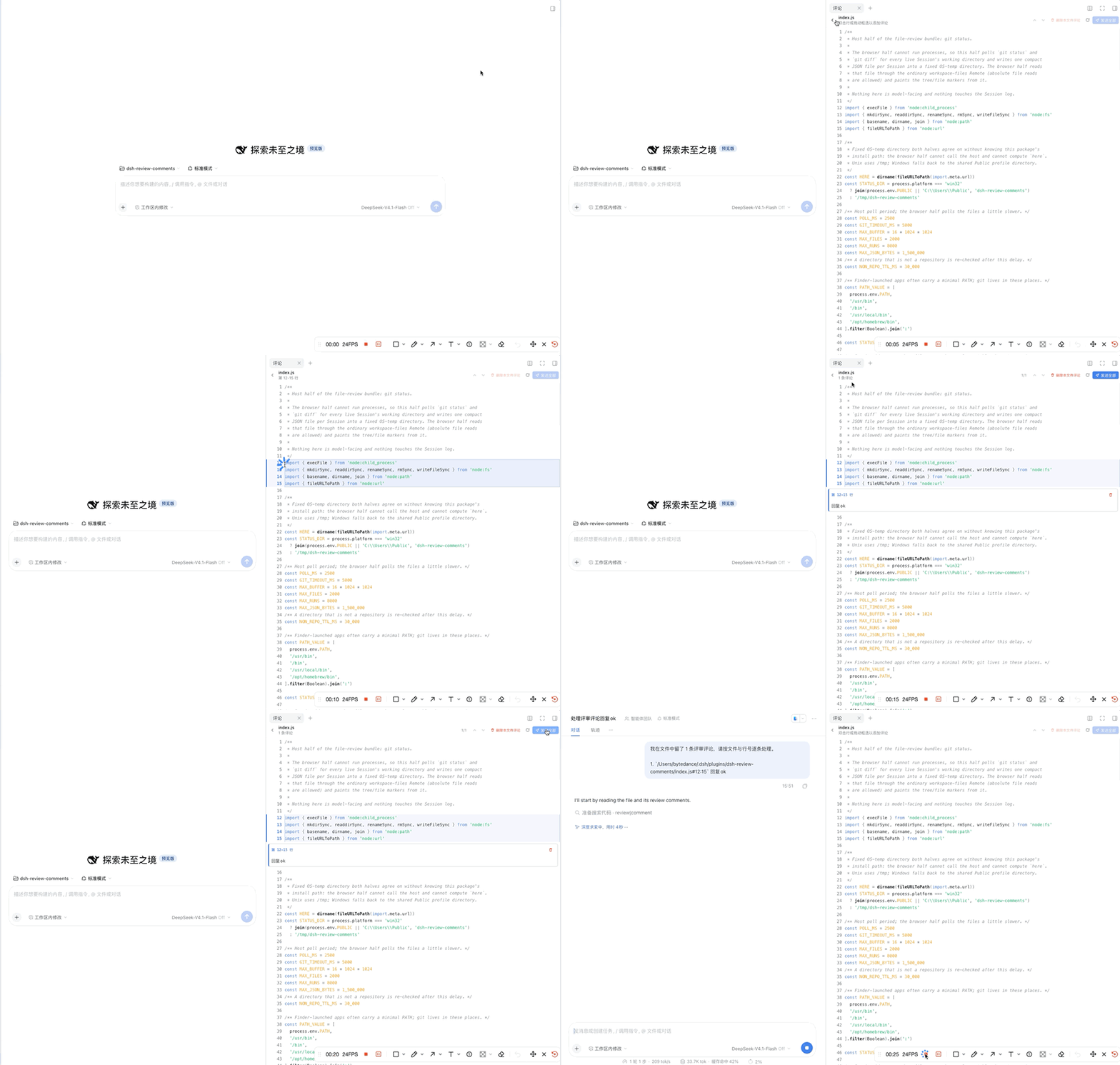
This plugin focuses on comments: read full file content, anchor a comment to a line or a line range, then hand the collected comments to the model. Git changes are shown as context marks, so browsing changes and writing comments stay out of each other's way.
changesitems finds
changes_items.tsx; separators and missing characters do not matter. Results are ranked
by match quality and grouped by folder. Skips .git/.svn/.hg/node_modules.Enter turns it into an inline
card; Shift+Enter adds a newline; Esc cancels.2/7) with
previous/next buttons; Ctrl/Cmd+Up/Down, Ctrl/Cmd+P/N and Ctrl/Cmd+wheel jump too.
The tree shows a right-aligned comment count per file and, for folders, the aggregate of
everything below them (rendered as a bold count tag on the theme accent colour, like the
composer's send button); the browser footer always shows the workspace total. The browser
header has a labelled Delete all comments button (the footer carries the same action as
a compact icon button), while the file header deletes only that file's comments and its
subtitle shows that file's count. Search results and the changed-files list carry the same
count tags.Ctrl/Cmd+Enter in the comment box or the panel's send
button submits the formatted list. Comments that are still pending are also appended to
any ordinary chat submit: type your own message, press Enter (or Cmd/Ctrl+Enter / the
Send button) in the chat composer, and the message goes out as your text, one blank line,
then the comment list — the comment cards stay in the panel until that send is accepted.--dsw-alias-* theme tokens; the UI ships
Simplified Chinese and English dictionaries.@deepseek-ai/dsh-client-ui-sidebar-right — part of the default web bundle). Tested with
DeepSeek Harness 0.2.1-rc.5 on macOS; other desktop/web platforms should work.git on PATH. Without it the plugin still runs; git status stays off.https://github.com/HusuSama/dsh-review-comments
(the manager supports GitHub sources) or pick a local checkout directory.# install from this repository (pnpm fetches the package from GitHub)
dsh plugin --profile web add github:HusuSama/dsh-review-comments
# local checkout instead, e.g. for development:
dsh plugin --profile web add link:/absolute/path/to/dsh-review-commentsThen enable the File Comments bundle in Settings → Plugins (the CLI only adds the dependency; the Plugin Manager UI installs and selects it in one step). No app restart is needed: the browser half hot-swaps, and the host half starts together with the bundle.
The plugin is distributed only through this GitHub repository — there is no npm
release, so always install with the github: spec above (or through the Plugin Manager's
GitHub source).
git clone https://github.com/HusuSama/dsh-review-comments.git
cd dsh-review-comments
node build.mjs                 # regenerate client.js from src/
node --test tests/core.test.mjs
dsh plugin --profile web add link:"$PWD"Open the right sidebar (the expand button in the conversation header) → the guide page shows the File Review card. Click it (or use the tab strip's add control → the card) to open the file manager. If the sidebar is already expanded, close another tab and use the guide. There is no global keyboard shortcut for opening the panel; the guide card is the entry point.
| Action | Where | Result |
|---|---|---|
| Click a folder | file list | expand/collapse (lazy per-level load) |
| Type in the search box | file list header | recursive fuzzy search of the whole workspace, ranked and grouped; empty input returns to the tree |
| Toggle Changed only | file list header | list only the session project's uncommitted git changes |
| Click a file | file list / results | open the file: line numbers, syntax highlighting, git change marks |
| Double-click a line | file view | comment composer opens below that line |
| Drag across lines | file view | select a line range; composer opens below the selection; the range stays highlighted while you type |
Enter |
composer | add the comment card at that place |
Shift+Enter |
composer | newline inside the comment |
Ctrl/Cmd+Enter |
comment box / header send button | send all pending comments to the model |
| Enter / Cmd+Enter / Send | chat composer | if comments are pending: your text, one blank line, then the comment list — sent as one message |
| Previous / Next | file header | jump between this file's comments (position 2/7 shown) |
Ctrl/Cmd+Up/Down, Ctrl/Cmd+P/N, Ctrl/Cmd+wheel |
file view | jump between this file's comments |
| Comment counts | file tree / footer | per-file count tags, per-folder subtree totals, workspace total in the footer |
| Delete all comments | file list header / footer | clear every pending comment |
| Delete comments in this file | file header | clear only the open file's comments |
Esc |
composer | cancel |
| Delete button on a card | comment card | remove that comment |
Comments are cached per sidebar tab, so switching tabs and coming back keeps them; send or delete them to clean up.
A single user message with an intro line and one ordered-list item per comment — absolute
path plus #startLine (or #startLine:endLine), then the comment text. No source excerpts:
the model can read the file at those lines itself.
我在文件中留了 3 条评审评论,请按文件与行号逐条处理。

1. `/Users/me/proj/README.md#5` 标题需要说明用途
2. `/Users/me/proj/src/client/index.ts#12` 这里没有处理 null 情况
3. `/Users/me/proj/src/client/index.ts#20:24` 这段逻辑可以提取为函数
The message follows the active UI language (Chinese above); items are ordered by path and start line, and multi-line comment text keeps its list indentation.
The host half polls the session working directory every 2.5 s and writes one compact JSON
file per session under the system temp directory (/tmp/dsh-review-comments; on Windows
C:\\Users\\Public\\dsh-review-comments); the browser half reads it through
the harness's ordinary file Remote.
A/M/D/R/U mark rows.The search box is recursive and fuzzy:
changesitems → src/utils/changes_items.tsx (separators ignored).git, .svn, .hg, node_modulesindex.js — host half. Uses the harness sessions + workingDirectory services to find
each live session's project, then git rev-parse/status/diff through child_process, and
writes <status-dir>/<sessionId>.json (atomic, only when changed).client.js (generated by build.mjs) — browser half. Registers a right-sidebar tab type
(ctx.sidebarRightTabs.register) plus its body in the sidebar.right.pane.tab slot, reads
workspace files through remote.workspaceFiles, and polls the status file above.inputActions.setDraft()/submit(), i.e. the same path as
pressing Enter in the chat box. An invisible bridge above the composer appends the pending
comments to an ordinary send (your text, blank line, then the list). Nothing is written to
the session log by the plugin itself.--dsw-alias-* theme tokens (link, bg-document-selection,
interactive-bg-hover-accent, elevation-panel, …), so light/dark and themes come for free.| Path | Purpose |
|---|---|
index.js |
host half: git status poller and status-file writer |
src/client.core.js |
pure logic: paths, formatter, Prism adapter, git/search helpers (unit tested) |
src/vendor/prism.min.js |
vendored PrismJS 1.30.0 (MIT), isolated from the host page globals |
THIRD_PARTY_NOTICES.md |
third-party license texts |
src/client.ui.js |
React UI (no JSX): file tree, search, file view, comment popover/cards, CSS |
src/client.apply.js |
registrations: locale dictionaries, tab type, body slot, stylesheet |
build.mjs |
concatenates the vendored Prism bundle and the three sources into client.js (do not edit client.js) |
tests/core.test.mjs |
Node built-in test runner, 137 tests |
locale/*.json, icon.svg |
plugin display metadata |
docs/media/demo.gif |
the demo animation shown above |
node build.mjs                # regenerate client.js
node --test tests/core.test.mjs   # 137 unit tests
node --check client.js        # syntax check
The browser half hot-swaps into an open page about half a second after client.js changes
(the harness client-hmr watcher). The host half is loaded with the bundle: after editing
index.js, disable and re-enable the bundle once in Settings → Plugins (or restart the
harness) to load it.
git rev-parse; non-repositories show the feature disabled.Syntax highlighting is powered by PrismJS 1.30.0, vendored under its MIT license. See THIRD_PARTY_NOTICES.md for the full text.
CLASSIFICATION EVIDENCE
系统优先读取 GitHub Topics,再与站内分类词典和词根规则比对。当前命中: deepseek-harness。
morluto
Reverse engineer anything with agents, from app behavior down to native binaries.

deepseek-ai
DeepSeek Harness: Everything is a Plugin.

nexu-io
The 1st Collaborative AI Design Agent Workspace. Local-first and open source. Create motion, prototypes, websites, apps, dashboards, presentations, images, and videos with your team and AI agents. Share work, exchange feedback, and iterate together in one workspace.