
其他
插件

dsh-bili-scroll
c1overzz
DSH 插件:每天替你刷一轮 B站,读字幕挑出值得的、写一份日报,值得的 @ 你
PROJECT TOPICS
INSTALL REFERENCE
dsh plugin --profile web add github:HumXC/dsh-nestquay
该命令指向仓库当前默认分支;尚无绑定当前 commit 的完整验证结果。
PROJECT README
English | 简体中文
Workspace groups for the DSH sidebar, so you can find and manage multiple projects more easily.
Organize workspaces by project, purpose, or stage of work. Give each group an icon or emoji and switch between groups from the bottom of the sidebar. Your workspaces and sessions keep their familiar behavior.
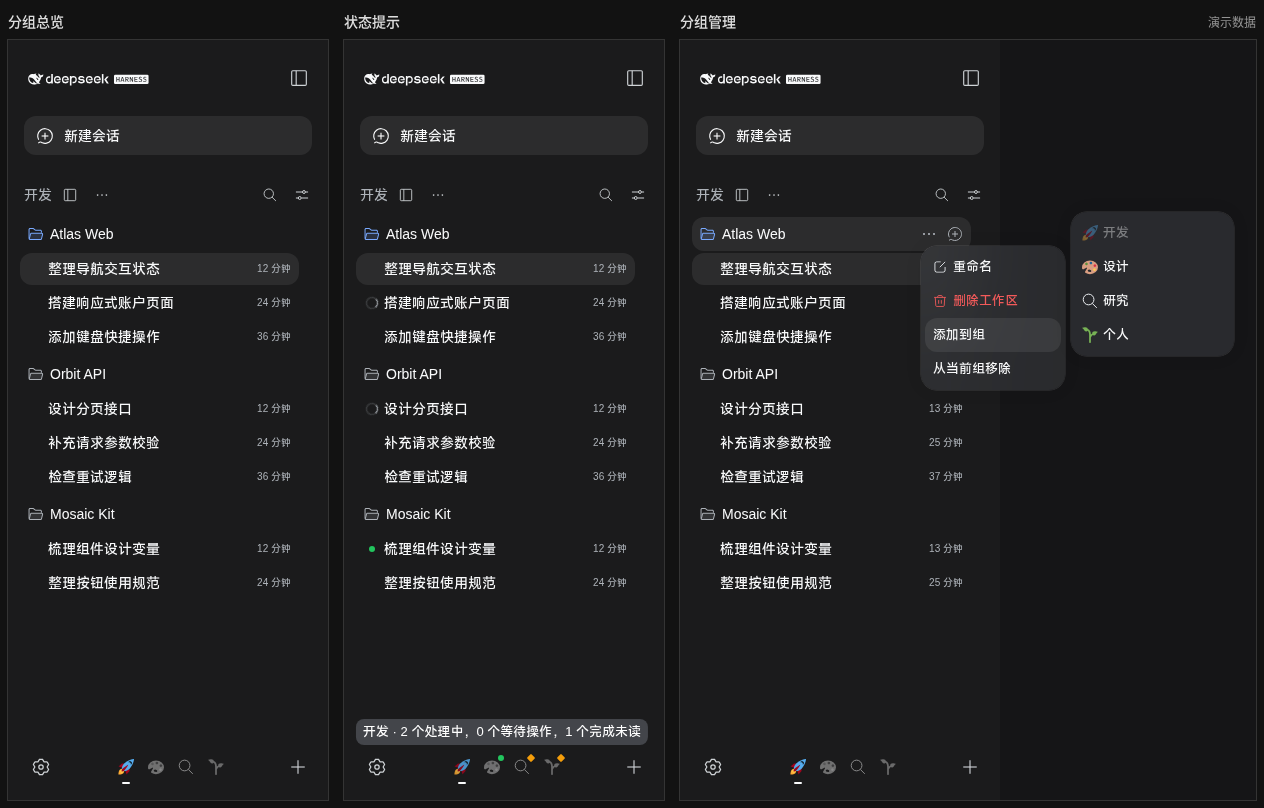
The screenshot uses fictional workspaces and sessions and shows only the sidebar and group menus.
Compatible with DSH 0.2.0-rc.2.
Use the DSH CLI to install the GitHub Release package into your web profile:
dsh plugin --profile web add https://github.com/HumXC/dsh-nestquay/releases/latest/download/dsh-nestquay.tgzFor a custom profile, replace web with its name. Restart DSH after installation, then refresh the browser page.
The initial default group is empty. New workspaces created in the group view automatically join the group that was active when creation began. Add existing workspaces through the Add to group (添加到组) menu. A workspace can belong to multiple groups. Workspaces without a group remain available in the standard workspace view.
At least one group must remain, so the last group cannot be deleted. Deleting a group does not delete its workspaces or sessions, or remove those workspaces from other groups.
Groups and the selected view are remembered. Icon order is stored in the current browser and survives page reloads.
Choose a built-in icon, select an emoji, or paste one. Emoji use a consistent appearance in the picker, preview, and input field. In the footer, inactive groups appear in grayscale; the selected group shows its original colors.
When the sidebar gets narrow, inactive group icons collapse into dots. Hover over or focus a dot to expand the icon and see the group name. If there are many groups, hover near either edge of the navigation bar to scroll.
Footer icons summarize the activity of sessions in each group. Hover over or focus an icon to see the counts.
| Indicator | Meaning |
|---|---|
| A sweep of the icon's original colors, or a pulsing dot | A session is running. |
| Green dot | A session has completed and has not been viewed yet. |
| Interaction marker | A session needs your input or approval. |
The completion marker is a reminder to open the session; it does not mean the task result has been verified. Animations are disabled when the system's reduced-motion setting is enabled.
Does switching groups change the session I am viewing?
No. Switching groups only changes which workspaces appear in the sidebar. The open session stays the same.
Where can I find a workspace after removing it from a group?
It remains in the standard workspace view. If it belongs to other groups, you can also find it there.
What happens when I disable the plugin?
The sidebar returns to its standard workspace view. Your workspaces and sessions are unaffected.
CLASSIFICATION EVIDENCE
系统优先读取 GitHub Topics,再与站内分类词典和词根规则比对。当前命中: 无有效分类标签。
c1overzz
DSH 插件:每天替你刷一轮 B站,读字幕挑出值得的、写一份日报,值得的 @ 你

hellowind777
一个自主的高级智能伙伴,不仅分析问题,更持续工作直到完成实现和验证。

xing-shuyin
Just open your browser — get all your work done.