
模型与 MCP
待识别

rea
morluto
Reverse engineer anything with agents, from app behavior down to native binaries.
PROJECT TOPICS
INSTALL REFERENCE
dsh plugin --profile web add github:HaroldZ32/My-Power-Dsh
该命令指向仓库当前默认分支;尚无绑定当前 commit 的完整验证结果。
PROJECT README
English | 中文








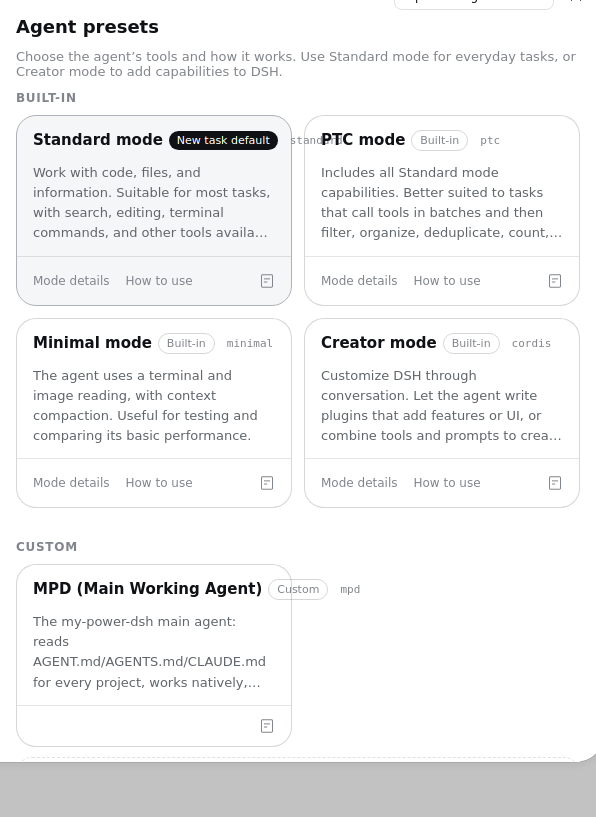
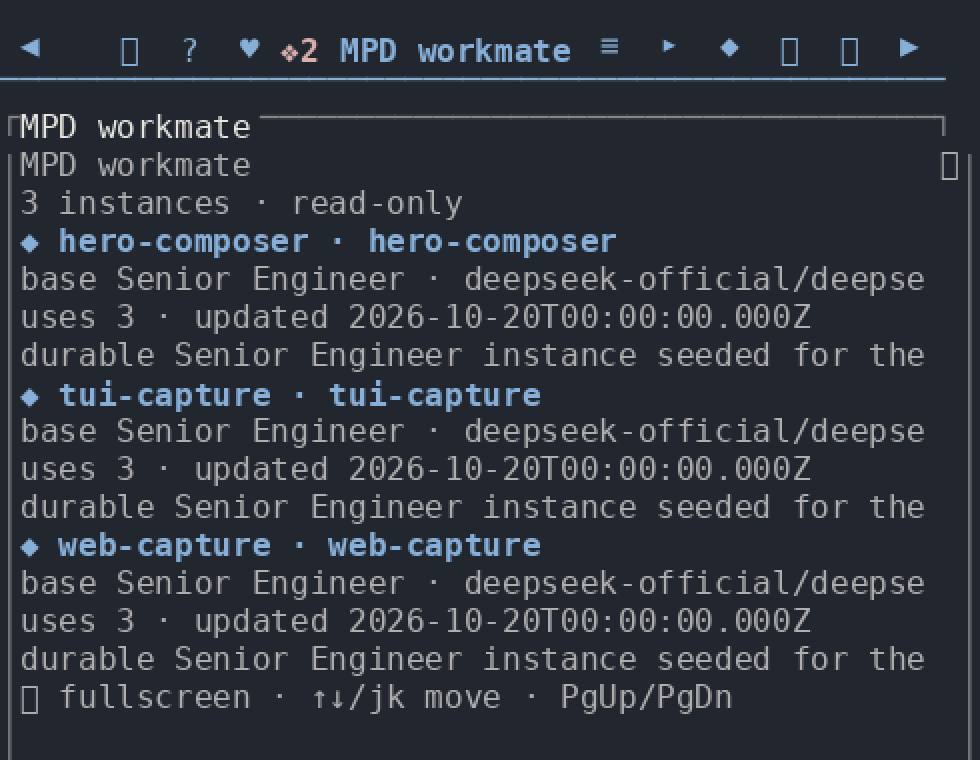
my-power-dsh is a plugin bundle for the DeepSeek Harness (DSH). One install turns a plain DSH setup into a working environment for real coding work: a main agent that reads your project rules, eleven specialists you can consult or delegate to, a library of durable "workmate" agents that remember what they learned, multi-agent teams that run on this bundle's own team record, a served skill corpus, MCP servers for code intelligence, and an extension interface other packages can contribute to.
The bundle runs on two surfaces. Everything below exists in the DSH Web GUI and in the DSH-TUI
terminal edition, with the same install, the same .mpd/ state, the same tools and the same mpd
preset. The terminal surface runs on dsh-TUI, whose site is
dshtui.com. Nothing is forked, and a capability is not absent from the terminal
just because it has no pixels there.
The bundle is the package @mpd-dsh/mpd; this
repository root is that package. One command installs it, and one command removes it without leaving
residue.
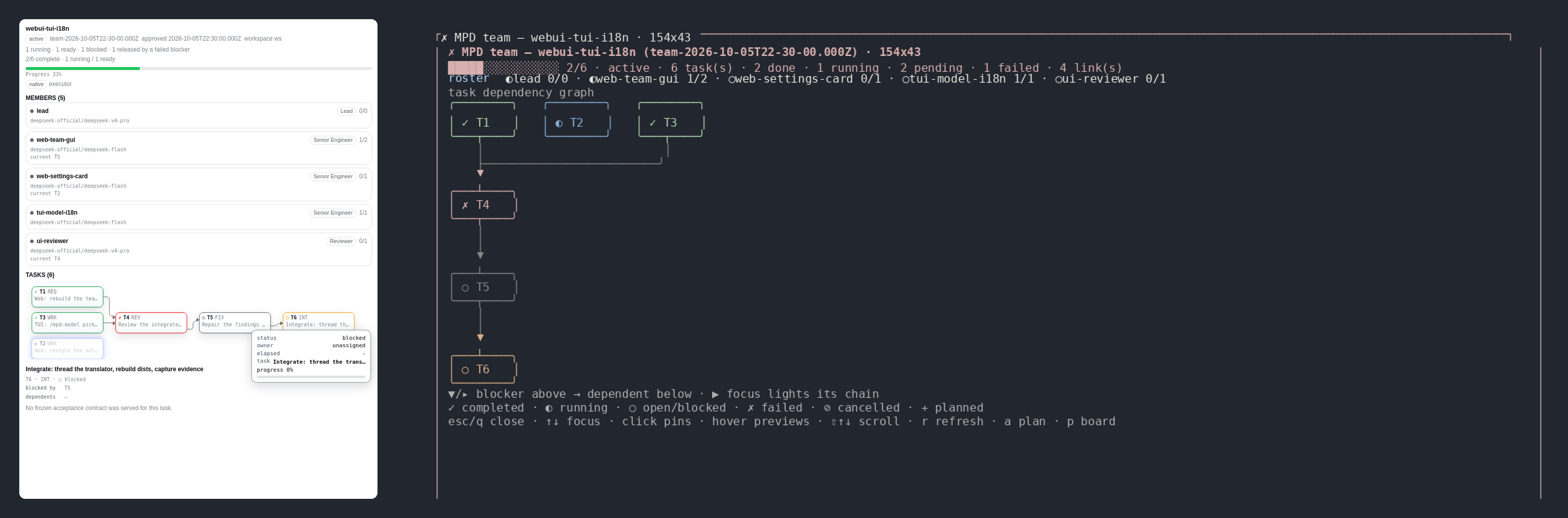
The same bundle, the same run, the same state: the Web GUI on the left, the DSH-TUI
terminal edition on the right. Every screenshot here is a real capture of the shipped bundle, produced
by the Docker lanes under docker/ui/: the Web tiles by headless Chromium driving the
real app, the terminal tiles by rasterizing the bytes the real TUI emitted on a real PTY
(tmux capture-pane -e, carrying the TUI's own colours) at the grid tmux computed.
The TUI localizes its command descriptions and its status line but not its scene bodies, so the
terminal scene tiles read the same in both languages.
One install puts the bundle into either profile, or both. The two surfaces share one state root
(<workspace>/.mpd/), one set of tools and one mpd preset. Only the rendering differs.
| What you want to do | DSH Web GUI | DSH-TUI (terminal) | Parity |
|---|---|---|---|
| See the team: id, name, phase, status | the Team view in a sidebar, served by this bundle (/plugins/mpd-team/state) |
/mpd team, a full-screen scene |
same facts |
| Read the roster: members, model routes, per-member task counts | the Team view's member cards | the same rows inside /mpd team |
same facts |
| Read the task graph: id, kind, status, owner, attempt, round, dependencies | the Team view's dependency graph; hover lights a chain, click pins a node | the same rows as boxes and box-drawing edges | same facts |
| Watch a wave that has gone quiet | the Team watchdog sidebar tab: the hold, the escalation banner and the incident replay | the team-hold held (…) row plus the incident replay dialog |
same facts |
| Review a staged plan before any work starts | the Team view renders the staged plan and the phrase that approves it | /mpd plan: read it, type approve plan-…, then Ctrl+X |
the same plan; approving is an agent_teams_plan tool call on both |
| Browse the workmate library | the Workmates sidebar tab: listing, persona / memory / note | /mpd workmates, the listing only |
TUI is listing-only; mutations are Web-only |
| Tune the bundle's knobs | Settings → MPD section | /settings → the MPD section |
same knobs, same restart caveat |
| See plan / boulder / workmate progress while you type | the sidebar and the settings card | the keyed status line above the prompt | TUI-native surface |
| Stay on the keyboard | no equivalent (pointer, plus the panel below) | the status line, the /mpd command tree, the alt+a merged panel |
TUI-native surface |
| See the roster and board the harness ships | the Agent Teams panel in the conversation header, a different, read-only surface (it spawns, renames and deletes nothing) | none | not this bundle's surface |
| Look at an archived team | ?archived=1 on the Agent Teams panel |
not projected; the TUI reads the newest live record | Web-only |
| Drag and resize the panel | the Agent Teams panel is a floating panel | a terminal scene has no geometry | not applicable |
Two Web surfaces are easy to confuse, so the table names them apart: the Agent Teams panel in the conversation header belongs to the harness's own client and is read-only, while the Team and Team watchdog views are this bundle's own pages, served from its routes and rendered in whichever sidebar host the composition provides.
The table is backed by a ledger. docs/tui-parity.md lists every row with its
evidence and records each deviation that is still open. Rows above whose two columns are not the same
sentence are exactly those recorded deviations; read the ledger before you rely on the TUI for a Web
capability.
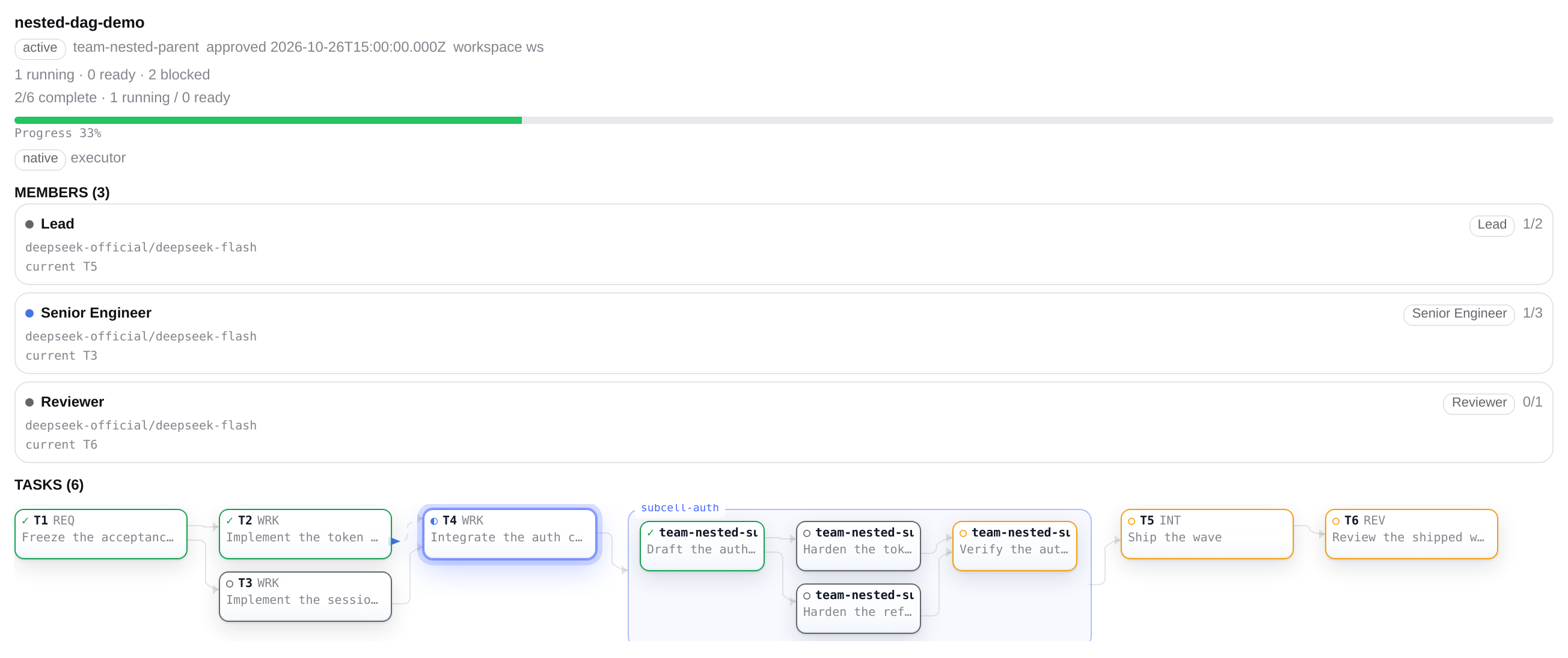
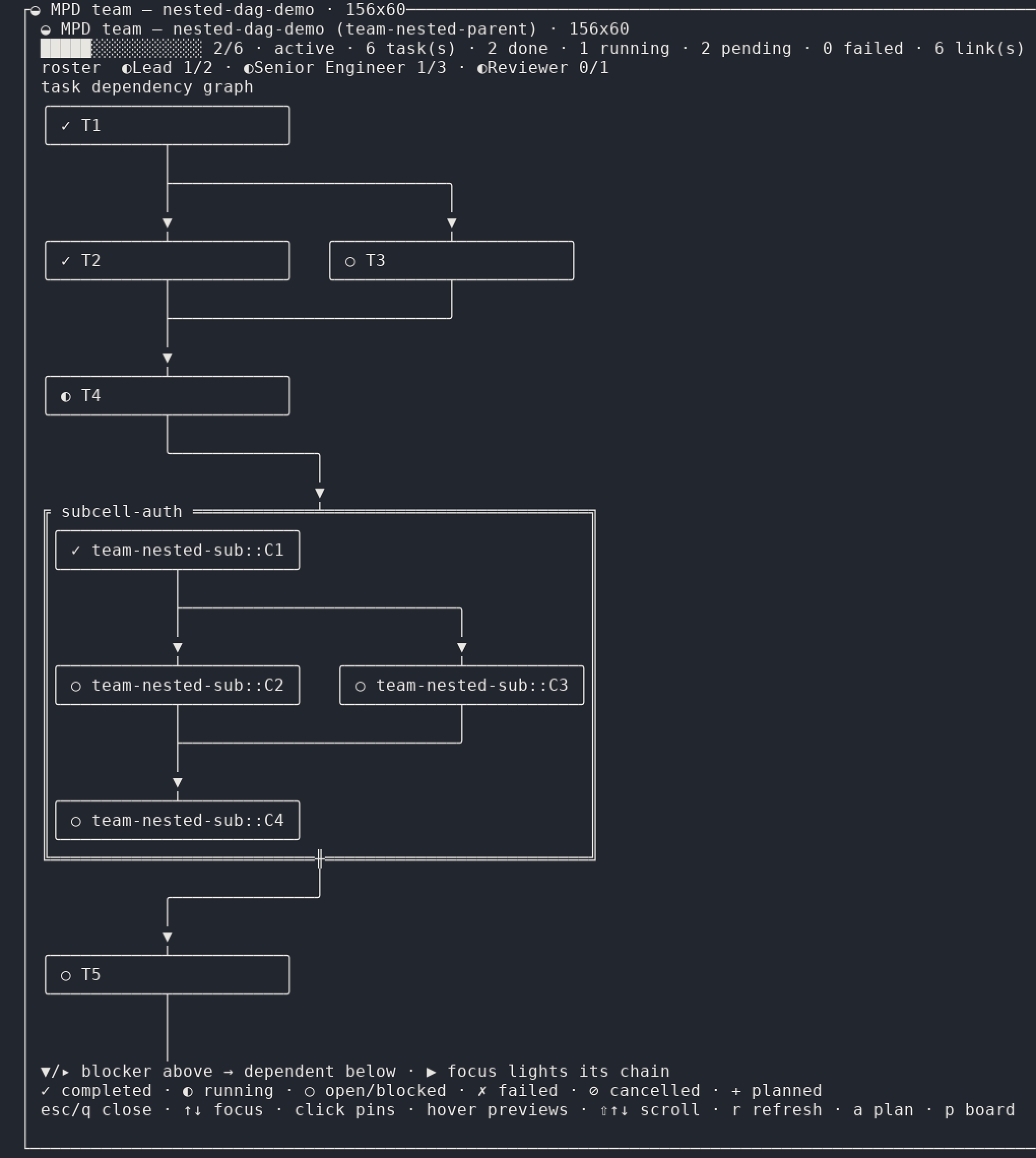
mpd, carries the
project-instruction convention: every session attempts AGENT.md, then AGENTS.md, then
CLAUDE.md, from the project root down to the working directory.~/.mpd/workmate/; it self-summarizes after each session, evolving its own persona and memory..mpd/team/teams/<id>.json,
served as mpdTeams), executed by the adapter's native TeamExecutor backend by DEFAULT; mpd
rows drive it through the agent_teams_plan door and the agent_teams_task / agent_teams_dispatch
board, and the official authoring verbs (spawn_teammate, team_task_*) are REFUSED at the tool
boundary. The official dsh.team* service is only the contained FALLBACK for a composition that runs
the official executor (its rows are disabled in a TUI composition). A durable mailbox, a Web panel
and a TUI scene read the same live record.<bundle>/skills, the repository's own dsh-qa among them. cordis-dev loads itself on
detection (cordis.patch.yml or presets/*.patch.yml, a manifest carrying dsh.bundle /
dsh.client, dsh-plugin.json, a packages/*/src/index.ts exporting apply, or an
extensions/* manifest), so Cordis / DSH plugin work starts from this repository's own rules.Requires Node.js ≥ 22.18 and pnpm on PATH, and a DSH install with a web or headless
profile. The bundle never configures model keys for you.
# Web GUI profile
dsh plugin --profile web add @mpd-dsh/mpd

# DSH-TUI profile: the same bundle, the terminal surface
dsh plugin --profile dsh-tui add @mpd-dsh/mpd
Then restart dsh and start a session on the MPD (Main Working Agent) preset. To uninstall:
dsh plugin --profile web remove @mpd-dsh/mpdThe package declares no cordis dependency and no preinstall/install/postinstall/prepare
script, so installing it runs no code from the package. Its rows reach the harness only through
cordis.patch.yml and the profile mechanism, and it overrides no host row: the mpd preset is
added additively, and it becomes your default through your action, never the bundle's.

To track the repository instead of the npm release, or to pin a revision, install from a checkout:
git clone https://github.com/HaroldZ32/My-Power-Dsh.git && cd My-Power-Dsh
bun install                                       # materialize the declared runtime dependencies
dsh plugin --profile web add .
The user guide covers the packed artifact, the dsh-tui launcher,
the dependency closure and what the install mounts.
Each row is the host pair a release was built and verified against: the Docker real-machine lanes
run the install and the mount on exactly that pair. The harness pin is the host-base ref in
dsh-distribution.json plus the engines.dsh span in
package.json, and the DSH-TUI pin is both manifests' compat.hosts plus the
host-tui ref in dsh-distribution.json. A newer host is not claimed
until a release row names it; pin both.
The newest row is the version this package publishes; the rows below it are the pins of earlier releases, kept as history.
@mpd-dsh/mpd |
DeepSeek Harness | DSH-TUI | Notes |
|---|---|---|---|
| 0.20.0 | 0.2.2-rc.3 | 0.20.1 | the current release |
| 0.19.0 | 0.2.2-rc.2 | 0.20.0 | previous |
| 0.18.1 | 0.2.2-rc.1 | 0.19.0 | previous |
| 0.18.0 | 0.2.2-rc.1 | 0.19.0 | previous |
| 0.17.5 | 0.2.1-rc.5 | 0.18.0 | previous |
| 0.17.4 | 0.2.1-rc.5 | 0.18.0 | previous |
| 0.17.3 | 0.2.1-rc.5 | 0.18.0 | previous |
| 0.17.2 | 0.2.1-rc.5 | 0.18.0 | previous |
| 0.17.1 | 0.2.1-rc.5 | 0.18.0 | previous |
| 0.17.0 | 0.2.1-rc.5 | 0.18.0 | previous |
| 0.16.4 | 0.2.1-rc.3 | 0.17.0 | previous |
| 0.16.3 | 0.2.1-rc.3 | 0.17.0 | previous |
| 0.16.2 | 0.2.1-rc.3 | 0.17.0 | previous |
| 0.16.1 | 0.2.1-rc.3 | 0.17.0 | previous |
| 0.15.4 | 0.2.1-rc.2 | 0.16.1 | previous |
| 0.15.2 | 0.2.1-rc.2 | 0.16.1 | previous |
| 0.15.1 | 0.2.1-rc.2 | 0.16.1 | previous |
| 0.15.0 | 0.2.1-rc.2 | 0.16.1 | previous |
| 0.14.0 | 0.2.1-rc.2 | 0.16.1 | previous (the harness-0.2.1 adaptation release) |
The newest row is that pair: 0.20.0 ships against harness 0.2.2-rc.3 and DSH-TUI 0.20.1. The
older hosts stay supported: engines.dsh spans >=0.2.1-rc.5 <0.3.0-0, harness 0.2.2-rc.2,
0.2.2-rc.1 and 0.2.1-rc.5 keep mounting and running, and the compat.hosts band keeps DSH-TUI
0.18.0, 0.19.0 and 0.20.0 beside the new 0.20.1. The harness pin lives in
dsh-distribution.json's host-base ref and package.json
engines.dsh; both manifests' compat.hosts list all four TUI hosts. The rows below it record what
earlier releases actually pinned. The full matrix is
docs/compatibility.md.
dsh, and start a session on the MPD (Main Working Agent) preset.bash / read / edit plus the MCP code tools. Drop an
AGENT.md in your project to steer it; the file is read automatically at session start.mpd_roles_list shows the roster, then
mpd_role_spawn { role: "Architect", task: "review the module boundaries in src/" }.mpd_workmate_init { base: "Architect", name: "system-architect" }, then
reuse it with mpd_workmate_spawn { name: "system-architect", task: "…" }.agent_teams_plan (add_member → create_task, each task declaring its dependency answer,
blocked_by or independent: true, → approve), then drives the board with agent_teams_task
and agent_teams_dispatch plus send_message / wait_agent; the official spawn_teammate /
team_task_* verbs are REFUSED at the tool boundary. Watch the roster and the shared board in this
bundle's Team sidebar view, or in the TUI's /mpd team scene.<workspace>/.mpd/extensions/ and check
it with mpd_ext_list.Two commands worth knowing from the first minute:
/autoproject  <objective>     drive a long objective to done, in rounds, with gates
/mpd  team            open the team scene (DSH-TUI)
Or just ask. Reach for a specialist when you want a scoped second pair of eyes:
use the Architect to review the retry logic in src/queue.ts
The status line, the /mpd command tree and the /settings section are terminal-native surfaces;
their Web counterparts are the bundle's Team / Team watchdog views, the Workmates tab and
Settings → MPD.
The bundle's work happens through tools and commands, the same ones on both surfaces. The short version:
| You want to… | Reach for | Detail |
|---|---|---|
| Work with an agent that knows your project rules | the mpd preset |
user guide §2 |
| Get a scoped second opinion | the specialist roster, mpd_role_spawn |
user guide §4 |
| Keep a specialist that accumulates knowledge | the workmate library, mpd_workmate_* |
user guide §5 |
| Run a real multi-agent workflow | team mode, agent_teams_plan → agent_teams_task / agent_teams_dispatch (the official spawn_teammate / team_task_* verbs are REFUSED) |
user guide §6 |
| Drive a long objective to done | the autoproject loop, /autoproject |
user guide §13.2 |
| Track a multi-step plan durably | the boulder ledger, mpd_boulder_* |
user guide §13.6 |
| Remember facts across sessions | the memory engine, mpd_memory_* |
user guide §13.7 |
| Edit files without line-drift mistakes | hash-anchored editing, mpd_hashline_* |
user guide §13.5 |
| Understand an unfamiliar codebase | the MCP servers: ast-grep, LSP, CodeGraph | user guide §3 |
| Teach the bundle a new trick | the extension interface, mpd_ext_* |
user guide §10 |
| Drive it all from a terminal | the DSH-TUI edition | user guide §7 |
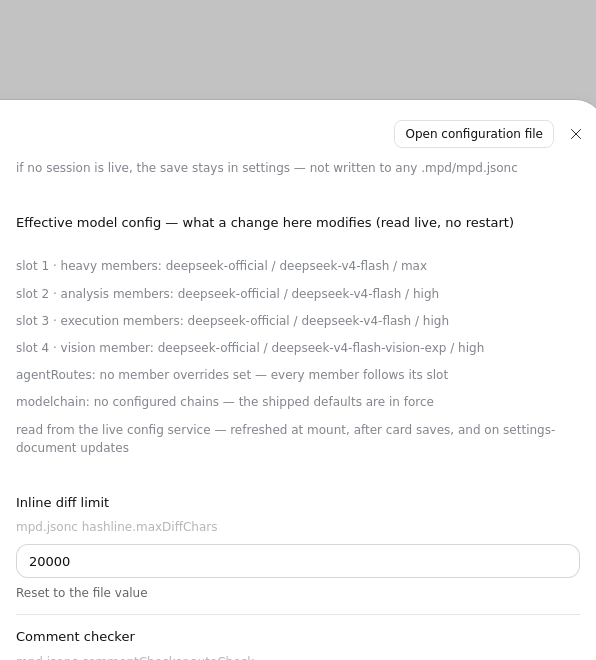
Configuration is JSONC and layered: <workspace>/.mpd/mpd.jsonc over $DSH_HOME/mpd.jsonc, per key,
project wins. Your state lives in <workspace>/.mpd/. The one exception is the workmate library,
which is HOME-scoped at ~/.mpd/workmate/. See
user guide §9 and
§14.
list_agents is not mounted on 0.2.1-rc.5: the
newer harness removed the subpath export the row needed, and a single preset cannot straddle both. See
docs/compatibility.md §2.docs/tui-parity.md.mpd becomes the
default only through your own action: docs/preset-default.md.mpd_config_get proving a new value is not proof that the running plugin acts on it.LICENSE.md, Copyright (c) 2026 HaroldZ32);
third-party material keeps its own licence, recorded per component in LICENSE-NOTICES.md.CONTRIBUTING.md carries the setup, the build and gate commands, and the branch
model. This repository is developed against a gate suite rather than a review convention: a change
without evidence on disk is not done. Both the human-facing docs and the pull-request description are
bilingual (English and 简体中文).
Release notes live in CHANGELOG.md, newest first, one section per released
version (the current release is v0.20.0). Annotated tags are listed under
Releases.
The third-party work this bundle ships, and the licence it travels under, is recorded in
LICENSE-NOTICES.md. In short:
code-yeongyu/lazycodex;dsh-better-sidebar;@code-yeongyu/comment-checker (MIT);No entry describes something this repository does not ship.
MIT: see LICENSE.md, Copyright (c) 2026 HaroldZ32. Third-party components keep
their own licences; the complete notices are in LICENSE-NOTICES.md.
CLASSIFICATION EVIDENCE
系统优先读取 GitHub Topics,再与站内分类词典和词根规则比对。当前命中: deepseek-harness。
morluto
Reverse engineer anything with agents, from app behavior down to native binaries.

deepseek-ai
DeepSeek Harness: Everything is a Plugin.

nexu-io
The 1st Collaborative AI Design Agent Workspace. Local-first and open source. Create motion, prototypes, websites, apps, dashboards, presentations, images, and videos with your team and AI agents. Share work, exchange feedback, and iterate together in one workspace.