
模型与 MCP
待识别

rea
morluto
Reverse engineer anything with agents, from app behavior down to native binaries.
PROJECT TOPICS
INSTALL REFERENCE
dsh plugin --profile web add github:HarmlessFunny/dsh-pet-in-frame
该命令指向仓库当前默认分支;尚无绑定当前 commit 的完整验证结果。
PROJECT README
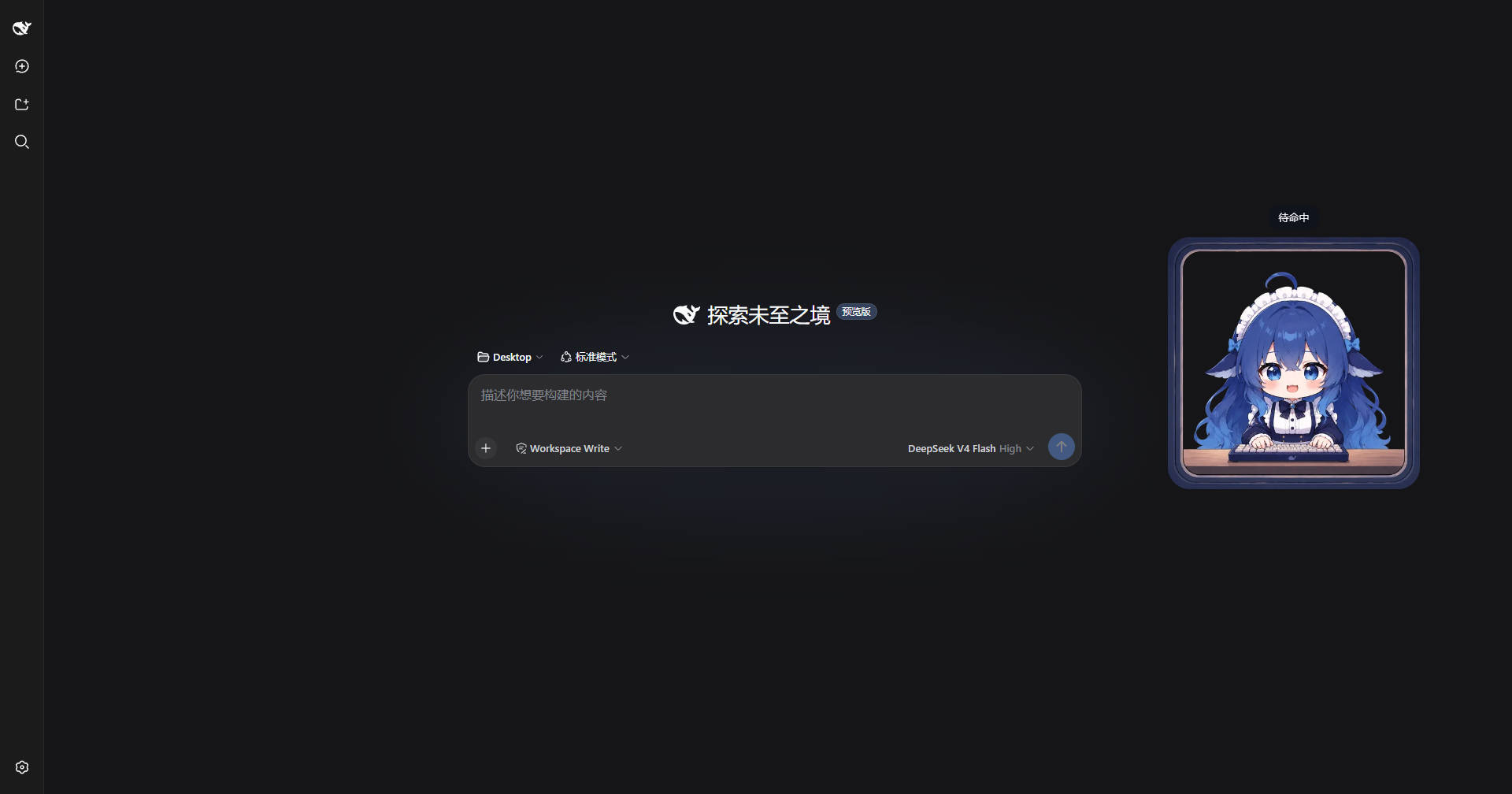
A single-package DeepSeek Harness plugin: a small desktop pet that floats in the corner of the Web GUI and reacts to what the agent is doing — thinking, searching the web, reading code, running commands, editing files, hitting an error, or idling.
One package = one bundle = one loader row. The host half listens to the agent lifecycle (agent/status, tools/execute, tools/result, agent/error), watches the assets/ directory for image and manifest.json changes, and serves five HTTP routes (/dsh-pet-in-frame/state, /texts, /frames/<action>, /assets/<file>, /wake). The browser half registers the pet into shell.overlay, polls state, and swaps static poses or cycles frame animations.
The differentiator: the assets directory is the config. Drop a bash.png into assets/ and the pet shows it whenever a command runs; add a frame list plus one manifest.json line and you get an animation. No rebuild, no code change — changes hot-reload within a few seconds.
Explore screen — the pet idles in the bottom-right corner:
In a conversation — the pet switches poses with the agent's activity and shows a status bubble on click:
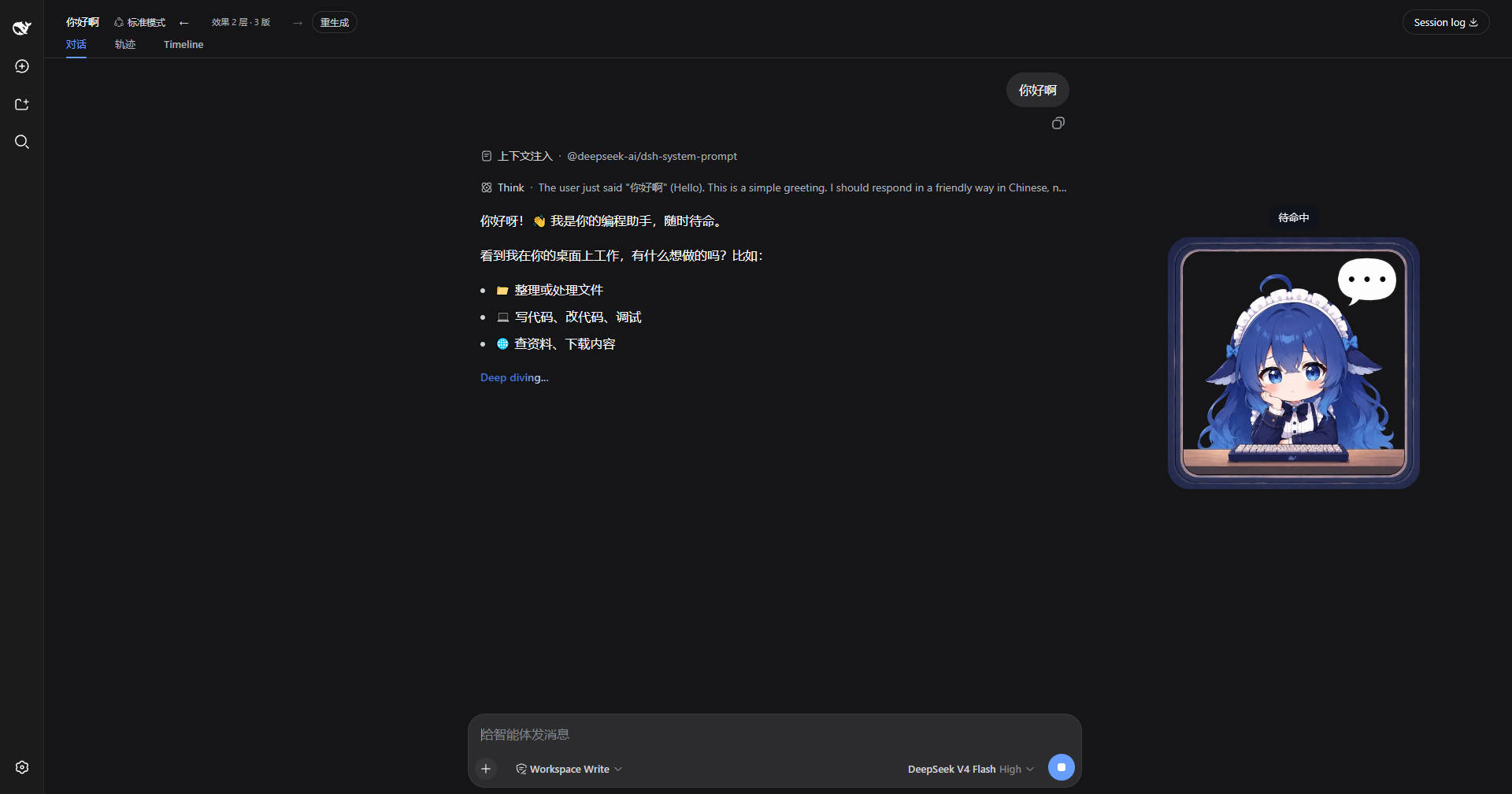
Poses switch with agent state and tool calls:
| Action | Triggered by | Image |
|---|---|---|
think |
running, no active tool | think.png / {imgs:[...],delay} |
search |
web_fetch |
search.png |
learn |
web_search, skill |
learn.png → default.png |
read |
read, glob, grep |
read.png → search.png → default.png |
bash |
bash, pwsh |
command.png / command.webp, plus a pinned bash_comp / pwsh_comp badge |
edit |
edit, write |
edit.png → default.png |
plan |
todo_*, goal tools, workflow, and goal/changed events (brief flash) |
plan.png / plan.webp |
ask |
ask_user_question |
ask.png → default.png |
subagent |
subagent/start, subagent/end events; subagent / subagent_fork / send_message / interrupt_agent / report tool dispatch |
subagent.png → default.png |
cordis |
cordis_define, cordis_run, cordis_stop, cordis_undefine, cordis_inspect_* |
cordis.png / cordis.webp |
permission |
while an approval request is pending (sandbox escalation / sandbox_permissions) |
permission.png / permission.webp |
error |
agent/error; tool results with isError (failed operations, a failed subagent run); bash/pwsh non-zero exit (foreground result or background job); cancelled calls are excluded |
oops.webp |
idle / default |
nothing active | default.png |
sleep |
after 30 s of continuous idle | sleep.png / {imgs:[...],delay} |
Subagent working indicator: while any subagent is running, a badge pinned inside the pet image (top-left at ~4.63% / 31.66% of the pet, sized ~26.63% × 36.92% — matching a 334×463 badge on a 1254×1254 pet sprite) cycles the subagent_comp1~3 frames (500 ms interval). Because it lives inside the pet's own container it follows drag and resize. At start/end the pet flashes the subagent pose for ~2 s, and the badge lingers ~2 s after the last subagent settles so both disappear in sync. The pose flash and the running indicator are independent. If the main agent calls a tool during the flash, the pet switches to that tool's pose immediately (the flash is cancelled); pure thinking keeps the subagent pose until the window ends, then switches to think.
Subagent isolation: tool calls, status and error events originating from live subagents are ignored — only the main agent's activity drives the pet pose. So a foreground subagent keeps the pet in the subagent pose for its whole run, and a background subagent never steals the pose from the main agent's ongoing work.
Command badge: while the main agent runs a foreground bash / pwsh tool, the pet switches to the command pose and pins the matching badge inside the pet image — bash → bash_comp1~2 frames, pwsh → pwsh_comp1~2 frames (500 ms interval; badge top-left at 74.24% / 45.61% of the pet, sized 15.95% × 15.95%). The badge and the pose stay in sync: both hold for ~1.5 s after a quick command settles (MIN_TOOL_SHOW_MS), so even a sub-second command shows its badge. Shell calls from inside subagents never trigger it (subagent isolation).
Background commands: when the main agent dispatches bash / pwsh with run_in_background: true, the pet mirrors the subagent pattern — it flashes the command pose for ~2 s and pins the matching comp badge (bash_comp / pwsh_comp) while the job runs; when the job settles (done or killed) it flashes command again for ~2 s, and a job that failed (explicit failed status, or a completed job with a non-zero exit code) shows the error pose for ~6 s instead. The badge lingers ~2 s after the last job so both disappear in sync. Job lifecycle comes from ctx.jobs.onJobDone (deployments without the jobs service skip background tracking; the foreground badge is unaffected).
Fast state polling: the client polls /state every 250 ms, so pose switches land within ~0.25 s (average ~0.125 s). Each tool pose (and its comp badge) is additionally held for ~1.5 s (MIN_TOOL_SHOW_MS) as a readable display duration, so even a sub-second tool call is visible.
Idle sleep: after 30 s of continuous idle the pet falls asleep (sleep frames, 500 ms interval) and stays asleep; click the pet to wake it back to default and restart the countdown — 30 s later it sleeps again. Any tool call, thinking, or error also interrupts sleep and restarts the timer.
Two ways to configure each action: "action": "image.png" (static) or "action": { "imgs": [...], "delay": 1000 } (frame animation, delay in ms, default 500).
Hot reload: edit an image or manifest.json and the pet updates within ~3–4 s. No restart.
Draggable with viewport clamping, hover −/+ size control (100–320 px), click for a status bubble, × to hide / 🐾 to bring back.
No build step: plain JavaScript (Node ESM host + window.__ModuleLoader__ client).
Prereqs: a running dsh web profile, pnpm available to the dsh CLI.
From npm (recommended):
dsh plugin --profile web add dsh-pet-in-frameFrom GitHub (pin a commit for auditability):
dsh plugin --profile web add github:HarmlessFunny/dsh-pet-in-frame#<commit-sha>From a local checkout (development):
dsh plugin --profile web add file:E:/path/to/dsh-pet-in-frameThen restart the dsh web process — new plugin entries load at boot. The package's cordis.patch.yml inserts its own loader row, so no manual cordis.yml edits are needed.
Images live in the package's assets/ directory. You can point elsewhere with the DSH_PET_ASSETS environment variable or a config.assetsDir on the loader row:
- id: dsh-pet-in-frame
  name: dsh-pet-in-frame
  config:
    assetsDir: C:/path/to/your/assets
Convention mode (zero config) — assets/<action>.<ext>, extensions png/jpg/jpeg/gif/webp/svg:
assets/
├── default.png   # fallback
├── think.png     # thinking
├── search.png    # web search / code reading
└── bash.png      # optional; falls back to default.png
manifest.json — explicit control, including animations:
{
  "default": "default.png",
  "think": { "imgs": ["think1.png", "think2.png", "think3.png"], "delay": 1000 },
  "sleep": { "imgs": ["sleep1.png", "sleep2.png", "sleep3.png"], "delay": 500 },
  "bash": "bash.png",
  "read": "search.png"
}{imgs, delay} = frame animation.Asset optimization: originals are usually 1254px+ while the pet displays at most 320px — shipping them raw slows first load noticeably. Run scripts/optimize-assets.cjs to downscale to 512px WebP (~1/10 the size) in place, then update manifest.json to the .webp names.
The host half exposes five loopback routes:
| Route | Returns |
|---|---|
/dsh-pet-in-frame/state |
{ status, action, tool, error, idleMs, rev } |
/dsh-pet-in-frame/texts |
bubble copy for each action |
/dsh-pet-in-frame/frames/<action> |
{ frames: [url...], delay } (URLs carry the current rev) |
/dsh-pet-in-frame/assets/<file> |
image bytes |
/dsh-pet-in-frame/wake |
POST; wake the pet and reset the idle countdown on click |
The client polls state every 250 ms and refetches frames whenever rev changes, so pose switches are near-instant and image/manifest edits propagate without a reload.
[\w.-]+, so no path traversal.JSON.parse and treated as data only; a bad manifest degrades to the convention mode.POST /wake, which only resets a timer (no request body read, nothing written).~/Desktop/assets, copy those files into the package's assets/ (or set DSH_PET_ASSETS).MIT. Copyright (c) 2025 dsh-pet-in-frame contributors.
CLASSIFICATION EVIDENCE
系统优先读取 GitHub Topics,再与站内分类词典和词根规则比对。当前命中: deepseek。
morluto
Reverse engineer anything with agents, from app behavior down to native binaries.

deepseek-ai
DeepSeek Harness: Everything is a Plugin.

nexu-io
The 1st Collaborative AI Design Agent Workspace. Local-first and open source. Create motion, prototypes, websites, apps, dashboards, presentations, images, and videos with your team and AI agents. Share work, exchange feedback, and iterate together in one workspace.