
学习研究
技能

last30days-skill-cn
Jesseovo
last30days-cn 是一个 AI Agent 技能(Skill),能够自动搜索中国互联网 8 大主流平台最近 30 天的内容,综合分析后生成有据可查的研究报告。
PROJECT TOPICS
INSTALL REFERENCE
dsh plugin --profile web add github:HarmlessFunny/dsh-background-by-model
该命令指向仓库当前默认分支;尚无绑定当前 commit 的完整验证结果。
PROJECT README


English | 中文
Forked from
Tkingxiao/dsh-any-backgroundand renamed todsh-background-by-model.
A DeepSeek Harness appearance plugin built around an ordered list of model rules. Each rule carries its own wallpapers and opacity and blur, and each image carries its own layout mode, framing and theme color — switch the model, and the background switches with it, through the global switch effect you choose on the Config page.
v0.3.0 is a breaking release. Video wallpapers, generated dynamic backgrounds and the single global theme color were removed. See the v0.3.0 entry in CHANGELOG.md.
A rule is a match string plus one complete set of background settings. When you switch models, the plugin reads the current session's model name, scans the list top-down, and applies the first rule whose match string appears anywhere in that model name (case-insensitive). If nothing matches, rule 1 is used — rule 1 doubles as the fallback.
Example list:
| # | Match string | Wallpaper |
|---|---|---|
| 1 | deepseek |
Image A |
| 2 | flash |
Image B |
| 3 | glm |
Image C |
| Current model | Result | Why |
|---|---|---|
DeepSeek-Flash |
Rule 1 → Image A | deepseek matches first |
GLM-Flash |
Rule 2 → Image B | flash is earlier in the list than glm |
Qwen-Flash |
Rule 2 → Image B | flash matches |
GLM-Turbo |
Rule 3 → Image C | only glm matches |
Kimi-K3 |
Fallback → Rule 1 → Image A | no rule matches |
Notes:
modelSelection projection — the same value the composer's model picker renders), so switching the model inside a session takes effect immediately. The Model Background page shows which model was read, and labels it host default when only the host-wide default was available instead of this session's own selection.Note: the example table above has no
kimientry, so switching to Kimi falls back to rule 1 = Image A, which looks like "nothing happened". Add a rule with the match stringkimito give Kimi its own wallpaper.
One interface, one config — only the current model differs:
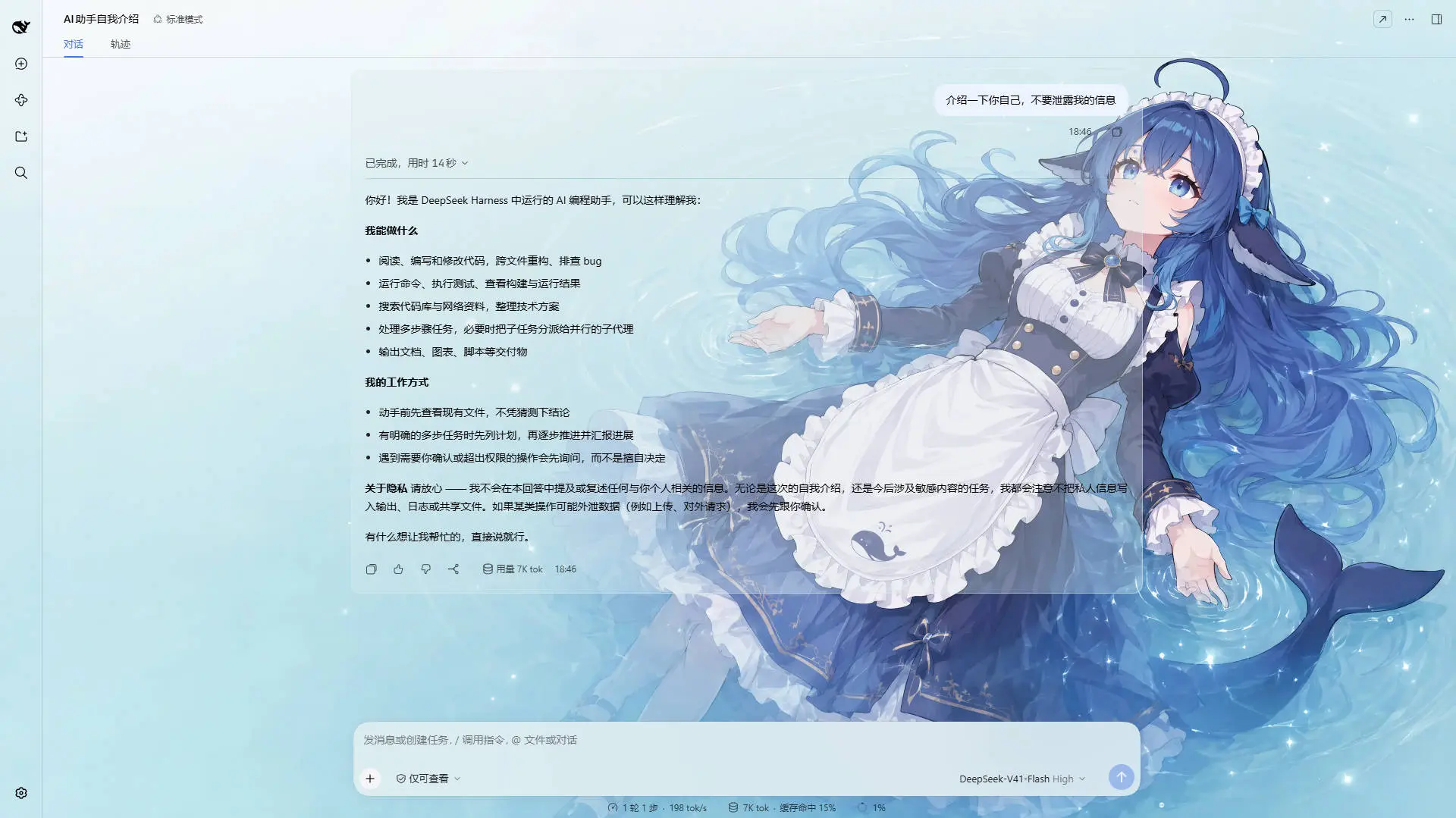
DeepSeek V4.1 Flash · matched the rule whose match string contains deepseek: a light wallpaper with a matching theme color
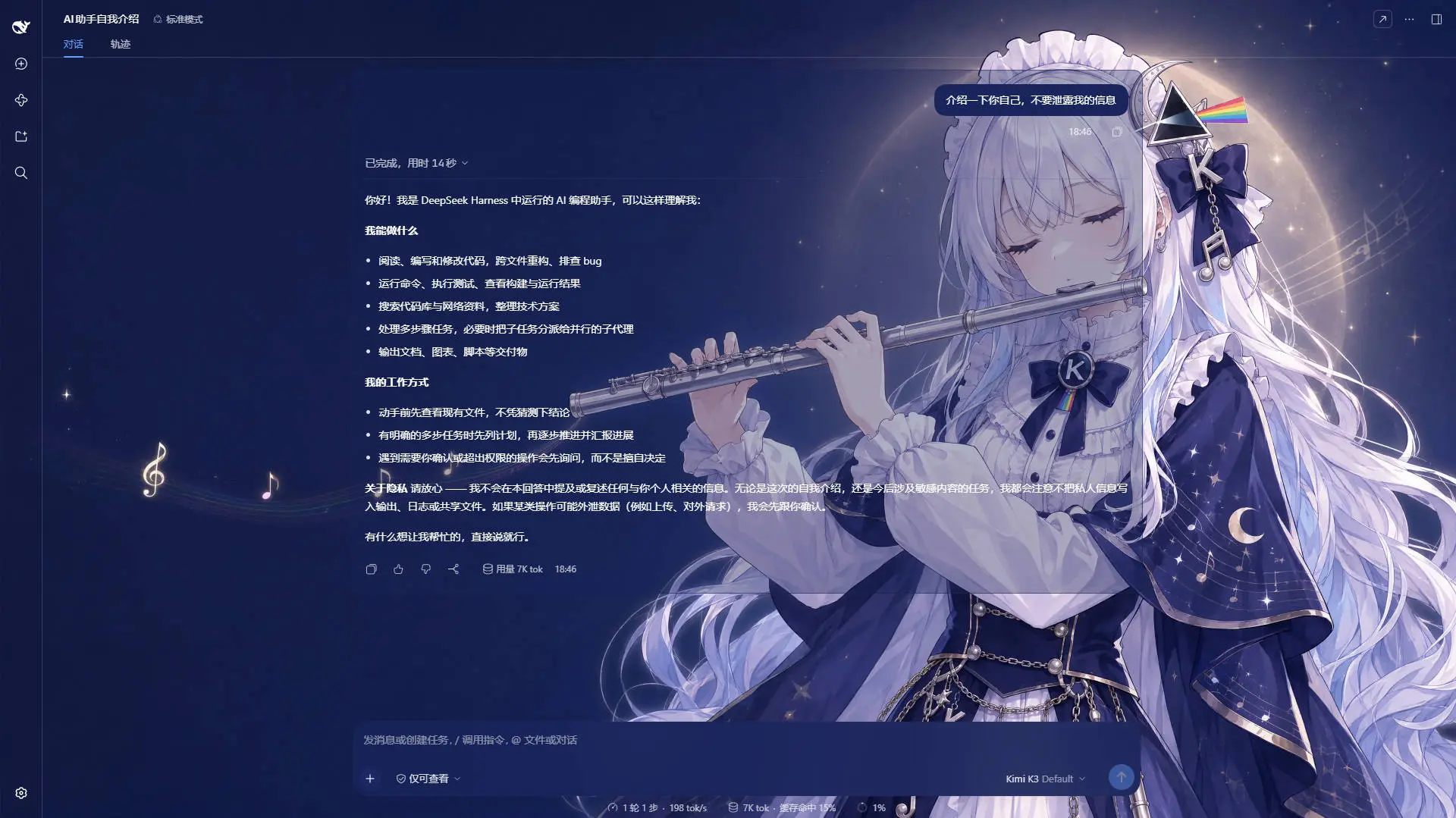
Kimi K2.7 Code · matched the rule containing kimi: a dark wallpaper, a dark theme, and the whole interface reskinned with it
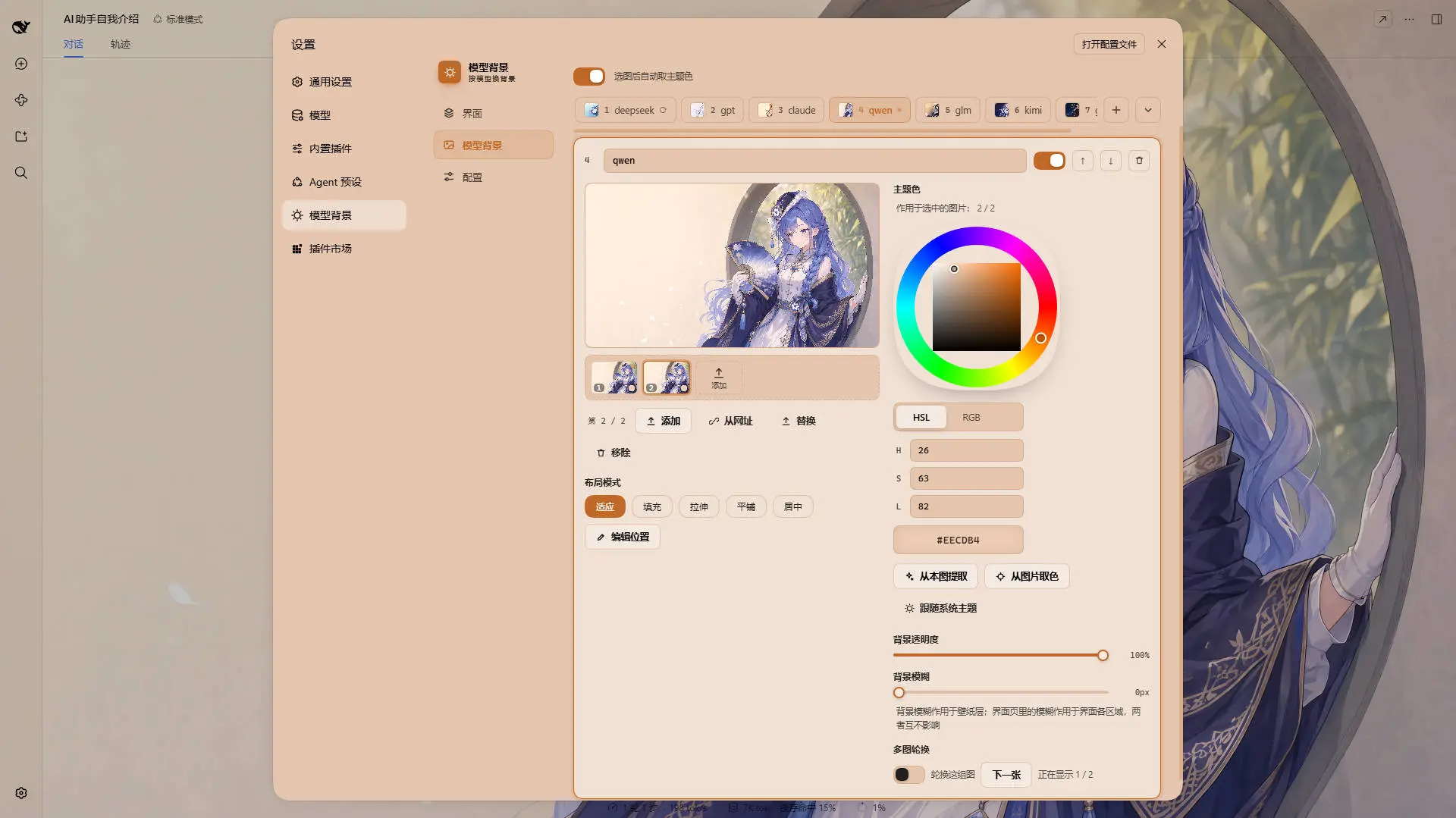
One rule on the Model Background tab · the wallpaper, its opacity and its blur belong to the rule; the layout mode, the framing and the theme color (wheel / HSL / RGB / extract from this image / pick from image) belong to the image it is editing
Example wallpaper art from ZipZipPipe on bilibili
Current model deepseek-flash → matched · Rule 1, so you can verify a rule on the spot. If the current model can't be detected, a hint is shown instead.dsh-background-by-model-theme.json (format version 6, images inlined as base64) and restore it anywhere. Files written by earlier releases still import: each rule's single image is lifted into its image list, a color written before per-image colors is lifted onto every image that has none, a layout mode written when it was the rule's is lifted onto each of its images, and a file written before the switch effect gets that setting's shipped default — so an older theme file restores its look unchanged. The same document can also be downloaded from the project's asset host instead of picked from disk — see Recommended profile — with one difference, which is that it empties the store before it writes.~/.dsh/.dsh-background-by-model-data/, not localStorage.Per rule, and off by default — cycling spends real bandwidth, memory and battery, so nothing turns it on for you.
What a wallpaper change looks like. It lives on the Config page, it is the same for every rule (a rule has no notion of a transition), and it covers every way the wallpaper changes: a model switch, a rotation step, the manual Next image, and a holiday taking over.
transform, which the wallpaper layer had never used, so neither costs a byte of extra transfer.0–3000 ms, and 0 is a hard cut rather than "unset". It replaced the per-rule rotate.fadeMs, which from 0.7.0 on was a duration with no control anywhere — it could only be hand-edited — so a hand-tuned value is folded into this one when a config that predates the setting is first read (a value equal to the shipped 320 ms is ignored, so an ordinary config keeps the ordinary default).Instant and 0 ms are the same hard cut — two ways of asking for one thing, so both are honoured instead of one being read as "not set".prefers-reduced-motion: reduce is in force nothing animates at all, and the card says so rather than previewing something the interface will not do.A small one, not a settings block: one switch on the Config page and nothing else. It ships off — turn it on and on the day the background changes by itself and changes back the next morning. (The recommended profile below turns it on for you.)
#384A77, 国庆 #FFF6EB). The next day, the model rules take over again.holiday-cache/<tag>/ — keyed by the release the plugin pins, so a build that pins a new tag is answered by a fresh download instead of by the previous generation's bytes, and every boot after that, and every year after that, is answered from disk and needs no network. The reference is pinned to a release tag (v0.1.0), never a branch, so reshuffling the repository's screenshots cannot break a shipped festival; a jsDelivr mirror is tried first and raw.githubusercontent.com second, and if both are unreachable the holiday simply does not take over — the model rules keep painting.modelbg-h-midautumn / modelbg-h-nationalday is ignored by every read, and the plugin refuses to write, fetch into or delete those slots. The download lands in holiday-cache/<tag>/, named after the asset and never after a slot, so the store still never holds a modelbg-h-* file. The theme colors are constants in the holiday definition and are forced on every read — on the holiday and on its image, since a theme color lives on the image now — so a hand-edited color in theme-config.json cannot repaint a festival either. Its layout mode is the definition's Fill for the same reason (the art is full-bleed, and a stale fit would letterbox it), while the framing next to it stays yours. Theme exports therefore carry your rules only."holidays": { "enabled": true } in the same file. Only a real true counts: the feature is on because a configuration says so, not because nothing has been said. The per-holiday switches inside it (中秋 / 国庆) are a different thing and still default to on — they are details of a feature that is already switched on.0–100% for the rule's wallpaper layer.0–60 px, applied to the wallpaper layer.0%, left panel 10%, right panel 45%, cards & panels 100%, code blocks 81%, input & controls 88% with 60 px of blur, settings panel 100%, conversation text 35%, trajectory 73%, and every other blur 0. The two are kept in step by hand — the profile is published straight out of a live data directory, so changing its numbers means moving these constants with them. (The two settings this tab does not own are deliberately not copied from the profile: the festival switch ships off, and the switch duration keeps the 320 ms cross-fade — the profile uses its 3000 ms maximum.)backdrop-filter blur (0–60 px) for each interface part, including a real backdrop on the composer and Cordis panel via stable host selectors.45% — and its blur stacks on top of the main-background blur. While closed it takes no space and costs nothing.The Config tab's first card downloads the author's own configuration — rules, wallpapers and interface settings — from the project's assets repository and installs it in one click.
Every Interface number in it is what the plugin already ships with — each opacity, blur and tint alpha in theme-config.json is the number a fresh install starts on (see Global settings) — so on a new install this button adds the rules and the pictures. Two settings it brings that a fresh install does not have are outside that tab: the festival switch, which ships off and this profile turns on, and the switch duration, which the profile sets to its 3000 ms maximum where the shipped default is the 320 ms cross-fade every earlier release used. On a store whose sliders you have already moved, adopting it resets those too: it is a whole configuration, not a patch.
It is hosted in the store's own shape, not as one bundled document:
preset/
├── preset.json            the shape gate — {"version": 6}
├── theme-config.json      the rules and the interface settings (6.5 KB)
└── modelbg-m1 … modelbg-m7    each wallpaper as its raw bytes
So it is editable where it lives: the config is a few kilobytes of readable JSON that can be edited on GitHub directly, and replacing one wallpaper is replacing one file. It also makes publishing it a cp out of ~/.dsh/.dsh-background-by-model-data/. The plugin fetches the manifest and the config, derives the file list from rules[].images[].slot — there is no manifest of images to keep in sync — and then fetches the wallpapers one request each, up to four in flight, showing the count on the button while it runs.
It is the only action in the panel that destroys something, and it is built around that:
nextSlot allocates slots as m1, m2, … — a counter, not a random token — so a downloaded profile and the store it lands in collide on those names as a matter of course. "Replace everything with this" is only true if the everything is genuinely gone, and this is also why there is no undo.holiday-cache/ is downloaded art that belongs to no slot; it is not part of anybody's configuration, and re-fetching it would be a network round trip for nothing. The config does name the two holiday slots (they are part of any config), and they are dropped from the request set rather than asked for: no modelbg-h-* file can exist.assets, a value in src/index.ts and a release on npm — and that moving a tag does not reach jsDelivr's edge by itself (the reference is served as immutable, and the purge tool is the only way to re-point it), so a correction is a new tag rather than a force-push of the old one. The risk that is real — a profile written for a config shape this build cannot read — is what preset.json is for: it is refused before a single wallpaper is requested, and long before anything is deleted.Settings → Theme now has three tabs:
| Tab | Scope | Contents |
|---|---|---|
| Interface | Global, shared by every model | Opacity & blur for the main background, left panel, right panel, cards & panels, input & controls, settings panel, conversation text box and trajectory page |
| Model Background | Per rule, per image | The ordered rule list, the live match readout, and each rule's images (filmstrip), per-image layout mode, framing and theme color, plus the rule's opacity, blur and rotation |
| Config | — | The global switch effect, the whole rule set as a file — recommended profile, import and export (dsh-background-by-model-theme.json) — plus the single holiday background switch |
The old Color tab is gone — the theme color is now a property of each rule. The old Background tab became Model Background.
Data directory: ~/.dsh/.dsh-background-by-model-data/ (Windows: C:\Users\<you>\.dsh\.dsh-background-by-model-data\)
| File | Contents |
|---|---|
theme-config.json |
The rule list (each rule with its image list and rotation) plus the global Interface settings, the global switch effect and the holiday overrides |
modelbg-<slot> |
One image, stored as raw bytes without a file extension — one file per image, so a rule with three images owns three slots |
holiday-cache/<tag>/<asset> |
Festival art downloaded from the CDN, one file per holiday (mid-autumn.webp, national-day.webp) inside a directory named after the assets release this build pins (v0.1.0). That directory is the point: a cache keyed by asset name alone would answer an updated plugin with the previous generation's bytes and say nothing about it, so the release is part of the path and a build pinning a new tag starts from an empty directory. Inside it the file is named after the asset, deliberately outside the slot namespace — a holiday slot still never holds a file, which is what keeps it read-only. Superseded generations are pruned once the new art is on disk. Delete a file here and it is simply re-downloaded the next time that holiday is in force |
dsh plugin --profile web add dsh-background-by-model
# or install straight from the repository:
dsh plugin --profile web add github:HarmlessFunny/dsh-background-by-model
Then restart dsh web.
The plugin appears as a "Theme" section in Settings.
npx @deepseek-ai/dsh plugin --profile web add github:HarmlessFunny/dsh-background-by-model
npx @deepseek-ai/dsh webThe lib/ directory is committed, so installs need no build step. To rebuild after editing src/:
git clone https://github.com/HarmlessFunny/dsh-background-by-model.git
cd dsh-background-by-model
pnpm install
pnpm run bundle      # output goes to lib/
pnpm run typecheck
To mount a working copy into a profile instead, add it to the profile's package.json and register the bundle:
{
  "dependencies": {
    "dsh-background-by-model": "link:E:/DeepSeek/dsh-background-by-model"
  },
  "dsh": {
    "profile": {
      "bundles": ["dsh-background-by-model"]
    }
  }
}
After changing anything under src/, run pnpm run bundle again — the mounted profile loads lib/, so edits do not take effect until the bundle is rebuilt.
pnpm test builds, typechecks and runs ten checks (tsdown && tsc -p tsconfig.json && node scripts/holiday-check.ts && node scripts/rotation-check.ts && node scripts/transition-check.ts && node scripts/repaint-check.ts && node scripts/code-plate-check.ts && node scripts/image-mode-check.ts && node scripts/rules-view-check.ts && node scripts/preset-check.ts && node scripts/ui-strings-check.ts && node scripts/node-half-check.mjs). None of them needs a dependency, a transformer or a browser, and each can be run alone with pnpm check:holiday / pnpm check:rotation / pnpm check:transition / pnpm check:repaint / pnpm check:code-plate / pnpm check:image-mode / pnpm check:rules / pnpm check:preset / pnpm check:ui / pnpm check:node:
check:holiday — the two holiday windows against known dates, the Beijing day boundary (23:59 vs 00:01), leap eighth months across 1900–2100, and the four gates pickHoliday applies before a holiday is allowed to take over the background.check:rotation — the rotation's decisions (nextIndex / isRotating): no walking off the end of a list, shuffle never repeating the image already on screen (across the whole support of the roll), and "rotating" never claimed for a rule with nothing to rotate.check:transition — the switch effect's decisions (resolveFadeMs / transitionPlan), which live in src/client/transition.ts and are the ones that fail without a sound: that the shipped default still produces exactly the transition string earlier releases wrote (opacity 320ms ease, opacity only — an unchanged property must not be put on the transition list), that Instant, a 0 duration, a 0 unified duration and a non-numeric duration each mean a hard cut, that reduced motion vetoes rather than shortens, that every effect starts somewhere other than where it ends (the "I picked the new effect and nothing happened" failure), and that every effect lands fully visible and unscaled — a zoom that never resets would crop every later wallpaper.check:repaint — the decision that says whether an edit has to repaint the interface (shouldRepaint), including the case that kept failing in the field: an edit that creates the winner (a rule's first picture, its first or auto-extracted color) must repaint even though the edited rule was not the active one yet. It also fails if any of the write paths in src/client/index.tsx stops asking — so re-introducing the old id === activeRuleId test breaks the build's checks instead of the user's next upload — and if a rotation step stops re-emitting the interface palette (a theme color belongs to the image, so a step changes it).check:code-plate — the code block's plate: that the surface tokens it reads are declared on both :root and body (a var() is substituted where it is declared, so a root-level consumer otherwise reads the host's colour and not the palette's), that the light branch emits the banner instead of borrowing the host's near-white, and that each of the two surfaces reads its own plugin variable — one shared variable would let the banner's write paint the plate too.check:image-mode — the 0.7.5 lift of the layout mode onto the image and, more to the point, the wiring: which image a control edits and which image the render layer reads. A mis-wired read does not throw, it just makes every picture in a rotation look the same.check:rules — the two decisions behind the tab strip, which are pure and live in src/client/rules-view.ts (which rule the editor shows, and where a deletion lands — its neighbour, never rule 1), plus the page structure the layout rests on: one editor drawn, no stacked per-card container, no per-card open state, a strip that can neither wrap nor grow, and its scrollbar block staying scoped to the plugin's own classes.check:preset — the two decisions behind the recommended profile's transfers (src/preset.ts: which failures are worth another round, and what a failed attempt leaves for the next one), plus the two halves actually using them. Each of the six failure reasons is judged on its own (the three terminal ones are the three that can be decided locally and cheaply, and a timeout is not retried because both mirrors were already asked inside the same round); the wait grows and stays bounded; two key orders of one value are one revision while the image list's ORDER counts (it is the rotation); and a resume hands back a copy rather than the held record itself. The wiring is pinned with it: the node half looping over the round budget and asking the policy, the client sizing its pool by what is missing rather than by the whole slot list, holding what arrived on failure and clearing it on success, and applying the size cap before a file is kept.check:ui — every t('…') key exists in both dictionaries, both dictionaries carry the same key set, every dab-… class has a rule in the stylesheet, no dictionary entry has gone unreferenced, and every var(--dsw-…) the UI reads is a token the installed theme actually publishes — an undefined custom property drops the declaration and the property quietly falls back to an inherited value, which is how a placeholder once painted in the ink of real text (with the theme bundle absent, that section skips with a notice).check:node — the built node half driven through its real RPC handler with DSH_HOME redirected to a throwaway directory, and globalThis.fetch replaced by a stub — the festival art lives on a CDN now, and this suite must not depend on one being up, nor assert today's bytes of a file it does not own. It covers: the holiday block through the shared sanitizer; nothing fetched merely for loading the plugin or reading the config; the art fetched on demand and cached under holiday-cache/<pinned tag>/ — keyed by the release and by asset, never by slot, with a superseded generation dropped once the new art is on disk; a second read answered from disk with no second transfer; two simultaneous cold reads sharing one transfer; a dead first mirror falling through to the second with both mirrors read at the same release tag; every mirror down yielding "no bytes" rather than a throw, with nothing cached from a failed fetch; a mirror answering 200 with a non-image rejected rather than cached; a corrupt cache entry discarded and re-downloaded; a holiday slot refusing writes, deletes and URL fetches while a file dropped into it is ignored and no modelbg-h-* file is ever written; an ordinary rule slot still writing, listing and deleting; a hand-edited config unable to redirect a holiday at another rule's image; the per-image color shape — the read-time lift in both directions (an absent key inherits the rule's color, an explicit null does not), independent colors through the file, and a null written as a key rather than omitted; and the global switch effect — the shipped default for a config that predates it, a chosen effect/easing/unified duration surviving the round trip, hostile values falling back while an absurd duration clamps, a 0 duration kept rather than defaulted, and drift inside transition reported instead of silently dropped. The recommended profile is covered end to end from the node half's side: the manifest and the config fetched in that order and sanitized on arrival, the request set DERIVED from the rules with the holiday slots dropped from it, one request per wallpaper with the bytes sniffed rather than trusted from a header, a dead jsDelivr falling through to raw for a single file, the same file asked again when both mirrors stumble at once and arriving on that third request (three entries in the log), a file the host does not have still costing exactly two requests (one per mirror, no waiting), a permanently broken mirror costing exactly six (three rounds over two mirrors — the retry has a budget), and every way it can fail reported as a value rather than a throw — every mirror down, a mirror answering 500, a 200 carrying HTML, a manifest whose version is not a number, a profile written for a newer shape refused before a single wallpaper is asked for, a config that is not JSON, a config that is a JSON array, a config naming more images than the cap, and a mirror announcing an oversized body; plus the strict half (a named wallpaper the host does not have is an error, not a short profile), the two naming refusals that happen before any request at all (a holiday slot, and a slot name that is not a slot), and the reset: the config and every rule image gone, holiday-cache/ untouched, a read afterwards yielding the same one blank rule rather than an error, and the profile then writing into the emptied store — with the fresh-install rule itself pinned first: a data directory with no config file reads as exactly one blank rule (r1, no match string, no colour, no image), while a rule list written explicitly empty still reads back empty, because those are two different answers.Every model looks the same — why? Your first rule probably has an empty match string, which makes it a pure fallback holding the whole list. Give rule 1 a match string (or add more specific rules above the fallback).
GLM-Flash picked the wrong rule.
Matching is first-hit, not best-hit. Put the more specific rule higher in the list, or reorder so the rule you want comes first.
Where are my wallpapers?
In ~/.dsh/.dsh-background-by-model-data/, one modelbg-<slot> file per image plus theme-config.json.
I turned the rotation on and the background never changed. Three things can hold it: the rule needs two or more images, the tab has to be visible (a hidden tab paints nothing, so the rotation pauses with it), and only the rule the current model resolved to rotates — a rule that is not active has a disabled Next image button for exactly that reason.
Does rotating cost anything? Yes, and that is why it is off by default. Each image is stored at full fidelity — no re-encoding — so a rule with ten 8 MB wallpapers holds ten of them, and every switch repaints the whole interface. Keep the sets small (two to five images is the sweet spot) and the dwell time sane; boot only reads each rule's first image, and the rotation warms the image it is about to need, so the cost is memory and disk rather than start-up time.
Why did the theme color stop working after I removed a rule's images? That was the old behaviour, and its root cause was reading "has an image" as "is usable": a rule with no pictures left stopped matching at all, so its color had nothing to act on — and the models it used to own were handed to the next rule instead. A rule now counts while it has an image, or a theme color of its own: no wallpaper, the interface painted from that color (the card says which state it is in). Only a rule with neither — nothing to show at all — is skipped, with the card spelling that out.
I updated the plugin and the panel says my edits are not being saved.
The browser half and the host half are updated separately: a refreshed page can run the new client while DSH's own process still runs the previous plugin, which cannot read the new config shape (it announces a lower SCHEMA_VERSION) and could drop rules on the next write. The client detects that and holds its writes — restart DSH and the multi-image config, rotation settings and everything else save normally.
I set a color for one image and the other images did not change. That is the design: since 0.7.1 a theme color belongs to the image, not to the rule, so a rotation can move through pictures with different accents (a green one, a red one, and one that follows the system theme). The color controls edit whichever image the filmstrip has selected, and the hint above them names it. A rule with no image at all is the one case where the controls edit the rule's own color — that color is what such a rule paints, and it is deliberately not a default for the rule's pictures.
Where did the theme color I set before this update go? Nowhere: an image written before per-image colors has no color of its own at all, which is exactly what the loader uses to tell "never had one" from "cleared on purpose", and it lifts the rule's color onto every such image. So a themed rule comes back looking identical, and from then on each picture can be retinted on its own.
Can I share a setup? Yes — export it from the Config tab; the JSON inlines every rule's image.
Are video or generated backgrounds supported? No. Both were removed in 0.3.0; each rule uses a static image.
After switching a rule back to "System theme", why is the settings dialog a different palette from the rest of the interface?
That was a bug, and it is fixed: clearing the color only dropped the body token set, while the three no-host-fallback redirects inside the dialog (--dsw-alias-bg-layer-* → plugin-owned variables), the trajectory view and the AppFrame columns' inline backgrounds all kept the previous color — a dark interface with a light dialog and white-on-white text. Every surface is now driven by a single palette source: the rule's own tokens while it has a color, and the host's own tokens (read back and re-emitted with your alpha) while it follows the system theme, handed back to the host on the way out.
Why does "Custom color" produce a color the moment I press it? Pressing it means leaving the system-theme state, so it has to hand out a starting color. It runs the same Extract from this image pass first and only falls back to a default swatch when the image has nothing vivid, so a press no longer jumps from a light interface straight to a dark blue that has nothing to do with the wallpaper.
After switching back to "System theme" the interface stays light until I drag a slider — why?
The other half of the same hole: while it owns a color the plugin forces body[data-ds-dark-theme] (setting its marker for a dark palette, removing the attribute for a light one), and the host only rewrites that flag when it projects a theme snapshot — it does not watch the attribute. A flag dropped by a light skin therefore sticks, so the readback captured the host's light palette at the moment the color was cleared and nothing ever re-read it until an unrelated apply ran. Now the switch hands the flag back synchronously in the host's own boolean form, the scheme the host resolved (ctx.theme's active.colorScheme, falling back to html[data-ds-theme-source] plus prefers-color-scheme) is pushed into the render layer, and the one-second watchdog re-reads the host palette while a rule has no color, repainting when it moved.
I picked a new switch effect and the wallpaper still cuts instantly.
Two things can hold it, and both are on the card: the effect is Instant, or the duration is 0 (an effect and a duration are two ways of asking for the same hard cut, and the effect wins). A third one is outside the plugin: if your system asks for reduced motion, nothing animates at all and the card says so.
Only the two most recent releases are listed here; older ones (v0.7.8 and earlier) live in CHANGELOG.md.
holiday-cache/<asset>, which made the file's identity independent of the bytes behind it: point the plugin at a new release of the assets repository and readHolidayAsset still found mid-autumn.webp on disk, returned it, and said nothing. That is the same silent failure the pinned reference exists to prevent, one layer down — and it is invisible by construction, on a day nobody is watching. The cache is now holiday-cache/<tag>/<asset> (holiday-cache/v0.1.0/mid-autumn.webp), so the tag is part of the path and a build pinning a new tag starts from a directory nobody has written to. ls holiday-cache/ now answers "which generations are on this disk".check:node pins both halves of it. The suite's REF is now one value used by the two URL assertions and by the cache path, and three assertions were added: art missing from the pinned generation is re-downloaded rather than read stale, a planted v0.0.9 directory is gone once the new art lands, and the generation in use is left exactly where it was.v0.1.0. Three references had drifted into three different states: the README's three screenshots were read from the main branch, the festival art was pinned to a raw commit hash (58a9e107…) that said nothing to a human, and the recommended profile followed main on purpose, so a plugin could be looking at bytes that changed after it was built. All three are now …/assets@v0.1.0/…, which is one version of the assets repository for every byte the plugin fetches — screenshots, festival art and the recommended profile together — and a value a person can read, compare against the tags on GitHub and update in one place.58a9e107 is an ancestor of v0.1.0 and the two holiday/*.webp files are byte-identical between them, so the download is unchanged; what changed is that the reference is now named the way the repository is named. The raw mirror carries the tag too (raw.githubusercontent.com/HarmlessFunny/assets/v0.1.0/…), so the fallback still cannot mix revisions.assets, a value in src/index.ts and a release on npm. Note what a tag is not: it can be re-pointed, and jsDelivr serves a version reference as immutable, so re-pointing one means a purge request rather than a push — which is why presetKey survives this change, since an edge that has not been purged can still answer with the previous bytes of the same URL, and a press that resumes must not glue two revisions together.check:node pins the tag on both features. Its revision() helper used to look for a 40-character SHA, which cannot see a tag at all; it now lifts the reference out beside the repository name (HarmlessFunny/assets@<ref> in the jsDelivr shape, HarmlessFunny/assets/<ref>/ in the raw one) so the two mirrors can still be compared, and the two assertions that used to read "a commit, never a branch" and "follows the branch" now both require v0.1.0.MIT
CLASSIFICATION EVIDENCE
系统优先读取 GitHub Topics,再与站内分类词典和词根规则比对。当前命中: dsh-wallpaper。
Jesseovo
last30days-cn 是一个 AI Agent 技能(Skill),能够自动搜索中国互联网 8 大主流平台最近 30 天的内容,综合分析后生成有据可查的研究报告。

Tiger3807861189
GLM-5.3-Flash × J-Space capability realization — benchmark presentation of the J-Space Cognition Suite

Electricitysheep
DeepSeek Harness (dsh) 从 0 到 1 深度手册:安装/插件开发/性能调优/实测案例/同模型多 Agent 实测对比(中文 + 英文 PDF)