
Agent 与会话
插件

nuwa-skill
alchaincyf
你想蒸馏的下一个员工,何必是同事。蒸馏任何人的思维方式——心智模型、决策启发式、表达DNA。Distill how anyone thinks.
PROJECT TOPICS
INSTALL REFERENCE
dsh plugin --profile web add github:Hariketsu/dsh-herdr-bridge
该命令指向仓库当前默认分支;尚无绑定当前 commit 的完整验证结果。
PROJECT README
English | 简体中文
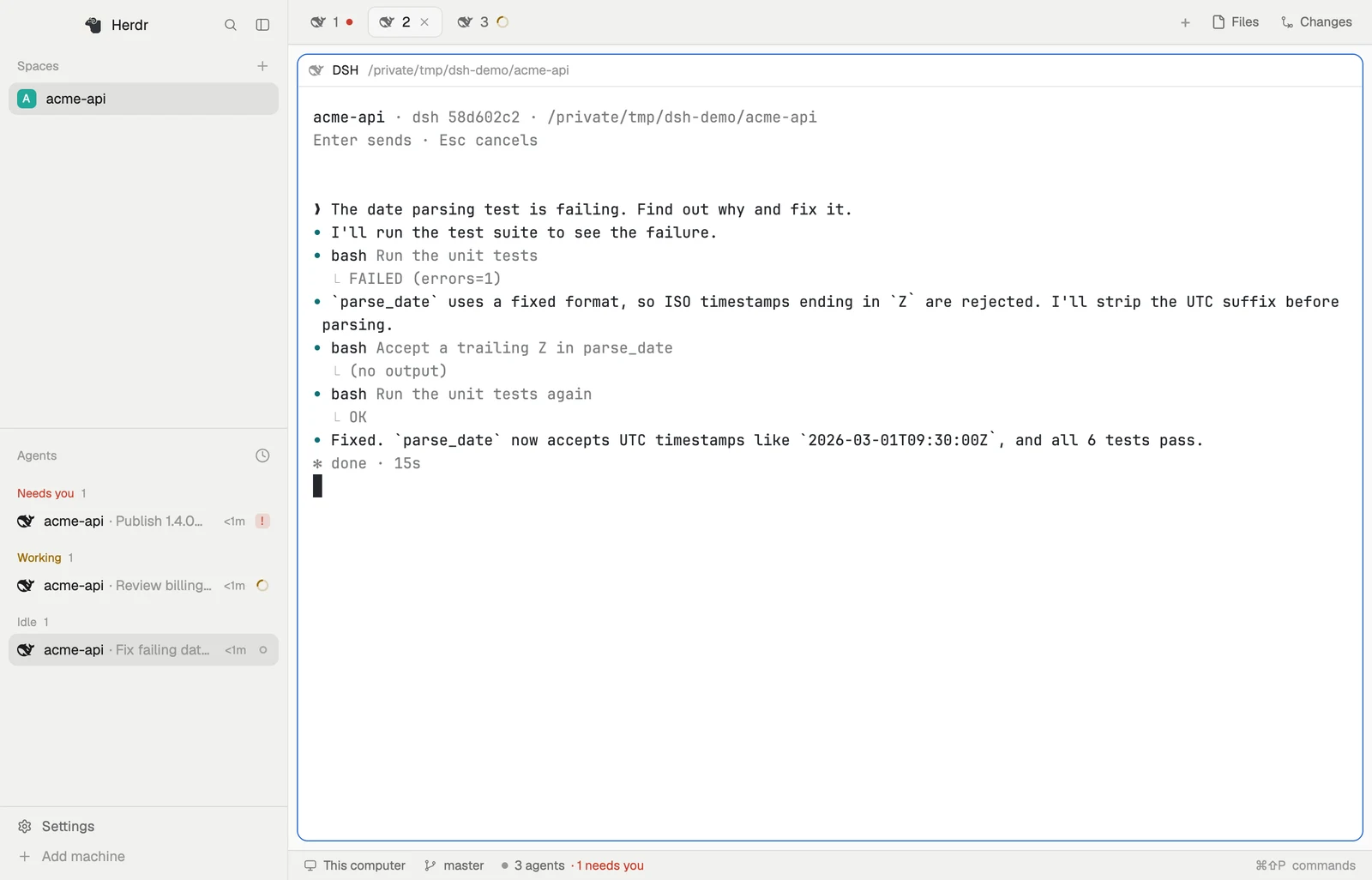
A DeepSeek Harness (DSH) plugin that brings DSH sessions into Herdr Core (hc). Each session becomes an hc terminal, so agents in Herdr can read and drive DSH the way they drive Claude Code or Codex. Works with DSH Desktop and dsh web.
| Tested with | |
|---|---|
DSH Desktop or dsh web |
0.2.2-rc.3 |
herdr-core (hc) |
0.1.21, on your login shell's PATH |
| Herdr App | 0.1.15 (optional) |
Tested on macOS. Windows and Linux are implemented but untested. DSH's plugin interfaces are still changing, so a DSH upgrade may need a plugin update.
Quit Desktop (⌘Q) or stop dsh web, then add the plugin to the profile you use, desktop or web:
dsh plugin --profile desktop add dsh-herdr-bridgeOpen DSH again and send a message in any session. A dsh-<short id> terminal appears in Herdr App and in hc ls, and hc templates lists dsh.
Use DSH as usual. A session shows up in Herdr the first time it runs. To bring in one that hasn't run yet, type /herdr in it.
Have an agent run DSH. Any agent that knows hc (through the herdr-core skill) can start DSH like any other agent:
hc run --bg --name fix --cwd ~/repo dsh "Fix the failing test in x.rs"
hc wait fix
hc read fix
hc send --wait fix "Also cover the edge cases"
hc interrupt fix                         # cancel the current turn
A message sent while the session is working joins the current turn, like steering in DSH.
The session also appears in DSH, and in Herdr App it shows under the agent that started it.
Take over a session you started in DSH.
~/.dsh/herdr-bridge/bin/dsh-hc ls                                        # recent sessions
hc run --bg --name login ~/.dsh/herdr-bridge/bin/dsh-hc attach 3b729fc9  # by id or part of the title
Let DSH start other agents. hc works in a DSH session's shell the same way it does for an agent running in hc: helpers it starts show under it and report back to it.
When a session asks for approval or asks you a question, you can answer in the DSH window or from hc. Whichever answers first wins, and the other side's dialog closes.
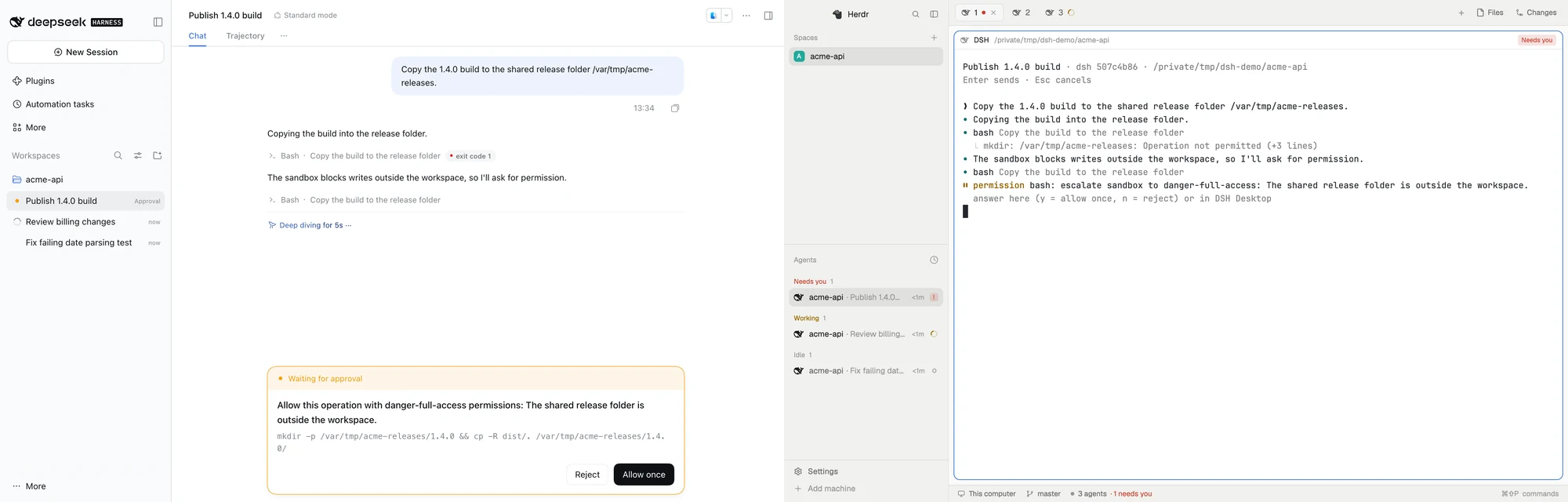
hc send --force fix y      # allow once; n rejects
hc send --force fix 1,3    # answer a question by option number, or with text
As with every agent in hc, answering a waiting session takes --force. Anything that can use your hc can drive a DSH session, and messages sent through hc reach the model as user messages.
In DSH, open Plugins → Herdr Bridge to choose where sessions you start in DSH appear in Herdr App: grouped by folder (default), all in one space named DSH with a tab per session, or not at all. You can also set these in ~/.dsh/profiles/<profile>/cordis.patch.yml:
- id: herdr-bridge
  config:
    herdrPlacement: folder      # folder, dsh, or none
    herdrSpace: sp123           # a fixed Herdr App space id instead
    reconnectGraceSeconds: 30   # how long a terminal waits for DSH to come back
hc: /path/to/hc # if hc isn't on your login shell's PATHThe log is ~/.dsh/herdr-bridge/bridge.log.
| Problem | What to do |
|---|---|
Sessions don't appear in hc ls |
Check the log. Make sure DSH can find hc (set hc in the config if needed) and that Desktop and dsh web aren't both running |
Sessions are in hc ls but not in Herdr App |
Check that the placement setting isn't "not at all" |
hc templates doesn't list dsh |
The plugin didn't load; check the log. If you wrote your own dsh template, it's kept |
| A terminal reports a protocol version mismatch | It's from before a plugin upgrade. Close it and attach again |
| The plugin stops working after a DSH upgrade | Open an issue with the log |
dsh web can be connected to Herdr at a time; the one started first wins.Quit DSH, run dsh plugin --profile <profile> remove dsh-herdr-bridge, and remove any herdr-bridge entry from cordis.patch.yml. Then delete ~/.dsh/herdr-bridge/, ~/.config/herdr-core/templates/dsh.md, the dsh entry in ~/.config/herdr-app/programs.json, and ~/.config/herdr-app/icons/dsh-herdr-bridge.svg.
MIT. assets/dsh.svg is the DeepSeek Harness logo, taken from deepseek-ai/deepseek-harness (MIT, Copyright (c) 2026 DeepSeek). The DeepSeek name and logo belong to their owner.
CLASSIFICATION EVIDENCE
系统优先读取 GitHub Topics,再与站内分类词典和词根规则比对。当前命中: session、sessions。
alchaincyf
你想蒸馏的下一个员工,何必是同事。蒸馏任何人的思维方式——心智模型、决策启发式、表达DNA。Distill how anyone thinks.

freestylefly
Prompt as Code | GPT Image 2 / 2.5 提示词与案例库,530+ 个案例、20+ 套工业级模板与可复用 Skills,新增 2.5 同提示词对比专区,附完整提示词与生成记录,持续更新。

titanwings
Distilly — Distill how they think into reusable Skills for any Agent or Bot. Formerly Colleague Skill(原同事 Skill).