
其他
完整应用

deepseek-harness
deepseek-ai
DeepSeek Harness: Everything is a Plugin.

HaoyueQin/deepseek-harness-desktop
[maintenance mode] A desktop shell for DeepSeek Harness — the pluggable AI agent harness from DeepSeek. Wrap the official dsh web UI into a native-feeling, always-on desktop app. / 为 DeepSeek Harness(DeepSeek 开源的可插拔 AI agent harness)打造的桌面应用壳,把官方 dsh web 界面包装成原生质感、常驻后台的桌面应用。
PROJECT TOPICS
INSTALL REFERENCE
dsh plugin --profile web add github:HaoyueQin/deepseek-harness-desktop
该命令指向仓库当前默认分支;尚无绑定当前 commit 的完整验证结果。
PROJECT README

English | 简体中文
[!WARNING] Maintenance mode. As of 2026-09-29 this project is no longer developed: no new features, and no tracking of upstream dsh releases. The official DeepSeek Harness desktop app (https://www.deepseek.com/download/) is the recommended replacement on Windows x64 and Apple-silicon macOS. The last shell release, v1.3.2, and every earlier build stay available on the Releases page indefinitely, and the MIT license means you are free to fork it.
Still accepted: on Linux or Intel macOS — platforms the official app does not ship yet — if an upstream change makes this shell unusable, open an issue with
dsh --versionand the log. Adaptation fixes only: no timeline, no feature requests.





A desktop shell for DeepSeek Harness — the pluggable AI agent harness from DeepSeek. Wrap the official dsh web UI into a native-feeling, always-on desktop app, reusing the dsh CLI you already have.
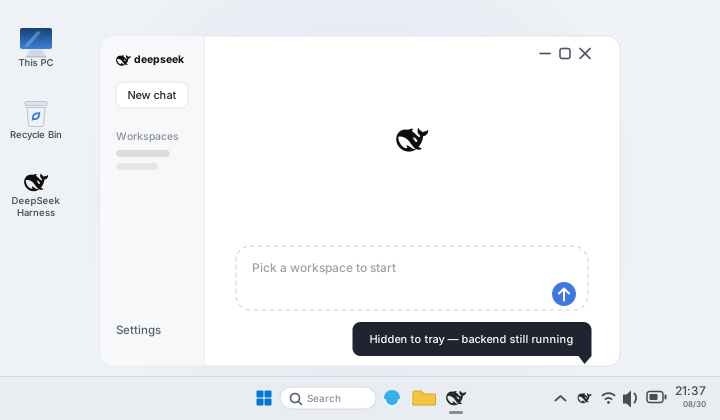
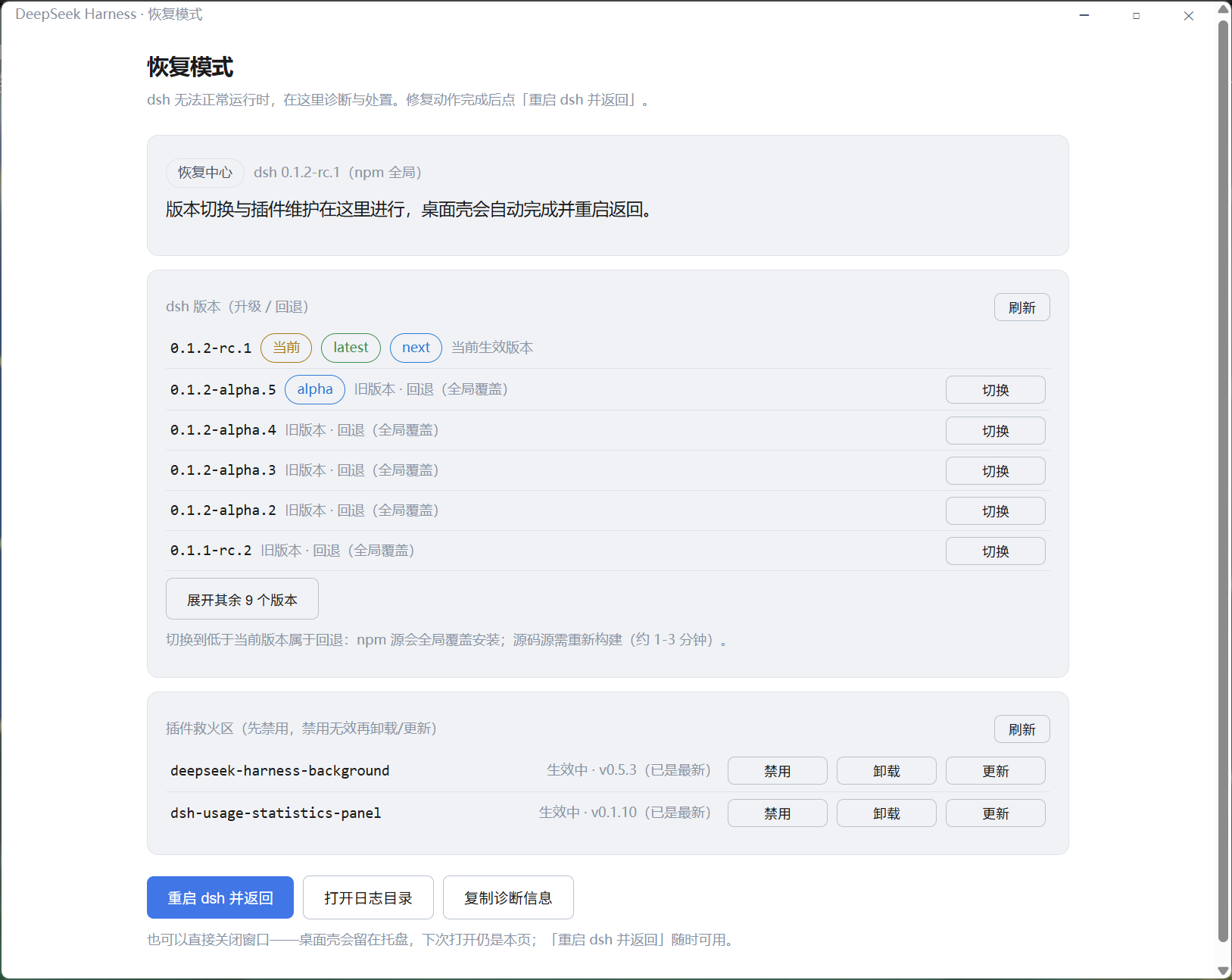
dsh moves fast and occasionally ships breaking changes, and plugins often lag behind — so a dsh update can leave the backend unable to boot, and a plugin that used to work can suddenly take the whole harness down with it. Until now, all the shell told you was a dead-end "backend exited unexpectedly" dialog: no plugin name, no error detail, no way to fix anything in place.
The Recovery Center is the shell's answer — a native page that turns a broken backend into a few clicks:
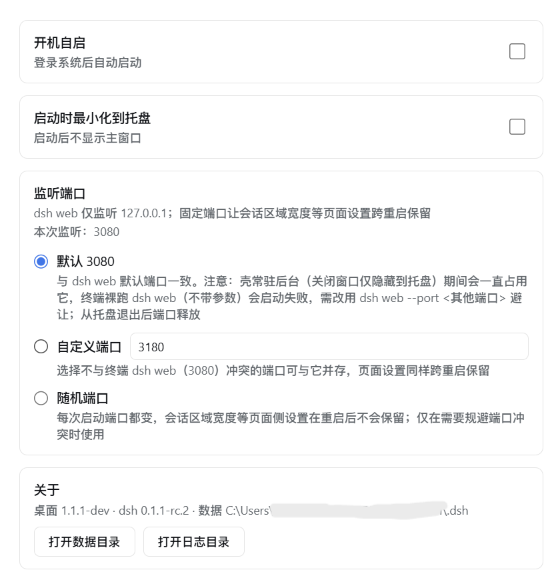
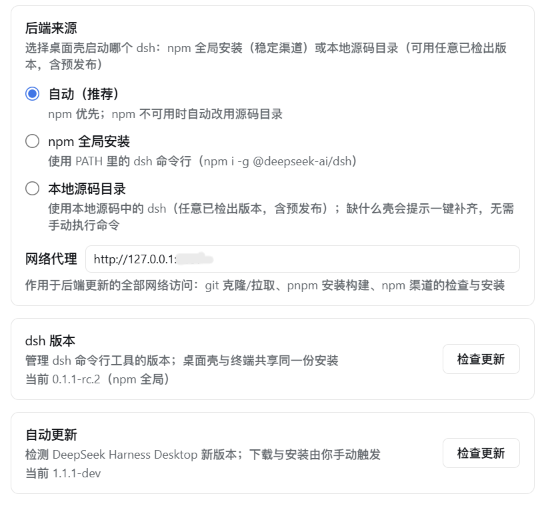
dsh plugin CLI with live logs. Host-critical modules are protected and refuse to be toucheddsh from your npm global install (stable channel) or from a local git checkout (any version, including pre-releases), switchable in Settings. Auto mode prefers npm and falls back to the source directory; if the chosen source breaks, the shell falls back to the other one and tells you whydsh as a child process (dsh web), loads its localhost UI; the harness source is never modified. One dsh shared by terminal and desktop — plugins, settings, credentials, sessions and versions always match (DSH_HOME, default ~/.dsh)pnpm install + pnpm build with live logs, validate the result, then boot. The only prerequisites are git and pnpm on PATH3080 by default (same as dsh web, giving a stable page origin so browser-side preferences survive restarts), switchable to a custom port or random in Settings; falls back to a random port with a notice when the fixed port is taken. Note: while the shell lives in the tray it holds the port — run dsh web --port <other> in a terminal to coexistcordis_define/cordis_run), $DSH_HOME/cordis.patch.yml, and the npm plugin ecosystem all work exactly as in the web edition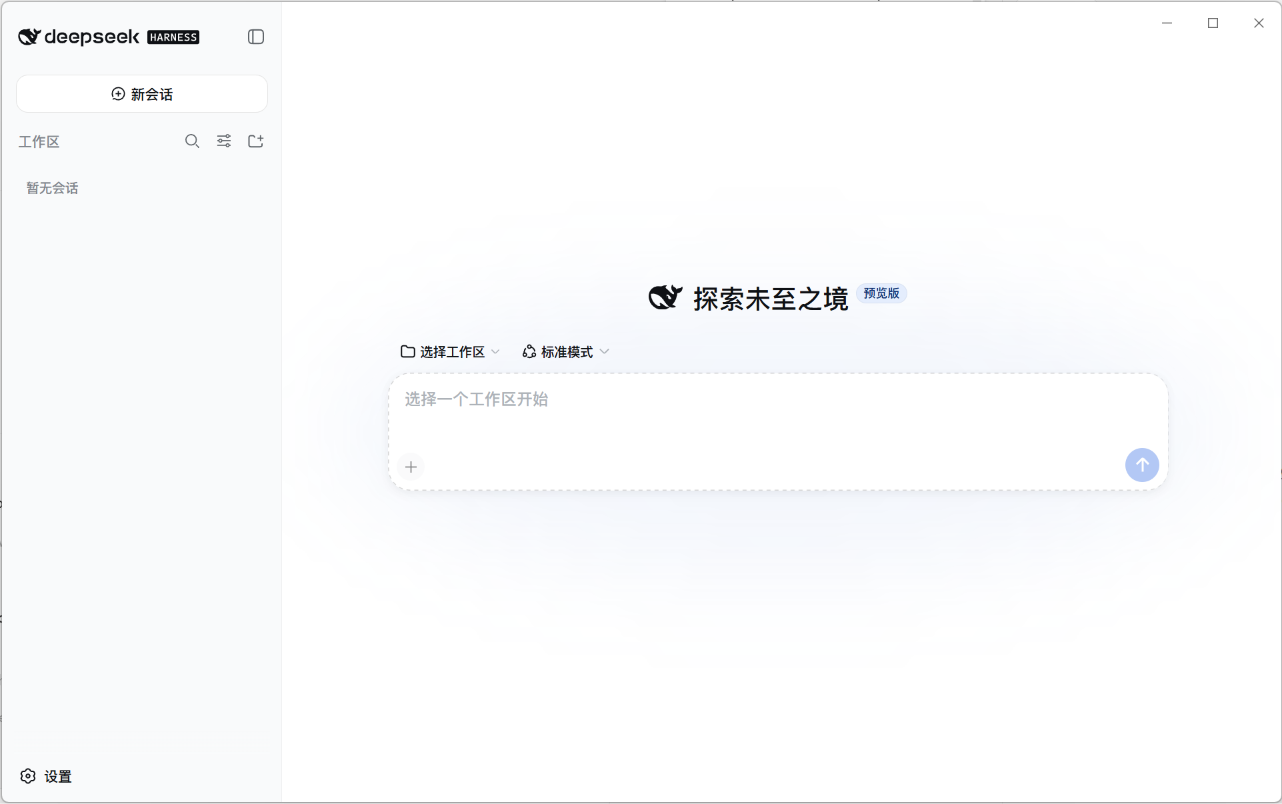
| General desktop options | Backend source, proxy and updates |
|---|---|
 |
 |
| dsh version | use |
|---|---|
| ≥ 0.1.5-rc.1 (verified through 0.1.6-alpha.2) | this shell release |
| anything older (0.1.0 through 0.1.5-alpha.2) | an older shell release — download it from the Releases page |
This shell no longer adapts to dsh versions before 0.1.5-rc.1. Check your backend with
dsh --version; if it is too old, either update dsh (npm i -g @deepseek-ai/dsh
— the latest npm channel is already past the 0.1.5-rc.1 floor — or press "Check for updates" in
Settings → Desktop from a supported shell) or download the matching older shell release.
Note on 0.1.6-alpha.2: dsh changed the default profile module-resolution mode from link
to runtime, so a bare plugin name must resolve from the profile's own node_modules
closure. This shell sidesteps that entirely — its --patch row uses a name that is a
path relative to the patch file, which dsh anchors to a file: URL. That mechanism
behaves the same on every dsh version from 0.1.5-rc.1 on, independent of the resolution
mode.
Since dsh 0.1.5, upstream ships its own official Electron app alongside the CLI. That app is now the recommended replacement for Windows x64 and Apple-silicon macOS (https://www.deepseek.com/download/) — this shell is in maintenance mode. There is no official build for Linux or Intel macOS; on those platforms, stay on shell release v1.3.2 or fork it. The two take different routes:
| This shell | Official Desktop app | |
|---|---|---|
| Profile | always web; never touches the official exclusive desktop profile (the CLI rejects --profile desktop, and the Recovery Center refuses to list or modify it) |
exclusively owns $DSH_HOME/profiles/desktop |
| Transport | listens on localhost (fixed 3080 by default, configurable, random fallback) — terminal and desktop share one backend |
opens no port (dsh-app:// + private pipes) |
| Versions | tracks a dsh version range (≥ 0.1.5-rc.1): npm latest or any source tag, switched from Settings / Recovery Center |
pins one exact Electron+dsh combination per release |
Coexistence: both can live under one DSH_HOME (sessions, settings and credentials are shared product data), but never drive the same profile at the same time — and this shell will always refuse to touch profiles/desktop. Quit this shell before starting the official app.
dsh CLI (npm i -g @deepseek-ai/dsh) — if missing, the app shows a setup page with a copyable command or a one-click in-app installgit and pnpm on PATH; the shell clones the repo and runs pnpm install + pnpm build for you — supported dsh versions (≥ 0.1.5-rc.1) use the prebuilt node-addon-system, so no C++ build toolchain is needed (historical 0.1.3.x compiled fs-ext and is outside the supported range)Download the installer for your platform from the Releases page:
| Platform | Package | Notes |
|---|---|---|
| Windows | deepseek-harness-desktop-<ver>-setup.exe |
NSIS installer, x64 |
| macOS | .dmg (Apple Silicon / Intel) |
unsigned — first run: right-click → Open |
| Linux | .AppImage + .deb |
x64 |
dsh web in the background and opens the UI at its ready state (no dsh? you'll see the setup page first)npm install # installs electron 43 + toolchain
npm run dev # dev mode: system Node + your chosen backend (npm or source dir)electron binary download stuck? (you see
Downloading Electron binary...forever) GitHub-hosted binaries can be slow from some networks. Manually fetchhttps://npmmirror.com/mirrors/electron/<version>/electron-v<version>-win32-x64.zipinto%LOCALAPPDATA%\electron\Cache\electron-v<version>-win32-x64\, then:printf "electron.exe" > node_modules/electron/path.txt # and unzip the archive into node_modules/electron/dist/
npm run build:runtime     # generates resources/icon.png (+ build/icon.png) from the upstream favicon
npm run dist:win          # Windows NSIS installer → release/
# npm run dist:mac        # macOS dmg (requires macOS; CI builds it)
# npm run dist:linux      # Linux AppImage + deb
The CI workflow (.github/workflows/release.yml) builds all three platforms on every v* tag and publishes the artifacts to a GitHub Release.
DSH_HOME): defaults to ~/.dsh (honors the $DSH_HOME environment variable) — profiles, sessions, storage; shared by both backend sources<userData>/logs/main.lognpm root -g, upgradable from Settings → Desktop) or a local checkout (validated before launch: manifest, node_modules/tsx, built web dist, plus an fs-ext hint for pre-floor 0.1.3.x directories)src/
main.ts app lifecycle: single-instance lock, window, tray, backend resolution, recovery IPC, setup page
paths.ts dev/prod resource resolution (icon, preload, desktop plugin patch, recovery page)
dsh-locator.ts locate the npm-global dsh CLI (PATH check + npm root -g) + semver compare
dsh-versions.ts backend version listing (npm versions × dist-tags → sorted, channel-tagged)
dsh-update-target.ts npm dist-tags → update target (semver whitelist, prerelease-aware)
dsh-source.ts git-checkout source: validation (manifest/tsx/web dist, incl. the 0.1.3.x fs-ext gate), tag parsing, entry args
dsh-source-updater.ts source-channel updates: fetch tags → clean tree → checkout → pnpm install/build → restart
dsh-updater.ts npm-channel backend: check latest / install any version (upgrade or rollback)
dsh/spawn.ts spawn dsh web --port <policy port> --patch; parse stdout URL line; output ring buffer; graceful stop
dsh/ready.ts HTTP readiness probe (any status — the URL may carry a process token since 0.1.2-alpha.1)
recovery/ Recovery Center core: crash diagnosis, profile patch layer, plugin inventory & toggles, recovery state, theme matching, IPC origin guard
kill-tree.ts subprocess-tree termination for timed-out maintenance commands
settings.ts shell settings (userData/settings.json — backend source, source dir, proxy, port policy)
updater.ts electron-updater (Windows guided / Linux AppImage auto)
tray.ts tray menu (open / auto-start / quit) + autostart sync
autostart.ts auto-start (native on win/mac; XDG file on linux)
preload.ts contextBridge bridge (window controls + desktop IPC; compiled to CJS)
scripts/
recovery-*.test.mjs recovery test suite (8 suites, node --test on dist)
install-runtime.mjs generates resources/icon.png at build time (from upstream favicon)
smoke.mjs headless smoke test: spawn dsh, assert URL line + HTTP response
resources/
recovery.html Recovery Center page (vanilla, dual theme)
desktop-integration/ settings "Desktop" section plugin (dsh browser half)
desktop-patch.yml shell-injected patch mounting the plugin
assets/
wordmark.svg project wordmarkdsh CLI (the setup page offers one-click install), the source channel needs git + pnpm — the shell bundles no runtime either way, so the installer stays small. Older dsh versions need an older shell release (see the dsh version support table above)dsh child it spawned can survive as an orphan and keep holding the fixed port, so the next launch falls back to a random port. Workaround: stop the leftover dsh web process (Windows: taskkill /F /PID <pid>), then relaunch — the port returns to 3080.The project is in maintenance mode (see the notice at the top). Issues are accepted for one case only: an upstream change that makes this shell unusable on Linux or Intel macOS. Include dsh --version, your platform and the relevant log. Feature requests and general usage questions are out of scope, and no timeline is promised.

CLASSIFICATION EVIDENCE
系统优先读取 GitHub Topics,再与站内分类词典和词根规则比对。当前命中: 无有效分类标签。
deepseek-ai
DeepSeek Harness: Everything is a Plugin.

anywhere-labs
为 DeepSeek Harness (DSH) 插件生态打造的现代化桌面端解决方案。万物皆「插件」,桌面本身也是「插件」。

walkinglabs
Harness engineering beginner tutorial, from 0 to 1