dsh-sandbox-escalation-fix (DSH 0.1.6-alpha.2 supported, Win & Linux & macOS)
English | 简体中文
[!IMPORTANT]
This is an independent community plugin. It is not published, maintained, or endorsed by DeepSeek, and it does not modify DeepSeek Harness core packages.
[!CAUTION]
DSH 0.1.6-alpha.2 has significantly mitigated the issue addressed by this plugin. In testing, a model may still fail its first tool call because of unsuitable sandbox-escalation arguments, but it will usually adjust those arguments after receiving the error and eventually complete the call successfully. Escalation schemas remain registry-global and are still not narrowed according to each Session's current permissions, so the underlying cause has not been fully removed. However, users who can tolerate a small number of retries and some additional token usage may now find the official behavior acceptable. Users should try the official behavior first and install this plugin only when the remaining retries, overhead, or instability are unacceptable.
Given the current effectiveness of the official improvements, this plugin may stop being maintained after the next official release. If you still need this plugin to be maintained at that time, please proactively open an issue, and the developer will respond as soon as possible.
Currently supported:
Latest supported DSH version: 0.1.6-alpha.2 (full list in Compatibility)
Desktop version: 2.0.3
OS: Windows & Linux & macOS (theoretically supported, not yet tested)
If there is any platform that has not yet been adapted and needs compatibility, please submit an issue.
If it's useful, please stars let more people can see it~ Thanks♪(・ω・)ノ
dsh-sandbox-escalation-fix is a zero-configuration compatibility plugin that directly resolves the issue of third-party models like GPT failing to call tools such as bash, pwsh, write, and edit under DSH All Access, resulting in repeated retries due to incorrect sandbox escalation parameter prompts.
If you've encountered the following errors, this plugin is designed for them:
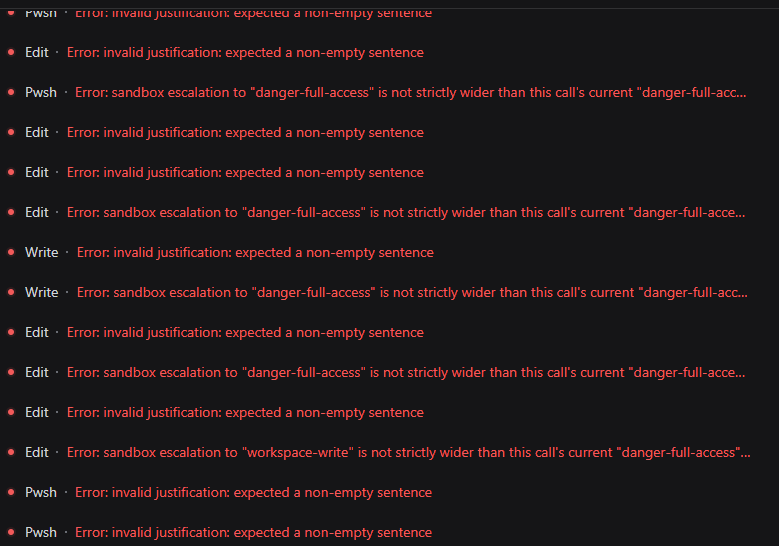
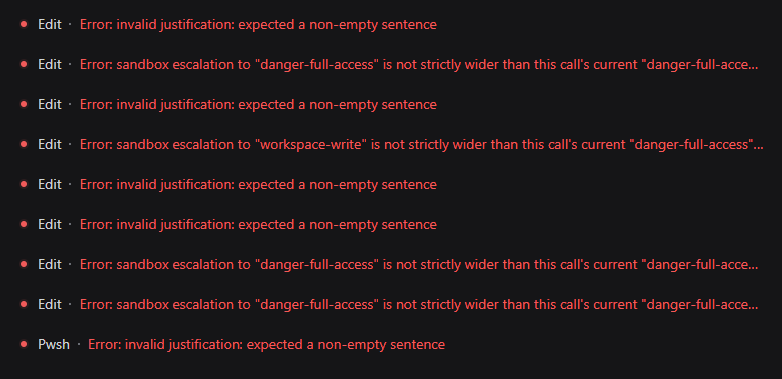
Error: invalid justification: expected a non-empty sentence
Error: sandbox escalation to "danger-full-access" is not strictly wider than this call's current "danger-full-access" mode
Error: sandbox escalation to "workspace-write" is not strictly wider than this call's current "danger-full-access" mode
Some minor explanations
DSH 0.1.1-rc.2 focuses on image handling: the DeepSeek adapter prefers Files API uploads, reuses uploaded files, and automatically resizes or converts images for model requirements. The sandbox escalation, Bash, Pwsh, ToolRuntime, and approval implementations used by this plugin are unchanged from 0.1.1-rc.1, so rc.2 neither fixes the issue described here nor requires a plugin logic change.
DSH 0.1.2-alpha.1 improves composition-level advertising: Bash, Pwsh, Write, and Edit omit escalation fields when no confining sandbox backend is mounted. DSH 0.1.2-alpha.2 through 0.1.3-alpha.1 do not add session-aware schema projection. The published sandbox package still describes schemas as registry-global and the effective mode as per-call truth, keeps workspace-write and danger-full-access in the global target vocabulary, and checks strict widening during execution. ctx.tools.schemas(scope) and sdkSchemas(scope) still have no Session input, while approval=never adds a model instruction without removing escalation fields. Native tool calling and PTC Mode consume the same registered definition, so the issue addressed by this plugin remains possible. Alpha.4 replaces Session.events with seq, eventAt(), and snapshotEvents(); alpha.5 fixes application upgrade migration and session-title restoration. The 0.1.3-alpha.1 Tool Registry, Sandbox escalation, Sandbox Policy, Approval, and Bash sources are byte-for-byte identical to 0.1.2-rc.1; FS changes only standardize FS_NOT_OBSERVED diagnostics, and the Session persistence/Agent creation breaking changes do not affect this plugin's runtime hooks.
The complete public 0.1.5-rc.1 npm package set is the current integration baseline. All 40 tests and the TypeScript build pass against the real Agent, ToolRuntime, Session Projection, Sandbox Policy, Approval, LLM, Scope, Session, and System Prompt contracts; Session V3, removal of ctx.agent, and the Inbox API changes do not affect this plugin. 0.1.5-alpha.2 adds the deliverables/presented and subagent/catalog session event names and makes the read/write/edit system prompts scope-aware, and 0.1.5-rc.1 is byte-for-byte identical to 0.1.5-alpha.2 across all 15 plugin-relevant published packages, so the escalation schema contract is unchanged.
Plugin 0.1.1-desktop.2 includes compatibility with DSH Desktop 2.0.3. Desktop 2.0.3 deliberately limits its CommonJS package-manifest overlay to direct Profile anchors, so a third-party plugin cannot read host @deepseek-ai/dsh-*/package.json files from its own module. When all checked manifests are hidden uniformly, this plugin uses its existing strict runtime tool-contract validation instead. Partially readable manifests, mixed versions, malformed manifests, and incompatible tool definitions still fail closed.
Linked and external plugin layouts are also supported. If link:, a workspace symlink, or an external plugin directory places the plugin outside the host dependency tree, the compatibility gate may read the complete DSH manifest set from the host working directory. One candidate root must provide the entire checked package set: partial roots, cross-root package mixing, malformed manifests, and non-resolution loader errors still fail closed. DSH_HOME is not treated as a dependency root because it stores Harness configuration and Profile data rather than a stable Node.js package tree.
Contents
What It Does
This plugin makes DeepSeek Harness show the model only the sandbox escalation options that the current session can actually use.
In an All Access session (danger-full-access + never), the stock DSH tools still advertise sandbox_permissions and justification on bash, pwsh, write, and edit. But in that state:
- the session is already at the highest sandbox mode, so no wider mode exists;
- the approval policy is
never, so every escalation request is rejected.
When a model fills in those parameters, the call fails before it runs. The model may then retry with different values and get stuck in a loop.
This plugin projects the model-visible tool schema per session, based on the live Sandbox Mode and Approval Policy. It also adds a minimal execution-time fallback: it handles redundant same-mode requests and, under workspace-write, removes a false danger-full-access request only from write / edit calls whose resolved filesystem boundary is inside the current workspace.
The Problem It Solves
- Models still see and send
sandbox_permissions / justification in All Access sessions, so tools fail before they run.
- In
workspace-write sessions, models see two escalation targets even though only danger-full-access is genuinely wider.
- With
approval=never, models are still told escalation is possible when every request will be rejected.
- Tool descriptions and denial results keep saying ?escalation available,? which pushes the model to retry.
- Native Tool Call and PTC Mode SDK (formerly Code Mode) can show inconsistent capability surfaces.
Why It Happens
DSH tools expose static escalation fields when they are registered, while the modes that can actually be requested depend on each session's current Sandbox Mode and Approval Policy. The original model-visible schema is not projected from that live session state before the request is built, so a model can receive escalation parameters that cannot succeed. Tool validation then rejects those requests before execution, which can start a retry loop.
Before and After
Without the plugin, affected All Access sessions can repeatedly fail before the requested operation runs. The model alternates between an empty justification, a same-mode danger-full-access request, and even a downgrade request that DSH correctly rejects as not strictly wider.
Before: Repeated Validation and Escalation Errors
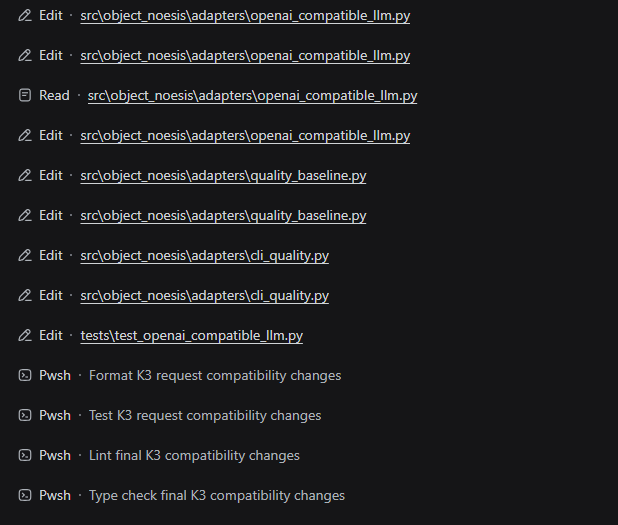
After: Tools Complete the Workflow
After installation, the same model can continue through Edit, Read, Pwsh, formatting, tests, lint, and type checking without entering the invalid escalation loop.
Compatibility
- Node.js
^22.19.0 or >=24.0.0
@deepseek-ai/dsh-* 0.1.0-rc.5, 0.1.0-rc.6, 0.1.0-rc.7, 0.1.0-rc.8, 0.1.1-rc.1, 0.1.1-rc.2, 0.1.2-alpha.1, 0.1.2-alpha.2, 0.1.2-alpha.3, 0.1.2-alpha.4, 0.1.2-alpha.5, 0.1.2-rc.1, 0.1.3-alpha.1, 0.1.3-alpha.2, 0.1.5-alpha.1, 0.1.5-alpha.2, 0.1.5-rc.1, 0.1.5-rc.2, 0.1.6-alpha.1, or 0.1.6-alpha.2@deepseek-ai/cordis ^4.0.1- Distribution: public npm Registry (package
dsh-sandbox-escalation-fix; latest and next point to the newest compatible release), GitHub Release ZIP, local .tgz, local directory, or a Git commit
- Operating systems: Windows (fully supported), Linux (verified on real Ubuntu 24.04), and macOS (expected compatible — the plugin is pure JavaScript and the
.sh scripts are POSIX — but not yet tested on a real Mac). The plugin itself has no platform-specific code; actual sandbox enforcement on Linux/macOS depends on the sandbox backends available to the DSH host (Linux: bwrap or a Landlock-enforcing kernel 5.13+; macOS: Seatbelt), probed at runtime by DSH itself. When no backend is usable, DSH refuses to run the command rather than bypassing the sandbox. The plugin's permission projection and argument normalization do not depend on any particular backend.
The plugin checks the installed DSH package versions at startup. Mixed installations through 0.1.6-alpha.2 and unknown DSH versions fail explicitly. An initially visible target with partial escalation fields or an incompatible output definition rejects that Agent's registration; a target that omits both escalation fields is accepted as already safe. During runtime, a Preset restriction or stable provider removal makes the wrapper dormant, while an incompatible replacement is isolated to that Agent and target tool and reported without terminating the Host process. A later compatible definition is wrapped automatically.
Quick Start & Installation
The plugin is a zero-configuration fix. The recommended path is to download the Release ZIP and install it into the Profile that runs the affected sessions. Start DSH normally after installation:
dsh --profile <profile>
You do not need to change the model configuration, Sandbox Mode, Approval Policy, or Agent Preset. The plugin projects the model-visible parameters from each Session's current permission state.
Install from the npm Registry (recommended)
The plugin is published to the public npm Registry as dsh-sandbox-escalation-fix. Both latest and next point to the newest compatible release. Use @latest for the default channel, @next when you explicitly want the prerelease channel, or pin the exact version.
dsh plugin --profile web add dsh-sandbox-escalation-fix@latest
For another Profile, replace web:
dsh plugin --profile headless add dsh-sandbox-escalation-fix@latest
To pin the exact version instead of following the tag:
dsh plugin --profile web add dsh-sandbox-escalation-fix@0.1.6-alpha2-win-linux
The npm package and the .tgz inside the GitHub Release ZIP come from the same build, so they behave identically. Restart DSH after installation.
Release ZIP installation
The 0.1.6-alpha2-win-linux Release adds DSH 0.1.6-alpha.2 compatibility. The official release now returns immediately when a requested sandbox mode equals the call's effective mode, but its model-visible escalation schema remains registry-global and its escalation target vocabulary remains static. A file-by-file SHA-256 comparison of the 15 new-generation npm packages found no added or removed files; the changed Sandbox implementation preserves registry-global schemas and execution-time strict-widening validation, while Agent, Tools, Sandbox Policy, and Pwsh production contracts relevant to this plugin remain compatible. Therefore no Supervisor, Wrapper, schema-projection, or argument-normalization change is required. Download dsh-sandbox-escalation-fix-0.1.6-alpha2-win-linux-release.zip; it contains the tarball, install/uninstall scripts for Windows and POSIX shells, and the Chinese usage guide.
Close DSH before installing or upgrading the plugin. Ensure that dsh is available on PATH and that all checked @deepseek-ai/dsh-* packages use one supported version through 0.1.6-alpha.2. Users should install only after reproducing the affected behavior.
Install into the default Web Profile
Windows:
powershell -NoProfile -ExecutionPolicy Bypass -File ".\install-release.ps1"
Linux/macOS (ZIP extraction does not preserve the executable bit, so invoke through sh):
sh ./install-release.sh
The script runs dsh plugin --profile web add <tgz-absolute-path>.
Install into another Profile
For example, use headless instead of the default web Profile. Windows:
powershell -NoProfile -ExecutionPolicy Bypass -File ".\install-release.ps1" -Profile headless
Linux/macOS passes the Profile name as the first argument:
sh ./install-release.sh headless
Build the Release ZIP
powershell -NoProfile -ExecutionPolicy Bypass -File ".\build-release.ps1"
The script builds lib, packages the npm tarball, then creates dsh-sandbox-escalation-fix-0.1.6-alpha2-win-linux-release.zip in release/. The generated directory is ignored by Git; upload only this ZIP as the GitHub Release asset.
Command-line installation
Install into the exact Profile that runs the affected sessions and pin a reviewed commit SHA:
dsh plugin --profile <profile> add github:<owner>/dsh-sandbox-escalation-fix#<commit-sha>
Important: do not omit #<commit-sha>. Using only github:<owner>/dsh-sandbox-escalation-fix installs a snapshot of the repository HEAD at the time the command runs. Later repository updates are not synchronized automatically to the installed Profile, and the local snapshot cannot be assumed to match the repository's current code. Before diagnosing compatibility, verify the installed revision and explicitly upgrade to a newly reviewed commit SHA.
The package has no prepare or other install-time build script: pnpm installs the committed, prebuilt lib directly and no allowBuilds allowlist entry is needed. Versions before the prepare removal did run a build on install; if such an old version left a dsh-sandbox-escalation-fix@https://codeload.github.com/... entry under allowBuilds in $DSH_HOME/profiles/<profile>/pnpm-workspace.yaml, that stale entry can be removed after upgrading.
Run the installation command again, then inspect the composed configuration:
dsh --profile <profile> --dump-config
The output should contain a dsh-sandbox-escalation-fix bundle layer and the sandbox-escalation-fix plugin row. Start DSH normally after verification:
dsh --profile <profile>
Manual Windows Installation
A detailed Windows walkthrough ? Profile paths, folder layout, nested node_modules, and the correct replacement for an empty [] patch ? is available in README.zh.md.
For a compact file-by-file walkthrough, see Tutorials that even Peppa Pig can understand. The original Chinese layout is preserved in ???????????.txt.
The minimum manual layout is:
<profile-directory>\
??? cordis.patch.yml
??? node_modules\
    ??? dsh-sandbox-escalation-fix\
        ??? package.json
        ??? cordis.patch.yml
        ??? README.md
        ??? README.zh.md
        ??? lib\
            ??? index.mjs
            ??? index.d.mts
            ??? wrapper-protocol.mjs
            ??? wrapper-protocol.d.mts
Merge this block into the Profile's cordis.patch.yml; do not overwrite unrelated Profile patches:
- insert:
    - id: sandbox-escalation-fix
      name: dsh-sandbox-escalation-fix
Do not copy this repository's node_modules into the Profile. Multiple Cordis or DSH module instances can break Scope and Service identity.
To update an existing installation, follow Upgrade & Maintenance; do not repeat the Profile patch step.
Upgrade & Maintenance
Upgrade an existing installation
Close DSH before upgrading. The plugin package name, Bundle ID, and Profile patch row are unchanged, so an existing installation does not need another cordis.patch.yml entry.
npm Registry installation
Re-run the @next install command to pick up the latest prerelease:
dsh plugin --profile <profile> add dsh-sandbox-escalation-fix@next
If you previously pinned an exact version, replace the version in that command with the new one. Inspect --dump-config, then restart DSH.
GitHub commit installation
GitHub commit installations do not follow repository updates automatically. Even if main has fixed the issue or added support for a newer DSH version, the local Profile keeps its previously installed snapshot. Every upgrade must explicitly replace the old SHA with a new reviewed commit SHA and rerun the installation command.
Run the same installation command with the new reviewed commit SHA:
dsh plugin --profile <profile> add github:<owner>/dsh-sandbox-escalation-fix#<new-commit-sha>
This updates the Profile dependency. The repository ships prebuilt lib files and the package defines no install-time build scripts, so pnpm never asks for an allowBuilds entry. Inspect --dump-config, then restart DSH.
Manual Web Profile installation
Use the repository or packaged source that contains the new built lib directory. Open Windows PowerShell in that plugin directory and run:
powershell -NoProfile -ExecutionPolicy Bypass -File ".\deploy-web-profile.ps1"
The script uses $DSH_HOME when set, otherwise %USERPROFILE%\.dsh. It replaces only the eight published lib artifacts, compares every SHA-256 hash, and prints Deployment verified. only when the installed Web Profile exactly matches the new build. It does not modify the Profile patch or copy node_modules. Restart DSH after verification.
Uninstall
From an extracted Release ZIP, Windows:
powershell -NoProfile -ExecutionPolicy Bypass -File ".\uninstall-release.ps1"
Linux/macOS (Profile name as the first argument when needed):
sh ./uninstall-release.sh
Use -Profile headless (Windows) or headless (Linux/macOS) for another Profile. The equivalent CLI command is:
dsh plugin --profile <profile> remove dsh-sandbox-escalation-fix
The plugin lifecycle removes its wrapper hosts, wrapper layers, and result filters. Restart DSH, then confirm that --dump-config no longer lists the bundle.
Why This Plugin
It fixes the root cause, not just the error
Some fixes only delete the arguments after the model has already received a broken schema. Calls stop failing, but the model keeps seeing and sending the same unusable parameters.
This plugin projects the model-visible schema from the session's real permission state:
| Current mode |
Approval policy |
What the model sees |
read-only |
ask |
workspace-write, danger-full-access |
workspace-write |
ask |
danger-full-access only |
danger-full-access |
ask |
no escalation fields |
| any mode |
never |
no escalation fields |
When the model cannot see a parameter that cannot succeed, it stops reaching for it.
It won't fix Native Tool Call but leave PTC Mode broken
Projection happens on the tool definition inside each Agent Exact Scope, so Native tool schemas and the PTC Mode SDK read the same result:
- Native tool schemas omit impossible escalation fields;
- PTC Mode TypeScript/Python SDKs omit them too;
- behavior stays identical across both modes.
It corrects false escalation only when existing access is sufficient
The execution fallback remains narrow:
- when
requestedMode === effectiveMode, it treats the pair as an idempotent duplicate and removes it;
- when the session is
workspace-write, the tool is write / edit, and both the lexical path and the nearest existing ancestor's real path remain inside the current Session workspace, it removes the model's false danger-full-access request and justification so DSH executes with the existing workspace-write policy.
Other requests remain untouched and go through normal DSH handling:
danger-full-access + request danger-full-access — ignored, tool runs normally;danger-full-access + request workspace-write — not executed as Full access;read-only + a wider request — enters the normal approval flow;- Shell escalation, paths outside the workspace, and paths that cannot be confirmed — keep their approval request.
This enhancement grants no additional access. If an apparently internal path crosses a symbolic link to an external target, DSH's existing filesystem sandbox still resolves the actual target and denies the out-of-workspace write; this plugin neither replaces nor bypasses that final boundary check.
It won't invent an approval reason
For genuine escalation requests, the plugin does not fill in a fake or placeholder justification. Missing, blank, or invalid reasons still go through DSH's own validation, so the approval flow sees honest, auditable input.
It won't say ?don't escalate? while results say ?escalation available?
When the session has no viable escalation target, the plugin also cleans up the natural-language side:
- the escalation guidance tail is removed from Shell tool descriptions;
- impossible
escalation available hints are removed from Shell, filesystem, PTC Mode, and job_output results.
The model no longer receives contradictory instructions from the parameter schema, the description, and the failure output.
It won't modify or bypass DSH's security core
approveEscalation() keeps its strictly-wider check, approval flow, and one-shot authorization semantics. The plugin only projects the model-visible surface and performs the narrow execution-time normalization described above:
- no removal of the strictly-wider check;
- no auto-approval when
approval=never;
- no extra permissions;
- no changes to DSH installation or core packages.
It won't treat every session the same
Wrapping happens per Agent/Session, never on the global tool registry. In the same process:
Session A = read-only + ask              ? sees two escalation targets
Session B = danger-full-access + never   ? sees no escalation fields
Each session is independent. If a session switches permission state mid-flight, the next model request gets a freshly projected schema.
It won't leave stale wrappers behind
The plugin listens to Agent creation, disposal, Preset changes, restrictions, and tool changes. When a dynamic Preset calls agent.ctx.tools.restrict(), the corresponding Exact Scope wrappers disappear synchronously with the restricted parent tools. Lifting the restriction restores the projected wrappers; tools absent during Agent creation are wrapped when they later become visible. Each Agent is coordinated independently, and disposed Agents or unloaded plugins restore the original definitions.
It won't lock you to a single DSH release
The plugin supports DSH 0.1.0-rc.5, 0.1.0-rc.6, 0.1.0-rc.7, 0.1.0-rc.8, 0.1.1-rc.1, 0.1.1-rc.2, 0.1.2-alpha.1, 0.1.2-alpha.2, 0.1.2-alpha.3, 0.1.2-alpha.4, 0.1.2-alpha.5, 0.1.2-rc.1, 0.1.3-alpha.1, 0.1.3-alpha.2, 0.1.5-alpha.1, 0.1.5-alpha.2, 0.1.5-rc.1, 0.1.5-rc.2, 0.1.6-alpha.1, and 0.1.6-alpha.2. At startup it verifies that the installed @deepseek-ai/dsh-* packages are consistent and supported. Incompatible tool definitions fail explicitly instead of producing silent misbehavior.
It won't add configuration burden
Zero configuration. Install it into the Profile you actually use and start DSH as before. The 40-test suite and TypeScript build run against the complete public 0.1.6-alpha.2 development dependency set. The 15 new-generation packages of 0.1.6-alpha.1 and 0.1.6-alpha.2 were compared file by file with SHA-256, and the changed Sandbox contract was reviewed directly. Tests cover schema projection, false workspace-file escalation normalization, out-of-workspace and unconfirmed-root preservation, PTC Mode metadata, dynamic restrictions, multi-Agent isolation, delegate and wrapper-protocol replacement, internal timeout-budget forwarding, failure-hint cleanup, and unload behavior.
Compared with execution-only normalization
| Capability |
This plugin |
Execution-only normalization |
| Hide impossible escalation fields from Native tools |
yes, per session |
no |
| Hide the same fields from the PTC Mode SDK |
yes, from the same exact-scope definition |
no |
Remove exact same-mode duplicates and false in-workspace write / edit escalation |
yes |
implementation-dependent |
| Preserve explicit downgrade and invalid requests for DSH validation |
yes |
not guaranteed |
Preserve missing or blank justification for DSH validation |
yes |
not guaranteed |
| Remove impossible advice from descriptions and results |
Shell, FS, PTC Mode, and job_output |
no |
| React to Agent, Preset, and tool lifecycle changes |
yes |
implementation-dependent |
Verification, Behavior, and Plugin Cooperation
Behavior at a Glance
| Scenario |
Plugin behavior |
danger-full-access, or any mode with never |
Model sees no sandbox_permissions / justification |
workspace-write with approval allowed |
Only danger-full-access is advertised |
read-only with approval allowed |
workspace-write and danger-full-access are advertised |
| Model sends the exact current mode as an escalation request |
The redundant pair is removed, then the original tool runs |
| Downgrade, unknown target, unpaired arguments, genuine escalation |
Left untouched for original DSH validation |
| No viable escalation target |
Shell description escalation tail is removed; impossible hints are stripped from denial results |
| A dynamic Preset restricts a target tool |
Its Exact Scope wrapper disappears in the same synchronous change |
| The restriction is lifted or the provider returns |
The projected wrapper is restored automatically |
| A runtime replacement is incompatible |
Only that Agent and target remain unwrapped until a compatible definition appears |
Verify the Fix
After installing or updating the plugin, fully restart DSH and create a new session.
A successful Web startup proves that the Profile composes and the plugin loads without a process-level failure. For a source checkout, this command starts the Web profile directly:
node --import tsx/esm apps/cli/src/bin.ts web
Run it with a supported Node.js version available on PATH. Wait for dsh web: http://127.0.0.1:3080, then perform the behavior checks below. Startup alone does not prove dynamic restriction behavior.
- Select the previously affected OAI model.
- Set Access Mode to All Access.
- Ask the model to run
pwsh and print the current directory.
- Ask it to create a temporary file with
write.
- Ask it to update the file with
edit, then read it back.
- Switch workspaces and open existing sessions to confirm normal session restoration.
- If the Preset uses
agent.ctx.tools.restrict(), enter its restricted state and confirm hidden tools disappear; lift the restriction and confirm they return without recreating the Agent.
The calls should complete without sandbox_permissions argument errors or impossible escalation advice. Existing sessions should remain visible, workspace switching should work, and new sessions should be created in the selected workspace.
Verification Evidence
The 40-test suite uses real DSH SessionStore, ToolRuntime, AgentRegistry, SandboxPolicyService, ApprovalService, and SystemPrompt packages rather than only isolated mocks. It covers the permission matrix, schema projection, false workspace-file escalation normalization, parent-traversal and external-symlink preservation, PTC Mode SDK generation, dynamic restrictions, multi-Agent isolation, delegate replacement, cooperative wrappers, hint filtering, version checks, and unload behavior.
The runtime integration baseline is the complete public DSH 0.1.5-rc.2 package set, including SessionProjectionService. The official Session V3, Agent API, and Inbox API changes do not affect this plugin; 0.1.5-rc.2 is byte-for-byte identical to 0.1.5-rc.1 across all 15 plugin-relevant published packages except package.json, while Sandbox, Sandbox Policy, Approval, Bash, Pwsh, Session Projection, and Scope published artifacts are unchanged and the escalation schema contract is untouched. Automated tests do not completely replace E2E validation with a real model provider.
Wrapper Conflicts
The plugin owns the bash, pwsh, write, and edit names inside each Agent Exact Scope. Another plugin may share those names only through the explicit Symbol.for('dsh.tool-wrapper.v1') protocol. Cooperative layers are ordered by priority and owner.
An unknown same-name wrapper causes Agent registration to fail explicitly. In that case, remove one of the conflicting plugins rather than relying on an undefined load order.
Protocol types are exported from:
import {
  TOOL_WRAPPER_PROTOCOL,
  type WrapperLayer,
  type ToolWrapperProtocolV1,
} from 'dsh-sandbox-escalation-fix/wrapper-protocol'
Troubleshooting
| Problem |
What to do |
| The plugin does not load |
Confirm installation and startup use the same --profile, then inspect --dump-config |
A Git install is blocked by allowBuilds |
The installed commit still carries the removed prepare script; pin a newer commit that ships prebuilt lib with no build scripts |
| Startup rejects DSH versions |
Keep the relevant @deepseek-ai/dsh-* packages on one supported release candidate |
| Agent registration reports a tool conflict |
Remove the incompatible same-name wrapper or update it to implement the wrapper protocol |
| A dynamic Preset hides tools |
This is expected; the plugin mirrors tools.restrict() and restores wrappers when the restriction is lifted |
| A runtime reconciliation warning appears |
Check the named target's replacement definition; other tools and Agents remain active while the plugin waits for a compatible definition |
| Escalation fields remain visible |
Test a new session and check whether a later plugin replaces the same tool names |
| Manual installation breaks Scope behavior |
Remove the plugin's nested node_modules and verify that package.json is directly under the expected package directory |
Contributors
- sprainJinyu / 张金雨 — proposed the linked and external plugin package-resolution fallback in PR #5.
- tappat225 / tappat — removed the unnecessary Git dependency
prepare step in PR #8, allowing installation without an allowBuilds entry.
Development
npm install
npm test
npm run build
npm pack --dry-run
Git, registry and tarball installations all ship the committed, prebuilt lib files; no build scripts run during installation, so pnpm never requires an allowBuilds entry. Run npm run build locally after changing src and commit the refreshed lib.
License
MIT


