
其他
完整应用

deepseek-harness
deepseek-ai
DeepSeek Harness: Everything is a Plugin.
PROJECT TOPICS
INSTALL REFERENCE
dsh plugin --profile web add github:H1Kariiiiiii/dsh-desktop-launcher2
该命令指向仓库当前默认分支;尚无绑定当前 commit 的完整验证结果。
PROJECT README
DeepSeek Harness 桌面启动器 + 一键关机 插件:在 Web 设置页创建桌面图标(双击启动 dsh web),带 WPF 风格的启动弹窗;页面右下角悬浮电源按钮,点击确认后优雅退出 dsh 进程。
中文 · English
dsh plugin --profile web add github:H1Kariiiiiii/dsh-desktop-launcher2只需要这一句:dsh 会从 GitHub 拉取源码、安装并自动把它加入 profile 的 bundles 层,无需手动编辑任何文件。装完执行
dsh web重启即可。
(若你的 dsh 尚未安装:npm i -g @deepseek-ai/dsh。若 github: 形式在你的 pnpm 版本解析异常,可改用 dsh plugin --profile web add git+https://github.com/H1Kariiiiiii/dsh-desktop-launcher2.git。)
DeepSeek-Harness.lnk(Windows)http://127.0.0.1:3080 是否已有 dsh 在运行dsh web~/.dsh/desktop-launcher/(launcher2.ps1 + .lnk + 图标资源)/api/dsh-desktop-launcher2/shutdown → ctx.appExit 优雅退出(先回收插件树再退出;无 appExit 时回退 process.exit(0))| 字段 | 默认值 | 说明 |
|---|---|---|
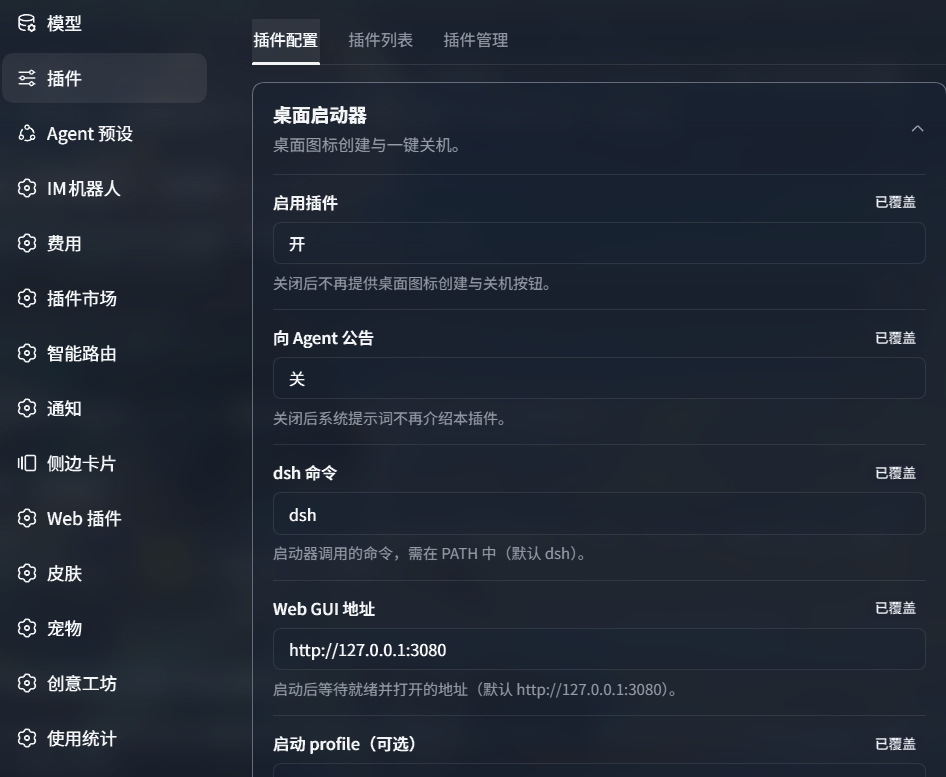
| 启用插件 | true |
关闭后不再提供桌面图标创建与关机按钮 |
| 向 Agent 公告 | false |
关闭后系统提示词不再介绍本插件 |
| dsh 命令 | dsh |
启动器调用的命令,需在 PATH 中 |
| Web GUI 地址 | http://127.0.0.1:3080 |
启动后等待就绪并打开的地址 |
| 启动 profile(可选) | 空 | 留空表示不带 --profile 参数 |
| 图标文件(可选) | 空 | 桌面图标的 .ico/.png 路径;留空使用内置 dsh 图标 |
| 退出前确认 | true |
关闭后点击关机按钮直接退出 |
配置写入 ~/.dsh/settings.yaml 的 desktop-launcher 段(与官方设置面板共享,重启后保留)。
设置页卡片(设置 → 插件 → 插件配置 → 桌面启动器)
页面右下角悬浮关机按钮
需要本机已安装 dsh(
dsh web能启动)。dsh plugin add会检测到包声明了dsh.bundle并自动把它加入 profile 的 bundles 层,无需手动编辑任何文件,装完重启dsh web即可。
# 安装
dsh plugin --profile web add github:H1Kariiiiiii/dsh-desktop-launcher2

# 重启
dsh web
纯 JS 包(无构建脚本),GitHub 安装即可直接用。若
github:形式在你的 pnpm 版本解析异常,可改用git+https://github.com/H1Kariiiiiii/dsh-desktop-launcher2.git。
# 把仓库克隆或解压到任意位置,然后用绝对路径 file: 安装
dsh plugin --profile web add "file:C:/路径/dsh-desktop-launcher2"

# 重启
dsh web
本地
file:依赖注意:pnpm 跨盘符时是复制(非链接),改源码后需重跑一次dsh plugin --profile web add "file:C:/路径/dsh-desktop-launcher2"(或删掉node_modules/dsh-desktop-launcher2后pnpm install)才会同步。
# 1) 确认插件进了组合层(应看到 dsh-desktop-launcher2 段)
dsh --profile web --dump-config | Select-String "dsh-desktop-launcher2"

# 2) 启动 dsh web,打开 设置 → 插件 → 插件配置 → 桌面启动器:
#    - 点击「创建桌面图标」→ 桌面应出现 DeepSeek-Harness.lnk
# - 页面右下角应出现 ⏻ 悬浮关机按钮dsh plugin --profile web remove dsh-desktop-launcher2
# 然后重启 dsh web;桌面快捷方式与 ~/.dsh/desktop-launcher/ 脚本可手动删除基于 rc.1 运行时实测,兼容矩阵:
| 层 | 状态 |
|---|---|
host 路由(ctx.webServer.register,exact) |
✅ 稳定(核心 API) |
settings 注册(installSection / register 双路径) |
✅ 特性检测,缺失时降级 |
ctx.appExit |
✅ 可选读取,缺失时 process.exit 兜底 |
ctx.systemPrompt |
✅ 可选读取,仅公告开启时使用 |
client bundle 协议(window.__ModuleLoader__.load 惰性 CJS) |
⚠️ 私有协议,随 dsh 版本可能变化 |
client 槽位(settings.plugin.item,keyed) |
⚠️ 契约细节(key 必须等于 settings 命名空间)可能变化 |
桌面快捷方式(launcher2.ps1) |
✅ 独立 PowerShell,不依赖插件存活 |
降级保障:即使 client UI 全部失效,launcher2.ps1 仍可独立启动 dsh web(只调用 dsh 命令)。
本机验证项目:宿主 dsh 0.1.2-rc.1、Node v24.19.0、Windows PowerShell 5.1+。
Q: 保存设置报 settings namespace "desktop-launcher" is not registered?
A: 插件 apply 时 settings 服务可能尚未就绪;已在路由层做懒注册兜底(POST 前检测并注册)。若仍出现,重启 dsh(host 注册需要重启)后重试。
Q: 插件配置卡片没出现?
A: 确认两点:① host 端注册成功(~/.dsh/settings.yaml 里有 desktop-launcher: 段);② 卡片 key 等于命名空间(本插件已按 desktop-launcher 注册)。两者都满足后刷新页面;改动 host 代码必须重启。
Q: 点桌面图标打开网页显示 401(authentication required)? A: 这是 rc.1 的浏览器认证机制(每次进程随机 token)。本插件启动脚本已让 dsh 自己打开带 token 的浏览器;若 dsh 已在运行且浏览器丢失 cookie,重启 dsh 让它重新打开认证 URL。
Q: 改源码后重启没变化?
A: file: 依赖在跨盘符时是复制而非链接,需重跑 add 或删 node_modules 内副本重装(见安装-方式二说明)。
@linxin666/dsh-desktop-launcher 是独立 npm 包(仓库 zhu1090093659/dsh-web),当前最新 0.3.13(2026-09-03)仍在维护。@linxin666/dsh-web-all 在 0.3.3 → 0.3.13 期间把它作为依赖捆绑;自 0.3.14 起从聚合作物依赖中移除(0.3.14/0.3.15/0.3.16 的 dependencies 与 exports 均无 desktop-launcher)。.pnpm_patches 残留;该版本依赖的 @deepseek-ai/dsh-client-runtime 已在 rc.1 中不存在)。注意:原包 0.3.9+ 已改用 dsh-client-store/dsh-client-ui-renderer 等仍存在的包适配 alpha.2+,0.3.13 要求 dsh >= 0.1.2-alpha.4,理论上可安装;本项目选择独立复刻而非直接依赖原包。window.__ModuleLoader__.load 惰性 CJS 工厂),适配 DeepSeek Harness 0.1.2-rc.1(Windows)。dsh-desktop-launcher2/
├── lib/
│ ├── index.js # host 入口:路由、settings 注册、公告
│ ├── client.js # client bundle:设置卡片 + 悬浮关机按钮
│ └── host/state.js # launcher 脚本生成(PowerShell / POSIX)
├── assets/ # dsh.ico / dsh.png(内置图标)
├── cordis.patch.yml # bundle patch 层
├── package.json # 插件清单(file: 加载)
└── LICENSE # Apache-2.0@linxin666/dsh-desktop-launcher@0.2.8(Apache-2.0)。本项目的 launcher 弹窗、快捷方式安装器、悬浮关机按钮等设计均来自该包,并按 dsh 0.1.2-rc.1 API 重写为纯 ESM JavaScript。dsh.ico/dsh.png)沿用原包内置素材。Apache-2.0(与原版一致;代码含原包移植部分,保留原版权声明)。
CLASSIFICATION EVIDENCE
系统优先读取 GitHub Topics,再与站内分类词典和词根规则比对。当前命中: 无有效分类标签。
deepseek-ai
DeepSeek Harness: Everything is a Plugin.

anywhere-labs
为 DeepSeek Harness (DSH) 插件生态打造的现代化桌面端解决方案。万物皆「插件」,桌面本身也是「插件」。

awesome-dsh-plugin
A curated list of plugins for DeepSeek Harness (dsh) · DeepSeek Harness 插件精选列表