
模型与 MCP
待识别

rea
morluto
Reverse engineer anything with agents, from app behavior down to native binaries.
PROJECT TOPICS
INSTALL REFERENCE
dsh plugin --profile web add github:H-h-Hh/dsh-stl-viewer
该命令指向仓库当前默认分支;尚无绑定当前 commit 的完整验证结果。
PROJECT README
An STL / STEP 3D preview for the DeepSeek Harness side card.
Click any .stl, .step, .stp, .iges, .igs or .brep in the
dsh-better-sidebar file tree and the file renders in
place, with the controls of a normal 3D viewer. STL is parsed in the page; STEP and the other B-rep
formats are tessellated by OpenCascade on the host, in a worker, and come back as the very same
triangles the rest of the plugin already knows how to draw, measure and weigh.
left-drag     orbit around the model
wheel         zoom
right-drag    pan (Shift + left-drag does the same; two-finger scroll zooms)
double-click  reset the view (the 复位视角 button and the R / 0 keys do too)

measure       click 测量 (or press M), then click two features — the cursor snaps to a
              vertex, an edge, a whole face or a circular rim, the way Bambu Studio's
              measure tool does. Shift-click takes an arbitrary point on the surface
              instead. Dragging still orbits, Esc or 测量 again leaves the mode

view          the 视图 menu holds front / top / right / iso (keys 1 / 2 / 3 / 4, animated),
              wireframe (W), turntable (A) and "save image" — and a shortcut card (?)

convert       a .step / .iges / .brep file is posted to the host, which tessellates it with
              OpenCascade in a worker; a small overlay counts the seconds and can cancel
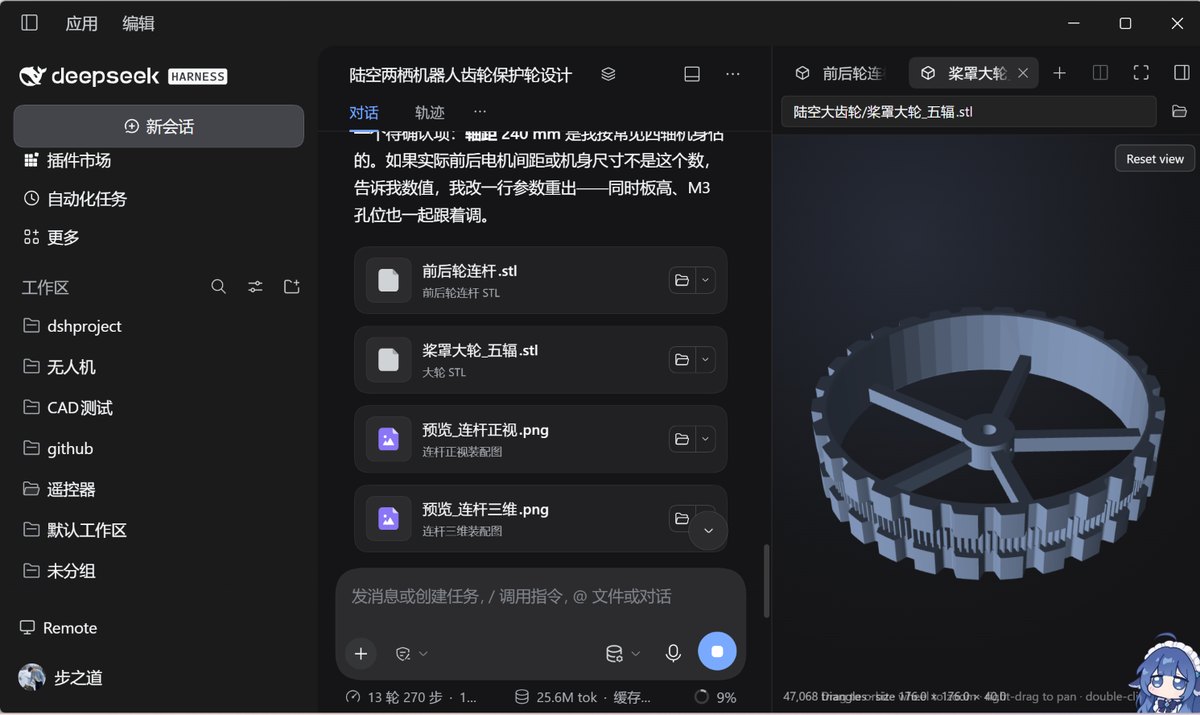
A 47,068-triangle gear cover (176 × 176 × 40 mm) in the real side card, next to the chat that produced it.
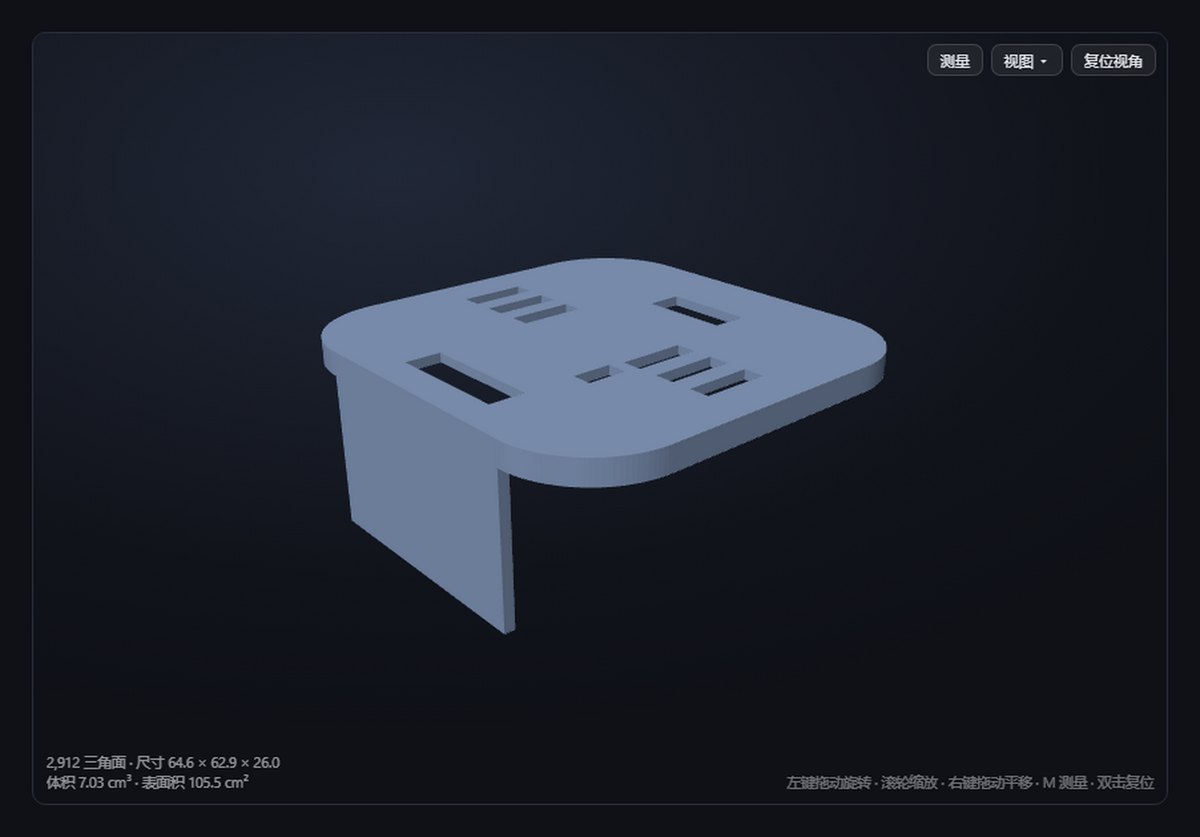
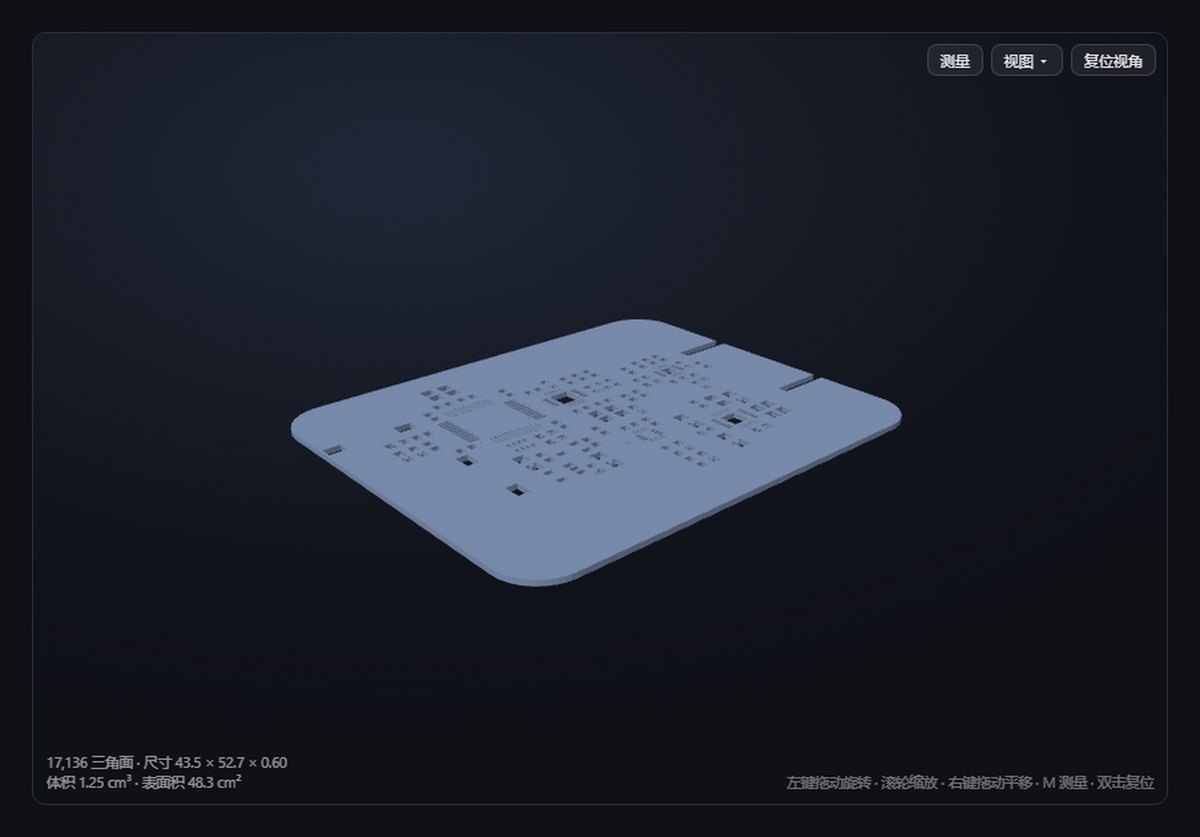
No viewer installed: “此文件类型不支持预览 / 下载查看”. With the plugin: a 2,912-triangle enclosure lid and a 17,136-triangle stencil, both in the side card.
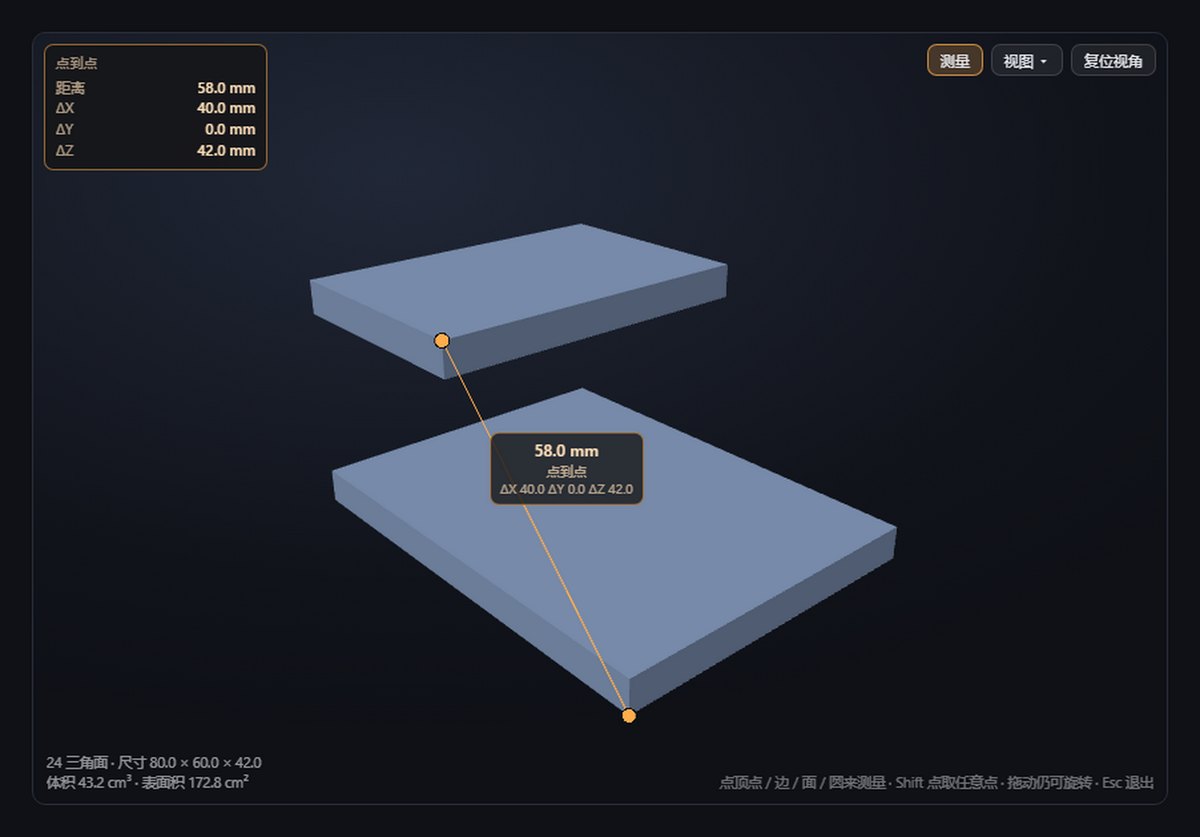
点到点: the cursor snaps to the corner you are aiming at, the picked point is drawn as a dot on the model, and the readout carries the straight distance plus ΔX / ΔY / ΔZ: 58.0 mm across the diagonal of a plate, the two farthest corners the test could find.
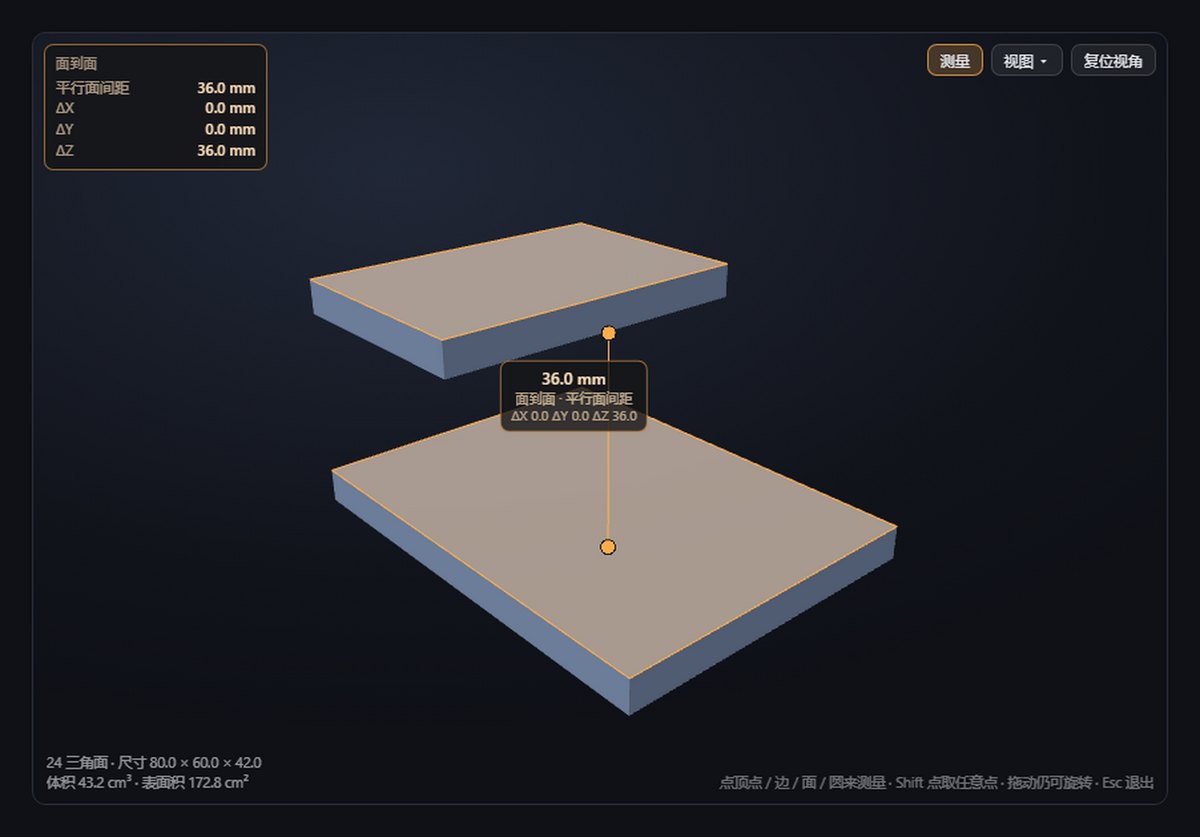
面到面: click one face, then another. Coplanar triangles are flood-filled from the picked one, so you measure a real face — not one triangle — and two parallel faces give the gap between them: 36.0 mm here, with ΔX / ΔY / ΔZ underneath.
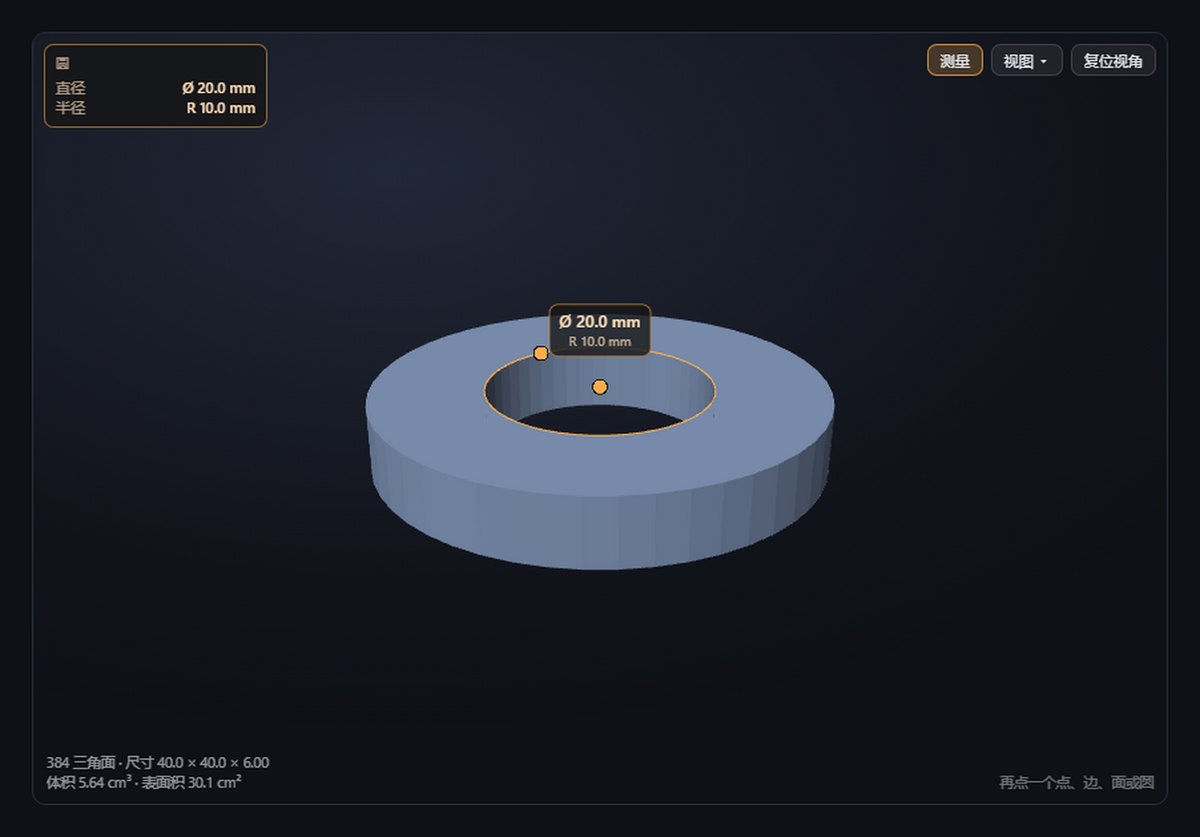
圆: hover a rim and the whole rim is one pick — here the 20 mm bore of a washer, with the 40 mm outer rim available as a second, separate pick. The panel in the top-left corner gives Ø and R (and, while measuring, the pair type plus ΔX / ΔY / ΔZ), the way Bambu Studio does it.
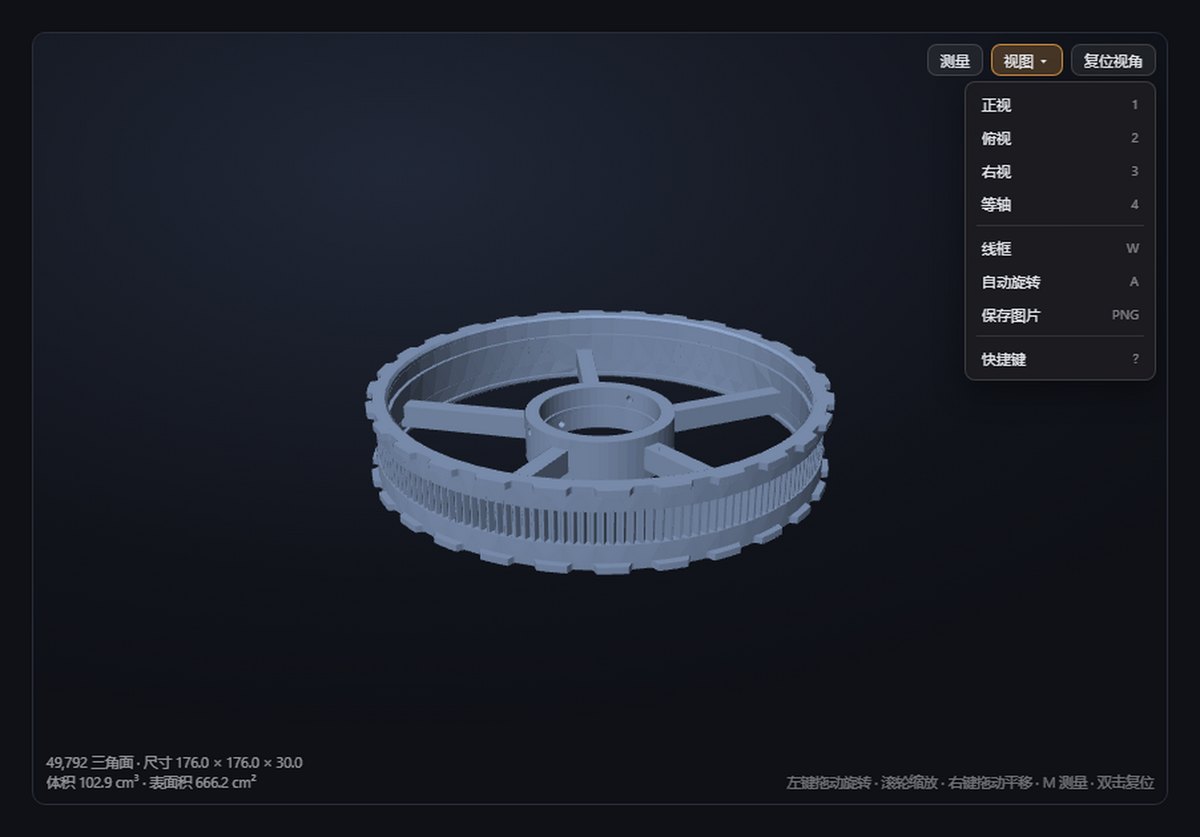
视图: front / top / right / iso, wireframe, turntable, save image and the shortcut card in one menu, with the model's volume, surface area and watertightness in the bottom-left corner.
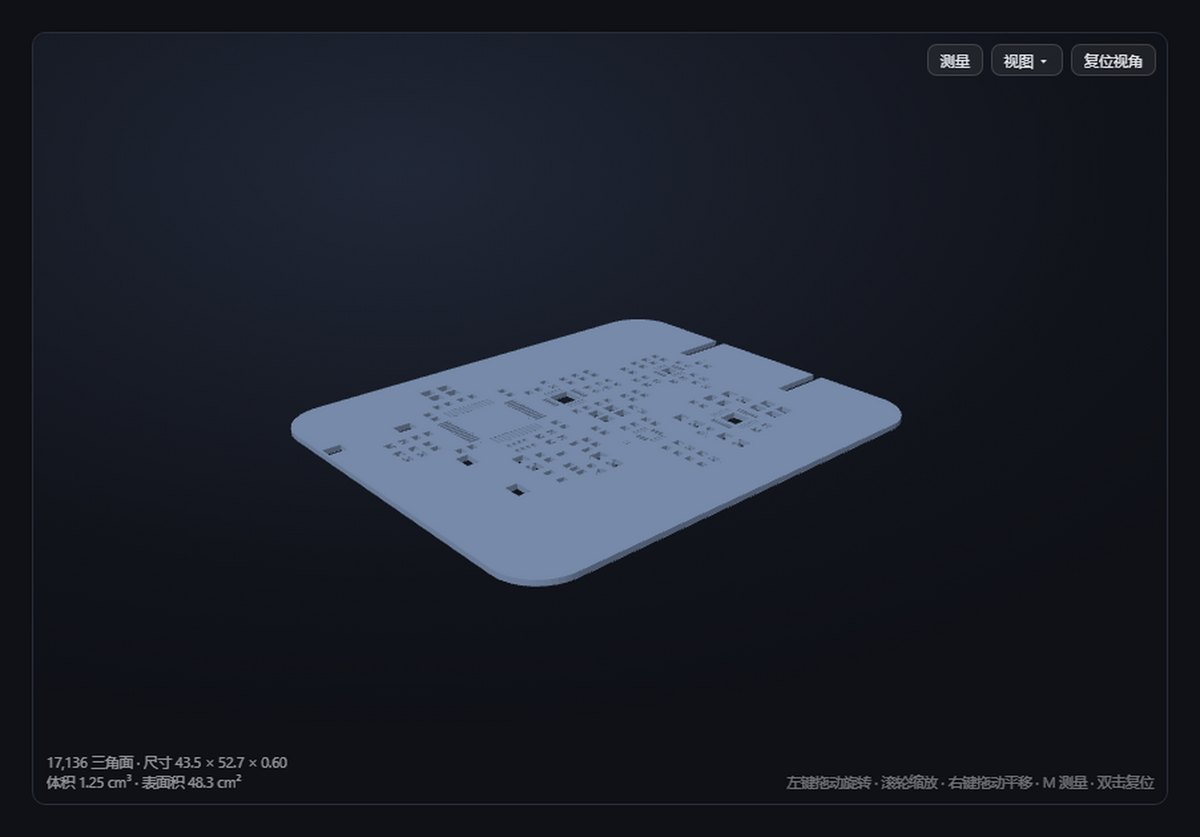
STEP: this is stencil_top.step, opened the same way. A B-rep file
has no triangles in it — the host tessellated its surfaces with OpenCascade and the plugin drew
the result, all 17,136 of them, which is exactly the count the STL export of the same part gives.
Measuring, volume and the view menu work because what arrives is ordinary triangles.
Why a separate plugin? DeepSeek Harness ships previews for text, images, PDFs and Markdown. Binary CAD formats such as
.stl,.obj,.stepfall through to “this file type cannot be previewed”. This plugin registers anstlfile viewer on thebetterSidebarservice, so.stlstops being an opaque blob — and it adds a host route so the same viewer can open the B-rep formats too.
worker_threads worker (the reader is
synchronous and would otherwise freeze the whole Host), and the result comes back as a packed
triangle buffer that the client decodes into the same pipeline STL uses. A 6 MB stencil:
17,136 triangles in about ten seconds, then cached by SHA-184 + 50·N
size match first, then an ASCII scan, then a tolerant binary pass for files with
trailing bytesgl_FrontFacing flips the normal, so inverted facets still read
as solid rather than a black hole直径 Ø 20.0 mm and 半径 R 10.0 mm for a circle, the pair type and
the distance for a measurement, with ΔX / ΔY / ΔZ underneathcm³ / cm² under the mm
assumption). "Not closed" means some edge belongs to a single facet — a hole in the shell1–4, with a 260 ms
eased transition that moves the orbit angles only, so your zoom and focus point surviveW and A, or the same rows in the view menu. Wireframe
draws the triangle edges over a dimmed solid (with polygon offset, so the lines do not
z-fight), which is how you see how a model was tessellatedtoDataURL, not grabbed from a stale buffer? opens a card listing every gesture and keycurrentColor chrome, so the panel follows
the app's dark/light theme instead of stamping a white box on itlib/client.js is the artifact>= 0.2.0>= 0.30.0 — it owns
the file tree, the tabs and the betterSidebar service this plugin registers intoocct-import-js, OpenCascade compiled to
WebAssembly, as its one dependencyIn DSH, or from the plugin manager page → install from a local directory:
plugin_manager install_bundle target: file:D:/path/to/dsh-stl-viewerThen reload the page. Open any .stl or .step from the file tree; if the file is already
open in a tab as an unsupported binary, close that tab and click the file again.
Uninstall:
plugin_manager remove_bundle target: dsh-stl-viewerThe plugin is a bundle with a host half and a client half.
| half | file | what it does |
|---|---|---|
| host | lib/index.js |
registers POST /dsh-stl-viewer/convert on ctx.webServer, SHA-1s each body, serves repeats from an LRU cache and from a disk cache, and hands the rest to a resident worker |
| worker | lib/convert.worker.mjs |
occt-import-js reads STEP / IGES / BREP, tessellates, and transfers back a packed triangle buffer |
| manifest | package.json |
dsh.bundle.patch makes it a bundle, exports["./client"] + dsh.client.platform: "web" publish /plugins/dsh-stl-viewer/client.js |
| patch | cordis.patch.yml |
the one insert: line that puts the plugin in the layer stack |
| client | lib/client.js |
parse (or fetch the converted mesh) → normalise → WebGL → input → registration; a classic script, run by the DSH module loader, require('react') resolving to the host's React |
The host half mounts its routes inside ctx.inject(['webServer'], …). Cordis refuses to read
ctx.webServer before the dependency is declared — and it throws at activation, not at call
time — while an object-level inject would defer the whole apply() until the service exists.
Wrapping just the mount block defers nothing else.
The viewer descriptor covers the extensions, one component for all of them:
Registration is one call, and the model bytes come from the sidebar's own route:
ctx.betterSidebar.registerFileViewer({
  id: 'dsh-stl-viewer:stl',
  title: () => t('title'),
  icon: (size) => cubeIcon(size),
  exts: ['stl', 'step', 'stp', 'iges', 'igs', 'brep'],
  priority: 10,
  fetchStrategy: 'mediaUrl',   // the host hands over the raw-bytes URL
  component: StlViewer
})
fetchStrategy: 'mediaUrl' means the viewer gets mediaUrl as a prop and does a plain
fetch(), so no host RPC, no base64 over the wire. Everything after that is local:
| step | detail |
|---|---|
| read | fetch(mediaUrl, { credentials: 'same-origin' }) → ArrayBuffer |
| parse | 80-byte header + uint32 count + 50 bytes/facet, or vertex x y z triples (ASCII capped at 6 M numbers) |
| normalise | centre on the bbox, scale to a max edge of 2, per-facet normals, Z-up → Y-up |
| render | WebGL 1, three lights + specular, one drawArrays, redraws only on demand |
STEP takes one extra hop, and the rest is shared:
| step | detail |
|---|---|
| fetch | the same mediaUrl fetch — the sidebar's route already knows how to hand over the bytes |
| post | POST plugins/dsh-stl-viewer/convert with the bytes and an x-dsh-stl-name header (a relative URL, so a reverse-proxied Host works too) |
| tessellate | the host reads the body (128 MB cap), SHA-1s it, and runs OpenCascade in a resident worker with linearDeflection: 0.0012 of the bounding box |
| pack | 'DSHM' + version + triangle count + part count, then 9 float32 per triangle — 616 KB for the 17 k-triangle stencil above, instead of the 6 MB file |
| decode | header check, one Float32Array view, then the same finalizeMesh, so measuring, circles, volume and the view menu see ordinary geometry |
The plugin also registers a cube file icon for all six extensions, so the file tree stops showing a generic blob.
size X × Y × Z readout is the
raw bounding box, not mm or inch. A STEP file does declare a unit, so the converter is
asked for millimetres and the numbers are real mm.cm³ / cm², i.e. the
file's numbers read as mm. An inch-authored part will show numbers that are 16 387× off,
which is the same caveat the measurement readout already carries.mm, because CAD STL almost always is. The number is the raw
coordinate distance in the file; if your model is authored in inches, read it as inches.drawArrays call; there is no streaming and no LOD.%TEMP%/dsh-stl-viewer-cache (24 files / 512 MB), so reopening a file — even after a DSH
restart — is instant. Measured on the 6 MB stencil: 12.5 s cold, 6 ms from memory, 8 ms from
disk. Detail is relative to the bounding box, which is what keeps a 0.6 mm stencil and a
300 mm part both sensible — but it also means a huge assembly comes out coarse.CYLINDRICAL_SURFACE..obj, .glb, .3mf are out of scope.npm install # only dependency: occt-import-js, used by the host half
node --check lib/client.js
node test/smoke.cjs # client, in a vm sandbox, no browser
node test/host.mjs # host routes, real OpenCascade, real STEP fixturetest/smoke.cjs runs lib/client.js in a vm sandbox with a minimal React hooks stub and
a replaceable fetch, and asserts the module contract, the viewer descriptor, a
hand-built binary cube (12 facets, size 20), an ASCII single triangle, the three
error paths (garbage bytes, empty file, failed fetch), the face-to-face geometry —
plane fitting, point-to-triangle and triangle-to-triangle distance — and the feature
topology: 8 corners and exactly 12 creases on a cube (the 6 in-plane diagonals do not
count), plus point/segment/plane helpers. The circle fit gets its own group: a 24-gon traces
back to its start and fits r = 10, a hexagon, a square and an open chain are all rejected,
and a washer fixture yields exactly two rims, R10 and R20. The last group checks the model
stats against arithmetic: the 20 mm cube fixture is 8000 mm³ and 2400 mm², the washer matches
π(R² − r²)h within the polygonal approximation, the two plates add up to 43200 mm³, and a
single triangle has area but no volume and is not closed. The last group is the STEP plumbing:
the five extensions are recognised, a hand-packed 'DSHM' buffer decodes back to 18 floats, the
decoded mesh reads as a 10 mm square of 100 mm², and a foreign magic number is rejected. No
browser needed.
.github/workflows/test.yml runs the same on every push.
test/host.mjs loads lib/index.js as a plain module with a fake Cordis context, captures the
two routes it registers, and drives them with Node-style request/response objects: the health
route reports the five formats, GET on the converter is a 405, the junk-bytes case comes back
as a JSON 500, and test/fixtures/cube.step — a 20 mm cube generated by
test/fixtures/make-step.cjs — round-trips through the real worker and OpenCascade as exactly
12 triangles, 20 × 20 × 20 mm and 8000 mm³, with the second request served from cache in under
200 ms.
The end-to-end check uses a real renderer: test/harness.html mounts the component with
React UMD builds, test/shoot.cjs screenshots it through a headless Electron
(--enable-unsafe-swiftshader --use-gl=swiftshader). That is how the images above
were produced.
test/measure.cjs drives the same harness with synthetic pointer events: it looks up the
screen pixels of the two plate faces through the viewer's _test handle, clicks 测量,
clicks both faces, and asserts the label reads 36.0 mm with 面到面 · 平行面间距, that
_test.measure().parallel is true, and that Esc clears everything again. The fixture
test/fixtures/plates.stl comes from test/fixtures/make-plates.cjs: two 80 x 60 mm
plates 36 mm apart, the top one covering half of the bottom one. The same fixture doubles as
the snapping check: test/snap-points.cjs scans the canvas for pixels that snap to a
point, picks the two farthest apart and asserts the label reads 58.0 mm — the diagonal of
the top plate — with ΔX 40 / ΔY 0 / ΔZ 42.
test/circle.cjs covers the rims, on a washer made by test/fixtures/make-ring.cjs (Ø40
outside, Ø20 bore, 6 mm thick, 48 segments, normals written as zero so the plugin has to
recompute them). It sweeps the canvas through _test.pickFeature, keeps the pixels that snap
to a circle and asserts there are exactly two of them, then clicks the bore and reads the
corner panel: 直径 Ø 20.0 mm and 半径 R 10.0 mm.
test/view.cjs drives the view menu through its real DOM: it opens 视图, clicks 俯视 and
asserts the camera really is looking down (pitch 1.5607) with the zoom untouched, turns
wireframe on, starts and stops the turntable (checking the yaw moved while it ran), grabs a
snapshot and asserts the result is a PNG data URL, opens the shortcut card and closes it
again, and finally presses 2 on the focused canvas and expects the same top view.
env -u ELECTRON_RUN_AS_NODE -u NODE_OPTIONS <electron> test/measure.cjs \
  "test/harness.html?file=./fixtures/plates.stl" out.png
env -u ELECTRON_RUN_AS_NODE -u NODE_OPTIONS <electron> test/snap-points.cjs \
  "test/harness.html?file=./fixtures/plates.stl" out.png
env -u ELECTRON_RUN_AS_NODE -u NODE_OPTIONS <electron> test/circle.cjs \
  "test/harness.html?file=./fixtures/ring.stl" out.png
env -u ELECTRON_RUN_AS_NODE -u NODE_OPTIONS <electron> test/view.cjs \
  "test/harness.html?file=./fixtures/ring.stl" out.png
env -u ELECTRON_RUN_AS_NODE -u NODE_OPTIONS <electron> test/hub.cjs \\
  "test/harness.html?file=./some/real/part.stl" out.png 47
test/hub.cjs is the regression for bores that are not clean: the last argument is the
diameter to look for in mm, and it clicks every circle it can find on a real part until one
answers with that Ø. It needs a model of your own, so it stays out of CI.
test/step.cjs is the end-to-end for the new formats, and the only test that uses the real
host: it starts an HTTP server inside the Electron main process that serves the harness and
the plugin's own convert handler, loads the page over http://, lets the viewer fetch the
STEP bytes and post them back to the host, and then reads the corner readout. With the fixture
cube it asserts 12 triangles and 8.00 cm³; pointed at a real 6 MB part it reports 17,136
triangles — the same count that part's STL export gives.
env -u ELECTRON_RUN_AS_NODE -u NODE_OPTIONS <electron> test/step.cjs out.png ./fixtures/cube.step
env -u ELECTRON_RUN_AS_NODE -u NODE_OPTIONS <electron> test/step.cjs out.png ./_your_part.step
The second form is how the STEP screenshot above was made: copy a model into test/ (the
harness serves that directory) and pass it as a relative path.
给 DSH 侧边栏加一个 STL / STEP 三维预览:文件树里点开 .stl、.step、.stp、.iges、.igs、.brep,右侧面板直接渲染,交互同常规 3D 看图。
plugin_manager install_bundle target: file:D:/path/to/dsh-stl-viewerR、0 也复位)M)后光标会像 Bambu Studio 那样吸附到顶点 / 棱 / 面 / 圆:两个点的直线距离、点到面的垂直距离、两棱的夹角与间距、两面平行取间距、不平行取夹角 + 最短距离、圆心距等,读数都带 ΔX/ΔY/ΔZ;Shift + 点击取任意表面点;拖动仍可旋转,Esc 退出直径 Ø 与 半径 R,和 Bambu Studio 的读数面板一致occt-import-js)在 worker 线程里三角化,再回传紧凑网格——遮罩上显示转换秒数、可取消。慢的是 OpenCascade 解析 B-rep:约每 MB 1.2–2 秒,且与三角化参数无关(6 MB 的钢网无论怎么调都是 12.8 秒)。所以只让它算一次:worker 常驻复用,结果按 SHA-1 缓存在内存(8 个 / 192 MB)和 %TEMP%/dsh-stl-viewer-cache(24 个 / 512 MB),重开同一文件甚至重启 DSH 后都是秒开——实测冷 12.5 秒、内存 6 ms、磁盘 8 ms。6 MB 钢网得到 17,136 个三角面,与同零件的 STL 导出完全一致1–4,260 ms 缓动过渡,缩放保持不变)、线框(W)、自动旋转(A)、保存当前画面为 PNG,以及 ? 快捷键卡片lib/client.js 就是产物尺寸没有单位(STL 不存单位;STEP 自带单位,转换时按毫米要),大文件整体解析(几十万面约 1–2 秒),.obj/.glb/.3mf 不在范围内。
MIT — see LICENSE.
CLASSIFICATION EVIDENCE
系统优先读取 GitHub Topics,再与站内分类词典和词根规则比对。当前命中: deepseek-harness。
morluto
Reverse engineer anything with agents, from app behavior down to native binaries.

deepseek-ai
DeepSeek Harness: Everything is a Plugin.

nexu-io
The 1st Collaborative AI Design Agent Workspace. Local-first and open source. Create motion, prototypes, websites, apps, dashboards, presentations, images, and videos with your team and AI agents. Share work, exchange feedback, and iterate together in one workspace.