
模型与 MCP
待识别

rea
morluto
Reverse engineer anything with agents, from app behavior down to native binaries.
PROJECT TOPICS
INSTALL REFERENCE
dsh plugin --profile web add github:GuoruiC/dsh-quota-bar
该命令指向仓库当前默认分支;尚无绑定当前 commit 的完整验证结果。
PROJECT README
DeepSeek Harness 底部常驻额度条:一抬眼就能看到 Codex、Gemini 的剩余额度与重置时间,以及 DeepSeek 平台账号的钱包余额。
每个来源都能单独关闭——关掉就不再发起任何请求。
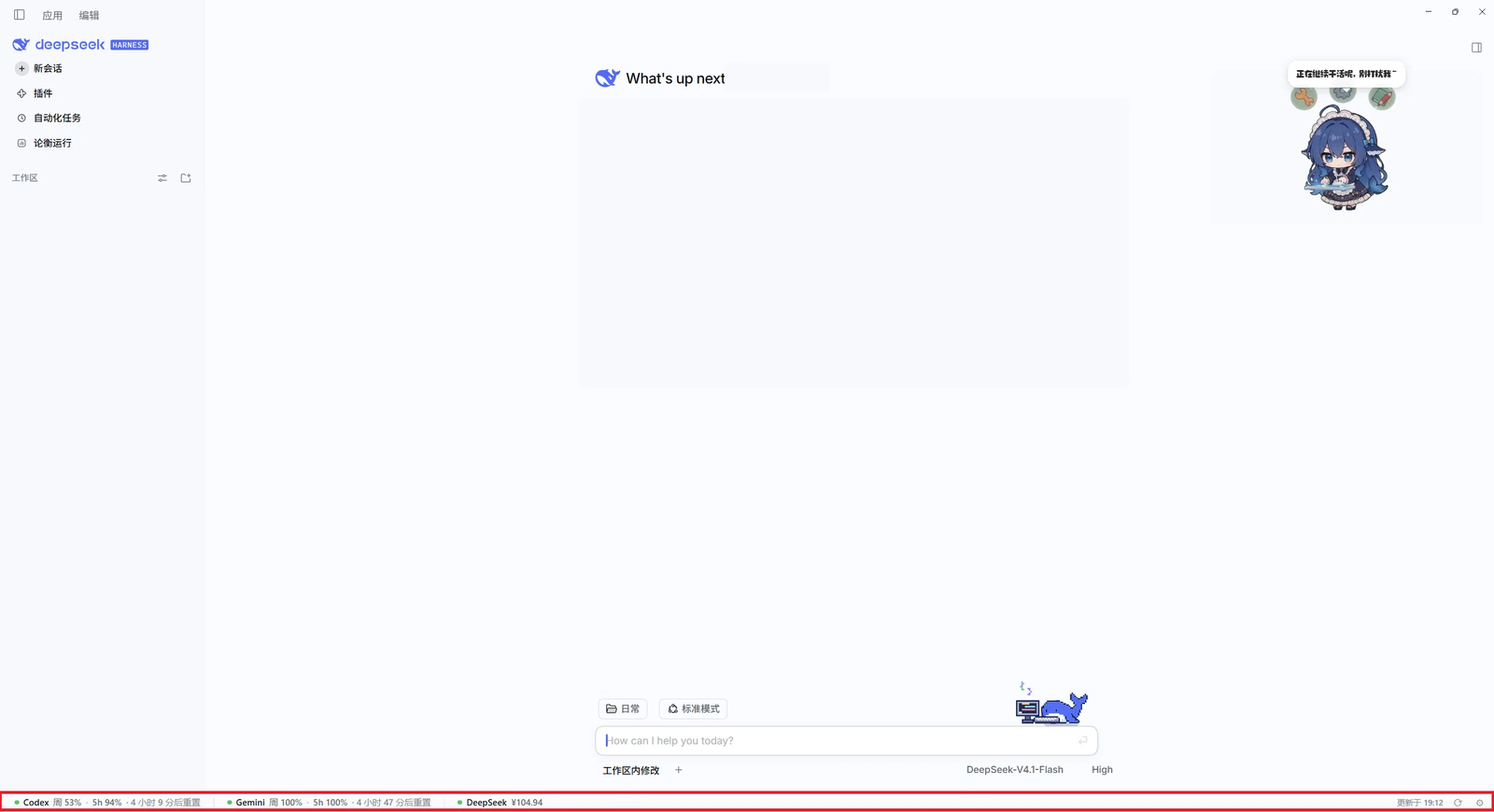
状态条贴在窗口最底部(图中红框处);截图里的侧栏会话名已打码。
● Codex 周 54% · 5h 97% · 4 小时 33 分后重置 │ ● Gemini 周 100% · 5h 100% · 4 小时 35 分后重置 │ ● DeepSeek ¥106.04 更新于 18:49 ⟳ ⚙这条状态条自己不查上游、不持有账号,它只是另外几个东西的「仪表」:
| 格子 | 数据真正来自 | 你需要先做的 |
|---|---|---|
| Codex | dsh-codex-subscription 插件里已登录的 ChatGPT / Codex 账号 |
在那个插件里登录 Codex 订阅账号 |
| Gemini | dsh-gemini-pool 插件账号池里已登录的 Google 账号 |
在那个插件里登录 Google 账号 |
| DeepSeek | DSH 平台账号的充值钱包(充值 + 赠金) | 在 DSH 里登录平台账号 |
没有装、没有登录、token 过期,对应格子只会显示「未登录 / 不可用」——这是如实反映,不是故障。 如果你不用 Codex 或 Gemini,把那一格关掉即可,不会产生任何请求。
dsh plugin add github:GuoruiC/dsh-quota-bar装完重启 DSH(bundle 在宿主启动时装配)。之后界面底部出现状态条。
也可以从市场安装:在 DSH 里打开 插件 → 发现,搜索 quota 或 dsh-quota-bar。
两个入口,同一份设置:
状态条右侧 ⚙ 展开的开关条;
设置 → 额度条。
关掉某个来源后,它既不显示,也不再发起任何请求——Codex 不调 RPC、Gemini 不 fetch、DeepSeek 不调账号服务。不是「请求了但藏起来」。
开关存在浏览器 localStorage(dsh.quota-bar.sources.v1),刷新与重启后保留。
三个全关时,状态条保留一行「额度来源已全部关闭」和 ⚙,方便随时开回来。
首次运行自动探测一次:把返回「未登录」的来源自动关掉,避免给没账号的人每 60 秒打一次必然失败的接口。之后不会再自动改动。

windowSeconds 判断,不按位置),
每个窗口显示剩余百分比;重置倒计时取该来源最近的一个窗口。≤0 红、<¥20 琥珀、其余绿。⟳ 立即强制刷新已开启的来源;平时 Codex / Gemini 每 60 秒、DeepSeek 每 10 分钟自动刷新一次。/api/codex-subscription/usage、/antigravity/api/status,
以及 DSH 账号服务 remote.account.getBalance(由宿主代为访问平台)。没有第三方上报、没有遥测。~/.dsh 下的凭据。lib/client.js,没有任何压缩或混淆。| 提供方 | 接口 | 读取字段 |
|---|---|---|
| Codex | POST /api/codex-subscription/usage(经 connection.rpc) |
usage.rateLimits(分组数组)→ id === 'codex' → windows[] 的 remainingPercent / windowSeconds / resetsAt |
| Gemini | GET /antigravity/api/status |
当前账号 quota.groups[].buckets[] 的 remainingFraction / window / resetTime |
| DeepSeek | ctx.remote.account.getBalance(client) |
快照 value(充值钱包)+ bonusWallets(赠金),同币种累加 |
三者都是各自插件在设置页里已经在用的公开接口,本插件不复制、不缓存它们的业务状态。
remote.account 是账号插件提供的命名空间,不写成硬依赖:每次轮询再取一次,账号服务晚就绪也能自己接上。
shell.bottom 槽位与客户端插件能力的 DSH(在 2026-11 的 DSH Desktop 构建上开发与验证)。node scripts/smoke.mjs # 离线冒烟:假 module loader + 假 React,验证槽位注册与三条解析路径
node scripts/install.mjs # 本机安装(复制到 $DSH_HOME/plugins + 注册进桌面 profile)lib/client.js 是浏览器半侧(window.__ModuleLoader__.load 包装,DSH 按 package.json 的
dsh.client 挂到 /plugins/dsh-quota-bar/client.js);lib/index.js 是宿主半侧空壳。
shell.bottom 是 root 级单占位槽位,若别的插件也往这里挂会冲突。usage 有内部缓存,⟳ 才会强制拉取。localStorage),换机器 / 清缓存会回到默认(三个全开 + 重新探测)。A persistent bottom strip for DeepSeek Harness showing remaining Codex / Gemini quota (weekly and 5-hour windows with reset countdown) and the DeepSeek platform wallet balance.
It is a read-only display: Codex and Gemini values come from accounts already signed in through
the dsh-codex-subscription and dsh-gemini-pool plugins — this plugin owns no accounts and cannot
sign in for you. Each source can be switched off from ⚙ on the bar or Settings → Quota Bar; a
switched-off source is not rendered and makes no request at all. The first run probes once and
turns off sources that report a signed-out state.
Install with dsh plugin add github:GuoruiC/dsh-quota-bar, then restart DSH. No telemetry, no
third-party endpoints: it only talks to the local DSH host.
MIT © GuoruiC
CLASSIFICATION EVIDENCE
系统优先读取 GitHub Topics,再与站内分类词典和词根规则比对。当前命中: deepseek-harness。
morluto
Reverse engineer anything with agents, from app behavior down to native binaries.

deepseek-ai
DeepSeek Harness: Everything is a Plugin.

nexu-io
The 1st Collaborative AI Design Agent Workspace. Local-first and open source. Create motion, prototypes, websites, apps, dashboards, presentations, images, and videos with your team and AI agents. Share work, exchange feedback, and iterate together in one workspace.