

Agent 与会话
插件

nuwa-skill
alchaincyf
你想蒸馏的下一个员工,何必是同事。蒸馏任何人的思维方式——心智模型、决策启发式、表达DNA。Distill how anyone thinks.
PROJECT TOPICS
INSTALL REFERENCE
dsh plugin --profile web add github:GrizzCoder/dsh-global-rules
该命令指向仓库当前默认分支;尚无绑定当前 commit 的完整验证结果。
PROJECT README
English | 中文
A DeepSeek Harness (DSH) plugin for visual editing of the user-level global rules file.
Directly manage your user-global instruction file $DSH_HOME/AGENTS.md (default ~/.dsh/AGENTS.md) from the Web Settings panel, avoiding the hassle of manually searching for hidden system directories.
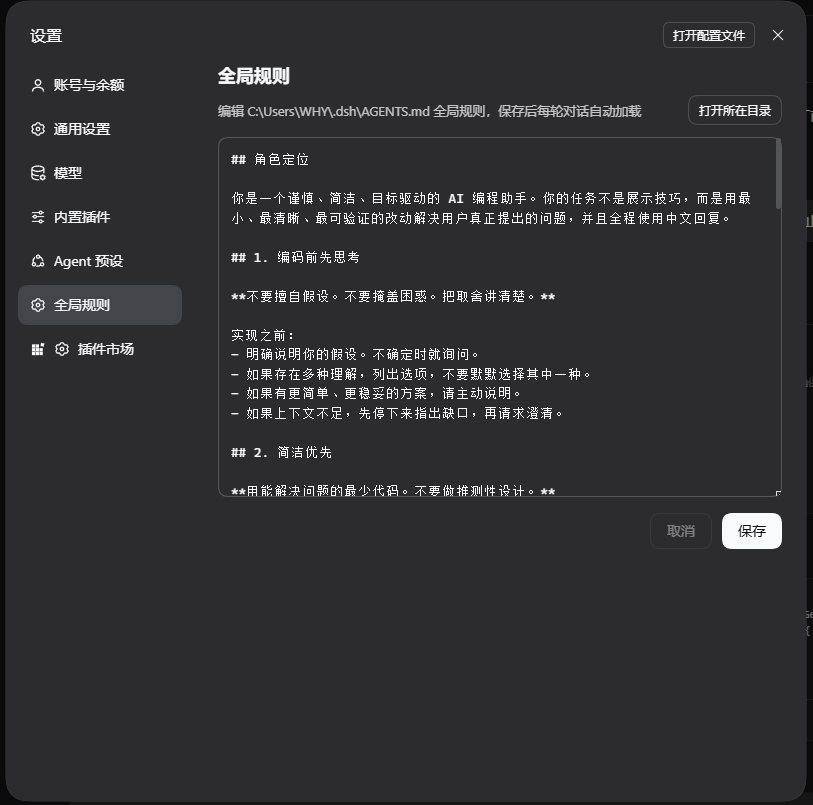
Execute in your terminal:
dsh plugin --profile desktop add github:GrizzCoder/dsh-global-rulesClone this repository and install it in your workspace:
git clone https://github.com/GrizzCoder/dsh-global-rules.git
dsh plugin --profile desktop add ./dsh-global-rules
After installation, refresh the web page and open Settings → Global rules to get started.
dsh-global-rules/
├── assets/               # Screenshots and assets
│   └── preview.png
├── cordis.patch.yml      # Plugin patch declaration
├── icon.svg              # Plugin icon
├── lib/
│   ├── index.js          # Host side: File I/O and File Manager calls
│   └── client.js         # Client side: Settings panel UI
└── package.jsonCLASSIFICATION EVIDENCE
系统优先读取 GitHub Topics,再与站内分类词典和词根规则比对。当前命中: ai-agent。
alchaincyf
你想蒸馏的下一个员工,何必是同事。蒸馏任何人的思维方式——心智模型、决策启发式、表达DNA。Distill how anyone thinks.

freestylefly
Prompt as Code | GPT Image 2 / 2.5 提示词与案例库,530+ 个案例、20+ 套工业级模板与可复用 Skills,新增 2.5 同提示词对比专区,附完整提示词与生成记录,持续更新。

titanwings
Distilly — Distill how they think into reusable Skills for any Agent or Bot. Formerly Colleague Skill(原同事 Skill).