
模型与 MCP
待识别

rea
morluto
Reverse engineer anything with agents, from app behavior down to native binaries.
PROJECT TOPICS
INSTALL REFERENCE
dsh plugin --profile web add github:GrapeCityXA/dsh-plugin-spreadjs-editor
该命令指向仓库当前默认分支;尚无绑定当前 commit 的完整验证结果。
PROJECT README
中文 · English · GitHub · npm · 版本记录 / Changelog
在 DeepSeek Harness Web UI 的文件树中打开 Excel / SpreadJS 文件,使用 Designer 编辑并保存回工作区。
Open Excel / SpreadJS files from the DeepSeek Harness Web UI file tree, edit them in Designer, and save back to the workspace.
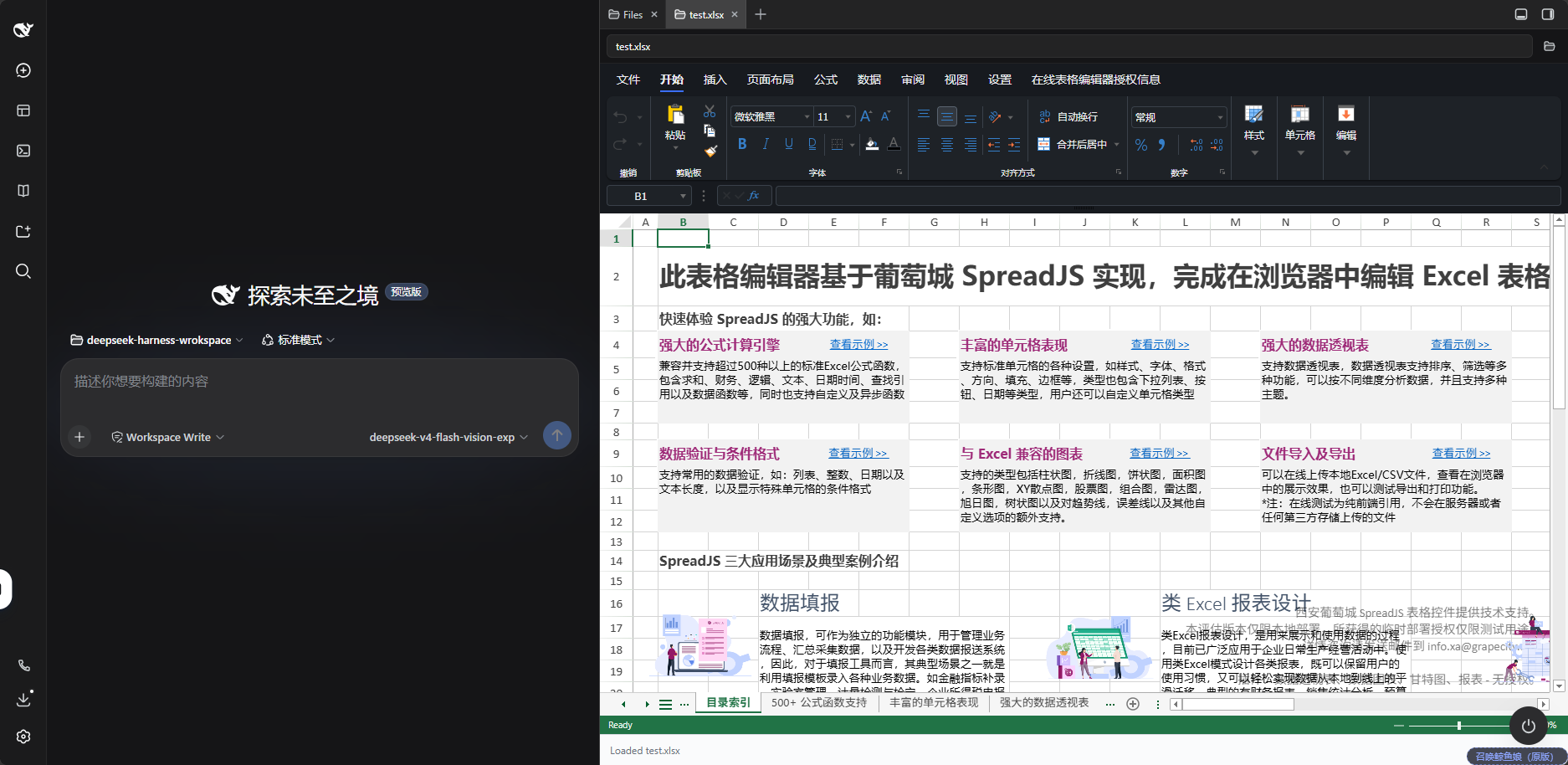
需要 DSH >=0.2.1-rc.3 <0.3.0-0、Node.js ≥22.19。插件内置 SpreadJS 和 Designer 19.2.1,使用 DSH 自带侧栏,无需额外侧栏插件或本地编译。使用前请确认下方的授权要求。
dsh plugin --profile web add @grapecity-software/dsh-spreadjs-editor@0.2.9
dsh --profile web
安装后重启 DSH,在 Web UI 右侧文件树中打开 .xlsx、.xlsm、.csv、.sjs 或 .ssjson 文件。
若插件未生效,检查当前 profile 的 dsh.profile.bundles 中是否已启用该插件。升级说明见 CHANGELOG。
Ctrl+S 写回原文件;「另存为…」写到工作区的另一路径,不覆盖已有文件。Designer 自带的「文件」标签已隐藏,其新建、导入、导出、打印等入口暂不可用。低版本 SpreadJS 可能无法打开本版本保存的 .sjs / .ssjson 文件,与旧系统交换文件时请保留原文件并确认兼容性。
Editor 可以独立使用。需要 AI 操作工作簿时,将 SpreadJS Driver 安装到同一个 web profile:
dsh plugin --profile web add @grapecity-software/dsh-spreadjs-driver@0.1.5重启 DSH,在「设置 → 电子表格编辑器」中选择 SpreadJS Driver,即可让 AI 打开和修改当前聊天中的工作簿。选择「不使用」可停用 Driver。
AI 改动默认不落盘,可通过工具请求保存或手动保存。执行期间暂停手动编辑;取消不会撤销已产生的改动,已发送的写入仍可能完成。第三方 Driver 接入及执行规则见桥接契约。
插件代码采用 MIT 许可证,不包含 SpreadJS 或 Designer Component 的商业授权。两个组件需要分别配置适用的授权;无 key 本地试用仅限供应商试用条款允许的 HTTP(S) 回环环境。正式部署或 SaaS 服务需获取适用于实际场景的授权。
桌面环境需要同时覆盖 SpreadJS 和 Designer Component 的适用无限制授权;没有该授权,桌面版无法使用本编辑器。 详见桌面授权策略。
在 web profile 的 cordis.patch.yml 中更新已有的 spreadjs-editor 配置项,保留其他字段:
- id: spreadjs-editor
  config:
    licenseKey: 'YOUR_SPREADJS_KEY'
designerLicenseKey: 'YOUR_DESIGNER_KEY'| 配置项 | 默认值 | 说明 |
|---|---|---|
licenseKey |
'' |
SpreadJS 授权 key |
designerLicenseKey |
'' |
Designer Component 授权 key |
maxSaveBytes |
67108864 |
单次保存上限,默认 64 MiB;超出时拒绝保存 |
trustedHosts |
[] |
除回环地址外,额外允许调用保存接口的地址;通过局域网访问时配置 |
修改后重启 DSH 并重新打开文件。bridge 由「电子表格编辑器」设置页管理,无需手写。初始化失败时可查看编辑器内的错误提示,修正配置后重新打开文件。
Requires DSH >=0.2.1-rc.3 <0.3.0-0 and Node.js ≥22.19. The plugin bundles SpreadJS and Designer 19.2.1 and uses DSH's built-in sidebar. No additional sidebar plugin or local build is needed. Check the licensing requirements before use.
dsh plugin --profile web add @grapecity-software/dsh-spreadjs-editor@0.2.9
dsh --profile web
Restart DSH after installation, then open an .xlsx, .xlsm, .csv, .sjs, or .ssjson file from the Web UI's right-side file tree.
If the plugin does not appear, check that it is enabled in the active profile's dsh.profile.bundles. See the changelog for upgrade notes.
Ctrl+S to write back to the original file. Save As… writes to another workspace path without overwriting an existing file.Designer's File tab is hidden, so its New, Import, Export, and Print entries are unavailable. Older SpreadJS versions may not open .sjs / .ssjson files saved by this version; keep originals and check compatibility when exchanging files with older systems.
The Editor works independently. To let AI operate on workbooks, install the SpreadJS Driver in the same web profile:
dsh plugin --profile web add @grapecity-software/dsh-spreadjs-driver@0.1.5Restart DSH and select SpreadJS Driver under Settings → Spreadsheet Editor. AI can then open and edit workbooks in the current chat. Select None to disable the Driver.
AI edits are not saved by default; a tool can request a save, or you can save manually. Manual editing is paused during execution. Cancellation does not undo edits already made, and a write already sent may still complete. See the bridge contract for third-party integration and execution rules.
The plugin code uses the MIT license. SpreadJS and Designer Component commercial licenses are not included. Configure applicable license keys for each component. Keyless local evaluation is limited to HTTP(S) loopback environments permitted by the vendor's trial terms. Production and SaaS deployments require licenses appropriate to their use.
Desktop use requires unrestricted licenses applicable to that environment and covering both SpreadJS and Designer Component. Without them, the editor cannot be used in the desktop app. See the desktop licensing policy.
Update the existing spreadjs-editor entry in the web profile's cordis.patch.yml, preserving its other fields:
- id: spreadjs-editor
  config:
    licenseKey: 'YOUR_SPREADJS_KEY'
designerLicenseKey: 'YOUR_DESIGNER_KEY'| Key | Default | Description |
|---|---|---|
licenseKey |
'' |
SpreadJS license key |
designerLicenseKey |
'' |
Designer Component license key |
maxSaveBytes |
67108864 |
Save size limit, 64 MiB by default; larger saves are refused |
trustedHosts |
[] |
Extra addresses allowed to call the save endpoint beyond loopback; configure for LAN access |
Restart DSH and reopen the file after changing configuration. The Spreadsheet Editor settings page manages bridge; no manual entry is needed. If initialization fails, review the editor's error message, correct the configuration, and reopen the file.
使用 pnpm 和仓库中的 pnpm-lock.yaml 安装依赖。开发依赖固定在 DSH 0.2.1-rc.4;兼容范围内的 patch / RC 不逐个发版适配,扩展到新的 DSH 次版本前先验证 API 和运行行为。
Install dependencies with pnpm and the committed pnpm-lock.yaml. Development dependencies are pinned to DSH 0.2.1-rc.4. Patch / RC updates within the declared range do not require individual plugin releases. Verify APIs and runtime behavior before extending support to a new DSH minor.
pnpm install --frozen-lockfile
npm run typecheck
npm test
npm run build
node scripts/smoke-client.mjs
node scripts/smoke-node.mjs
npm run verify:package
npm run probe:live 可验证运行中 DSH 的真实保存、冲突和工作区边界;运行前需重启 DSH 加载当前构建。支持 --url(默认 http://127.0.0.1:3080)、--session、--home 参数,使用 npm run probe:live -- <参数> 传入。探针会创建并删除一个临时文件。
npm run probe:live checks real saves, conflicts, and workspace boundaries against a running DSH. Restart DSH on the current build first. Pass --url (default http://127.0.0.1:3080), --session, or --home via npm run probe:live -- <options>. The probe creates and deletes a temporary file.
开发文档 / Development docs: 发布流程 / Release workflow · 手工回归 / Manual regression.
CLASSIFICATION EVIDENCE
系统优先读取 GitHub Topics,再与站内分类词典和词根规则比对。当前命中: deepseek-harness。
morluto
Reverse engineer anything with agents, from app behavior down to native binaries.

deepseek-ai
DeepSeek Harness: Everything is a Plugin.

nexu-io
The 1st Collaborative AI Design Agent Workspace. Local-first and open source. Create motion, prototypes, websites, apps, dashboards, presentations, images, and videos with your team and AI agents. Share work, exchange feedback, and iterate together in one workspace.