
模型与 MCP
待识别

rea
morluto
Reverse engineer anything with agents, from app behavior down to native binaries.
PROJECT TOPICS
INSTALL REFERENCE
dsh plugin --profile web add github:GooDAnDReaDY/dsh-ollama-cloud-provider
该命令指向仓库当前默认分支;尚无绑定当前 commit 的完整验证结果。
PROJECT README



|
⭐ If you like this plugin, please star it on GitHub — it shows me that the plugin is useful to you and motivates me to keep developing it.
🐛 If you find a bug or would like to request a feature, open a GitHub issue in any language — I will review your proposal and implement useful suggestions in a future plugin version. |
Ollama Cloud provider plugin for DeepSeek Harness (dsh).
It registers one native LLM route, ollama-cloud, served by https://ollama.com, with two wire protocols:
| Transport | Endpoint | When |
|---|---|---|
native (default) |
POST /api/chat |
thinking, tool calls, usage counters |
openai-chat |
POST /v1/chat/completions |
OpenAI-compatible deployments and fallback |
Requests resolve the key per call, so a changed credential reaches the next request without a restart.
When the web service is present, the plugin registers Ollama Cloud as both a
search and a fetch provider (id: ollama-cloud). It calls
POST <apiBase>/api/web_search and POST <apiBase>/api/web_fetch with the same
credential reference as chat. Requests fail closed on redirects, retry one
transport/timeout failure, cap search results at 10 and fetched text at 256 KiB.
Select it in the profile:
- id: web
  config:
    searchProvider: ollama-cloud
fetchProvider: ollama-cloudgraph LR
subgraph DSH["DeepSeek Harness Core"]
Agent["DSH Agent / Chat"]
Creds["Credentials / launch env"]
end
subgraph Plugin["dsh-ollama-cloud-provider"]
Router{"Route: ollama-cloud"}
Pool["Account pool<br/>rotation, cooldowns, sticky"]
Catalog["Live catalog<br/>/v1/models + /api/tags"]
Usage["Balance & usage<br/>/api/balance + /api/usage"]
subgraph Transports["Wire protocols"]
T1["Native /api/chat (NDJSON)"]
T2["OpenAI /v1/chat/completions (SSE)"]
end
end
subgraph Ollama["Ollama Cloud"]
Chat["ollama.com/api/chat"]
OpenAI["ollama.com/v1/chat/completions"]
Billing["/api/balance, /api/usage"]
end
Agent --> Router
Creds -.-> Pool
Router --> Pool
Pool --> Transports
T1 --> Chat
T2 --> OpenAI
Catalog --> Router
Usage --> BillingGET /v1/models, enriched with capability flags from GET /api/tags./api/balance and /api/usage endpoints: included credits, purchased credits, 24-hour / 7-day / 30-day spend, and spend by model./state while disabled): a ring with the highest used window and rows with remaining credits or legacy windows; an optional planLabel is shown next to the provider name./ollama command for status, usage, balance, accounts, models, rules and test [model].0.2.0-rc.2 || >=0.2.1-rc.2 <0.2.3-0 || >=0.2.2-0 <0.2.3-0 (desktop and web profiles).>=22.0.0.Build and pack first:
npm install
npm run build
npm pack
Install the published package:
dsh plugin --profile web add @goodandready/dsh-ollama-cloud-provider@0.1.39
# DSH Desktop:
dsh plugin --profile desktop add @goodandready/dsh-ollama-cloud-provider@0.1.39
Or install the packed tarball into a profile:
dsh plugin --profile web add /absolute/path/to/goodandready-dsh-ollama-cloud-provider-0.1.39.tgz
# DSH Desktop:
dsh plugin --profile desktop add /absolute/path/to/goodandready-dsh-ollama-cloud-provider-0.1.39.tgz
Restart dsh (or DSH Desktop), then pick Ollama Cloud in the model picker.
Use the tarball, not the directory. On dsh 0.2.1-rc.2/rc.3 the Desktop CLI aliases a local directory passed to
dsh plugin addand overwrites the target'spackage.json.
- id: llm-ollama-cloud
  name: "@goodandready/dsh-ollama-cloud-provider"
  config:
    apiKeyEnv: OLLAMA_API_KEY      # default
    # apiKey: ...                  # composition only, never commit
    transport: native              # native | openai-chat
    requestTimeoutMs: 300000
    streamIdleTimeoutMs: 300000
    visibleModels: []
    modelTransports: {}
    # contextWindowOverrides: { "model-id": 131072 }
    # maxOutputTokens: 32768
    accounts:
      - label: Work
        apiKeyEnv: OLLAMA_API_KEY_2
    activeAccount: ''              # label or credential name to pin
    stickySession: true
    showSidebarQuota: false
    planLabel: ''                  # optional, e.g. PRO
Every field except apiKey is volatile and appears in dsh settings.
config.apiKey (composition only, role('secret')).apiKeyEnv (default OLLAMA_API_KEY)..env, $DSH_HOME/.env).Create a key at https://ollama.com/settings/keys. Keys do not expire; x-api-key is not accepted, only Authorization: Bearer.
Add a second account in Settings → Ollama Cloud → Accounts: give it a name and a credential reference (for example OLLAMA_API_KEY_2), paste its key, then Save. The default account always serves first unless activeAccount pins another one.
Rotation happens before any content is streamed. When the serving key is rejected with an invalid credential, a rate limit or an exhausted quota, the adapter marks that key and retries the same request with the next usable account. A request that already started streaming is not replayed. Cooldowns are stored in ~/.dsh/storages/dsh-ollama/cooldowns.json keyed by a SHA-256 fingerprint — raw keys are never written. Authentication rejections (401/403) cool keys for 5 minutes instead of locking them for a day, and quota rejections follow provider Retry-After headers. Cooldowns can be cleared at any time via the Reset cooldowns button in the Accounts card or by sending POST /dsh-ollama/cooldowns/reset.
Pin a model to a preferred account with a glob. The first matching rule wins; * and ? are supported and matching is case-insensitive. Other accounts remain fallbacks.
modelAccountRules:
  - pattern: "*flash*"
account: "Work"The plugin uses the documented cloud endpoints:
GET /api/balance → included.balance_usd / included.allowance_usd / included.period and purchased.balance_usd. Legacy accounts return included.session.remaining_percent and included.weekly.remaining_percent; both formats are displayed.GET /api/usage?range=24h|7d|30d&group_by=model → totals and per-model groups with request count, USD, input, cached input and output tokens./api/usage is limited to 10 requests per minute per user, so the reader caches each range (balance 60 s, usage 120 s, failures 30 s) and never polls in the background. Quota failures are fail-open: chat never depends on them.
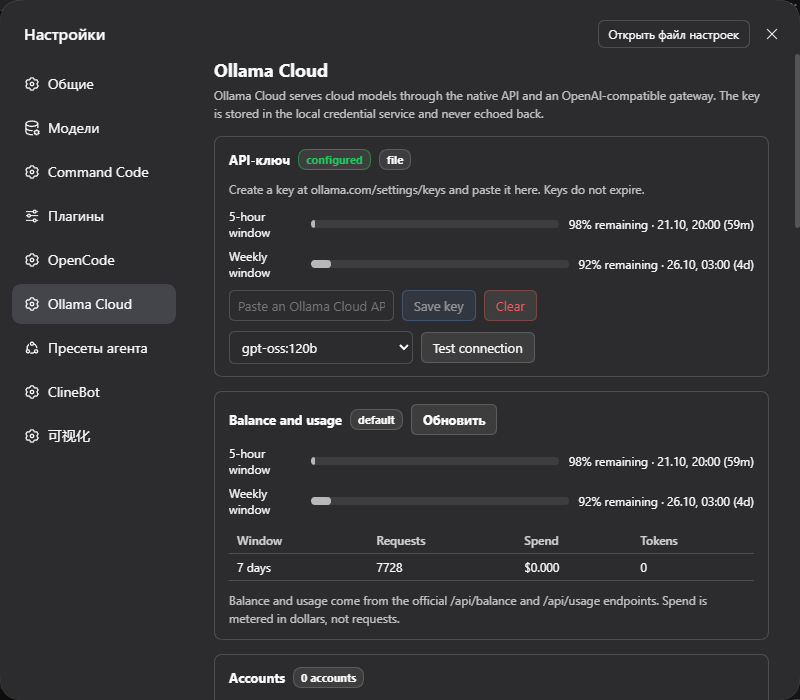
Open Settings → Ollama Cloud:
PRO) shown next to the provider name.The Host serves /dsh-ollama/state, /health, /status, /analytics, /usage, /balance, /config, /key, /key/clear, /refresh, /models/refresh, /test and /update. /status probes the public tag endpoint without a key or quota. Writes require JSON, an Origin or Referer matching Host (the Desktop renderer is identified by its dsh-auth-* cookie and desktop user agent when both headers are absent), and are restricted to loopback (127.0.0.1 / ::1); a write without any source identity is rejected with 403.
/ollama status            # provider, accounts, quota and model count
/ollama usage             # 7-day spend windows and spend by model
/ollama balance           # included and purchased credits
/ollama accounts          # labels, source, active/cooling, 7-day spend
/ollama models            # ids, price, context, capabilities
/ollama rules             # model → account rules
/ollama test [model] # minimal real requestChecked live on 2026-10-21:
GET https://ollama.com/v1/models is public and returns data[] plus a non-standard models[] array carrying context_window, max_context_window, input_modalities, supported_reasoning_levels, default_reasoning_level, visibility and supported_in_api.GET https://ollama.com/api/tags is public and is the only per-model source of capabilities (completion, tools, thinking, vision)./api/chat streams NDJSON and reports prompt_eval_count, prompt_eval_cached_count, eval_count and done_reason in the final line./v1/chat/completions supports streaming, tools, vision, reasoning_effort and stream_options.include_usage./v1/messages) exists but is partial; this plugin does not use it.npm run typecheck
npm test
npm run build
npm run check # typecheck + tests + build
npm run release # check + packed tarball
node scripts/probe.mjsscripts/probe.mjs is read-only against the public catalog; with OLLAMA_API_KEY set it also probes chat, balance and usage and prints the raw shapes.
The Ollama Cloud settings page in DSH Desktop (dark theme): configured credential, balance and usage, and the connection probe.
Origin/Referer and the host authentication check; a DNS name is never treated as loopback.http(s) without embedded credentials or fragments; link-local and metadata addresses are refused./status is cached for 10 seconds, while refresh, test and endpoint-discovery routes are single-flight and rate-limited.http://localhost:11434 is not registered as a route.embedding capability./ollama command and the model route.MIT © GooDAnDReaDY. See LICENSE and NOTICE.
CLASSIFICATION EVIDENCE
系统优先读取 GitHub Topics,再与站内分类词典和词根规则比对。当前命中: ollama、deepseek-harness。
morluto
Reverse engineer anything with agents, from app behavior down to native binaries.

deepseek-ai
DeepSeek Harness: Everything is a Plugin.

nexu-io
The 1st Collaborative AI Design Agent Workspace. Local-first and open source. Create motion, prototypes, websites, apps, dashboards, presentations, images, and videos with your team and AI agents. Share work, exchange feedback, and iterate together in one workspace.