模型与 MCP
待识别

rea
morluto
Reverse engineer anything with agents, from app behavior down to native binaries.

GULI-lab/DSH-element-source
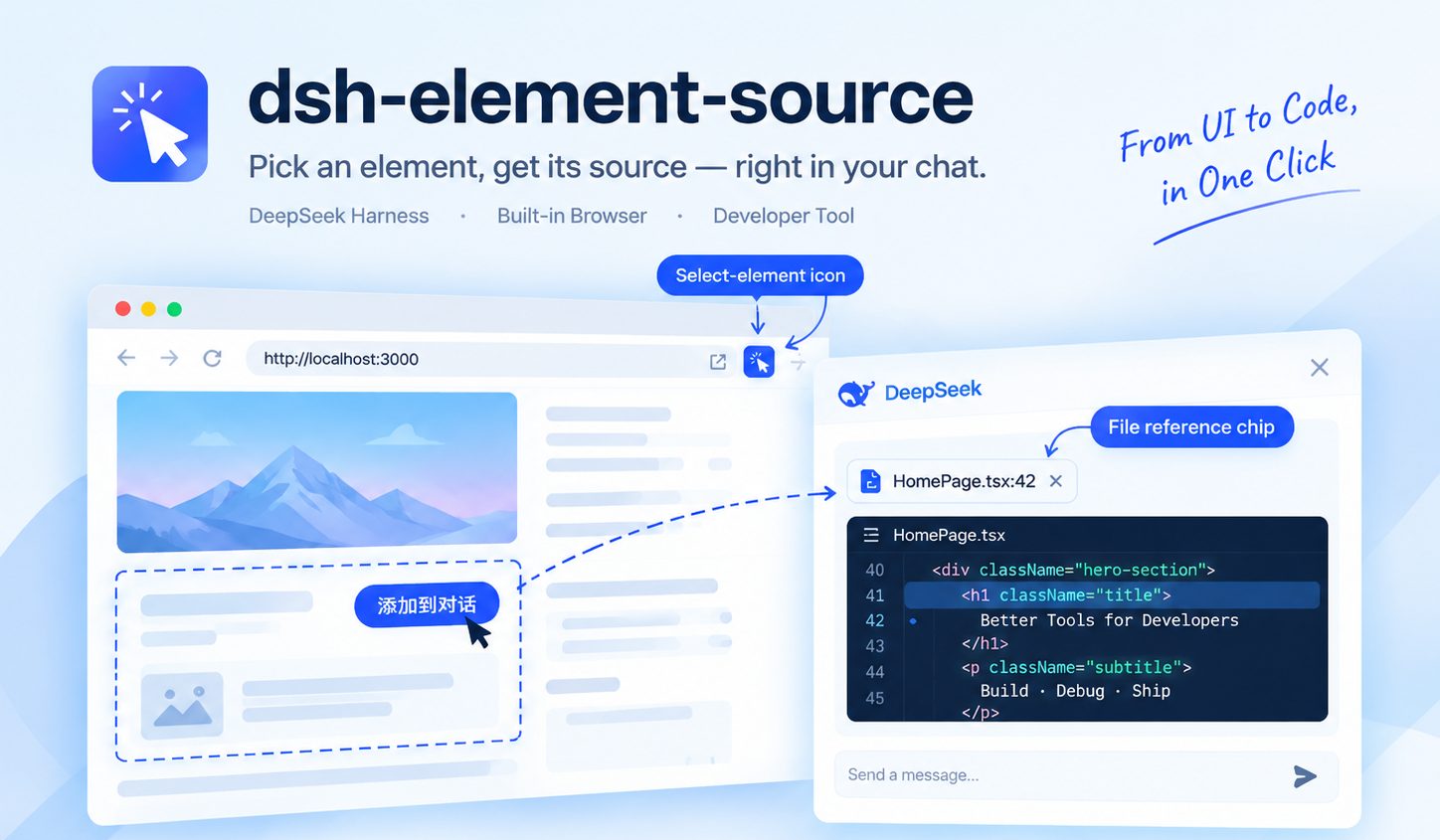
DSH 内置浏览器点击定位源码:点任意 UI 元素,Vue / React / Svelte / Angular 源码文件+行号直达 DSH 聊天,交给助手微调。Click-to-source in the DSH built-in browser: click any UI element to send its Vue / React / Svelte / Angular source file and line number straight to the DSH chat for the assistant to fine-tune.
PROJECT TOPICS
INSTALL REFERENCE
dsh plugin --profile web add github:GULI-lab/DSH-element-source
该命令指向仓库当前默认分支;尚无绑定当前 commit 的完整验证结果。
PROJECT README
Click-to-source for the DeepSeek Harness built-in browser.
Open your frontend dev page in DSH's built-in browser, turn on the picker from the browser's own toolbar, then click the 「添加到对话」 pill on the element you want. The element's source file — with its line — lands in the current session's chat composer as a file reference chip, and clicking that chip opens the built-in preview scrolled to the exact line. Nothing is sent until you send it.




English | 中文
This release is a deliberate reset of the plugin's product surface: it is built for the DeepSeek Harness built-in browser and nothing else.
desktop.Why remove the old preview? The built-in browser already provides the address bar, tabs, history, cookies and the Electron session. A second iframe/proxy duplicated that surface and competed with dsh-better-sidebar for the same slot. The plugin now does two things only: add the picker to the browser toolbar, and hand the located file to the current chat composer.
| Requirement | Details |
|---|---|
| DSH | DSH desktop app 0.2.x with the built-in browser. The web-only dsh web page has no Electron <webview>, so no picker appears there. |
| Frontend | A running dev server (Vite, webpack, etc.) and a development build of your page. |
| Workspace | The current session's working directory must be your frontend project root. The resolver refuses files outside it. |
| Framework | React, Vue 2/3, Svelte, Angular, code-inspector, or the generic text-search fallback. |
Production builds carry no runtime source metadata, so the picker only appears on development pages.
One command, into the desktop profile:
macOS / Linux:
curl -fsSL https://raw.githubusercontent.com/GULI-lab/DSH-element-source/main/scripts/install.sh | DSH_PROFILE=desktop bashWindows PowerShell 5.1+ / pwsh:
$env:DSH_PROFILE = "desktop"
irm https://raw.githubusercontent.com/GULI-lab/DSH-element-source/main/scripts/install.ps1 | iex
Manual install:
cd ~/.dsh/profiles/desktop
npx -y --package @deepseek-ai/dsh dsh plugin --profile desktop add dsh-element-source
If your desktop app uses a differently named profile, substitute that profile for
desktop. After installing, restart DSH or reload the desktop app window so the
client half is loaded.
Local checkout:
git clone https://github.com/GULI-lab/DSH-element-source
cd ~/.dsh/profiles/desktop
npx -y --package @deepseek-ai/dsh dsh plugin --profile desktop add link:/path/to/DSH-element-sourcehttp://localhost:3000.LoginPage.tsx:90.Press Esc or click the toolbar icon to turn the picker off; page clicks work
normally again. The icon color and tooltip reflect the current state.
The picker is deliberately active while you inspect the page: ordinary clicks and the context menu are swallowed, and the pill is the only pick target. If you need to interact with the page, press
Escor toggle the toolbar icon first.
LoginPage.tsx:90, using the
same @path mention semantics as the built-in @ file menu. The chip
serializes as the @path:90 mention, so the agent receives the located line;
it is clickable and jumps to the line in the built-in preview.[元素定位] src/App.vue:12 text is appended to the draft.autoSteer: true only if you want the
session agent to be woken with a bilingual located-source message immediately
after a pick.Override the plugin row in your profile's cordis.patch.yml:
- id: element-source
  config:
    autoSteer: false        # wake the agent after a pick (default false: only fill the composer draft)
    mappings:               # source-path prefix mappings (monorepo / node_modules rebasing)
      - find: '@app/ui/src'
        replacement: 'D:/workspace/my-app/packages/ui/src'
    sessionId: 'fixed-session'  # pin a session (usually unnecessary)
autoSteer — false by default. When true, a successful pick also calls the
session agent with a located-source message; it does not send a composer
message for you.mappings — prefix rewrites applied before path normalization. The final path
must still be inside the session workspace.sessionId — pins resolution to one session. By default the current session is
used.proxyHosts is gone. There is no preview proxy anymore.
DSH desktop app
└─ built-in browser <webview>
   ├─ dev page: probe injected on dom-ready / did-navigate / did-navigate-in-page
   │    hover → 「添加到对话」 pill → pick stored in window.__dshEsPicks
   ├─ toolbar: select-element icon appended as the last item (dev pages only;
   │           removed again on a non-development page)
   └─ client overlay polls the webview every 300 ms
        picks → POST /dsh-element-source/api/pick   (public, write-only queue)
        host  → GET  /dsh-element-source/api/pending (trust fence + real session)
                  resolve within session cwd → file[:line[:column]]
        client → file reference chip in the current session composer
                 chip click → built-in file preview scrolled to the line
No page proxy and no second UI stack. The probe is injected directly into the
Electron <webview>, so the page keeps its real origin and its own network
behavior. Resolution is bounded (2.5 s search budget, 60 s result cache) so a
pick in a large monorepo does not stall the composer.
| Framework | File | Line | How |
|---|---|---|---|
| React (dev build) | exact | exact | Reads JSX __source on the fiber (@vitejs/plugin-react / CRA inject it) |
| Vue 2 / Vue 3 (dev build) | exact | approximate | __file gives the file; the line comes from template-text matching |
| Svelte (dev build) | exact | exact | Reads dev-mode __svelte_meta |
| Angular | best effort | best effort | ng-reflect-* markers, then component/text search |
| Any framework + code-inspector-plugin | exact | exact | Reads injected data-insp-* DOM attributes |
| Other / unknown | yes | approximate | Full-text search of the session workspace for text / class / id |
The built-in browser is the supported path and the only one that gets the toolbar icon. If you must inspect a page in a regular browser, load the probe yourself; picks still reach the DSH desktop app through the same host queue.
Option A — script tag:
<script src="http://127.0.0.1:3080/dsh-element-source/inject.js"></script>Option B — Vite plugin:
// vite.config.ts
import { defineConfig } from 'vite'
import { dshElementSourcePlugin } from 'dsh-element-source/vite-plugin'

export default defineConfig({
  plugins: [dshElementSourcePlugin(), /* your other plugins */],
})
The Vite plugin only injects in dev (apply: 'serve'); production builds are
untouched. If your DSH server is not on the default address:
dshElementSourcePlugin({ dshOrigin: 'http://192.168.1.5:3080' })In this mode there is no toolbar icon; the probe starts active on a development page and shows the 添加到对话 pill. The DSH desktop app must be running so the pick is drained into the current session.
POST /dsh-element-source/api/pick is public and CORS-open because the page
runs in an isolated webview. It is write-only: a bounded FIFO queue (32 picks),
no pick data is returned.GET /dsh-element-source/api/pending sits behind the same browser-trust fence
as the DSH /api gateway and requires a real session.cwd; a resolved file outside the
workspace is refused. mappings can rebase a path but cannot escape the
workspace.inject.js is public read-only probe code. It collects element metadata and
optional framework source metadata; it does not touch DSH data.| Old | New |
|---|---|
| Standalone "Local preview" tab / right sidebar | DSH built-in browser only |
| dsh-better-sidebar integration | Removed; not supported |
GET /dsh-element-source/preview proxy |
Removed (404) |
proxyHosts config |
Removed |
Install into web profile |
Install into desktop profile |
| Pick inserted plain text into the composer | File reference chip (+ plain-text fallback) |
Keep autoSteer, mappings and sessionId; they still work. A 0.1.x
installation may also leave dsh-better-sidebar behind — remove it separately if
you no longer need it.
| Symptom | What to check |
|---|---|
| No select icon in the browser toolbar | Use the DSH desktop app's built-in browser, not a plain dsh web page. The page must be a development build. Confirm the plugin is installed in the desktop profile, then restart the app. |
| Icon visible, but no 「添加到对话」 pill | The probe may not have activated: the page may be a production build, or it loaded before the plugin. Reload the page and hover again. |
| Pick succeeds, but the composer gets nothing | The current session needs a working directory. Switch the session workspace to the project root and ensure the DSH app is running. |
| Location is refused as outside the workspace | The resolved file is outside the session cwd. Change the session's working directory to the project root. |
| The chip opens the preview at the top instead of the line | The line is remembered per inserted chip for the current app run; a chip restored after an app restart may fall back to a top-of-file open. Re-pick to restore the line jump. |
| dsh-better-sidebar still shows an old "Local preview" tab | That is the old 0.1.x integration. Install the new version, restart, and remove dsh-better-sidebar if it was only used for this plugin. |
autoSteer does not wake the agent |
The session must have a live agent; picking alone never sends a message. |
dsh web UI has no Electron <webview>
pages, so the toolbar icon and probe never appear there.autoSteer only wakes an existing session
agent; it never sends a composer draft for you.pnpm install
pnpm typecheck # tsc --noEmit
pnpm test # vitest: draft / probes / protocol / resolve / steer
pnpm build # tsc types + tsdown artifactsArtifacts: lib/index.js (host), lib/client.js (browser half), lib/inject.js
(page probe), lib/vite-plugin.js (optional Vite injection).
Contributions are welcome. See CONTRIBUTING.md for the development setup and submission flow. Found a bug or have an idea? Open an issue.
MIT © dsh-element-source contributors
CLASSIFICATION EVIDENCE
系统优先读取 GitHub Topics,再与站内分类词典和词根规则比对。当前命中: deepseek、deepseek-harness。
morluto
Reverse engineer anything with agents, from app behavior down to native binaries.

deepseek-ai
DeepSeek Harness: Everything is a Plugin.

nexu-io
The 1st Collaborative AI Design Agent Workspace. Local-first and open source. Create motion, prototypes, websites, apps, dashboards, presentations, images, and videos with your team and AI agents. Share work, exchange feedback, and iterate together in one workspace.