dsh-approval-reason-dock



An additive web-client plugin for DeepSeek Harness that attaches an optional note to either approval decision: a rejection reason, or an allow note. The note is delivered into the running turn as a steering user message before the approval is answered, so the model reads it in its next step instead of guessing why the action was denied — or what constraints came with the permit. Allows are guarded by a confirmation view: the plugin only ships your note, it never widens what the approval authorizes. 0.3.0 adds three optional conveniences on the same client-only path — a brief delivered notice after an allow-with-note, an approval log kept only in this browser, and an update check that prints the command instead of installing anything; the built-in approval card is still never replaced or edited.
中文说明
Preview
Why
Harness approval prompts offer Allow once / Reject only. The result is a closed outcome value with no note channel, so the model gets a bare "the user rejected tool X" — or a bare allow with none of the constraints you meant to attach. Both gaps matter in practice:
- A denial often carries context ("the network is unreliable", "do not touch that file yet") that belongs in the conversation immediately, not in a follow-up turn.
- An allow often carries constraints too ("only change files under docs/", "run
--dry-run first", "send me the diff next turn"). Without a note the model learns them only after the action already ran.
Allowing is also the riskier direction: one click executes the tool call. So the panel asks for confirmation before every allow, explains that allowing runs the call immediately while the plugin itself only delivers the note and does not change the authorization scope, and points partial or conditional approval to Reject with note — DSH approval results are only allow/reject, so conditions have to travel as a rejection reason for the model to redo the step.
This plugin adds a small frame-wide panel on top of the host UI. It does not replace the built-in approval card, does not change the approval protocol or audit events, and fails soft: if the panel cannot render, the built-in card keeps working exactly as before.
Behavior
- While the active session has an answerable approval, a panel appears in the top-right corner (
shell.overlay slot).
- The panel follows the session shown in the main view: only that session's approval is offered, and approvals in other sessions stay quiet until you switch to them. The panel header shows the session title.
- The panel starts expanded and can be collapsed into a semi-transparent “Pending review” pill so it does not cover the conversation; clicking the pill expands it again. Each new approval starts expanded.
- Note drafts are kept per approval, so switching between several sessions with pending approvals does not wipe the text typed for the other one.
- The buttons follow the draft:
- empty input: Allow once / Reject — the native outcomes, no message is sent;
- non-empty input: Allow with note / Reject with note.
- Allow is two steps, with or without a note:
- clicking either allow button opens a confirmation view inside the panel — title, what allowing actually does (the tool call runs immediately; the plugin only delivers your note and does not change the authorization scope), a warning that partial or conditional approval should use Reject with note, the note preview, and Confirm allow / Cancel.
Cancel and Esc return to the input view with the draft kept and the approval still unanswered; Enter does not confirm; repeated clicks submit only once.
- Confirm allow delivers
(approval allow note) <text> (only when a note is present) into the running session as a steering user message (remote.session.prompt with mode: "steer", falling back to mode: "queue" when the turn no longer accepts steering), and only then answers the approval as allowed-once.
- Reject with note skips the confirmation view (the note is the confirmation):
(approval rejection reason) <text> is sent first (steer → queue fallback), then the approval is answered as rejected.
- A note delivery failure blocks the decision. If the note cannot be delivered, the approval is not answered: the panel stays open with a dismissible error, the draft is kept, and retrying re-sends the note. Nothing is allowed (or rejected) without its note.
- A successful allow or reject clears that approval's draft. With delivered notices on (the default), a successful allow-with-note clears the card and keeps its delivered notice until the duration ends; with notices off, the panel closes immediately (0.2.0 behavior).
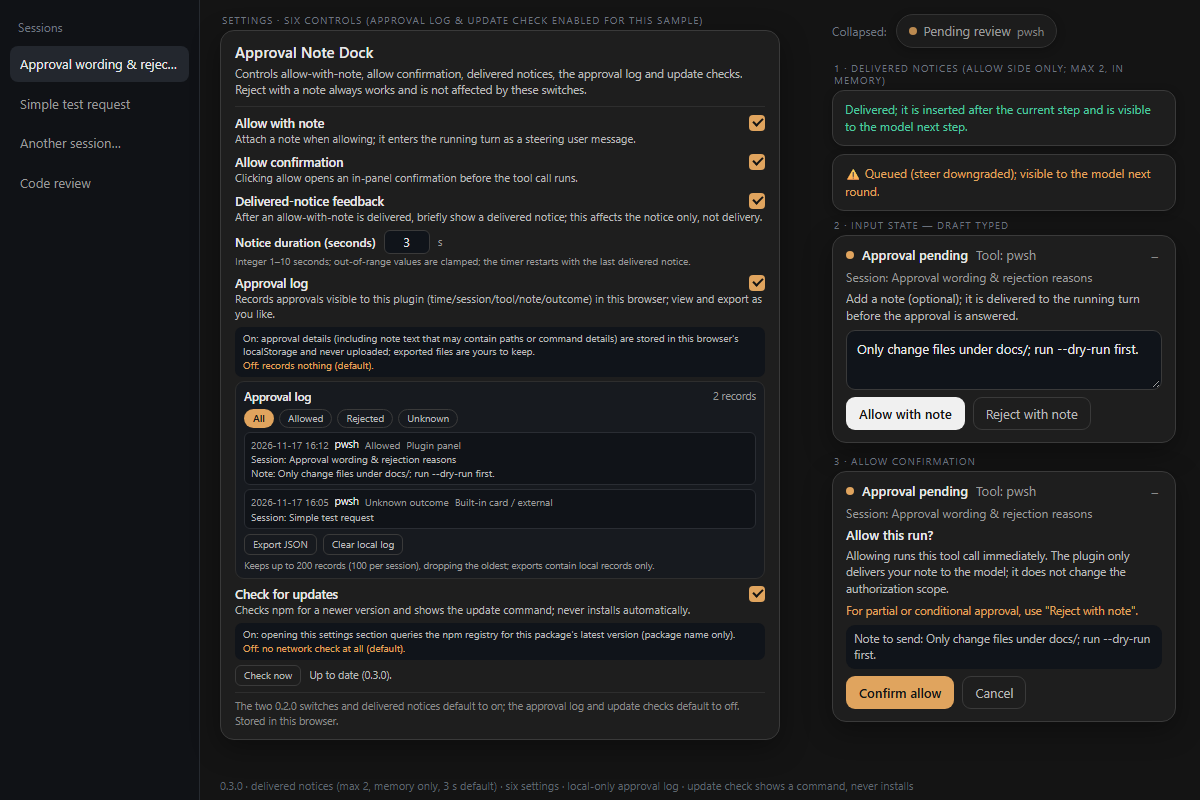
- Delivered notices (allow side only). When an allow-with-note was actually delivered and the approval has been answered, the panel shows a small notice:
- steer delivery: Delivered; it is inserted after the current step and is visible to the model next step.
- queue delivery (steering was unavailable): ⚠️ Queued (steer downgraded); visible to the model next round. — warn-tinted.
Up to two notices stack (newest at the bottom, older ones dropped). They live in memory only and are lost on reload; a new approval card or a session switch does not clear them, and every new delivery restarts the auto-close timer (1–10 s, default 3 s). Rejects never produce a notice, and a failed delivery keeps its retryable error row instead.
- Both allow behaviors — carrying a note and the confirmation step — follow the plugin's allow-side Settings switches; delivered notices only change the feedback, and the log/update-check switches never change delivery. Reject with note is always available and is not affected by them.
Settings
The plugin registers a Settings → Approval Note Dock section with six controls. All are stored in the current browser (localStorage). The two 0.2.0 switches and the delivered-notice switch only change the allow path and its feedback; the approval log records both decisions locally, and the update check only talks to npm. Reject with note always works and is not affected by these switches.
Allow with note
Default: on.
- On: allows can carry a note. With a typed draft the buttons read Allow with note / Reject with note, and the note is delivered into the running turn (steer → queue) before the approval is answered.
- Off: allows carry no note; even with a typed draft the allow button stays Allow once and the draft is not sent. The model only sees a native allow — use Reject with note when you need conditions.
Risks:
- On: the note becomes a normal user message in the session log and model context; if it cannot be delivered, the approval is not answered (retryable).
- Off: allows carry no conditions — the model only sees a native allow; use "Reject with note" instead.
Allow confirmation
Default: on.
- On: clicking allow first opens the in-panel confirmation view (cancelable); the tool call runs only after Confirm allow.
- Off: clicking allow runs the tool call immediately; the confirmation step is skipped.
Risks:
- On: one extra step per allow; frequent approvals feel slower.
- Off: clicking allow runs the tool call immediately; no second line of defense against misclicks.
Delivered notices and duration
Default: on, duration 3 seconds.
- On: after an allow-with-note is delivered and the approval is answered, a Delivered notice appears under the panel and auto-closes after the duration; queued delivery shows the warn-tinted
⚠️ variant instead. At most two notices stack; they are in memory only (a reload drops them), a new card or session switch keeps them, and each new delivery restarts the timer.
- Off: the overlay disappears as soon as the approval is handled (0.2.0 behavior), and any notice currently showing is cleared.
- Duration: whole seconds from 1 to 10; out-of-range values are clamped. Changing it while notices are showing restarts the timer from now. The input is disabled while the notice switch is off.
Risks:
- On: shows a delivered notice that auto-closes after the duration below; notices are in memory only and disappear on reload.
- Off: the overlay disappears as soon as the approval is handled (0.2.0 behavior).
Approval log
Default: off.
- On: records the approvals this plugin can see — time, session, tool, the offered reason/note text and the outcome — in this browser's
localStorage (schema v1, at most 200 records total and 100 per session, oldest dropped; text capped at 500 characters). The settings section lists the newest first, filters by Allowed/Rejected/Unknown, exports the log as JSON and can clear it locally.
- The log only covers what this plugin sees: a decision taken in the built-in card is recorded as Unknown outcome / Built-in card or external, and an entry that is never answered while visible stays Pending. No tool parameter contents are stored.
- Off: records nothing (default). Existing records stay viewable and exportable.
Risks:
- On: approval details (including note text that may contain paths or command details) are stored in this browser's localStorage and never uploaded; exported files are yours to keep.
- Off: records nothing (default).
Check for updates
Default: off.
- On: opening the settings section asks the npm registry for this package's latest version (
https://registry.npmjs.org/dsh-approval-reason-dock/latest — the package name only), compares it with the bundled version, and shows the update command dsh plugin --profile web add dsh-approval-reason-dock@latest when a newer version exists. Automatic checks reuse a result for one hour and fail silently; Check now always rechecks and shows the error if the check fails.
- Off: no network check at all (default).
- It never installs, writes files or restarts DSH.
Risks:
- On: opening this settings section queries the npm registry for this package's latest version (package name only).
- Off: no network check at all (default).
The 0.2.0 switches and delivered notices default to on; the approval log and update checks default to off. Stored in this browser (clearing site data restores the defaults).
Non-invasive by design
This is the plugin's core selling point: it adds a layer; it does not change DSH's security architecture.
- Client-only bundle. No host half, no HTTP routes, no
tools/* hooks — nothing of this plugin runs inside the DSH host process.
- Local by default.
0.3.0 keeps the same client path: delivered notices are memory-only, the approval log is written to this browser's localStorage only (off by default, export explicit), and the update check reads only npm registry metadata and never installs. index.js, exports.inject and dsh.client.inject are unchanged.
- The built-in approval card is never replaced or edited. The approval protocol, audit events, sandbox policy and permission checks stay exactly as shipped. The plugin only reads pending-approval metadata, calls the same
answer() the built-in card calls (allowed-once / rejected), and delivers the note through the normal session prompt path.
- The plugin never widens authorization. The allow confirmation spells this out: allowing runs the tool call exactly as the built-in card would; the note is a hint to the model, not an extra permission. The plugin cannot grant anything beyond the approval being answered.
- Fail-soft. If the panel cannot render or crashes, approvals keep working through the built-in card with native behavior.
- Subagent sessions are left alone. DSH disables approval prompts there and auto-rejects escalation; the plugin never claims those interactions and renders nothing.
- Human-readable trail. The note is an ordinary steering user message, so the transcript records what was rejected/approved and why — useful when a human reviews or debugs a session later.
Install
Requires DSH 0.2.2-rc.1 or a later 0.2.x release (see engines.dsh).
Version match:
| DSH |
Plugin |
Status |
0.2.1-rc.2 |
0.1.0 |
verified stable; 0.1.1 is not supported on this line |
0.2.2-rc.1 |
0.1.1+ |
verified (all 0.1.1 real-machine tests ran here) |
0.2.2-rc.1+ |
0.2.0+ |
verified on the DSH 0.2.2 line (allow note + allow confirmation) |
0.2.2-rc.1+ |
0.3.0 |
same client-only path (delivered notices, local approval log, update check); engines.dsh unchanged |
On DSH 0.2.1-rc.2, install the verified older line explicitly:
dsh plugin --profile web add dsh-approval-reason-dock@0.1.0
Why 0.1.1 does not claim 0.2.1: it needs the client-side uiSession service
declared in exports.inject, and that service was not verified to exist in the
0.2.1 client runner. The DSH plugin manager evaluates engines.dsh for
compatibility, so 0.1.1 may be flagged as incompatible on 0.2.1; pinning
@0.1.0 avoids depending on that check.
0.1.2 was a documentation/market-sync release with runtime behavior identical
to 0.1.1. 0.2.0 adds the allow note and the allow confirmation on top of the
same non-invasive client path; engines.dsh and the client inject set are
unchanged. 0.3.0 adds delivered notices, the local approval log and the update
check on that same path; engines.dsh, the client inject set and the empty host
half are unchanged too.
Install with the DSH CLI (npm package):
dsh plugin --profile web add dsh-approval-reason-dock
Preferred: install the bundle from the DSH UI (Plugin Manager → install bundle) using the npm package name or the GitHub spec:
dsh-approval-reason-dock
github:FzqxDedafeiyu/dsh-approval-reason-dock
Or from GitHub source with the CLI:
dsh plugin --profile web add github:FzqxDedafeiyu/dsh-approval-reason-dock
Manual profile patch (if you manage the profile yourself): add the bundle to dsh.profile.bundles and let its patch insert the row:
- insert:
    - id: approval-reason-dock
      name: dsh-approval-reason-dock
The bundle ships cordis.patch.yml, index.js (empty Host half), client.js (browser half), locale/*.json and icon.svg.
Compatibility and risks
- The browser half uses DSH client internals: the
shell.overlay slot, uiSession session-status interactions, and remote.session.prompt. These APIs are not a stable public contract; a Harness upgrade may require a plugin update.
- If an internal API is missing, the panel stays hidden and approvals still work through the built-in card (fail-soft).
- The confirmation view and the two-step allow flow are implemented in the plugin bundle itself; the built-in card's own buttons are unchanged.
- With the update check off (the default) the plugin sends no network requests; when it is on, opening the settings section fetches only the npm registry metadata for this package (package name only). It reads no session content beyond the pending approval metadata, and nothing is sent anywhere else.
Privacy
Whatever note you type — a rejection reason or an allow note — becomes a normal user message in the session log and model context (capped at 500 characters, plain text, never rendered as HTML), delivered through the ordinary session prompt path. It is not a private channel to the plugin: the host and the model treat it exactly like something you would have typed into the conversation. Nothing is sent anywhere else, and the plugin stores nothing outside the page. Two 0.3.0 features are explicit opt-ins at that boundary: the approval log (default off) keeps approval metadata — time, session title, tool name, reason/note text and outcome — in this browser's localStorage and never uploads it, and note text may contain paths or command details, so treat exported JSON as yours to keep; the update check (default off) requests only the npm registry metadata for this package (package name only) when you open the settings section.
Uninstall
Remove the dsh-approval-reason-dock entry from dsh.profile.bundles (or use Plugin Manager → uninstall), then restart DSH.
Development
node test/harness.mjs
node test/harness.mjs runs 460 checks: it verifies the manifest/packaging shape, loads the real client.js factory, and drives the approval flows against a fake React/Cordis/slot environment — allow/reject with and without notes, note delivery before the answer, the steer→queue fallback, the allow confirmation view (cancel, Esc, Enter, repeated clicks), the delivery-failure blocking path, the settings store and settings section (defaults, persistence, toggles, the six-field schema and its 0.2.0 migration), the allow behavior matrix under both switches, the delivered-notice queue (steer/queue copy, two-notice cap, timer restart), the local approval-log store (caps, merge, filters, export, corrupt storage), the update checker and semver comparison, already-settled approvals, and the i18n/panel rendering. Component interactions render through react-test-renderer (dev-only). npm run pack:check verifies the published file list.
Repository layout:
client.js           browser half (window.__ModuleLoader__ bundle)
index.js            host half (no-op apply)
cordis.patch.yml    Loader row
locale/{en,zh}.json display metadata
icon.svg            plugin icon
test/harness.mjs    sandbox tests
.github/workflows/  CI
Maintenance
Release, install/rollback, upgrade smoke tests and troubleshooting are documented in the
maintenance handbook (Chinese, written for this deployment).
License
MIT. See LICENSE.


