

模型与 MCP
待识别

rea
morluto
Reverse engineer anything with agents, from app behavior down to native binaries.
PROJECT TOPICS
INSTALL REFERENCE
dsh plugin --profile web add github:Fengze233/dsh-vscode
该命令指向仓库当前默认分支;尚无绑定当前 commit 的完整验证结果。
PROJECT README





English | 中文
DeepSeek Harness (DSH) inside VS Code. Click the whale and get the full DSH web UI beside your code — the extension starts or reuses dsh web, handles DSH's one-time-token authentication, and adds native file, clipboard and image integration.
⭐ If DSH saves you context switches, star the repo. It is the simplest way to help more VS Code users find it.
Works with DSH 0.1.2 and newer, including its browser authentication (auto sign-in, no manual step). Older DSH (≤ 0.1.1, no auth) keeps working. Both npm-installed dsh and DSH Desktop on Windows are supported.
Install the extension from the Marketplace, or run:
code --install-extension Fengze233.dsh-vscode-panelClick the DSH whale in the left Activity Bar or the right Secondary Side Bar.
Done. The extension starts (or reuses) dsh web, signs the panel in, and shows DSH next to your code. No terminal, no browser tab, no manual login for a service it started itself.
Prerequisite: install the dsh CLI from DeepSeek Harness and put it on your PATH — or install DSH Desktop on Windows. If dsh is missing, the extension shows a hint; DSH: Show Logs prints the detected path, source and version.
VSIX package: download the latest dsh-vscode.vsix from Releases, then in VS Code run Extensions: Install from VSIX... and reload the window.
From source:
git clone https://github.com/Fengze233/dsh-vscode.git
cd dsh-vscode
npm install
npm run package # produces dsh-vscode.vsix| Stay in the editor | DSH lives in the sidebar or a side panel. Review code, run commands and talk to the agent without switching to a terminal or browser. |
| Zero-config lifecycle | The extension detects the port, reuses an existing dsh web, or starts one silently and loads it once ready. Closing the window stops only the service it started. |
| Native editor integration | A small bridge makes file paths clickable in VS Code, opens external links in your browser, routes copy buttons through the extension host, and restores undo/redo in the embedded page. |
| Auth that just works | DSH ≥ 0.1.2 prints a one-time launch URL; the extension exchanges it for a 30-day session and serves the panel through a local loopback relay, so the cross-site iframe keeps working. |
| Works where you work | Local, WSL, SSH Remote, Dev Containers and Codespaces (remote scenarios are opt-in via dsh.remote.enabled). |
| Private by design | Loopback addresses only (127.0.0.1 / localhost / [::1]); no credentials are read; the relay is not exposed to the network. |
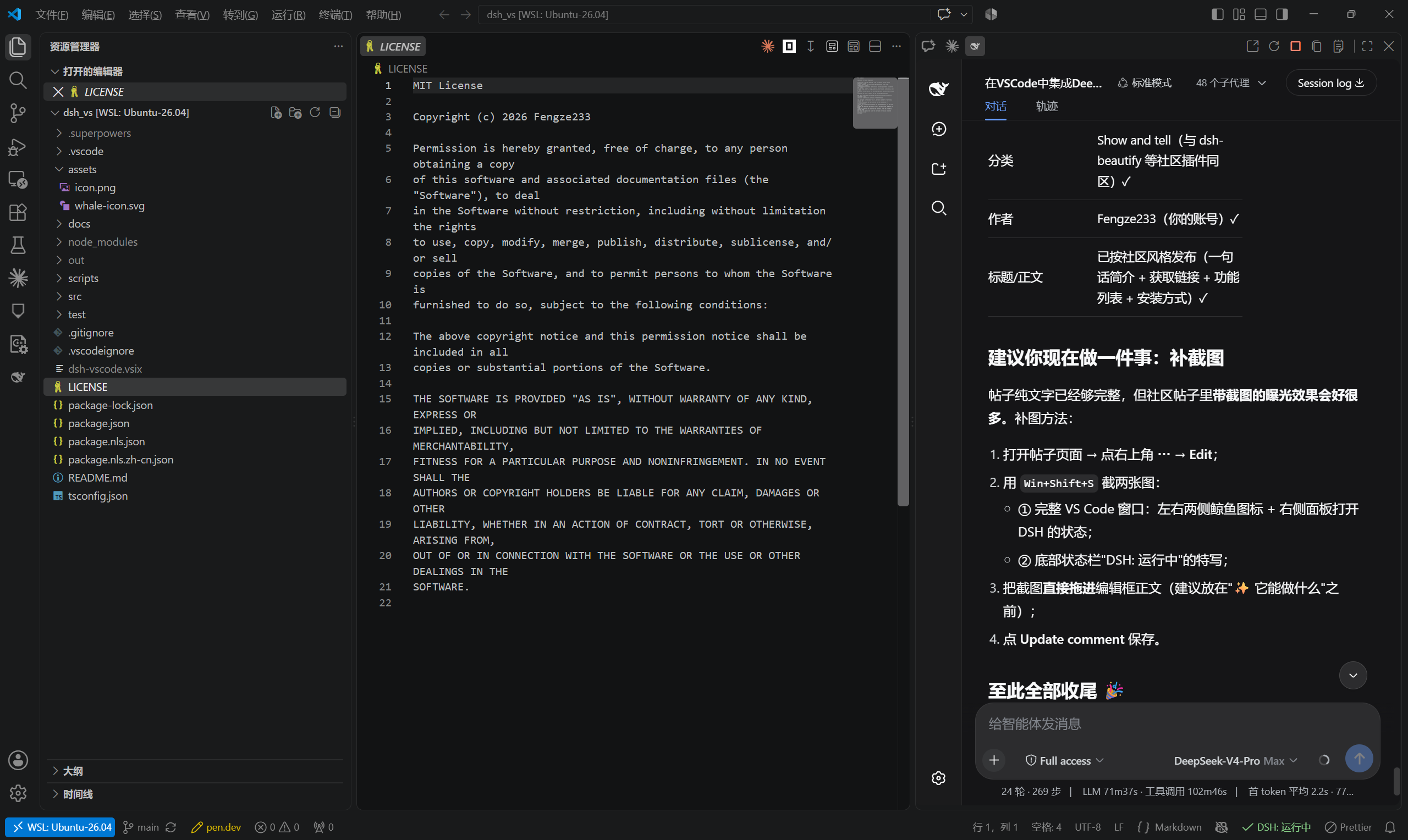
DSH embedded in the right-side panel — code and agent side by side.
59-second demo on Bilibili (Chinese): BV1p8bD6dE18
%LOCALAPPDATA% (for example H:\DeepSeek Harness), the extension now uses the Desktop command already on PATH as a fallback instead of failing with ENOENT.| Feature | What you get |
|---|---|
| 🖱️ One-click open | A whale icon in the left Activity Bar and the right Secondary Side Bar; the editor title bar has a white-bg whale that opens the right-side panel. |
| 🚀 Service management | Auto-detect the port; reuse a running dsh web, otherwise start one in the background. Port conflicts temporarily fall back to the first free port, with a notification. |
| 🛟 Recoverable errors | Dedicated pages for missing dsh, occupied port, start timeout, crash and disconnect — each with a one-click reconnect. |
| 🔐 Auth relay | Parses the one-time launch URL, stores a 30-day session cookie, and forwards the panel through a loopback relay. Externally started services get a one-time paste page. |
| 🔗 Bridge integration | File paths open in VS Code, external links open in your browser, copy buttons work, and undo/redo is restored in the embedded page. |
| 🖼️ Images without vision | Attach images even when the active model has no vision: the image is cached in the workspace and sent as a file-path reference; the model reads it with an image tool. Opt out with dsh.image.fallback. |
| 🌐 Remote-ready | SSH Remote, Dev Containers and Codespaces run dsh on the remote and tunnel the panel; WSL works without a tunnel. |
| ⚙️ Customizable | Custom DSH profile, port, launch preference (npm / Desktop / auto), executable path, extra args, proxy env, timeout and panel zoom. |
| 🌍 Bilingual | UI copy follows the VS Code display language: Chinese for zh-*, English otherwise. |
dsh.port is occupied by another program, the extension temporarily switches to the first free port for this session and tells you; your setting is unchanged.DSH:)| Command | Description |
|---|---|
DSH: Open Panel |
Open the left panel |
DSH: Open in Secondary Side Bar |
Open the right panel |
DSH: Open Right Panel |
Editor-title whale button: open the right panel |
DSH: Open in Browser |
Open the DSH page in the system browser |
DSH: Restart Service |
Restart the extension-managed service |
DSH: Stop Service |
Stop the extension-started service |
DSH: Copy URL |
Copy the DSH page URL |
DSH: Show Logs |
Open the extension log output channel |
DSH: Copy Logs |
Copy the full log (environment info + service log) for bug reports |
DSH: Retry Bridge Install |
Reinstall the bridge and restart the service |
DSH: Uninstall Bridge |
Remove the bridge package and restore cordis.patch.yml |
DSH: Clean Up Image Cache |
Delete cached dsh-imgcache-* files |
Install the dsh CLI (npm i -g @deepseek-ai/dsh) or DSH Desktop, then make sure the command is on PATH. With dsh.launchPreference: auto, the extension prefers an npm install and falls back to Desktop. If Desktop lives in a custom directory, set dsh.desktopCommandPath; if you use a wrapper script, set dsh.executablePath. Since 0.4.4, a Desktop command already on PATH is used even when Desktop is installed on a non-default drive. Run DSH: Copy Logs and check the dsh 可执行文件 / dsh 启动来源 / dsh 实际入口 lines.
auto prefers npm and falls back to Desktop; set dsh.launchPreference to npm or desktop to force one. Note that the official DSH Desktop uses the desktop profile, while VS Code uses web by default: sessions/settings are shared under ~/.dsh, but plugins are installed per profile. To use DSH plugins in VS Code, install them into the web profile.
DSH ≥ 0.1.2 requires a browser session. For a service the extension started itself, sign-in is automatic. For a service you started outside VS Code, the extension cannot read its log: copy the launch URL from that service's log and paste it once into the panel — the session lasts up to 30 days. Check DSH: Show Logs for the detected URL/port and 401 handling.
Set dsh.useEnvProxy: true, or use dsh.env to inject NODE_OPTIONS=--use-env-proxy and provide HTTPS_PROXY / HTTP_PROXY. The proxy variables must be visible to the dsh web child process.
dsh.image.fallback must be on (default), and a workspace folder must be open so the image can be cached. Vision-capable models keep the native image upload. Temporary images are deleted after use; DSH: Clean Up Image Cache purges leftovers.
Remote support is opt-in: enable dsh.remote.enabled and install the extension on the remote host (VS Code prompts). The panel then opens through a VS Code tunnel; the service still listens on the remote loopback. WSL works without a tunnel.
Open the DSH panel DevTools console: you should see [dsh-vscode-bridge] handshake ok, v0.4.4, imageFallback=true. The bridge version always matches the extension version; the installer force-reinstalls on a version or client.js content mismatch. If it still shows an older version, run DSH: Retry Bridge Install or restart the DSH service.
If another program owns the port, the extension temporarily switches to the first free port for this session and tells you. Your dsh.port setting is unchanged. Set dsh.port to pick a different default.
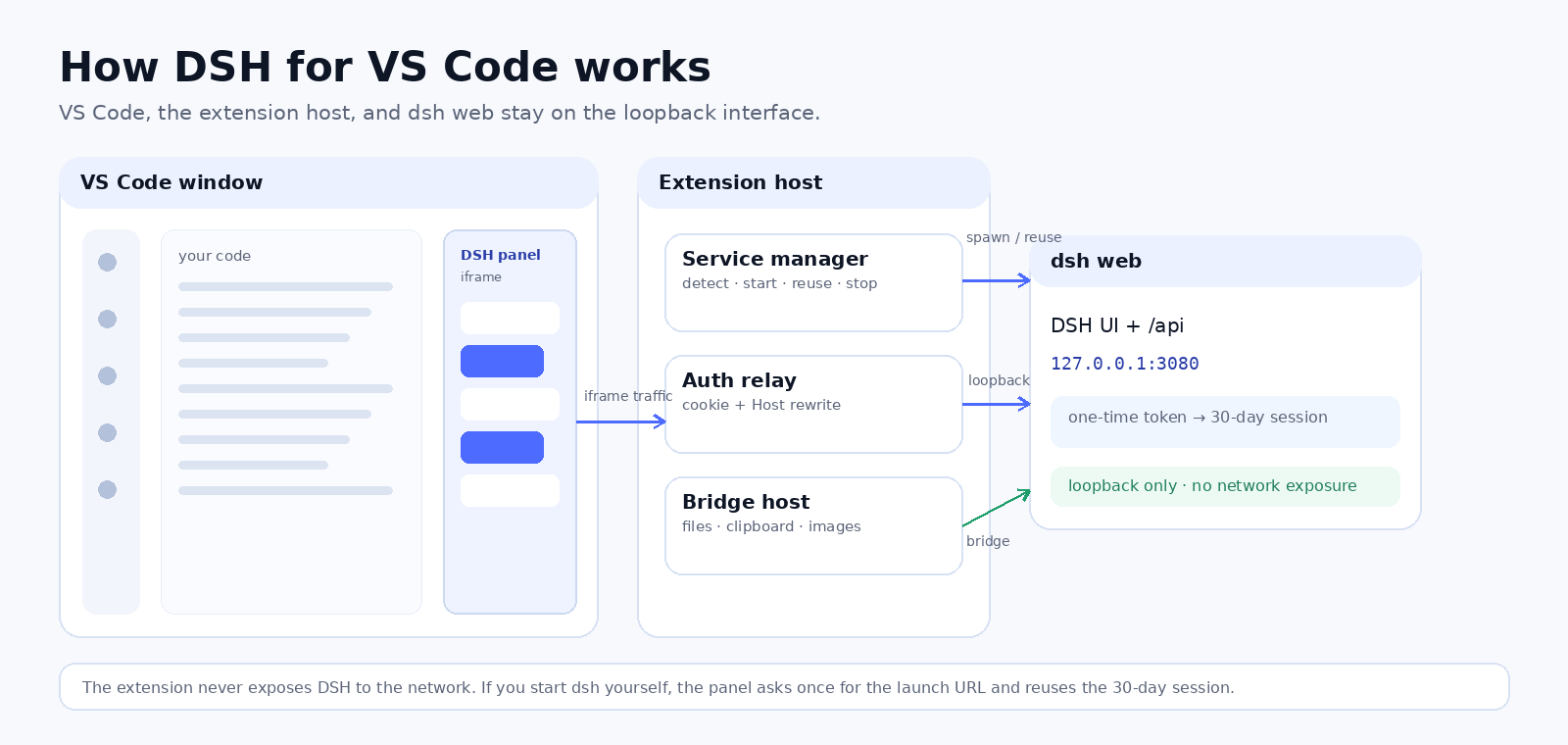
The extension owns the service lifecycle and a local relay. The panel is an iframe inside a VS Code webview; the extension host talks to dsh web on 127.0.0.1. The bridge runs inside the DSH page and relays editor actions through postMessage.
DSH 0.1.2 introduced mandatory browser authentication. On startup dsh web prints a one-time launch URL:
dsh web: http://127.0.0.1:3080/?token=<one-time token>Visiting it returns 303 plus a signed session cookie (HttpOnly; SameSite=Strict, bound to the request Host, 30-day lifetime). Every page and /api call then requires that cookie; without it DSH answers 401 dsh web authentication required.
Why a relay is needed. The panel is a cross-site iframe (its top-level document is vscode-webview://…), and browsers never send a SameSite=Strict cookie in that context. So the iframe cannot log itself in, no matter what URL it loads.
What the extension does (automatic for a service it started):
401/403 with a dsh web body marker as “DSH is running and needs a login” instead of “port occupied”;host:port (30 days; a service restart does not invalidate it);127.0.0.1): the iframe loads the relay, which forwards traffic to dsh web, injects the cookie, rewrites Host, and adapts DSH's /api browser-trust fence (the relay strips browser-origin headers as a trusted local intermediary). Uploads, SSE streams and WebSocket upgrades are forwarded as streams;401 upstream and the extension re-acquires the session (self-started service) or shows the sign-in page again.If you start DSH yourself (systemd, a terminal), the extension cannot read that process's log, so the panel shows a one-time sign-in page: paste the launch URL from the service log (for example journalctl -u dsh -n 100). One paste lasts up to 30 days, and a service restart does not require pasting again. A bare http://127.0.0.1:3080/ also works for DSH ≤ 0.1.1 (no auth).
Exposure of the relay: it listens on 127.0.0.1 only and holds a 30-day session, so any local process (including other local users) that finds the port can drive that session — the same exposure as a DSH ≤ 0.1.1 service listening on 127.0.0.1:3080 without authentication, and narrower in practice (the port is random and must be scanned). DSH 0.1.2's authentication protects against network exposure and cross-site browser contexts; the relay does not reintroduce network exposure.
The extension installs its own bridge package dsh-vscode-bridge into DSH's official client-plugin extension point under your DSH user directory. It enables:
dsh.image.fallback).Install / uninstall transparency. The bridge is installed into $DSH_HOME/profiles/<dsh.profile> (default ~/.dsh/profiles/web) and registered by a marked insert: block in cordis.patch.yml (# dsh-vscode-bridge: begin/end). The extension writes only to the user directory, never to the DSH installation. To remove it, uninstall the extension (VS Code runs the uninstall hook) or run DSH: Uninstall Bridge; both remove the marked entry and the bridge directory (best-effort, never blocking the uninstall).
Versioning: the bridge package version is always identical to the extension version. The installer force-reinstalls whenever the bundled version differs or the bundled
client.jscontent differs, so logic updates reach users even when the version number is unchanged.
Bridge-related settings
| Setting | Default | Description |
|---|---|---|
dsh.bridge.enabled |
true |
Enable the bridge (when off: no install, no injection, no warning; the integrations are unavailable) |
dsh.workspaceRootIndex |
0 |
For multi-root workspaces: which root to use as the dsh web process working directory (out-of-range falls back to the first) |
dsh.bridge.silenceWarning |
false |
Suppress the bridge degradation warning |
Degradation behavior. The bridge only works inside the panel. If it is inactive (for example, you open DSH in a browser, or installation failed), the panel remains fully usable — only the integrations above are unavailable. A one-time startup warning offers Retry Install / Don't Show Again.
dsh.*)| Setting | Default | Description |
|---|---|---|
dsh.profile |
web |
DSH profile used for startup and bridge installation (custom profiles must provide the web UI) |
dsh.launchPreference |
auto |
Which dsh install to prefer: auto (npm first, then DSH Desktop), npm, or desktop. If the preferred one is missing the other is used automatically; the log and environment header record the actual source |
dsh.desktopCommandPath |
(empty) | Absolute path of the DSH Desktop command (usually under %LOCALAPPDATA%\Programs\DeepSeek Harness\...); empty means auto-detect. Desktop installed on another drive is also found via PATH |
dsh.port |
3080 |
Desired port (used for both detection and startup) |
dsh.host |
127.0.0.1 |
Service address (loopback only) |
dsh.autoStart |
true |
Auto-start the service when it is not running |
dsh.stopOnExit |
true |
Stop the extension-started service when the last window closes |
dsh.extraArgs |
[] |
Extra arguments appended when starting dsh web |
dsh.executablePath |
"" |
Absolute path to the dsh executable (dsh.cmd on Windows); empty = look up on PATH |
dsh.openInBrowser |
false |
Open the DSH page in the default browser after the service starts (when off, --no-open is passed to dsh web) |
dsh.remote.enabled |
false |
Enable remote scenarios (SSH Remote / WSL / Dev Containers / Codespaces): run dsh on the remote and open the panel through a VS Code tunnel (off by default; reload the window after enabling) |
dsh.image.fallback |
true |
Send attached images as file-path references when the active model has no vision, instead of failing (files are cached under the workspace root and cleaned up after use) |
dsh.startTimeoutMs |
45000 |
How long to wait for dsh web to become ready, in milliseconds (5000–600000). Raise it on slow machines (Windows cold start measured at 17–23 s) |
dsh.env |
{} |
Extra environment variables injected into the DSH child process (merged with the parent environment). Typical proxy use: {"NODE_OPTIONS":"--use-env-proxy"} |
dsh.useEnvProxy |
false |
Append --use-env-proxy to the child process's NODE_OPTIONS (existing options are kept). Enable it when the model API is only reachable through an HTTP/HTTPS proxy |
dsh.panel.zoomLevel |
1 |
Zoom of the embedded page: pick 0.5–1.5 from the dropdown (0.05 steps); finer values via settings.json |
Set "dsh.profile": "custom-profile" and "dsh.port": 3081 to launch dsh --profile custom-profile --host 127.0.0.1 --port 3081 --no-open and install the bridge into $DSH_HOME/profiles/custom-profile. Changing the profile restarts an extension-owned service; an existing external service is still reused by port. The default web profile preserves current behavior. Profile names may contain ASCII letters, numbers, dots, underscores and hyphens; they cannot start with a hyphen and cannot be . or ..; surrounding whitespace is trimmed.
UI copy follows the VS Code display language (Configure Display Language): zh-* → Simplified Chinese, anything else → English. The package ships package.nls.json, package.nls.zh-cn.json and package.nls.zh-hans.json.
Requirements: Node.js ≥ 22, VS Code ≥ 1.91.
npm install
npm run test          # 324 unit/integration tests (including real dsh web flows: service lifecycle, auth session)
npm run compile       # builds out/extension.js
npm run watch         # watch build
npm run typecheck     # type check
npm run package       # package .vsix
Debugging: open this folder in VS Code and press F5 to launch the Extension Development Host.
src/
├── extension.ts          # entry: assembly and command registration
├── i18n.ts               # runtime copy dictionary (zh-* Chinese / otherwise English)
├── config.ts             # settings normalization (loopback whitelist)
├── service/
│   ├── detect.ts         # port probing (DSH marker detection)
│   ├── process.ts        # cross-platform subprocess wrapper (dsh / dsh.cmd)
│   ├── launcher.ts       # Windows launch resolution (npm / Desktop / explicit)
│   └── manager.ts        # service manager state machine (core)
├── bridge/               # bridge: installer, handshake host, message handling, status
├── panel/
│   ├── html.ts           # panel page templates (minimal CSP)
│   └── provider.ts       # WebviewViewProvider (iframe + placeholder pages)
├── workspaceRoot.ts      # multi-root workspace resolution
└── statusbar.ts # status bar controllerIssues and PRs are welcome. Keep PRs small and focused, and read CONTRIBUTING.md before opening one.
PR checklist
package.json, package-lock.json, bridge-client/package.json, BRIDGE_VERSION) or add tags; releases are handled by maintainers.[Unreleased].README.md and README.zh.md in sync; test counts must match npm test.npm run typecheck, npm test, npm run compile and npx vsce package --no-dependencies; CI must pass.out/, *.vsix, logs or local caches.See CONTRIBUTING.md for the full rules.
dragenter/dragover/drop to a webview (microsoft/vscode#339278; the upstream fix is still open). Use your system file manager or type @ in the composer. Tracked in issue #37.DSH: Clean Up Image Cache purges leftovers.This is a DeepSeek Harness community plugin (topic: dsh-plugin).
Many improvements here came from the community. Contributions are grouped by type (IDs link to the corresponding issue/PR in this repository):
| Contributor | Contribution | Ref |
|---|---|---|
| @jubeater | Configurable DSH profile and multi-profile bridge cleanup; accurate stopping-state UX | #35, #40 |
| Reporter | Report | Ref |
|---|---|---|
| @Donarli | DSH Desktop installed on a non-default drive (H:\) failing with ENOENT, with complete root-cause analysis and a suggested fix |
#41 |
| @Joshuayang228 | Shift+drag from the Explorer not reaching the webview: identified the VS Code regression and the Lexical second layer | #37 |
| @AAAwoshi | Panel reloading on every active-editor switch: traced it to the redundant render() and regenerated nonce, with log evidence and a minimal patch |
#27 |
| @Joshuayang228 | File clicks not forwarded to the editor: pinpointed the CSS Module hashed class name and provided reproduction evidence and a fix sketch | #22 |
| @lizhuoyuan41-droid | Bridge package written into DSH Desktop's private command directory, breaking desktop startup: root cause plus an allow-list suggestion | #20 |
| @Minelenbolan | Duplicate bridge entry in cordis.patch.yml crashing the plugin tree |
#19 |
| @HafenYin | Windows cold start exceeding the hard-coded 15 s timeout (with full startup log) | #23 |
| @NOIPJohnny | DSH unable to reach the model API behind a proxy; suggested injecting child-process environment variables | #18 |
| @ThinBuffalo | Request for zoom control of the embedded page | #8 |
| @smallshieh | Request for editor context injection (send the active file/selection with a message) | #10 |
| @Tsechiyuan | Request to send the current selection straight into the conversation | #7 |
| @sseryling | WSL Remote blank panel and bridge handshake failure: provided measured fixes | #13 |
| @Zanford | DSH failing to start from VS Code | #12 |
MIT © 2026 Fengze233
If DSH makes your editor feel more complete, a ⭐ on GitHub helps other VS Code + DSH users find it. It is the simplest way to support the project.
CLASSIFICATION EVIDENCE
系统优先读取 GitHub Topics,再与站内分类词典和词根规则比对。当前命中: deepseek、deepseek-harness。
morluto
Reverse engineer anything with agents, from app behavior down to native binaries.

deepseek-ai
DeepSeek Harness: Everything is a Plugin.

nexu-io
The 1st Collaborative AI Design Agent Workspace. Local-first and open source. Create motion, prototypes, websites, apps, dashboards, presentations, images, and videos with your team and AI agents. Share work, exchange feedback, and iterate together in one workspace.