dsh-mattpocock-skills-deck
INSTALL
安装
前置要求:DSH(DeepSeek Harness)。在 DSH 里,你下指令、AI 干活;MattSkillsDeck 把这些活变成面板上的任务。
# ① 安装 DSH CLI(已装跳过)
npm install -g @deepseek-ai/dsh

# ② 安装 MattSkillsDeck —— --profile 必填:装进你实际使用的 DSH 入口对应的 profile
#    (装错 profile 等于没装,重启多少次都不会加载)
dsh plugin --profile web add dsh-mattpocock-skills-deck     # 用自启 web 服务(dsh web)
#     或者
dsh plugin --profile desktop add dsh-mattpocock-skills-deck   # 用 DSH Desktop 桌面应用
# 锁定最新版更稳(当前 1.7.44):
dsh plugin --profile web add dsh-mattpocock-skills-deck@1.7.44 --registry https://registry.npmjs.org
#     或者
dsh plugin --profile desktop add dsh-mattpocock-skills-deck@1.7.44 --registry https://registry.npmjs.org
装完重启一次对应的 DSH 入口即生效:桌面应用完全退出并重开 DSH Desktop;web 服务重启 dsh web 后刷新页面。零配置。
右侧面板性能极致优化:点击到内容可见,真机实测从 5075 毫秒降到 193 毫秒,性能提升约 96.2%(约 26 倍)。
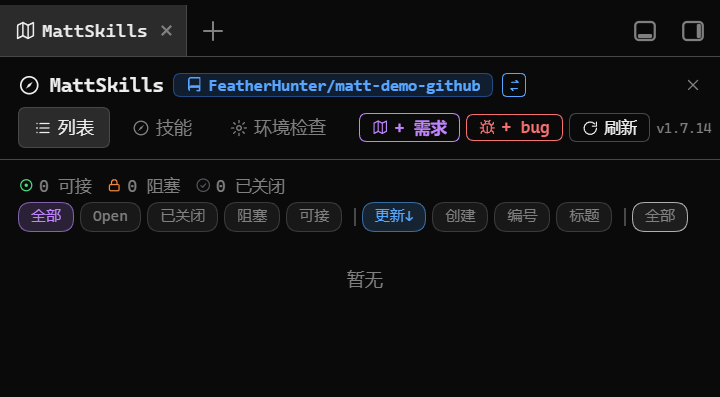
面板就开在 DSH 自己的右侧边栏里:左边列表、右边详情,并排看。不需要再装别的插件。
👇 装完重启,面板就绪就是这个样子。
进阶安装:免全局、更新不生效、交给 AI
下面命令以 web profile 为例——DSH Desktop 桌面应用用户请把所有 --profile web 换成 --profile desktop。
# 免全局安装(想更稳,像上面一样锁版本)
npx --yes @deepseek-ai/dsh plugin --profile web add dsh-mattpocock-skills-deck

# 更新被静默忽略时,显式指定官方源
dsh plugin --profile web add dsh-mattpocock-skills-deck@latest --registry https://registry.npmjs.org
复制下面这段发给你的 AI,它会确认 profile、检查环境并按需安装:
请帮我安装 DeepSeek Harness 插件 dsh-mattpocock-skills-deck(MattSkillsDeck)。
先读仓库 README:https://github.com/FeatherHunter/dsh-mattpocock-skills-deck
先确认我实际使用的 DSH 入口对应哪个 profile(DSH Desktop 桌面应用 → desktop;自启 web 服务 → web),把插件装进正确的 profile;
然后自行检查环境并按需安装(已装的跳过),完成后简要汇报结果。
升级 · 卸载(desktop profile 用户把 --profile web 换成 --profile desktop):
dsh plugin --profile web update dsh-mattpocock-skills-deck   # 升级
dsh plugin --profile web remove dsh-mattpocock-skills-deck   # 卸载
BOARD
任务板列表
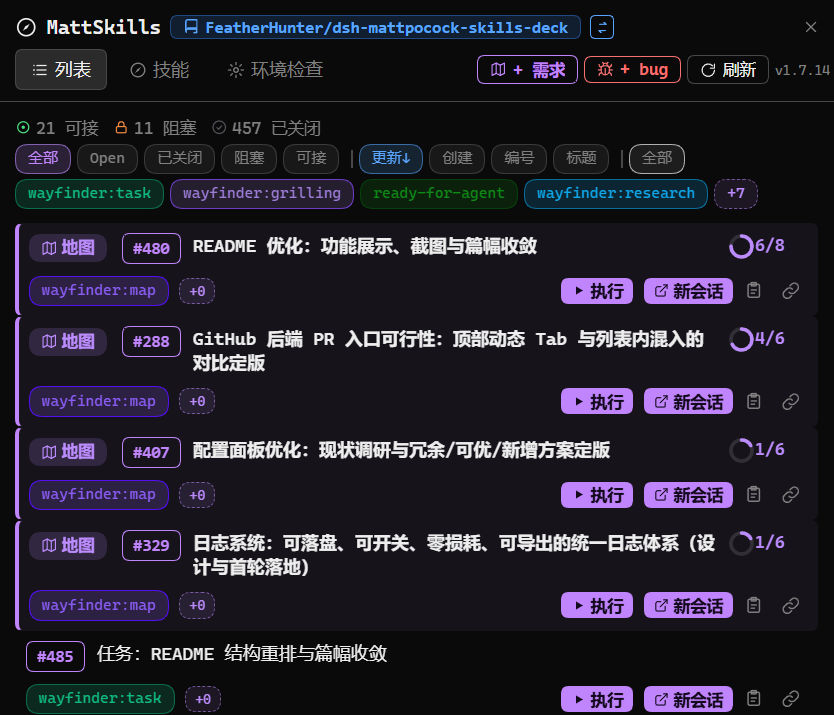
仓库里的任务不再是流水账:面板把它们按可接、阻塞、已关闭归位,进度走到哪一格一眼看清。每行任务的按钮就是动作入口:点一下,写好的指令填进输入框,确认后再发送。地图类型的行永远置顶,已关闭的收成一行。
👇 任务在哪看、状态怎么筛,全在这张图。
STATUSBAR
底部任务栏
每条会话输入框下面都有一条胶囊状态栏:可接数量、待修(BUG)数量、诊断、沉淀、交接、环境进度都在上面。点可接、环境等主要分段,即跳到对应面板页,看完即回,不打断手头会话。
👇 离手最近的操作条,完整一条长这样。

DETAIL
ISSUE 详情与评论
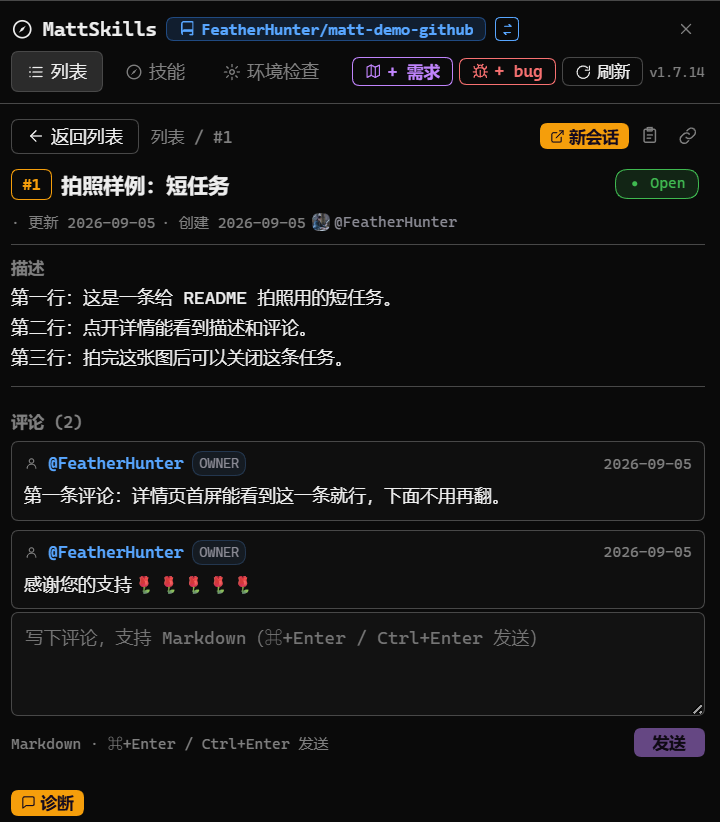
点开任意一条任务,描述、标签、认领人与评论都在面板里排好版,不用跳终端。在底部输入框直接回话,一般只按标签显示其中一个(诊断、修复、讨论、执行),需要另起再点新会话。
👇 点开一条任务,看透并回上话。
NEW SESSION
新会话
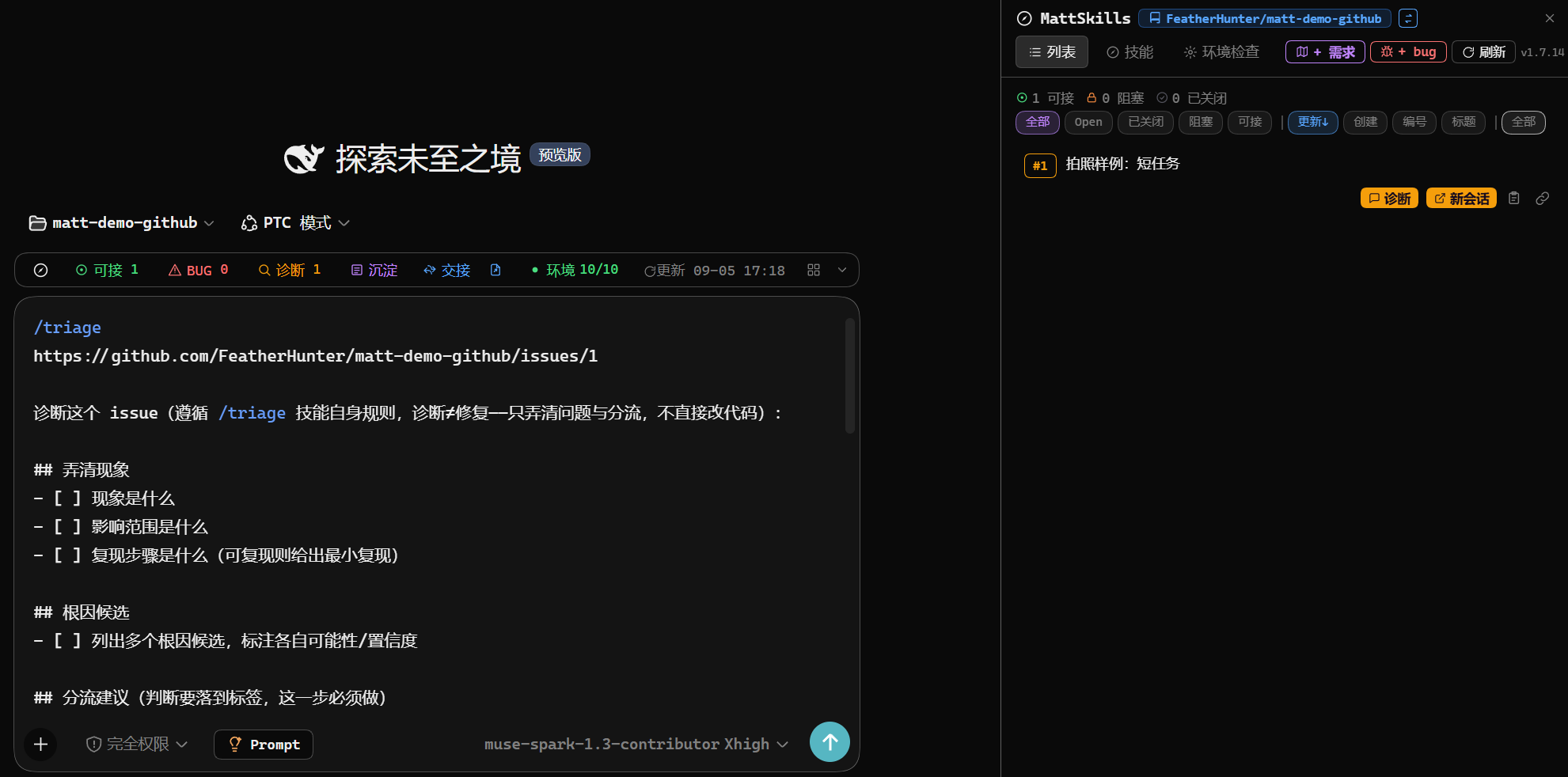
任何活都能另起干净会话干:详情页顶部点新会话,新会话标题自动起好,承接指令已预填,人只管检查后发送。当前会话不受扰,脏活累活都在新会话里。
👇 点一下新会话,指令已预填等人发。
SKILLS
技能快捷入口
随包 27 个技能(快照 v1.3.1)装好即用:面板技能页顶部给通用推荐(默认 /ask-matt),列表一行讲清一个技能的中文用途,点加载就把斜杠指令填进输入框。完整名单与教程见 Matt 官方 aihero.dev/skills,本插件只讲入口与推荐。
BACKENDS
多后端切换
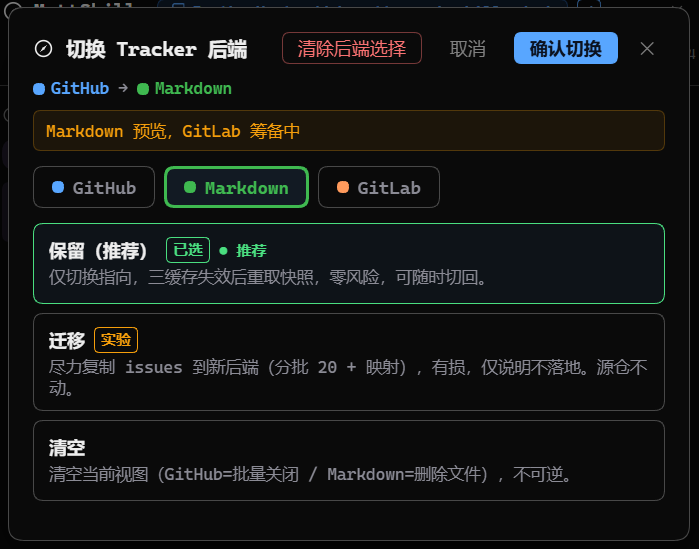
同一个面板可换跑道:设置页后端选择器列出 GitHub、本地 Markdown、GitLab 与 Other(无后端)逃生舱。切换只换数据源:切换后原数据不可见,原后端数据保留,切回来又可见。新人第一次大多只用一条跑道,知道能换即可。
👇 换跑道不断数据,选择器长这样。
FAQ
常见问题
更新之后还是旧版本?
这是 DSH 桌面端的 pnpm 供应链策略(minimumReleaseAge)导致的:刚发布的版本,几个小时内 dsh plugin update 和插件市场的「更新」按钮都会静默跳过。更新后请完全退出 DSH 再重开,按 Ctrl+F5 刷新页面;还没更新的话,显式指定官方源装一次:
dsh plugin --profile web add dsh-mattpocock-skills-deck@latest --registry https://registry.npmjs.org
👇 官方源装最新版,成功回显长这样。

更新报错找不到新版本(No matching version),地址是镜像源?
这是镜像源还没有同步到新版本:报错地址写着镜像源(例如 registry.npmmirror.com),而新版本已经在官方源上发布,包本身没有漏发。等镜像源同步完成就能正常更新;着急用的话,显式指定官方源装一次(下面这条命令不要去掉末尾的源参数,去掉就会走回镜像源):
dsh plugin --profile web add dsh-mattpocock-skills-deck@latest --registry https://registry.npmjs.org
桌面应用用户把 --profile web 换成 --profile desktop。
ARCHITECTURE
架构
DEVELOPMENT
开发
MORE
作者的其他作品
THANKS
致谢
感谢每一位提交 Issue、PR 与参与讨论的朋友,是你们让这个插件一点点变好。
@pioneerAlone — 反馈了 #298(details/better-sidebar 重复,附完整复现与截图)、#274、#234 等状态栏与健康检查误报、#645(镜像源滞后导致更新失败),并提交了修复 PR #273、#316,感谢你让「重装后到处异常」的体感得以一次清爽修复 🌹🌹🌹🌹🌹🌹
@Shimmernight — 提交了 #277 等 Issue,以及 PR #287、#275、#106(toast 主题、命名修正、macOS 适配) 🌹🌹🌹🌹
@21967201 — 提交了 PR #321(完善 triage + wayfinder 标签文档) 🌹
@angenet — 反馈了 #295、#262 等 macOS 环境检测问题 🌹🌹
@hyperion2144 — 反馈了 #110 等环境检查问题,以及 #646(建议直接注册 DSH 原生侧边栏,不再经过 better-sidebar 中转) 🌹🌹
@tafcear — 反馈了 #422(非编码工作区状态栏降噪诉求),感谢你让非编码工作区不再被初始化横幅打扰 🌹
@271912980 — 在 #257 下提出把会话做成稳定可寻址端点(会话 ID + 语义名)的想法
@xiSage — 反馈了 #435(自托管 GitLab 仓库无法识别),并在讨论区发起 #436(按工作区关闭插件功能) 🌹
@dis0neplay — 提交了 PR #493(修 CI 与 Pages 根目录跳转,按请求关闭) 🌹
@snmtg1008 — 在 #476 下留下了自己排查并修好「本地数据目录误报不可写」的完整方案
@arnold117 — 反馈了 #574(本地 Markdown 后端里多个工作单元撞号,只能看到第一个,评论还会写进别的文件),并提交了 PR #575 修好它(已合入),感谢你让一个仓库里并存多个工作单元时不再读错写错 🌹🌹
@SbDonger — 反馈了 #640(状态栏与输入框错位,输入框上方出现一条横向背景带) 🌹
@anupamme — 提交了 PR #727、#728(给 rpcChannel.js 加两处安全加固:防原型污染与加资源限制,目前待评审) 🌹🌹
@seameafst — 反馈了 #793(点「+ 新建需求」后直接回车会发出一份空模板,需求原文在链路里没人收,附完整根因与两档修法) 🌹
@zerocodefast — 发起了 #823(邀请把本插件收录进 awesome-ai-plugins 清单,并给出建议条目) 🌹
@li873582595 — 反馈了 #835(官方桌面版上装插件后初始化阶段反复断开重连,卸载后消失) 🌹
@SKADI0718 — 提交了 #856(后由作者撤回作废) 🌹
也感谢在评论区与讨论区留下想法的每一位朋友。如果你也遇到了问题或有新想法,欢迎直接提 Issue 或发起讨论。
CONNECT
加入我们
扫码加入话题群——二维码永久有效。日常闲聊与快速答疑走群里,Bug 与需求请直接提 ISSUE,更高效可追溯。
 加入话题群
dsh-mattpocock-skills · 该二维码永久有效
加入话题群
dsh-mattpocock-skills · 该二维码永久有效







