
模型与 MCP
待识别

rea
morluto
Reverse engineer anything with agents, from app behavior down to native binaries.
PROJECT TOPICS
INSTALL REFERENCE
dsh plugin --profile web add github:EuphonXD/dsh-billing-chip
该命令指向仓库当前默认分支;尚无绑定当前 commit 的完整验证结果。
PROJECT README



挂在 DSH Web 界面右下角的一小块纯文字计费牌:当前模型、这一轮花了多少、今天累计多少、DeepSeek 账户还剩多少、现在是峰时还是谷时。右键可以直接填 API Key。
没有头像、没有插画、没有动画 —— 只有数字。窄到不挡事,一眼能看完。
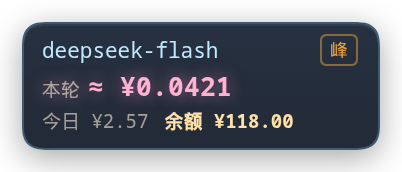
特色是「本轮花费实时估算」:DSH 的会话日志要 1–5 分钟才落盘,等它算钱,一轮早结束了。这个插件直接订阅模型输出流,数着生成的字符实时折算 token,钱在牌子上一分一分往上跳 —— 不用等账。结算后再把「实际 · 预估」并排放在一起,让你知道这次估得准不准。
同一套算法移植自桌宠的计费板(bridge.mjs 的 estAdd / estEmit):
reasoning-delta / text-delta 的每一段文字(思考内容也算,它是要计费的)max(本轮已结算 output, 字符估算) —— 真实值到了就以真实值为准cacheRead + uncachedInput;这一步还没结算时,退回上一次请求的量级(每步都重发全量上下文,量级接近)实测(deepseek-flash,让模型写 600 字散文):流式期间涨到 ≈ ¥0.0126,结算后实际 ¥0.0126,误差 0%。
多 step 的轮次(中间调工具)按同一个 turn 累加字符,不会被每次工具调用打断。
DSH 每一轮对话都会把 usage(输入 / 缓存命中 / 缓存写入 / 输出 token)写进会话日志:
$DSH_HOME/sessions/<workspace>/<session-id>/session.v4.jsonl.zstd日志写盘有 1–5 分钟延迟,光靠它算不出"正在涨的钱"。所以插件挂了两条腿:
| 数据源 | 拿到什么 | 延迟 |
|---|---|---|
会话日志 session.v4.jsonl.zstd |
已结算的 usage、模型、turn 边界、今日汇总 | 1–5 分钟 |
assistant 流(进程内 sessionController.follow + assistantStream) |
正在生成的思考/正文增量,用来实时估钱 | 立刻 |
两条腿合并成一块牌子:
| 项目 | 说明 |
|---|---|
| 本轮 | 跑着的时候用流式预估(粉色 ≈ ¥,实时在涨);turn/end 一到换成本轮实际花费,预估和实际差 ≥3% 时并排显示 ¥实际 · ≈¥预估 |
| 今日 | 今天所有会话加起来的花费与 token 数(跨 workspace、跨 session 汇总) |
| 余额 | 调 GET https://api.deepseek.com/user/balance,显示 CNY 可用余额 |
余额什么时候刷:
turn/end)立刻拉一次 —— 刚花掉钱,数字得跟上| 峰 / 谷 | 北京时间工作日 09:00–12:00、14:00–18:00 为高峰(价格翻倍);周末与法定节假日全天按谷时价 |
订阅流走的是 DSH 自己的 sessionController.follow()(cordis service,没装就自动退回只读日志),不抓 cookie、不碰私有 HTTP 端点。
deepseek-flash      峰
本轮 ¥0.0421
今日 ¥2.57  余额 ¥118.00
配色和金额刻度与桌宠的计费牌一致:深梦蓝渐变卡、模型名浅蓝 #bfeaff、本轮数字暖黄 #ffe1a8、次要信息奶油色 62%。
本轮有这几种状态:
| 状态 | 文案 | 颜色 |
|---|---|---|
| 轮次进行中 | ≈ ¥0.0123 |
粉 #ffb3d1(实时流式预估) |
| 刚结算,预估和实际差 ≥3% | ¥0.0123 · ≈¥0.0110 |
金 #ffd873,闪 2.4 秒 |
| 刚结算,两者接近 | ¥0.0123 |
金 #ffd873,闪 2.4 秒 |
| 已结束 | ¥0.0123 |
奶油 #f6e7d3 |
小数位按桌宠的 money4 规则:≥1 两位、≥0.01 三位、更小四位;今日与余额固定两位。
轮次进行中(粉):
刚结算完(金色,闪 2.4 秒):
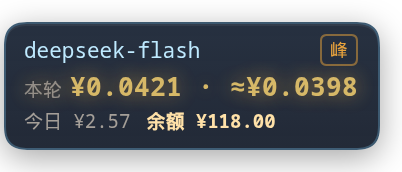
牌子上能做什么:
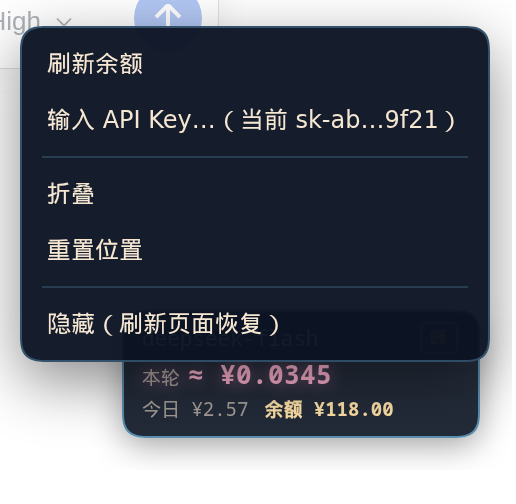
右键菜单里:
还没填 Key 的时候,直接点一下牌子也会弹出输入框。
包里带了两个脚本和一份给 AI 的流程说明(SETUP-AI.md),把仓库地址丢给 DSH 里的 AI,它照着做就行:
# 1. 定位 DSH:环境变量 → 本机监听端口 → 局域网扫描 → 手动填写
node scripts/find-dsh.mjs

# 2. 挂进 profile(先 dry-run 看改动,再 --write 落盘)
node scripts/enable-in-profile.mjs --profile web --write

# 3. 重启 dsh web,验证
curl -s "$DSH_URL/api/dsh-billing-chip/state" -H "Origin: $DSH_URL"
find-dsh.mjs 认 DSH 的方式是两道指纹:未登录时 HTTP 401 + 正文 dsh web authentication required; …,或者登录后首页 HTML 里含 __DSH_BOOT__。扫局域网时它会自动跳过 docker / VPN 虚拟网卡,默认端口是 3080, 3099, 3000, 8080, 8000,都能用参数改。
| 脚本 | 干什么 |
|---|---|
scripts/find-dsh.mjs |
三级探测 DSH 地址:--local / --lan / --url / --range / --ports / --manual / --json |
scripts/enable-in-profile.mjs |
改 profile 的 dependencies 与 dsh.profile.bundles 并跑 pnpm install;默认 dry-run,--write 才落盘,改前自动备份 |
一行(npm 上的 dsh-billing-chip@0.2.0,装进 web profile):
dsh plugin --profile web add dsh-billing-chip想直接跟 GitHub 上的最新提交:
dsh plugin --profile web add github:EuphonXD/dsh-billing-chip两种装法都会把包装进 profile 的 node_modules,但都要手动把 dsh-billing-chip 加进 profile 的 dsh.profile.bundles 再重启 dsh web,细节见下面两节。
# 1. 把包 link 进 profile(dsh plugin 就是把参数转发给 pnpm)
dsh plugin --profile web add link:/path/to/dsh-billing-chip

# 2. 手动把名字加进 profile 的 dsh.profile.bundles —— 这一步 dsh plugin 不会替你做
#    然后 pnpm install / 重启 dsh web
profile 的 package.json 应该长这样:
{
  "dependencies": {
    "dsh-billing-chip": "link:/path/to/dsh-billing-chip"
  },
  "dsh": {
    "profile": {
      "bundles": ["@deepseek-ai/dsh-base", "@deepseek-ai/dsh-web-app", "dsh-billing-chip"]
    }
  }
}
然后 pnpm install、重启 dsh web。插件自带 cordis.patch.yml,bundle 加载时会自动 insert。
不想改 bundles 的话,把这条抄进 profile 的 cordis.patch.yml:
- insert:
    - id: dsh-billing-chip
name: 'dsh-billing-chip'在 cordis.yml(或 profile 的 patch)里给插件传 config,全部可选:
- id: dsh-billing-chip
  name: 'dsh-billing-chip'
  config:
    apiKey: ''              # 也可以在这里给 Key(不推荐,会进版本库)
    defaultModel: deepseek-flash   # 日志里读不到模型时的兜底
    settingsPath: ''        # 默认 $DSH_HOME/dsh-billing-chip/settings.json
    allowRemote: false      # true 才允许任意来源(含非浏览器的远程脚本)访问它的 HTTP 路由
    priceOverrides:         # 官方调价时不用改代码
      deepseek-flash:
        hit: [0.02, 0.04]
        miss: [1, 2]
        out: [4, 8]
API Key 的三种来源(优先级从高到低):
$DSH_HOME/dsh-billing-chip/settings.json,权限 0600apiKeyDEEPSEEK_API_KEY填过之后牌子上会显示余额;鼠标悬停能看到 Key 来自哪一层。
| 方法 | 路径 | 作用 |
|---|---|---|
| GET | /api/dsh-billing-chip/state |
模型、本轮(日志口径 turn)、实时预估(live)、今日、余额、界面偏好 |
| POST | /api/dsh-billing-chip/key |
{ "apiKey": "sk-..." } 保存并立即验证;空串等于清除 |
| POST | /api/dsh-billing-chip/refresh |
重新拉余额 |
| POST | /api/dsh-billing-chip/ui |
{ "position": {x,y}, "collapsed": bool } 记界面偏好 |
state 返回示例:
{
  "ok": true,
  "model": "deepseek-flash",
  "provider": "deepseek-official",
  "turn": { "index": 2, "cost": 0.7561, "peak": true, "done": false,
            "usage": { "inputTokens": 117045, "cacheReadTokens": 6781184,
                       "cacheWriteTokens": 0, "outputTokens": 31347,
                       "totalTokens": 6929576 } },
  "live": { "turn": 2, "step": 1, "active": true, "chars": 776.4,
            "estCost": 0.0121, "estTokens": 35624, "estOut": 1062,
            "actualCost": null, "frames": 918, "lastType": "stream:chunk" },
  "today": { "date": "2026-10-26", "cost": 2.03, "tokens": 25371513, "messages": 259 },
  "peak": true,
  "sessions": 5,
  "hasKey": true,
  "keyMasked": "sk-ab…9f21",
  "keySource": "settings",
  "balance": { "currency": "CNY", "total": 118.0, "granted": 0, "toppedUp": 118.0, "available": true },
  "allowRemote": false,
  "ui": {}
}GET /user/balance(带你的 Key)之外不向任何地方发请求,也没有埋点。$DSH_HOME/dsh-billing-chip/settings.json,0600;接口只回显掩码(sk-ab…9f21),不返回明文。日志里不打印 Key。allowRemote: false 时,只有回环地址(127.0.0.1 / ::1)或者 Origin 与 Host 一致的浏览器请求能通过。也就是说,你在局域网里用 http://192.168.1.10:3080 打开 DSH,牌子照常工作;但外部脚本直接 curl 这个接口会被 403 挡掉。远程运维要直连接口时才把它设成 true。priceOverrides。$DSH_HOME/sessions 下所有 workspace 的日志,子代理的会话也算在里面(它们的 usage 同样落在日志里)。src/index.js 顶部,每年要补一次。zlib.zstdDecompressSync)。dsh 是本地起的还是 systemd 起的都行,但插件必须装在会话所在的那个 dsh 进程的 profile 里 —— 实时流是进程内数据,装在别的实例上只能读到日志(预估会退回"只按已结算 usage 算")。MIT
CLASSIFICATION EVIDENCE
系统优先读取 GitHub Topics,再与站内分类词典和词根规则比对。当前命中: deepseek。
morluto
Reverse engineer anything with agents, from app behavior down to native binaries.

deepseek-ai
DeepSeek Harness: Everything is a Plugin.

nexu-io
The 1st Collaborative AI Design Agent Workspace. Local-first and open source. Create motion, prototypes, websites, apps, dashboards, presentations, images, and videos with your team and AI agents. Share work, exchange feedback, and iterate together in one workspace.