
模型与 MCP
待识别

rea
morluto
Reverse engineer anything with agents, from app behavior down to native binaries.
PROJECT TOPICS
PROJECT README
Install and manage MCP servers from Settings → dsh-mcp-installer in DSH.
The plugin writes them into the current profile's cordis.patch.yml.
Check the current version on npm:
npm view dsh-mcp-installer versionThen add it to the profile you use. Replace web with your profile name:
dsh plugin --profile web add dsh-mcp-installerYou can also pin or track a version:
dsh plugin --profile web add dsh-mcp-installer@1.2.0
dsh plugin --profile web add dsh-mcp-installer@latest
Restart that profile, then open Settings → dsh-mcp-installer.
The desktop profile of DSH Desktop is managed by Desktop itself. Start Desktop
once, then run the command inside the shell Desktop provides:
dsh plugin --profile desktop add dsh-mcp-installerDo not manage Desktop's profile with a separately installed dsh CLI.
This lists the MCP servers that DSH has loaded. It includes servers from other sources, not only the ones this plugin wrote. Each row shows its source layer, transport, enabled state, connection state and tool count. You can filter by name, command or URL, and click a row to see details. The top of the page shows the target file, whether it is writable, the file fingerprint and the backup count.
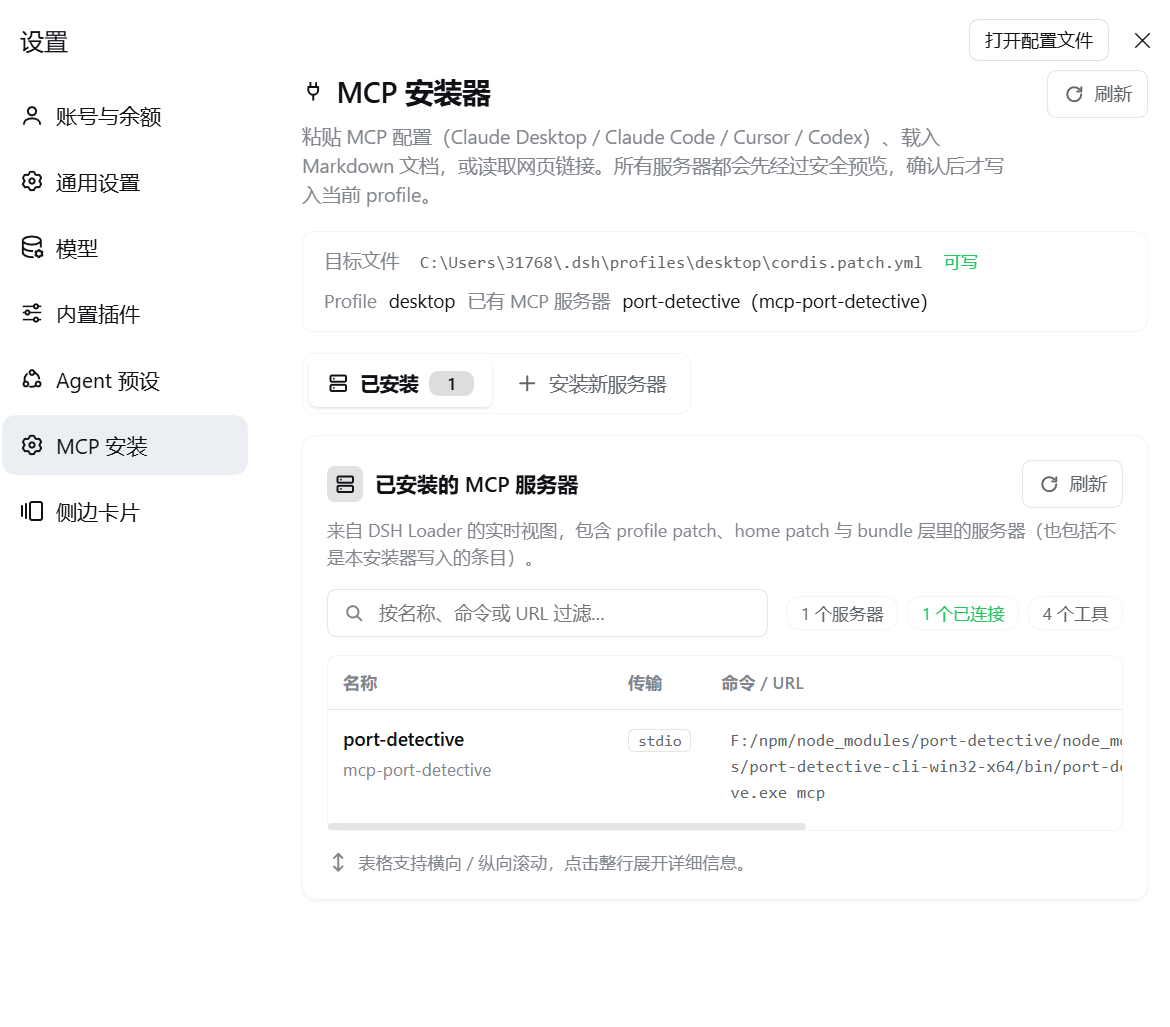
The screenshots show the Chinese UI of an earlier version. The layout is the
same, and the page is now titled dsh-mcp-installer.
Each row offers:
disabled: true, so you can
turn a server off while debugging.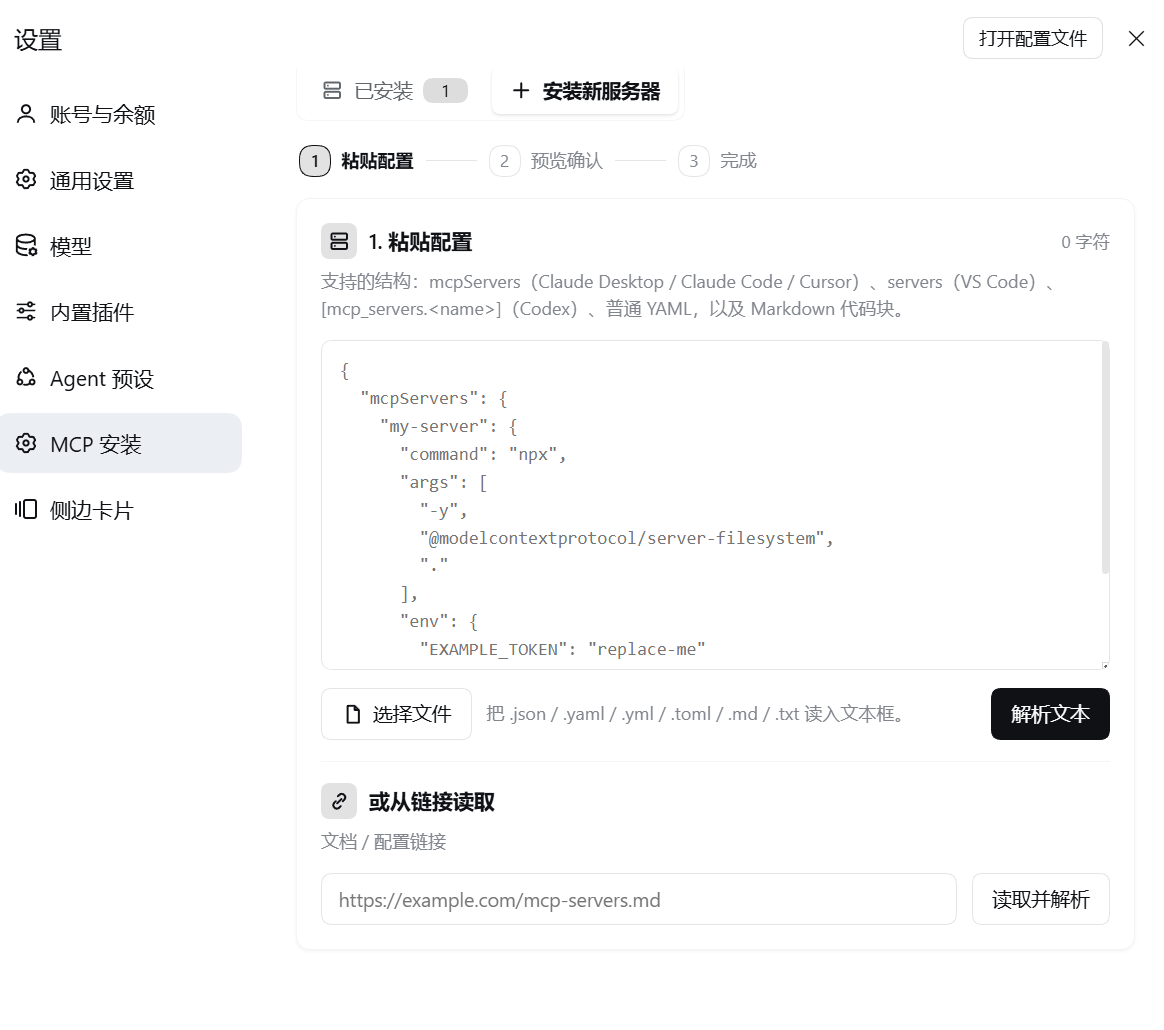
.json, .yaml,
.yml, .toml, .md, .markdown, .txt), or enter a URL and use
Fetch and parse.command, args or
url, and add or remove env and headers entries. Secrets are hidden by
default. Risk is re-checked as you edit, and a blocked row cannot be selected.${VAR} placeholder or
looks like a live key, use Use an environment variable instead. It becomes
!!js process.env.VAR, so the secret never lands in the config file.Supported input:
mcpServers — Claude Desktop, Claude Code, Cursorservers — VS Code[mcp_servers.<name>] — Codexclaude mcp add and codex mcp add commandsSupported transports are stdio and streamable-http. SSE is not supported.
Example:
{
  "mcpServers": {
    "filesystem": {
      "command": "npx",
      "args": ["-y", "@modelcontextprotocol/server-filesystem", "."]
    }
  }
}
New MCP tools appear as mcp__<serverName>__<toolName>. Open a new session (or
restart DSH) to load them.
One batch can hold up to 50 servers. Pasted or fetched text is capped at 2 MB.
cordis.patch.yml.bak-<timestamp>. The very first write makes no copy,
because there is nothing to overwrite yet.Export produces a portable mcpServers block you can paste on another
machine. Any value that looks like a live secret is replaced with a ${VAR}
placeholder.
Several tools can write the same patch: Config Editor, Plugin Manager, this plugin, or your own editor.
Install and restore send a SHA-256 fingerprint of the file the page read. If the file changed in the meantime, the write is refused and the page offers to retry against the new content. Nothing is silently overwritten. Edit, delete and enable/disable work on one located row and do not send a fingerprint.
sk-…, ghp_…, AKIA…, a JWT or a bearer token are flagged. Random-looking
high-entropy strings are flagged too. The page shows key names only, never the
values.--privileged, bind-mounting the host root,
mounting docker.sock or podman.sock, --network host and host PID/IPC
namespaces are high risk. --cap-add is a warning.npx, uvx and bunx without an exact
version can change under you, so they raise a supply-chain warning.npm install
npm run typecheck # tsc --noEmit
npm test # build, then 190 tests
npm run verify # check the built bundles end to endTests cover parsing, the safety rules, config writes and rollback, connection probing, and the 12 HTTP routes.
MIT
CLASSIFICATION EVIDENCE
系统优先读取 GitHub Topics,再与站内分类词典和词根规则比对。当前命中: mcp、mcp-installer、mcp-server、deepseek-harness。
morluto
Reverse engineer anything with agents, from app behavior down to native binaries.

deepseek-ai
DeepSeek Harness: Everything is a Plugin.

nexu-io
The 1st Collaborative AI Design Agent Workspace. Local-first and open source. Create motion, prototypes, websites, apps, dashboards, presentations, images, and videos with your team and AI agents. Share work, exchange feedback, and iterate together in one workspace.