

其他
插件

dsh-bili-scroll
c1overzz
DSH 插件:每天替你刷一轮 B站,读字幕挑出值得的、写一份日报,值得的 @ 你
PROJECT TOPICS
INSTALL REFERENCE
dsh plugin --profile web add github:Endless-zby/dsh-jenkins-plugin
该命令指向仓库当前默认分支;尚无绑定当前 commit 的完整验证结果。
PROJECT README
Jenkins integration for DeepSeek Harness: a live build-progress panel in the Web GUI's right sidebar, plus a set of model-facing Jenkins tools.
Once installed you stop switching to the Jenkins page to watch a build: the jobs you follow become cards in the sidebar with a live progress bar, a notice when a build finishes, and — when a build fails — one button that hands the failure to the model for a diagnosis.

Installing from npm is recommended — the package ships prebuilt code and needs no build permission:
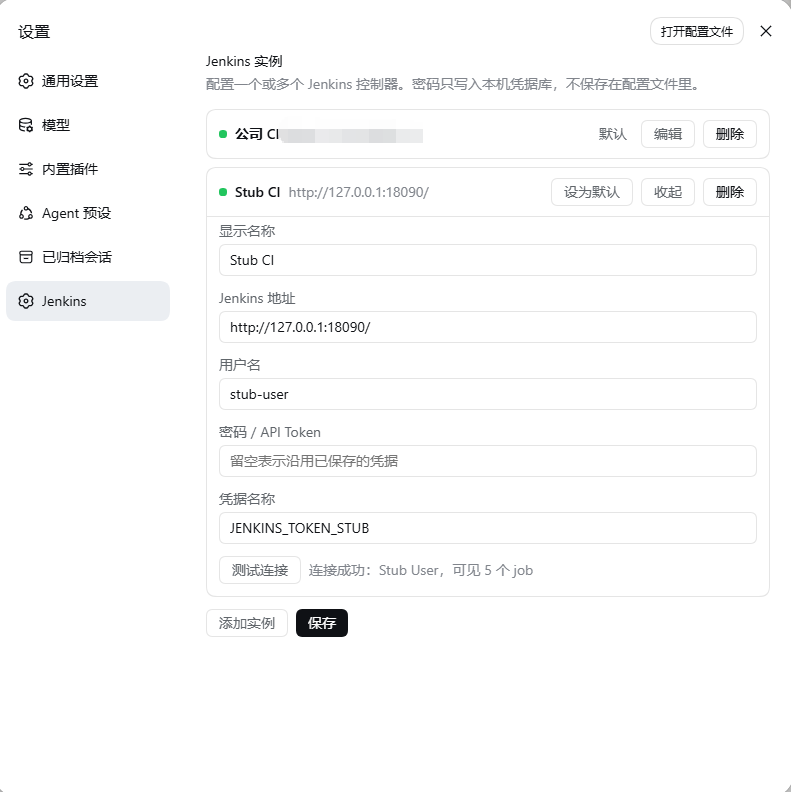
dsh plugin --profile web add dsh-jenkins-pluginRestart dsh web, open Settings → Jenkins, add an instance (URL, account, password/API token) and save; the Jenkins panel then appears in the right sidebar.
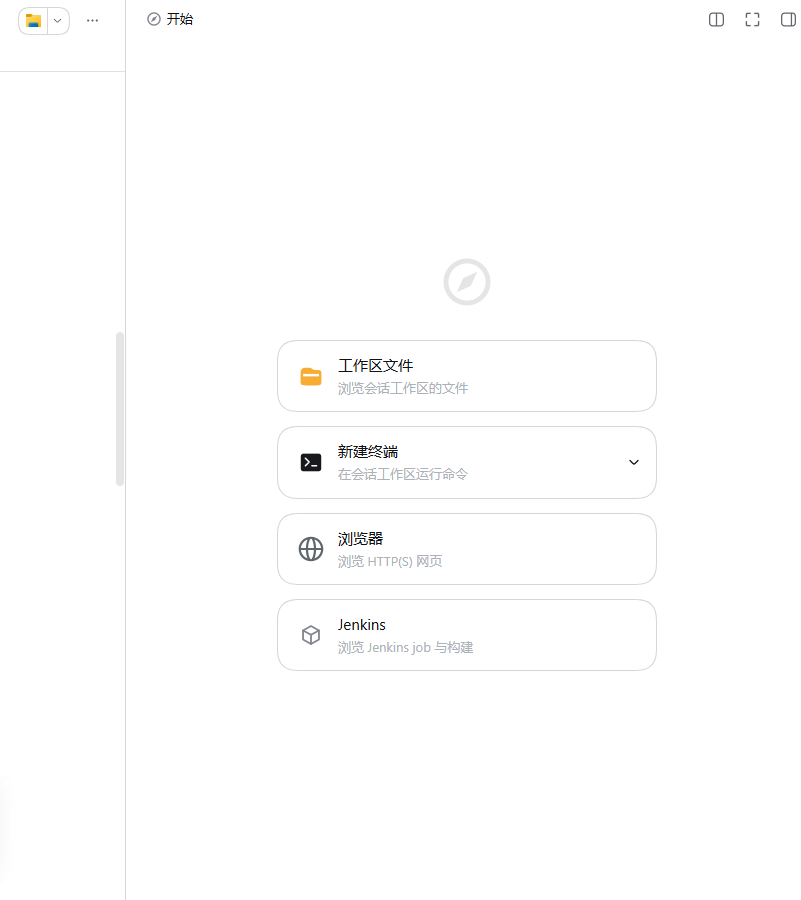
Other sources:
# tarball (offline or internal distribution)
dsh plugin --profile web add ./dsh-jenkins-plugin-0.1.0.tgz

# git sources: the profile must allow the prepare script to build (pnpm ≥10 blocks it by default)
dsh plugin --profile web add github:<owner>/dsh-jenkins-plugin
A git install fetches sources, not built artifacts, so the profile's pnpm-workspace.yaml has to allow its prepare script:
allowBuilds:
  dsh-jenkins-plugin: true
That is permission for this package's code to run on your machine at install time, outside any sandbox the agent runs in — only allow sources you trust, and pin a commit (github:<owner>/dsh-jenkins-plugin#<sha>). Use npm or a tarball to avoid the step entirely.
The panel (the Jenkins tab in the right sidebar) has two modules:

Clicking a job or a card drills down without ever leaving the panel: build history (paged) → build detail (stage bar, embedded console log, test summary, change set, artifacts). Downloading an artifact is the only action that opens a Jenkins page.
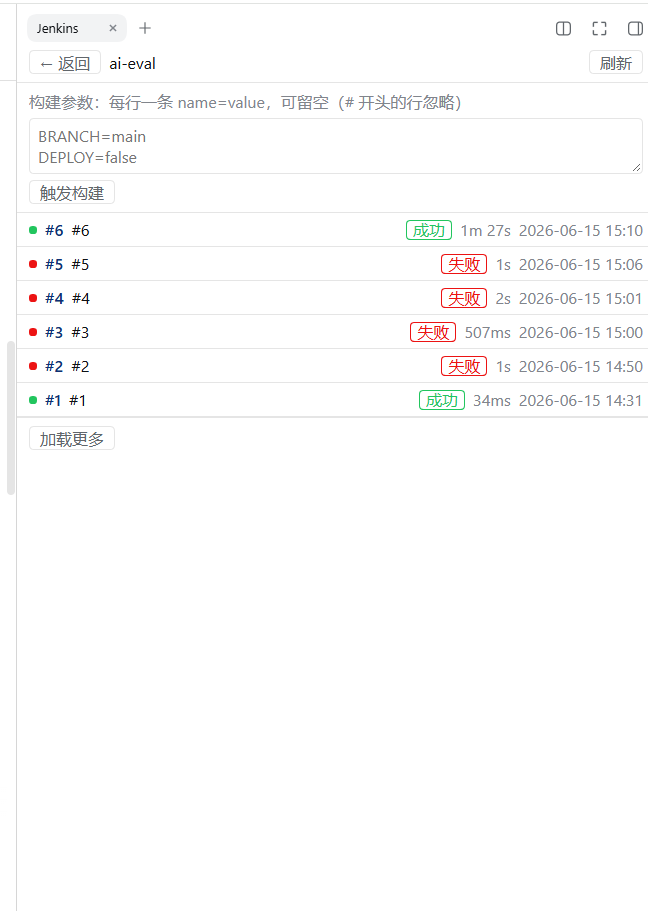
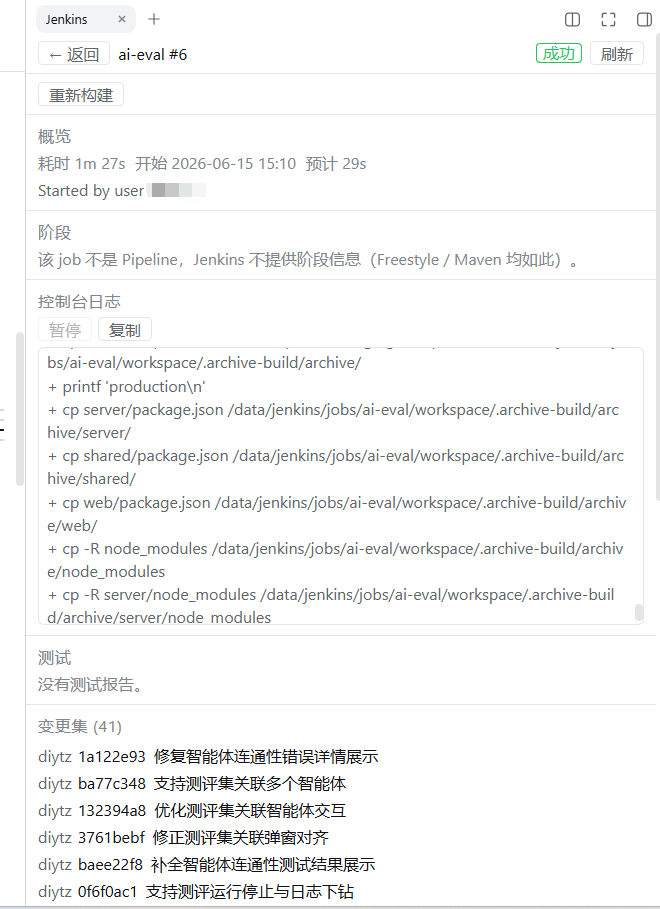
Writes happen in the panel as button → inline confirmation → run → result in place:
| Action | Notes |
|---|---|
| Trigger a build | parameterized jobs get a KEY=VALUE box |
| Rebuild | offered only for failed builds; reuses the failed build's parameters |
| Abort | allowCancel is off by default; enable it to use the button |
| Hand to AI | offered only for failed builds; sends the failed log tail, stages and change set to the current session's model, and the answer appears in the conversation |
Jobs on denyJobs are refused whatever the switches say, and not a single request reaches Jenkins.
Tools the model can call on its own:
| Tool | Purpose |
|---|---|
jenkins_jobs |
list jobs and their status, optionally with recent build history |
jenkins_build_status |
one build's result, duration, Pipeline stages, change set, test summary |
jenkins_log |
console log, tail by default, continue from next_offset |
jenkins_workspace |
a build's workspace directory or artifact list (workspace reads need the Jenkins Workspace API plugin) |
jenkins_build |
trigger or cancel a build — the only write tool; denyJobs/allow.* first, then operator approval |
Multiple instances: the settings page holds several Jenkins controllers and probes each one with "test connection" before saving (if any row fails, the whole save is rejected with zero writes). The panel footer switches instances and marks the current one in green. The instance list and the followed jobs live in $DSH_HOME/jenkins.json.
Completion notices: a followed job's finished build is announced once through the platform's own background-job mechanism; the same build is never announced twice.
Failure wake (notifyWakeOnFailure, off by default): when a followed job fails, the conversation it was followed from gets the failure handed to it — the same log tail, stage and commits the button sends — so the model can explain it without anyone watching the build list. The favorite remembers which session followed it, so the answer lands where the person is. Only a real failure wakes anyone (unstable and aborted do not), each build wakes at most once, and a session that has closed is skipped silently. allowAnalyze: false turns it off too, since it sends the same log.
Please take these as read before installing:
tokenRef names a credential reference). The plugin's own jenkins.json holds only URLs, accounts and credential names — no passwords — and credentials never appear in tool output, the panel, or logs.allowTrigger defaults to on, allowCancel to off, and denyJobs hard-blocks specific jobs (including whole folders). Model-side calls additionally require approval; a panel click uses inline confirmation plus the same policy check.jenkins_log calls send console log content to the model as part of the prompt. Jenkins logs are untrusted input — they can contain arbitrary text, including instructions aimed at the model — so treat them that way. Only the last 16 KiB of a failed build's log is sent by default (analyzeLogBytes).$DSH_HOME/jenkins.json (instance list plus followed jobs) and DSH credentials (passwords).0.2.1-rc.3. engines.dsh accepts the 0.2.1-rc.3 line and later 0.2.x releases (>=0.2.1-rc.3 <0.3.0-0), and the @deepseek-ai/dsh-* peer dependencies use ^0.2.1-rc.3. Older harness lines (0.1.x) are not supported: the plugin uses harness APIs that changed between them.^22.19.0 || >=24.0.0.dsh web), verified on the Web composition.wfapi endpoints; on a controller without Pipeline jobs the stage list is empty and the card falls back to an elapsed-time estimate — that is "the controller reported no stages", not a broken panel.jenkins_workspace says so instead of pretending.mavenArtifacts/api/json, which only Maven jobs answer — and on a real 2.176.2 it is usually produced when the build ends, so a running Maven build's card may have no version. When there is none, nothing is shown; a version is never guessed.tree query cannot fetch artifact sizes.uiAutoOpenOnTrigger (open the panel on trigger) is accepted but not active; maxTrackedBuilds is advisory only — the followed list is the user's own choice, so nothing is hard-capped.Static configuration is only the fallback layer: instances configured in the settings page win, and static configuration applies when no panel settings exist (as an instance with id config). baseUrl/username may be left empty — that is exactly the "configure everything in the panel" setup.
- id: jenkins
  name: dsh-jenkins-plugin
  config:
    baseUrl: https://ci.example.com/jenkins
    username: ci-bot
    tokenRef: JENKINS_TOKEN
denyJobs: ['infra/*']| Field | Default | Meaning |
|---|---|---|
baseUrl |
empty | Jenkins root URL; empty means panel settings only |
username |
empty | login name paired with the token |
tokenRef |
JENKINS_TOKEN |
credential reference holding the API token; resolved per call, so a rotation applies without a restart |
settingsFile |
jenkins.json |
panel settings file: an absolute path, or a name under the harness home |
tlsMode |
verify |
verify validates the certificate; allowSelfSigned accepts an untrusted one |
tlsCaFile |
— | PEM bundle used to validate the certificate under verify |
timeoutMs |
15000 |
bound on one HTTP request |
crumbMode |
auto |
auto fetches a CSRF crumb before mutating requests; off skips it |
denyJobs |
[] |
job paths that may never be triggered or cancelled; folder/* matches a folder |
allowTrigger |
true |
whether triggering builds is allowed |
allowCancel |
false |
whether cancelling builds is allowed |
progressIntervalMs |
3000 |
stage polling interval for tracked builds |
logIntervalMs |
1500 |
console-log polling interval for the build the panel shows |
idleBackoffMaxMs |
30000 |
upper bound of the idle backoff |
queueTimeoutMs |
300000 |
how long a build may stay queued before it reports a timeout |
maxTrackedBuilds |
5 |
advisory cap on tracked builds (not enforced) |
retainMs |
600000 |
how long a finished build stays in the tracking table |
historyCount |
10 |
default build-history rows (max 50) |
maxLogBytes |
262144 |
byte cap on one console-log response |
logReadBytes |
8388608 |
byte window read from the controller per log call |
maxListingBytes |
4194304 |
byte cap on one response of the recursive job walk |
maxWorkspaceEntries |
500 |
entry cap on one workspace directory listing |
maxReadFileBytes |
1048576 |
byte cap on one workspace file read |
notifyOnComplete |
true |
announce a followed build when it finishes |
notifyWakeOnFailure |
false |
hand a failed followed build to the session that followed it |
allowAnalyze |
true |
allow handing a failed build to the model |
analyzeLogBytes |
16384 |
log-tail bytes handed to the model |
uiAutoOpenOnTrigger |
true |
open the panel on trigger (not active yet) |
maxLogBytes and logReadBytes are two different things because real Jenkins ignores ?start=: the read window has to be far larger than a page, or the "tail" you get back is really the head of the log. That is why this plugin reads a window and slices locally.
npm install          # runs prepare (= build) once
npm run typecheck
npm test             # 415 assertions, no test framework: every tests/*.ts runs on its own
npm run build        # tsc (Host half) + esbuild (browser half → lib/client.js)
npm run check        # test + secret scan + packed-payload audit
The browser half is bundled into the client module system's lazy factory (window.__ModuleLoader__.load({ id, factory })): React, Cordis and the static UI libraries stay external and resolve through the injected require, everything else is inlined — so the package has no runtime dependency beyond the platform baseline.
tests/stub-jenkins.ts is a zero-dependency stub Jenkins (node tests/stub-jenkins.ts) with stages, a failing build, a parameterized Maven job, write endpoints and a queue delay; it exercises the panel's live path and write path without touching a real controller.
Three gates run before a release (and are what CI runs):
npm run check:secrets   # credential shapes in everything a commit would carry (private hostnames / user paths warn only)
npm run check:payload   # reads npm pack's manifest: artifacts present, no src/ or internal notes shipped
npm pack                # produce the tarball, install it into a clean profile, then publish
Releasing is scripted end to end in RELEASING.md (npm run release:check is the
pre-flight that refuses to reuse a version or a tag).
CLASSIFICATION EVIDENCE
系统优先读取 GitHub Topics,再与站内分类词典和词根规则比对。当前命中: 无有效分类标签。
c1overzz
DSH 插件:每天替你刷一轮 B站,读字幕挑出值得的、写一份日报,值得的 @ 你

hellowind777
一个自主的高级智能伙伴,不仅分析问题,更持续工作直到完成实现和验证。

xing-shuyin
Just open your browser — get all your work done.