
模型与 MCP
待识别

rea
morluto
Reverse engineer anything with agents, from app behavior down to native binaries.
PROJECT TOPICS
INSTALL REFERENCE
dsh plugin --profile web add github:Edison-A-N/dsh-remote-editor
该命令指向仓库当前默认分支;尚无绑定当前 commit 的完整验证结果。
PROJECT README
A DeepSeek Harness (DSH) Web plugin that opens the current session's workspace in Cursor, VS Code, VS Code Insiders or Windsurf on the computer running your browser, connected to the DSH server over Remote-SSH.
DSH's built-in "Open In..." button launches applications on the machine that runs the DSH server. That works when the browser and the server share a desktop. When you reach DSH from another computer (a devbox, a VM, a lab server), the button is hidden because the server has no display, and if it were shown, the editor window would open on the server where you cannot see it.
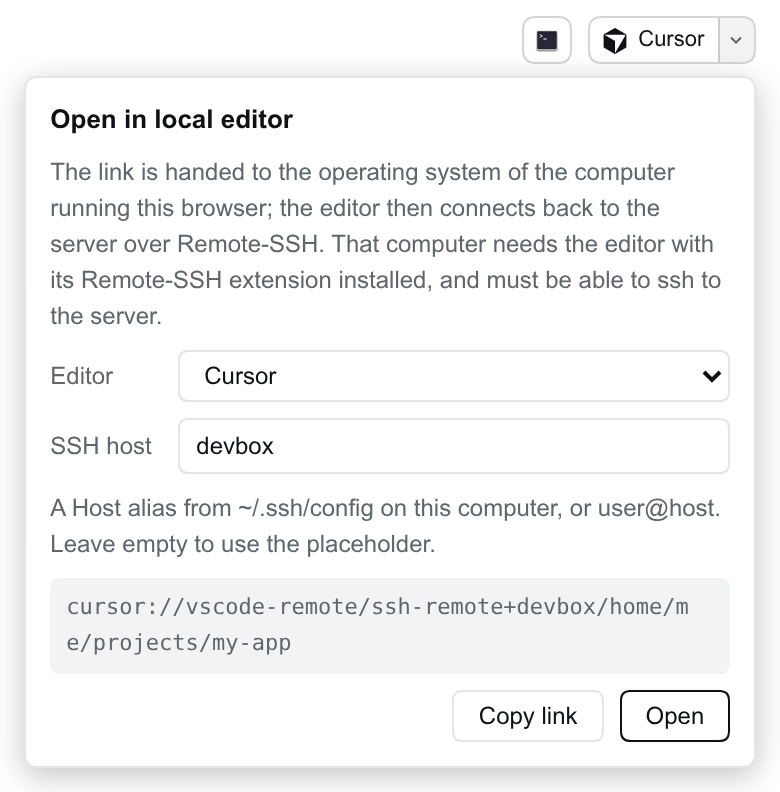
A web page cannot start applications on your computer. It can follow a link whose scheme your operating system hands to an installed app. Cursor and the VS Code family register such schemes, and they accept Remote-SSH folder links:
cursor://vscode-remote/ssh-remote+<host><absolute path>
vscode://vscode-remote/ssh-remote+<host><absolute path>
This plugin puts that link on the session header, built from the session's working directory.
localStorage, because they describe your computer, not the server. Different computers can use different settings against the same DSH server.<server account>@<address in the browser's location bar>. Put an ~/.ssh/config alias there instead when you need a specific key, port or jump host.On the computer running the browser:
ssh access to the DSH server under the host you configure.The first time a browser follows a cursor:// or vscode:// link it asks whether to open the app; allow it. If clicking does nothing, the editor is not installed or did not register its URL scheme.
DSH >=0.2.2-alpha.2 <0.3.0-0 (0.2.x, including its prereleases), Node >=22.19.
Open any session. Click the button with the editor's logo in the top-right header to open the workspace; click the arrow beside it to change the editor or the SSH host.
# from npm
dsh plugin --profile web add dsh-remote-editor

# from GitHub
dsh plugin --profile web add github:Edison-A-N/dsh-remote-editor
The package ships its own bundle patch (dsh.bundle.patch + cordis.patch.yml), so the CLI and the Web UI's Plugins page load it in one step. Restart DSH, reload the page and open a session.
lib/client.js): registers one entry in the conversation.session.header.utilities slot. It reads the session's cwd from the slot's useSessions prop, the same source the official button uses, and renders a plain <a href="cursor://...">. A real link keeps the click a user gesture, so browsers hand the scheme to the OS without navigating the page.lib/index.js): one GET /plugins/remote-editor/api/info route behind DSH's login check, returning the server account name for the default host. The server never launches anything.. _ - @ : [ ], and each path segment is percent-encoded, so a host or path cannot break out of the link. Paths with . or .. segments and hosts starting with - are refused.pnpm install
pnpm run build # bundles client/src into lib/client.js
pnpm testlib/client.js is committed, because DSH loads it as-is; rebuild it in the same commit as any change under client/src.
Bug reports and pull requests are welcome on GitHub. Please include the DSH version, the browser and OS, and the link shown in the panel.
MIT. Editor logos are from Simple Icons (CC0-1.0); the names and logos are trademarks of their owners and are used only to identify the editor that a link opens.
CLASSIFICATION EVIDENCE
系统优先读取 GitHub Topics,再与站内分类词典和词根规则比对。当前命中: deepseek-harness。
morluto
Reverse engineer anything with agents, from app behavior down to native binaries.

deepseek-ai
DeepSeek Harness: Everything is a Plugin.

nexu-io
The 1st Collaborative AI Design Agent Workspace. Local-first and open source. Create motion, prototypes, websites, apps, dashboards, presentations, images, and videos with your team and AI agents. Share work, exchange feedback, and iterate together in one workspace.