
Agent 与会话
插件

nuwa-skill
alchaincyf
你想蒸馏的下一个员工,何必是同事。蒸馏任何人的思维方式——心智模型、决策启发式、表达DNA。Distill how anyone thinks.
PROJECT TOPICS
INSTALL REFERENCE
dsh plugin --profile web add github:EdgarSantiago/dsh-prompt-history
该命令指向仓库当前默认分支;尚无绑定当前 commit 的完整验证结果。
PROJECT README
Find and reuse previous prompts in the Harness composer without sending them automatically.
The sections below follow the dsh-plugin.org submission template. This is an independent plugin, not an official DeepSeek product.
EdgarSantiago/dsh-prompt-history
Public source repository maintained by EdgarSantiago. Package: @local/dsh-prompt-history, version 0.2.4. The existing package and Slot identifiers are retained for compatibility with local installations. GitHub installation follows the published main branch.
Adds searchable human-prompt history to Harness so you can copy or reuse previous text in the composer without sending it automatically.
Sessions & Messages
Requires DeepSeek Harness >=0.2.2-rc.1 <0.2.3-0 and Node.js 18+. Choose the profile you use:
Desktop
dsh plugin --profile desktop add github:EdgarSantiago/dsh-prompt-historyWeb
dsh plugin --profile web add github:EdgarSantiago/dsh-prompt-historyThe repository includes the prebuilt Client. Follow the plugin manager's application/reload guidance; do not edit profile manifests manually.
This is a GitHub-only source release, not an npm release. The private: true flag prevents accidental npm publication; it does not prevent installation from GitHub. Existing local links remain valid. To replace a local installation with the GitHub source, remove the existing bundle through the plugin manager first.
| Item | Declared compatibility |
|---|---|
| DeepSeek Harness | >=0.2.2-rc.1 <0.2.3-0 |
| Profiles | Web and Desktop |
| Runtime | Node.js 18+ |
| Browser | Modern browser with Popover API support |
| Languages | English, Portuguese, Chinese (Simplified), Japanese, Spanish, French, German, and Russian, following Harness Settings → Language (pt-BR aliases Portuguese) |
| Verified platform | macOS; other platforms have not been visually certified |
The interface uses native Slots and Harness's React, without an iframe or a separate React installation. The user-authorized compatibility range admits 0.2.2 from rc.1 onward, including stable 0.2.2, but blocks even 0.2.3 prereleases. Later 0.2.2 candidates are allowed by policy, not individually certified. The earlier rc.2 audit checked shipped projection, composer, and Slot contracts; relevant installed rc.3 contracts were inspected for this update. The custom menu explicitly excludes its visible box from macOS window dragging. Live visual interaction still needs confirmation after installation.
Controls, accessible names, status/error feedback, and plugin metadata cover all eight Harness languages. Changing Settings → Language updates the launcher and open panel reactively, including open menus, confirmations, existing feedback, and locale-formatted dates/times. Open menus adjust to translated label widths without resetting keyboard focus. English remains the native translation fallback; unsupported date locales also fall back to English. Prompt text and conversation titles are user content and are never translated.
MIT. The icon was originally drawn for this plugin.
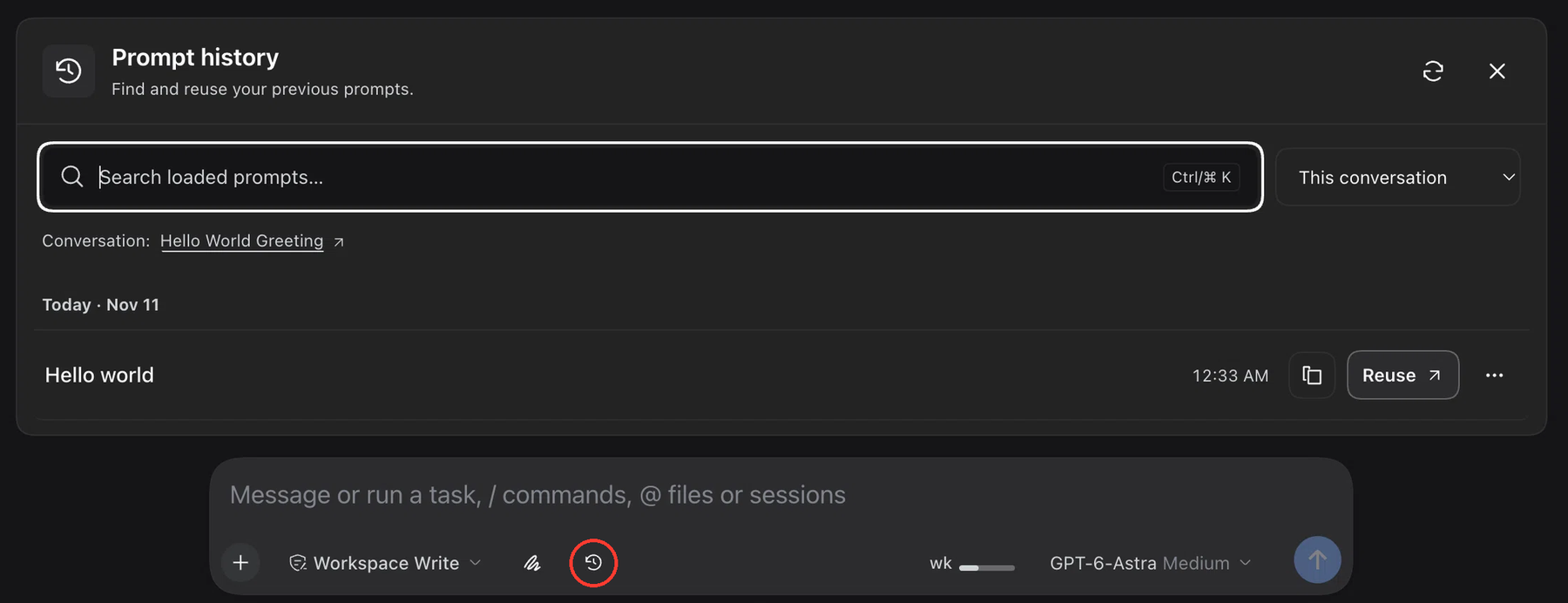
Actual plugin screenshot from 0.1.9, before panel keyboard navigation and quote/paste actions. The red outline marks the history launcher in the composer toolbar. The screenshot was cropped to highlight the panel and composer; the outline is an annotation only.
Paste inserts at the native captured selection and revision, preserving surrounding draft content and existing attachments. Quote uses the native atomic quote action rather than simulating a quote with Markdown. Neither action sends a message. Reuse retains its separate confirmation before replacing an existing plain draft.
Keyboard scope: the native-composer shortcuts only open this panel. They do not recall text directly into the composer. ↑/↓ remain native for every nonempty draft, so normal cursor movement is preserved. After opening, the panel owns its search and navigation keys; text is inserted only after an explicit Paste, Quote, Reuse, or panel Enter action. Right-click actions remain confined to history rows, not the native composer. No keybinding setup is required.
DOM compatibility bridge: automatic opening observes the exact card containing this plugin's clock, using Harness 0.2.2-rc.1 markers [data-composer-card], [data-composer-input], and [data-trigger-menu]. This is a version-dependent DOM integration, not a stable public composer-keyboard API. It reads focus/selection and UI markers but never writes the native editor's DOM or selection. Unknown markup fails closed; the clock remains available. The bridge declines IME/composition, selected text, active menus/modals, busy/claimed input, bang/slash/reference prefixes, attachments, reference/command/quote chips, and ambiguous duplicate composer surfaces for the same Session. The double-Down sequence resets after another key, a click, focus loss, IME, a draft revision change, editor replacement, or a newly blocked input; it never carries across Session/component lifetimes. Other fields and Command+R stay native; Ctrl+R suppresses browser refresh only when an eligible composer accepts the opening action. Use only one composer-history keyboard interceptor at a time.
The DOM approach was checked against the reference terminal-history plugin. This implementation keeps its own projection-backed history and opens a non-destructive panel instead of replacing the draft while browsing.
History opens above the composer and closes when you click or tap outside the panel and clock button. The outside interaction keeps its action and focus without changing the draft. In the current-conversation filter, the conversation appears once above the list; in recent-conversation results, each entry identifies its source. Refresh reloads history, and Load more conversations extends the loaded set.
Reuse does not send messages, execute commands, or restore attachments or references. Sensitive information remains part of a saved prompt: review it before copying, sending, or including it in a screenshot.
| Action | Shortcut/behavior |
|---|---|
| Open history and focus search from the native composer | ↑ once or ↓ twice within 500 ms, with an empty, unstructured draft and a collapsed caret |
| Open reverse search from the native composer | Ctrl+R in an eligible plain-text composer |
| Focus search | Ctrl/⌘ K, while focus is inside the panel |
| Enter results from search | ↓ focuses the first result |
| Next/previous visible history row | ↓ / ↑; focus stays in the list at both boundaries |
| Reverse search / older match | Ctrl+R inside the history panel |
| Paste selected prompt | Enter in history search or on a focused history row |
| Open a history row's actions | Right-click, ContextMenu key, or Shift+F10 on the row |
| Exit reverse search | Escape; this leaves the history panel open |
| Close the panel or cancel confirmation | Escape outside reverse-search mode |
| Navigate the ⋯ menu | Arrow keys, Home, and End |
| Close the menu | Escape, returning focus to its button |
Icon buttons have accessible names, focus is visible, actions reflow in narrow panels, and animations respect prefers-reduced-motion.
pnpm install --frozen-lockfile --ignore-scripts
pnpm run build
pnpm run check
pnpm test
For a local development installation, run dsh plugin --profile desktop add "$(pwd)" from the project root after building (or use --profile web). Manage updates through the Harness plugin manager.
The Client is bundled with esbuild; there is no install script. Tests use Node's built-in runner, synthetic data, real Date/Intl, and real Cordis Context/Service instances. They cover human sources, bounds, ACLs, cancellation, draft confirmation, local dates, year boundaries, daylight-saving transitions, outside-pointer dismissal, stable-key history navigation, captured insertion spans, native quote/paste refusal, panel keyboard integration contracts, and composer-opening policy/listener lifecycle using real Node EventTarget/Event instances. Localization tests verify complete key and named-placeholder parity, distributable metadata, shared pt-BR registration, the English fallback catalog, registration cleanup in both source and the prebuilt Client, open-menu resize/focus contracts, and real Date/Intl formatting and malformed-locale fallback across all supported languages. They check the locale subscription and deferred feedback-translation contracts without reimplementing the host translation runtime or mocking React hooks. DOM markers were checked against installed Harness source; live Language switching (including open menus, confirmation, and feedback), the browser DOM probe, and visual keyboard interactions still require a manual check in the running app. Contract tests do not replace interaction checks in Harness.
dsh-plugin added.apply(ctx) module.package.json.Website vs. Plugin Hub: according to the listing requirements, a public repository with the dsh-plugin topic can be indexed on the website without npm. The Plugin Hub inside DSH additionally requires an installable npm package. Source publication does not imply catalog listing or completed community verification; neither is claimed here.
CLASSIFICATION EVIDENCE
系统优先读取 GitHub Topics,再与站内分类词典和词根规则比对。当前命中: prompt-history。
alchaincyf
你想蒸馏的下一个员工,何必是同事。蒸馏任何人的思维方式——心智模型、决策启发式、表达DNA。Distill how anyone thinks.

freestylefly
Prompt as Code | GPT Image 2 / 2.5 提示词与案例库,530+ 个案例、20+ 套工业级模板与可复用 Skills,新增 2.5 同提示词对比专区,附完整提示词与生成记录,持续更新。

titanwings
Distilly — Distill how they think into reusable Skills for any Agent or Bot. Formerly Colleague Skill(原同事 Skill).