
模型与 MCP
待识别

rea
morluto
Reverse engineer anything with agents, from app behavior down to native binaries.
PROJECT TOPICS
INSTALL REFERENCE
dsh plugin --profile web add github:EasonMWS/dsh-plugin-health
该命令指向仓库当前默认分支;尚无绑定当前 commit 的完整验证结果。
PROJECT README


DSH updated and your plugins stopped loading? This tells you which ones broke, which can be fixed, and which cannot — then fixes them for you.
Some rejected plugins have outdated version declarations. For trusted plugins, this tool can install and boot them using a separate temporary DSH data directory before offering a version exemption, a brief for your own AI, or a configuration change to disable the plugin.
Health diagnoses compatibility and observed loading problems; it does not contain malware. Startup checks execute plugin code with your account permissions and cannot safely open unknown software. Read Health's security boundaries and the official DSH safety notice.
Source candidate:
3.2.1. The registry install below follows the published npm release.
npm install -g dsh-plugin-healthNo terminal needed. Install it, restart DSH, then open Settings → Plugin health and press the buttons. The commands below are for people who prefer a shell.
Not ready to install? Check any plugin first, in the browser: https://easonmws.github.io/dsh-plugin-health/compat/ — every catalogued plugin against every current host version, rebuilt daily.
| If you are… | Read |
|---|---|
| a DSH user whose plugins broke | Fix a broken plugin |
| stuck because DSH will not start | When DSH will not start |
| a plugin author | Compatibility checks in CI |
| building a plugin market | Use the plugin index |
| checking whether this tool is safe | Security |
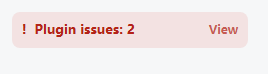
When a plugin is rejected, a chip appears in the sidebar — no need to go looking:
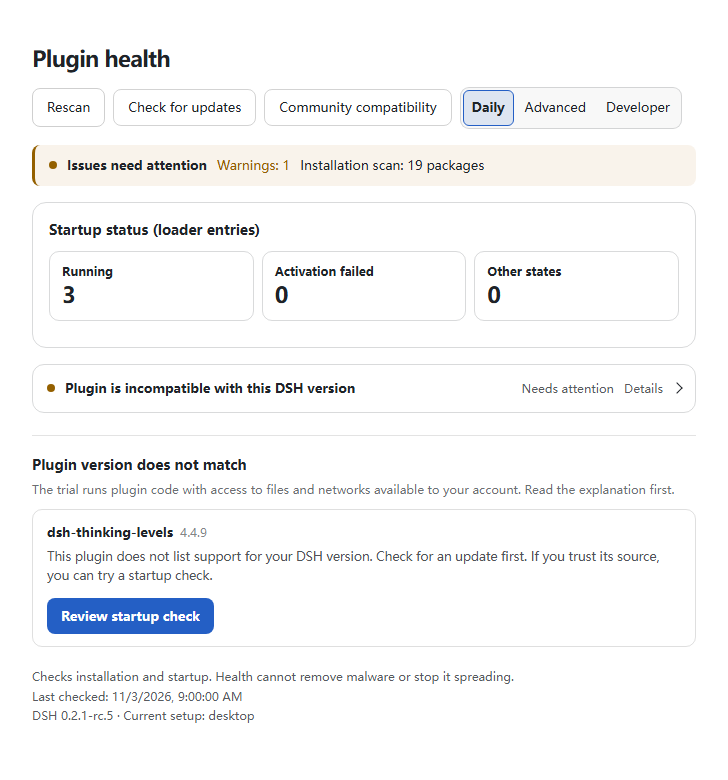
Open Settings → Plugin health. You get one line per problem, and one button per plugin:
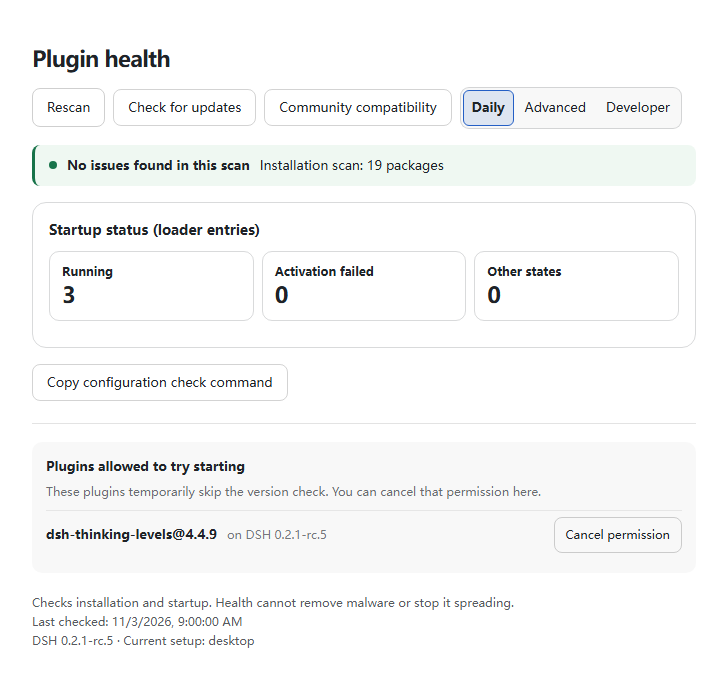
compatibility.json, with one-click undo.You can revoke Health's exemption record. Revocation does not undo effects of plugin execution.
Once the rehearsal passes, you get the exemption and a Revoke button beside it:
Or check everything at once. If you prefer a shell:
$ dsh-plugin-health doctor --profile desktop
scanned 19 plugins…
✓ 14 healthy
⚠ 3 have a stale version range (these can be saved)
✗ 2 are genuinely incompatibleThe gate lets it through — that is not official support. A passing trial records that startup checks completed in the temporary DSH data directory. It does not certify plugin safety or all features.
allow-version exemption. No plugin is modified, nothing on npm is touched.Reading declarations is the first layer. Four things happen between a plugin being rejected and your DSH working again:
| # | Layer | What it does | Where |
|---|---|---|---|
| 1 | Detect | Scans every installed plugin — bundles, dependencies, cordis.patch.yml inserts (including nested ones) and node_modules — and compares each declaration against the version you actually run |
your machine |
| 2 | Verify | Rehearses a trusted plugin in a separate temporary DSH data directory: grants the exemption there, installs it, boots it, checks activation | current account; trial files retained |
| 3 | Repair | If the rehearsal booted, writes a single official allow-version exemption to your profile — recorded, one click to undo |
your profile |
| 4 | Escalate | If the trial fails or is inconclusive, withholds the normal-profile exemption and offers a disable option or a brief for your own agent. Checks upstream for an existing report first | your choice |
Layer 2 is the one that decides. Without it, layer 3 would be a guess.
An incompatible version is the loudest failure and the easiest to explain, but a profile that has been installed and removed from for months rarely has just that one problem. Layer 1 reads the whole configuration, not only the ranges:
| What it finds | Why it matters |
|---|---|
| Duplicate insert ids | Two plugins registering the same entry id. The second one silently replaces the first, and the plugin that lost its entry looks broken for no visible reason |
| Module replacement | One plugin's patch removes or replaces a module another plugin provides |
| Fields dropped by a later layer | A patch in home or profile overwrites a field a bundle set, so the bundle's own behaviour changes without any version changing |
| Host-core packages inside a profile | A copy of a package the host already ships, which can shadow the host's own |
| Overlapping shared-write declarations | Two plugins declaring a write to the same path |
That last row is deliberately called overlap, not conflict. A declared write to the same file is evidence of a risk, not proof that two plugins raced — one of them may never run, or may write a different key. The report says which declarations overlap and which layer each came from, and stops there. Deciding what to do with that is a judgement about your setup, and the tool does not have it.
A plugin can boot cleanly on its own and still break when it loads beside its neighbour — they both want the same tool name, or one needs a service the other replaces. A single-plugin rehearsal cannot see that.
smoke takes repeated --with <spec> companions, up to twelve:
dsh-plugin-health smoke --dsh-dir <installed @deepseek-ai/dsh> \
  --plugin @scope/plugin-a@1.4.0 --boot-only \
  --with @scope/plugin-b@2.0.1 \
  --with @scope/plugin-c@0.9.0
The check requires each named package to actually reach active in the loader. An entry that merely
shares a name does not count, because that is exactly the failure mode being hunted: something is
registered, so a shallow check reports success while the plugin you asked about never loaded.
This is still a data directory, not a sandbox. See Safety boundaries.
An outdated version declaration does not tell us whether a plugin will boot. Measured on 0.2.1-rc.4:
| Plugin | Declared | Observed startup in a temporary DSH data directory |
|---|---|---|
@nanmicoder/dsh-agent-teams@0.1.27 |
❌ rejected | ✅ full boot, all 94 entries active |
dsh-find-plugin@0.4.0 |
❌ rejected | ✅ runs fine |
@feng0531/dsh-vcs@0.4.10 |
❌ rejected | ❌ fails: waits for a service the host no longer provides |
By declaration, all three are equally rejected. Two of them boot without complaint; one does not. Reading declarations cannot tell them apart, which is why the trial precedes the normal-profile exemption. Exempting the third would have produced exactly the outcome the gate exists to prevent — a plugin that loads and then misbehaves, with no warning left anywhere.
You do not need to install anything for this. DSH ships a prerelease every week or two, and a
pinned engines.dsh breaks your plugin on a schedule. This Action tells you in the PR, before your
users find out.
Add one file, .github/workflows/dsh-compat.yml:
name: dsh compatibility
on: [pull_request]
permissions:
  contents: read
  pull-requests: write      # required to post the comment
jobs:
  matrix:
    runs-on: ubuntu-latest
    steps:
      - uses: actions/checkout@v4
      - uses: EasonMWS/dsh-plugin-health@v3
        with:
          plugins: .
          versions: latest,next
That posts a comment on the PR with a compatibility table, writes a job summary, and uploads
matrix.json, matrix.md and SVG badges.
Fail the build when your plugin breaks. Add failOn: any and the job goes red instead of posting
a passing table. Better: watch only the channel you actually support, so a new nightly warns you
without blocking contributors:
        with:
          plugins: .
          versions: latest,next,alpha
          failOn: next          # red on the next channel only
Show the result in your README. The run writes badges you can commit:
This is the cheapest way to answer "does this still work on the current DSH?" — for you and for anyone browsing your repo.
Or a live badge, with nothing to commit. The public compatibility page publishes a
shields.io endpoint for every catalogued plugin, rebuilt daily
against the latest host. Replace <slug> with your package name (@scope/name becomes scope__name):
[](https://easonmws.github.io/dsh-plugin-health/compat/#p-<slug>)It says the strongest thing that is true and no more: boots only when this exact version was boot-tested
on the latest host, accepted when only the declaration was checked, next build rejects when your
declaration will refuse the next prerelease, rejected · boots if exempted when the declaration is stale
but the code starts. The same data is at compat/p/<slug>.json.
Prefer a reusable workflow? matrix-review.yml does the same
with less YAML:
jobs:
  matrix:
    uses: EasonMWS/dsh-plugin-health/.github/workflows/matrix-review.yml@v3
    with:
      plugins: '.'
      versions: 'latest,next,alpha'
      comment: true
Full inputs: action.yml · example: examples/dsh-compat.yml.
scan finds a rejected plugin
  ↓
trial in a temporary DSH data directory: exempt there, then boot trusted code
  ├─ it boots → standalone startup passed in this trial
  │    → confirm, then write one exemption in your profile (undo in one click)
  │    → record it and watch upstream for a real release
  │    → when a fix ships, the record tells you to revoke and upgrade
  └─ it fails or is inconclusive → report what this trial observed
       → do not write the normal-profile exemption
       → two choices: switch it off, or generate a brief for your own agent
The order avoids writing a normal-profile exemption before startup checks pass. It does not constrain the tested code's access to your computer or make an unknown plugin safe to execute.
Under Settings → Plugin health, every incompatible plugin gets:
An exemption is an entry in the host's own compatibility.json. Undo restores the recorded
exemption value. It does not reverse plugin side effects or guarantee that loaded code has stopped.
| Control | What it does |
|---|---|
| Rescan | Re-runs the whole check now |
| Check for updates | Asks npm whether this plugin is current, on demand |
| Browse all plugin health | Opens the public compatibility table in your browser |
An update installs from the panel — one button, no terminal. Checking ends in Update now, which runs the profile's own package manager (pnpm in a pnpm profile, never npm into it) against the exact version the check found. It says it needs a restart rather than performing one: the files change on disk, the running host keeps the code it loaded, and restarting on your behalf would end your session without asking. A failure shows the package manager's own message, not an exit code.
It checks for its own updates when DSH starts, and stays quiet about it. A health tool that is itself out of date is worse than useless — it tells you your plugins need attention while missing the fix released for the checker. One request per launch, at most one every six hours, and it only speaks up when something newer exists, with the exact upgrade command. An "up to date" banner on every visit would train you to ignore the strip where a real notice has to appear.
A check that fails is recorded as a failure, never as "you are current": those are different statements and only one of them is true.
No outbound traffic from a health tool? Set DSH_PLUGIN_HEALTH_NO_UPDATE=1 and it makes no
update requests at all. The panel's Check for updates button still works — that one is you asking.
Before installing anything:
https://easonmws.github.io/dsh-plugin-health/compat/
The compatibility table uses entries from the community catalog and compares their declarations against current host versions.
| How many | All compatibility table entries, including unknown results, with counts by host and a next-build forecast |
| Category | The catalog's own category, filterable |
| Released | Publish date of the version shown — tells you whether the author is still active |
| Filter | By name, by category, or only the rejected ones |
| Language | English / 中文, remembered between visits |
A tick means the plugin's declared range admits that host. Startup tests have separate results and evidence links. Entries marked GitHub only use a readable manifest from the default branch.
The same data is downloadable as
matrix.json, and you can build
the page for your own plugin set:
dsh-plugin-health matrix --plugins list.txt \
  --versions latest,next \
  --catalog https://awesome-dsh-plugin.com/plugins.json \
--out site/compatIf you are building a plugin market, a directory, or a launcher, there is a ready format-1 index:
https://easonmws.github.io/dsh-plugin-health/index.jsonUse it in DSH right now: paste that URL into Plugins → 自定义插件市场 → 发现 → 添加索引源.
@deepseek-ai/dsh-plugin-market-index (the same reader the DSH host uses)awesome-dsh-plugin.com/plugins.jsonBuild your own with:
dsh-plugin-health index \
  --catalog https://awesome-dsh-plugin.com/plugins.json \
  --host "$(npm view @deepseek-ai/dsh version)" \
  --index-url https://example.com/index.json \
  --limit 300 --out site
Details: descriptions are bilingual (en required, zh kept); categories come from the catalog plus
labels (npm, compatible, incompatible, unchecked, capability risk) and sort keys
(downloads, stars, health score). The health score is deterministic — popularity (log downloads
55, log stars 25), then +10 / −20 for whether the declaration admits the host, −10 for a capability
red line, and, when --verify supplies a boot test of the exact listed version on the same host, +8 for
V3 (its entries activated) or −8 for V1/V2 (admitted, but it did not install or start). A plugin that
was never boot-tested neither gains nor loses. Clamped to 0–100. It is not a security rating.
Download counts and stars come from public npm and GitHub data.
Scope: npm-published catalog entries only (2,607 of 5,704 in the October 2026 snapshot); GitHub- and tarball-only entries are skipped and reported.
Running anything below 2.1.3? Use the latest 3.x. Three rounds of review fixed these, and one release fixed problems the previous one had only half-fixed — so the version matters:
| Version | What it fixed |
|---|---|
| 1.1.0 | Seven issues from a security test of 1.0.2, one rated high: the write routes' control key was handed out by the unauthenticated status endpoint |
| 2.0.0 | 25 findings from two more reviews. A cross-origin page could drive every write route (cookies ignore the port, so same-site is not same-origin); a request body could name any package to install and run; three paths granted an exemption without a rehearsal on the target host |
| 2.1.1 | Four fixes from the previous release that did not hold. The worst: the loopback check read only the Host header, which the client writes — so with the web server bound to a LAN address, any machine on the network could send Host: 127.0.0.1:<port>, pass every check, read the key from /status, and disable plugins |
| 2.1.3 | The panel could not obtain its key, so every button answered 401; the message also blamed the network for what was an authentication failure |
If you bind the DSH web server to a non-loopback address (0.0.0.0 or a LAN IP), treat every
plugin route as exposed to the network and check that the host's own authentication is what you are
relying on.
Trust boundary, stated plainly: the write routes are reachable by any local process. The loopback
interface is the boundary — not the control key. A local process can read Set-Cookie and replay it;
what the key does stop is a page on another local port, and that is what the peer and same-origin
checks enforce.
Security: see Security above for the full version table. The short version: below 2.1.3 you are missing at least one fix that matters, and the loopback check before 2.1.1 could be bypassed by a LAN client with a forged
Hostheader.
| Health's actions | What Health itself does not do |
|---|---|
| Rehearse trusted code using a temporary DSH data directory | ❌ call your AI or spend your tokens |
Use DSH's official allow-version exemption |
❌ modify plugin source or anything on npm |
| Record version exemptions and support revoking them | ❌ grant an exemption when the rehearsal failed |
| Check whether upstream already has a report | ❌ file issues on your behalf |
| Prepare a complete AI brief | ❌ press send for you |
These statements describe Health's own actions. Code executed during a trial has the account's permissions and is outside these guarantees. A failed trial can already have produced side effects. Health's repair quarantine is an ordinary backup directory, not antivirus isolation.
A temporary exemption allows loading on the selected host version. The trial covers observed startup checks, not malicious behavior or all features. When the author ships a supported version, revoke the exemption and upgrade. Revoking permission does not undo plugin effects.
A major version is a promise about stability, so here is exactly what is frozen and what is not — rather than letting you find out by upgrading.
2.0.0 broke three things on purpose, and they are listed in the changelog: writes need
application/json, the rescue actions refuse plugins that are not installed, and a
compatibility.json that cannot be parsed is refused rather than rewritten. Everything below has
held since 1.0 and still holds.
Frozen for 3.x:
| Surface | Guarantee |
|---|---|
CLI commands and flags (matrix, smoke, doctor, repair, rescue, handoff, report, boot, index) |
Existing flags keep their meaning. New flags may be added; none are removed or repurposed |
The plugin_health agent tool's name and input schema |
Additive fields only |
Exit codes (0 success, 1 findings/failure, 2 usage error) |
Unchanged |
Files this tool writes (compatibility.json, plugin-health-rescue.json, handoff bundles) |
Format documented and forward-compatible: unknown keys are preserved, never dropped |
The status route shape (/plugins/dsh-plugin-health/status) |
Fields may be added; existing fields keep their names and types. Since 2.1.3 the body also carries key, the per-launch control key the panel uses to authenticate its own writes — see Security for why that is not a weaker boundary than the cookie |
Not frozen — may change in a minor release, because they are presentation or internals:
src/ (nothing in src/ is a public import path except
./api and ./client);Version policy for a host bump. engines.dsh is a range (>=0.2.0-rc.0 <0.3.0-0), not an
enumeration, so a new DSH nightly does not break this plugin the way it breaks plugins that pin
exact versions. When DSH 0.3.0 ships, this package needs a release that extends that range — the one
known expiry point, announced in the changelog before it lands.
If a plugin stops DSH from booting, the settings page cannot help — it runs inside DSH. These three commands run entirely outside the host, so they still work from a terminal:
# 1. Why did it fail? Reads the host's own crash reports, then static checks.
dsh-plugin-health boot diagnose --profile desktop

# 2. Cannot tell? Disable every third-party entry so DSH starts again.
dsh-plugin-health boot safe --profile desktop --apply

# 3. Once the culprit is fixed, put everything back.
dsh-plugin-health boot restore --profile desktop --apply
boot diagnose reads the desktop app's crash reports
(%APPDATA%\@deepseek-ai\dsh-desktop\logs\crash-*.log), which name the offending package outright
when a plugin is at fault — the CLI itself prints to stderr and leaves nothing on disk.
boot safe only appends disabled: true overlays to the profile's own patch layer: no files are
deleted, no plugin is modified, host entries are never touched, and this tool never disables
itself (that would remove the panel explaining what happened). boot restore removes only the
entries it added, leaving your own patches exactly as they were. Both default to a dry run; add
--apply to write.
This package is what you want if you are searching for any of these:
| If you are looking for… | This package does that |
|---|---|
| a plugin manager for DSH | shows every installed plugin and its state in one page |
| a plugin checker / inspector / scanner | scans all installed plugins, not a sample |
| a plugin doctor / diagnostics | explains what is broken and what to do about it |
| Plugin upgrade and conflict review | checks declared DSH ranges, literal patch overrides and declared shared writes |
| to fix / repair a broken plugin | one-click repair (quarantine only, never deletes) |
| why a plugin stopped working after a DSH update | compares declared ranges against the new host |
| 插件管理 / 插件检查 / 插件冲突 / 插件诊断 / 插件不兼容 | 中文界面,设置 → 插件健康 |
Not this package if you want to browse and install new plugins from a market — that is a marketplace, while this one manages what you already have. (It does build the official format-1 index that marketplaces can consume.)
A startup trial only exercises what the profile reaches while booting. A command that lazy-loads later, or an event handler that fires minutes in, is not covered — the plugin can start cleanly and still be broken by the same upgrade.
For that side, dsh-seam checks a plugin’s own source against the
installed @deepseek-ai/* type definitions and points at the line that broke. It covers the whole call
surface instead of the boot path; this package covers whether the package installs and starts at all. The
failure modes do not overlap, so neither replaces the other.
dsh-seam |
this package | |
|---|---|---|
| reads | your source → upstream .d.ts |
the installed package → a real host |
| catches a nullability change you relied on | yes, with file:line |
only if boot reaches it |
catches engines.dsh too narrow, missing dependency, blocked build script |
no | yes, at install time |
| coverage | the whole call surface | the boot path |
DSH rejects a new install whose declared range does not cover the running version:
$ dsh plugin --profile test add dsh-session-recall
dsh: installation rejected: Plugin dsh-session-recall@0.7.9 is incompatible with dsh 0.2.1-rc.3
dsh: nothing was installed.
It also re-checks plugins that are already installed, every time a profile starts. A bundle whose declaration no longer admits the host is skipped, and the rest of the profile starts as if nothing happened. All it leaves behind is a line on stderr, which the desktop app does not show:
dsh: skipping profile bundle "dsh-browser-cdp": Error: Plugin dsh-browser-cdp@1.7.5 is incompatible
with dsh 0.2.2-rc.1: requirements {"engines.dsh":"0.1.7-rc.1 || … || 0.2.1-rc.5"}. …
Verified on 2026-11-09 against @deepseek-ai/dsh-app-boot from 0.2.0-rc.2 through 0.2.2-rc.1 (the
check is in loadProfileDirectory, and entries from patch layers are disabled by the startup preflight), and
by booting a profile with that plugin installed: with its exemption it registers its tool; without it the
profile boots with the plugin silently absent. Earlier versions of this README said the plugin "keeps
loading" after an upgrade — that was wrong.
So a plugin you rely on can vanish after a host update, with nothing in the UI to say which one or why. That is the gap this package fills: it reads what every installed plugin declares, compares it against the version you are actually running, tells you which ones the host is now dropping, and checks whether each one would still start.
Each time the host moves, the same scan runs across catalogued plugins, and every maintainer whose plugin the new host rejects gets a report: which declaration fails, on which host version, and what the official evaluator says. A maintainer can confirm it without installing anything.
As of 2026-11-09: 11 reports filed, 10 fixed and released by their maintainers, 1 still without a reply. Most were closed within two days.
| Host | Plugin | Report | Fixed in |
|---|---|---|---|
0.2.1-rc.2 |
dsh-plugin-subscriptions |
V1ki/dsh-plugin-subscriptions#158 | 0.9.10 |
0.2.1-rc.3 |
@anionex/dsh-vision-toolkit |
Anionex/dsh-vision-toolkit#178 | 0.1.48 |
0.2.1-rc.3 |
@nanmicoder/dsh-agent-teams |
NanmiCoder/dsh-agent-teams#277 | 0.1.27 |
0.2.1-rc.3 |
@goodandready/dsh-clinebot |
GooDAnDReaDY/dsh-clinebot#17 | 0.6.16 |
0.2.1-rc.5 |
dsh-chat-manager |
WSL043/dsh-chat-manager#35 | 1.5.21 |
0.2.1-rc.5 |
dsh-context-compression-improved |
drscrewdriver/dsh-context-compression-improved#9 | 0.10.3 |
0.2.1-rc.5 |
dsh-prime-memory |
drscrewdriver/dsh-prime-memory#26 | 0.26.16 |
0.2.1-rc.5 |
dsh-perm-gate |
drscrewdriver/dsh-perm-gate#5 | 5.4.1 |
0.2.1-rc.5 |
dsh-browser-cdp |
drscrewdriver/dsh-browser-cdp#7 | 1.7.5 |
0.2.1-rc.5 |
dsh-thinking-levels |
drscrewdriver/dsh-thinking-levels#7 | 4.4.10 |
0.2.1-rc.2 |
@feng0531/dsh-vcs |
f-e-n-g-0531/dsh-vcs#1 | — no reply yet |
One more, dsh-workbuddy-connect, was rejected on 0.2.1-rc.3, but its repository is unreachable,
so no report could be filed.
Confirmed against the published 0.1.47 manifest and the official rc.3 host compatibility evaluator: 19 DSH peers were rejected, while rc.2 still passed. Fixed on main in #179 … All nine PR CI jobs passed, including the new required rc.3 Profile lane.
How to declare the range stays the maintainer's call. Some added the one new version they had tested;
two switched to a range that covers the rest of the prerelease line
(dsh-clinebot in 0.6.16, dsh-plugin-subscriptions in 0.9.12), so the next prerelease on that
line will not reject them again.
Upgrade reports: docs/upgrade-0.2.1.md · docs/upgrade-0.2.1-rc3.md. Listed in awesome-dsh-plugin and on dsh-plugin.org.
Install it as a bundle and DSH gets a native Settings → Plugin health section (设置 → 插件健康 in Chinese). The panel and sidebar alert follow DSH's language setting, including finding details and repair confirmations.
dsh plugin --profile desktop add dsh-plugin-health
# ^^^^^^^ desktop app uses `desktop`; `dsh web` uses `web`插件有 N 个问题 entry appears above the account menu and
jumps straight to the section.Upgrading DSH? Run the check first.
0.2.1-rc.3(2026-10-23) dropped the compatible count from 118 to 113 of the top 120 plugins: 5 plugins that worked on rc.2 stop loading on rc.3, all because they enumerate exact@deepseek-ai/*versions. As of 2026-10-26, 4 of them have shipped fixes (affected 5 → 1). Earlier, rc.2 had broken 3 others. Latest report: docs/upgrade-0.2.1-rc3.md · docs/upgrade-0.2.1.md.dsh-plugin-health matrix --plugins plugins.txt --versions 0.2.1-rc.2,0.2.1-rc.3
DSH ships no official plugin market index and publishes a prerelease roughly every two days with breaking changes. Its official plugin manager does install, list versions, update and grant version exemptions — but it judges a plugin against the host that is running, so an author still has to check a plugin against every other version by hand, and nothing verifies that a plugin actually starts. Windows/WSL install failures also leave partial directories and stale locks behind.
This tool covers the three gaps that the existing doctor/market tools do not:
0.1.7-rc.2, 0.2.0-rc.2,
0.2.1-alpha.4, 0.2.1-rc.2, ...? Evaluated with the exact official semantics
(engines.dsh first, otherwise @deepseek-ai/dsh* peers, prereleases included,
workspace: ranges mapped to the host version).npm install -g dsh-plugin-health
# or run the checkout:
git clone https://github.com/EasonMWS/dsh-plugin-health.git && cd dsh-plugin-health && npm ci
node bin/dsh-plugin-health.js --helpRequires Node.js 20+.
The package is also an installable DSH bundle. Installing it into a profile adds a read-only
plugin_health agent tool that reports missing third-party bundles, broken package directories,
cordis.patch.yml residue, proxy/registry configuration, profile drift, and installed plugins
incompatible with the running DSH version.
dsh plugin --profile desktop add dsh-plugin-health
#                 ^^^^^^^ desktop app uses `desktop`; `dsh web` uses `web`
The bundle declares engines.dsh and registers this read-only tool alongside the settings UI.
Profile changes use the UI's explicit repair and exemption controls; startup can also check for
Health updates as described above.
dsh-plugin-health matrix \
  --plugins examples/plugins.txt \
  --versions latest,next,alpha,0.1.7-rc.2 \
  --out dsh-health-out/matrix \
  --fail-on any
--plugins accepts a file (one spec per line, # comments allowed), a comma list, or repeated
flags. A spec is name, name@version, or a local plugin directory.--versions accepts exact SemVer versions or npm dist-tags of @deepseek-ai/dsh
(latest, next, alpha, ...).matrix.json, matrix.md, and static SVG badges (badges/).--fail-on any|none|<host> makes the command usable as a CI gate.The evaluation mirrors packages/boot/app-boot/src/plugin-compatibility.ts:
| Manifest declares | Check |
|---|---|
engines.dsh |
that range alone; peers are ignored |
no engines.dsh, has peers |
every @deepseek-ai/dsh / @deepseek-ai/dsh-* peer range |
peer range workspace:^ / ~ / * |
the running host version |
| prerelease host versions | participate in ranges (includePrerelease: true) |
The matrix is static (manifests + official requirements). A passing declaration does not
prove that a plugin activates or that its tools work. Use the separate opt-in smoke command
below for runtime acceptance. Git-only plugins can be checked statically from a local clone.
Install the host version you want to test into a separate directory, then test the package users will install, including a release tarball:
npm install --prefix /tmp/dsh-rc3 @deepseek-ai/dsh@0.2.1-rc.3
dsh-plugin-health smoke \
  --dsh-dir /tmp/dsh-rc3/node_modules/@deepseek-ai/dsh \
  --plugin ./my-plugin-1.0.0.tgz \
  --tool my_plugin_tool \
  --calls ./smoke-calls.json \
  --out dsh-health-out/runtime
smoke-calls.json is an array of tool calls. Each call must complete without a tool error;
expectedValue, when provided, is compared with the entire structured return value:
[{"name":"my_plugin_tool","arguments":{"input":"example"},"expectedValue":{"answer":42}}]The command installs through the official dsh plugin CLI into a new DSH_HOME, boots through
the host's public @deepseek-ai/dsh/profile-boot export, checks named tool registrations, executes
the supplied calls, and disposes the profile. It requires at least one --tool or --calls
assertion. --tool alone checks registration, not tool behavior or browser rendering.
Installation has a 120-second limit. Boot, calls and shutdown share a 30-second limit; override
with --install-timeout and --timeout (milliseconds). On timeout, Health attempts to stop the
trial's child process tree; cleanup is best effort. The report names the failing
stage (install, boot, assertions or shutdown) and preserves the host diagnostic. Exit 1
means acceptance failed, even if a signal handler exits zero after a timeout.
On POSIX, a process that exits zero but leaves background descendants also fails acceptance and
its remaining process group is stopped. Windows uses taskkill /T for timeouts; detecting children
after their parent has already exited is not supported there.
The plugin under test inherits your environment by default. That is the documented behaviour when
you rehearse your own plugin: it is your code, running with your permissions. When the plugin is one you have
not read — a batch run, a CI job over a catalog — pass --clean-env and only a fixed list crosses the
boundary: the machine basics (PATH, HOME, TMPDIR, locale, TZ, CI, the Windows equivalents),
the package-manager plumbing (HTTP_PROXY, HTTPS_PROXY, NO_PROXY, NODE_EXTRA_CA_CERTS,
npm_config_*, PNPM_HOME, the XDG directories), and DSH_HOME. Anything whose name looks like a
credential is refused even if it would otherwise be allowed, and CI-injected ACTIONS_*, GITHUB_* and
RUNNER_* variables never pass. The report records env: { mode, passed } — names only, never values.
A proxy URL that carries a username and password is still passed, because the install cannot reach the
registry without it. --clean-env narrows what the plugin can see; it is not a sandbox.
Every run retains its home, smoke.json, runtime.json and bounded stdout/stderr in a new run
directory. Health selects that new directory as the trial's profile; it does not prevent the tested
code from accessing existing profiles. There is no automatic cleanup; inspect logs before sharing
them. Repeat with a separate installed host directory for each version in your matrix.
The installed host needs Node.js and pnpm versions supported by that DSH release, and must export
profile-boot (tested with 0.2.1-rc.2 and 0.2.1-rc.3).
This runs plugin code with your OS account permissions and inherited environment. A temporary DSH home selects separate test data; it does not restrict file, network or process access. Only run packages you trust. Unknown software needs a separately configured environment that restricts files, credentials, networking and processes; Health does not create or verify that environment. Startup checks cannot certify all plugin behavior, safety or UI compatibility.
verify runs the boot-only smoke for a list of plugins, always with --clean-env, and gives each a level:
| Level | Meaning |
|---|---|
V1 |
its declaration admits this host (the same evaluation the install gate runs) |
V2 |
the official CLI installed it into a clean profile |
V3 |
after boot, every entry of the plugin is active |
dsh-plugin-health verify --dsh-dir <installed @deepseek-ai/dsh> \
  --plugins plugins.txt --out verify-out [--cache .verify-cache] [--shard 3/10] [--concurrency 2]
A plugin whose declaration rejects the host is still run once with the exact-version exemption inside the
throwaway home, and the result is recorded under bypass. It never raises the level: "the declaration is
stale but the code boots" and "the code is broken" are different findings, and the page shows both.
Each plugin's footprint (entries and tool names) is recorded relative to an empty profile on the same host,
so it lists only what the plugin added. Two plugins that add the same tool name or entry id are listed in
conflicts as predicted — they were not installed together.
Output: verify.json (levels, failure kinds, predicted conflicts) and results/<slug>.json (the full
smoke report with package integrity, tool and runtime versions, and stage timings). --cache reuses a
result for the same package bytes, host and tool line. Exit code is 0 when the run completes;
--fail-on any returns 1 if any plugin stops short of V3.
V3 means the plugin started. It is not a review of what the code does, and it does not cover features that
need an API key, the desktop app, or a working UI.
dsh 0.1.7-rc.2: 6/7 compatible, 1 incompatible
dsh 0.2.0-rc.2: 5/7 compatible, 2 incompatible
dsh 0.2.1-alpha.4: 5/7 compatible, 2 incompatible
dsh 0.2.1-rc.2: 5/7 compatible, 2 incompatible
✗ dsh-win32@0.17.14: incompatible on all four (narrow @deepseek-ai/dsh-subprocess-local peers)
✗ dsh-find-plugin@0.4.0: incompatible from 0.2.0-rc.2 (@deepseek-ai/dsh-tools peer)
The first result reproduces the real failure tracked in dsh-win32 issue #89 (a peer upper bound
that is too narrow for later host lines) without installing anything.
dsh-plugin-health doctor --home C:\Users\me\.dsh --profile desktop --runtime 0.2.1-rc.2
dsh-plugin-health repair --home C:\Users\me\.dsh --profile desktop --apply --yes
Checks: declared third-party bundles that are not installed (bundles shipped by the DSH
installation are treated as provided), unreadable/partial package directories, missing profile
dependencies, broken or empty cordis.patch.yml entries, .bak-* / .lock / .lock.takeover-*
residue, large plugin-manager logs, WSL and long Windows paths, installed-plugin incompatibility
against --runtime, and plugin-set drift between profiles.
Repairs are opt-in (--apply), default to a dry run, and never delete:
<home>/.plugin-health/quarantine/<timestamp>/ (a repair-log.json
records every action);cordis.patch.yml is edited textually (top-level - [] entries only) after a backup, so comments
and formatting survive.Open Settings → Plugin health and use the buttons next to the title. Daily shows findings and recovery controls, Advanced adds loader entries and configuration findings, and Developer adds runtime evidence export and CLI examples. The upgrade preview reports how many packages had assessable version declarations and how many had mismatches without exemptions.
Tab to a view button and use Enter or Space to select it. Preview inputs, results and expanded sections are preserved when switching views. Hover over or focus Rescan for refresh timing and the last observed startup state timestamp. The footer describes the security limits. A failed refresh preserves the last results with a stale notice, and a later configuration change prompts a new preview. Review exported plugin names, configuration identifiers and paths before sharing. Read requests time out after 15 seconds and allow retry. Repair confirmation uses a one-use preview valid for five minutes. New or changed targets require another preview; failed repairs show their reason and offer a fresh plan before confirmation.
scripts/browser-qa.mjs exercises the real React component in Edge using synthetic host responses,
including three views, keyboard interaction, transitions, downloads, 360px layouts and dark appearance.
Its setup instructions keep test dependencies outside the package. Native DSH desktop acceptance is separate.
The status endpoint samples the current loader as the panel or sidebar refreshes. It records the last 24 observed transitions in memory for this host session. If the host retains a recognized duplicate-tool error, the panel shows the tool name and the rejected entry. This is a sampled view of activation. Tool execution, file writes and network access require a separate test.
The downloadable snapshot can be compared from a terminal, including when DSH cannot start.
dsh-plugin-health review --profile desktop --runtime 0.2.1-rc.5 --save before.json
dsh-plugin-health review --profile desktop --target 0.2.1-rc.6 --candidate ./unpacked-plugin --json
dsh-plugin-health review --profile desktop --runtime 0.2.1-rc.6 --compare before.json
The candidate command reads an unpacked local package without installing or starting it. It models the bundle's declared patch in the current order, or at the end of the bundle list for a new install. The report separates declarations from loader state. It identifies repeated literal insert IDs, configuration keys omitted by later rows and selected core package copies inside the profile. It leaves dynamic patch rows, launcher overlays and actual tool or file behavior unverified. The snapshot stores package metadata and file fingerprints. It is a comparison baseline, and repair backups are stored separately. Exit status 1 indicates a known declaration mismatch or a command error. For CI, retain the JSON report alongside the existing runtime acceptance checks.
To test trusted packages together, repeat --with <name@version|unpacked-dir> on a
smoke --dsh-dir <dir> --plugin <name@version|unpacked-dir> command with --boot-only or
your existing tool assertions. The trial installs the selected packages in one temporary profile,
checks that each enters the loader, and records each install separately. The same OS permission
boundary as the single-plugin trial applies.
Plugin authors can optionally declare exact file access in package.json:
{
  "dshPluginHealth": {
    "version": 1,
    "resources": [
      { "scope": "workspace", "path": "archive/index.json", "access": "write" }
    ]
  }
}
Scopes are workspace, profile and dsh-home. Entries are relative file names with read or write
access. Review flags multiple declared writers to the same scoped file, including a local candidate.
This is evidence of declared intent and requires cooperation from plugin authors.
For new repairs using the default quarantine, the repair output includes a run ID.
dsh-plugin-health repair --restore <run-id> previews recovery. Add --apply --yes to restore
eligible items. Recovery refuses to overwrite an occupied quarantine destination or a patch edited
after repair. Start DSH afterward to verify the affected behavior.
Everything this section used to list as future work is in the package:
| Capability | How to use it |
|---|---|
| Runtime acceptance for browser-only plugins | smoke --boot-only accepts activation alone, without probing agent tools |
| Git and tarball sources, not just registry specs | smoke --plugin <spec|tarball> |
| A matrix over the whole catalog, built nightly | .github/workflows/publish-index.yml, published beside the index |
| An in-app panel for the matrix and doctor results | Settings → Plugin health, in three view modes |
| A reusable GitHub Action and a public dashboard | action.yml, and the compatibility page |
npm ci
npm test
Unit tests cover the official compatibility semantics, the format-1 builder (validated with the
official parser), doctor/repair fixtures, and runtime-runner failure paths. npm test needs no
network. To run the separate installed-host acceptance fixtures (requires pnpm and an installed
host):
npm run test:runtime -- /tmp/dsh-rc3/node_modules/@deepseek-ai/dshThis packs and installs controlled healthy, pending-injection, throwing-init and hanging-init fixtures. Their profiles and reports are retained for inspection.
DSH plugins run with the user's full permission. A health score, a compatibility label, or a catalog listing is not a security review. Third-party indexes are unsigned; only add sources you trust.
MIT
CLASSIFICATION EVIDENCE
系统优先读取 GitHub Topics,再与站内分类词典和词根规则比对。当前命中: deepseek、deepseek-harness。
morluto
Reverse engineer anything with agents, from app behavior down to native binaries.

deepseek-ai
DeepSeek Harness: Everything is a Plugin.

nexu-io
The 1st Collaborative AI Design Agent Workspace. Local-first and open source. Create motion, prototypes, websites, apps, dashboards, presentations, images, and videos with your team and AI agents. Share work, exchange feedback, and iterate together in one workspace.