
模型与 MCP
待识别

rea
morluto
Reverse engineer anything with agents, from app behavior down to native binaries.

DightEndless/dsh-browser
Open the extension side panel and it takes over the page you are already on: click, type, scroll, drag, navigate, upload, screenshot — login state intact. Adds hover, coordinate clicks, batches and multi-browser switching. Chrome/Edge MV3 extension + DSH bridge plugin. 打开侧边栏即可原地接管当前网页。
PROJECT TOPICS
INSTALL REFERENCE
dsh plugin --profile web add github:DightEndless/dsh-browser
该命令指向仓库当前默认分支;尚无绑定当前 commit 的完整验证结果。
PROJECT README
[!NOTE] Open the extension side panel and it takes over the page you are browsing right now.
This is a fork of omdsh-dev/dsh-browser that fills in what upstream lacks: viewport and whole-page
browser_screenshot,browser_hover,browser_click_at,browser_drag,browser_batch,browser_eval,browser_upload, andbrowser_images. Its bridge package is@dightendless/dsh-bridge-browser— a name of its own, so this fork and the upstream package can sit in one dsh profile without replacing each other.
English | 中文
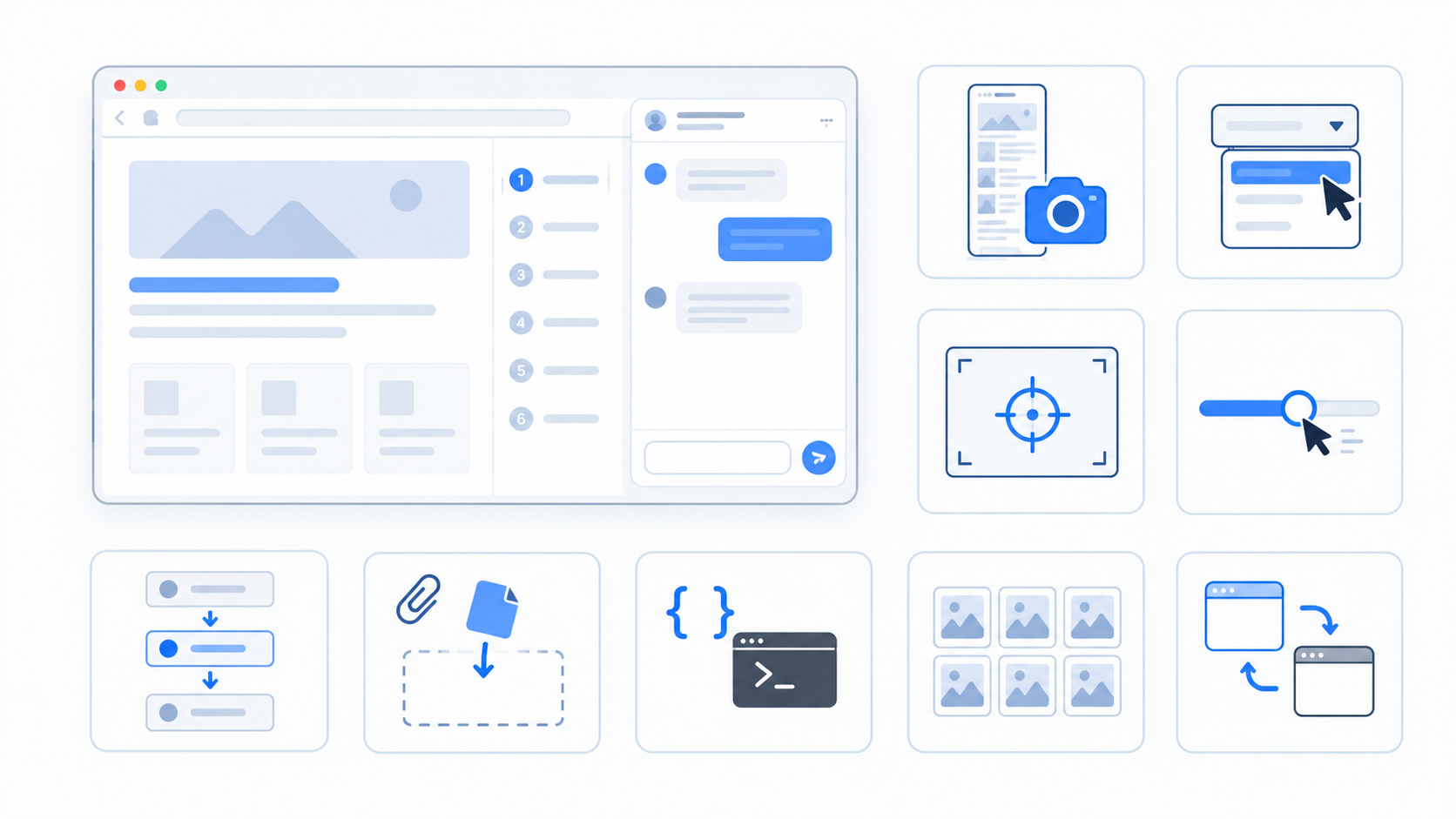
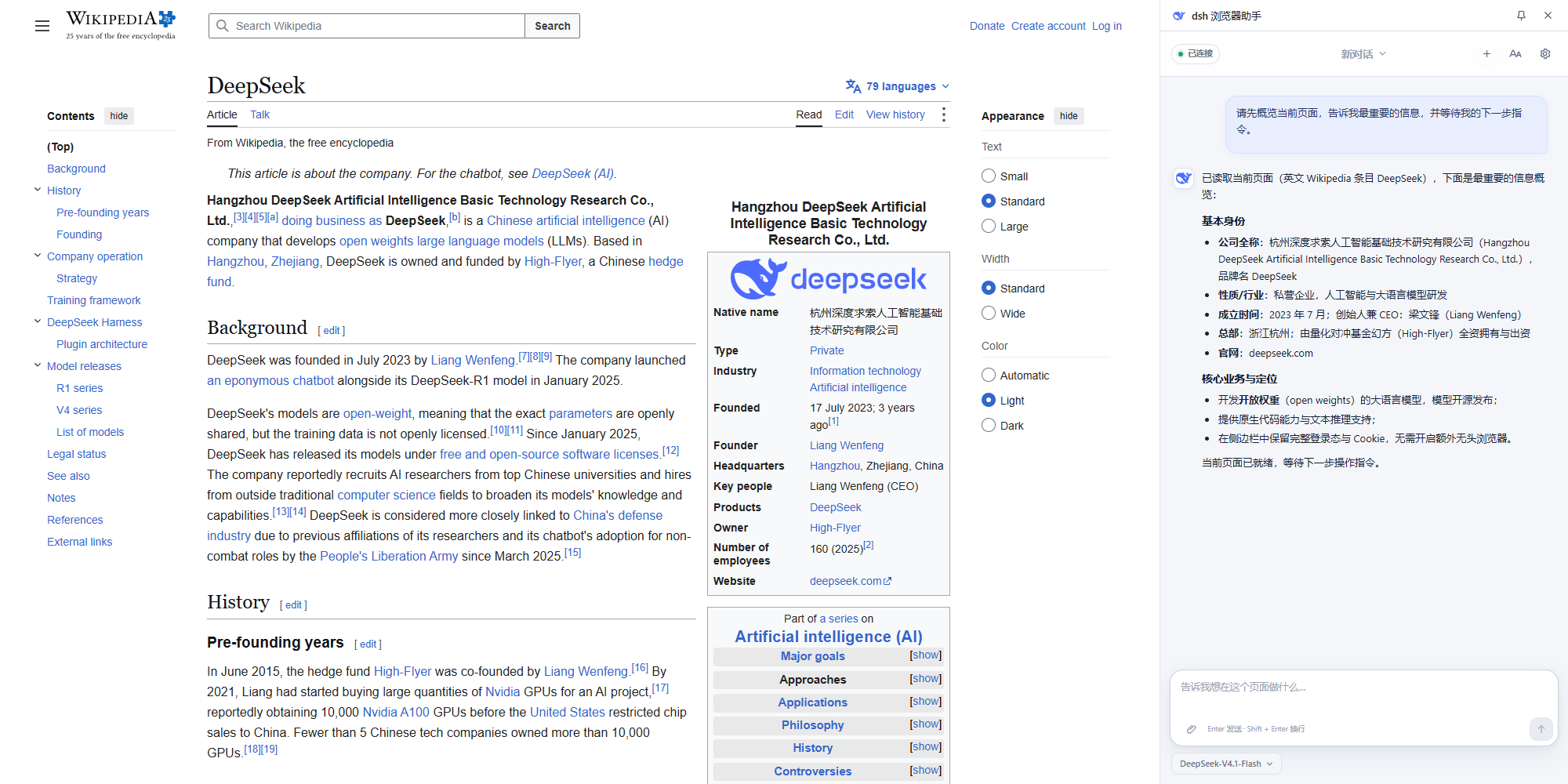
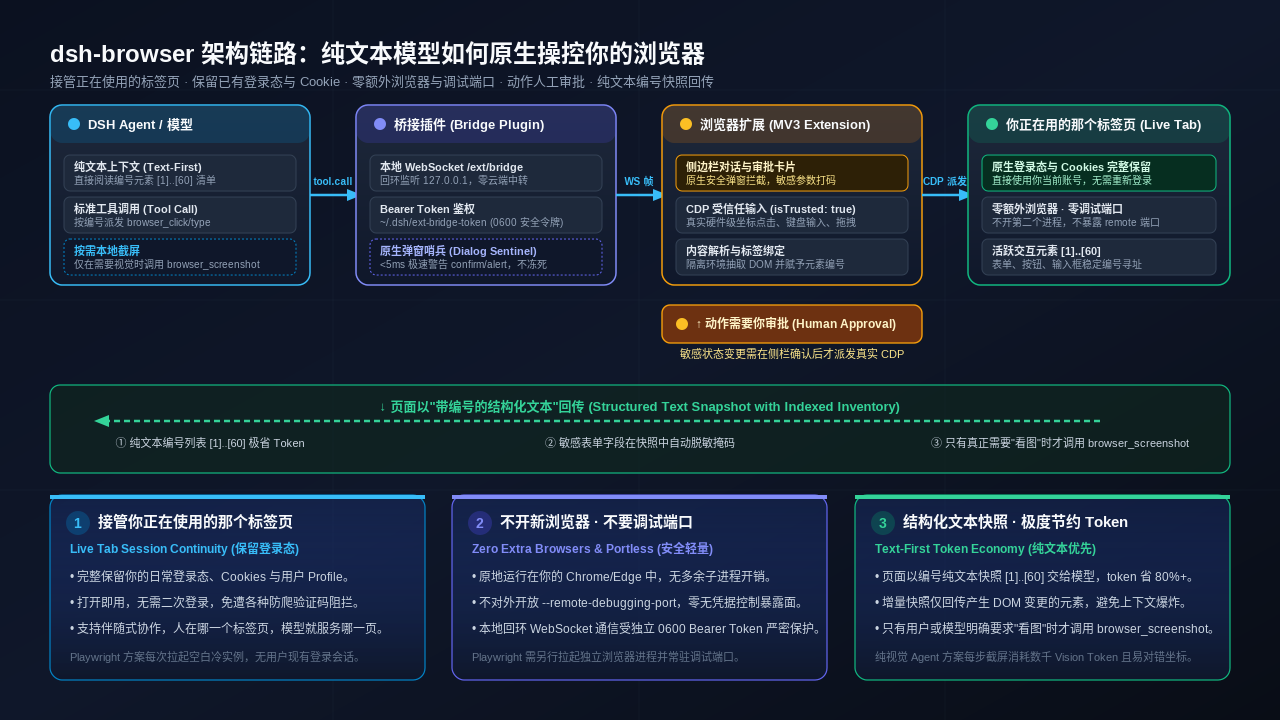
Connect DeepSeek Harness to the Chrome or Firefox tabs you are already using. The model can read page content, operate controls, navigate, and manage tabs while preserving your login state, session, and cookies. A side panel or sidebar provides the conversation UI.
dsh is DeepSeek AI's open-source, plugin-based agent harness. This repository provides a companion browser bridge plugin and Chrome/Firefox MV3 extension as one standalone pnpm workspace.
Browser operation is text-first: pages become structured text with a numbered inventory of interactive elements, and the model addresses those elements by number. browser_screenshot is the one tool that returns an image—it saves the capture to a local file and hands the model that path, so the page channel keeps its text shape. dsh 0.2.0 multimodal chat is a separate channel again: the side panel accepts PNG, JPEG, WebP, and GIF attachments when the host advertises image support.
[!IMPORTANT] Supported dsh runtimes:
0.2.0-rc.2, the whole0.2.1-alphaline, and0.2.1-rc.1/0.2.1-rc.2. The0.2.1line tightened the gateway'sPeerScopecontract, so 0.3.6 is the first release that works there — anything older desynced on$eventsand the panel never connected. Older dsh releases are not supported.
[!TIP] No API key, no account, no third-party service. Chrome works with zero configuration: install the plugin, restart dsh, load the extension once, and the side panel connects by itself. Everything runs on loopback against the dsh you already have. (Only Firefox needs a local token, because a
moz-extension://UUID cannot authenticate an add-on — see Firefox.)
Three routes. The integration contains both a dsh bridge plugin and a browser extension, and the extension half is always loaded unpacked in Chrome, which allows no other way — so unless you use the installer, the two halves are installed separately.
1. Plugin only, prebuilt, with no build step and no Git:
dsh plugin --profile web add @dightendless/dsh-bridge-browser(The same bytes are attached to the latest release as a tarball for offline installs, and npm i @dightendless/dsh-bridge-browser works if you manage the profile by hand. After installing the plugin, restart dsh; it releases the extension to ~/.dsh/browser-extension and prints the path.)
2. Extension only, prebuilt: take the extension/ folder from the same release tarball, or let the plugin release it (route 1 does this on first start). Then open
chrome://extensions (Edge: edge://extensions), turn on Developer mode, choose Load unpacked, and select that folder.
Routes 1 and 2 together are the whole product, and neither needs Node, pnpm, or Git.
3. Both halves, through the one-line installer, which builds and registers the bridge plugin, builds the Chrome extension into ~/.dsh/browser-extension, and opens chrome://extensions:
macOS and Linux:
curl -fsSL https://raw.githubusercontent.com/DightEndless/dsh-browser/refs/heads/main/scripts/install.sh | bashWindows, in PowerShell:
$s="$env:TEMP\dsh-install.ps1"; irm https://raw.githubusercontent.com/DightEndless/dsh-browser/refs/heads/main/scripts/install.ps1 -OutFile $s; powershell -NoProfile -ExecutionPolicy Bypass -File $sThis route needs Node.js 22+ and pnpm, because it builds both halves from source.
Whichever route you take, load or reload dsh Browser Assistant on the browser's extension page, and restart dsh if it is already running. See Detailed installation and usage for prerequisites, startup commands, updates, and developer installation.
Installing the plugin from repository source also works — dsh plugin --profile web add github:DightEndless/dsh-browser#path:/packages/browser/bridge-browser — but that package builds itself on install, and pnpm refuses to run build scripts for a git-hosted package until it is allowlisted, so this route needs a manual allowBuilds entry first. The release assets above need none, because they ship already built.
[!IMPORTANT] The unscoped
dsh-browserpackage on npm belongs to a different project and is not affiliated with this repository. This fork is not published on npm either: the prebuilt release assets above are the install, and the installer is the one-command alternative.
Most browser-automation agent stacks rely on headless Playwright or Puppeteer. While effective for automated testing, running an interactive personal agent with that architecture creates distinct trade-offs:
dsh-browser attaches directly to the Chrome or Edge tab you are already browsing in, so existing logins, cookies, session credentials, and user profiles remain instantly available without manual re-authentication or credentials sharing.--remote-debugging-port (which exposes an unauthenticated control surface), dsh-browser operates via an unpacked MV3 extension communicating with the host over a local, bearer-token-authenticated loopback WebSocket.dsh-browser gates state-changing actions behind explicit user approval in the side panel. While browser_click uses content script el.click() (synthetic event), coordinate clicks (browser_click_at), keyboard input (browser_press/browser_type), and drag/upload dispatch genuine CDP events (isTrusted: true) that modern web applications accept, while sensitive form values are masked in snapshots.In a paired 60-run end-to-end benchmark on August 18, 2026, measured on the upstream project whose page-tool surface this fork shares, both backends completed all 30 assigned runs successfully, while dsh Browser Control required fewer model/tool round trips and finished faster:
| Backend | Success | Mean end-to-end latency | Mean browser tool calls |
|---|---|---|---|
| dsh Browser Control | 30/30 | 5.32 s | 3.4 |
| Matched Playwright baseline | 30/30 | 6.67 s | 4.7 |
The paired Playwright / extension duration ratio was 1.24 (95% CI 1.16–1.34): Playwright took about 24% longer, or equivalently, dsh Browser Control reduced latency by about 20% and saved 1.35 seconds per task on average. The suite used six browser tasks, five deterministic seeds, the same DSH profile and model (deepseek-v4-flash), and independently validated page state. See the benchmark methodology and reproduction guide.
| Capability | Tool | Notes |
|---|---|---|
| Read page | browser_snapshot |
Structured text snapshot: title, URL, main text, numbered controls, and masked form fields; delta: true returns only changes |
| Click element | browser_click |
Click links, buttons, checkboxes, and other controls by inventory number |
| Click a point | browser_click_at |
Click a viewport position with trusted mouse input; x/y are fractions of the viewport |
| Fill forms | browser_type |
React/Vue-compatible input; picks a <select> option by its label or value and toggles checkboxes/radios; replace clears the field first |
| Upload a file | browser_upload |
Attach a local file to a file input by path; the approval prompt names the file |
| Run script | browser_eval |
Evaluate a JavaScript expression in the page through the DevTools protocol and return its value; needs the debugger permission |
| Press keys | browser_press |
Enter, Tab, Escape, arrows etc. Tab moves focus and Enter/Space run the page's default action |
| Scroll | browser_scroll |
Viewport scrolling: up, down, top, and bottom |
| Navigate | browser_navigate / browser_open_tab / browser_back / browser_forward / browser_reload |
Navigation inside the controlled tab, or open a URL in a new tab and follow it (active:false keeps the current tab in front) |
| List tabs | browser_list_tabs |
List accessible tabs with stable IDs, titles, URLs, window/index metadata, and active/controlled state |
| Follow tab | browser_follow_tab |
Bind later browser tools to a tab returned by browser_list_tabs without activating it |
| Close tab | browser_close_tab |
Close a tab returned by browser_list_tabs |
| Read region | browser_get_text |
Lazy-loaded or partial page text |
| List images | browser_images |
Absolute image URLs from the main content region, one per line, with dimensions, alt text, and lazy/placeholder flags; resolves zoomfile/file/data-src channels, and takes selector, limit, allFrames |
| Capture the view | browser_screenshot |
Save the visible area as a local image and return its path for read_image; use it for visual content (captcha, chart, layout) or images browser_images cannot reach |
| Wait | browser_wait |
Page settle detection, or wait for a selector/text to appear — or to disappear with gone — within timeoutMs |
| Send images | session.prompt / session.attachment |
Host-capability-gated image drafts, image-only prompts, and durable history previews |
| Quote a selection | side panel composer | Text you highlight in the page appears in the composer and is sent with your next message as fenced, attributed page content |
packages/browser/bridge-browser/
  cordis.patch.yml
extensions/dsh-browser/
scripts/install.sh
scripts/install.ps1•••• and never leave the page.Requirements: Node.js ^22.19 or >=24, Corepack/pnpm, and Chrome 116+ or Firefox 140+. Windows additionally needs Windows PowerShell 5.1, which ships with Windows, or PowerShell 7+.
For a managed installation, run:
curl -fsSL https://raw.githubusercontent.com/DightEndless/dsh-browser/refs/heads/main/scripts/install.sh | bashor, on Windows:
$s="$env:TEMP\dsh-install.ps1"; irm https://raw.githubusercontent.com/DightEndless/dsh-browser/refs/heads/main/scripts/install.ps1 -OutFile $s; powershell -NoProfile -ExecutionPolicy Bypass -File $sThe installer downloads this repository's default branch, builds and registers the bridge plugin, builds the Chrome extension into ~/.dsh/browser-extension, and opens chrome://extensions. On the first install, load that directory as an unpacked extension; on updates, click Reload. Restart dsh if it is already running.
scripts/install.sh covers macOS and Linux, and scripts/install.ps1 covers Windows; both write the same managed workspace and the same install metadata. The installer copies the extension path to the clipboard when a clipboard tool is available (pbcopy, wl-copy, xclip, xsel, or PowerShell's Set-Clipboard), and prints the path either way. When no Chrome or Chromium install is found, it prints the command that installs one; set DSH_INSTALL_BROWSER=1 to let the installer attempt that install itself.
The Windows command downloads install.ps1 and runs it rather than piping it into Invoke-Expression: the script is UTF-8 with a byte order mark so Windows PowerShell renders its Chinese output, and Invoke-Expression rejects a leading mark. Local checkout paths may contain spaces; the installer registers the bridge through a profile-local directory junction so the package spec never contains the absolute Windows path.
To install the current branch from a source checkout instead:
git clone https://github.com/DightEndless/dsh-browser.git
cd dsh-browser
./scripts/install.sh
On Windows, run .\scripts\install.ps1 from the checkout instead. After pulling or switching revisions, rerun the installer and reload the extension.
Firefox uses a separate MV3 manifest, event-page background, and sidebar. Build it from a checkout, then open about:debugging#/runtime/this-firefox, choose Load Temporary Add-on, and select extensions/dsh-browser/dist-firefox/manifest.json:
pnpm install
pnpm --filter dsh-browser-extension run build:firefox
The bridge address is still auto-discovered. Firefox's moz-extension:// UUID does not authenticate an add-on, so copy the bearer token from ~/.dsh/ext-bridge-token into the extension settings (the dsh startup log reports that file's path). Signed distribution can package the same dist-firefox/ output.
Start the managed installation with:
cd ~/.dsh/dsh-browser && pnpm startFrom a source checkout, run pnpm start in the repository root. The exact supported public runtime is:
npx @deepseek-ai/dsh@0.2.0-rc.2 webLocal Chrome use requires no configuration; Firefox requires the local bridge token described above. Open a page, click the DeepSeek whale icon, and wait for Connected. Existing HTTP(S) tabs are instrumented on the first action. On browser-protected pages and extension stores, the model can read tab metadata and use browser-level HTTP(S) navigation, back, forward, and reload, but it cannot inspect or operate the protected page DOM.
Side panel stays "Not connected"
Chrome needs no address and no token — leave both fields blank and the extension finds the bridge itself. If it still does not connect:
30789, falling back to 30790 / 30791) and answers /ext/bridge-config there with the live WebSocket URL. Check it with curl http://127.0.0.1:30789/ext/bridge-config; it returns JSON such as {"wsUrl":"ws://127.0.0.1:<port>/ext/bridge"}.dsh plugin --profile <profile> list and restart dsh after installing.chrome://extensions and click the circular arrow on the card. A dsh restart alone does not reload it.--host 0.0.0.0 deployment cannot be discovered automatically. Open the panel settings, expand Advanced, and paste the bridge address (plus the token) there.Firefox always requires the token: moz-extension:// UUIDs cannot authenticate an add-on.
The bridge plugin and Chrome/Firefox extension are both members of this repository's workspace. Run all commands from the repository root. For the first development installation, run pnpm install.
pnpm run build
pnpm run typecheck
pnpm run test
pnpm run check:runtime
pnpm run test:smoke

pnpm --filter @dightendless/dsh-bridge-browser run build
pnpm --filter @dightendless/dsh-bridge-browser run typecheck
pnpm --filter @dightendless/dsh-bridge-browser run test

pnpm --filter dsh-browser-extension run build
pnpm --filter dsh-browser-extension run build:firefox
pnpm --filter dsh-browser-extension run test
Notes:
lib/ before startup because the loader consumes it; both scripts/install.sh and the root pnpm run build build the plugin before the extension.copyFileSync, so the same package script works without a Unix cp executable.@deepseek-ai/dsh and the bridge plugin are pinned to the same tested public release line. An upgrade must update the manifests and lockfile together and rerun the root checks.check:runtime checks the resolved DSH dependencies and lockfile; test:smoke starts the real web host in a temporary DSH home and verifies the bridge and session reads after a restart, without model credentials. CI runs these checks after a clean installation.
If you encounter cache.hydratePrepared is not a function, update the repository, rerun pnpm install --frozen-lockfile and pnpm run build, then restart pnpm start. Session data and the global package cache can be kept.
/api trust boundary and performs its own bearer-token authentication.settings.*, credentials.*, and host.open* reject non-loopback sources.browser_screenshot is the one browser tool that returns an image: the capture goes to a local file and the model is given that path, never the pixels inline. Explicitly attached chat images use dsh's durable attachment service. Password and payment-card values never leave the page.off, and never from password or payment-card fields. It stays inside the extension until you send the message, is dropped when you dismiss it or its page navigates or closes, and reaches the model inside the same untrusted-content boundary as page snapshots — including its source title and URL, which the page also controls.auto mode reads only the controlled tab without an extra prompt; privacy-sensitive users can select ask for per-read confirmation or off to block reads entirely. In ask mode, the read dialog can allow one read or persistently switch back to auto; this can be reversed in Settings. Read page text is sent to the selected model.browser_navigate calls and unknown history destinations always prompt again.CLASSIFICATION EVIDENCE
系统优先读取 GitHub Topics,再与站内分类词典和词根规则比对。当前命中: deepseek、deepseek-harness。
morluto
Reverse engineer anything with agents, from app behavior down to native binaries.

deepseek-ai
DeepSeek Harness: Everything is a Plugin.

nexu-io
The 1st Collaborative AI Design Agent Workspace. Local-first and open source. Create motion, prototypes, websites, apps, dashboards, presentations, images, and videos with your team and AI agents. Share work, exchange feedback, and iterate together in one workspace.