
模型与 MCP
待识别

rea
morluto
Reverse engineer anything with agents, from app behavior down to native binaries.
PROJECT TOPICS
INSTALL REFERENCE
dsh plugin --profile web add github:DevTarlow/dsh-response-chime
该命令指向仓库当前默认分支;尚无绑定当前 commit 的完整验证结果。
PROJECT README
Hear when the agent has finished answering.
Send a prompt, walk away, and a chime plays when the turn ends. It rings for a long plan-and-goal run, for the moment an agent stops to ask you something, and for a turn that finishes while you are reading another conversation, so you can stop checking the tab.
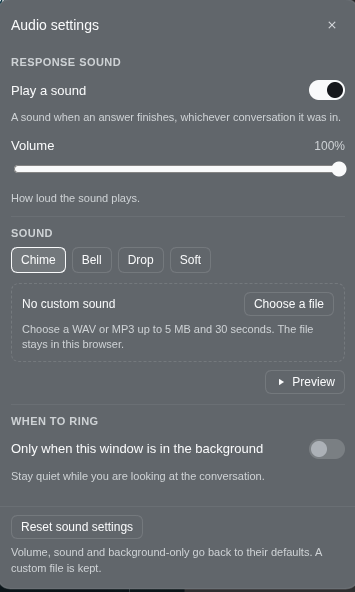
The speaker row sits above Settings at the foot of the left sidebar. Click it to open Audio settings. That is where you turn the chime on or off, set the volume, choose one of four sounds, add a WAV or MP3 of your own, or keep it quiet while you are looking at the page.
Nothing is uploaded. The built-in sounds are generated in your browser, and a custom file stays in this browser's storage.
You need the DeepSeek Harness, running in a browser or the desktop app.
Open Plugins in the left sidebar.
Press Install.
Paste this repository's address:
https://github.com/DevTarlow/dsh-response-chimeInstall it, then refresh the page.
If you work from a local copy, clone the repository and paste the folder's full path instead. The install dialog accepts a GitHub address, a package name, or a local folder.
The plugin stays in your Harness for every session until you remove it.
The speaker row sits above Settings. In the wide sidebar it shows the current state next to the speaker; in the narrow rail it becomes a round button. The icon shows sound waves when the chime is on and a small × when it is off.
Press Escape or click outside the panel to close it. Focus goes back to the
speaker row.
A ring means a Session went from working to idle. That covers the times you would otherwise keep checking:
It does not ring when you open the page in the middle of a turn. The first status sets the baseline, and only a later running-to-idle change counts as an answer. It also does not ring when a Session appears or stays idle.
With Only when this window is in the background on, the chime stays quiet while the page is visible and focused. A visible but unfocused window counts as background, because you are working somewhere else.
A custom sound is a WAV or MP3 up to 5 MB and 30 seconds. The panel decodes the file before accepting it, so a file that is not really audio is refused with a message instead of being played as noise.
The bytes stay in this browser's IndexedDB, so the file is never uploaded and another browser cannot see it. The clip is normalized to the same level as the built-in sounds, so a quiet recording and a loud one land at roughly the same volume; the slider then scales both.
If the stored clip cannot be found or decoded later, the default chime plays instead of leaving you with silence. Remove clears it, and clearing the site's data removes it too.
Browsers do not let a page make sound until you have clicked or typed in it. The plugin creates its audio on your first click or keypress, then schedules the notes on the audio clock, which does not advance while sound is blocked. And if you typed the prompt in this page, the chime plays even when the tab is in the background and the screen is off. A custom clip is decoded from that first gesture too, so it is ready when a turn ends.
I hear nothing. Open Audio settings and check that Play a sound is on. If it is, click once in the page and send a short prompt; a page that has never been clicked cannot make sound yet. Check the system volume and the tab's mute state as well. At 100% the chime is about as loud as a normal notification. If a custom sound is selected and its file is gone, the default chime plays instead; choose another file to replace it.
Can I make it louder? 100% is the top of the slider and is a normal notification level. If you need more, raise the system volume or the app's volume. But the plugin does not boost above that.
Can I change the sound or the volume? The panel has four built-in sounds, a custom WAV or MP3, and a volume slider. Every sound is normalized to the same level, so changing the sound does not change how loud it is. The default is the original two-note chime.
Does it ring for other conversations? Any Session finishing rings, which is what makes it useful for work you started and then left.
Does it ring when an agent is waiting for approval? A paused turn is an idle Session, and that is the moment you need to come back.
Does it send anything anywhere? Nothing leaves your machine. The Harness side is an empty row. The sounds are generated or decoded in your browser, the settings are in the page's local storage, and a custom sound's bytes are in this browser's IndexedDB.
Is the setting per browser? It lives in local storage, so another browser
starts with the defaults. Copy the dsh.response-chime.v2 key over to match the
settings, though a custom sound still has to be chosen in each browser.
What is stored, exactly? One settings key, dsh.response-chime.v2, holding
the on/off choice, volume, sound name, custom file's name and size, and the
background-only choice. A custom clip is one IndexedDB record in the
dsh-response-chime database. The old dsh.response-chime.v1 key is read to
carry over the on/off choice.
What happens if I clear the site's data? The settings and any custom sound are removed, and the plugin returns to its defaults, though the plugin itself stays installed.
Open Plugins, find dsh-response-chime, and uninstall it. The row leaves the sidebar right away. The stored settings and any custom clip stay in local storage and IndexedDB until you clear the site's data; the plugin ignores them once it is gone.
Two source files and no build step.
| File | Runs in | Owns |
|---|---|---|
| index.js | the Harness | an inert row; there is no service and no route |
| client.js | the browser | the settings panel, the Session status comparison, the audio, and the stored clip |
Things to know before changing it:
react and
nothing else, which is what lets it load on a released dsh with no build.sidebar.footer.action, whose standard props include
useSessionStatus. The component reads that slice and compares two snapshots,
so it never polls an agent, folds Session events, or rescans a transcript.pointerdown and
keydown on the window start it.AudioBufferSourceNode;
neither waits on setTimeout.dsh.response-chime.v2 in local
storage. dsh.response-chime.v1 is read only to migrate the on/off choice. A
further shape change means a new key.clips/custom, never in the settings JSON. The file is decoded, checked for
duration and silence, normalized, and capped at 5 MB / 30 seconds. A decode
that was in flight when the selection changed is retired by an epoch guard, so
an old clip cannot overwrite a new one. If the clip is missing at playback
time, the built-in chime plays instead.color-mix() of one, and the stylesheet
is a React child, so uninstalling restores the sidebar exactly.aria-haspopup="dialog" and aria-expanded; the switch lives inside the
panel. A nested interactive control in the trigger would break keyboard and
screen-reader behaviour.npm testThe tests load the bundle against a stub module loader, hook surface,
AudioContext and IndexedDB; no browser or DOM is needed. They cover the
registration, the running-to-idle rule, the trigger and panel, the settings shape
and legacy migration, volume, background-only, custom-clip storage and playback,
the missing-clip fallback, and the normalized loudness. Edit client.js and
refresh the page; edit index.js or cordis.patch.yml and restart the Harness.
Run the suite before committing, and see AGENTS.md for the commit
and push workflow.
MIT.
CLASSIFICATION EVIDENCE
系统优先读取 GitHub Topics,再与站内分类词典和词根规则比对。当前命中: deepseek。
morluto
Reverse engineer anything with agents, from app behavior down to native binaries.

deepseek-ai
DeepSeek Harness: Everything is a Plugin.

nexu-io
The 1st Collaborative AI Design Agent Workspace. Local-first and open source. Create motion, prototypes, websites, apps, dashboards, presentations, images, and videos with your team and AI agents. Share work, exchange feedback, and iterate together in one workspace.