
Agent 与会话
插件

nuwa-skill
alchaincyf
你想蒸馏的下一个员工,何必是同事。蒸馏任何人的思维方式——心智模型、决策启发式、表达DNA。Distill how anyone thinks.
PROJECT TOPICS
INSTALL REFERENCE
dsh plugin --profile web add github:Denis-Tang/dsh-agent-board
该命令指向仓库当前默认分支;尚无绑定当前 commit 的完整验证结果。
PROJECT README
Agent Board / 智能体看板 — a DeepSeek Harness UI plugin that renders the current
session's agents as a live two-column card board in the right sidebar: the main
agent on top, every sub-agent below it in creation-time order. It is a standard
DSH bundle (dsh.bundle, bundle id dsh-agent-board) with a Web Client half and
no build step.
中文简介:在 DeepSeek Harness 右侧边栏中以两列卡片实时展示当前会话的主/子智能体:主 agent 在最上方,子 agent 按创建时间往下排;每个卡片显示状态、计划进度、Token、费用和运行时间。
Each agent is a compact card ("小方块") with a minimal 1px outline:
我 on the main agent's card,
and a short Greek-god / modern-scientist name (宙斯, 牛顿, 居里, …) on
every sub-agent card,RUN with a blinking dot, WAIT, DONE, IDLE,
FAIL, or EXT for an external task,The session you are viewing keeps a thin blue outline; there is no separate "current" badge any more. When the current session is itself a subagent, the chart walks up to the topmost available parent, so the main agent is always the first card on screen.
Install straight from GitHub (no npm package needed):
dsh plugin --profile <your-profile> add github:Denis-Tang/dsh-agent-boardOn DSH Desktop, open the sidebar Plugins page → Add plugin (or
Install a third-party plugin) and paste github:Denis-Tang/dsh-agent-board
(the desktop app owns its profile, so the CLI does not change the running app's
profile). After installation the plugin appears in the right sidebar's +
guide; reload the page if the new tab does not show up immediately.
The plugin is also being prepared for the
dsh-market catalog through
awesome-dsh-plugin.
Once the catalog entry is live, search Agent Board / 智能体看板 in
Plugins → Plugin Market.
Repository: Denis-Tang/dsh-agent-board.
Requires DeepSeek Harness >=0.2.1-rc.1 <0.3.0; this independent build is
version 1.0.0.
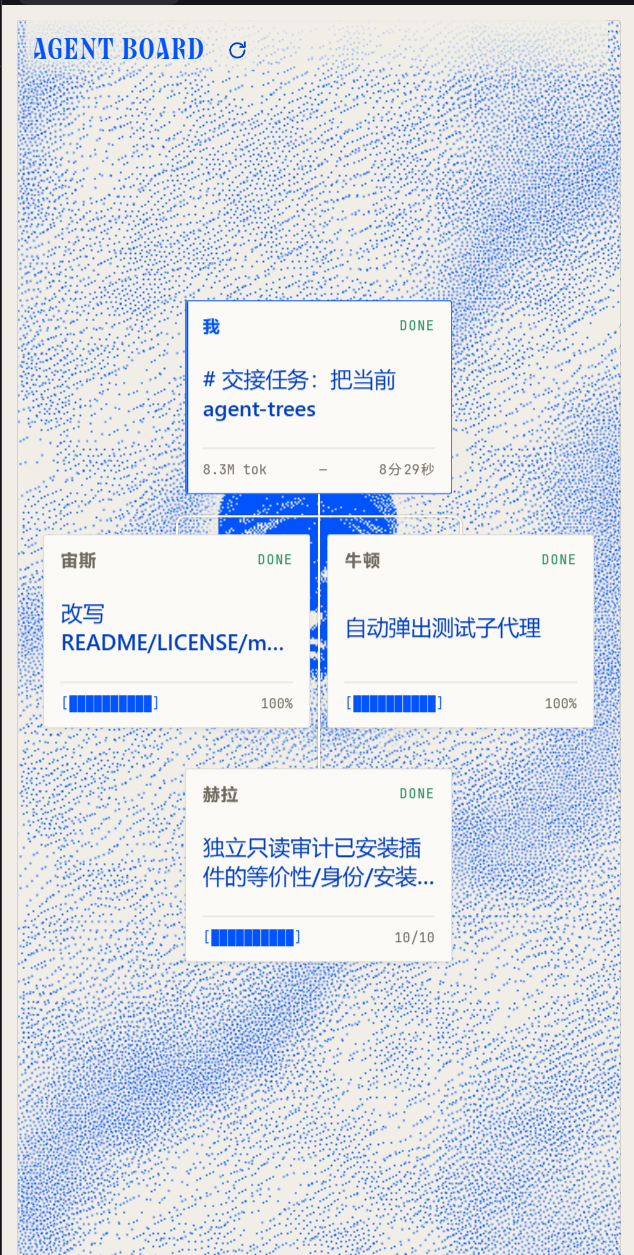
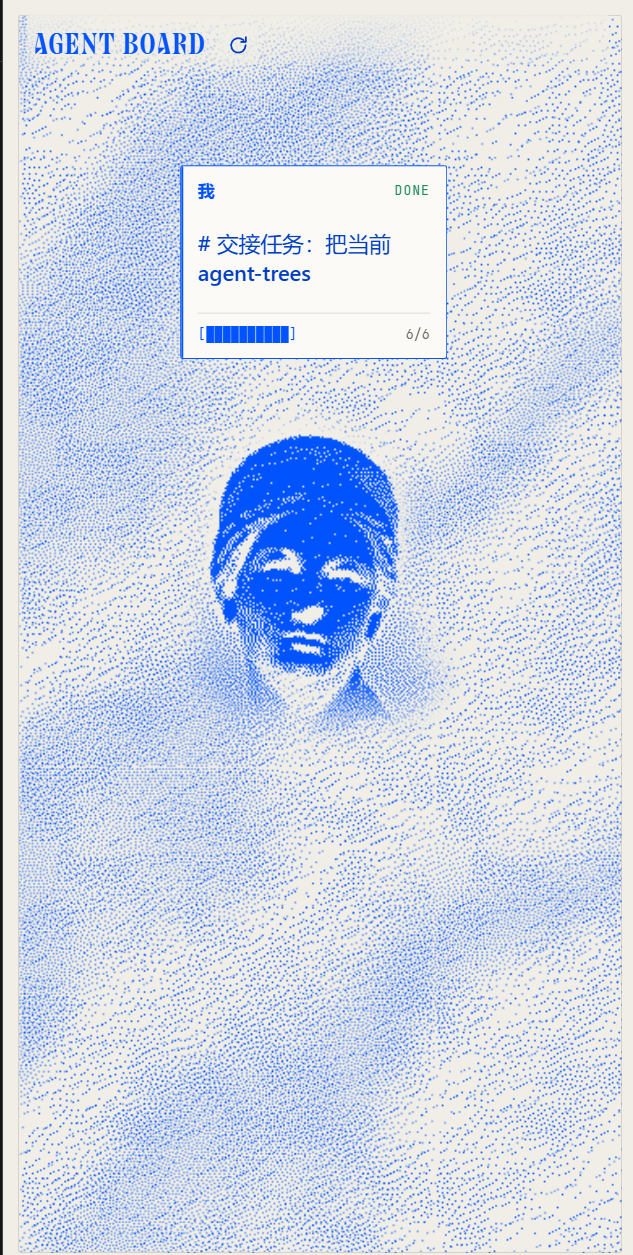
The view lives in the right sidebar:
+ guide lists an Agent Board capsule, so the tab can
be opened from there.sidebar.right.pane.tab body with a compact
layout, and it stays open beside the chat while the session changes.The sidebar is not opened automatically for an ordinary session. It opens
when you pick the capsule from the sidebar + guide. While a session is on
screen, every newly created sub-agent pops the sidebar open and focuses the
Agent Board tab (expanding the column if it is collapsed), so the new branch
shows up without a manual click. Agents that already exist when the page mounts
do not trigger it, and a new agent only announces itself once.
The view opens in Chart layout: a strict two-column card grid on the Hermes-blue paper canvas. The main agent's card owns the first row on its own; every sub-agent (whatever its depth) then fills two-card rows below it, ordered by creation time, so reading top to bottom is reading the delegation timeline. A paper-white (warm off-white) bus leaves the bottom of the main card and branches into every sub-agent card, which keeps the main-to-sub relationship visible without drawing a full tree that the time order would contradict. New agents append at the end, so existing cards never jump around.
The panel is never wider than its content needs: the card width follows the measured panel width, so a wide sidebar panel shows two roomy columns while the default right sidebar keeps exactly two narrow ones. Cards keep a fixed aspect ratio: the column width picks a single scale factor and the whole card — text, padding, borders and progress bar included — is scaled uniformly by it, so a wider panel produces proportionally bigger cards instead of only flatter ones. The card scale is clamped to the sidebar range (about 0.7×–1.9×); when the chart is taller than the panel it is scaled down as a whole (auto-fit can reach 30%, manual wheel zoom stays at 35%–250%) so all cards stay in view; use the mouse wheel to zoom around the cursor and double-click the background to reset pan and zoom. Each card is three rows: the status row (agent label first, then the status tag with its blinking dot) at the top, the left-aligned title in a deeper blue vertically centred in the middle, and the progress bar pinned to the bottom edge (hover swaps it for tokens, cost, and runtime). All three rows share the card's content-box left edge, so the label, the title and the progress bar start on the same vertical line.
The paper/particle-cloud artwork is a full-panel layer: it runs behind the
header, the wordmark and every card, with the same breathing margin on all four
sides. The blue AGENT BOARD wordmark floats on the cloud (with a soft paper
halo so it stays readable), the old three-square logo is gone from the header,
and the refresh button sits right next to the wordmark.
Press and drag anywhere — on a card or on the empty background — to pan the whole chart: every card and connector moves together, so the shape never breaks apart. A plain click (no movement) still opens the agent or toggles the tree. The pan lives until you double-click the background or switch sessions. Click the empty canvas to collapse every sub-agent card; click it again to bring the whole chart back. There is no per-card collapse chevron.
The plugin is Client-only and reads existing client-visible session projections — it writes no session events and registers no Host route:
| Projection | Used for |
|---|---|
subagentCatalog |
parent → child topology, delegation mode, task label |
subagentTiming |
last-turn completion, settled/active duration |
tokenUsage |
per-agent token total |
costUsage |
per-agent token buckets and USD cost (when dsh-cost-meter is mounted) |
todos |
per-agent task progress, when the agent used todo_write |
Session summaries (useSessions().byId) supply titles, running state, blank,
and the parent link. useSessionStatus supplies the live status map.
(completed + 0.5 × in_progress) / total, and the card shows done/total.无计划; the blinking RUN tag indicates that it is running. Nothing flows or
animates.DONE tag.FAIL tag; its bar stays at its actual todo progress, or 无计划 when it had
no plan.WAIT tag.mode: "external") have no local session, so their bar is
neutral and labelled "外部".FAIL just for being idle between turns:
it shows the grey IDLE tag. FAIL is reserved for a subagent that ended
without completing. The main agent's todo projection is cleared at each turn
start, so the card shows 无计划 until a new plan is written; it keeps the
last plan it observed.我; it never gets a personal name.宙斯, 牛顿, 赫拉, 爱因斯坦, …). Names follow child
creation time across the whole tree, so the first sub-agent is 宙斯, the
second 牛顿, and so on.宙斯2,
牛顿2, …).Cards no longer display sequence numbers or priority levels. The main agent is always the first row, every other card follows by creation time two per row, and the agent label on each card carries the identity instead of a depth tag.
AGENT BOARD wordmark in the header.ArrowUp / ArrowDown move between cards, ArrowRight /
ArrowLeft expand or collapse, Home / End jump to the ends, Enter /
Space opens.Projection updates arrive through the normal Client store, so topology, status, todos, duration, and token counts update live. A one-second clock refreshes durations while any agent runs.
Built and tested against DeepSeek Harness 0.2.1-rc.3. The package declares
engines.dsh: >=0.2.1-rc.1 <0.3.0.
It depends only on the Web Client slot surface and the standard session hooks:
sidebar.right.pane.tab slot with sessionId, useSessions, useSessionStatus,
useProjection('todos') (optional, falls back to the projection store)ctx.sidebarRightTabs.register (tab type) and ctx.get('sidebarRight') (open/focus)conversation.session.header.utilities (invisible helper that opens the tab when a sub-agent is created)ctx.sessions.refreshProjectionsctx.uiWorkspace.openSessionctx.locale and ctx.slotsNo Harness Client package is imported as a module; React comes from the browser module table.
| File | Purpose |
|---|---|
index.js |
Host half (metadata only) |
client.js |
Browser module: view, two-column board, cards, styles, locale dictionaries |
cordis.patch.yml |
Inserts the dsh-agent-board row |
locale/en.json, locale/zh.json |
Plugin Manager display metadata |
fonts/ |
Embedded Collapse wordmark and JetBrains Mono web fonts |
icon.svg |
Original artwork |
screenshot-main.png, screenshot-sidebar.png |
Marketplace screenshots |
screenshots.json |
dsh-market screenshot manifest |
assets/icon.png |
Marketplace tile icon (512×512 PNG) |
marketplace/dsh-agent-board.yml |
Entry prepared for the awesome-dsh-plugin catalog |
LICENSE |
MIT |
subagentCatalog (for example an external task
without a parent-owned catalog fact) cannot be shown as a local child.无计划; the card never invents a percentage.The plugin has no build step. Edit client.js (a browser module registered
through window.__ModuleLoader__) and let DSH HMR reload it, or reload the page.
Run node --check client.js for a syntax check. The host half index.js is a
no-op metadata module; the bundle patch inserts the client row.
Agent Board is an independent, rebranded fork based on the upstream project xiezouqu12/agent-trees, used and modified under the MIT License. Credit for the original board concept, two-column layout, interaction model and paper-cloud visual design belongs to the upstream author; this repository only renames the plugin, maintains it independently, and adds its own documentation and icon artwork.
MIT © 2026 xiezouqu12 (upstream work); modifications © 2026 Denis-Tang. See LICENSE.
The full-panel backdrop is a 1-bit dithered print of a Greek marble head from The Metropolitan Museum of Art (CC0 / public domain, object Marble head of a goddess), converted offline with a Floyd–Steinberg dither and printed as Hermes-blue ink on warm paper (single theme, no dark mode). A seamless paper-dot tile keeps the dot field covered at any sidebar width, and a few wide wavy dot bands with uneven widths drift and breathe at non-linear speeds, their widths changing over time.
The bundled Collapse wordmark font and JetBrains Mono web fonts are
distributed under the SIL Open Font License 1.1; see
fonts/OFL.txt for the full license text.
CLASSIFICATION EVIDENCE
系统优先读取 GitHub Topics,再与站内分类词典和词根规则比对。当前命中: agent。
alchaincyf
你想蒸馏的下一个员工,何必是同事。蒸馏任何人的思维方式——心智模型、决策启发式、表达DNA。Distill how anyone thinks.

freestylefly
Prompt as Code | GPT Image 2 / 2.5 提示词与案例库,530+ 个案例、20+ 套工业级模板与可复用 Skills,新增 2.5 同提示词对比专区,附完整提示词与生成记录,持续更新。

titanwings
Distilly — Distill how they think into reusable Skills for any Agent or Bot. Formerly Colleague Skill(原同事 Skill).