

模型与 MCP
待识别

rea
morluto
Reverse engineer anything with agents, from app behavior down to native binaries.
PROJECT TOPICS
INSTALL REFERENCE
dsh plugin --profile web add github:DeepNeuralNerd/dsh-tool-doctor
该命令指向仓库当前默认分支;尚无绑定当前 commit 的完整验证结果。
PROJECT README


Fewer failed tool calls. Less backtracking.
An AI assistant can understand your task and still stumble over a tool request: a line number past the end of a file, a number supplied as text, or an edit that misses because its spacing changed. Tool doctor catches supported, mechanical mistakes in DeepSeek Harness (DSH), corrects the request or retries a recoverable error, and records what happened. You spend less time watching the assistant repeat a call it could have fixed.
For example, if a tool rejects limit: 5000 and reports a maximum of 2000, Tool doctor can retry with limit: 2000. If that retry fails, the original error remains available to the assistant. The dashboard distinguishes a successful repair from an attempted repair, an ordinary failure, and a call merely recognized in text.
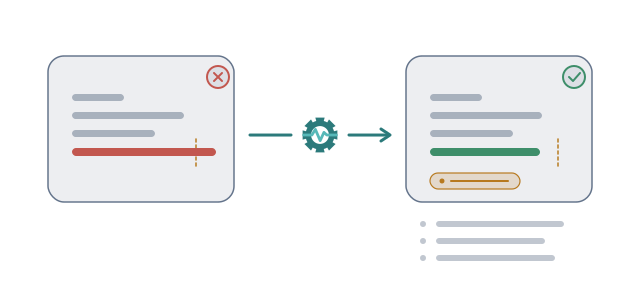
Tool doctor is useful if you are new to DSH and want fewer avoidable interruptions. If you build long coding workflows, its schema-aware repairs, bounded retries, and local diagnostics also give you a way to inspect where tool calls go wrong.
run_code formatting errors.The plugin handles mechanical patterns. It cannot infer a model's intent, make a missing file exist, or resolve every permission, tool, or command failure. A successful call after an argument rewrite is counted as a repair outcome; it does not prove that the original call would have failed. Token savings shown in the dashboard are estimates, not measured billing reductions.
Each rule below is a switch in the dashboard — the switch column is its config flag, and titles match the dashboard cards. The plugin follows one adoption standard: a rule exists only when a published failure class or a deterministic host contract justifies it, and the repair is provably mechanical — the re-parse proves the value, the tool's own schema confirms the name, or the host stays the final authority on the retry. Repairs that would need to guess intent are not rules; they are left as honest failures. (Research corpus and coverage matrix; design review record.)
| Rule (switch) | What it does | Why it exists |
|---|---|---|
Schema-shaped arguments (autoSchemaArgs) |
Repairs structurally wrong arguments only when re-parse proves it: a JSON payload delivered as a string, one-level {"arguments": …} wrapper nesting, Markdown fences around the payload, string↔number/boolean/array drift against the tool's declared type (including types reached through a local $ref), a canonical rename of a well-known wrong parameter name, and — never adopted — payloads with duplicate JSON member names. |
Stringified/wrapped arguments and schema–value type drift are the largest classes in the published corpora (serving-stack reports from vLLM and others document string-encoded nested arguments and type coercion gaps). The duplicate-name abstention is RFC 8259 §4: JSON.parse silently keeps the last value, which can swap a target path. Renames fire only when the tool's own schema confirms the canonical name. |
Path separator normalization (autoNormalizePaths) |
Canonicalizes Windows↔POSIX separator drift where the rewrite is lossless, expands ~, and unwraps paths wrapped in straight or curly quotes. |
Path-shape mistakes are the second-largest reported class. Quote-unwrapping is restricted to Windows absolute-path shapes, where a quote cannot legally appear in a file name — so the unwrap is semantics-preserving; POSIX names may contain quotes, so those are left alone. |
Whitespace-tolerant edit retry (autoFuzzyEdit) |
When an edit reports old_string not found, retries once per whitespace-equivalent anchor spelling (CRLF↔LF, tabs↔spaces). |
Anchor-match failure is the most-documented edit-tool failure (aider's troubleshooting corpus: #1 edit error; its own first escalation step is whitespace tolerance). The host remains the match authority: an ambiguous variant is rejected, never guessed. |
Range & path normalization (autoClampRanges) |
Clamps out-of-bounds ranges to the bound the tool itself reported, moves read offsets back from past-EOF, and drops out-of-workspace source paths. | A range past a maximum is a boundary error whose correct value the tool states in its own error — retrying at the reported bound is deterministic, not speculative. |
Observe-then-retry (autoObserveFiles) |
After FS_NOT_OBSERVED / FS_STALE_VERSION on an edit or write, reads the target once and retries through the host dispatcher; anchor-lost errors refresh observation state without a blind retry. |
Stale/unobserved file state is a documented root-cause class of agent tool failures. One observation-then-retry is the bounded form of the "refresh state, don't blindly retry" rule the failure-attribution literature recommends. |
Unknown-tool recovery (autoBridgeDirectTools) |
Re-dispatches an unknown-tool result as a nested host call when the intended tool is registered in scope, including name drift (case, MCP-namespace segments) — but only when exactly one registered tool matches, and it fills a known schema wrapper gap for mnemon_subagent_result payloads. |
Hallucinated or mis-namespaced tool names are a published failure class; ambiguity abstains by design. The mnemon_* fill repairs a documented required-field wrapper mismatch on a DSH built-in tool. |
Directory kind correction (autoKindFixes) |
When a file reader receives a directory ("not a regular file"/EISDIR), re-dispatches the call to a listing tool the agent can call, built from that tool's own schema. No listing tool in scope: the original error stands. | Sending a directory to a file reader has one unambiguous intent — listing — and wrong-tool-for-the-job is a documented root-cause class. The rewrite uses only the target tool's own definition. |
run_code argument repair (autoWrapRunCode) |
Fixes run_code schema slips (command→code, missing description, descriptions inside embedded tool() calls), strips Markdown fences, and heals common syntax errors. |
Host-contract class: run_code rejects these shapes deterministically, and the correction is mechanical re-shaping of the same program text. |
In-text tool-call promotion (healResponseTools) |
Promotes recognized tool-call markup streamed as plain text into structured tool blocks. Guards treat markup as data when it sits in code fences, think blocks, backticks, or quoted/parenthesized examples, when a placeholder names a tool that is not declared, and when the same call already exists as a structured call in the reply. | Models served behind non-native parsers emit valid call markup as prose — documented in serving-stack and parser reports (the promotion parser is ported from the Unsloth Studio healing layer). Promotion is recorded separately from execution success, and the host dispatch decides. |
Prompt guidance injection (injectPrompt) |
Injects concise best-practice guidance into the system context to reduce tool-call errors at the source. | Error-shaped, actionable guidance is the recommended front line in the failure literature (actionable errors and retry-safety guidance); this is the one rule that prevents rather than repairs. |
Failure hints (errorHints) |
Appends an actionable recovery hint to otherwise-unrecovered errors, preserving the original text. | Benchmark guidance for agents on failure: state what to do instead, and do not retry the same arguments blindly. |
Passthrough trace persistence (persistPassthrough) |
Optionally persists successful untouched calls in the detailed local trace. | Diagnostic switch: a full call history makes a repair rule auditable; aggregate counters are unaffected. |
Shadow mode (shadowMode) |
Evaluates every pre-dispatch repair and records what the rules would fix — but dispatches the original arguments. | Measure a rule's coverage before trusting it to act. Adopted from external review as the plugin's promotion standard: "parses successfully" is a syntax check, not proof a repair preserves intent. |
Rules are enabled by default. The dashboard can turn them on or off without a restart.
Install the published GitHub repository into your DSH web profile:
dsh plugin --profile web add github:DeepNeuralNerd/dsh-tool-doctorRestart DSH after installation so the host loads the plugin. Then open Settings → Plugins → Installed → Tool doctor to review activity and adjust rules. Rule overrides are saved under the DSH home directory. Model guidance edits take effect immediately in the running process but return to the factory default after a plugin restart.
The dashboard's data comes from local files under DSH_HOME (or ~/.dsh when that variable is unset): tool-doctor-events.jsonl for detailed diagnostic events and tool-doctor-summary.json for counters. Argument previews are bounded and redact common secret forms. Review exported records before sharing them because errors and paths can still contain sensitive information. The plugin does not add its own telemetry service.
The plugin registers these routes under /plugin-api/tool-doctor/:
| Route | Method | Purpose |
|---|---|---|
stats |
GET | Counters, categories, and recent records |
candidates |
GET | Recurring unresolved error patterns |
config |
GET, POST | Read or update rule switches |
guidance |
GET, PUT | Read or update model guidance |
guidance/reset |
POST | Restore factory guidance |
reset |
POST | Clear diagnostic records and counters |
npm run checkThis runs TypeScript checking, the automated tests, and the build. The build emits lib/index.js for the host and lib/client.js for the dashboard. Tests cover the repair mechanics, pipeline, dashboard, and adapter contract with a simulated Cordis host. Check behavior against the installed DSH version before relying on a repair in a production workflow.
MIT. See LICENSE.
CLASSIFICATION EVIDENCE
系统优先读取 GitHub Topics,再与站内分类词典和词根规则比对。当前命中: deepseek-harness。
morluto
Reverse engineer anything with agents, from app behavior down to native binaries.

deepseek-ai
DeepSeek Harness: Everything is a Plugin.

nexu-io
The 1st Collaborative AI Design Agent Workspace. Local-first and open source. Create motion, prototypes, websites, apps, dashboards, presentations, images, and videos with your team and AI agents. Share work, exchange feedback, and iterate together in one workspace.