

模型与 MCP
待识别

rea
morluto
Reverse engineer anything with agents, from app behavior down to native binaries.
PROJECT TOPICS
INSTALL REFERENCE
dsh plugin --profile web add github:DanneLeung/dsh-multi-key-rotation
该命令指向仓库当前默认分支;尚无绑定当前 commit 的完整验证结果。
PROJECT README
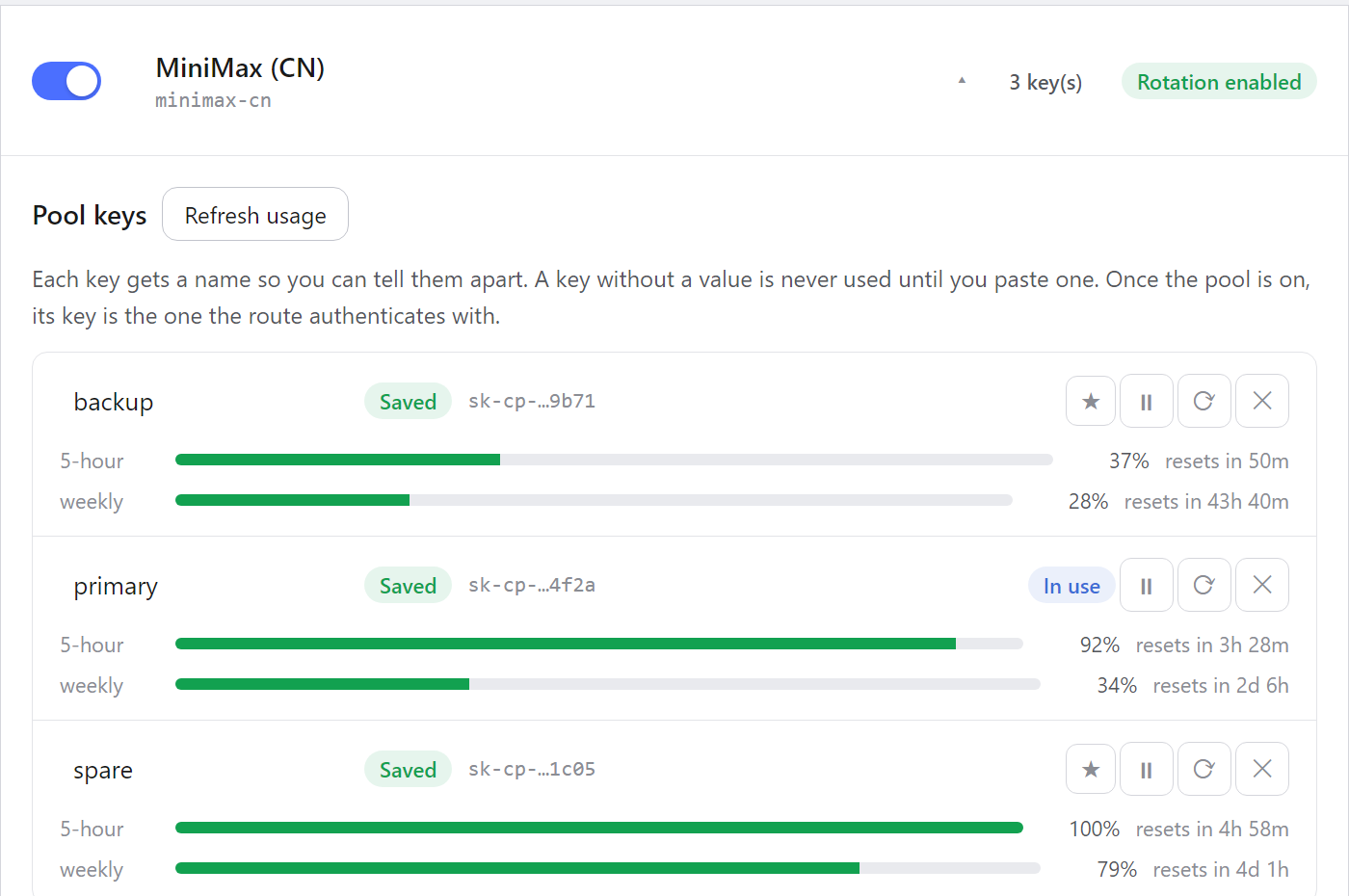
Give a MiniMax Token Plan route several named API keys, and let the plugin rotate between them automatically by remaining quota — configured from a tab in the built-in Plugins settings section, without naming an environment variable by hand.


This first release supports MiniMax Token Plan only — the minimax and
minimax-cn routes.
That is deliberate, not a gap. MiniMax Token Plan is the one subscription whose quota is published as two windows (a 5-hour one and a weekly one), and the one whose spent-plan error the adapter misclassifies — which is the whole reason this plugin exists. A route whose quota endpoint is unknown would mean showing usage figures the plugin cannot actually know, so such a route is left out rather than half-supported.
A route this release does not support gets no settings card, no composer indicator, and no quota probe — it is never touched, even if a leftover configuration names it.
Give a MiniMax Token Plan route several API keys, and the plugin keeps it working when one of them runs out.
When a request fails because a key hit its plan quota, its quota, a rate limit, or an auth error, the plugin writes the next key of the pool into the route's credential reference and retries the request. The turn continues; nothing is lost and nothing restarts.
Four things make it more than a rotation loop:
The rotation idea is not new — @m1khal3v/dsh-llm-key-rotation
already does it. What it asks of the user is the friction this plugin
removes:
| key rotation | Multi-Key Rotation (this plugin) | |
|---|---|---|
| Credential names | the user names MINIMAX_CN_API_KEY_CHAIN_1, …_CHAIN_2 |
the plugin owns the naming: MINIMAX_CN_API_KEY_POOL_1, …_POOL_2 |
| Key names | invisible | every key gets a name you choose ("main", "backup-1") |
| Adding keys | one "Add key" → one "Save" per key | paste every key at once, one key per line |
| The key in use | invisible | shown as a masked stored key next to its pool slot |
| Who owns the route's key | the Models page | the plugin takes it over as soon as it loads |
| Picking the key yourself | not possible | a per-key button pins the key the provider starts with |
| Remaining quota | not shown | queried per key, for the 5-hour window and the weekly one |
| In the composer | not shown | a capsule in front of the model selector; hovering it lists every key of the pool with both windows and both countdowns |
| Switching | on failure only | on failure, and the next key is picked by reset order |
| MiniMax Token Plan | an HTTP 402 arrives as PI_AI_ERROR and rotates on nothing |
a spent plan is recognized and rotates |
This plugin is an independent work. It takes the idea from the project above, not its code. See Acknowledgements.
<profile> is the name of a DSH profile — the folder under
~/.dsh/profiles/. Use desktop for the desktop app, web for the CLI's web
profile:
Get-ChildItem $env:USERPROFILE\.dsh\profiles
# desktop
# web
A plugin installed into one profile is invisible to the others.
dsh plugin --profile desktop add @danneleung/dsh-multi-key-rotationPlugins → Add plugin → search the market for the package name.
The desktop app manages its own
desktopprofile, so installing there from the command line can be refused. Use Plugins → Add plugin in the app for that profile; the command line is the way in for thewebprofile and for a CLI-hosted DSH.
The plugin also installs from a Git repository, a ZIP, a tarball, or a local directory — no npm account involved.
From GitHub — use the git+https:// form:
dsh plugin --profile desktop add git+https://github.com/DanneLeung/dsh-multi-key-rotation.gitIn the desktop app, Plugins → Add plugin, and paste that same string.
Use
git+https://, notgithub:. Thegithub:shorthand only works in its short form (github:DanneLeung/dsh-multi-key-rotation). Written out in full —github:https://github.com/DanneLeung/dsh-multi-key-rotation.git— the installer builds a malformed SSH URL (git+ssh://git@github.com/https://github.com/…) and fails withCould not read from remote repository. Thegit+https://form above always works.
From a ZIP — the published files, nothing else:
dsh-multi-key-rotation-1.0.0.zip
and unzip it.dsh plugin --profile desktop add D:/path/to/unzipped/dsh-multi-key-rotationThe other forms:
# a tarball
dsh plugin --profile desktop add D:/downloads/danneleung-dsh-multi-key-rotation-1.0.0.tgz

# a local directory — the path must be absolute
dsh plugin --profile desktop add D:/path/to/dsh-multi-key-rotation
The plugin depends only on @deepseek-ai/schemastery (a pure schema
library). It deliberately does not depend on
@deepseek-ai/dsh-credentials: that package pulls the whole Cordis runtime
in behind it, and a second copy of Cordis inside the plugin would be a second
set of runtime identities.
Settings → Plugins → Multi-Key Rotation (「多密钥轮换」): the plugin's configuration is a tab of the built-in Plugins settings section, beside the shipped Plugin list tab. Every MiniMax route that has keys gets one card.
Key values are stored in the Harness credential store, never in the profile
configuration. The plugin writes the pool configuration — provider flags,
trigger codes, the named keys, the pinned key, and the policy — to the
llm-key-pool: settings section.
The pool takes over the route. A provider route authenticates through
one credential reference — for minimax-cn that is MINIMAX_CN_API_KEY
— and the Harness resolves that reference on every request. The pool's own
keys live in their own references (MINIMAX_CN_API_KEY_POOL_1, …_POOL_2),
so out of the box the route would keep authenticating with whatever key
Settings → Models stores. This plugin writes the pool's choice into the
route's reference as soon as it loads — and again whenever the settings
change — so a configured pool is the route's key from the first request. The
Models page is never touched, and the write is idempotent.
The trigger. The key in use stays in use until it fails. The plugin does not move the pool on its own: a failure with a trigger code is what starts the walk, and the request is then retried with the new key.
The selection. The pool moves to the key whose weekly window resets soonest, and among those the key whose 5-hour window resets soonest. The weekly allowance is the scarcer resource: a key whose week is about to roll over becomes a fresh key, so it is spent now, while a key whose week still has time keeps its allowance for later. The key that just failed is left out of the search.
Two settings shape the search:
thresholdPercent) — a key whose remaining share is below
this percentage rests: it is not chosen for routine requests. It becomes
eligible again automatically once its weekly window resets, so a spent
week costs you one window, not the whole plan. 0 never rests a key.reservePercent) — a key holding more than this share is
held back for the failure path, so the routine path cannot spend the last
healthy key and leave nothing to fall back to.A key's remaining share is the weakest of its two windows: a key with a full week but no 5-hour headroom is not usable now, and a key with 5-hour headroom but an exhausted week is not usable for long. When every key rests, the pool is used anyway rather than failing the request outright.
Pinning a key. Each key row carries a ★ button. Clicking it pins that key as the one the provider should use. The pin is a preference, not a lock: the plugin starts on the pinned key and the routine path returns to it, but a failure still rotates away from it — the pool never sits on a key that does not work. Clicking it again unpins it. The pin is stored as a reference, not as a name, so it survives a rename and a value change.
In the composer row, right in front of the model selector, the plugin shows a small capsule with two bars:

The bars are colored by the remaining share: green while it is healthy, amber under 20%, red at zero.
Hover the capsule to open a panel. Its heading names the plan the figures belong to — MiniMax Token Plan — and below it the panel lists every key of the pool, one row per key, with two lines per row:
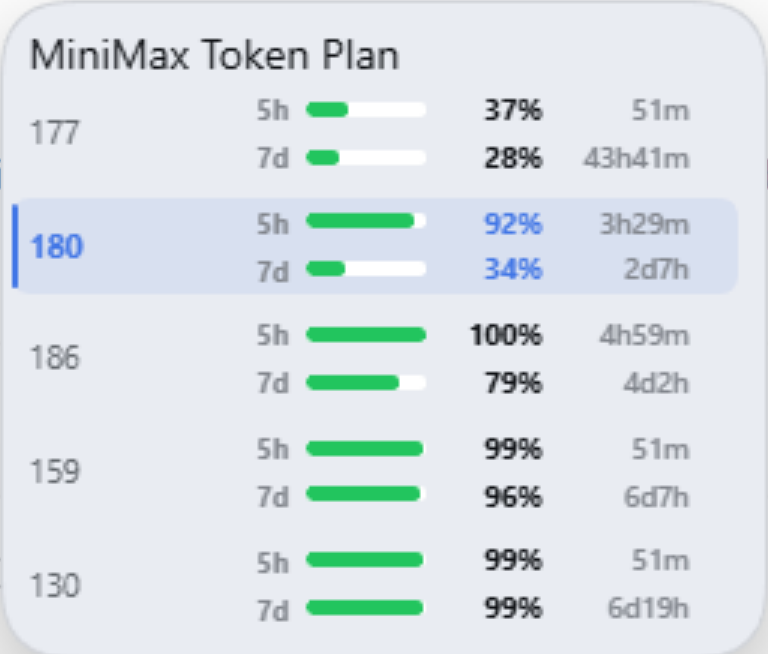
MiniMax Token Plan
primary   5h  ▓▓▓▓▓▓░░░░  80% 2h13m
          7d  ▓▓▓▓░░░░░░░  39% 2d22h
Each line is the window's label, its remaining share as a bar and a percentage, and the time left before the window resets. The rows are listed in the order the pool is used in — the key whose week rolls over soonest first — and the key the route is authenticating with is highlighted. Apart from that one heading line, the panel is deliberately terse — numbers rather than sentences — because it floats over the composer and holds a whole pool.
Moving the pointer away closes the panel, and Escape closes it too. Clicking the capsule forces a fresh probe of every key instead of waiting for the next poll, and the panel shows the new figures when they arrive.
The capsule is a normal item in the composer row: the row lays it out, so the input's layout is the Host's business and nothing is measured or positioned by the plugin.
The indicator only appears for a MiniMax route this plugin pools, and only while a session is open. It never shows a key value — only the remaining shares and the reset moments, which the Host reads from the provider.
MiniMax reports a spent plan as HTTP 402 with body code 2067
("套餐额度已用完"), and an exhausted window as HTTP 429 with code 2056
("超出 M Plan 资源限制"). The pi-ai adapter classifies a bare HTTP 402 as
PI_AI_ERROR, which no provider profile would ever list — so without special
handling a spent plan rotates on nothing and the turn simply fails.
This plugin recognizes those provider signatures and reports them as the
TOKEN_PLAN trigger code, which the card offers as Plan quota used up.
Listing it makes a MiniMax Token Plan key pool rotate on a spent plan, a
spent credit balance, and an exceeded plan window alike.
The remaining quota of a Token Plan key is published at
GET /v1/token_plan/remains. The plugin probes that endpoint on the
Host, where the key values live, and caches each answer for 45 seconds. The
browser only ever sees the remaining percentage and the reset moments — never
a key.
The two regions are probed at their own hosts: minimax-cn at
api.minimaxi.com, minimax at www.minimax.io.
dsh-llm-retrydsh-llm-retry owns the provider's retry policy and runs before this
plugin in the recovery waterfall.
TOKEN_PLAN, QUOTA and AUTH are not in dsh-llm-retry's default
retryableCodes, so retry delegates immediately and the pool rotates at
once.RATE_LIMIT is in the default set, so retry handles it first. Remove
RATE_LIMIT from the provider's retryPolicy.retryableCodes to rotate on
a rate limit immediately.The activation is logged, so a pool that took over a route says so:
[llm-key-pool] activated provider="minimax-cn" key→"primary" (50%)Every rotation, delegation and pool reset is printed to the launching terminal:
[llm-key-pool] rotated provider="minimax-cn" pool[0]→"MINIMAX_CN_API_KEY" (TOKEN_PLAN) window=fresh-start lastWriteAge=–No key value is ever logged — only provider names, slot indices, reference names and failure codes.
npm install
npm test          # Host + browser tests
npm run pack:check
The browser half is a plain ESM module with no bundler, so the browser tests
run on Node's own test runner with a small harness in test/client-harness.cjs.
index.js, client.js and src/pool.js ship exactly as they are in the
repository — there is no build step, which keeps the published tarball
auditable.
The detail document covers the internals: the package layout, the Host and browser halves, the settings-tab contract, the telemetry event, and how to distribute the plugin without npm.
This plugin was inspired by
@m1khal3v/dsh-llm-key-rotation by Anton Mikhalev
(MIT licensed). dsh-multi-key-rotation is an independent work: it contains
no source code from that project. What it takes is the idea of rotating
between several API keys of one LLM provider when a quota is exhausted.
The full attribution, including the original MIT license text, is in the
NOTICE file shipped with this package.
MIT — see LICENSE.
CLASSIFICATION EVIDENCE
系统优先读取 GitHub Topics,再与站内分类词典和词根规则比对。当前命中: llm、deepseek。
morluto
Reverse engineer anything with agents, from app behavior down to native binaries.

deepseek-ai
DeepSeek Harness: Everything is a Plugin.

nexu-io
The 1st Collaborative AI Design Agent Workspace. Local-first and open source. Create motion, prototypes, websites, apps, dashboards, presentations, images, and videos with your team and AI agents. Share work, exchange feedback, and iterate together in one workspace.